radio LINCOLN CORSAIR 2022 Owners Manual
[x] Cancel search | Manufacturer: LINCOLN, Model Year: 2022, Model line: CORSAIR, Model: LINCOLN CORSAIR 2022Pages: 676, PDF Size: 7.67 MB
Page 4 of 676
Introduction
About This Manual
..........................................11
Symbols Glossary ............................................
11
Data Recording ...............................................
14
Perchlorate .......................................................
18
Lincoln Automotive Financial Services ........................................................................\
..
18
Replacement Parts Recommendation ........................................................................\
..
19
Special Notices ...............................................
19
Mobile Communications Equipment .........
21
Export Unique Options ..................................
21
Environment
Protecting the Environment ........................
23
At a Glance
Instrument Panel ............................................
24
Child Safety
General Information ......................................
27
Installing Child Restraints ............................
29
Booster Seats .................................................
35Child Restraint Positioning
..........................
38
Child Safety Locks .........................................
40
Seatbelts
Principle of Operation ..................................
42
Fastening the Seatbelts ...............................
43
Seatbelt Height Adjustment .......................
46
Seatbelt Warning Lamp and Indicator Chime ...........................................................
46
Seatbelt Reminder .........................................
47
Child Restraint and Seatbelt Maintenance ........................................................................\
.
49
Seatbelt Extensions ......................................
49
Personal Safety System ™
Personal Safety System ™..............................
51
Supplementary Restraints System
Principle of Operation ..................................
52
Driver and Passenger Airbags ...................
53
Front Passenger Sensing System .............
55
Side Airbags ....................................................
57Driver and Passenger Knee Airbags
........
58
Safety Canopy™ ..............................................
59
Crash Sensors and Airbag Indicator ........
60
Airbag Disposal ...............................................
61
Pedestrian Protection
Pedestrian Alert System ..............................
62
911 Assist
What Is 911 Assist ...........................................
63
Emergency Call Requirements ...................
63
Emergency Call Limitations ........................
64
Keys and Remote Controls
General Information on Radio Frequencies ........................................................................\
65
Remote Control ..............................................
65
Replacing a Lost Key or Remote Control ........................................................................\
68
Phone as a Key
What Is Phone As a Key ...............................
69
Phone as a Key Limitations .........................
69
1
2022 Corsair (CTF) Canada/United States of America, enUSA, Edition date: 202106, First-Printing Table of Contents
Page 7 of 676
Heated Rear Window
..................................172
Heated Exterior Mirrors ..............................
173
Interior Air Quality
What Is the Cabin Air Filter ........................
174
Locating the Cabin Air Filter ......................
174
Replacing the Cabin Air Filter ...................
174
Seats
Sitting in the Correct Position ...................
175
Head Restraints ............................................
176
Power Seats ...................................................
178
Memory Function .........................................
183
Rear Seats ......................................................
186
Heated Seats ................................................
188
Ventilated Seats ...........................................
189
Rear Occupant Alert System
What is the Rear Occupant Alert System ........................................................................\
191
How Does the Rear Occupant Alert System Work .............................................................
191
Rear Occupant Alert System Precautions ........................................................................\
191 Rear Occupant Alert System Limitations
........................................................................\
191
Switching Rear Occupant Alert System On and Off ........................................................
192
Rear Occupant Alert System Indicators .......................................................................
192
Rear Occupant Alert System Audible Warnings ....................................................
192
Garage Door Opener
What Is the Garage Door Opener ............
193
How Does the Garage Door Opener Work .......................................................................
193
Garage Door Opener Precautions ..........
193
Garage Door Opener Limitations ............
194
Programming the Garage Door Opener to Your Hand-Held Transmitter .................
194
Programming the Garage Door Opener to Your Garage Door Opener Motor ........
195
Programming the Garage Door Opener to Your Gate Opener Motor .......................
195
Clearing the Garage Door Opener ..........
196
Reprogramming the Garage Door Opener .......................................................................
196 Garage Door Opener Radio Frequencies
.......................................................................
196
Auxiliary Power Points
Auxiliary Power Points ................................
198
Wireless Accessory Charger .....................
198
Storage Compartments
Overhead Console ......................................
201
Starting and Stopping the Engine
General Information ...................................
202
Keyless Starting ...........................................
202
Starting a Gasoline Engine .......................
203
Starting a Hybrid Electric Vehicle System ......................................................................
206
Engine Block Heater ..................................
209
Unique Driving Characteristics
Auto-Start-Stop ..............................................
211
Hybrid Vehicle Operation - Hybrid Electric Vehicle (HEV) ............................................
213
4
2022 Corsair (CTF) Canada/United States of America, enUSA, Edition date: 202106, First-Printing Table of Contents
Page 12 of 676
Engine Specifications - 2.3L
.....................462
Engine Specifications - 2.5L, Plug-In Hybrid Electric Vehicle (PHEV) ..........................
463
Motorcraft Parts - 2.0L ...............................
464
Motorcraft Parts - 2.3L ...............................
465
Motorcraft Parts - 2.5L, Plug-In Hybrid Electric Vehicle (PHEV) ..........................
466
Capacities and Specifications - 2.0L ......
467
Capacities and Specifications - 2.3L ......
475
Capacities and Specifications - 2.5L, Plug-In Hybrid Electric Vehicle (PHEV)
......................................................................
483
Bulb Specification Chart ............................
489
Vehicle Identification
Vehicle Identification Number .................
490
Connected Vehicle
What Is a Connected Vehicle ....................
491
Connected Vehicle Requirements ...........
491
Connected Vehicle Limitations .................
491
Connecting the Vehicle to a Mobile Network ......................................................
491Connecting the Vehicle to a Wi-Fi Network
.......................................................................
491
Connected Vehicle – Troubleshooting ......................................................................
492
Vehicle Wi-Fi Hotspot
Creating a Vehicle Wi-Fi Hotspot ............
495
Changing the Vehicle Wi-Fi Hotspot Name or Password .............................................
495
Audio System
General Information ....................................
497
Audio Unit .....................................................
498
Digital Radio .................................................
499
Satellite Radio ..............................................
502
USB Port ........................................................
505
SYNC™ 3
General Information ....................................
507
Using Voice Recognition ...........................
509
Entertainment ................................................
521
Climate ...........................................................
533
Phone .............................................................
536
Navigation .....................................................
538Electric Vehicle Information
......................
546
Apps ...............................................................
552
Settings ..........................................................
555
SYNC™ 3 Troubleshooting .........................
557
Accessories
Accessories ...................................................
574
Lincoln Protect
Lincoln Protect .............................................
576
Scheduled Maintenance
General Maintenance Information ..........
579
Normal Scheduled Maintenance ............
584
Special Operating Conditions Scheduled Maintenance ............................................
588
Customer Information
Radio Frequency Certification Labels ......................................................................
592
Appendices
Electromagnetic Compatibility ................
626
9
2022 Corsair (CTF) Canada/United States of America, enUSA, Edition date: 202106, First-Printing Table of Contents
Page 19 of 676
Note:
Event data recorder data is recorded
by your vehicle only if a non-trivial crash
situation occurs; no data is recorded by the
event data recorder under normal driving
conditions and no personal data or
information (e.g., name, gender, age, and
crash location) is recorded. However, other
parties, such as law enforcement, could
combine the event data recorder data with
the type of personally identifying data
routinely acquired during a crash
investigation.
To read data recorded by an event data
recorder, special equipment is required, and
access to the vehicle or the event data
recorder is needed. In addition to the vehicle
manufacturer, other parties, such as law
enforcement, that have such special
equipment, can read the information if they
have access to the vehicle or the event data
recorder. Comfort, Convenience and
Entertainment Data
Your vehicle has electronic control units that
have the ability to store data based on your
personalized settings. The data is stored
locally in the vehicle or on devices that you
connect to it, for example, a USB drive or
digital music player. You can delete some of
this data and also choose whether to share
it through the services to which you
subscribe. See Settings (page 555).
Comfort and Convenience Data
Data recorded includes, for example:
• Seat and steering wheel position.
• Climate control settings.
• Radio presets.
Entertainment Data
Data recorded includes, for example:
• Music, videos or album art.
• Contacts and corresponding address
book entries.
• Navigation destinations. Services That We Provide
If you use our services, we collect and use
data, for example, account information,
vehicle location and driving characteristics,
that could identify you. We transmit this data
through a dedicated, protected connection.
We only collect and use data to enable your
use of our services to which you have
subscribed, with your consent or where
permitted by law. For additional information,
see the terms and conditions of the services
to which you have subscribed.
Services That Third Parties Provide
We recommend that you review the terms
and conditions and data privacy information
for any services equipped with your vehicle
or to which you subscribe. We take no
responsibility for services that third parties
provide.
16
2022 Corsair (CTF) Canada/United States of America, enUSA, Edition date: 202106, First-Printing Introduction
Page 24 of 676
Using Your Vehicle as an Ambulance
If your light truck has the Ford Ambulance
Preparation Package, it may be utilized as
an ambulance. We urge ambulance
manufacturers to follow the
recommendations of our Incomplete Vehicle
Manual, Ford Truck Body Builder’
s Layout
Book and the Qualified Vehicle Modifiers
(QVM) Guidelines as well as pertinent
supplements. For additional information,
please contact the Truck Body Builders
Advisory Service at
http://www.fleet.ford.com/truckbbas/ and
then by selecting Contact Us or by phone at
1–877–840–4338.
Use of your light truck as an ambulance,
without the Ford Ambulance Preparation
Package voids the Ford New Vehicle Limited
Warranty and may void the emissions
warranties. In addition, ambulance usage
without the preparation package could cause
high underbody temperatures,
over-pressurized fuel and a risk of spraying
fuel, which could lead to fires. If your vehicle has the Ford Ambulance
Preparation Package, it is indicated on the
Safety Compliance Certification Label. The
label is on the driver side door pillar or on
the rear edge of the driver door. You can
determine whether the ambulance
manufacturer followed our recommendations
by directly contacting that manufacturer.
MOBILE COMMUNICATIONS
EQUIPMENT
WARNING: Driving while distracted
can result in loss of vehicle control, crash
and injury. We strongly recommend that
you use extreme caution when using any
device that may take your focus off the
road. Your primary responsibility is the safe
operation of your vehicle. We recommend
against the use of any hand-held device
while driving and encourage the use of
voice-operated systems when possible.
Make sure you are aware of all applicable
local laws that may affect the use of
electronic devices while driving. Using mobile communications equipment is
becoming increasingly important in the
conduct of business and personal affairs.
However, you must not compromise your
own or others
’ safety when using such
equipment. Mobile communications can
enhance personal safety and security when
appropriately used, particularly in emergency
situations. Safety must be paramount when
using mobile communications equipment to
avoid negating these benefits. Mobile
communication equipment includes, but is
not limited to, cellular phones, pagers,
portable email devices, text messaging
devices and portable two-way radios.
EXPORT UNIQUE OPTIONS
For your particular global region, your vehicle
may be equipped with features and options
that are different from the features and
options that are described in this Owner’ s
Manual. A market unique supplement may
be supplied that complements this book. By
referring to the market unique supplement,
if provided, you can properly identify those
features, recommendations and
21
2022 Corsair (CTF) Canada/United States of America, enUSA, Edition date: 202106, First-Printing Introduction
Page 68 of 676
GENERAL INFORMATION ON
RADIO FREQUENCIES
This device complies with Part 15 of the FCC
Rules and with Industry Canada
license-exempt RSS standard(s). Operation
is subject to the following two conditions: (1)
This device may not cause harmful
interference, and (2) This device must accept
any interference received, including
interference that may cause undesired
operation.
WARNING: Changes or modifications
not expressively approved by the party
responsible for compliance could void the
user's authority to operate the equipment.
The term "IC:" before the radio certification
number only signifies that Industry Canada
technical specifications were met.
The typical operating range for your
transmitter is approximately 33 ft (10 m).
Vehicles with the remote start feature will
have a greater range. One of the following could cause a decrease
in operating range:
•
Weather conditions.
• Nearby radio towers.
• Structures around the vehicle.
• Other vehicles parked next to your
vehicle.
The radio frequency used by your remote
control can also be used by other radio
transmitters, for example amateur radios,
medical equipment, wireless headphones,
wireless remote controls, cell phones, battery
chargers and alarm systems. If the
frequencies are jammed, you will not be able
to use your remote control. You can lock and
unlock the doors with the key.
Note: Make sure to lock your vehicle before
leaving it unattended.
Note: If you are in range, the remote control
will operate if you press any button
unintentionally.
Note: The remote control contains sensitive
electrical components. Exposure to moisture
or impact may cause permanent damage. Intelligent Access
(If Equipped)
The system uses a radio frequency signal to
communicate with your vehicle and authorize
your vehicle to unlock when one of the
following conditions are met:
• You activate the front exterior door
handle switch.
• You press the luggage compartment
button.
• You press a button on the transmitter.
If excessive radio frequency interference is
present in the area or if the transmitter
battery is low, you may need to mechanically
unlock your door. You can use the
mechanical key blade in your intelligent
access key to open the driver door in this
situation.
See Remote Control (page 65).
REMOTE CONTROL
Passive Key
Note: You may not be able to shift out of
park (P) unless the passive key is inside your
vehicle.
65
2022 Corsair (CTF) Canada/United States of America, enUSA, Edition date: 202106, First-Printing Keys and Remote Controls
Page 72 of 676
WHAT IS PHONE AS A KEY
Phone as a Key allows you to use your phone
in place of a passive key.
You can use your phone for the following
functions:
•
Remote locking and unlocking.
• Passive entry and exit.
• Passive start and drive the vehicle.
• Remote start.
• Memory function recall.
PHONE AS A KEY LIMITATIONS
Limitations can vary based on the make and
model of your phone, phone location and
physical obstructions.
The following items could impact Phone as
a Key performance or prevent functionality
in some cases:
• The typical operating range for Phone as
a Key is 131 ft (40 m). •
Your
Bluetooth® connection is not
enabled, is disrupted, or out of range.
• Your Phone as a Key is not active or
enabled on at least one phone.
• Your vehicle battery has depleted.
• Your phone battery has depleted.
• Interference from other devices using
radio frequencies or physical
obstructions.
• Your phone is too close to metal objects
or other electronic devices.
Note: Do not leave a duplicate coded key
in the vehicle. Always take your keys and
phone and lock all doors when leaving the
vehicle.
PROGRAMMING YOUR PHONE
To program your smartphone as Phone as a
Key:
1. Visit your device's app store to download
the Lincoln Way app. 2.
Create or sign-in to the Lincoln Way app
and add the vehicle identification number
to your account.
3. Once you add the vehicle identification number, follow the prompts in the Lincoln
Way app to complete the Sync Connect
Authorization process.
4. After the vehicle authorizes, you can setup Phone as a Key following the
prompts in the Lincoln Way app.
5. After Phone as a Key is setup, you can setup the Backup Start Passcode by
following the prompts on your
touchscreen.
Note: Keep your new Backup Start Passcode
with you in case of an emergency.
Resetting Phone as a Key
If the Phone as a Key belongs to your
account, you can delete it from your phone.
If not, reset Phone as a Key using the
following steps:
1. Press
Settings on the touchscreen.
2. Press
General.
3. Press
Reset.
69
2022 Corsair (CTF) Canada/United States of America, enUSA, Edition date: 202106, First-Printing Phone as a Key
(If Equipped)
Page 76 of 676
WHAT IS MYKEY
MyKey allows you to program keys with
restricted driving modes to promote good
driving habits.
MYKEY SETTINGS
NON-CONFIGURABLE MYKEY
SETTINGS
Seatbelt Reminder or Belt-Minder™
MyKey mutes the audio system until the
drivers, and in some instances, passengers,
fasten their seatbelts.
Note:
If your vehicle includes an AM/FM
radio or a very basic audio system, then the
radio may not mute.
Satellite Radio (If Equipped)
Satellite radio adult content restrictions. Early Low Fuel
The low fuel level warning lamp turns on
earlier.
Driving and Parking Aids
Parking aids, blind spot information system
and cross traffic alert turn on when you start
the engine and cannot be switched off with
a MyKey.
Pre-collision assist and lane keeping alert
turn on when you start the engine, but can
be switched off with a MyKey.
A new destination in the navigation system
can only be set using voice commands when
using a MyKey, and with your vehicle moving.
Note:
MyKey drivers may be able to turn the
lane departure warning feature off, but this
feature turns back on automatically with
every new key cycle.
CONFIGURABLE MYKEY SETTINGS
You can configure the following settings after
creating a MyKey.
See Creating a MyKey
(page 74). Speed Limit WARNING:
Do not set MyKey
maximum speed limit to a limit that will
prevent the driver from maintaining a safe
speed considering posted speed limits and
prevailing road conditions. The driver is
always responsible to drive in accordance
with local laws and prevailing conditions.
Failure to do so could result in accident or
injury.
You can set a speed limit for your vehicle.
Warning messages appear in the information
display and a tone sounds if your vehicle
reaches the set speed. You cannot override
the set speed when using a MyKey.
Speed Reminder
You can set a speed reminder for your
vehicle. Warning messages appear in the
information display and a tone sounds if your
vehicle exceeds the set speed.
73
2022 Corsair (CTF) Canada/United States of America, enUSA, Edition date: 202106, First-Printing MyKey™
Page 77 of 676
Audio System Volume Limit
The audio system maximum volume is
reduced. A message appears in the
information display if you attempt to exceed
the volume limit. Automatic volume control
turns off.
Emergency Assistance
If you set emergency assistance to always
on, you cannot switch it off with a MyKey.
Do Not Disturb
If you set do not disturb to always on, you
cannot switch it off with a MyKey.
Note:
If a phone is connected using Apple
CarPlay or Android Auto while driving with
a MyKey, the driver can receive phone calls
and text messages even if the do not disturb
restriction is on. If the vehicle comes with
satellite radio, the adult content is not
restricted.
Traction Control
If you set traction control to always on, you
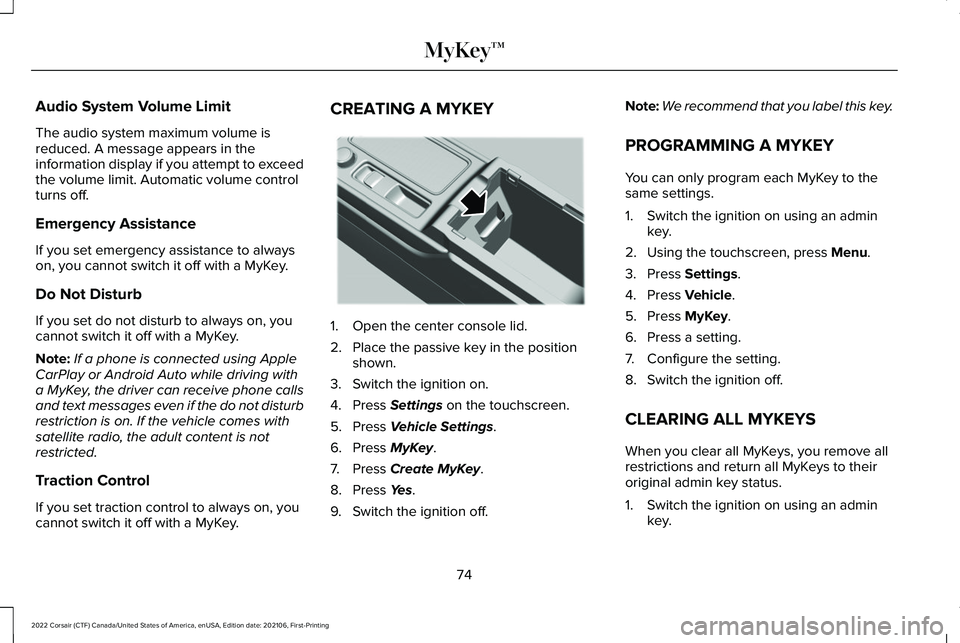
cannot switch it off with a MyKey. CREATING A MYKEY
1. Open the center console lid.
2. Place the passive key in the position
shown.
3. Switch the ignition on.
4. Press Settings on the touchscreen.
5. Press
Vehicle Settings.
6. Press
MyKey.
7. Press
Create MyKey.
8. Press
Yes.
9. Switch the ignition off. Note:
We recommend that you label this key.
PROGRAMMING A MYKEY
You can only program each MyKey to the
same settings.
1. Switch the ignition on using an admin key.
2. Using the touchscreen, press
Menu.
3. Press
Settings.
4. Press
Vehicle.
5. Press
MyKey.
6. Press a setting.
7. Configure the setting.
8. Switch the ignition off.
CLEARING ALL MYKEYS
When you clear all MyKeys, you remove all
restrictions and return all MyKeys to their
original admin key status.
1. Switch the ignition on using an admin key.
74
2022 Corsair (CTF) Canada/United States of America, enUSA, Edition date: 202106, First-Printing MyKey™E306288
Page 188 of 676
Linking a Personal Profile to Your Remote
Control or Mobile Device
You can save preset memory positions for
up to three remote controls by assigning a
remote control to a personal profile using
the touchscreen. You can assign three
additional remote controls set up as Phone
as a Key.
Use the touchscreen to link a remote control,
mobile device or both to a personal profile.
1. Switch the ignition on and leave the
vehicle in park (P).
2. Select the Personal Profiles button under
Settings.
3. Touch the arrow for the profile you wish to link to a remote control or mobile
device.
4. Select remote control, mobile device, or
both.
5. Follow the instructions on the display.
Note: To successfully link a mobile device,
the mobile device must be in your vehicle,
and must have previously been setup as a
remote control for your vehicle. Note:
If more than one linked remote control
is in range, the memory function moves to
the settings of the first key to initiate a
memory recall.
Note: The guest profile consists of existing
settings when there is no driver profile
created. After you create a driver profile, the
guest profile serves as an additional driver
profile.
Note: You cannot link a personalized name,
a memory seat button or a remote control
to a guest profile.
Personal Settings
Personal Profiles allow you to personalize
positional settings such as seats and mirrors,
as well as non-positional settings such as
radio, navigation, driver assist and system
settings. See SYNC™ 3 (page 507). You
cannot change the menu locations and
settings of those personalized features with
Personal Profiles.
Note: Non-positional settings save to the
active driver profile whenever you change
a setting. Note:
You can save positional settings if you
press and hold a memory seat button.
Recalling and Changing a Profile
You can recall a profile by:
• Using a remote control or mobile device
linked to a driver profile to access the
remote start feature, press an unlock
button or open the door with the exterior
door handle.
• Pressing a memory seat button linked to
a driver profile.
• Using the Personal Profiles menu on the
touchscreen.
Note: The recalled profile replaces the
previously active profile. If the active profile
is not your preferred profile, you can change
it using any of the three methods listed.
185
2022 Corsair (CTF) Canada/United States of America, enUSA, Edition date: 202106, First-Printing Seats