tire pressure LINCOLN CORSAIR 2022 Owners Manual
[x] Cancel search | Manufacturer: LINCOLN, Model Year: 2022, Model line: CORSAIR, Model: LINCOLN CORSAIR 2022Pages: 676, PDF Size: 7.67 MB
Page 11 of 676
The Better Business Bureau (BBB) Auto
Line Program (U.S. Only) ........................371
Utilizing the Mediation/Arbitration Program (Canada Only) ..........................................
372
Getting Assistance Outside the U.S. and Canada .......................................................
373
Ordering Additional Owner's Literature ......................................................................
375
Reporting Safety Defects (U.S. Only) ......
376
Reporting Safety Defects (Canada Only) ......................................................................
376
Fuses
Fuse Specification Chart ...........................
378
Changing a Fuse .........................................
389
Maintenance
General Information .....................................
391
Opening and Closing the Hood ...............
391
Under Hood Overview - 2.0L/2.3L .........
393
Under Hood Overview - Plug-In Hybrid Electric Vehicle (PHEV) ..........................
395
Engine Oil Dipstick .....................................
396
Engine Oil Check ........................................
396Oil Change Indicator Reset
.......................
397
Changing the Engine Air Filter - 2.0L/2.3L ......................................................................
397
Changing the Engine Air Filter - 2.5L, Plug-In Hybrid Electric Vehicle (PHEV)
......................................................................
399
Engine Coolant Check ...............................
400
Automatic Transmission Fluid Check ......
404
Brake Fluid Check ......................................
405
Power Steering Fluid Check ....................
406
Changing the 12V Battery .........................
406
Adjusting the Headlamps .........................
409
Washer Fluid Check ....................................
410
Fuel Filter .......................................................
410
Checking the Wiper Blades .......................
410
Changing the Wiper Blades .......................
411
Removing a Headlamp ...............................
412
Changing a Bulb ...........................................
412
Vehicle Care
General Information .....................................
413
Cleaning Products ........................................
413
Cleaning the Exterior ...................................
414
Waxing ............................................................
415Cleaning the Engine
....................................
416
Cleaning the Windows and Wiper Blades .......................................................................
416
Cleaning the Interior ....................................
417
Cleaning the Instrument Panel and Instrument Cluster Lens .........................
417
Cleaning Leather Seats ..............................
418
Repairing Minor Paint Damage .................
419
Cleaning the Wheels ...................................
419
Vehicle Storage ............................................
419
Body Styling Kits ...........................................
421
Wheels and Tires
General Information ....................................
422
Tire Sealant and Inflator Kit ......................
424
Tire Care .........................................................
431
Using Snow Chains .....................................
445
Tire Pressure Monitoring System ............
446
Changing a Road Wheel ............................
451
Technical Specifications ............................
459
Capacities and Specifications
Engine Specifications - 2.0L ......................
461
8
2022 Corsair (CTF) Canada/United States of America, enUSA, Edition date: 202106, First-Printing Table of Contents
Page 16 of 676
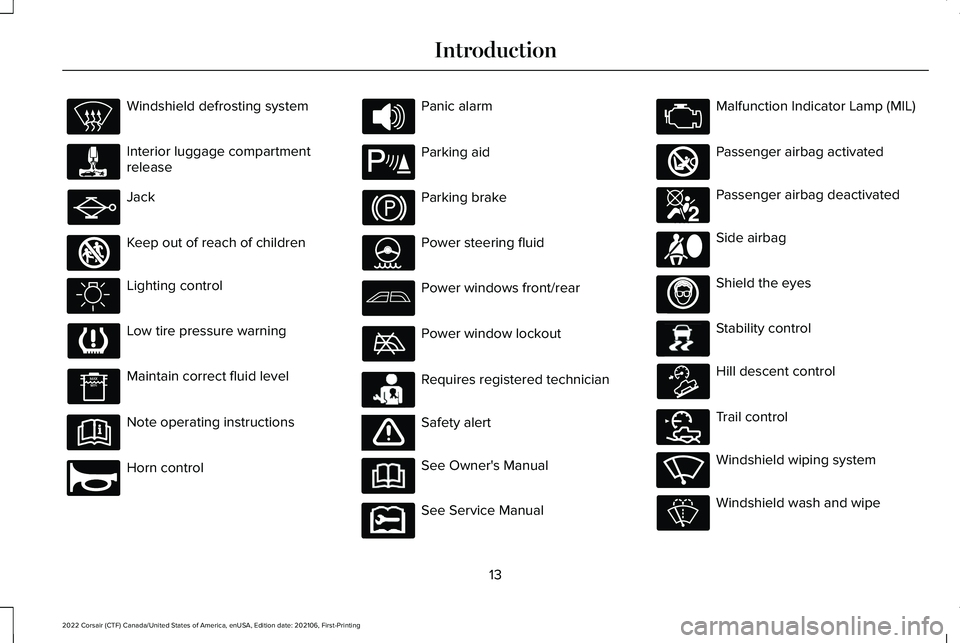
Windshield defrosting system
Interior luggage compartment
release
Jack
Keep out of reach of children
Lighting control
Low tire pressure warning
Maintain correct fluid level
Note operating instructions
Horn control Panic alarm
Parking aid
Parking brake
Power steering fluid
Power windows front/rear
Power window lockout
Requires registered technician
Safety alert
See Owner's Manual
See Service Manual Malfunction Indicator Lamp (MIL)
Passenger airbag activated
Passenger airbag deactivated
Side airbag
Shield the eyes
Stability control
Hill descent control
Trail control
Windshield wiping system
Windshield wash and wipe
13
2022 Corsair (CTF) Canada/United States of America, enUSA, Edition date: 202106, First-Printing Introduction E161353 E270945 E139213 E231159 E65963 E231158 E270849 E270850 E167012 E138639 E163957 E272858 E270969
Page 17 of 676

DATA RECORDING
WARNING: Do not connect wireless
plug-in devices to the data link connector.
Unauthorized third parties could gain
access to vehicle data and impair the
performance of safety related systems.
Only allow repair facilities that follow our
service and repair instructions to connect
their equipment to the data link connector.
We respect your privacy and are committed
to protecting it. The information contained
in this manual was correct at the time of
publication but as technology rapidly
changes, we recommend that you visit the
regional Lincoln website for the latest
information. Your vehicle has electronic control units that
have data recording functionality and the
ability to permanently or temporarily store
data. This data could include information on
the condition and status of your vehicle,
vehicle maintenance requirements, events
and malfunctions. The types of data that can
be recorded are described in this section.
Some of the data recorded is stored in event
logs or error logs.
Note:
Error logs are reset following a service
or repair.
Note: We may provide information in
response to requests from law enforcement,
other government authorities and third
parties acting with lawful authority or through
a legal process. Such information could be
used by them in legal proceedings.
Data recorded includes, for example:
• Operating states of system components,
for example, fuel level, tire pressure and
battery charge level.
• Vehicle and component status, for
example, wheel speed, deceleration,
lateral acceleration and seatbelt status. •
Events or errors in essential systems, for
example, headlamps and brakes.
• System responses to driving situations,
for example, airbag deployment and
stability control.
• Environmental conditions, for example,
temperature.
Some of this data, when used in combination
with other information, for example, an
accident report, damage to a vehicle or
eyewitness statements, could be associated
with a specific person.
Service Data
Service data recorders in your vehicle are
capable of collecting and storing diagnostic
information about your vehicle. This
potentially includes information about the
performance or status of various systems
and modules in the vehicle, such as engine,
throttle, steering or brake systems. In order
to properly diagnose and service your
vehicle, Lincoln (Lincoln of Canada, in
Canada), and service and repair facilities may
access or share among them vehicle
diagnostic information received through a
14
2022 Corsair (CTF) Canada/United States of America, enUSA, Edition date: 202106, First-Printing Introduction
Page 137 of 676

Lamps On
Illuminates when you switch the
low beam headlamps or the
parking lamps on.
Liftgate Ajar Illuminates when the liftgate is not
completely closed.
Low Beam Warning Illuminates when the low beam
headlamp bulb is not functioning
properly.
Low Fuel Level Illuminates when the fuel level is
low or the fuel tank is nearly
empty. Refuel as soon as possible. Low Tire Pressure Warning Illuminates when your tire pressure
is low. If the lamp remains on with
the engine running or when
driving, check your tire pressure as soon as
possible.
It also illuminates momentarily when you
switch the ignition on to confirm the lamp is
functional. If it does not illuminate when you
switch the ignition on, or begins to flash at
any time, have the system checked as soon
as possible.
Low Washer Fluid Illuminates when the windshield
washer fluid is low.
Powertrain Fault Illuminates when the system
detects a powertrain or a
4WD/AWD fault. Have your vehicle
checked as soon as possible. Ready to Drive (If Equipped) Illuminates when you switch on
your vehicle and it is ready to
drive. A corresponding message
may appear in the information display.
Service Engine Soon Illuminates when you switch the
ignition on prior to engine start to
check the bulb and to indicate
whether your vehicle is ready for Inspection
and Maintenance (I/M) testing.
Normally, it illuminates until the engine is
cranked and automatically turns off if no
system errors are present. However, if after
15 seconds it flashes eight times, this
indicates that your vehicle is not ready for
Inspection and Maintenance (I/M) testing.
See
Catalytic Converter (page 232).
If it illuminates when the engine is running
this indicates a system error. The On Board
Diagnostics system has detected an error in
the vehicle emission control system.
134
2022 Corsair (CTF) Canada/United States of America, enUSA, Edition date: 202106, First-Printing Instrument Cluster E162453 E181350 E132353 E224090
Page 143 of 676

PERSONALIZED SETTINGS
Information On Demand
Note:
On Demand information appears on the right-hand side of the instrument c\
luster in single gauge view and in the center of the instrument
cluster in dual gauge view when you switch on certain drive modes.
Note: Pure EV information is only available when you switch on the Pure EV dri\
ve mode.
Note: Some menu items are regional specific or optional and may appear slightl\
y different or not at all. Information Screens
Calm ScreenPURE EV Trip 1
Trip 2
This Trip
Fuel Economy
Auto StartStop Seatbelts
Tire Pressure
Power Distribution
140
2022 Corsair (CTF) Canada/United States of America, enUSA, Edition date: 202106, First-Printing Information Displays
Page 163 of 676
Starting System
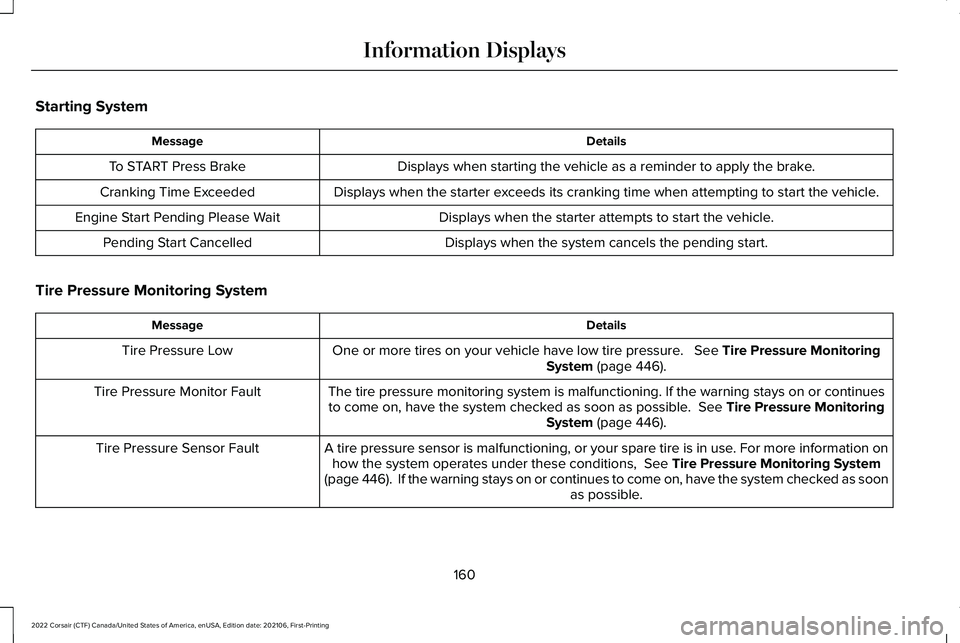
Details
Message
Displays when starting the vehicle as a reminder to apply the brake.
To START Press Brake
Displays when the starter exceeds its cranking time when attempting to start the vehicle.
Cranking Time Exceeded
Displays when the starter attempts to start the vehicle.
Engine Start Pending Please Wait
Displays when the system cancels the pending start.
Pending Start Cancelled
Tire Pressure Monitoring System Details
Message
One or more tires on your vehicle have low tire pressure. See Tire Pressure Monitoring
System (page 446).
Tire Pressure Low
The tire pressure monitoring system is malfunctioning. If the warning st\
ays on or continuesto come on, have the system checked as soon as possible.
See Tire Pressure Monitoring
System (page 446).
Tire Pressure Monitor Fault
A tire pressure sensor is malfunctioning, or your spare tire is in use. For more information onhow the system operates under these conditions,
See Tire Pressure Monitoring System
(page 446). If the warning stays on or continues to come on, have the\
system checked as soon as possible.
Tire Pressure Sensor Fault
160
2022 Corsair (CTF) Canada/United States of America, enUSA, Edition date: 202106, First-Printing Information Displays
Page 270 of 676
To resume operation, switch the ignition off
and allow the system to cool down for a
minimum of 15 minutes. After the system has
cooled down, you will see a brief message
display in the information display. See
Information Messages (page 142).
When driving at slow speeds in deep sand
under high outside temperatures, use a low
gear when possible. Low gear operation will
maximize the engine and transmission
cooling capability.
Tips when driving over sand:
• Keep all four wheels on the most solid
area of the trail.
• Shift to a lower gear.
• Apply the accelerator slowly.
• Drive steadily through the terrain.
• Avoid excessive wheel spin.
• Avoid reducing the tire pressures. Mud and Water
Mud
Avoid sudden changes in vehicle speed or
direction when you are driving in mud. Even
all-wheel drive vehicles can lose traction in
mud. If your vehicle does slide, steer in the
direction of the slide until you regain control
of your vehicle.
After driving through mud, clean off excess
mud stuck to rotating driveshafts and tires.
Excess mud stuck on tires and rotating
driveshafts can cause an imbalance that
could damage drive components.
Water
Drive slowly through high water. Traction or
brake capability may be limited.
When driving through water, determine the
depth and avoid water higher than the
bottom of the wheel rims. If the ignition
system gets wet, your vehicle may stall. Once through water, always try the brakes.
Wet brakes will not stop your vehicle as
quickly as dry brakes. Apply light pressure
to the brake pedal while slowly moving the
vehicle to dry the brakes.
Note:
Driving through deep water may
damage the transmission. If the front or rear
axle is submerged in water, have the power
transfer unit (PTU) or rear axle serviced by
an authorized dealer.
Driving on Hilly or Sloping Terrain
Although natural obstacles may make it
necessary to travel diagonally up or down a
hill or steep incline, always try to drive
straight up or straight down the sloping
terrain.
Note: To maintain traction and avoid
possibly rolling your vehicle, avoid turning
on steep slopes or hills. When you drive on
a hill, determine beforehand the route you
will use. Do not drive over a hill without first
seeing what is on the other side. Do not drive
in reverse over a hill without the aid of an
observer.
267
2022 Corsair (CTF) Canada/United States of America, enUSA, Edition date: 202106, First-Printing All-Wheel Drive
(If Equipped)
Page 326 of 676
 when I can s\
ee the lane markings on the road?
You are driving too close to the vehicle in front of you.
Transitioning between no lane markin")
Why is the feature not available (line markings are gray) when I can s\
ee the lane markings on the road?
You are driving too close to the vehicle in front of you.
Transitioning between no lane markings to lane markings or vice versa.
There is standing water on the road.
Faint lane markings, for example partial yellow lane markings on concret\
e roads.
Lane width is too narrow or too wide.
The camera has not been calibrated after a windshield replacement.
Driving on tight roads or on uneven roads. Why does the vehicle not come back toward the middle of the lane, as expected, in the aid or alert and aid mode?
High cross winds are present.
There is a large road crown.
Rough roads, grooves or shoulder drop-offs.
Heavy uneven loading of the vehicle or improper tire inflation pressure.
The tires have been changed, or the suspension has been modified.
323
2022 Corsair (CTF) Canada/United States of America, enUSA, Edition date: 202106, First-Printing Driving Aids
Page 362 of 676
BREAKING-IN
Your vehicle requires a break-in period. For
the first 1,000 mi (1,600 km), avoid driving at
high speeds, heavy braking, aggressive
shifting or using your vehicle to tow. During
this time, your vehicle may exhibit some
unusual driving characteristics.
DRIVING ECONOMICALLY
The following helps to improve fuel
consumption:
•
Drive smoothly, accelerate gently and
anticipate the road ahead to avoid heavy
braking.
• Regularly check your tire pressures and
make sure that they are inflated to the
correct pressure.
• Follow the recommended maintenance
schedule and carry out the
recommended checks.
• Plan your journey and check the traffic
before you set off. It is more efficient to
combine errands into a single trip
whenever possible. •
Avoid idling the engine in cold weather
or for extended periods. Start the engine
only when you are ready to set off.
• Do not carry unnecessary weight in your
vehicle as extra weight wastes fuel.
• Do not add unnecessary accessories to
the exterior of your vehicle, for example
running boards. If you use a roof rack,
remember to fold it down or remove it
when not in use.
• Do not shift into neutral when you are
braking or when your vehicle is slowing
down.
• Shut all windows when driving at high
speeds.
• Switch off all electric systems when not
in use, for example air conditioning. Make
sure that you unplug any accessories
from the auxiliary power points when not
in use. DRIVING THROUGH SHALLOW
WATER WARNING: Do not attempt to cross
a deep or flowing body of water. Failure to
follow this instruction could result in the
loss of control of your vehicle, personal
injury or death.
Note: Driving through standing water can
cause vehicle damage.
Note: Engine damage can occur if water
enters the air filter.
Before driving through standing water, check
the depth. Never drive through water that is
higher than the bottom of the front rocker
area of your vehicle.
359
2022 Corsair (CTF) Canada/United States of America, enUSA, Edition date: 202106, First-Printing Driving Hints
Page 418 of 676
Exterior Chrome Parts
•
Apply a high quality-cleaning product to
bumpers and other chrome parts. Follow
the manufacturer’ s instructions. We
recommend Motorcraft Custom Bright
Metal Cleaner.
• Do not apply the cleaning product to hot
surfaces. Do not leave the cleaning
product on chrome surfaces longer than
the time recommended.
• Using non-recommended cleaners can
result in severe and permanent cosmetic
damage.
Note: Never use abrasive materials, for
example steel wool or plastic pads as they
can scratch the chrome surface.
Note: Do not use chrome cleaner, metal
cleaner or polish on wheels or wheel covers.
Exterior Plastic Parts
For routine cleaning we recommend
Motorcraft Detail Wash. If tar or grease spots
are present, we recommend Motorcraft Bug
and Tar Remover. Stripes or Graphics (If Equipped)
Hand washing your vehicle is preferred
however, pressure washing may be used
under the following conditions:
• Do not use water pressure higher than
2,000 psi (14,000 kPa)
.
• Do not use water hotter than 179°F (82°C).
• Use a spray with a 40 degree wide spray
angle pattern.
• Keep the nozzle at a
12 in (305 mm)
distance and 90 degree angle to your
vehicle's surface.
Note: Holding the pressure washer nozzle
at an angle to the vehicle's surface may
damage graphics and cause the edges to
peel away from the vehicle's surface.
Underbody
Regularly clean the underside of your vehicle
using water. Keep body and door drain holes
free of debris or foreign material. Under Hood
For removing black rubber marks from under
the hood we recommend Motorcraft Wheel
and Tire Cleaner or Motorcraft Bug and Tar
Remover.
WAXING
Regular waxing is necessary to protect your
car's paint from the elements. We
recommend that you wash and wax the
painted surface once or twice a year.
When washing and waxing, park your vehicle
in a shaded area out of direct sunlight.
Always wash your vehicle before applying
wax.
•
Use a quality wax that does not contain
abrasives.
• Follow the manufacturer’ s instructions to
apply and remove the wax.
• Apply a small amount of wax in a
back-and-forth motion, not in circles.
415
2022 Corsair (CTF) Canada/United States of America, enUSA, Edition date: 202106, First-Printing Vehicle Care