display LINCOLN CORSAIR 2023 Owners Manual
[x] Cancel search | Manufacturer: LINCOLN, Model Year: 2023, Model line: CORSAIR, Model: LINCOLN CORSAIR 2023Pages: 690, PDF Size: 15.04 MB
Page 540 of 690
WHAT IS ALEXA BUILT-IN
Allows you to use Alexa in your vehicle forauto specific use cases on the road andgives you access to an ever evolving numberof skills that help to make your life moreproductive, entertaining, and connectedwhile using your vehicle.
ALEXA BUILT-IN REQUIREMENTS
To use Alexa, all of the following must occur:
•Your vehicle modem is enabled.
•You are logged into an existing Amazonaccount.
•Vehicle location services are enabled.
•Vehicle connectivity and vehicle datasharing is enabled.
SIGNING INTO YOUR ACCOUNT
Press the button in the status barand follow the on-screen prompts.
To sign in using the settings menu:
1.Press Settings on the touchscreen.
2.Press Amazon Alexa.
3.Press Get Started.
4.Sign into your account by either scanningthe QR code or entering the on-screencode into the Amazon website.
5.Once logged in, follow the on-screenprompts.
6.When complete, the vehicle informs youthat Alexa is ready to be used in thevehicle.
Signing Out of Your Account
1.Press Settings on the touchscreen.
2.Press Amazon Alexa.
3.Press Sign Out.
USING ALEXA BUILT-IN
To use Alexa, say “Alexa” or press the voiceinteraction button on the steering wheel andthen say “Alexa” to invoke Alexa to startlistening.
Note:If the wake word is not enabled, youcan only use the voice interaction button.
You can use Alexa for the following andmore:
•Entertainment.
•Hands-free calling.
•Traffic and navigation.
•Vehicle controls.
•Smart home device control.
•Weather and news information.
ALEXA BUILT-IN SETTINGS
Enabling the Wake Word
1.Press Settings on the touchscreen.
2.Press Amazon Alexa.
3.Switch Listen for Wake Word on or off.
Note:If the wake word is not enabled, youcan only use the voice interaction button.
Contact List
Displays a list of connected phones andcontact sharing status for each phone.
536
2023 Corsair (CTF) Canada/United States of America, enUSA, Edition date: 202208, DOMAlexa Built-InE368039
Page 542 of 690
PHONE PRECAUTIONS
WARNING: Driving while distractedcan result in loss of vehicle control, crashand injury. We strongly recommend thatyou use extreme caution when using anydevice that may take your focus off theroad. Your primary responsibility is the safeoperation of your vehicle. We recommendagainst the use of any hand-held devicewhile driving and encourage the use ofvoice-operated systems when possible.Make sure you are aware of all applicablelocal laws that may affect the use ofelectronic devices while driving.
CONNECTING YOUR PHONE
Go to the settings menu on your device andswitch Bluetooth® on.
Press the phone option on thefeature bar.
1.Press Add Phone.
Note:A prompt alerts you to search for yourvehicle on your cell phone.
2.Select your vehicle on your cell phone.
Note:A number appears on your cell phoneand on the touchscreen.
3.Confirm the number on your cell phonematches the number on the touchscreen.
Note:The touchscreen indicates that youhave successfully paired your cell phone.
4.Download the phonebook from your cellphone when you are prompted.
Note:If you pair more than one cell phone,use the phone settings on the center displayto specify the primary phone. You canchange this setting at any time.
PHONE MENU
This menu becomes available after pairinga phone.
Recent Call List
Display and select an entry from a list ofprevious calls.
Contacts
Display a smart search form to look up yourcontacts. Use the List button to alphabeticallysort your contacts.
Favorites
Display the list of favorite contacts that areset up on your phone.
Messaging
Displays the list of text messages to read,listen to, or respond to.
Email
Displays the list of emails to read, listen to,or respond to.
Phone List
Display the list of paired or connecteddevices that you can select.
Note:Up to 12 devices can be stored.
538
2023 Corsair (CTF) Canada/United States of America, enUSA, Edition date: 202208, DOMPhone
Page 544 of 690
MAKING AND RECEIVING A
PHONE CALL
Making Calls
To call a number in your contacts, select:
Action and DescriptionMenu Item
You can then select thename of the contact youwant to call. Any numbersstored for that contactdisplay along with anystored contact photos. Youcan then select the numberthat you want to call. Thesystem begins the call.
Contacts
To call a number from your recent calls,select:
Action and DescriptionMenu Item
You can then select an entrythat you want to call. Thesystem begins the call.
Recent CallList
To call a number from your favorites, select:
Action and DescriptionMenu Item
You can then select an entrythat you want to call. Thesystem begins the call.
Favorites
To call a number that is not stored in yourphone, select:
Action and DescriptionMenu Item
Select the digits of thenumber you wish to call.PhoneKeypad
The system begins the call.Call
Pressing the backspace button deletes thelast digit you typed.
Receiving Calls
During an incoming call, an audible tonesounds. Caller information appears in thedisplay if it is available.
To accept the call, select:
Menu Item
Accept
Note:You can also accept the call bypressing the phone button on the steeringwheel.
To reject the call, select:
Menu Item
Reject
Ignore the call by doing nothing. The systemlogs it as a missed call.
During a Phone Call
During a phone call, the contacts name andnumber display on the screen along with thecall duration.
The phone status items are also visible:
•Signal Strength.
•Battery.
540
2023 Corsair (CTF) Canada/United States of America, enUSA, Edition date: 202208, DOMPhone
Page 547 of 690
SWITCHING TEXT MESSAGE
NOTIFICATION ON AND OFF
The settings on your device must be enabledto receive text message notifications on thecenter display. Check your device settingsto enable these features.
543
2023 Corsair (CTF) Canada/United States of America, enUSA, Edition date: 202208, DOMPhone
Page 553 of 690
When disabled:
•Unlocking a door with a remote controlor mobile device does not recall anynon-positional settings but still recallspositional settings from the driver profilewhich the remote control or mobiledevice is linked to.
•Pressing a memory seat button that isnot linked to a driver profile or saved toa preset setting does not change thepositional or non-positional settings.
•Pressing a memory seat button that islinked to a driver profile or has saved toa preset setting recalls the positionalsettings that you saved to that memoryseat button.
CREATING A PERSONAL PROFILE
Use the touchscreen to create a personalprofile.
1.Switch the vehicle on and leave thevehicle in park (P).
2.Select the Personal Profiles button underSettings.
3.Follow the instructions on the display.
LINKING OR UNLINKING A
PERSONAL PROFILE TO A REMOTE
CONTROL
You can save preset memory positions forup to three remote controls by assigning aremote control to a personal profile usingthe touchscreen.
Use the touchscreen to link a remote controlto a personal profile.
1.Switch the vehicle on and leave thevehicle in park (P).
2.Select the Personal Profiles button underSettings.
3.Touch the arrow for the profile you wishto link to a remote control.
4.Select remote control.
5.Follow the instructions on the display.
Note:If more than one linked remote controlis in range, the memory function moves tothe settings of the first key to initiate amemory recall.
Note:The guest profile consists of existingsettings when there is no driver profilecreated. After you create a driver profile, theguest profile serves as an additional driverprofile.
Note:You cannot link a remote control to aguest profile.
LINKING OR UNLINKING A
PERSONAL PROFILE TO A DEVICE
Use the touchscreen to link a mobile deviceto a personal profile.
1.Switch the vehicle on and leave thevehicle in park (P).
2.Select the Personal Profiles button underSettings.
3.Touch the arrow for the profile you wishto link to a mobile device.
4.Select mobile device.
5.Follow the instructions on the display.
549
2023 Corsair (CTF) Canada/United States of America, enUSA, Edition date: 202208, DOMPersonal Profiles
Page 568 of 690
Your vehicle has an Intelligent Oil-LifeMonitor system, a message appears in theinformation display at the proper oil changeinterval. This interval may be up to one yearor 10,000 mi (16,000 km), hybrid vehiclesmay exceed 10,000 mi (16,000 km).
Your vehicle can be driven in such a way thatdilutes and increases the level of oil by shorttrips that do not allow the engine to get tooperating temperature, extended idling, andlow speed driving for long periods of time.
When the oil change message appears inthe information display, it is time for an oilchange. Make sure you perform the oilchange within two weeks or 500 mi (800 km)of the message appearing. Make sure youreset the Intelligent Oil-Life Monitor aftereach oil change. See Intelligent Oil LifeMonitor (page 433).
If your information display resets prematurelyor becomes inoperative, you should performthe oil change interval at six months or5,000 mi (8,000 km) from your last oilchange. Never exceed one year or 10,000 mi(16,000 km) between oil change intervals,
Your vehicle is very sophisticated and builtwith multiple, complex, performance systems.Every manufacturer develops these systemsusing different specifications andperformance features. That is why it isimportant to rely upon your dealership toproperly diagnose and repair your vehicle.
We have recommended maintenanceintervals for various parts and componentsystems based upon engineering testing.We rely upon this testing to determine themost appropriate mileage for replacementof oils and fluids to protect your vehicle atthe lowest overall cost to you andrecommends against maintenance schedulesthat deviate from the scheduled maintenanceinformation.
We strongly recommend the use of onlygenuine Ford, Motorcraft or Ford-authorizedre-manufactured replacement partsengineered for your vehicle.
Additives and Chemicals
This owner's manual and our WorkshopManual list the recommended additives andchemicals for your vehicle. We do notrecommend using chemicals or additives notapproved by us as part of your vehicle’snormal maintenance. Please consult yourwarranty information.
Oils, Fluids and Flushing
In many cases, fluid discoloration is a normaloperating characteristic and, by itself, doesnot necessarily indicate a concern or that thefluid needs to be changed. However, aqualified expert, such as the factory-trainedtechnicians at your dealership, shouldinspect discolored fluids that also show signsof overheating or foreign materialcontamination immediately.
564
2023 Corsair (CTF) Canada/United States of America, enUSA, Edition date: 202208, DOMScheduled Maintenance
Page 569 of 690
Make sure to change your vehicle’s oils andfluids at the specified intervals or inconjunction with a repair. Flushing is a viableway to change fluid for many vehiclesub-systems during scheduled maintenance.
It is critical that systems are flushed only withnew fluid that is the same as that requiredto fill and operate the system or using aFord-approved flushing chemical.
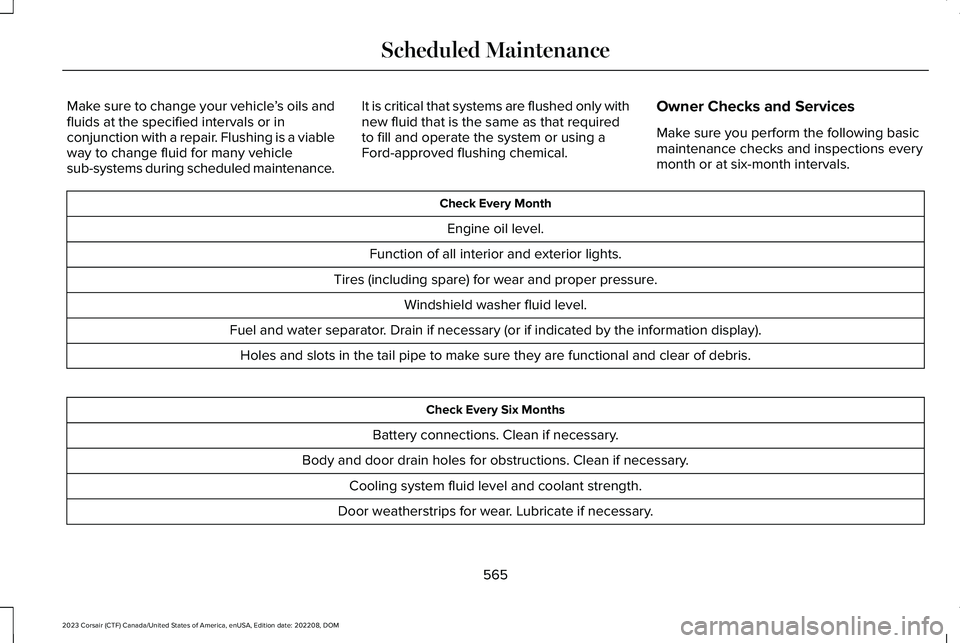
Owner Checks and Services
Make sure you perform the following basicmaintenance checks and inspections everymonth or at six-month intervals.
Check Every Month
Engine oil level.
Function of all interior and exterior lights.
Tires (including spare) for wear and proper pressure.
Windshield washer fluid level.
Fuel and water separator. Drain if necessary (or if indicated by the information display).
Holes and slots in the tail pipe to make sure they are functional and clear of debris.
Check Every Six Months
Battery connections. Clean if necessary.
Body and door drain holes for obstructions. Clean if necessary.
Cooling system fluid level and coolant strength.
Door weatherstrips for wear. Lubricate if necessary.
565
2023 Corsair (CTF) Canada/United States of America, enUSA, Edition date: 202208, DOMScheduled Maintenance
Page 572 of 690
NORMAL SCHEDULED
MAINTENANCE
Intelligent Oil-Life Monitor™
Your vehicle has an Intelligent Oil-LifeMonitor that determines when you shouldchange the engine oil based on how you useyour vehicle. By using several important
factors in its calculations, the monitor helpsreduce the cost of owning your vehicle andreduces environmental waste at the sametime.
This means you do not have to remember tochange the oil on a mileage-based schedule.Your vehicle lets you know when an oilchange is due by displaying a message inthe instrument cluster display.
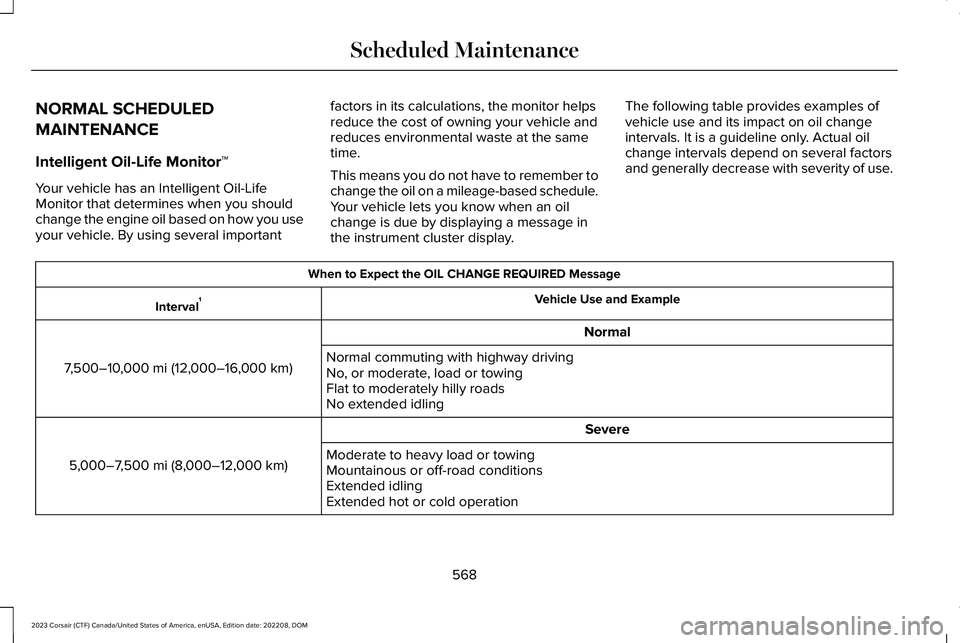
The following table provides examples ofvehicle use and its impact on oil changeintervals. It is a guideline only. Actual oilchange intervals depend on several factorsand generally decrease with severity of use.
When to Expect the OIL CHANGE REQUIRED Message
Vehicle Use and ExampleInterval1
Normal
7,500–10,000 mi (12,000–16,000 km)Normal commuting with highway drivingNo, or moderate, load or towingFlat to moderately hilly roadsNo extended idling
Severe
5,000–7,500 mi (8,000–12,000 km)Moderate to heavy load or towingMountainous or off-road conditionsExtended idlingExtended hot or cold operation
568
2023 Corsair (CTF) Canada/United States of America, enUSA, Edition date: 202208, DOMScheduled Maintenance
Page 573 of 690
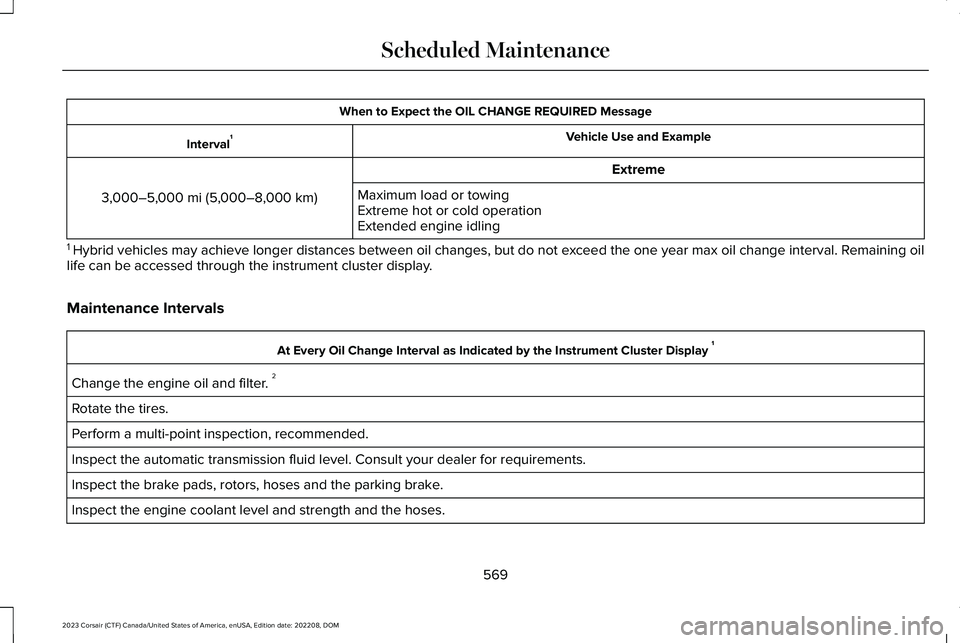
When to Expect the OIL CHANGE REQUIRED Message
Vehicle Use and ExampleInterval1
Extreme
3,000–5,000 mi (5,000–8,000 km)Maximum load or towingExtreme hot or cold operationExtended engine idling
1 Hybrid vehicles may achieve longer distances between oil changes, but do not exceed the one year max oil change interval. Remaining oillife can be accessed through the instrument cluster display.
Maintenance Intervals
At Every Oil Change Interval as Indicated by the Instrument Cluster Display 1
Change the engine oil and filter. 2
Rotate the tires.
Perform a multi-point inspection, recommended.
Inspect the automatic transmission fluid level. Consult your dealer for requirements.
Inspect the brake pads, rotors, hoses and the parking brake.
Inspect the engine coolant level and strength and the hoses.
569
2023 Corsair (CTF) Canada/United States of America, enUSA, Edition date: 202208, DOMScheduled Maintenance
Page 574 of 690
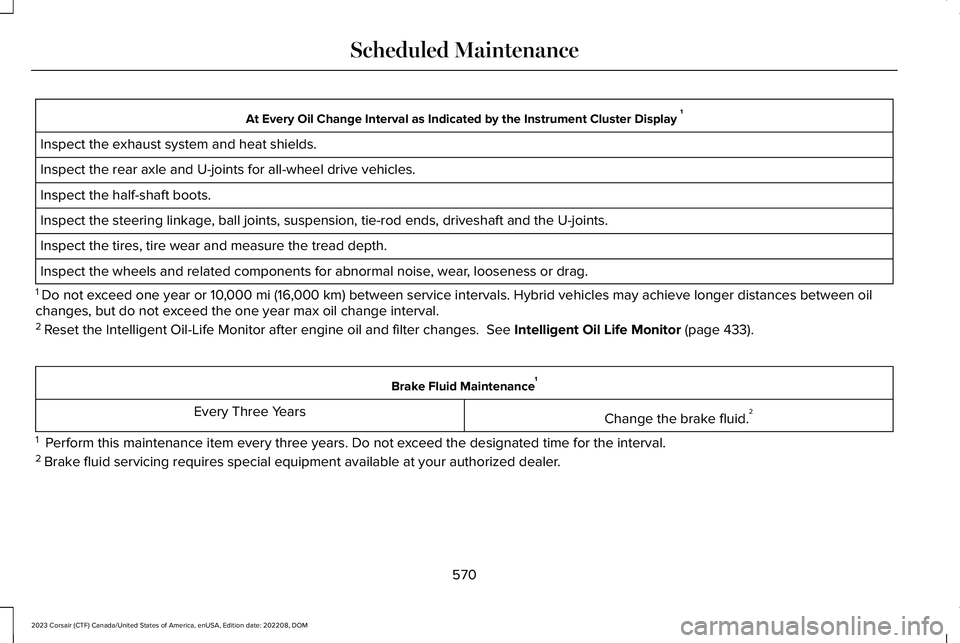
At Every Oil Change Interval as Indicated by the Instrument Cluster Display 1
Inspect the exhaust system and heat shields.
Inspect the rear axle and U-joints for all-wheel drive vehicles.
Inspect the half-shaft boots.
Inspect the steering linkage, ball joints, suspension, tie-rod ends, driveshaft and the U-joints.
Inspect the tires, tire wear and measure the tread depth.
Inspect the wheels and related components for abnormal noise, wear, looseness or drag.
1 Do not exceed one year or 10,000 mi (16,000 km) between service intervals. Hybrid vehicles may achieve longer distances between oilchanges, but do not exceed the one year max oil change interval.2 Reset the Intelligent Oil-Life Monitor after engine oil and filter changes. See Intelligent Oil Life Monitor (page 433).
Brake Fluid Maintenance1
Change the brake fluid.2Every Three Years
1 Perform this maintenance item every three years. Do not exceed the designated time for the interval.2 Brake fluid servicing requires special equipment available at your authorized dealer.
570
2023 Corsair (CTF) Canada/United States of America, enUSA, Edition date: 202208, DOMScheduled Maintenance