warning LINCOLN CORSAIR 2023 Owners Manual
[x] Cancel search | Manufacturer: LINCOLN, Model Year: 2023, Model line: CORSAIR, Model: LINCOLN CORSAIR 2023Pages: 690, PDF Size: 15.04 MB
Page 373 of 690
EVASIVE STEERING ASSISTLIMITATIONS
Evasive steering assist only activates whenall the following occur:
•Automatic emergency braking andevasive steering assist are on.
•The system detects a road user aheadand starts to apply the brakes.
•You significantly turn the steering wheelto steer around a road user.
Note:Evasive steering assist does notautomatically steer around a road user. Ifyou do not turn the steering wheel, evasivesteering assist does not activate.
Note:Evasive steering assist does notactivate if the distance to the road userahead is too small and the system cannotavoid a crash.
SWITCHING EVASIVE STEERING
ASSIST ON AND OFF
To switch the system on or off, use thetouchscreen:
1.Press Features on the touchscreen.
2.Press Driver Assistance.
3.Press Pre-Collision Assist.
4.Switch Evasive Steering on or off.
Note:If you switch automatic emergencybraking off, evasive steering assist turns off.
Note:Automatic emergency braking andevasive steering assist turn on every timeyou switch the ignition on.
PRE-COLLISION ASSIST –
TROUBLESHOOTING
PRE-COLLISION ASSIST – WARNINGLAMPS
A telltale illuminates in the clusterto indicate if the system is disabledor unavailable.
PRE-COLLISION ASSIST – INFORMATION MESSAGES
ActionMessage
You have a blocked sensor due to bad weather, ice, mud or water infront of the radar sensor. You can typically clean the sensor to resolve.Pre-Collision Assist Not Available Sensor Blocked
A fault with the system has occurred. Have your vehicle checked assoon as possible.Pre-Collision Assist Not Available
369
2023 Corsair (CTF) Canada/United States of America, enUSA, Edition date: 202208, DOMPre-Collision AssistE335612
Page 376 of 690
WHAT IS DRIVER ALERT
Driver alert alerts you if it determines thatyou are becoming drowsy or if your drivingdeteriorates.
HOW DOES DRIVER ALERT WORK
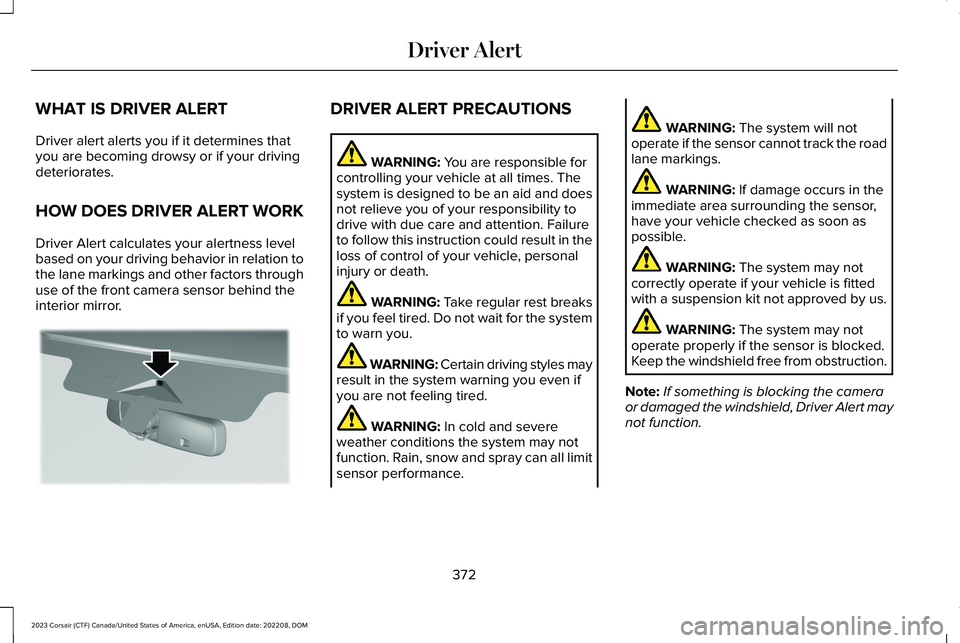
Driver Alert calculates your alertness levelbased on your driving behavior in relation tothe lane markings and other factors throughuse of the front camera sensor behind theinterior mirror.
DRIVER ALERT PRECAUTIONS
WARNING: You are responsible forcontrolling your vehicle at all times. Thesystem is designed to be an aid and doesnot relieve you of your responsibility todrive with due care and attention. Failureto follow this instruction could result in theloss of control of your vehicle, personalinjury or death.
WARNING: Take regular rest breaksif you feel tired. Do not wait for the systemto warn you.
WARNING: Certain driving styles mayresult in the system warning you even ifyou are not feeling tired.
WARNING: In cold and severeweather conditions the system may notfunction. Rain, snow and spray can all limitsensor performance.
WARNING: The system will notoperate if the sensor cannot track the roadlane markings.
WARNING: If damage occurs in theimmediate area surrounding the sensor,have your vehicle checked as soon aspossible.
WARNING: The system may notcorrectly operate if your vehicle is fittedwith a suspension kit not approved by us.
WARNING: The system may notoperate properly if the sensor is blocked.Keep the windshield free from obstruction.
Note:If something is blocking the cameraor damaged the windshield, Driver Alert maynot function.
372
2023 Corsair (CTF) Canada/United States of America, enUSA, Edition date: 202208, DOMDriver AlertE309385
Page 377 of 690
DRIVER ALERT LIMITATIONS
Driver alert may not function correctly if:
•The sensor cannot track the road lanemarkings.
•Your vehicle's speed is less thanapproximately 40 mph (65 km/h).
SWITCHING DRIVER ALERT ON
AND OFF
1.Press Features on the touchscreen.
2.Press Driver Assistance.
3.Switch Driver Alert on or off.
Note:The system remains on or offdepending on how it was last set.
Resetting Driver Alert
You can reset the system by either:
•Switching the ignition off and on.
•Opening and closing the driver doorwhen your vehicle is stationary, and it issafe to do so.
DRIVER ALERT – TROUBLESHOOTING
DRIVER ALERT – INFORMATION MESSAGES
ActionMessage
Stop and rest as soon as it is safe to do so.Driver Alert Warning Rest Now
Take a rest soon.Driver Alert Warning Rest Suggested
373
2023 Corsair (CTF) Canada/United States of America, enUSA, Edition date: 202208, DOMDriver Alert
Page 378 of 690
WHAT IS SPEED SIGN
RECOGNITION
Speed sign recognition detects speed limitsigns to inform you of the current speed limit.Detected speed signs appear in theinstrument cluster display.
HOW DOES SPEED SIGN
RECOGNITION WORK
Speed sign recognition uses a sensor behindthe interior mirror to detect speed signs.
If your vehicle has speed sign recognitionwith navigation, stored speed sign data mayinfluence the indicated speed limit value.
SPEED SIGN RECOGNITION
PRECAUTIONS
WARNING: You are responsible forcontrolling your vehicle at all times. Thesystem is designed to be an aid and doesnot relieve you of your responsibility todrive with due care and attention. Failureto follow this instruction could result in theloss of control of your vehicle, personalinjury or death.
WARNING: In cold and severeweather conditions the system may notfunction. Rain, snow and spray can all limitsensor performance.
WARNING: The system may notoperate properly if the sensor is blocked.Keep the windshield free from obstruction.
WARNING: Do not performwindshield repairs in the area surroundingthe sensor.
WARNING: The system may notcorrectly operate if your vehicle is fittedwith a suspension kit not approved byFord.
WARNING: Not all traffic signs canbe recognized by the system anddisplayed correctly.
Note:Always fit our original parts whenreplacing headlamp bulbs. Other bulbs mayreduce system performance. See ExteriorBulb Specification Chart (page 450).
SPEED SIGN RECOGNITION
LIMITATIONS
Speed sign recognition may not operatecorrectly due to:
•Outdated map data.
•Incorrect recognition of speed limits bythe sensor of signs on parallel roads orexit ramps.
•Missed recognition of faded, dirty, ordistorted signs.
374
2023 Corsair (CTF) Canada/United States of America, enUSA, Edition date: 202208, DOMSpeed Sign Recognition
Page 379 of 690
SPEED SIGN RECOGNITION
INDICATORS
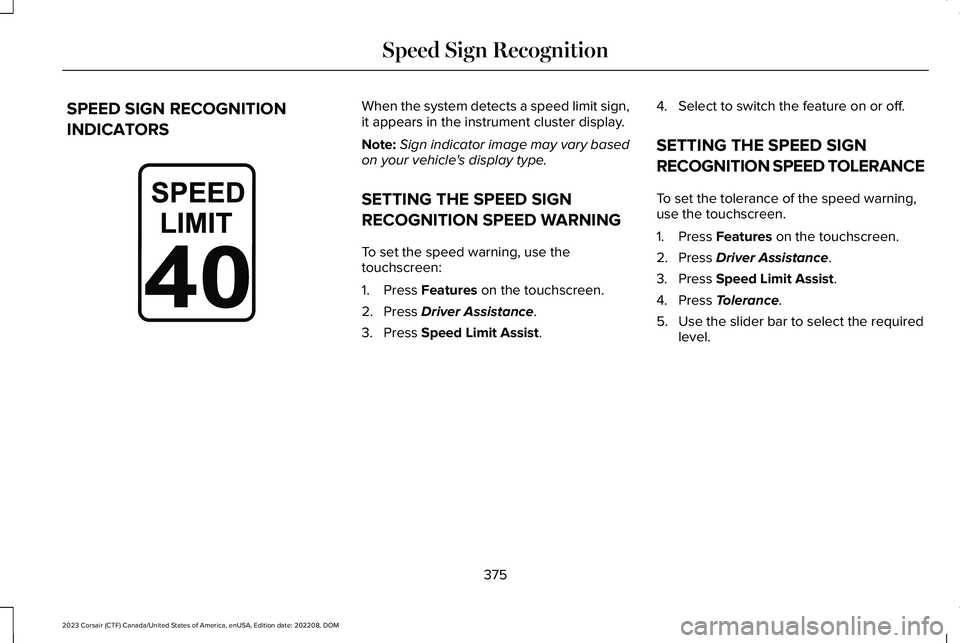
When the system detects a speed limit sign,it appears in the instrument cluster display.
Note:Sign indicator image may vary basedon your vehicle's display type.
SETTING THE SPEED SIGN
RECOGNITION SPEED WARNING
To set the speed warning, use thetouchscreen:
1.Press Features on the touchscreen.
2.Press Driver Assistance.
3.Press Speed Limit Assist.
4.Select to switch the feature on or off.
SETTING THE SPEED SIGN
RECOGNITION SPEED TOLERANCE
To set the tolerance of the speed warning,use the touchscreen.
1.Press Features on the touchscreen.
2.Press Driver Assistance.
3.Press Speed Limit Assist.
4.Press Tolerance.
5.Use the slider bar to select the requiredlevel.
375
2023 Corsair (CTF) Canada/United States of America, enUSA, Edition date: 202208, DOMSpeed Sign RecognitionE317824
Page 382 of 690
LOAD CARRYING PRECAUTIONS
Keep your loaded vehicle weight withinits design rating capability, with orwithout a trailer. Properly loading yourvehicle provides maximum return ofvehicle design performance. Before youload your vehicle, become familiar withthe following terms for determining yourvehicle’s weight rating, with or withouta trailer, from the vehicle’s Tire andLoading Information label or SafetyCompliance Certification label.
WARNING: The appropriateloading capacity of your vehicle canbe limited either by volume capacity(how much space is available) or by
payload capacity (how much weightthe vehicle should carry). Once youhave reached the maximum payloadof your vehicle, do not add morecargo, even if there is space available.Overloading or improperly loadingyour vehicle can contribute to loss ofvehicle control and vehicle rollover.
WARNING: Exceeding the SafetyCompliance Certification label vehicleweight limits can adversely affect theperformance and handling of yourvehicle, cause vehicle damage andcan result in the loss of control of yourvehicle, serious personal injury ordeath.
WARNING: Do not usereplacement tires with lower loadcarrying capacities than the originaltires because they may lower yourvehicle's GVWR and GAWR limitations.Replacement tires with a higher limitthan the original tires do not increasethe GVWR and GAWR limitations.
WARNING: Do not exceed theGVWR or the GAWR specified on thecertification label.
WARNING: Exceeding anyvehicle weight rating can adverselyaffect the performance and handlingof your vehicle, cause vehicle damageand can result in the loss of control ofyour vehicle, serious personal injuryor death.
WARNING: When loading theroof racks, we recommend you evenlydistribute the load, as well as maintaina low center of gravity. Loadedvehicles, with higher centers of gravity,may handle differently than unloadedvehicles. Take extra precautions, suchas slower speeds and increasedstopping distance, when driving aheavily loaded vehicle.
The gross combined weight must neverexceed the Gross Combined WeightRating.
378
2023 Corsair (CTF) Canada/United States of America, enUSA, Edition date: 202208, DOMLoad Carrying
Page 386 of 690
ROOF RACK (IF EQUIPPED)
ROOF RACK PRECAUTIONS
WARNING: Read and follow themanufacturer's instructions when you arefitting a roof rack.
WARNING: When loading the roofracks, we recommend you evenly distributethe load, as well as maintain a low centerof gravity. Loaded vehicles, with highercenters of gravity, may handle differentlythan unloaded vehicles. Take extraprecautions, such as slower speeds andincreased stopping distance, when drivinga heavily loaded vehicle.
Note:If you use a roof rack, the fuelconsumption of your vehicle will be higherand you may experience different drivingcharacteristics.
Note:Never place loads directly on the roofpanel. The roof panel is not designed todirectly carry a load.
Make sure that you securely fasten the load. Check the tightness of the load beforedriving and at each fuel stop.
382
2023 Corsair (CTF) Canada/United States of America, enUSA, Edition date: 202208, DOMLoad Carrying
Page 387 of 690
LUGGAGE COMPARTMENT
PRECAUTIONS
WARNING: Make sure that youproperly secure objects in the luggagecompartment. Failure to follow thisinstruction could result in personal injuryin the event of a sudden stop or crash.
WARNING: Do not place objects onthe luggage cover. Failure to follow thisinstruction could result in personal injuryor death in the event of a sudden stop orcrash.
WARNING: The appropriate loadingcapacity of your vehicle can be limitedeither by volume capacity (how muchspace is available) or by payload capacity(how much weight the vehicle shouldcarry). Once you have reached themaximum payload of your vehicle, do notadd more cargo, even if there is spaceavailable. Overloading or improperlyloading your vehicle can contribute to lossof vehicle control and vehicle rollover.
WARNING: Make sure that you fullyclose the liftgate to prevent exhaust fumesfrom entering your vehicle. If you areunable to fully close the liftgate, open theair vents or the windows to allow fresh airto enter your vehicle. Failure to follow thisinstruction could result in personal injuryor death.
WARNING: Do not exceed themaximum front and rear axle loads for yourvehicle.
Note: When loading long objects into yourvehicle, for example pipes, timber orfurniture, be careful not to damage theinterior trim.
INSTALLING AND REMOVING THE
LUGGAGE COMPARTMENT COVER
WARNING: Make sure that youproperly secure the luggage cover. Failureto follow this instruction could result inpersonal injury in the event of a suddenstop or crash.
WARNING: Do not place objects onthe luggage cover. Failure to follow thisinstruction could result in personal injuryor death in the event of a sudden stop orcrash.
Installing the Luggage Cover
1.Insert the luggage cover.
383
2023 Corsair (CTF) Canada/United States of America, enUSA, Edition date: 202208, DOMLuggage Compartment
Page 389 of 690
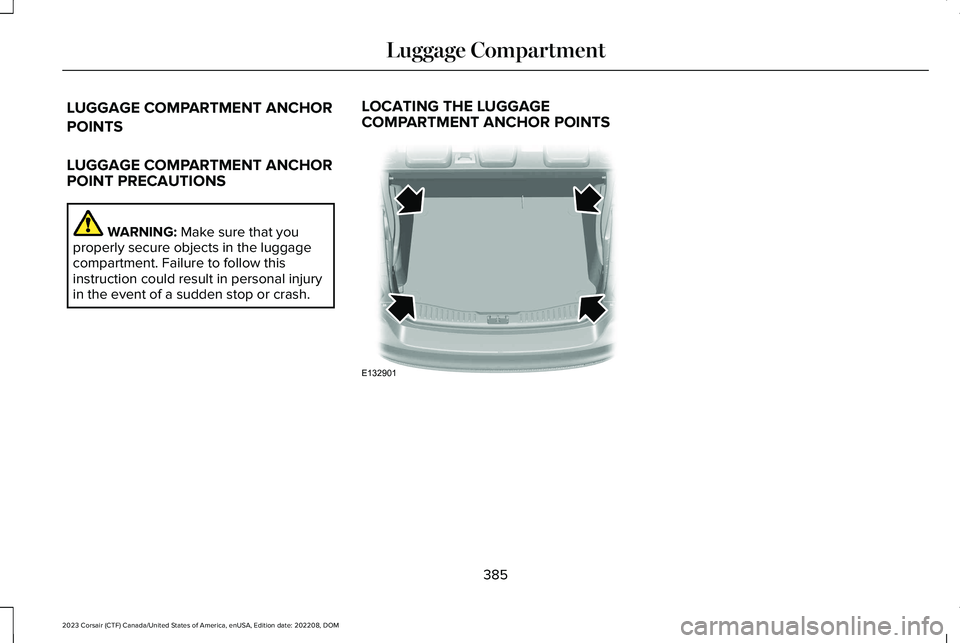
LUGGAGE COMPARTMENT ANCHOR
POINTS
LUGGAGE COMPARTMENT ANCHORPOINT PRECAUTIONS
WARNING: Make sure that youproperly secure objects in the luggagecompartment. Failure to follow thisinstruction could result in personal injuryin the event of a sudden stop or crash.
LOCATING THE LUGGAGECOMPARTMENT ANCHOR POINTS
385
2023 Corsair (CTF) Canada/United States of America, enUSA, Edition date: 202208, DOMLuggage CompartmentE132901
Page 390 of 690
CONNECTING A TRAILER
PRECAUTIONS
Do not tow a trailer until you drive yourvehicle at least 1,000 mi (1,600 km).
Consult your local motor vehicle laws fortowing a trailer.
See the instructions included with towingaccessories for the proper installation andadjustment specifications.
Service your vehicle more frequently if youtow a trailer. See Normal ScheduledMaintenance (page 568).
If you use a rental trailer, follow theinstructions the rental agency gives you.
Account for the trailer coupler weight as partof your vehicle load when calculating thetotal vehicle weight.
Do not exceed the load limits. SeeCalculating the Load Limit (page 380).
CONNECTING A TRAILER
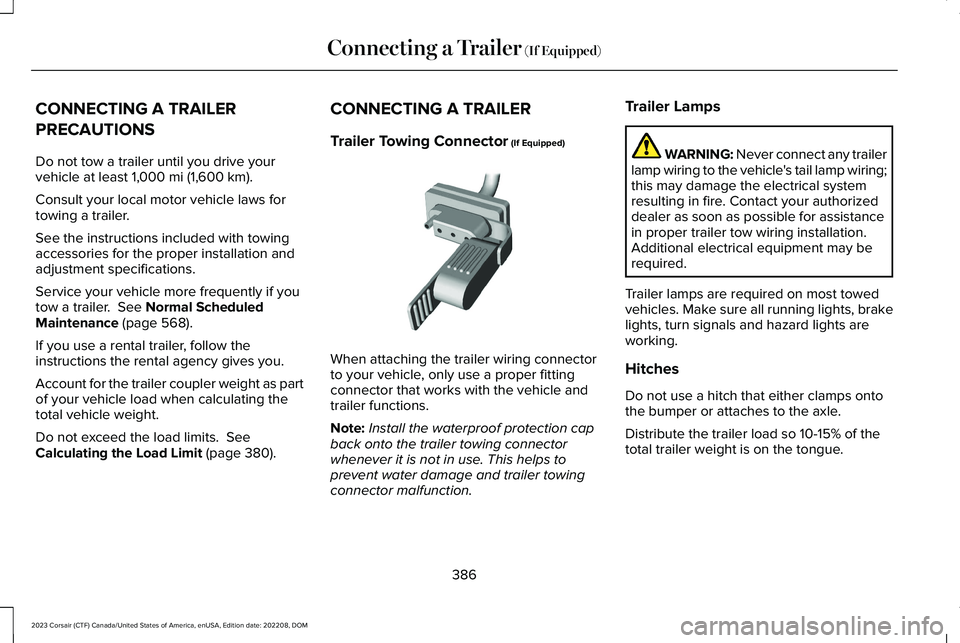
Trailer Towing Connector (If Equipped)
When attaching the trailer wiring connectorto your vehicle, only use a proper fittingconnector that works with the vehicle andtrailer functions.
Note:Install the waterproof protection capback onto the trailer towing connectorwhenever it is not in use. This helps toprevent water damage and trailer towingconnector malfunction.
Trailer Lamps
WARNING: Never connect any trailerlamp wiring to the vehicle's tail lamp wiring;this may damage the electrical systemresulting in fire. Contact your authorizeddealer as soon as possible for assistancein proper trailer tow wiring installation.Additional electrical equipment may berequired.
Trailer lamps are required on most towedvehicles. Make sure all running lights, brakelights, turn signals and hazard lights areworking.
Hitches
Do not use a hitch that either clamps ontothe bumper or attaches to the axle.
Distribute the trailer load so 10-15% of thetotal trailer weight is on the tongue.
386
2023 Corsair (CTF) Canada/United States of America, enUSA, Edition date: 202208, DOMConnecting a Trailer (If Equipped) E168683