brakes LINCOLN CORSAIR 2023 Owner's Manual
[x] Cancel search | Manufacturer: LINCOLN, Model Year: 2023, Model line: CORSAIR, Model: LINCOLN CORSAIR 2023Pages: 690, PDF Size: 15.04 MB
Page 292 of 690
HOW DOES STABILITY CONTROL
WORK
WARNING: Vehicle modificationsinvolving braking system, aftermarket roofracks, suspension, steering system, tireconstruction and wheel and tire size maychange the handling characteristics of yourvehicle and may adversely affect theperformance of the electronic stabilitycontrol system. In addition, installing anystereo loudspeakers may interfere withand adversely affect the electronic stabilitycontrol system. Install any aftermarketstereo loudspeaker as far as possible fromthe front center console, the tunnel, andthe front seats in order to minimize the riskof interfering with the electronic stabilitycontrol sensors. Reducing theeffectiveness of the electronic stabilitycontrol system could lead to an increasedrisk of loss of vehicle control, vehiclerollover, personal injury and death.
WARNING: Remember that evenadvanced technology cannot defy the lawsof physics. It's always possible to losecontrol of a vehicle due to inappropriatedriver input for the conditions. Aggressivedriving on any road condition can causeyou to lose control of your vehicleincreasing the risk of personal injury orproperty damage. Activation of theelectronic stability control system is anindication that at least some of the tireshave exceeded their ability to grip theroad; this could reduce the operator'sability to control the vehicle potentiallyresulting in a loss of vehicle control, vehiclerollover, personal injury and death. If yourelectronic stability control system activates,SLOW DOWN.
If a driving condition activates either thestability control or the traction control systemyou may experience the following conditions:
•The stability and traction control lightflashes.
•Your vehicle slows down.
•Reduced engine power.
The stability control system has severalfeatures built into it to help you maintaincontrol of your vehicle:
Electronic Stability Control
Electronic stability control enhances yourvehicle’s ability to prevent skids or lateralslides by applying brakes to one or more ofthe wheels individually and, if necessary,reducing engine power.
Roll Stability Control
Roll stability control enhances your vehicle’sability to prevent rollovers by detecting yourvehicle’s roll motion and the rate at which itchanges by applying the brakes to one ormore wheels individually.
288
2023 Corsair (CTF) Canada/United States of America, enUSA, Edition date: 202208, DOMStability Control
Page 293 of 690
Curve Control
Curve control enhances your vehicle’s abilityto follow the road when cornering severelyor avoiding objects in the roadway. Curvecontrol operates by reducing engine powerand, if necessary, applying brakes to one ormore of the wheels individually.
Traction Control
Traction control enhances your vehicle’sability to maintain traction of the wheels bydetecting and controlling wheel spin. SeeHow Does Traction Control Work (page 286).
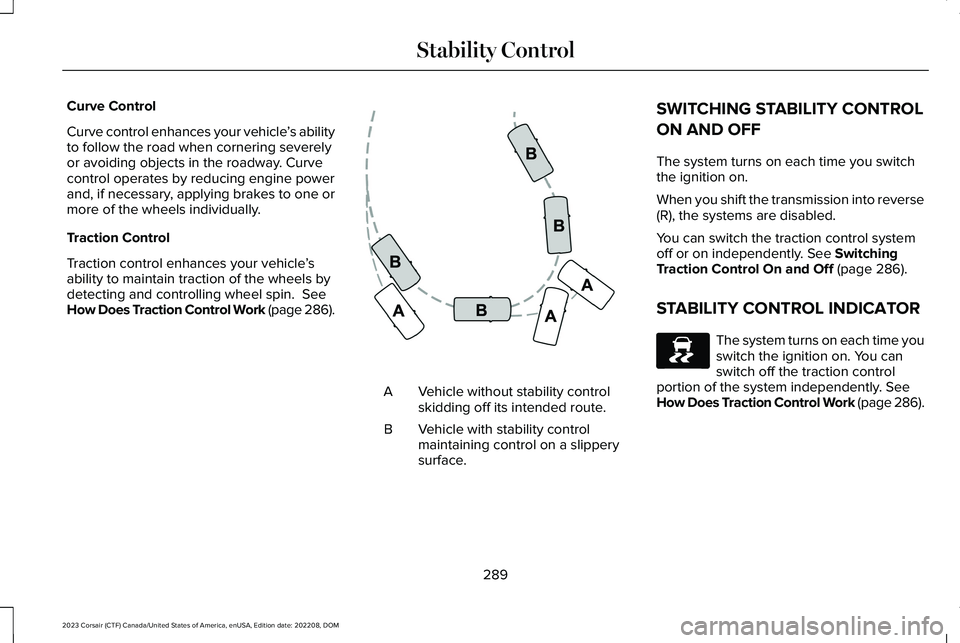
Vehicle without stability controlskidding off its intended route.A
Vehicle with stability controlmaintaining control on a slipperysurface.
B
SWITCHING STABILITY CONTROL
ON AND OFF
The system turns on each time you switchthe ignition on.
When you shift the transmission into reverse(R), the systems are disabled.
You can switch the traction control systemoff or on independently. See SwitchingTraction Control On and Off (page 286).
STABILITY CONTROL INDICATOR
The system turns on each time youswitch the ignition on. You canswitch off the traction controlportion of the system independently. SeeHow Does Traction Control Work (page 286).
289
2023 Corsair (CTF) Canada/United States of America, enUSA, Edition date: 202208, DOMStability ControlE72903 E138639
Page 297 of 690
PARKING AID PRECAUTIONS
WARNING: To help avoid personalinjury, always use caution when in reverse(R) and when using the sensing system.
WARNING: The system may notdetect objects with surfaces that absorbreflection. Always drive with due care andattention. Failure to take care may resultin a crash.
WARNING: Traffic control systems,fluorescent lamps, inclement weather, airbrakes, external motors and fans mayaffect the correct operation of the sensingsystem. This may cause reducedperformance or false alerts.
WARNING: The system may notdetect small or moving objects, particularlythose close to the ground.
WARNING: The parking aid systemcan only assist you to detect objects whenyour vehicle is moving at parking speeds.To help avoid personal injury you musttake care when using the parking aidsystem.
WARNING: The system may notfunction if the sensor is blocked.
WARNING: In cold and severeweather conditions the system may notfunction. Rain, snow and spray can all limitsensor performance.
WARNING: If damage occurs in theimmediate area surrounding the sensor,have your vehicle checked as soon aspossible.
Note:If your vehicle sustains damageleaving the sensors misaligned, this willcause inaccurate measurements or falsealerts.
When you connect a trailer to your vehicle,the rear parking aid detects the trailer andprovides an alert. Disable the parking aidwhen you connect a trailer to prevent thealert.
Note:Connected trailers might be detectedby the vehicle and parking aid turns offautomatically in those instances.
Note:Certain add-on devices installedaround the bumper or fascia may createfalse alerts, for example, large trailer hitches,bike or surfboard racks, license platebrackets, bumper covers or any other devicethat could block the normal detection zoneof the parking aid system. Aftermarket sparetires or spare tire covers mounted to the rearliftgate could cause false alerts from the parkaid system. Remove the add-on device toprevent false alerts.
Note: Keep the sensors free from snow, iceand large accumulations of dirt. If thesensors are covered, the system's accuracycan be affected.
Do not clean the sensors with sharp objects.
293
2023 Corsair (CTF) Canada/United States of America, enUSA, Edition date: 202208, DOMParking Aids
Page 309 of 690
WHAT IS ACTIVE PARK ASSIST
Assists you with parking in and out of parkingspaces.
HOW DOES ACTIVE PARK ASSIST
WORK
Active park assist uses sensors to detectparking spaces. The system steers,accelerates, brakes and shifts gears asnecessary to maneuver into or out of aparking space.
ACTIVE PARK ASSIST
PRECAUTIONS
WARNING: You must remain in yourvehicle when the system turns on. At alltimes, you are responsible for controllingyour vehicle, supervising the system andintervening, if required. Failure to take caremay result in the loss of control of yourvehicle, serious personal injury or death.
WARNING: The sensors may notdetect objects in heavy rain or otherconditions that cause interference.
WARNING: You are responsible forcontrolling your vehicle at all times. Thesystem is designed to be an aid and doesnot relieve you of your responsibility todrive with due care and attention. Failureto follow this instruction could result in theloss of control of your vehicle, personalinjury or death.
WARNING: Do not use the systemwith accessories that extend beyond thefront or rear of your vehicle, for example atrailer hitch or bike rack. The system is notable to make corrections for the additionallength of the accessories.
SWITCHING ACTIVE PARK ASSIST
ON AND OFF
Press the parking aid button, thenpress the active park assist iconon the touchscreen to bring up fullscreen notifications.
Press the soft keys on the touchscreen toswitch between the parallel park in,perpendicular park in, or parallel park outparking modes.
Cancelling Active Park Assist
To cancel parking assistance at any time,shift out of neutral (N).
Pausing Active Park Assist
To pause parking assistance at any time,release the parking aid button.
If you open the passenger or rear doors,active park assist pauses.
To resume parking, press and hold theparking aid button again.
305
2023 Corsair (CTF) Canada/United States of America, enUSA, Edition date: 202208, DOMActive Park Assist (If Equipped)PE326188
Page 314 of 690
HOW DOES ADAPTIVE CRUISE
CONTROL WITH STOP AND GO
WORK
Adaptive cruise control with stop and gouses radar and camera sensors to maintaina set gap between your vehicle and thevehicle in front of you while following it to acomplete stop. Stop and go can also be setto follow a vehicle directly in front of you andadjust the set speed, while you are at acomplete stop.
ADAPTIVE CRUISE CONTROL
PRECAUTIONS
WARNING: You are responsible forcontrolling your vehicle at all times. Thesystem is designed to be an aid and doesnot relieve you of your responsibility todrive with due care and attention. Failureto follow this instruction could result in theloss of control of your vehicle, personalinjury or death.
WARNING: Do not use adaptivecruise control on winding roads, in heavytraffic or when the road surface is slippery.This could result in loss of vehicle control,serious injury or death.
WARNING: Pay close attention tochanging road conditions such as enteringor leaving a highway, on roads withintersections or roundabouts, roadswithout visible lanes of travel, roads thatare unpaved, or steep slopes. Failure tofollow this instruction could result in theloss of control of your vehicle, personalinjury or death.
WARNING: The system is not a crashwarning or avoidance system.
WARNING: Do not use the systemwhen towing a trailer that has aftermarketelectronic trailer brake controls. Failure tofollow this instruction could result in theloss of control of your vehicle, personalinjury or death.
WARNING: Do not use tire sizesother than those recommended becausethis can affect the normal operation of thesystem. Failure to do so may result in a lossof vehicle control, which could result inserious injury.
WARNING: Do not use the systemwith a snow plow blade installed.
WARNING: Do not use the system inpoor visibility, for example fog, heavy rain,spray or snow.
When Following a Vehicle
WARNING: When following a vehiclethat is braking, your vehicle does notalways decelerate quickly enough to avoida crash without driver intervention. Applythe brakes when necessary. Failure tofollow this instruction could result inpersonal injury or death.
310
2023 Corsair (CTF) Canada/United States of America, enUSA, Edition date: 202208, DOMAdaptive Cruise Control
Page 315 of 690
Hilly Condition Usage
Select a lower gear when the system isactive in situations such as prolongeddownhill driving on steep slopes, for examplein mountainous areas.
ADAPTIVE CRUISE CONTROL
LIMITATIONS
Sensor Limitations
WARNING: On rare occasions,detection issues can occur due to the roadinfrastructures, for example bridges,tunnels and safety barriers. In these cases,the system may brake late orunexpectedly. At all times, you areresponsible for controlling your vehicle,supervising the system and intervening, ifrequired.
WARNING: If the systemmalfunctions, have your vehicle checkedas soon as possible.
WARNING: Large contrasts in outsidelighting can limit sensor performance.
WARNING: The system only warnsof vehicles detected by the radar sensor.In some cases there may be no warningor a delayed warning. Apply the brakeswhen necessary. Failure to follow thisinstruction could result in personal injuryor death.
WARNING: The system may notdetect stationary or slow moving vehiclesbelow 6 mph (10 km/h).
WARNING: The system does notdetect pedestrians or objects in the road.
WARNING: The system does notdetect oncoming vehicles in the same lane.
WARNING: The system may notoperate properly if the sensor is blocked.Keep the windshield free from obstruction.
WARNING: The sensor mayincorrectly track lane markings as otherstructures or objects. This can result in afalse or missed warning.
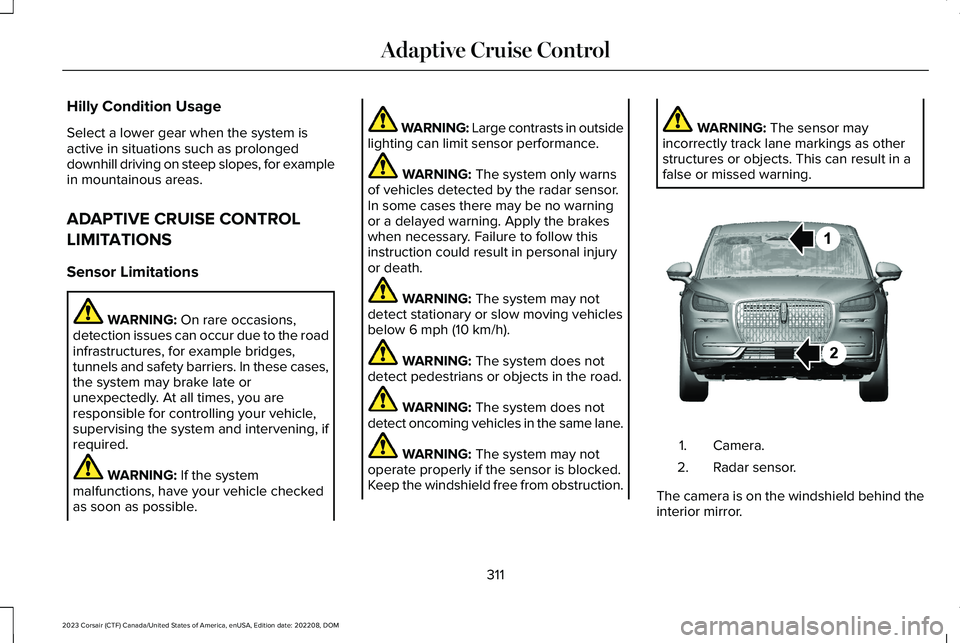
Camera.1.
Radar sensor.2.
The camera is on the windshield behind theinterior mirror.
311
2023 Corsair (CTF) Canada/United States of America, enUSA, Edition date: 202208, DOMAdaptive Cruise ControlE370664
Page 319 of 690
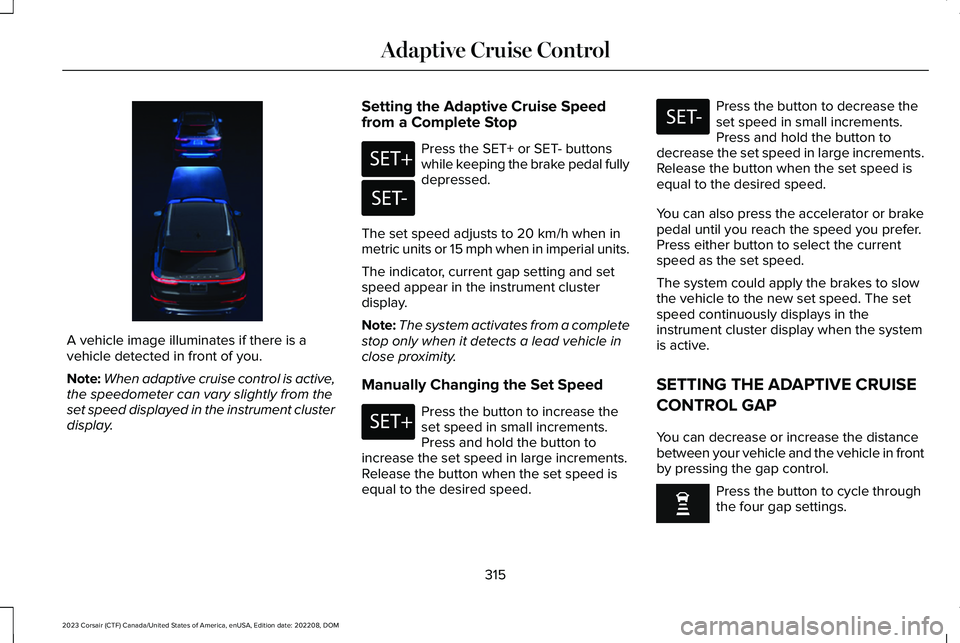
A vehicle image illuminates if there is avehicle detected in front of you.
Note:When adaptive cruise control is active,the speedometer can vary slightly from theset speed displayed in the instrument clusterdisplay.
Setting the Adaptive Cruise Speedfrom a Complete Stop
Press the SET+ or SET- buttonswhile keeping the brake pedal fullydepressed.
The set speed adjusts to 20 km/h when inmetric units or 15 mph when in imperial units.
The indicator, current gap setting and setspeed appear in the instrument clusterdisplay.
Note:The system activates from a completestop only when it detects a lead vehicle inclose proximity.
Manually Changing the Set Speed
Press the button to increase theset speed in small increments.Press and hold the button toincrease the set speed in large increments.Release the button when the set speed isequal to the desired speed.
Press the button to decrease theset speed in small increments.Press and hold the button todecrease the set speed in large increments.Release the button when the set speed isequal to the desired speed.
You can also press the accelerator or brakepedal until you reach the speed you prefer.Press either button to select the currentspeed as the set speed.
The system could apply the brakes to slowthe vehicle to the new set speed. The setspeed continuously displays in theinstrument cluster display when the systemis active.
SETTING THE ADAPTIVE CRUISE
CONTROL GAP
You can decrease or increase the distancebetween your vehicle and the vehicle in frontby pressing the gap control.
Press the button to cycle throughthe four gap settings.
315
2023 Corsair (CTF) Canada/United States of America, enUSA, Edition date: 202208, DOMAdaptive Cruise ControlE371375 E246884 E246885 E246884 E246885
Page 320 of 690
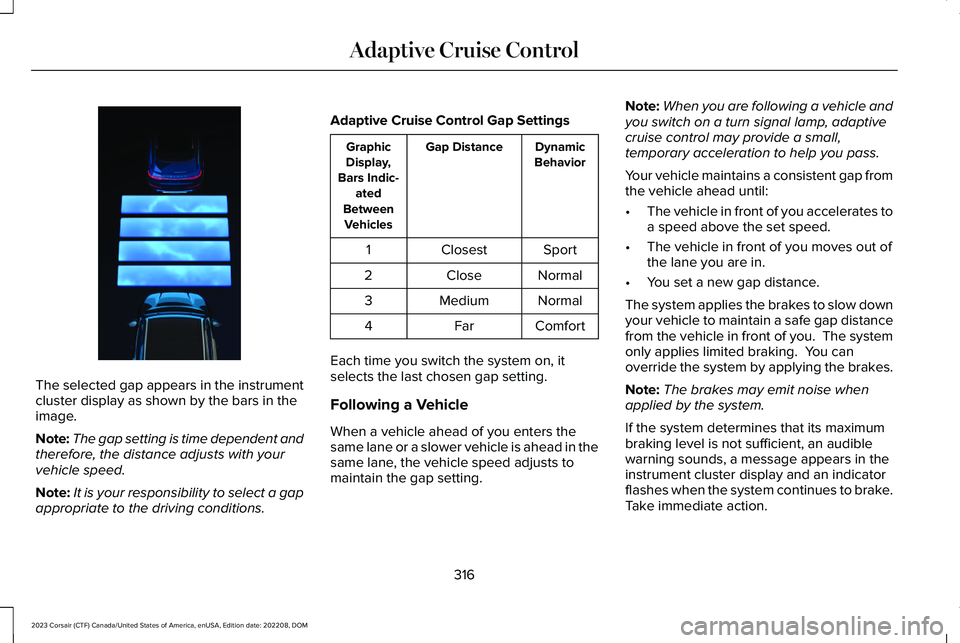
The selected gap appears in the instrumentcluster display as shown by the bars in theimage.
Note:The gap setting is time dependent andtherefore, the distance adjusts with yourvehicle speed.
Note:It is your responsibility to select a gapappropriate to the driving conditions.
Adaptive Cruise Control Gap Settings
DynamicBehaviorGap DistanceGraphicDisplay,Bars Indic-atedBetweenVehicles
SportClosest1
NormalClose2
NormalMedium3
ComfortFar4
Each time you switch the system on, itselects the last chosen gap setting.
Following a Vehicle
When a vehicle ahead of you enters thesame lane or a slower vehicle is ahead in thesame lane, the vehicle speed adjusts tomaintain the gap setting.
Note:When you are following a vehicle andyou switch on a turn signal lamp, adaptivecruise control may provide a small,temporary acceleration to help you pass.
Your vehicle maintains a consistent gap fromthe vehicle ahead until:
•The vehicle in front of you accelerates toa speed above the set speed.
•The vehicle in front of you moves out ofthe lane you are in.
•You set a new gap distance.
The system applies the brakes to slow downyour vehicle to maintain a safe gap distancefrom the vehicle in front of you. The systemonly applies limited braking. You canoverride the system by applying the brakes.
Note:The brakes may emit noise whenapplied by the system.
If the system determines that its maximumbraking level is not sufficient, an audiblewarning sounds, a message appears in theinstrument cluster display and an indicatorflashes when the system continues to brake.Take immediate action.
316
2023 Corsair (CTF) Canada/United States of America, enUSA, Edition date: 202208, DOMAdaptive Cruise ControlE370638
Page 322 of 690
ActionMessage
Press and release the button or use the accelerator pedal to resumefollowing the lead vehicle.
Displays when on a limited access highway after following a vehicleto a complete stop. In this situation, your vehicle resumes followingthe lead vehicle without a button press or pressing the acceleratorpedal. The system can remain in auto-resume state for approximately30 seconds, after which it no longer automatically resumes.
Auto-Resume
OVERRIDING THE SET SPEED
WARNING: If you override the systemby pressing the accelerator pedal, it doesnot automatically apply the brakes tomaintain a gap from any vehicle ahead.
When you press the accelerator pedal, youoverride the set speed and gap distance.
Use the accelerator pedal to intentionallyexceed the set speed limit.
When you override the system, the indicatorremains blue, the set speed is dimmed andthe lead vehicle icon does not appear in theinstrument cluster display.
The system resumes operation when yourelease the accelerator pedal. The vehiclespeed decreases to the set speed, or a lowerspeed if following a slower vehicle.
ADAPTIVE CRUISE CONTROL
INDICATORS
Illuminates when you switchadaptive cruise control on. Thecolor of the indicator changes toindicate the system status.
White indicates the system is on but inactive.
Blue indicates that you set the speed andthe system is active.
SWITCHING FROM ADAPTIVE
CRUISE CONTROL TO CRUISE
CONTROL
WARNING: Normal cruise control willnot brake when your vehicle isapproaching slower vehicles. Always beaware of which mode you have selectedand apply the brakes when necessary.
318
2023 Corsair (CTF) Canada/United States of America, enUSA, Edition date: 202208, DOMAdaptive Cruise ControlE144529
Page 326 of 690
LANE CENTERING INDICATORS
Illuminates when you switch lanecentering on. The color of theindicator changes to indicate thesystem status.
Gray status indicates the system is on but instandby mode.
Green status indicates the system is enabledand applying steering assistance to keep thevehicle in the center of the lane.
Amber status with an audible tone, that thenchanges to gray status, indicates a systemautomatic cancellation.
PREDICTIVE SPEED ASSIST
HOW DOES PREDICTIVE SPEEDASSIST WORK
Predictive Speed Assist works with adaptivecruise control and adjusts the vehicle speedto the road geometry and to the speed limitdetected by the speed sign recognitionsystem. As the system identifies curves andhighway exits, the vehicle speed temporarilydecreases ahead of and during the changingroad geometry. When passing new speedsigns, the set speed updates. See PredictiveSpeed Assist Precautions (page 322).
There are limitations that affect the accuracyof the speed sign recognition system and itsability to determine the current speed limit.Predictive speed assist and its ability todetermine the current speed limit sharesthese limitations. See Speed SignRecognition (page 374).
Note:The adaptive cruise control gap settingoperates normally when the feature isenabled.
PREDICTIVE SPEED ASSISTPRECAUTIONS
WARNING: You are responsible forcontrolling your vehicle at all times. Thesystem is designed to be an aid and doesnot relieve you of your responsibility todrive with due care and attention. Failureto follow this instruction could result in theloss of control of your vehicle, personalinjury or death.
WARNING: Pay close attention tochanging road conditions. You may needto override the system by pressing thebrake or accelerator pedal if the adjustedspeed becomes higher or lower thannecessary.
WARNING: The system only provideslimited braking. Your vehicle may notalways decelerate quickly enough to avoida crash without driver intervention. Applythe brakes when necessary.
322
2023 Corsair (CTF) Canada/United States of America, enUSA, Edition date: 202208, DOMAdaptive Cruise ControlE297977