ignition LINCOLN CORSAIR 2023 Workshop Manual
[x] Cancel search | Manufacturer: LINCOLN, Model Year: 2023, Model line: CORSAIR, Model: LINCOLN CORSAIR 2023Pages: 690, PDF Size: 15.04 MB
Page 318 of 690
Switching Adaptive Cruise Control Off
Press the button when the systemis in standby mode or switch theignition off.
Note:When you switch the system off, theset speed clears.
ADAPTIVE CRUISE CONTROL
AUTOMATIC CANCELLATION
The system may cancel if:
•The tires lose traction.
•You apply the parking brake.
The system may cancel and set the parkingbrake if:
•You unbuckle the seatbelt and open thedriver door after adaptive cruise controlstops your vehicle.
•Adaptive cruise control holds yourvehicle at a stop continuously for morethan three minutes.
The system may deactivate or preventactivating when requested if:
•The vehicle has a blocked sensor.
•The brake temperature is too high.
•There is a failure in the system or arelated system.
SETTING THE ADAPTIVE CRUISE
CONTROL SPEED
Drive to the speed you prefer.
Press either button to set thecurrent speed.
Take your foot off the accelerator pedal.
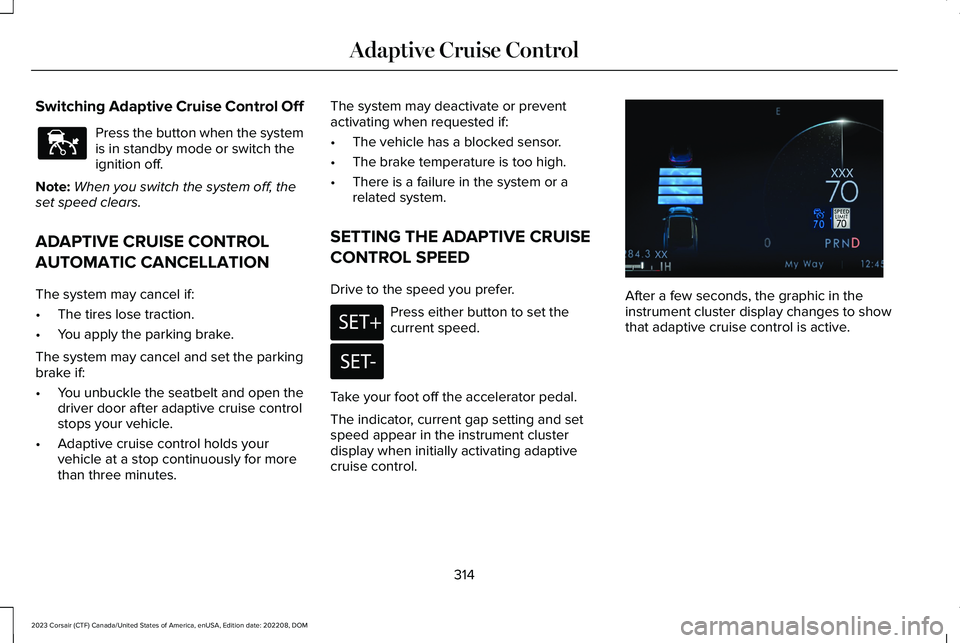
The indicator, current gap setting and setspeed appear in the instrument clusterdisplay when initially activating adaptivecruise control.
After a few seconds, the graphic in theinstrument cluster display changes to showthat adaptive cruise control is active.
314
2023 Corsair (CTF) Canada/United States of America, enUSA, Edition date: 202208, DOMAdaptive Cruise ControlE144529 E246884 E246885 E371374
Page 335 of 690
Using Activation Prompts
When the prompt appears, pressthe button to switch ActiveGlideon.
The indicator appears in the instrumentcluster. When the system is on, the color ofthe indicator changes to indicate the systemstatus.
Note:You must enable activation promptsin the touchscreen.
Using Steering Wheel Controls
Using the adaptive cruise controland lateral support buttons, makesure both systems are active.ActiveGlide activates.
Switching ActiveGlide Off
Press either the lateral support oradaptive cruise control buttonwhen system is active or instandby mode.
ActiveGlide turns off through eachignition cycle.
ACTIVEGLIDE™ ALERTS
When ActiveGlide is providing hands-ondriving or transitioning to hands-on drivingfrom hands-free driving and detects nosteering activity for a certain period of time,the system alerts you with a message in theinstrument cluster to put your hands on thesteering wheel. After the first alert, thesystem alerts you with a message in theinstrument cluster and an audible warning.
When ActiveGlide is providing hands-on orhands-free driving and detects you are notlooking at the road for a certain period oftime, the system alerts you to return youreyes to the road. Depending on where youare looking, the alert can be a message inthe instrument cluster and an audiblewarning.
If you do not react to the warnings,ActiveGlide cancels, quickly activates andreleases the brakes, and slows your vehicledown to low speeds while maintainingsteering control.
If your vehicle slows down and you resumecontrol, a message appears to prompt youto press the accelerator pedal to allow thesystem to resume.
Note:If the system detects repeatedinactivity, it disables until the next key cycle.
ACTIVEGLIDE™ AUTOMATIC
CANCELLATION
When an external condition cancelsActiveGlide, for example, no lane markingsavailable, a tone sounds and a messageappears in the instrument cluster.
If your vehicle starts to slow down,you must take control of steeringand press and release the buttonto reactivate ActiveGlide.
System cancellation can also occur if:
•The lane becomes too narrow.
•The system cannot detect valid lanemarkings.
331
2023 Corsair (CTF) Canada/United States of America, enUSA, Edition date: 202208, DOMActiveGlide™ (If Equipped)E144529 E308131 E144529 E308131 E144529 E281472
Page 342 of 690
WHAT IS DRIVE MODE CONTROL
The system delivers a driving experiencethrough a suite of sophisticated electronicvehicle systems. These systems optimizesteering, handling and powertrain response.This provides a single location to controlmultiple systems performance settings.
Changing the drive mode automaticallychanges the functionality of the followingsystems:
•Electronically power-assisted steeringsystem adjusts steering effort and feelbased on the mode you select. See HowDoes Electric Power Steering Work(page 291).
•Electronic stability control and tractioncontrol maintains your vehicle control inadverse conditions or high performancedriving. See Stability Control (page 288).
•Electronic throttle control enhances thepowertrain response to your drivinginputs.
•Transmission controls optimize with shiftschedules tuned to each mode.
•AWD settings become optimized andtuned to each mode.
The system automatically tailors your vehicleconfiguration for each mode you select.
Note:Not all settings, or modes, may beavailable.
Note:The system has diagnostic checks thatcontinuously monitor the system for properoperation. If a mode is unavailable due to asystem fault, the mode defaults to Normal.
SELECTING A DRIVE MODE
Note:Drive mode changes may not beavailable when the ignition is off.
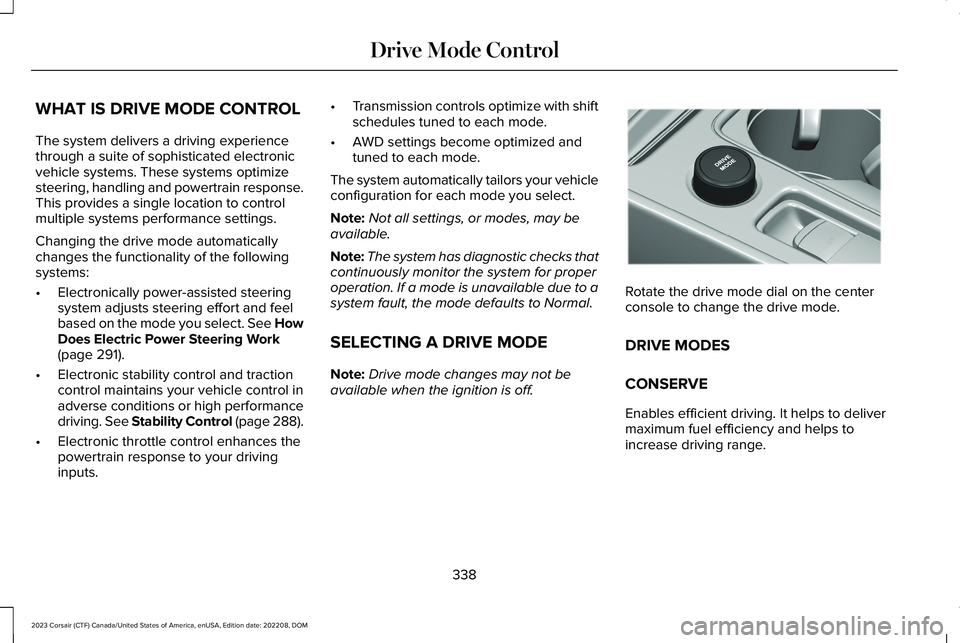
Rotate the drive mode dial on the centerconsole to change the drive mode.
DRIVE MODES
CONSERVE
Enables efficient driving. It helps to delivermaximum fuel efficiency and helps toincrease driving range.
338
2023 Corsair (CTF) Canada/United States of America, enUSA, Edition date: 202208, DOMDrive Mode ControlE307643
Page 343 of 690
EXCITE
For sporty on-road driving. This modeincreases throttle response, provides asportier exhaust sound and steering feel,along with quicker shifting. The suspensioncould stiffen, with an emphasis on handlingand control. The transmission also holdsgears longer, helping your vehicle acceleratefaster when shifting gears.
Note:Sportier exhaust sound may not beavailable depending on vehicleconfiguration.
NORMAL
For everyday driving. This mode is a perfectbalance of excitement, comfort andconvenience. This is the default mode aftereach ignition cycle.
PRESERVE EV - PLUG-IN HYBRIDELECTRIC VEHICLE (PHEV)
Your vehicle runs the engine as needed tosave electric driving range for later use inanother drive mode. For example, you firstdrive at high speeds on open roads whereengine operation is appropriate. Later, youdrive at low speeds in an urban area whereelectric only is most efficient.
If the battery charge is low when you selectthis mode, the engine begins to charge thehigh voltage battery to provide some electricrange for later.
PURE EV - PLUG-IN HYBRID ELECTRICVEHICLE (PHEV)
This mode can provide an electric onlydriving experience. Your vehicle couldaccelerate slower, and the top speed couldbe reduced. For more power, fully press theaccelerator pedal to temporarily engage theengine.
Your vehicle could enable the engine ifsystem conditions require it. An engineenabled message displays if this occurs.
The engine could enable if the climatecontrol is in a defrost mode and the outsidetemperature is cold. If the vehicle does notneed defrost, select a different climatecontrol mode to permit pure EV.
Your vehicle changes from pure EV mode tonormal mode when the vehicle electric rangeis zero.
Note:When in pure EV mode, your vehiclestays in this mode if there is all electricdriving range available and the system doesnot fault.
SLIPPERY
For less than ideal road conditions, such assnow or ice covered roads. Slippery modeinspires confidence without taking away fromdriving pleasure. Slippery mode lowersthrottle response and optimizes shifting forslippery surfaces.
Note:Using slippery mode on dry hardsurfaces could produce some vibration,driveline bind up, and potential excessivetire wear as the intent of this mode is forslippery and loose surfaces.
339
2023 Corsair (CTF) Canada/United States of America, enUSA, Edition date: 202208, DOMDrive Mode Control
Page 345 of 690
WHAT IS ECO COACH
Eco coach is designed to monitor certaindriving characteristics to help you drive moreefficiently.
HOW DOES ECO COACH WORK
Eco coach provides feedback through theinstrument cluster display about your drivingbehaviour.
Note:The efficiency levels do not result in adefined fuel consumption figure.
Note:The system only indicates theefficiency level for the current trip. Thesystem resets each time you switch theignition on.
HOW DOES INSTANTANEOUS
EFFICIENCY LEVEL WORK
The display ring increases as theinstantaneous efficiency level increases andilluminates when it reaches maximumefficiency. The level continuously updatesto indicate the efficiency level for the currenttrip.
VIEWING THE INSTANTANEOUS
EFFICIENCY LEVEL
1.Press the menu button on the steeringwheel to enter the instrument clusterdisplay main menu.
2.Select Display Setup.
3.Select Eco Coach.
4.Select a setting and press the OK button.
HOW DOES TRIP SUMMARY WORK
The calculated trip summary is shown as fourcolored bars. The bars travel from left to rightas the calculated efficiency levels increase.The bars indicate the average efficiency levelfor acceleration, deceleration, speed andgear shifting during the total distancetraveled by your vehicle for the current trip.
Note:Vehicles with an automatictransmission do not have a bar for gearshifting.
VIEWING THE TRIP SUMMARY
1.Press the menu button on the steeringwheel to enter the instrument clusterdisplay main menu.
2.Select Select Screens.
3.Select Eco Behavior.
4.Select the screen on your main screen.See Instrument Cluster Display MainMenu (page 153).
341
2023 Corsair (CTF) Canada/United States of America, enUSA, Edition date: 202208, DOMEco Coach
Page 362 of 690

CROSS TRAFFIC ALERT
LIMITATIONS
The system may not correctly operate whenany of the following occur:
•Something is blocking the sensors.
•Adjacently parked vehicles or objects areobstructing the sensors.
•Vehicles approach at speeds less than4 mph (6 km/h) or greater than 37 mph(60 km/h).
•Your vehicle speed is greater than 7 mph(12 km/h).
•You reverse out of an angled parkingspace.
Cross Traffic Alert Limitations with aTrailer Attached
The system remains on when you attach atrailer in vehicles with blind spot informationsystem with trailer tow under the followingconditions:
•You connect a trailer.
•The trailer is a bike rack or cargo rackwith a maximum length of 3 ft (1 m).
•You set the trailer length to 3 ft (1 m) inthe instrument cluster display.
Note:The system may not correctly operatewhen towing a trailer. For vehicles with atrailer tow module and tow bar approved bythe manufacturer, the system turns off whenyou attach a trailer. For vehicles with anaftermarket trailer tow module or tow bar,we recommend that you switch the systemoff when you attach a trailer.
SWITCHING CROSS TRAFFIC
ALERT ON AND OFF
To switch cross traffic alert on or off use thetouchscreen.
1.Press Features on the touchscreen.
2.Press Driver Assistance.
3.Switch Cross Traffic Alert on or off.
Note:The system switches on every timeyou switch the ignition on. To permanentlyswitch the system off, contact an authorizeddealer.
LOCATING THE CROSS TRAFFIC
ALERT SENSORS
The sensors are behind the rear fascia onboth sides of your vehicle.
Note:Keep the sensors free from snow, iceand large accumulations of dirt.
358
2023 Corsair (CTF) Canada/United States of America, enUSA, Edition date: 202208, DOMCross Traffic AlertE205199
Page 368 of 690
Pedestrian detection operates optimallywhen detected hazards are clearlyidentifiable. System performance may reducein situations where pedestrians are running,partly obscured, have a complexbackground, or cannot be distinguished froma group.
Cyclist Detection Limitations
Cyclist detection is active at speeds up to50 mph (80 km/h).
Cyclist detection functions optimally whendetected hazards are clearly identifiable. Thesystem’s detection level may be less insituations where cyclists are moving fast,partly hidden, have a complex background,or the system cannot distinguish the cyclistfrom a group.
Intersection Assist (If Equipped)
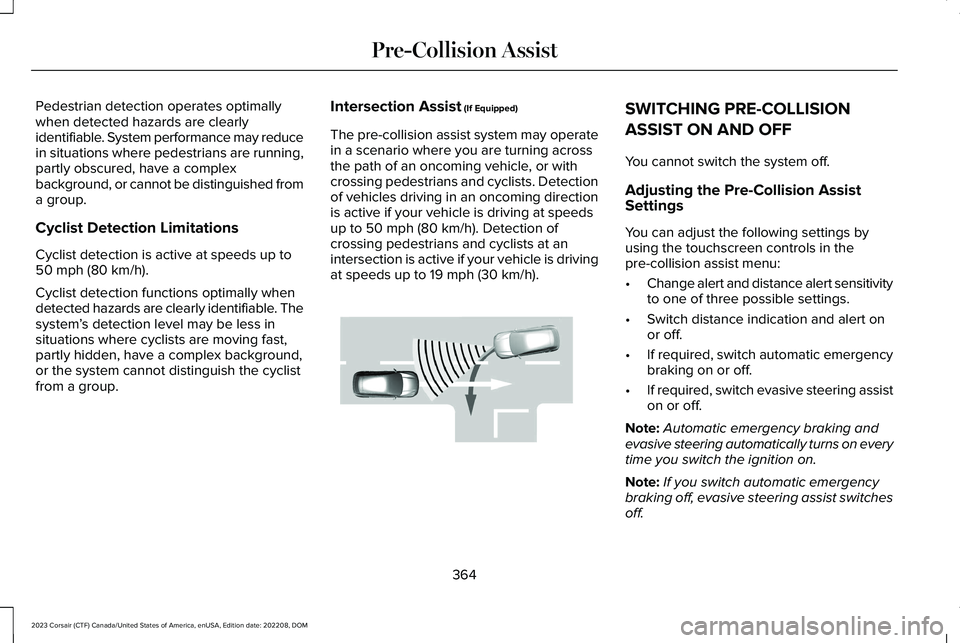
The pre-collision assist system may operatein a scenario where you are turning acrossthe path of an oncoming vehicle, or withcrossing pedestrians and cyclists. Detectionof vehicles driving in an oncoming directionis active if your vehicle is driving at speedsup to 50 mph (80 km/h). Detection ofcrossing pedestrians and cyclists at anintersection is active if your vehicle is drivingat speeds up to 19 mph (30 km/h).
SWITCHING PRE-COLLISION
ASSIST ON AND OFF
You cannot switch the system off.
Adjusting the Pre-Collision AssistSettings
You can adjust the following settings byusing the touchscreen controls in thepre-collision assist menu:
•Change alert and distance alert sensitivityto one of three possible settings.
•Switch distance indication and alert onor off.
•If required, switch automatic emergencybraking on or off.
•If required, switch evasive steering assiston or off.
Note:Automatic emergency braking andevasive steering automatically turns on everytime you switch the ignition on.
Note:If you switch automatic emergencybraking off, evasive steering assist switchesoff.
364
2023 Corsair (CTF) Canada/United States of America, enUSA, Edition date: 202208, DOMPre-Collision AssistE309750
Page 373 of 690
EVASIVE STEERING ASSISTLIMITATIONS
Evasive steering assist only activates whenall the following occur:
•Automatic emergency braking andevasive steering assist are on.
•The system detects a road user aheadand starts to apply the brakes.
•You significantly turn the steering wheelto steer around a road user.
Note:Evasive steering assist does notautomatically steer around a road user. Ifyou do not turn the steering wheel, evasivesteering assist does not activate.
Note:Evasive steering assist does notactivate if the distance to the road userahead is too small and the system cannotavoid a crash.
SWITCHING EVASIVE STEERING
ASSIST ON AND OFF
To switch the system on or off, use thetouchscreen:
1.Press Features on the touchscreen.
2.Press Driver Assistance.
3.Press Pre-Collision Assist.
4.Switch Evasive Steering on or off.
Note:If you switch automatic emergencybraking off, evasive steering assist turns off.
Note:Automatic emergency braking andevasive steering assist turn on every timeyou switch the ignition on.
PRE-COLLISION ASSIST –
TROUBLESHOOTING
PRE-COLLISION ASSIST – WARNINGLAMPS
A telltale illuminates in the clusterto indicate if the system is disabledor unavailable.
PRE-COLLISION ASSIST – INFORMATION MESSAGES
ActionMessage
You have a blocked sensor due to bad weather, ice, mud or water infront of the radar sensor. You can typically clean the sensor to resolve.Pre-Collision Assist Not Available Sensor Blocked
A fault with the system has occurred. Have your vehicle checked assoon as possible.Pre-Collision Assist Not Available
369
2023 Corsair (CTF) Canada/United States of America, enUSA, Edition date: 202208, DOMPre-Collision AssistE335612
Page 377 of 690
DRIVER ALERT LIMITATIONS
Driver alert may not function correctly if:
•The sensor cannot track the road lanemarkings.
•Your vehicle's speed is less thanapproximately 40 mph (65 km/h).
SWITCHING DRIVER ALERT ON
AND OFF
1.Press Features on the touchscreen.
2.Press Driver Assistance.
3.Switch Driver Alert on or off.
Note:The system remains on or offdepending on how it was last set.
Resetting Driver Alert
You can reset the system by either:
•Switching the ignition off and on.
•Opening and closing the driver doorwhen your vehicle is stationary, and it issafe to do so.
DRIVER ALERT – TROUBLESHOOTING
DRIVER ALERT – INFORMATION MESSAGES
ActionMessage
Stop and rest as soon as it is safe to do so.Driver Alert Warning Rest Now
Take a rest soon.Driver Alert Warning Rest Suggested
373
2023 Corsair (CTF) Canada/United States of America, enUSA, Edition date: 202208, DOMDriver Alert
Page 406 of 690
Note:The hazard flashers operate when theignition is in any position, or if the key is notin the ignition. The battery loses charge andcould have insufficient power to restart yourvehicle.
Press the button again to switch them off.
JUMP STARTING THE VEHICLE
JUMP STARTING PRECAUTIONS
WARNING: Batteries normallyproduce explosive gases which can causepersonal injury. Therefore, do not allowflames, sparks or lighted substances tocome near the battery. When working nearthe battery, always shield your face andprotect your eyes. Always provide correctventilation.
WARNING: Keep batteries out ofreach of children. Batteries contain sulfuricacid. Avoid contact with skin, eyes orclothing. Shield your eyes when workingnear the battery to protect against possiblesplashing of acid solution. In case of acidcontact with skin or eyes, flush immediatelywith water for a minimum of 15 minutes andget prompt medical attention. If acid isswallowed, call a physician immediately.
WARNING: Use only adequatelysized cables with insulated clamps.
WARNING: Make sure that the cablesare clear of any moving parts and fueldelivery system parts.
WARNING: Connect batteries withonly the same nominal voltage.
WARNING: If the engine is runningwhile the hood is open, stay clear ofmoving engine components. Failure tofollow this warning could result in seriouspersonal injury or death.
Do not attempt to push-start an automatictransmission vehicle. This could causetransmission damage.
Do not disconnect the battery of the disabledvehicle. This could damage your vehicle'selectrical system.
PREPARING THE VEHICLE
Use only a 12 volt supply to start your vehicle.
Park the booster vehicle close to the hoodof the disabled vehicle, making sure the twovehicles do not touch.
JUMP STARTING THE VEHICLE -PLUG-IN HYBRID ELECTRIC VEHICLE(PHEV)
Connecting the Jumper Cables
WARNING: Do not connect thenegative jumper cable to any other part ofyour vehicle. Use the ground point.
402
2023 Corsair (CTF) Canada/United States of America, enUSA, Edition date: 202208, DOMCrash and Breakdown Information