Tire LINCOLN LS 2002 Owners Manual
[x] Cancel search | Manufacturer: LINCOLN, Model Year: 2002, Model line: LS, Model: LINCOLN LS 2002Pages: 288, PDF Size: 2.44 MB
Page 2 of 288
Seating and Safety Restraints 121
Seating 121
Safety restraints 126
Air bags 139
Child restraints 146
Driving 156
Starting 156
Brakes 160
Traction control/AdvanceTrac 164
Transmission operation 167
Vehicle loading 181
Trailer towing 183
Recreational towing 186
Roadside Emergencies 187
Hazard flasher switch 188
Fuses and relays 190
Changing tires 198
Jump starting 202
Wrecker towing 209
Customer Assistance 210
The dispute settlement board 213
Utilizing the mediation/arbitration 216
Getting assistance outside the U.S. and Canada 216
Ordering additional owner's literature 217
Reporting safety defects (U.S. only) 219
Table of Contents
2
Page 9 of 288
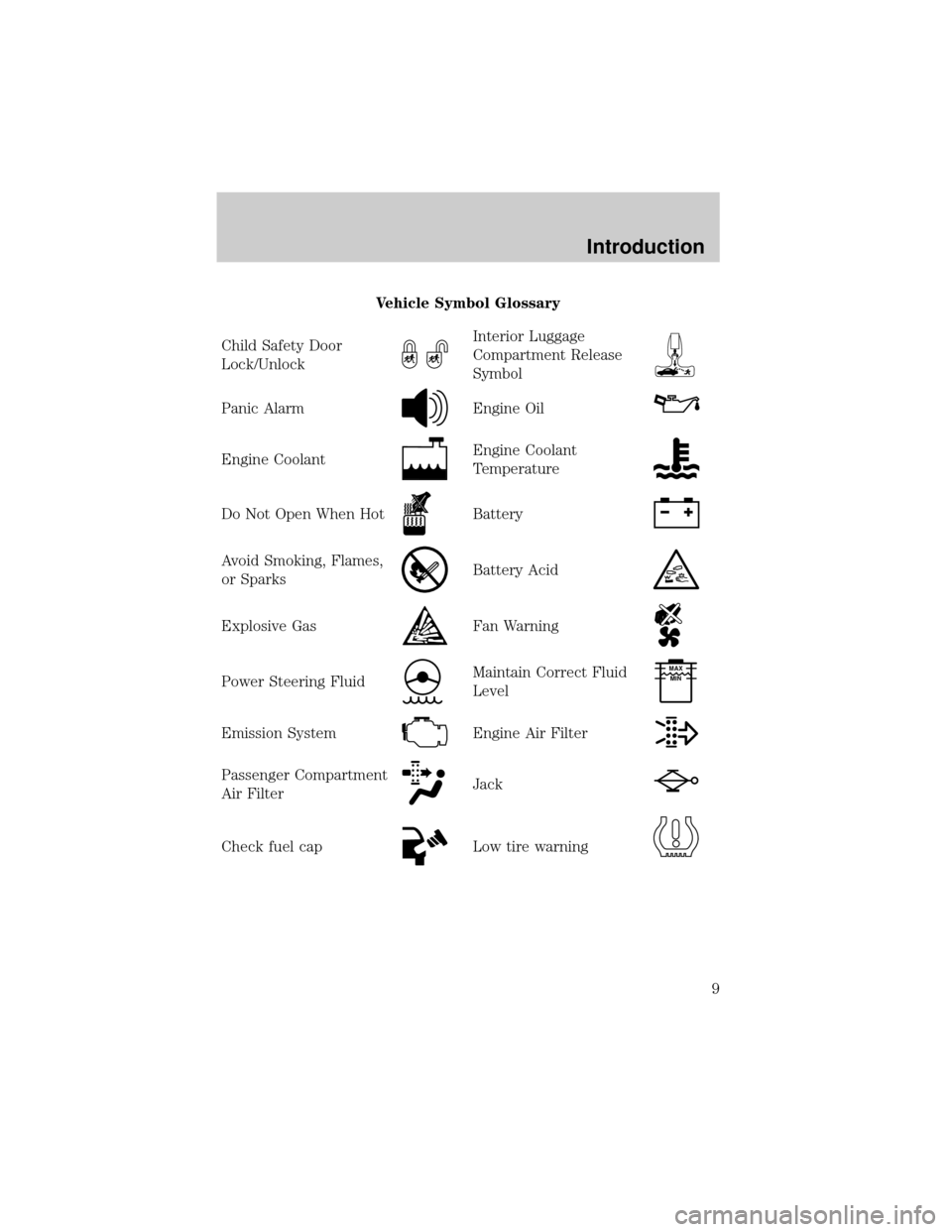
Vehicle Symbol Glossary
Child Safety Door
Lock/Unlock
Interior Luggage
Compartment Release
Symbol
Panic AlarmEngine Oil
Engine CoolantEngine Coolant
Temperature
Do Not Open When HotBattery
Avoid Smoking, Flames,
or SparksBattery Acid
Explosive GasFan Warning
Power Steering FluidMaintain Correct Fluid
LevelMAX
MIN
Emission SystemEngine Air Filter
Passenger Compartment
Air FilterJack
Check fuel capLow tire warning
Introduction
9
Page 119 of 288
Programming spare keys
A maximum of eight keys can be coded to your vehicle. Only
SecuriLockykeys can be used. To program acoded keyyourself, you
will need two previously programmedcoded keys(keys that already
operate your vehicle's engine) and the new unprogrammed key(s) readily
accessible for timely implementation of each step in the procedure.
If two previously programmed coded keys are not available, you must
bring your vehicle to your dealership to have the spare coded key(s)
programmed.
Please read and understand the entire procedure before you begin.
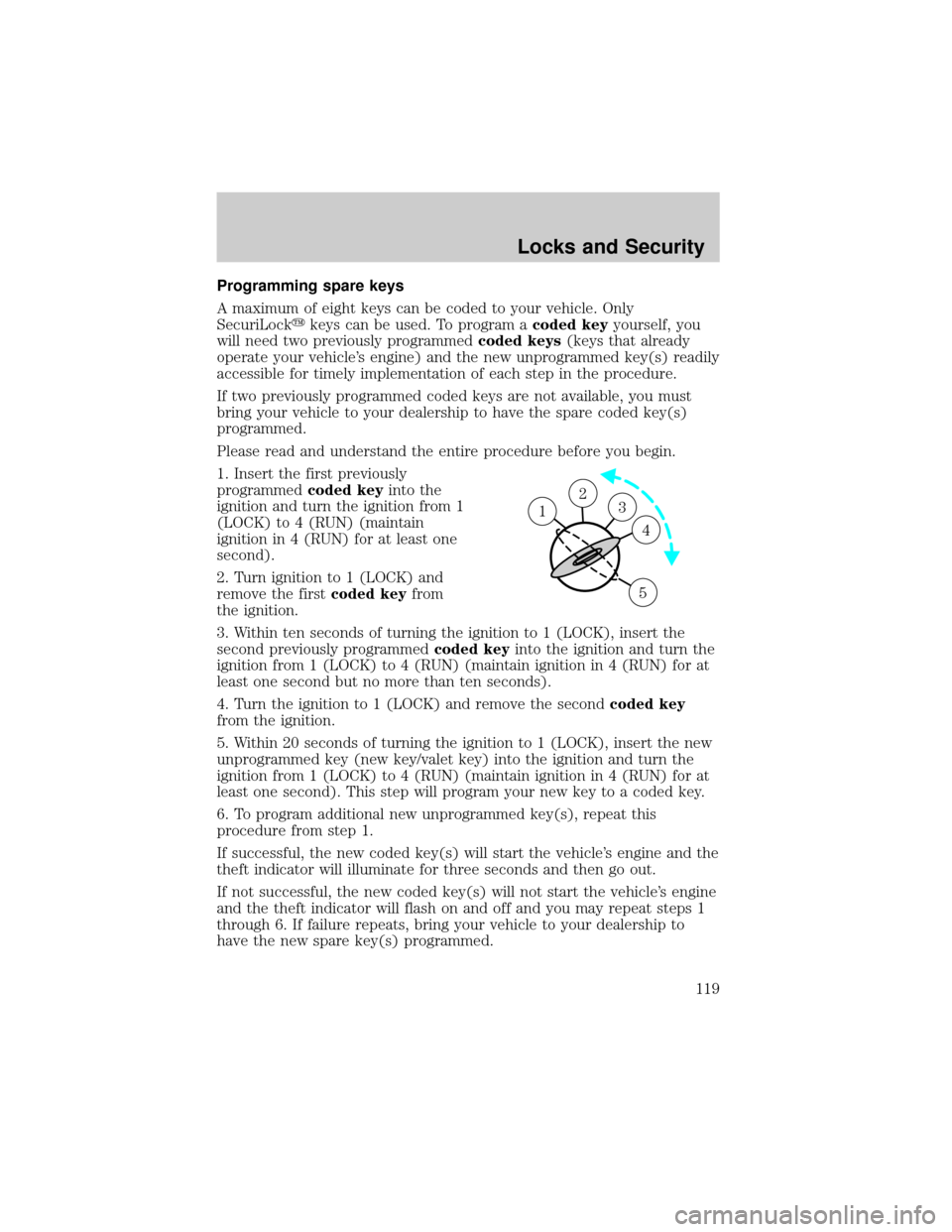
1. Insert the first previously
programmedcoded keyinto the
ignition and turn the ignition from 1
(LOCK) to 4 (RUN) (maintain
ignition in 4 (RUN) for at least one
second).
2. Turn ignition to 1 (LOCK) and
remove the firstcoded keyfrom
the ignition.
3. Within ten seconds of turning the ignition to 1 (LOCK), insert the
second previously programmedcoded keyinto the ignition and turn the
ignition from 1 (LOCK) to 4 (RUN) (maintain ignition in 4 (RUN) for at
least one second but no more than ten seconds).
4. Turn the ignition to 1 (LOCK) and remove the secondcoded key
from the ignition.
5. Within 20 seconds of turning the ignition to 1 (LOCK), insert the new
unprogrammed key (new key/valet key) into the ignition and turn the
ignition from 1 (LOCK) to 4 (RUN) (maintain ignition in 4 (RUN) for at
least one second). This step will program your new key to a coded key.
6. To program additional new unprogrammed key(s), repeat this
procedure from step 1.
If successful, the new coded key(s) will start the vehicle's engine and the
theft indicator will illuminate for three seconds and then go out.
If not successful, the new coded key(s) will not start the vehicle's engine
and the theft indicator will flash on and off and you may repeat steps 1
through 6. If failure repeats, bring your vehicle to your dealership to
have the new spare key(s) programmed.
23 1
4
5
Locks and Security
119
Page 131 of 288
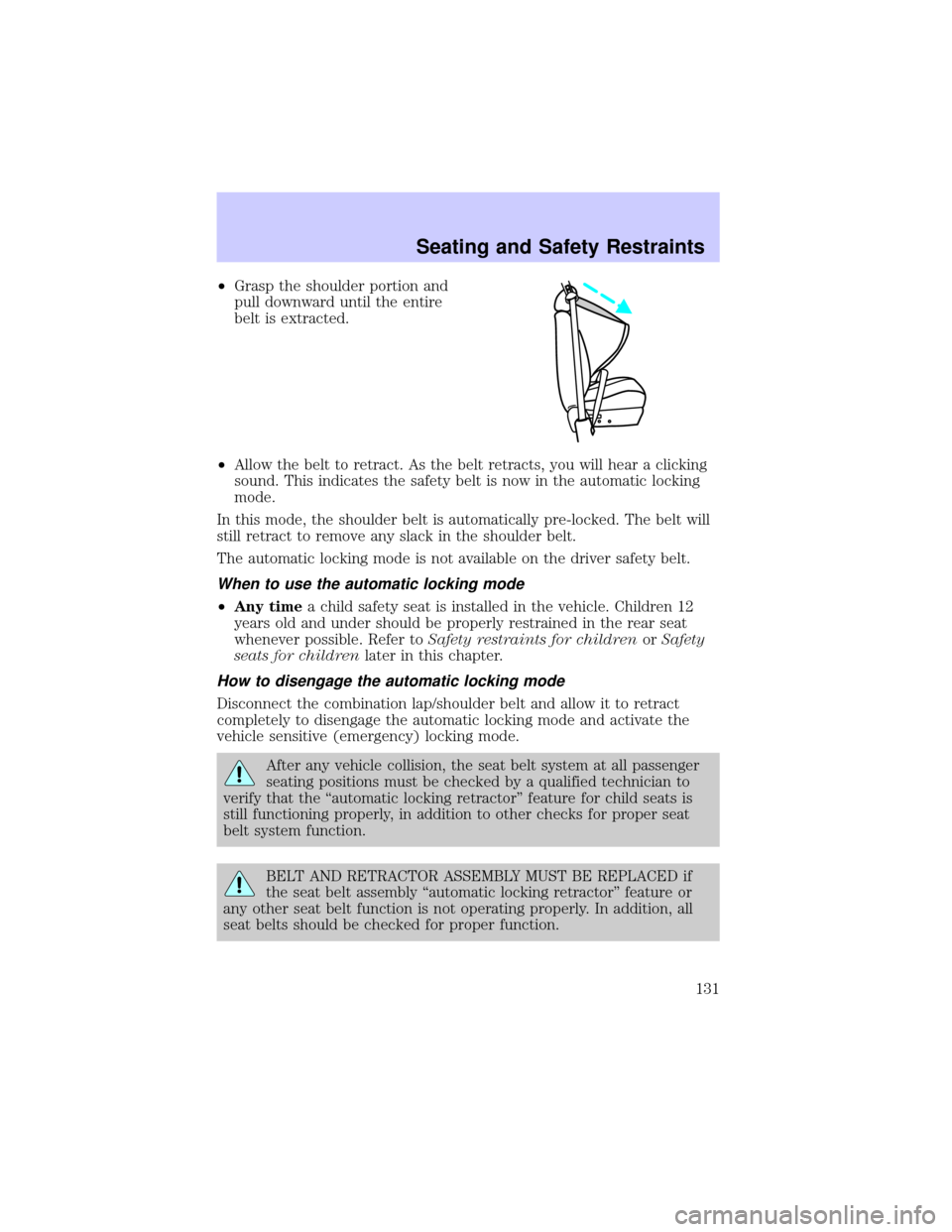
²Grasp the shoulder portion and
pull downward until the entire
belt is extracted.
²Allow the belt to retract. As the belt retracts, you will hear a clicking
sound. This indicates the safety belt is now in the automatic locking
mode.
In this mode, the shoulder belt is automatically pre-locked. The belt will
still retract to remove any slack in the shoulder belt.
The automatic locking mode is not available on the driver safety belt.
When to use the automatic locking mode
²Any timea child safety seat is installed in the vehicle. Children 12
years old and under should be properly restrained in the rear seat
whenever possible. Refer toSafety restraints for childrenorSafety
seats for childrenlater in this chapter.
How to disengage the automatic locking mode
Disconnect the combination lap/shoulder belt and allow it to retract
completely to disengage the automatic locking mode and activate the
vehicle sensitive (emergency) locking mode.
After any vehicle collision, the seat belt system at all passenger
seating positions must be checked by a qualified technician to
verify that the ªautomatic locking retractorº feature for child seats is
still functioning properly, in addition to other checks for proper seat
belt system function.
BELT AND RETRACTOR ASSEMBLY MUST BE REPLACED if
the seat belt assembly ªautomatic locking retractorº feature or
any other seat belt function is not operating properly. In addition, all
seat belts should be checked for proper function.
Seating and Safety Restraints
131
Page 163 of 288
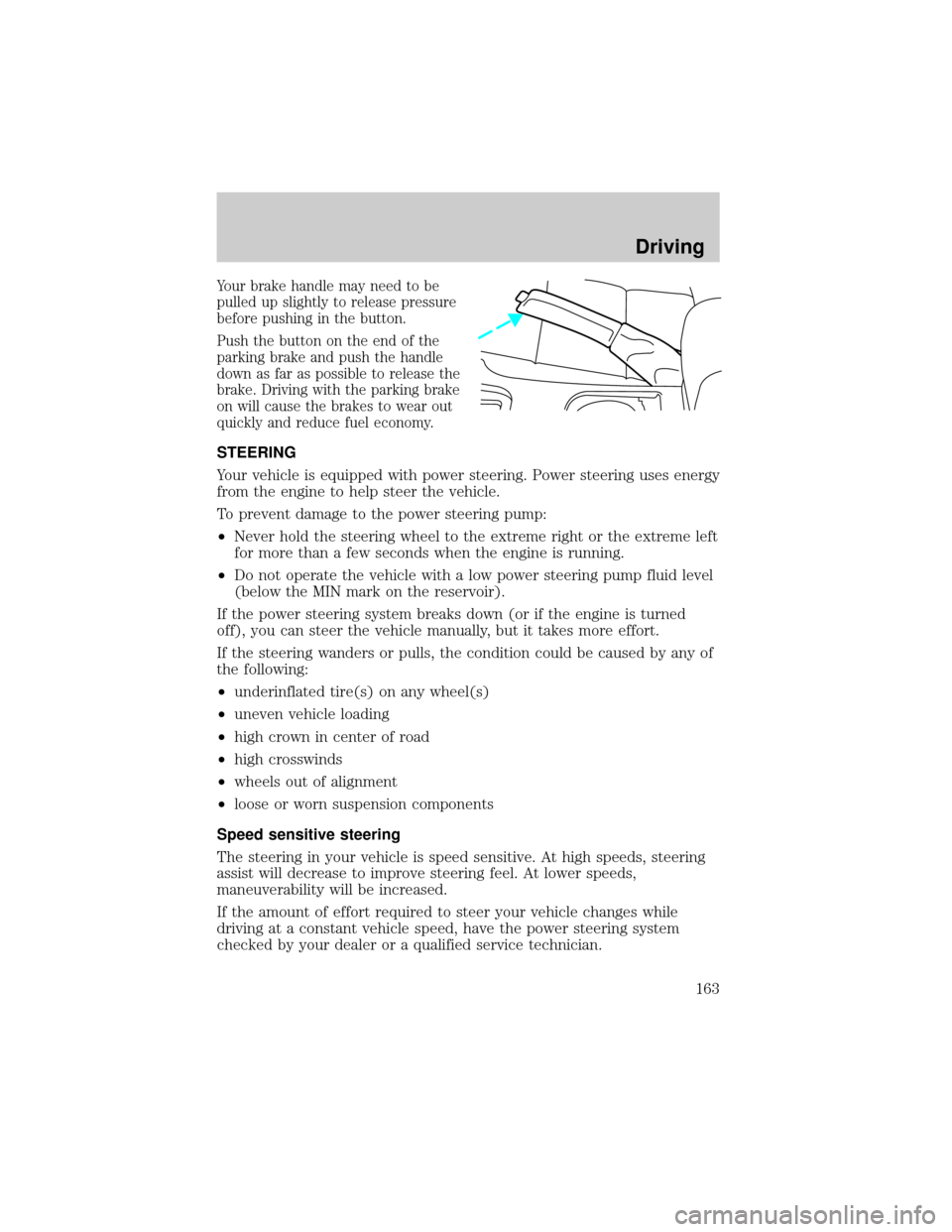
Your brake handle may need to be
pulled up slightly to release pressure
before pushing in the button.
Push the button on the end of the
parking brake and push the handle
down as far as possible to release the
brake. Driving with the parking brake
on will cause the brakes to wear out
quickly and reduce fuel economy.
STEERING
Your vehicle is equipped with power steering. Power steering uses energy
from the engine to help steer the vehicle.
To prevent damage to the power steering pump:
²Never hold the steering wheel to the extreme right or the extreme left
for more than a few seconds when the engine is running.
²Do not operate the vehicle with a low power steering pump fluid level
(below the MIN mark on the reservoir).
If the power steering system breaks down (or if the engine is turned
off), you can steer the vehicle manually, but it takes more effort.
If the steering wanders or pulls, the condition could be caused by any of
the following:
²underinflated tire(s) on any wheel(s)
²uneven vehicle loading
²high crown in center of road
²high crosswinds
²wheels out of alignment
²loose or worn suspension components
Speed sensitive steering
The steering in your vehicle is speed sensitive. At high speeds, steering
assist will decrease to improve steering feel. At lower speeds,
maneuverability will be increased.
If the amount of effort required to steer your vehicle changes while
driving at a constant vehicle speed, have the power steering system
checked by your dealer or a qualified service technician.
Driving
163
Page 165 of 288

AdvanceTracYStability Enhancement System (if equipped)
The AdvanceTracysystem helps the driver maintain the stability and
steerability of the vehicle. The system integrates anti-lock braking system
(ABS), Traction Controlyand a more advanced function to further
enhance the stability of the vehicle. The system shares many of the
electronic and mechanical elements already present in the Traction
Controlyand ABS systems.
The AdvanceTracyconstantly monitors the vehicle motion relative to
the driver's intended course. This is done by using added sensors that
compare the steering inputs from the driver with the actual motion of
the vehicle. When there is a discrepancy between the driver's inputs and
the vehicle motion, AdvanceTracychanges the force at each tire to help
control the vehicle. If the vehicle begins to rotate excessively left or
right, spin out, or slide sideways, the system will attempt to correct the
excessive motion. If the vehicle does not respond to steering inputs, the
system will attempt to increase the turning response of the vehicle.
The AdvanceTracyenhances stability during maneuvers that require all
available tire traction to control the vehicle. The benefits of the
AdvanceTracysystem are most noticeable when driving in wet/snowy/icy
road conditions and/or when performing emergency maneuvers. In an
emergency lane-change, the driver will experience better overall vehicle
traction, and have better control of the vehicle.
Driving conditions which may activate AdvanceTracyinclude:
²Taking a turn too fast
²Evasively maneuvering to avoid an accident, pedestrian or obstacle
²Hitting a patch of ice
²Changing lanes on a snow-rutted road
²Entering a snow-free road from a snow-covered side street
²Entering a paved road from a gravel road
²Hitting a curb while turning
²Driving on slick surfaces
The AdvanceTracysystem defaults to ON when the engine is started.
The system does not work when the vehicle is traveling backwards. In
reverse, ABS and Traction Controlywill continue to function. The
system uses ABS and Traction Controly(including control of the
engine) as well as its more advanced controls to enhance vehicle
stability.
Driving
165
Page 167 of 288
Aggressive driving in any road conditions can cause you to lose
control of your vehicle increasing the risk of severe personal
injury or property damage. The occurrence of an AdvanceTracyevent
is an indication that at least some of the tires have exceeded their
ability to grip the road and that you may lose control of the vehicle. If
you experience a severe road event, SLOW DOWN.
If you find yourself regularly experiencing AdvanceTracyevents,
you are driving too fast for conditions, you should reduce your
speed, and drive less aggressively. AdvanceTracyis limited by the laws
of physics. It is always possible to lose control of a vehicle due to
inappropriate driver inputs for the conditions. The occurrence of an
AdvanceTracyevent is an indication that at least some of the tires
have exceeded their ability to grip the road; this may cause you to lose
control of the vehicle increasing the risk of severe personal injury or
property damage.
AUTOMATIC TRANSMISSION OPERATION (IF EQUIPPED)
Brake-shift interlock
This vehicle is equipped with a brake-shift interlock feature that prevents
the gearshift lever from being moved from P (Park) when the ignition is
in the RUN position unless brake pedal is depressed.
If you cannot move the gearshift lever out of P (Park) with ignition in
the RUN position and the brake pedal depressed:
1. Apply the parking brake, turn ignition key to LOCK, then remove the
key.
2. Insert the key and turn it to OFF.Apply the brake pedal and shift
to N (Neutral).
In the ignition OFF position, the automatic transmission shift
lever can be moved from the P (Park) position without the brake
pedal depressed. To avoid unwanted vehicle movement, always set the
parking brake.
3. Start the vehicle.
Driving
167
Page 168 of 288
If it is necessary to use the above procedure to move the gearshift lever,
it is possible that a fuse has blown or the vehicle's brakelamps are not
operating properly. Refer toFuses and relaysin theRoadside
emergencieschapter.
Do not drive your vehicle until you verify that the brakelamps
are working.
If your vehicle gets stuck in mud or snow it may be rocked out by
shifting from forward and reverse gears, stopping between shifts, in a
steady pattern. Press lightly on the accelerator in each gear.
Do not rock the vehicle if the engine is not at normal operating
temperature or damage to the transmission may occur.
Do not rock the vehicle for more than a few minutes or damage
to the transmission and tires may occur or the engine may
overheat.
Always set the parking brake fully and make sure the gearshift is
latched in P (Park). Turn off the ignition whenever you leave
your vehicle.
If the parking brake is fully released, but the brake warning lamp
remains illuminated, the brakes may not be working properly.
See your dealer or a qualified service technician.
Driving with a 5±speed automatic transmission (if equipped)
Your automatic transmission electronically controls the shift feel by using
an adaptive learning strategy. This feature is designed to increase
durability, and provide consistent shift feel over the life of the vehicle. It
is normal for a new transmission to shift firmly. This operation is
considered normal and will not affect function durability of the
transmission. Once the vehicle is at operating temperature it may take
several shifts at the same operating condition for the transmission to
properly adapt. Over time the adaptive learning process will fully update
transmission operation. The more varied the driving habits, speed and
torque, the longer it may take to adapt but the more complete the
process will be.
Driving
168
Page 182 of 288
²Maximum Trailer Weight Rating:Maximum weight of a trailer the
vehicle is permitted to tow. The maximum trailer weight rating is
determined by subtracting the vehicle curb weight for each
engine/transmission combination, any required option weight for trailer
towing and the weight of the driver from the GCWR for the towing
vehicle.
²Maximum Trailer Weight:Maximum weight of a trailer the loaded
vehicle (including occupants and cargo) is permitted to tow. It is
determined by subtracting the weight of the loaded trailer towing
vehicle from the GCWR for the towing vehicle.
²Trailer Weight Range:Specified weight range that the trailer must
fall within that ranges from zero to the maximum trailer weight rating.
Remember to figure in the tongue load of your loaded trailer when
figuring the total weight.
Do not exceed the GVWR or the GAWR specified on the
certification label.
Do not use replacement tires with lower load carrying capacities than the
originals because they may lower the vehicle's GVWR and GAWR
limitations. Replacement tires with a higher limit than the originals do
not increase the GVWR and GAWR limitations.
The Safety Certification Label, found on the driver's door pillar, lists
several important vehicle weight rating limitations. Before adding any
additional equipment, refer to these limitations. If you are adding weight
to the front of your vehicle, (potentially including weight added to the
cab), the weight added should not exceed the front axle reserve capacity
(FARC). Additional frontal weight may be added to the front axle reserve
capacity provided you limit your payload in other ways (i.e. restrict the
number of occupants or amount of cargo carried).
Always ensure that the weight of occupants, cargo and equipment being
carried is within the weight limitations that have been established for
your vehicle including both gross vehicle weight and front and rear gross
axle weight rating limits. Under no circumstance should these limitations
be exceeded.
Exceeding any vehicle weight rating limitation could result in
serious damage to the vehicle and/or personal injury.
Driving
182
Page 183 of 288
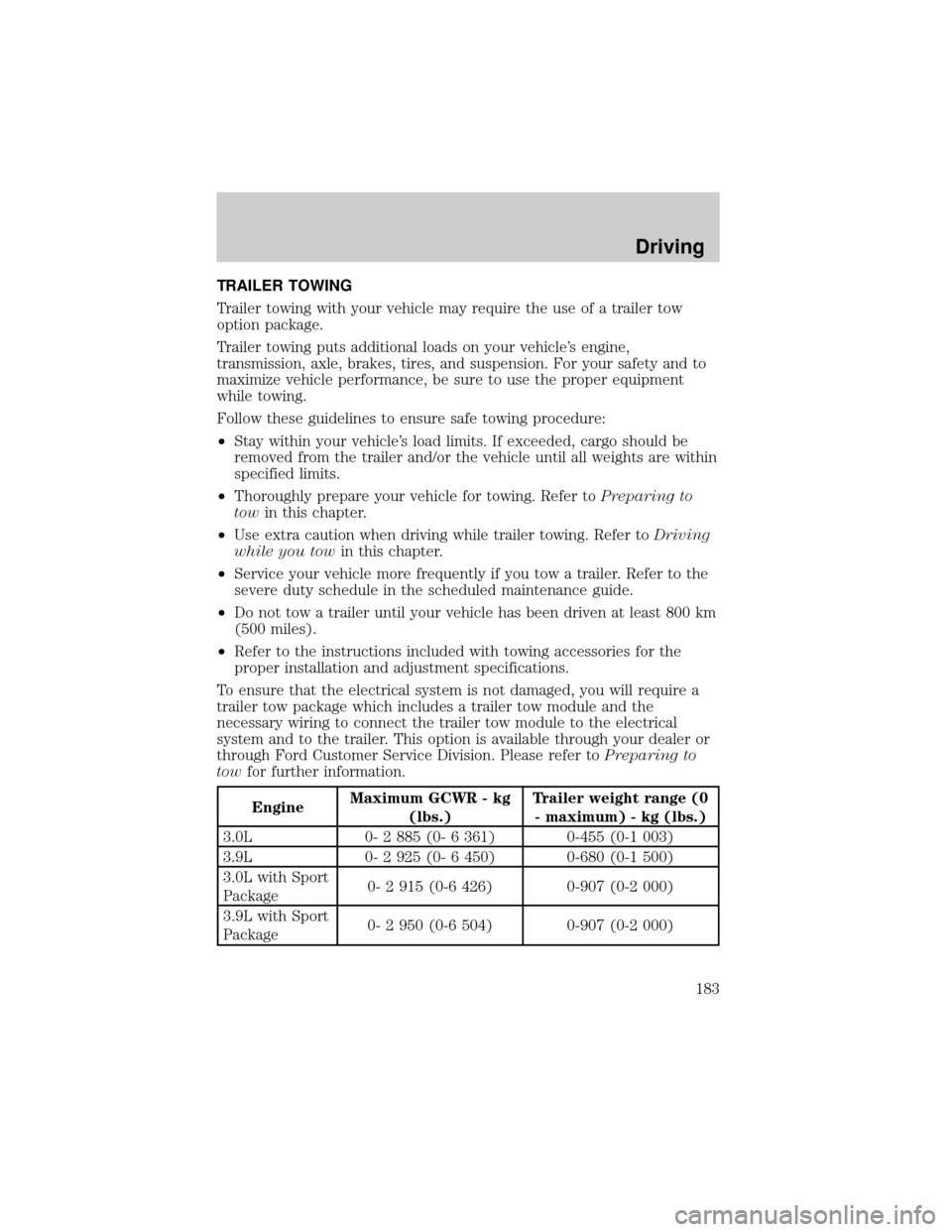
TRAILER TOWING
Trailer towing with your vehicle may require the use of a trailer tow
option package.
Trailer towing puts additional loads on your vehicle's engine,
transmission, axle, brakes, tires, and suspension. For your safety and to
maximize vehicle performance, be sure to use the proper equipment
while towing.
Follow these guidelines to ensure safe towing procedure:
²Stay within your vehicle's load limits. If exceeded, cargo should be
removed from the trailer and/or the vehicle until all weights are within
specified limits.
²Thoroughly prepare your vehicle for towing. Refer toPreparing to
towin this chapter.
²Use extra caution when driving while trailer towing. Refer toDriving
while you towin this chapter.
²Service your vehicle more frequently if you tow a trailer. Refer to the
severe duty schedule in the scheduled maintenance guide.
²Do not tow a trailer until your vehicle has been driven at least 800 km
(500 miles).
²Refer to the instructions included with towing accessories for the
proper installation and adjustment specifications.
To ensure that the electrical system is not damaged, you will require a
trailer tow package which includes a trailer tow module and the
necessary wiring to connect the trailer tow module to the electrical
system and to the trailer. This option is available through your dealer or
through Ford Customer Service Division. Please refer toPreparing to
towfor further information.
EngineMaximum GCWR - kg
(lbs.)Trailer weight range (0
- maximum) - kg (lbs.)
3.0L 0- 2 885 (0- 6 361) 0-455 (0-1 003)
3.9L 0- 2 925 (0- 6 450) 0-680 (0-1 500)
3.0L with Sport
Package0- 2 915 (0-6 426) 0-907 (0-2 000)
3.9L with Sport
Package0- 2 950 (0-6 504) 0-907 (0-2 000)
Driving
183