lights LINCOLN LS 2005 Owners Manual
[x] Cancel search | Manufacturer: LINCOLN, Model Year: 2005, Model line: LS, Model: LINCOLN LS 2005Pages: 320, PDF Size: 3.5 MB
Page 1 of 320
Introduction 4
Instrument Cluster 10
Warning and control lights 10
Gauges 15
Entertainment Systems 17
AM/FM stereo with in-dash six CD 17
AM/FM stereo cassette with CD 21
Navigation system 26
Climate Controls 89
Electronic automatic temperature control 89
Rear window defroster 96
Lights 98
Headlamps 98
Turn signal control 101
Bulb replacement 102
Driver Controls 107
Windshield wiper/washer control 107
Steering wheel adjustment 108
Power windows 111
Mirrors 112
Speed control 117
Message center 127
Locks and Security 142
Keys 142
Locks 142
Anti-theft system 154
Table of Contents
1
REVIEW COPY
2005 Lincoln LS(dew), Owners Guide (post-2002-fmt)(own2002),
Market:USA_English(fus)
Table of Contents
Page 10 of 320
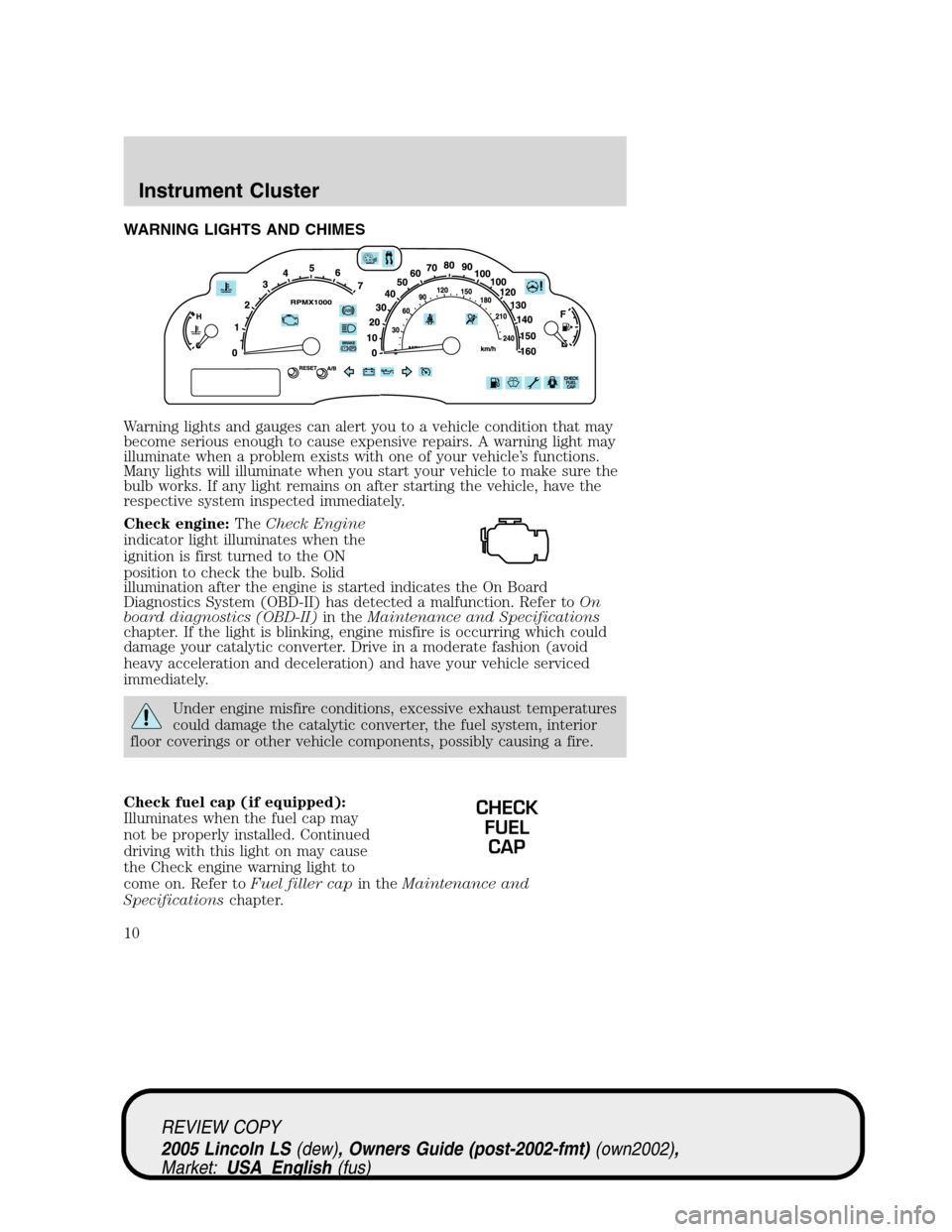
WARNING LIGHTS AND CHIMES
Warning lights and gauges can alert you to a vehicle condition that may
become serious enough to cause expensive repairs. A warning light may
illuminate when a problem exists with one of your vehicle’s functions.
Many lights will illuminate when you start your vehicle to make sure the
bulb works. If any light remains on after starting the vehicle, have the
respective system inspected immediately.
Check engine:TheCheck Engine
indicator light illuminates when the
ignition is first turned to the ON
position to check the bulb. Solid
illumination after the engine is started indicates the On Board
Diagnostics System (OBD-II) has detected a malfunction. Refer toOn
board diagnostics (OBD-II)in theMaintenance and Specifications
chapter. If the light is blinking, engine misfire is occurring which could
damage your catalytic converter. Drive in a moderate fashion (avoid
heavy acceleration and deceleration) and have your vehicle serviced
immediately.
Under engine misfire conditions, excessive exhaust temperatures
could damage the catalytic converter, the fuel system, interior
floor coverings or other vehicle components, possibly causing a fire.
Check fuel cap (if equipped):
Illuminates when the fuel cap may
not be properly installed. Continued
driving with this light on may cause
the Check engine warning light to
come on. Refer toFuel filler capin theMaintenance and
Specificationschapter.
CHECK
FUEL
CAP
REVIEW COPY
2005 Lincoln LS(dew), Owners Guide (post-2002-fmt)(own2002),
Market:USA_English(fus)
Instrument Cluster
Instrument Cluster
10
Page 13 of 320
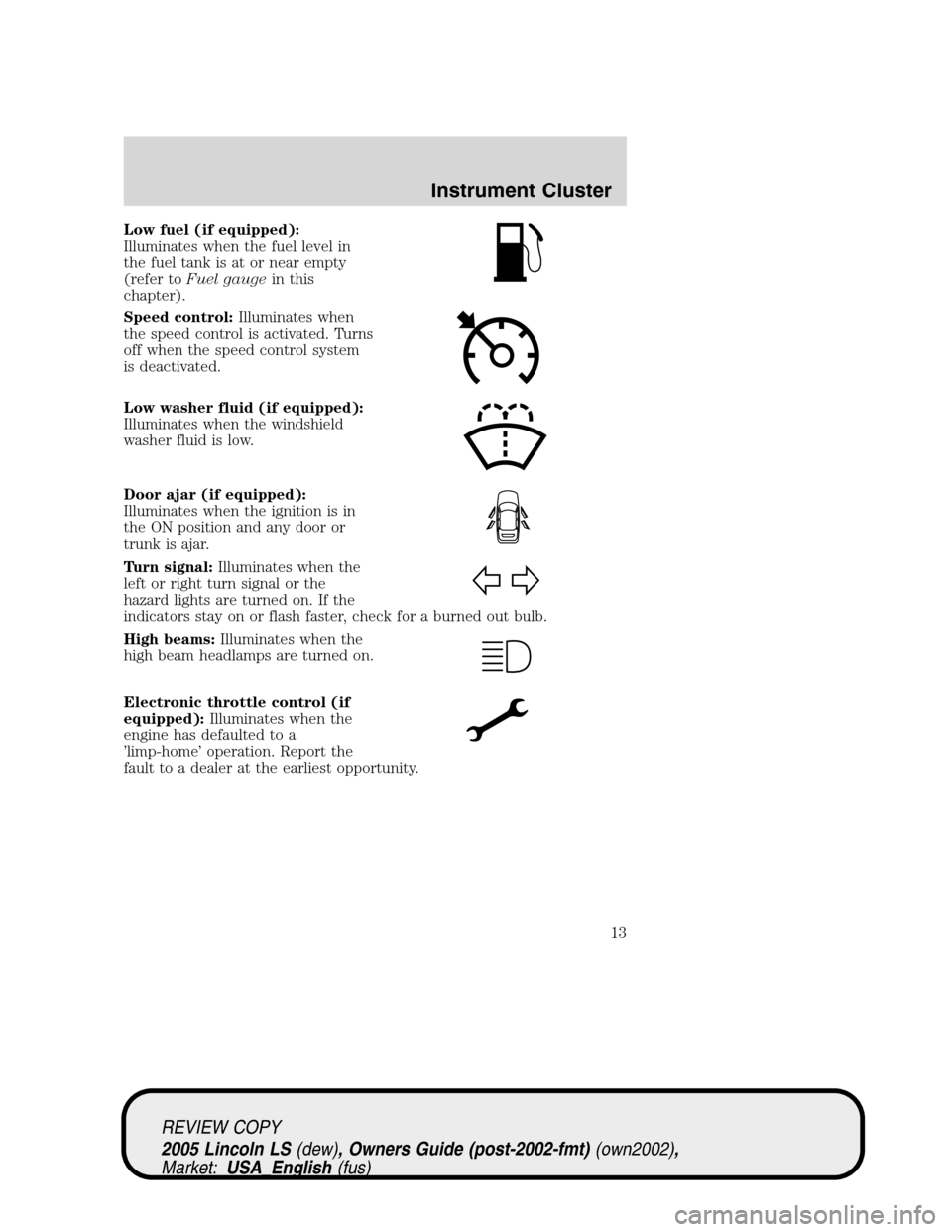
Low fuel (if equipped):
Illuminates when the fuel level in
the fuel tank is at or near empty
(refer toFuel gaugein this
chapter).
Speed control:Illuminates when
the speed control is activated. Turns
off when the speed control system
is deactivated.
Low washer fluid (if equipped):
Illuminates when the windshield
washer fluid is low.
Door ajar (if equipped):
Illuminates when the ignition is in
the ON position and any door or
trunk is ajar.
Turn signal:Illuminates when the
left or right turn signal or the
hazard lights are turned on. If the
indicators stay on or flash faster, check for a burned out bulb.
High beams:Illuminates when the
high beam headlamps are turned on.
Electronic throttle control (if
equipped):Illuminates when the
engine has defaulted to a
’limp-home’operation. Report the
fault to a dealer at the earliest opportunity.
REVIEW COPY
2005 Lincoln LS(dew), Owners Guide (post-2002-fmt)(own2002),
Market:USA_English(fus)
Instrument Cluster
13
Page 25 of 320
RADIO RECEPTION FACTORS
There are three factors that can effect radio reception:
•Distance/strength: The further you travel from an FM station, the
weaker the signal and the weaker the reception.
•Terrain: Hills, mountains, tall buildings, power lines, electric fences,
traffic lights and thunderstorms can interfere with your reception.
•Station overload: When you pass a broadcast tower, a stronger signal
may overtake a weaker one and play while the weak station frequency
is displayed.
CD/CD PLAYER CARE
Do:
•Handle discs by their edges only. Never touch the playing surface.
•Inspect discs before playing. Clean only with an approved CD cleaner
and wipe from the center out.
Don’t:
•Expose discs to direct sunlight or heat sources for extended periods
of time.
•Insert more than one disc into each slot of the CD changer magazine.
•Clean using a circular motion.
CD units are designed to play commercially pressed 12 cm (4.75
in) audio compact discs only. Due to technical incompatibility,
certain recordable and re-recordable compact discs may not
function correctly when used in Ford CD players. Irregular
shaped CDs, CDs with a scratch protection film attached, and CDs
with homemade paper (adhesive) labels should not be inserted
into the CD player. The label may peel and cause the CD to
become jammed. It is recommended that homemade CDs be
identified with permanent felt tip marker rather than adhesive
labels. Ball point pens may damage CDs. Please contact your
dealer for further information.
AUDIO SYSTEM WARRANTY AND SERVICE
Refer to theWarranty Guidefor audio system warranty information. If
service is necessary, see your dealer or qualified technician.
REVIEW COPY
2005 Lincoln LS(dew), Owners Guide (post-2002-fmt)(own2002),
Market:USA_English(fus)
Entertainment Systems
25
Page 29 of 320
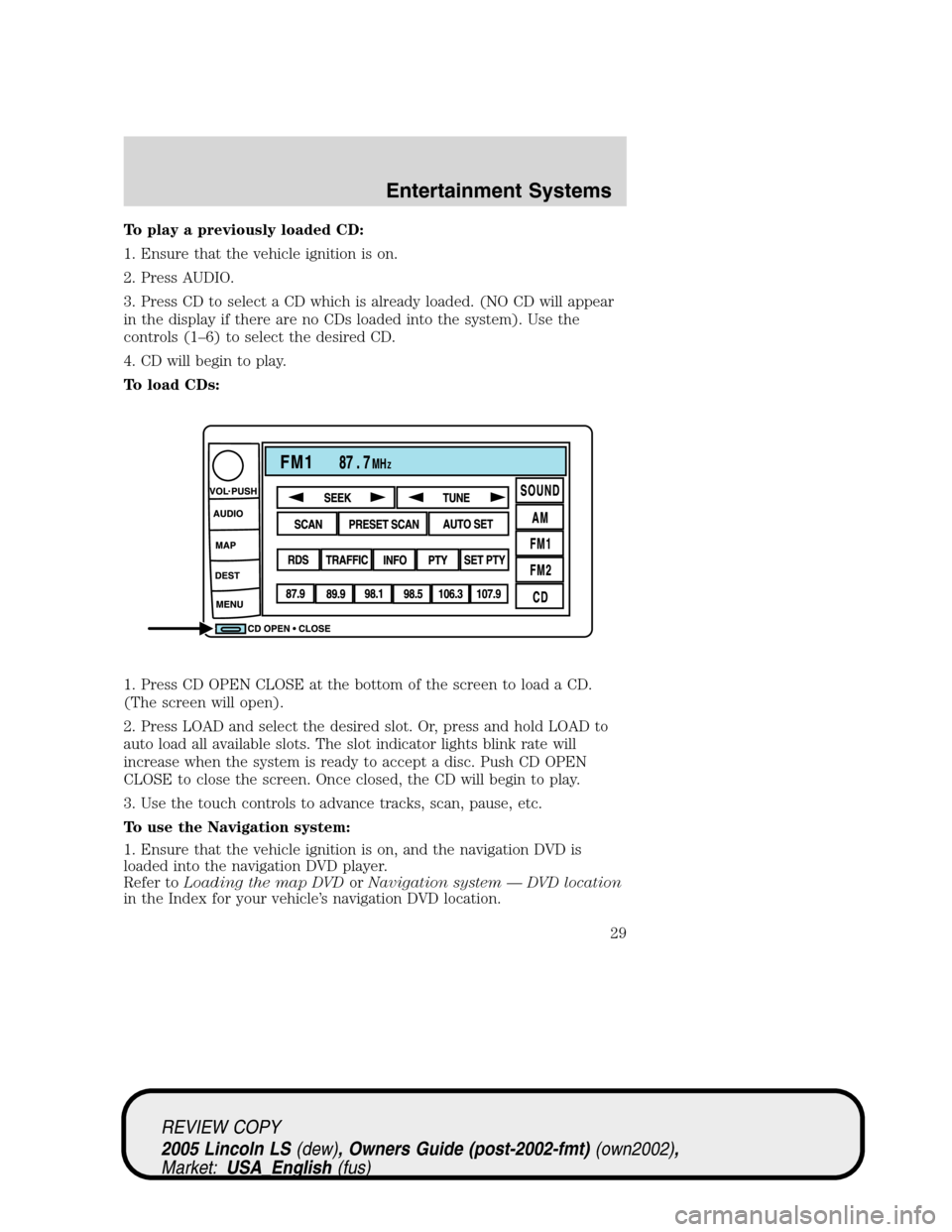
To play a previously loaded CD:
1. Ensure that the vehicle ignition is on.
2. Press AUDIO.
3. Press CD to select a CD which is already loaded. (NO CD will appear
in the display if there are no CDs loaded into the system). Use the
controls (1–6) to select the desired CD.
4. CD will begin to play.
To load CDs:
1. Press CD OPEN CLOSE at the bottom of the screen to load a CD.
(The screen will open).
2. Press LOAD and select the desired slot. Or, press and hold LOAD to
auto load all available slots. The slot indicator lights blink rate will
increase when the system is ready to accept a disc. Push CD OPEN
CLOSE to close the screen. Once closed, the CD will begin to play.
3. Use the touch controls to advance tracks, scan, pause, etc.
To use the Navigation system:
1. Ensure that the vehicle ignition is on, and the navigation DVD is
loaded into the navigation DVD player.
Refer toLoading the map DVDorNavigation system—DVD location
in the Index for your vehicle’s navigation DVD location.
REVIEW COPY
2005 Lincoln LS(dew), Owners Guide (post-2002-fmt)(own2002),
Market:USA_English(fus)
Entertainment Systems
29
Page 87 of 320
traffic lights and thunderstorms. Moving away from an interfering
structure (out of its“shadow”) returns your reception to normal.
•Station overload.Weak signals are sometimes captured by stronger
signals when you pass a broadcast tower. A stronger signal may
temporarily overtake a weaker signal and play while the weak station
frequency is displayed.
Principles of GPS (global positioning system) operation
Your system directs you based on information derived from global
positioning satellites, road maps stored on the DVD, sensors in your
vehicle and the desired destination. The system compiles all necessary
information to guide you to your selected destination. Space satellites
determine the vehicle’s current location and transmit position and time
signals to your car.
If the vehicle has been parked for a long period of time, the navigation
function may be temporarily unresponsive. The navigation system will
operate reliably again once GPS reception is available for a few minutes.
Limited GPS reception
System performance may be adversely affected if GPS reception is
interrupted or interference occurs over a distance of several miles. The
following are possible causes for GPS reception being interrupted. If the
vehicle is:
•in multi-story parking garages
•in tunnels and under bridges
•inside or in between buildings
•by forests or tree-lined avenues
•in heavy rain showers and thunderstorms
•in valleys and in mountainous regions
•roads under cliffs
Ensure that you do not have any metal objects on the rear parcel shelf.
If your windows are tinted, ensure that you use non-metal tinting instead
of metal oxide tinting. Both of these factors can interrupt GPS reception.
Cleaning the display
Do not spray cleaning fluid directly onto the unit. Instead, spray onto a
soft cloth and gently wipe the unit. Only recommended products should
be used.
•Recommended products- Rubbing alcohol based cleaner (i.e., methyl
alcohol) or a damp clean cloth.
REVIEW COPY
2005 Lincoln LS(dew), Owners Guide (post-2002-fmt)(own2002),
Market:USA_English(fus)
Entertainment Systems
87
Page 92 of 320
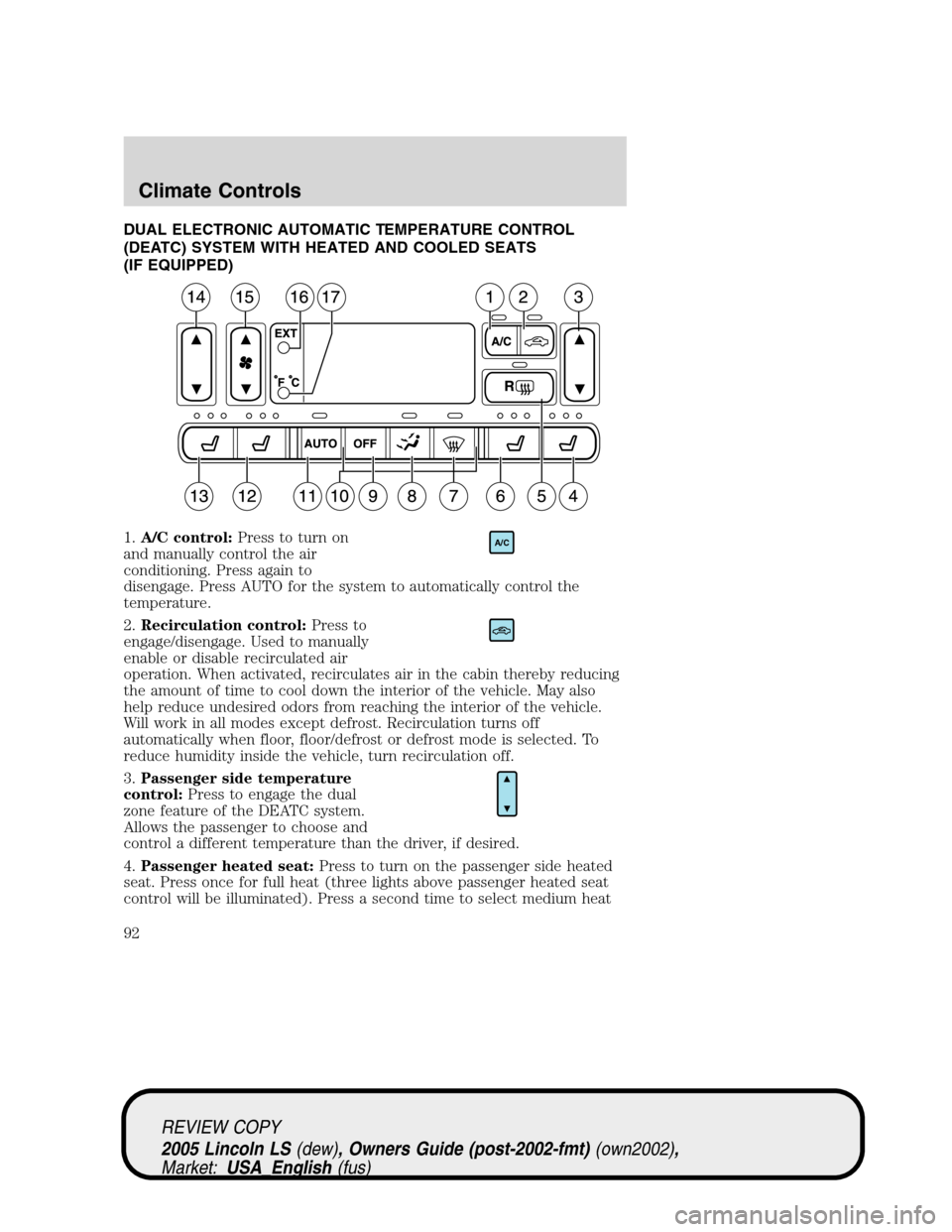
DUAL ELECTRONIC AUTOMATIC TEMPERATURE CONTROL
(DEATC) SYSTEM WITH HEATED AND COOLED SEATS
(IF EQUIPPED)
1.A/C control:Press to turn on
and manually control the air
conditioning. Press again to
disengage. Press AUTO for the system to automatically control the
temperature.
2.Recirculation control:Press to
engage/disengage. Used to manually
enable or disable recirculated air
operation. When activated, recirculates air in the cabin thereby reducing
the amount of time to cool down the interior of the vehicle. May also
help reduce undesired odors from reaching the interior of the vehicle.
Will work in all modes except defrost. Recirculation turns off
automatically when floor, floor/defrost or defrost mode is selected. To
reduce humidity inside the vehicle, turn recirculation off.
3.Passenger side temperature
control:Press to engage the dual
zone feature of the DEATC system.
Allows the passenger to choose and
control a different temperature than the driver, if desired.
4.Passenger heated seat:Press to turn on the passenger side heated
seat. Press once for full heat (three lights above passenger heated seat
control will be illuminated). Press a second time to select medium heat
A/C
REVIEW COPY
2005 Lincoln LS(dew), Owners Guide (post-2002-fmt)(own2002),
Market:USA_English(fus)
Climate Controls
92
Page 93 of 320
(two lights). Press a third time to select low heat (one light). Press a
fourth time to disengage the feature (all lights will be off).
5.
R(Rear defrost): Press to defrost the rear window. Refer toRear
Window Defrostfor more information.
6.Passenger cooled seat:Press to turn on the passenger side cooled
seat. Press once for full cool (three lights above passenger cooled seat
control will be illuminated). Press a second time to select medium cool
(two lights). Press a third time to select low cool (one light). Press a
fourth time to disengage the feature (all lights will be off).
Automatic heated/cooled passenger seat:To engage, press the
passenger side heat and cool seat controls simultaneously. The center
light above the passenger side heated and cooled controls will illuminate
and the display will show
. This allows the seat to automatically heat
or cool based on the climate control temperature selected. Press either
control to disengage.
7.
(Defrost): Distributes outside air through the windshield
defroster ducts and the demister outlets. Can be used to clear ice or fog
from the windshield. The system will automatically provide outside air to
reduce window fogging.
8.
Airflow direction control:Press to toggle through the air
distribution modes listed below. The selected mode will illuminate in the
display.
—Distributes air through the windshield defroster ducts, demister
outlets and the front and rear seat floor ducts. The system will
automatically provide outside air to reduce window fogging.
:Distributes air through the floor and rear seat floor ducts. The
system will automatically provide outside air to reduce window fogging.
: Distributes air through the instrument panel, center console
registers, and the front and rear seat floor ducts.
:Distributes air through the instrument panel and center console
registers.
9.Off:Outside air is shut out and
the fan will not operate.
10.Manual override controls:Allows you to manually select where
airflow is directed. To return to full automatic control, press AUTO.
OFF
REVIEW COPY
2005 Lincoln LS(dew), Owners Guide (post-2002-fmt)(own2002),
Market:USA_English(fus)
Climate Controls
93
Page 94 of 320
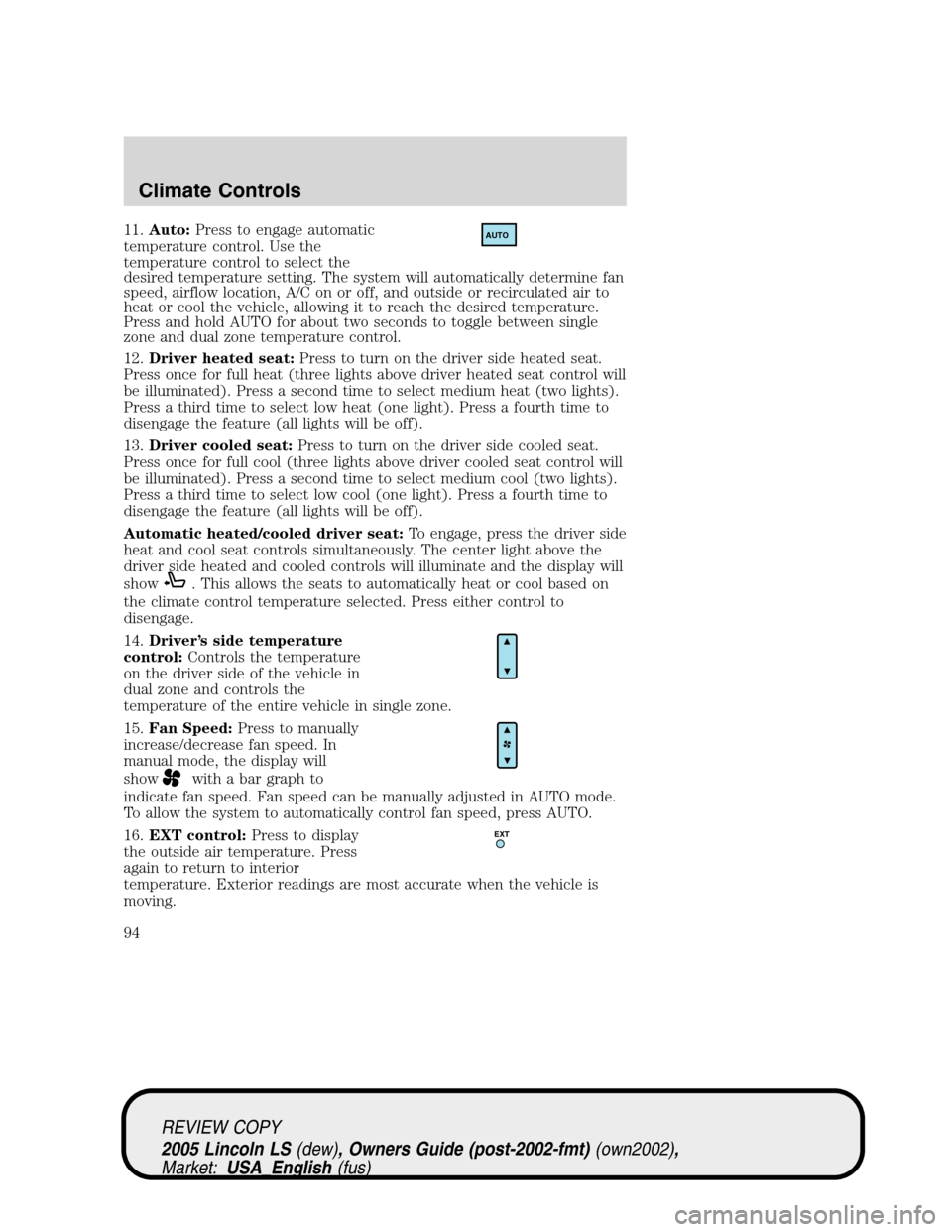
11.Auto:Press to engage automatic
temperature control. Use the
temperature control to select the
desired temperature setting. The system will automatically determine fan
speed, airflow location, A/C on or off, and outside or recirculated air to
heat or cool the vehicle, allowing it to reach the desired temperature.
Press and hold AUTO for about two seconds to toggle between single
zone and dual zone temperature control.
12.Driver heated seat:Press to turn on the driver side heated seat.
Press once for full heat (three lights above driver heated seat control will
be illuminated). Press a second time to select medium heat (two lights).
Press a third time to select low heat (one light). Press a fourth time to
disengage the feature (all lights will be off).
13.Driver cooled seat:Press to turn on the driver side cooled seat.
Press once for full cool (three lights above driver cooled seat control will
be illuminated). Press a second time to select medium cool (two lights).
Press a third time to select low cool (one light). Press a fourth time to
disengage the feature (all lights will be off).
Automatic heated/cooled driver seat:To engage, press the driver side
heat and cool seat controls simultaneously. The center light above the
driver side heated and cooled controls will illuminate and the display will
show
. This allows the seats to automatically heat or cool based on
the climate control temperature selected. Press either control to
disengage.
14.Driver’s side temperature
control:Controls the temperature
on the driver side of the vehicle in
dual zone and controls the
temperature of the entire vehicle in single zone.
15.Fan Speed:Press to manually
increase/decrease fan speed. In
manual mode, the display will
show
with a bar graph to
indicate fan speed. Fan speed can be manually adjusted in AUTO mode.
To allow the system to automatically control fan speed, press AUTO.
16.EXT control:Press to display
the outside air temperature. Press
again to return to interior
temperature. Exterior readings are most accurate when the vehicle is
moving.
AUTO
EXT
REVIEW COPY
2005 Lincoln LS(dew), Owners Guide (post-2002-fmt)(own2002),
Market:USA_English(fus)
Climate Controls
94
Page 98 of 320
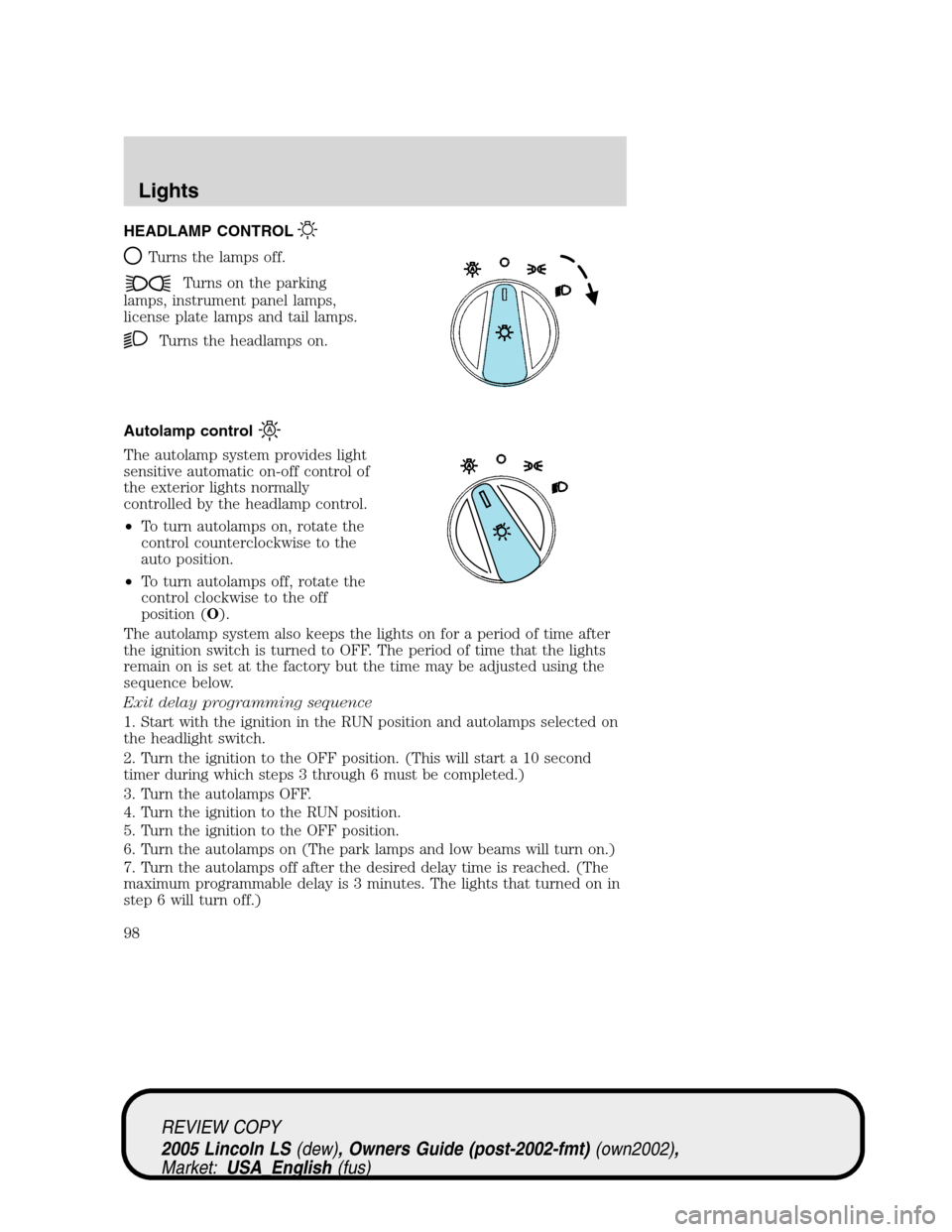
HEADLAMP CONTROL
Turns the lamps off.
Turns on the parking
lamps, instrument panel lamps,
license plate lamps and tail lamps.
Turns the headlamps on.
Autolamp control
The autolamp system provides light
sensitive automatic on-off control of
the exterior lights normally
controlled by the headlamp control.
•To turn autolamps on, rotate the
control counterclockwise to the
auto position.
•To turn autolamps off, rotate the
control clockwise to the off
position (O).
The autolamp system also keeps the lights on for a period of time after
the ignition switch is turned to OFF. The period of time that the lights
remain on is set at the factory but the time may be adjusted using the
sequence below.
Exit delay programming sequence
1. Start with the ignition in the RUN position and autolamps selected on
the headlight switch.
2. Turn the ignition to the OFF position. (This will start a 10 second
timer during which steps 3 through 6 must be completed.)
3. Turn the autolamps OFF.
4. Turn the ignition to the RUN position.
5. Turn the ignition to the OFF position.
6. Turn the autolamps on (The park lamps and low beams will turn on.)
7. Turn the autolamps off after the desired delay time is reached. (The
maximum programmable delay is 3 minutes. The lights that turned on in
step 6 will turn off.)
REVIEW COPY
2005 Lincoln LS(dew), Owners Guide (post-2002-fmt)(own2002),
Market:USA_English(fus)
Lights
Lights
98