buttons LINCOLN MARK VIII 1997 User Guide
[x] Cancel search | Manufacturer: LINCOLN, Model Year: 1997, Model line: MARK VIII, Model: LINCOLN MARK VIII 1997Pages: 315, PDF Size: 2.18 MB
Page 110 of 315

105
q
Remove the cover panel from your garage door
opener receiver. (The receiver should be located
by the garage door opener motor.)
q
Locate the training button on the garage door
opener receiver. The exact location and color of
the button may vary by garage door opener
brand. If you have difficulty locating the training
button, reference your garage door opener
manual, or call1-800-355-3515.
q
Press the training button on the garage door
opener receiver for 1-2 seconds.
q
Return to the HomeLink Transmitter in the
vehicle, and depress the programmed HomeLink
button for the duration of the rapid flash of the
HomeLink's red light, (1-2 seconds). Release the
button, and re-press the button to confirm that
the HomeLink Transmitter has been trained to
the receiver.
q
Your garage door opener should now recognize
your HomeLink Transmitter. You may use either
your HomeLink Transmitter or your original
hand-held transmitter to open your garage door.
If after following these suggestions you still have
difficulties in programming your HomeLink
Transmitter, call toll-free for customer assistance:
1-800-355-3515.
Erasing ChannelsTo erase all three programmed channels, hold down
the two outside buttons until the red light begins to
flash. Then release both buttons. Individual channels
cannot be erased, but can be reprogrammed using
the procedures for programming the HomeLink
Transmitter, (steps 2 through 5).
NOTE:Be sure to retain your original transmitter
for future programming procedures (i.e., new
vehicle purchase).
File:05fncf8.ex
Update:Thu Jun 27 10:02:20 1996
Page 123 of 315
118Using the Power Trunk ReleaseThe remote trunk lock switch located in the driver's
door trim panel can be operated at any time unless
you render the switch inoperable by locking the
button with your master key.
The remote control for the trunk
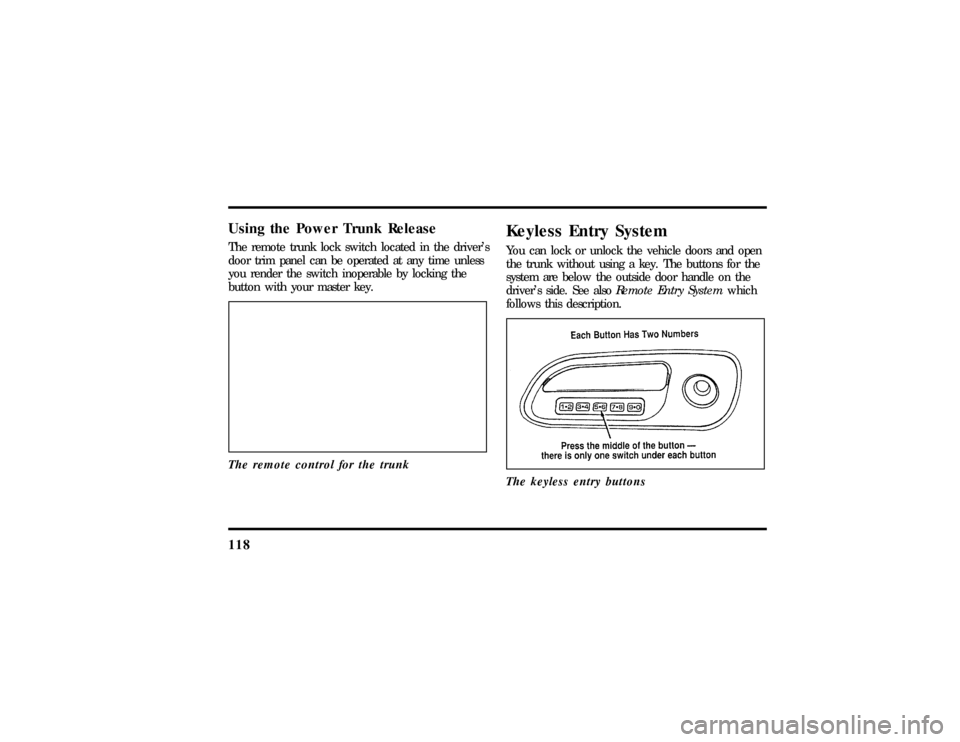
Keyless Entry SystemYou can lock or unlock the vehicle doors and open
the trunk without using a key. The buttons for the
system are below the outside door handle on the
driver's side. See alsoRemote Entry Systemwhich
follows this description.
The keyless entry buttons
File:05fncf8.ex
Update:Thu Jun 27 10:02:20 1996
Page 124 of 315

119
When you bought your vehicle, you were given a
computer code that operates the system for your
vehicle. For your convenience, we have duplicated
this code in three places.
The code is:q
on your owner's wallet card found in the glove
compartment
q
taped to the right hinge of the trunk lid
q
taped to the computer module inside the
driver's door panel
When you use keyless entry, the illuminated entry
system turns on the interior lights for 25 seconds
and the buttons on the keypad light up. Do not
push the buttons with a key, ballpoint pen, pencil,
or any other hard object. These objects could
damage the buttons.
Unlocking the Doors with the Keyless
Entry SystemYou must unlock the driver's door before you
unlock any of the other doors or trunk. If you let
more than five (5) seconds pass before pressing
numbers, the system shuts down, and you have to
enter the code again. The system has shut down if
the keypad light is out. If the keyless entry system
does not work properly, use the key or
transmitter(s) to lock and unlock the doors or
unlock the trunk.
1. To unlock the driver's door, enter the factory
code or your personal code. All codes have five
(5) numbers. After you press the fifth number,
the driver's door unlocks.
2. To unlock the passenger's door, press the 3/4
button within five seconds of unlocking the
driver's door or trunk, or re-enter the code to
open the driver's door, then press 3/4.
File:05fncf8.ex
Update:Thu Jun 27 10:02:20 1996
Page 126 of 315

121
To program your own code:
1. Select five digits for your personal code.
2. Enter the factory code that the dealership gave
you.
3. Within five (5) seconds, press 1/2.
4. Within five (5) seconds of pressing 1/2, enter
your personal code, pressing each digit within
five (5) seconds of the previous digit.
The keyless entry system registers this second
code. To open your vehicle, you can now use
either code. The module remembers only one
personal code at a time. Entering a second
personal code will erase the first, replacing it
with the new second one.To erase your personal code:
1. Enter the original permanent code.
2. Press 1/2 within five seconds of Step 1.
3. Wait six seconds.
The keyless entry system automatically erases
your personal code. The system will now only
respond to the permanent code.
Do not set a code that presents the numbers in
sequential order, such as 1/2, 3/4, 5/6, 7/8, 9/0.
Studies show that people who idly press the buttons
usually press a sequential pattern. Also, do not
select a code that uses the same button five times.
Thieves can easily figure out these types of codes.
File:05fncf8.ex
Update:Thu Jun 27 10:02:20 1996
Page 127 of 315

122Arming, disarming and resetting your
anti-theft system from the keyless entry
padThe Keyless Entry system will arm the anti-theft
system when you use the 7/8 and 9/0 keys to lock
the doors, and will disarm or reset a triggered
anti-theft alarm when you enter in the five digit
code to unlock the driver's door.Remote Entry SystemWith the remote entry system, you can lock and
unlock the vehicle doors and open the trunk
without using a key. The buttons for the system are
located on the two hand held transmitters that
came with your vehicle. The remote also has a
personal alarm feature.
The system will work with up to four remotes.
Your vehicle came with two remotes. Additional
remotes can be ordered from your dealer.When unlocking a vehicle with the Programmable
Memory Seat/Outside Rear View Mirrors feature,
the seat, the outside mirrors and steering column
will adjust to position that is set for the transmitter
being used.
The remote entry features only operate with the
ignition in the OFF position.
Remote entry transmitter
File:05fncf8.ex
Update:Thu Jun 27 10:02:20 1996
Page 129 of 315

124When you use the remote entry UNLOCK, TRUNK
or PANIC buttons, the illuminated entry system
turns on the interior lights for 25 seconds. You can
turn these lights off with the LOCK button or by
turning the ignition to the RUN position.Memory Seat/Mirrors/Steering Column
FeatureYour vehicle allows the remote keyless entry system
to control the Memory Seat/Mirrors/Steering
Column feature. With this feature, each of the first
two transmitters programmed will recall a different
seat position.
Pressing the transmitter UNLOCK button once will
unlock the driver's door and move the seat to its
corresponding memory seat/mirrors position, just as
if you had pressed the memory button in the
vehicle.When your dealer programs new transmitters, the
order of programming controls seat recall as follows:
q
First Transmitter Programmed Ð Recall
Seat/Mirrors/Steering Column Position #1
q
Second Transmitter Programmed Ð Recall
Seat/Mirrors/Steering Column Position #2
q
Third Transmitter Programmed Ð NO
Recall/Memory Seat/Mirrors/Steering Column
(allows only three positions)
You may change seat/mirrors positions at any time.
Once programmed, Transmitter #1 will always
move the seat/mirrors/steering column to position
#1.
The feature is turned on at the factory for your
convenience. You can deactivate the system by
using the OFF button or switching the key fob
switch to OFF.
File:05fncf8.ex
Update:Thu Jun 27 10:02:20 1996
Page 132 of 315

127
Arming the SystemTo arm the system, do the following four steps in
sequence.
1. Remove the key from the ignition.
2. Open any door. The alarm indicator light will
start flashing to remind you to arm the system.
3. Lock the doors by using the power door lock
switch, pressing the remote entry transmitter
LOCK control or pressing the last two buttons
(7/8, 9/0) of the keyless entry keypad.
4. Close all doors. The alarm indicator light will
then remain on steadily for approximately 30
more seconds and then go out. When the light
goes out the system is armed.NOTE:Be sure to close all doors completely. If
not, the alarm indicator light will remain on.
Remember, your anti-theft system is armed only
after the alarm indicator light remains on steadily
for approximately 30 seconds after the last door is
closed, and then goes out.
You can also arm the anti-theft system with the
factory installed remote entry system or the keyless
entry system by following this sequence:
1. Remove the key from the ignition.
2. Close all of the doors.
3. Press the remote entry transmitter LOCK
control or press the last two buttons (7/8, 9/0)
of the keyless entry keypad to lock the doors.
The alarm indicator will come on for 30
seconds to show the alarm is arming and then
turn off to show that the alarm has armed.
File:05fncf8.ex
Update:Thu Jun 27 10:02:20 1996
Page 175 of 315

170Have the exhaust and body ventilation systems
checked whenever:q
your vehicle is raised for service
q
the sound of the exhaust system changes
q
your vehicle has been damaged in a collision
Improve your ventilation by keeping all air inlet
vents clear of snow, leaves, and other debris.If the engine is idling while you are stopped in an
open area for long periods of time, open the
windows at least one inch (2.5 cm). Also, adjust
the heating or air conditioning system to bring in
outside air.
If you use the Electronic Automatic Climate
Control, set the fan speed selector dial to a medium
or high blower speed with the VENT or PNL-FLR
function buttons pressed.
File:08fnto8.ex
Update:Wed Jun 19 15:04:46 1996