air condition LINCOLN MKC 2015 Owner's Guide
[x] Cancel search | Manufacturer: LINCOLN, Model Year: 2015, Model line: MKC, Model: LINCOLN MKC 2015Pages: 490, PDF Size: 4.74 MB
Page 367 of 490
Under this menu, you can set your
clock, access and adjust the
display, sound and vehicle settings
as well as access settings for specific modes
or the help feature.
Clock
Note: You cannot manually set the date.
Your vehicle ’s GPS does this for you.
Note: If the battery has been disconnected,
your vehicle needs to acquire a GPS signal
to update the clock. Once your vehicle
acquires the signal, it may take a few
minutes for the update to display the correct
time. 1. Press the Settings icon > Clock.
2. Press
+ and - to adjust the time.
From this screen, you can also make other
adjustments such as 12-hour or 24-hour
mode, activate GPS time synchronization and
have the system automatically update new
time zones. You can also switch the outside air
temperature display off and on. It appears at
the top center of the touchscreen, next to
the time and date.
The system automatically saves any updates
you make to the settings.
Display
You can adjust the touchscreen display
through the touchscreen or by pressing the
voice button on your steering wheel controls
and when prompted, say, "Display settings".
Press the Settings icon >
Display,
to access and make adjustments
using the touchscreen.
• Brightness
allows you to make the
screen display brighter or dimmer.
• Auto DIM
, when set to On, lets you use
the Auto Dim Manual Offset feature.
When set to
Off, screen brightness does
not change. •
Mode
allows you to set the screen to a
certain brightness or have the system
automatically change based on the
outside light level, or switch the display
off.
• If you select
AUTO or NIGHT, you
have the options of switching the
display's Auto Dim feature on or off
and changing the Auto Dim Manual
Offset feature.
• Auto Dim Manual Offset
allows you to
adjust screen dimming as the outside
lighting conditions change from day to
night. This feature also allows you to
adjust screen brightness using the
instrument panel dimming control.
• Edit Wallpaper
•You can have your touchscreen
display the default photo or upload
your own.
364
MKC (TME), enUSA MyLincoln Touch™E142607 E142607 E142607
Page 407 of 490
Under the Information menu, you can access
features such as:
•
SYNC Services
• Sirius Travel Link
• Alerts
• Calendar
• SYNC Applications If your vehicle is equipped with
Navigation, press the Information
button to access these features. If
your vehicle is not equipped with Navigation,
press the corner of the touchscreen with the
green tab.
SYNC Services (If Equipped, United
States Only)
Note: SYNC Services varies by trim level and
model year and may require a subscription.
Traffic alerts and turn-by-turn directions
available in select markets. Message and
data rates may apply. Ford Motor Company
reserves the right to change or discontinue
this product service at any time without prior
notification or incurring any future obligation. Note:
SYNC Services requires activation
before use. Visit www.SYNCMyRide.com to
register and check your eligibility for
complimentary services. Standard phone
and message rates may apply. Subscription
may be required. You must also have the
active SYNC Services Bluetooth-enabled
cellular phone paired and connected to the
system in order to connect to, and use, SYNC
Services. See Phone (page 396).
Note: This feature does not function properly
if you have enabled caller ID blocking on
your cellular phone. Make sure your cellular
phone is not blocking caller ID before using
SYNC Services. Note:
The driver is ultimately responsible for
the safe operation of the vehicle, and
therefore, must evaluate whether it is safe
to follow the suggested directions. Any
navigation features provided are only an aid.
Make your driving decisions based on your
observations of local conditions and existing
traffic regulations. Do not follow the route
suggestions if doing so would result in an
unsafe or illegal maneuver, if you would be
placed in an unsafe situation, or if you would
be directed into an area that you consider
unsafe. Maps used by this system may be
inaccurate because of errors, changes in
roads, traffic conditions or driving conditions.
404
MKC (TME), enUSA MyLincoln Touch™E142608
Page 408 of 490
Note:
When you connect, the service uses
GPS technology and advanced vehicle
sensors to collect your vehicle's current
location, travel direction and speed to help
provide you with the directions, traffic
reports, or business searches you request.
Further, to provide the services you request,
for continuous improvement, the service may
collect and record call details and voice
communications. For more information, see
SYNC Services Terms and Conditions at
www.SYNCMyRide.com. If you do not want
Ford or its service providers to collect your
vehicle travel information or other
information identified in the Terms and
Conditions, do not subscribe or use the
service.
SYNC Services uses advanced vehicle
sensors, integrated GPS technology and
comprehensive map and traffic data, to give
you personalized traffic reports, precise
turn-by-turn directions, business search,
news, sports, weather and more. For a
complete list of services, or to learn more,
please visit www.SYNCMyRide.com. Connecting to SYNC Services Using Voice
Commands 1. Press the voice button.
2. When prompted, say "Services". This
initiates an outgoing call to SYNC
Services using your paired and
connected Bluetooth-enabled cellular
phone.
3. Once you connect to the service, follow the voice prompts to request the desired
service, such as "Traffic" or "Directions".
You can also say, "What are my choices?"
to receive a list of available services from
which to choose.
4. Say, "Services" to return to the Services main menu or for help, say, "Help".
Connecting to SYNC Services Using the
Touchscreen If your vehicle is equipped with
Navigation, press the Information
button.If your vehicle is not equipped with
Navigation, press the green tab on your
touchscreen.
1.
Select Connect to Services to initiate an
outgoing call to SYNC Services using
your phone.
2. Once connected, follow the voice prompts to request your desired Service,
such as "Traffic" or "Directions". You can
also say, "What are my choices?" to
receive a list of available services from
which to choose.
3. Say, "Services" to return to the Services main menu or for help, say, "Help".
Receiving Turn-by-Turn Directions
1. When connected to SYNC Services, say "Directions" or "Business search". To find
the closest business or type of business
to your current location, just say
"Business search" and then "Search near
me". If you need further assistance in
finding a location you can say "Operator"
at any time within a Directions or
Business search to speak with a live
operator. The system may prompt you to
405
MKC (TME), enUSA MyLincoln Touch™E142599 E142608
Page 419 of 490
Recirculated air: Touch the button to switch between outside air and recirculated air. When you select recirculated air, the button
illuminates and the air currently in the passenger compartment recircula\
tes. This may reduce the time needed to cool the interior
(when used with A/C) and may reduce unwanted odors from entering your \
vehicle. Recirculated air may turn off automatically (or
be prevented from turning on) in all airflow modes except MAX A/C to reduce the possibility of fogging.
D
MAX A/C:
Touch to switch on. The system distributes recirculated air through the i\
nstrument panel air vents, the air conditioning
automatically turns on, the driver and passenger temperatures are set to\
LO and the fan speed adjusts to the highest speed. This
re-cooling of the interior is more economical and efficient than normal \
A/C.
E
A/C:
Touch to turn air conditioning on or off. To improve air conditioning when starting your vehicle, drive with the windows slightly
open for two to three minutes. Use A/C with recirculated air to improve \
cooling performance and efficiency. In certain conditions,
the air conditioning compressor may still operate even though the A/C bu\
tton is off.
F
AUTO:
Touch to turn on fully automatic operation. Select the desired temperatur\
e using the temperature control. The system
automatically adjusts fan speed, air distribution, A/C operation, and ou\
tside or recirculated air, to heat or cool the vehicle to maintain
the selected temperature.
G
Rear defrost:
Touch to switch the rear window defroster and heated mirrors (if equippe\
d) on or off.
H
MAX defrost:
Touch to clear the windshield of fog and thin ice. The driver and passenger temperatures set to HI, outside air
distributes through the windshield vents, the air conditioning automatic\
ally turns on and the fan automatically adjusts to the highest
speed. The heated rear window automatically turns on when you switch on \
MAX defrost and you will be unable to select recirculated
air (to prevent fogging).
I
416
MKC (TME), enUSA MyLincoln Touch™
Page 457 of 490
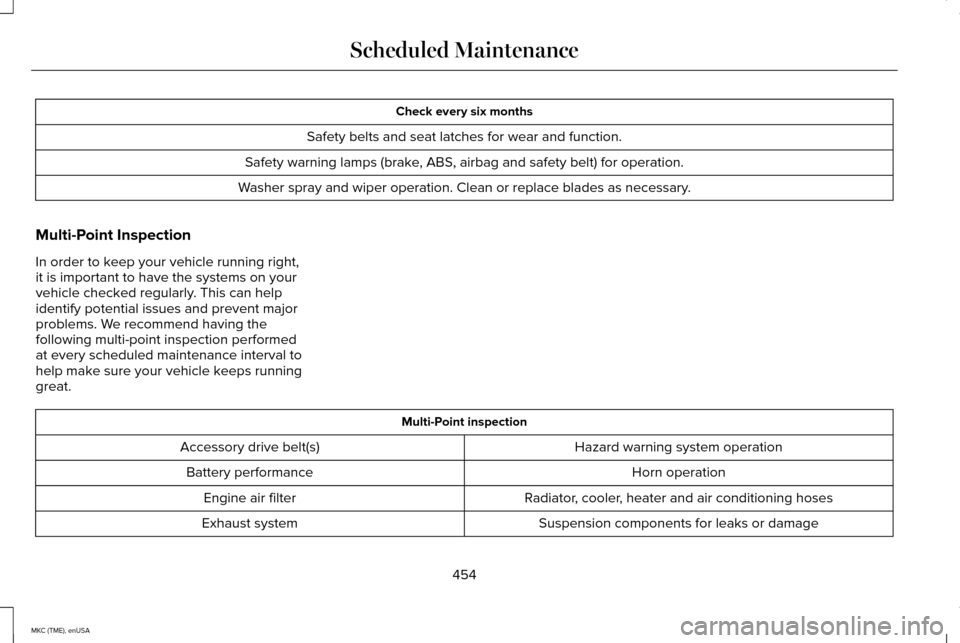
Check every six months
Safety belts and seat latches for wear and function.
Safety warning lamps (brake, ABS, airbag and safety belt) for operation.
Washer spray and wiper operation. Clean or replace blades as necessary.
Multi-Point Inspection
In order to keep your vehicle running right,
it is important to have the systems on your
vehicle checked regularly. This can help
identify potential issues and prevent major
problems. We recommend having the
following multi-point inspection performed
at every scheduled maintenance interval to
help make sure your vehicle keeps running
great. Multi-Point inspection
Hazard warning system operation
Accessory drive belt(s)
Horn operation
Battery performance
Radiator, cooler, heater and air conditioning hoses
Engine air filter
Suspension components for leaks or damage
Exhaust system
454
MKC (TME), enUSA Scheduled Maintenance
Page 464 of 490

Change engine oil and filter as indicated by the information displ")
Extensive idling or low-speed driving for long distances, as in heavy co\
mmercial use (such as delivery, taxi, patrol car or livery)
Change engine oil and filter as indicated by the information display and\
perform services listed in the Normal
Scheduled Maintenance chart.
As required
Replace cabin air filter.*
Inspect frequently, service
as required
Replace engine air filter.
Change automatic transmission fluid.
Every 30000 miles (48000
km)
Replace spark plugs.
Every 60000 miles (96000
km)
* This is an optional feature. Operating in dusty or sandy conditions (such as unpaved or dusty roads)\
Replace cabin air filter. *
Inspect frequently, service
as required
Replace engine air filter.
Inspect the wheels and related components for abnormal noise, wear, looseness or drag.
Every 5000 miles (8000 km)
Rotate tires, inspect tires for wear and measure tread depth.
461
MKC (TME), enUSA Scheduled Maintenance
Page 465 of 490
\
Change engine oil and filter. **
Every 5000 miles (8000 km)
or six months
Perform multi-point inspection.
Change automatic tra")
Operating in dusty or sandy conditions (such as unpaved or dusty roads)\
Change engine oil and filter. **
Every 5000 miles (8000 km)
or six months
Perform multi-point inspection.
Change automatic transmission fluid.
Every 30000 miles (48000
km)
* This is an optional feature.
** Reset your Intelligent Oil-Life Monitor after engine oil and filter chang\
es. See Engine Oil Check (page 283).
Exceptions
There are several exceptions to the Normal
Schedule:
Axle Maintenance
Change the axle fluid anytime an axle is
submerged in water. California Fuel Filter Replacement
If you register your vehicle in California, the
California Air Resources Board has
determined that the failure to perform this
maintenance item does not nullify the
emission warranty or limit recall liability
before the completion of your vehicle's
useful life. Ford Motor Company, however,
urges you to have all recommended
maintenance services performed at the
specified intervals and to record all vehicle
service.Hot Climate Oil Change Intervals
Vehicles operating in the Middle East, North
Africa, Sub-Saharan Africa or locations with
similar climates using an American Petroleum
Institute (API) Certified for Gasoline Engines
(Certification mark) oil of SM or SN quality,
the normal oil change interval is 3000 miles
(5000 kilometers).
If the available API SM or SN oils are not
available, then the oil change interval is 1800
miles (3000 kilometers).
462
MKC (TME), enUSA Scheduled Maintenance
Page 466 of 490
Engine Air Filter and Cabin Air Filter
Replacement
The life of the engine air filter and cabin air
filter is dependent on exposure to dusty and
dirty conditions. Vehicles operated in these
conditions require frequent inspection and
replacement of the engine air filter and cabin
air filter.
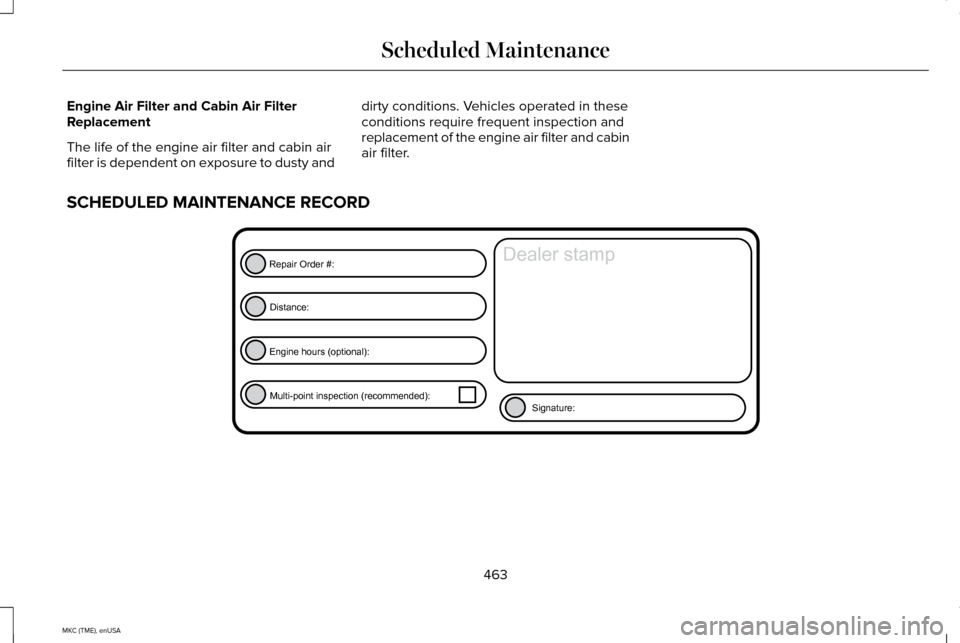
SCHEDULED MAINTENANCE RECORD 463
MKC (TME), enUSA Scheduled MaintenanceE146852
Repair Order #:Distance:
Engine hours (optional): Multi-point inspection (recommended): Signature:
Dealer stamp
Page 478 of 490
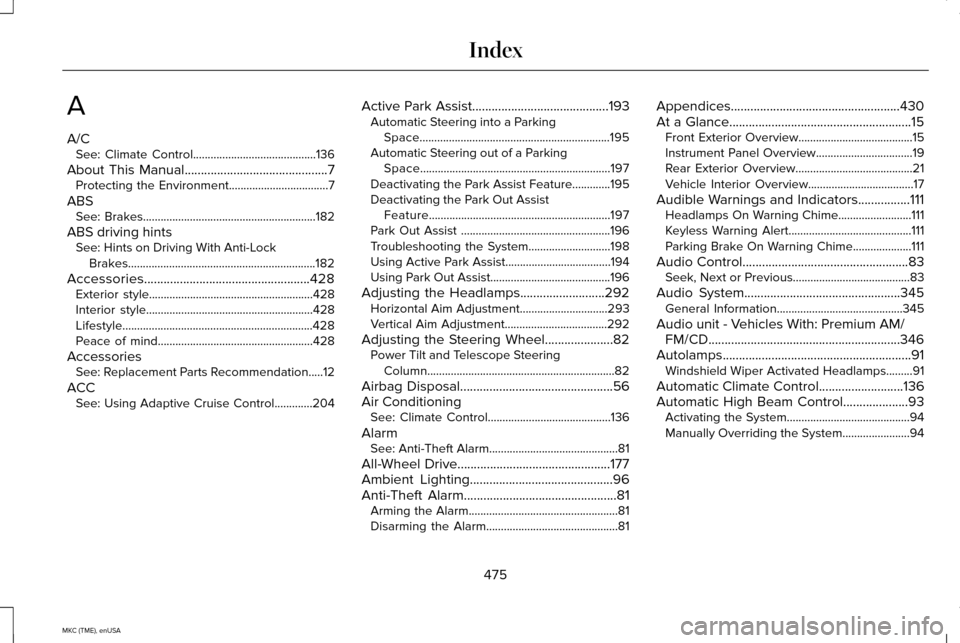
A
A/C
See: Climate Control..........................................136
About This Manual............................................7
Protecting the Environment..................................7
ABS See: Brakes...........................................................182
ABS driving hints See: Hints on Driving With Anti-Lock
Brakes................................................................182
Accessories...................................................428 Exterior style........................................................428
Interior style.........................................................428
Lifestyle.................................................................428
Peace of mind.....................................................428
Accessories See: Replacement Parts Recommendation.....12
ACC See: Using Adaptive Cruise Control.............204 Active Park Assist..........................................193
Automatic Steering into a Parking
Space.................................................................195
Automatic Steering out of a Parking Space.................................................................197
Deactivating the Park Assist Feature.............195
Deactivating the Park Out Assist Feature..............................................................197
Park Out Assist ...................................................196
Troubleshooting the System............................198
Using Active Park Assist....................................194
Using Park Out Assist.........................................196
Adjusting the Headlamps..........................292 Horizontal Aim Adjustment..............................
293
Vertical Aim Adjustment...................................292
Adjusting the Steering Wheel.....................82 Power Tilt and Telescope Steering
Column................................................................82
Airbag Disposal
...............................................56
Air Conditioning See: Climate Control..........................................136
Alarm See: Anti-Theft Alarm............................................81
All-Wheel Drive
...............................................177
Ambient Lighting............................................96
Anti-Theft Alarm
...............................................81
Arming the Alarm...................................................81
Disarming the Alarm.............................................81 Appendices....................................................430
At a Glance........................................................15
Front Exterior Overview.......................................15
Instrument Panel Overview.................................19
Rear Exterior Overview........................................21
Vehicle Interior Overview....................................17
Audible Warnings and Indicators................111 Headlamps On Warning Chime.........................111
Keyless Warning Alert..........................................111
Parking Brake On Warning Chime....................111
Audio Control
...................................................83
Seek, Next or Previous........................................83
Audio System................................................345 General Information...........................................345
Audio unit - Vehicles With: Premium AM/ FM/CD...........................................................346
Autolamps ..........................................................
91
Windshield Wiper Activated Headlamps.........91
Automatic Climate Control..........................136
Automatic High Beam Control....................93 Activating the System..........................................94
Manually Overriding the System.......................94
475
MKC (TME), enUSA Index
Page 486 of 490
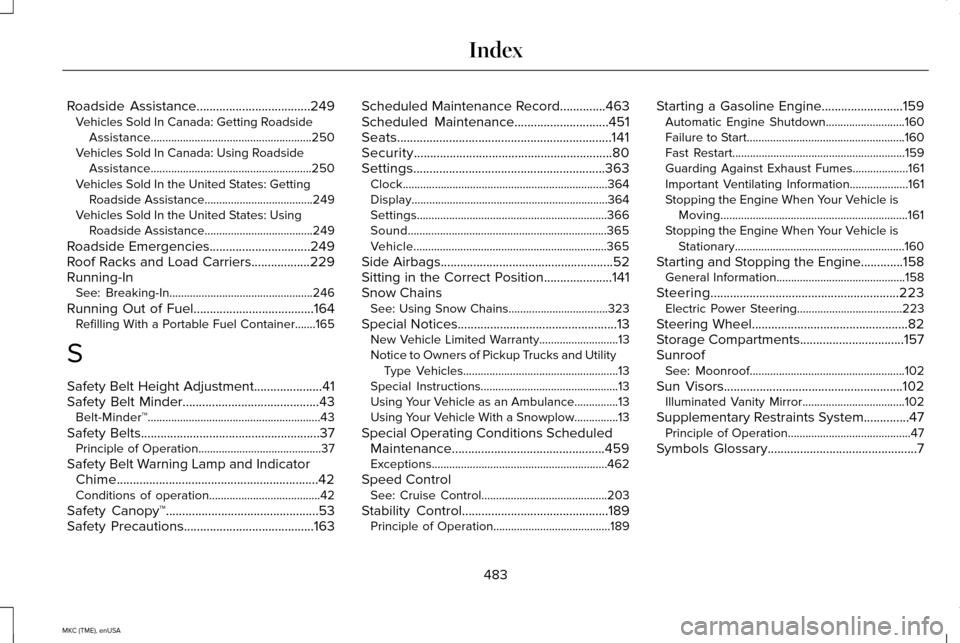
Roadside Assistance...................................249
Vehicles Sold In Canada: Getting Roadside
Assistance.......................................................250
Vehicles Sold In Canada: Using Roadside Assistance.......................................................250
Vehicles Sold In the United States: Getting Roadside Assistance.....................................249
Vehicles Sold In the United States: Using Roadside Assistance.....................................249
Roadside Emergencies
...............................249
Roof Racks and Load Carriers..................229
Running-In See: Breaking-In.................................................246
Running Out of Fuel
.....................................164
Refilling With a Portable Fuel Container.......165
S
Safety Belt Height Adjustment
.....................41
Safety Belt Minder..........................................43 Belt-Minder™...........................................................43
Safety Belts
.......................................................37
Principle of Operation..........................................37
Safety Belt Warning Lamp and Indicator Chime..............................................................42
Conditions of operation......................................42
Safety Canopy™...............................................53
Safety Precautions
........................................163 Scheduled Maintenance Record
..............463
Scheduled Maintenance.............................451
Seats..................................................................141
Security.............................................................80
Settings...........................................................363 Clock......................................................................364
Display...................................................................364
Settings.................................................................366
Sound....................................................................365
Vehicle..................................................................365
Side Airbags
.....................................................52
Sitting in the Correct Position.....................141
Snow Chains See: Using Snow Chains..................................323
Special Notices
.................................................13
New Vehicle Limited Warranty...........................13
Notice to Owners of Pickup Trucks and Utility Type Vehicles.....................................................13
Special Instructions...............................................13
Using Your Vehicle as an Ambulance...............13
Using Your Vehicle With a Snowplow...............13
Special Operating Conditions Scheduled Maintenance...............................................459
Exceptions............................................................462
Speed Control See: Cruise Control...........................................203
Stability Control
.............................................189
Principle of Operation........................................189 Starting a Gasoline Engine.........................159
Automatic Engine Shutdown...........................160
Failure to Start......................................................160
Fast Restart...........................................................159
Guarding Against Exhaust Fumes...................161
Important Ventilating Information....................161
Stopping the Engine When Your Vehicle is
Moving................................................................161
Stopping the Engine When Your Vehicle is Stationary..........................................................160
Starting and Stopping the Engine.............158 General Information............................................158
Steering..........................................................223 Electric Power Steering....................................223
Steering Wheel
................................................82
Storage Compartments................................157
Sunroof See: Moonroof.....................................................102
Sun Visors
.......................................................102
Illuminated Vanity Mirror...................................102
Supplementary Restraints System..............47 Principle of Operation..........................................47
Symbols Glossary
..............................................7
483
MKC (TME), enUSA Index