fuel LINCOLN MKC 2015 Workshop Manual
[x] Cancel search | Manufacturer: LINCOLN, Model Year: 2015, Model line: MKC, Model: LINCOLN MKC 2015Pages: 490, PDF Size: 4.74 MB
Page 411 of 490
Sirius Travel Link (If Equipped)
WARNING
Driving while distracted can result in
loss of vehicle control, crash and injury.
We strongly recommend that you use
extreme caution when using any device that
may take your focus off the road. Your
primary responsibility is the safe operation
of your vehicle. We recommend against the
use of any handheld device while driving and
encourage the use of voice-operated
systems when possible. Make sure you are
aware of all applicable local laws that may
affect the use of electronic devices while
driving. Note:
In order to use Sirius Travel Link, your
vehicle must be equipped with navigation
and your navigation SD card must be in the
SD card slot.
Note: A paid subscription is required to
access and use these features. Go to
www.siriusxm.com/travellink for more
information. Note:
Visit www.siriusxm.com/traffic# and
click on Coverage map and details for a
complete listing of all traffic areas covered
by Sirius Travel Link.
Note: Neither Sirius nor Ford is responsible
for any errors or inaccuracies in the Sirius
Travel Link services or its use in vehicles.
When you subscribe to Sirius Travel Link, it
can help you locate the best gas prices, find
movie listings, get current traffic alerts, view
the current weather map, get accurate ski
conditions and see scores to current sports
games. If your vehicle is equipped with
Navigation, touch the i
(Information) button to access
these features. If your vehicle is not
equipped with Navigation, touch the corner
of the touchscreen with the green tab.
Traffic On Route and Traffic Nearby
Touch these buttons to identify traffic
incidents on your route, nearby your vehicle ’s
current location or near any of your favorite
places, if programmed. Fuel Prices
Touch this button to view fuel prices at
stations close to your vehicle
’s location or
on an active navigation route.
Movie Listings
Touch this button to view nearby movie
theaters and their show times, if available.
Weather
Touch this button to view the nearby
weather, current weather, or the five day
forecast for the chosen area. Select
Map to
see the weather map, which can show
storms, radar information, charts and winds.
Select Area to select from a listing of weather
locations.
Sports Info
Touch this button to view scores and
schedules from a variety of sports. You can
also save up to 10 favorite teams for easier
access. The score automatically refreshes
when a game is in progress.
408
MKC (TME), enUSA MyLincoln Touch™E142608
Page 412 of 490
Ski Conditions
Touch this button to view ski conditions for
a specific area.
Sirius Travel Link Voice Commands
Press the voice button on the
steering wheel controls. When
prompted, say any of the following
commands: "SIRIUS TRAVEL LINK"
"5-day weather forecast" "Fuel prices"
"Movie listings"
"Sports headlines" *
"Sports schedules" *
"Sports scores" *
"Traffic"
"Weather" "SIRIUS TRAVEL LINK"
"Weather map" "Help"
* If you say "Sports headlines", "Sports
schedules" or "Sports scores", you can then
say any of the commands in the following
chart. Sports-related Commands
*
"Baseball"
"College basketball" "College football" "Golf "
"MLS"
"My teams" "NBA""NFL"
"NHL" Sports-related Commands
*
"WNBA" "Help"
* If you want to hear headlines, schedules or
scores from a particular sport, or your favorite
team(s), say the sport (or team), then
"headlines", "schedules" or "scores". Additional sports-related voice commands
"Baseball headlines""Baseball schedule" "Baseball scores"
"College basketball headlines" "College basketball schedule" "College basketball scores"
"College football headlines" "College football schedule" "College football scores"
409
MKC (TME), enUSA MyLincoln Touch™E142599
Page 414 of 490
911 Assist (If Equipped)
WARNINGS
Unless the 911 Assist setting is set on
before a crash, the system will not dial
for help, which could delay response time,
potentially increasing the risk of serious
injury or death after a crash. Do not wait for 911 Assist to make an
emergency call if you can do it yourself.
Dial emergency services immediately to
avoid delayed response time, which could
increase the risk of serious injury or death
after a crash. If you do not hear 911 Assist
within five seconds of the crash, the system
or phone may be damaged or non-functional. Always place your phone in a secure
location in your vehicle so it does not
become a projectile or damaged in a crash.
Failure to do so may cause serious injury to
someone or damage the phone, which could
prevent 911 Assist from working properly. Note:
The SYNC 911 Assist feature must be
set on prior to the incident. Note:
Before setting this feature on, make
sure that you read the 911 Assist Privacy
Notice later in this section for important
information.
Note: If any user turns 911 Assist on or off,
that setting applies for all paired phones. If
911 Assist is turned off, either a voice
message plays or a display message (or
icon) comes on (or both) when your vehicle
is started after a previously paired phone
connects.
Note: Every phone operates differently.
While SYNC 911 Assist works with most
cellular phones, some may have trouble
using this feature.
If a crash deploys an airbag (excludes knee
airbags and rear inflatable safety belts [if
equipped]) or activates the fuel pump
shut-off, your SYNC-equipped vehicle may
be able to contact emergency services by
dialing 911 through a paired and connected
Bluetooth-enabled phone. You can learn
more about the 911 Assist feature, visit
www.SYNCMyRide.com,
www.SYNCMyRide.ca or
www.syncmaroute.ca. See Supplementary Restraints System
(page 47). Important information regarding
airbag deployment is in this chapter.
See
Roadside Emergencies (page 249).
Important information regarding the fuel
pump shut-off is in this chapter.
Setting 911 Assist On If your vehicle is equipped with
Navigation, touch the i
(Information) button to access
these features. If your vehicle is not
equipped with Navigation, touch the corner
of the touchscreen with the green tab.
Touch
Apps > 911 Assist, then select On. You can also access 911 Assist by:
• Pressing the Settings icon >
Settings >
Phone > 911 Assist, or
• Pressing the Settings icon >
Help > 911
Assist.
411
MKC (TME), enUSA MyLincoln Touch™E142608 E142607
Page 415 of 490
To make sure that 911 Assist works properly:
•
SYNC must be powered and working
properly at the time of the incident and
throughout feature activation and use.
• The 911 Assist feature must be set on
prior to the incident.
• You must pair and connect a
Bluetooth-enabled and compatible phone
to SYNC.
• A connected Bluetooth-enabled phone
must have the ability to make and
maintain an outgoing call at the time of
the incident.
• A connected Bluetooth-enabled phone
must have adequate network coverage,
battery power and signal strength.
• The vehicle must have battery power and
be located in the United States, Canada
or in a territory in which 911 is the
emergency number. In the Event of a Crash
Not all crashes deploy an airbag or activate
the fuel pump shut-off (which would trigger
911 Assist); however, SYNC tries to contact
emergency services if 911 Assist triggers. If
a connected phone sustains damage or loses
connection to SYNC, SYNC searches for, and
tries to connect to, any available previously
paired phone and tries to make the call to
911.
Before making the call:
•
SYNC provides a short window of time
(about 10 seconds) to cancel the call. If
you fail to cancel the call, SYNC attempts
to dial 911.
• SYNC says the following, or a similar
message: "SYNC will attempt to call 911,
to cancel the call, press Cancel on your
screen or press and hold the phone
button on your steering wheel." If you do not cancel the call, and SYNC
makes a successful call, a pre-recorded
message plays for the 911 operator, and then
the occupant(s) in your vehicle is able to talk
with the operator. Be prepared to provide
your name, phone number and location
immediately, because not all 911 systems are
capable of receiving this information
electronically.
911 Assist May Not Work If
•
Your cellular phone or 911 Assist
hardware sustains damage in a crash.
• The vehicle's battery or the SYNC system
has no power.
• The phone(s) thrown from your vehicle
are the ones paired and connected to
the system.
911 Assist Privacy Notice
When you turn on 911 Assist, it may disclose
to emergency services that your vehicle has
been in a crash involving the deployment of
an airbag or activation of the fuel pump
shut-off. Certain versions or updates to 911
Assist may also be capable of electronically
412
MKC (TME), enUSA MyLincoln Touch™
Page 422 of 490
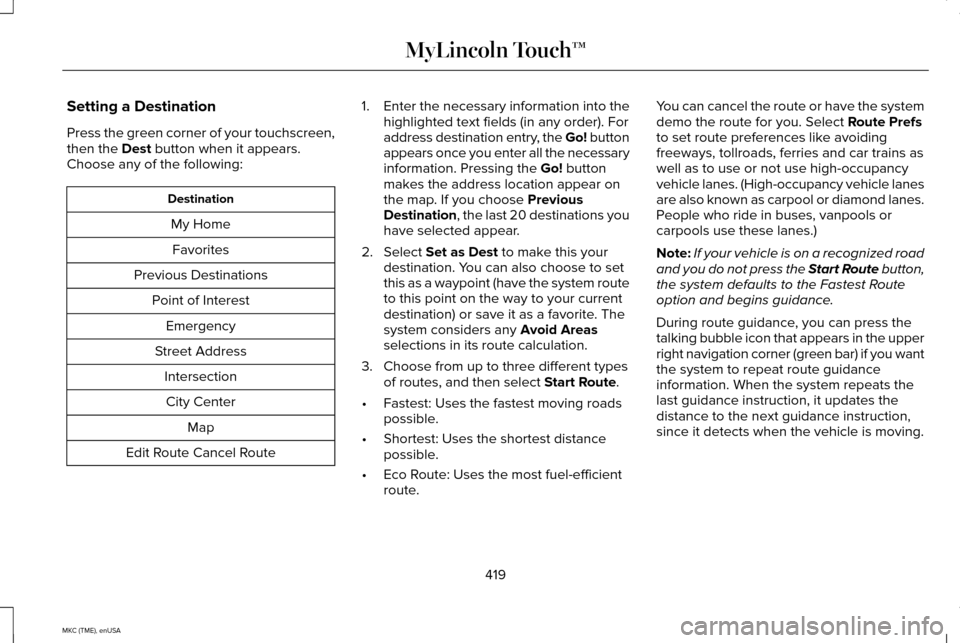
Setting a Destination
Press the green corner of your touchscreen,
then the Dest button when it appears.
Choose any of the following: Destination
My HomeFavorites
Previous Destinations Point of InterestEmergency
Street Address IntersectionCity Center Map
Edit Route Cancel Route 1.
Enter the necessary information into the
highlighted text fields (in any order). For
address destination entry, the Go! button
appears once you enter all the necessary
information. Pressing the
Go! button
makes the address location appear on
the map. If you choose
Previous
Destination, the last 20 destinations you
have selected appear.
2. Select
Set as Dest to make this your
destination. You can also choose to set
this as a waypoint (have the system route
to this point on the way to your current
destination) or save it as a favorite. The
system considers any
Avoid Areas
selections in its route calculation.
3. Choose from up to three different types of routes, and then select
Start Route.
• Fastest: Uses the fastest moving roads
possible.
• Shortest: Uses the shortest distance
possible.
• Eco Route: Uses the most fuel-efficient
route. You can cancel the route or have the system
demo the route for you. Select
Route Prefs
to set route preferences like avoiding
freeways, tollroads, ferries and car trains as
well as to use or not use high-occupancy
vehicle lanes. (High-occupancy vehicle lanes
are also known as carpool or diamond lanes.
People who ride in buses, vanpools or
carpools use these lanes.)
Note: If your vehicle is on a recognized road
and you do not press the Start Route button,
the system defaults to the Fastest Route
option and begins guidance.
During route guidance, you can press the
talking bubble icon that appears in the upper
right navigation corner (green bar) if you want
the system to repeat route guidance
information. When the system repeats the
last guidance instruction, it updates the
distance to the next guidance instruction,
since it detects when the vehicle is moving.
419
MKC (TME), enUSA MyLincoln Touch™
Page 431 of 490
For a complete listing of the accessories that
are available for your vehicle, please contact
an authorized dealer or visit our online store
at www.Accessories.Lincoln.com (United
States only).
Lincoln Motor Company will repair or replace
any properly authorized dealer-installed
Lincoln Genuine Accessory found to be
defective in factory-supplied materials or
workmanship during the warranty period, as
well as any component damaged by the
defective accessories.
Lincoln Motor Company will warrant your
accessory through the warranty that provides
the greatest benefit:
•
24 months, unlimited mileage.
• The remainder of your new vehicle
limited warranty.
Contact an authorized dealer for details and
a copy of the warranty.
Exterior style
• Side-window deflectors.
• Splash guards. Interior style
•
All-weather floor mats.
• Rear seat entertainment*.
• Premium carpeted floor mats.
Lifestyle
• Ash cup (smoker's packages).
• Cargo area protector.
• Cargo net.
• Cargo organizer.
• Luggage cover.
• Recovery hook (towing eye).
• Roof racks and carriers*.
• Trailer hitch.
• Trailer hitch accessories.
Peace of mind
• Car cover*.
• Wheel locks.
• Locking fuel plug for capless fuel system. *The accessory manufacturer designs,
develops and therefore warrants Lincoln
Licensed Accessories, and does not design
or test these accessories to Lincoln Motor
Company engineering requirements. Contact
an authorized Lincoln dealer for the
manufacturer's limited warranty details and
request a copy of the Lincoln Licensed
Accessories product limited warranty from
the accessory manufacturer.
428
MKC (TME), enUSA Accessories
Page 451 of 490
PROTECT YOURSELF FROM THE RISING
COST OF VEHICLE REPAIRS WITH A
LINCOLN EXTENDED SERVICE PLAN.
SERVICE PLANS (U.S. Only)
Lincoln owners have discovered the powerful
protection of Lincoln Extended Service Plan.
It is the only extended service plan backed
by Lincoln Motor Company, and provides
peace of mind protection beyond the New
Vehicle Limited Warranty coverage.
Lincoln ESP Can Quickly Pay for Itself
One service bill – the cost of parts and labor
– can easily exceed the price of your Lincoln
Extended Service Plan. With Lincoln ESP,
you minimize your risk for unexpected repair
bills and rising repair costs.
Up to 1000+ Covered Vehicle Components
There are four Extended Service Plans with
different levels of coverage. Ask your
authorized dealer for details.
1.
PremiumCARE - Our most comprehensive
coverage. With over 1000 covered
components, this plan is so complete that
we generally only discuss what’ s not
covered.
2. ExtraCARE - Covers 113 components, and
includes many high-tech items.
3. BaseCARE - Covers 84 components.
4. PowertrainCARE - Covers 29 critical components.
Lincoln Extended Service Plan is honored by
all authorized Lincoln and Ford dealers in
the U.S. and Canada. It is the only extended
service plan authorized and backed by
Lincoln Motor Company.
That means you get:
• Reliable, quality service at any Lincoln or
Ford dealership.
• Repairs performed by factory trained
technicians, using genuine parts. Rental Car Reimbursement
1st day Rental Benefit
You take advantage of replacement
transportation if your vehicle is at your
authorized dealer for same day covered
repairs.
Extended Rental Benefits
If your vehicle is kept overnight for covered
repairs, you are eligible for rental car
coverage, including bumper to bumper
warranty repairs, and Field Service Actions.
Roadside Assistance
Exclusive 24/7 roadside assistance, including:
•
Towing, flat-tire change and battery jump
starts.
• Out of fuel and lock-out assistance.
• Travel expense reimbursement for
lodging, meals and rental car.
• Destination assistance for taxi, shuttle,
rental car coverage and emergency
transportation.
448
MKC (TME), enUSA Extended Service Plan (ESP)
Page 465 of 490
\
Change engine oil and filter. **
Every 5000 miles (8000 km)
or six months
Perform multi-point inspection.
Change automatic tra")
Operating in dusty or sandy conditions (such as unpaved or dusty roads)\
Change engine oil and filter. **
Every 5000 miles (8000 km)
or six months
Perform multi-point inspection.
Change automatic transmission fluid.
Every 30000 miles (48000
km)
* This is an optional feature.
** Reset your Intelligent Oil-Life Monitor after engine oil and filter chang\
es. See Engine Oil Check (page 283).
Exceptions
There are several exceptions to the Normal
Schedule:
Axle Maintenance
Change the axle fluid anytime an axle is
submerged in water. California Fuel Filter Replacement
If you register your vehicle in California, the
California Air Resources Board has
determined that the failure to perform this
maintenance item does not nullify the
emission warranty or limit recall liability
before the completion of your vehicle's
useful life. Ford Motor Company, however,
urges you to have all recommended
maintenance services performed at the
specified intervals and to record all vehicle
service.Hot Climate Oil Change Intervals
Vehicles operating in the Middle East, North
Africa, Sub-Saharan Africa or locations with
similar climates using an American Petroleum
Institute (API) Certified for Gasoline Engines
(Certification mark) oil of SM or SN quality,
the normal oil change interval is 3000 miles
(5000 kilometers).
If the available API SM or SN oils are not
available, then the oil change interval is 1800
miles (3000 kilometers).
462
MKC (TME), enUSA Scheduled Maintenance
Page 481 of 490
Engine Specifications..................................336
Drivebelt Routing................................................336
Entertainment................................................376 AM/FM Radio.......................................................378
Bluetooth Audio..................................................394
Browsing Device Content.................................
377
CD ........................................................................\
...389
Line In (Auxiliary Input Jack)............................394
SD Card Slot and USB Port...............................391
Sirius® Satellite Radio (If Activated)...............385
Supported Media Players, Formats and Metadata Information...................................394
EPB See: Electric Parking Brake..............................183
Essential Towing Checks.............................241 Before Towing a Trailer.....................................242
Hitches...................................................................241
Launching or Retrieving a Boat or Personal
Watercraft (PWC)............................................242
Safety Chains.......................................................241
Trailer Brakes........................................................241
Trailer Lamps.......................................................242
When Towing a Trailer.......................................242
Event Data Recording See: Data Recording..............................................9
Export Unique Options...................................14 Extended Service Plan (ESP).....................448
SERVICE PLANS (CANADA ONLY).................449
SERVICE PLANS (U.S. Only).............................
448
Exterior Mirrors
................................................98
Auto-Dimming Feature......................................100
Blind Spot Monitor...............................................101
Fold-Away Exterior Mirrors.................................99
Heated Exterior Mirrors.....................................100
Integrated Blind Spot Mirrors...........................100
Lincoln Welcome Mat.........................................100
Memory Mirrors...................................................100
Power Exterior Mirrors.........................................98
F
Fastening the Safety Belts...........................38 How to Extract Safety Belts in the Rear
Outboard Positions..........................................40
Safety Belt Extension Assembly........................41
Safety Belt Locking Modes................................39
Using Safety Belts During Pregnancy.............39
Floor Mats
.......................................................247
Front Passenger Sensing System..............49
Fuel and Refueling........................................163
Fuel Consumption
.........................................167
Calculating Fuel Economy................................168
Filling the Tank.....................................................168
Fuel Filter
.......................................................288 Fuel Quality
.....................................................164
Choosing the Right Fuel....................................164
Octane Recommendations...............................164
Fuel Shutoff
...................................................250
Fuses................................................................261
Fuse Specification Chart.............................261
Passenger Compartment Fuse Box..............268
Power Distribution Box......................................261
Pre-Fuse Box........................................................261
Rear Cargo Fuse Box.........................................274
G
Garage Door Opener See: Universal Garage Door Opener.............150
Gauges............................................................105 Engine Coolant Temperature Gauge.............107
Fuel Gauge...........................................................106
Information Display.............................................106
General Information on Radio Frequencies...................................................57
Intelligent Access..................................................57
478
MKC (TME), enUSA Index
Page 483 of 490
Information Messages...................................118
Active Park.............................................................118
Adaptive Cruise Control.....................................118
AdvanceTrac ™........................................................119
Airbag.....................................................................120
Alarm......................................................................120
All-Wheel Drive.....................................................121
Automatic Engine Shutdown...........................120
Battery and Charging System..........................122
Blind Spot Information and Cross Traffic Alert System...............................................................123
Collision Warning System..................................123
Doors and Locks..................................................124
Driver Alert............................................................124
Fuel........................................................................\
.125
Hill Start Assist.....................................................125
Keys and Intelligent Access.............................125
Lane Keeping System........................................126
Maintenance.........................................................127
MyKey.....................................................................128
Park Aid..................................................................129
Park Brake.............................................................129
Power Steering....................................................130
Remote Start..........................................................131
Seats........................................................................\
131
Starting System ....................................................131
Tire Pressure Monitoring System
....................132
Traction Control...................................................132 Transmission....................................................133
Installing Child Seats
.....................................25
Child Seats.............................................................25
Using Lap and Shoulder Belts...........................25
Using Lower Anchors and Tethers for
CHildren (LATCH).............................................28
Using Tether Straps..............................................30
Instrument Cluster........................................105
Instrument Lighting Dimmer........................92
Interior Lamps
..................................................95
Front Interior Lamp ..............................................95
Rear Interior Lamp................................................96
Interior Mirror
..................................................101
Auto-Dimming Mirror...........................................101
Introduction
.........................................................7
J
Jump Starting the Vehicle...........................251 Connecting the Jumper Cables......................
251
Jump Starting......................................................252
Preparing Your Vehicle......................................251
Removing the Jumper Cables........................252 K
Keyless Entry
....................................................77
SECURICODE™ KEYLESS ENTRY
KEYPAD...............................................................77
Keyless Starting
.............................................158
Ignition Modes.....................................................158
Keys and Remote Controls
...........................57
L
Lane Keeping System..................................213 Switching the System On and Off...................213
Lighting Control..............................................90 Headlamp Flasher................................................90
High Beams............................................................90
Lighting.............................................................90
Lincoln Automotive Financial Services......12
Load Carriers See: Roof Racks and Load Carriers...............229
Load Carrying................................................229
Load Limit
.......................................................230
Vehicle Loading - with and without a
Trailer................................................................230
480
MKC (TME), enUSA Index