page 92 LINCOLN MKC 2015 Repair Manual
[x] Cancel search | Manufacturer: LINCOLN, Model Year: 2015, Model line: MKC, Model: LINCOLN MKC 2015Pages: 490, PDF Size: 4.74 MB
Page 138 of 490
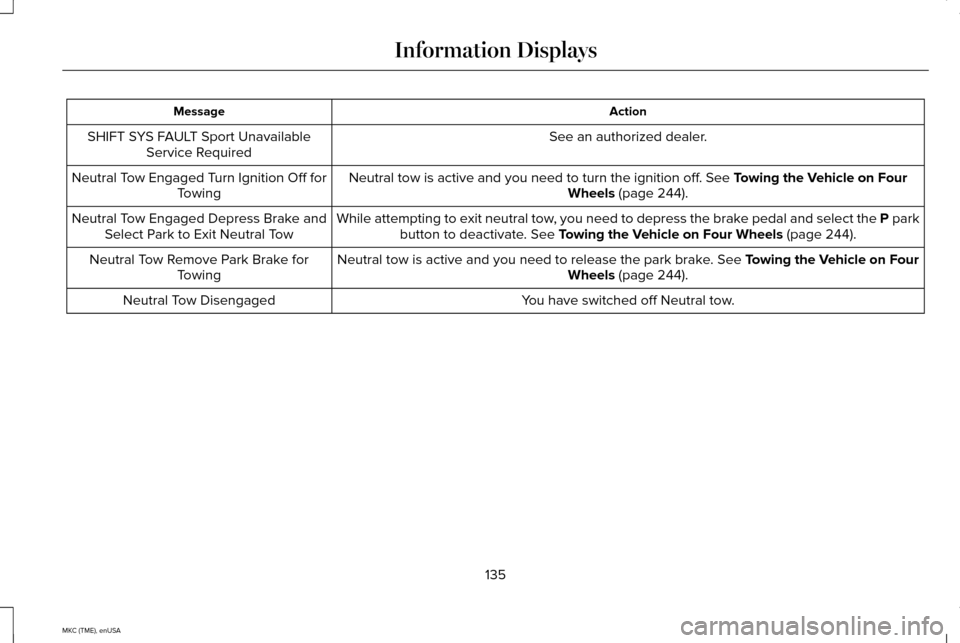
Action
Message
See an authorized dealer.
SHIFT SYS FAULT Sport Unavailable
Service Required
Neutral tow is active and you need to turn the ignition off. See Towing the Vehicle on Four
Wheels (page 244).
Neutral Tow Engaged Turn Ignition Off for
Towing
While attempting to exit neutral tow, you need to depress the brake pedal and select the P parkbutton to deactivate.
See Towing the Vehicle on Four Wheels (page 244).
Neutral Tow Engaged Depress Brake and
Select Park to Exit Neutral Tow
Neutral tow is active and you need to release the park brake.
See Towing the Vehicle on Four
Wheels (page 244).
Neutral Tow Remove Park Brake for
Towing
You have switched off Neutral tow.
Neutral Tow Disengaged
135
MKC (TME), enUSA Information Displays
Page 139 of 490
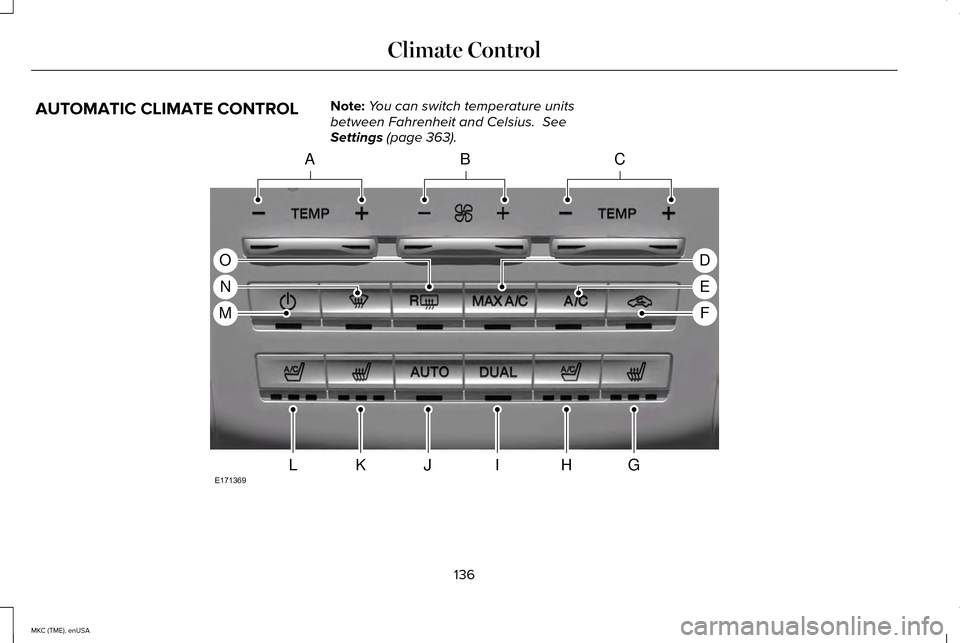
AUTOMATIC CLIMATE CONTROL
Note:
You can switch temperature units
between Fahrenheit and Celsius. See
Settings (page 363). 136
MKC (TME), enUSA Climate ControlACB
GHIJKL
D
E
F
O
N
M
E171369
Page 140 of 490

Driver temperature controls: Press the control to increase or decrease the air temperature for the d\
river side of the vehicle. This
control also adjusts the passenger side temperature when dual zone opera\
tion is off.
A
Fan speed control:
Press the control to increase or decrease the volume of air circulated \
in your vehicle.
B
Passenger temperature controls:
Press the control to increase or decrease the air temperature for the p\
assenger side of the
vehicle.
C
MAX A/C: Press the control to maximize cooling. The driver and passenger tempera\
tures are set to LO, recirculated air flows through
the instrument panel air vents, the air conditioning automatically turns\
on and the fan automatically adjusts to the highest speed.
D
A/C:
Press the control to operate the air conditioning compressor. Use A/C with recirculated air to improve cooling performance
and efficiency. Note: In certain conditions, such as when using MAX defrost, the air conditio\
ning compressor may continue to
operate even though the A/C control is off.
E
Recirculated air:
Press the control to switch between outside air and recirculated air. When you select recirculated air, the air
currently in the passenger compartment recirculates. This may reduce the\
time needed to cool the interior (when used with A/C)
and may reduce unwanted odors from entering your vehicle. To reduce the possibility of fogging, recirculated air may turn off
automatically or the system may prevent you from switching the feature o\
n in all airflow modes except
MAX A/C.
F
Heated passenger seat control:
Press the control to operate the heated seat. See Heated Seats (page 147).
G
Ventilated passenger seat control:
Press the control to operate the ventilated seat. See Climate Controlled Seats (page 148).
H
DUAL:
Press the control once to switch on the feature. When engaged, the feature allows the passenger to set a temperature th\
at
is independent from the driver setting. Press the control a second time \
to switch off the feature. The passenger setting automatically
links with the driver setting.
Note: The DUAL indicator automatically illuminates when adjusting the passenger's temperature.
I
AUTO:
Press the control to switch on the fully automatic operation. Select th\
e desired temperature using the temperature control.
The system automatically determines fan speed, air distribution, air con\
ditioning operation, and outside or recirculated air to heat
or cool the vehicle to reach and maintain your desired temperature.
Note: You can also use the AUTO control to link the passenger's
temperature to the driver's temperature by pressing and holding the AUTO control for more than two seconds.
J
137
MKC (TME), enUSA Climate Control
Page 141 of 490
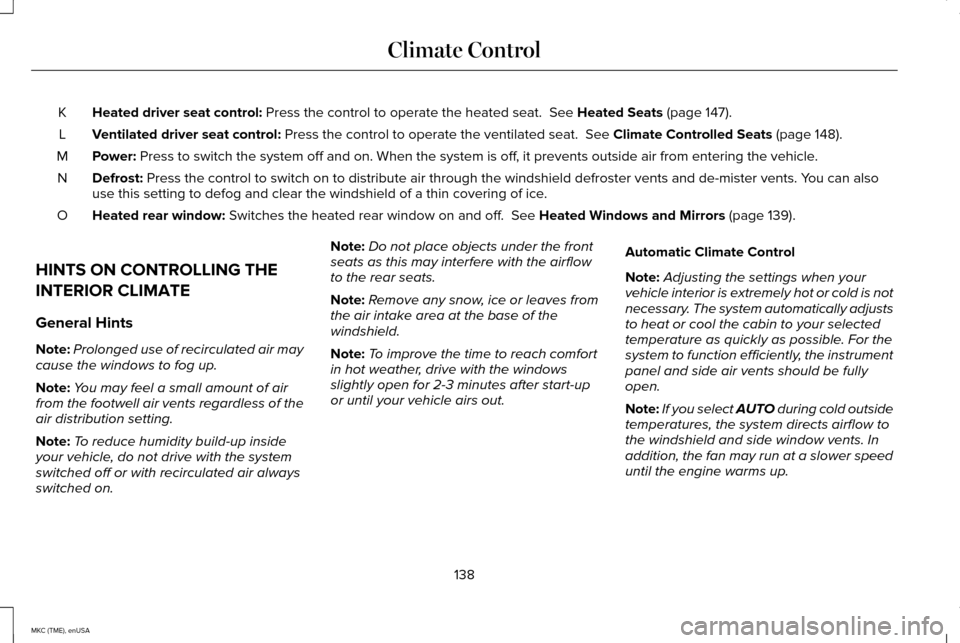
Heated driver seat control: Press the control to operate the heated seat. See Heated Seats (page 147).
K
Ventilated driver seat control:
Press the control to operate the ventilated seat. See Climate Controlled Seats (page 148).
L
Power:
Press to switch the system off and on. When the system is off, it prevents outside air from entering the vehicle.
M
Defrost:
Press the control to switch on to distribute air through the windshield\
defroster vents and de-mister vents. You can also
use this setting to defog and clear the windshield of a thin covering of\
ice.
N
Heated rear window:
Switches the heated rear window on and off. See Heated Windows and Mirrors (page 139).
O
HINTS ON CONTROLLING THE
INTERIOR CLIMATE
General Hints
Note: Prolonged use of recirculated air may
cause the windows to fog up.
Note: You may feel a small amount of air
from the footwell air vents regardless of the
air distribution setting.
Note: To reduce humidity build-up inside
your vehicle, do not drive with the system
switched off or with recirculated air always
switched on. Note:
Do not place objects under the front
seats as this may interfere with the airflow
to the rear seats.
Note: Remove any snow, ice or leaves from
the air intake area at the base of the
windshield.
Note: To improve the time to reach comfort
in hot weather, drive with the windows
slightly open for 2-3 minutes after start-up
or until your vehicle airs out. Automatic Climate Control
Note:
Adjusting the settings when your
vehicle interior is extremely hot or cold is not
necessary. The system automatically adjusts
to heat or cool the cabin to your selected
temperature as quickly as possible. For the
system to function efficiently, the instrument
panel and side air vents should be fully
open.
Note: If you select
AUTO during cold outside
temperatures, the system directs airflow to
the windshield and side window vents. In
addition, the fan may run at a slower speed
until the engine warms up.
138
MKC (TME), enUSA Climate Control
Page 143 of 490
CABIN AIR FILTER
Your vehicle is equipped with a cabin air
filter. It is located inside the instrument panel
and to the left of the glove box.
The particulate filtration system reduces the
concentration of airborne particles such as
dust, spores and pollen in the air supplied to
the interior of your vehicle.
Note:
Make sure the cabin air filter is in
place at all times. Running the system
without a filter in place could result in
degradation or damage to the system.
The particulate filtration system gives you
and your passengers the following benefits:
• It improves your driving comfort by
reducing particle concentration.
• It improves the interior compartment
cleanliness.
• It protects the climate control
components from particle deposits.
Replace the filter at regular intervals. See
Scheduled Maintenance (page 451). For additional cabin air filter information, or
to replace the filter, see an authorized dealer.
REMOTE START
The remote start feature allows you to
pre-condition the interior of your vehicle. The
climate control system works to achieve
comfort according to your previous settings.
Note:
You cannot adjust the system during
remote start operation.
Turn the ignition on to return the system to
its previous settings. You can now make
adjustments normally, but you need to turn
certain vehicle-dependent features back on,
such as:
• Heated seats.
• Cooled seats.
• Heated steering wheel.
• Heated mirrors.
• Heated rear window. You can adjust the default remote start
settings using the information display
controls.
See Information Displays (page
112).
Automatic Settings
In hot weather, the system is set to 72°F
(22°C). The cooled seats are set to high (if
available, and selected to AUTO in the
information display).
In moderate weather, the system either heats
or cools (based on previous settings). The
rear defroster, heated mirrors and heated
seats do not automatically switch on.
In cold weather, the system is set to 72°F
(22°C). The heated seats are set to high (if
available, and selected to AUTO in the
information display). The rear defroster and
heated mirrors automatically switch on.
140
MKC (TME), enUSA Climate Control
Page 149 of 490
A pre-set memory position can also be
recalled by:
•
Pressing the unlock button on your
intelligent access key fob if it is linked to
a pre-set position.
• Unlocking the intelligent driver door
handle if a linked key fob is present.
• Entering a personal entry code on the
Securicode keypad. See Locks (page
68).
Note: Using a linked key fob to recall your
memory position when the ignition is off will
move the seat and steering column to the
Easy Entry position.
Linking a Pre-Set Position to your
Remote Control or Intelligent Access
Key
Your vehicle can save the pre-set memory
positions for up to three remote controls or
intelligent access (IA) keys.
1. With the ignition on, move the memory positions to the desired positions. 2.
Press and hold the desired pre-set button
for about five seconds. A chime will
sound after about two seconds. Continue
holding until a second chime is heard.
3. Within three seconds, press the lock button on the remote control you are
linking.
To unlink a remote control, follow the same
procedure – except in Step 3, press the
unlock button on the remote control.
Easy Entry and Exit Feature
If you enable the easy entry and exit feature,
it automatically moves the driver seat
position rearward up to two inches (five
centimeters) when you switch the ignition
off. The driver seat will return to the previous
position when you switch the ignition on.
You can enable or disable this feature in the
information display.
See Information
Displays (page 112). REAR SEATS
146
MKC (TME), enUSA SeatsE171298
Page 163 of 490
Failure to Start
If you cannot start the engine after three
attempts, wait 10 seconds and follow this
procedure:
1. Fully press the brake pedal.
2. Fully press the accelerator pedal and
hold it there.
3. Start the engine.
Note: You can crank the engine for a total
of 60 seconds (without the engine starting)
before the starting system temporarily
disables. The 60 seconds does not have to
be all at once. For example, if you crank the
engine three times for 20 seconds each time,
without the engine starting, you reached the
60-second time limit. A message appears in
the information display alerting you that you
exceeded the cranking time. You cannot
attempt to start the engine for at least 15
minutes. After 15 minutes, you are limited to
a 15-second engine cranking time. You need
to wait 60 minutes before you can crank the
engine for 60 seconds again. Automatic Engine Shutdown
If your vehicle is equipped with a keyless
ignition, it has a feature that automatically
shuts down the engine if it has been idling
for an extended period. The ignition also
turns off in order to save battery power.
Before the engine shuts down, a message
appears in the information display showing
a timer counting down from 30 seconds. If
you do not intervene within 30 seconds, the
engine shuts down. Another message
appears in the information display to inform
you that the engine has shut down in order
to save fuel. Start your vehicle as you
normally do.
Automatic Engine Shutdown Override
Note:
You cannot permanently switch off the
automatic engine shutdown feature. When
you switch it off temporarily, it turns on at
the next ignition cycle.
You can stop the engine shutdown, or reset
the timer, at any point before the 30-second
countdown has expired by doing any of the
following: •
You can reset the timer by interacting
with your vehicle (such as pressing the
brake pedal or accelerator pedal).
• You can temporarily switch off the
shutdown feature any time the ignition is
on (for the current ignition cycle only).
Use the information display to do so. See
Information Displays (page 112).
• During the countdown before engine
shutdown, you are prompted to press OK
or RESET (depending on your type of
information display) to temporarily switch
the feature off (for the current ignition
cycle only).
Stopping the Engine When Your
Vehicle is Stationary
1. Put the transmission in position
P.
2. Press the button once.
3. Apply the parking brake.
Note: This switches off the ignition, all
electrical circuits, warning lamps and
indicators.
160
MKC (TME), enUSA Starting and Stopping the Engine
Page 168 of 490
•
You may need to cycle the ignition from
off to on several times after refueling to
allow the fuel system to pump the fuel
from the tank to the engine. On
restarting, cranking time will take a few
seconds longer than normal. With keyless
ignition, just start the engine. Crank time
will be longer than usual.
• Normally, adding 1 gallon (3.8 liters) of
fuel is enough to restart the engine. If the
vehicle is out of fuel and on a steep
grade, more than 1 gallon (3.8 liters) may
be required.
• The service engine soon indicator may
come on. For more information on the
service engine soon indicator, See
Warning Lamps and Indicators (page
107). Refilling With a Portable Fuel Container WARNINGS
Do not insert the nozzle of portable
fuel containers or aftermarket funnels
into the capless fuel system. This could
damage the fuel system and its seal, and
may cause fuel to run onto the ground
instead of filling the tank, which could result
in serious personal injury. Do not try to pry open or push open
the capless fuel system with foreign
objects. This could damage the fuel system
and its seal and cause injury to you or others. Note:
Do not use aftermarket funnels; they
will not work with the capless fuel system
and can damage it. The included funnel has
been specially designed to work safely with
your vehicle.
When filling the vehicle ’s fuel tank from a
portable fuel container, use the funnel
included with the vehicle. The funnel is
located in the rear of the vehicle, inside the
load compartment, underneath the load floor
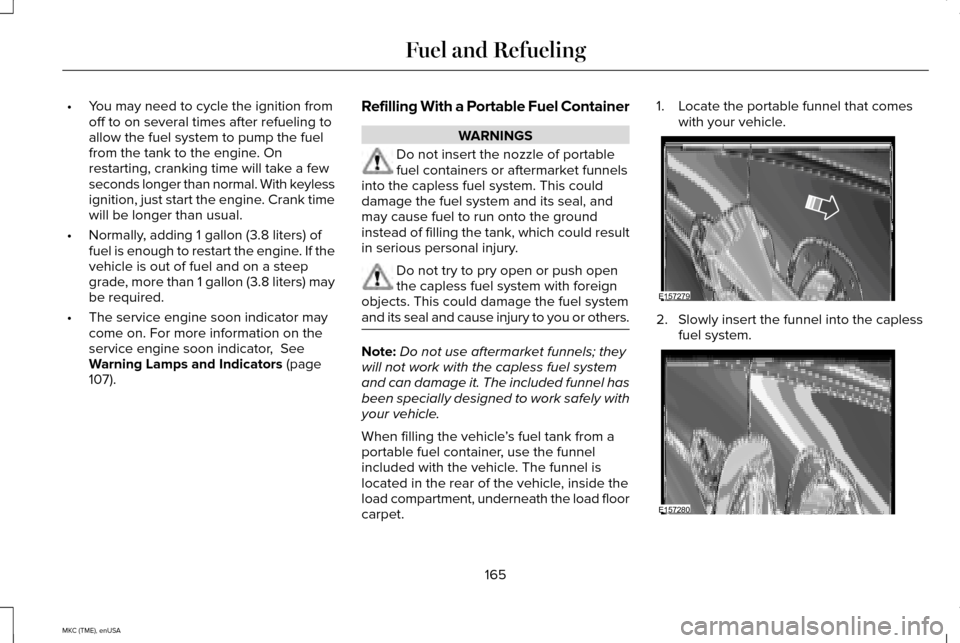
carpet. 1. Locate the portable funnel that comes
with your vehicle. 2. Slowly insert the funnel into the capless
fuel system. 165
MKC (TME), enUSA Fuel and RefuelingE157279 E157280
Page 172 of 490
Your vehicle is equipped with various
emission control components and a catalytic
converter that will enable your vehicle to
comply with applicable exhaust emission
standards. To make sure that the catalytic
converter and other emission control
components continue to work properly:
•
Use only the specified fuel listed.
• Avoid running out of fuel.
• Do not turn off the ignition while your
vehicle is moving, especially at high
speeds.
• Have the items listed in scheduled
maintenance information performed
according to the specified schedule.
The scheduled maintenance items listed in
scheduled maintenance information are
essential to the life and performance of your
vehicle and to its emissions system.
If you use parts other than Ford, Motorcraft
or Ford-authorized parts for maintenance
replacements, or for service of components
affecting emission control, such non-Ford
parts should be the equivalent to genuine
Ford Motor Company parts in performance
and durability. Illumination of the service engine soon
indicator, charging system warning light or
the temperature warning light, fluid leaks,
strange odors, smoke or loss of engine
power could indicate that the emission
control system is not working properly.
An improperly operating or damaged exhaust
system may allow exhaust to enter the
vehicle. Have a damaged or improperly
operating exhaust system inspected and
repaired immediately.
Do not make any unauthorized changes to
your vehicle or engine. By law, vehicle
owners and anyone who manufactures,
repairs, services, sells, leases, trades
vehicles, or supervises a fleet of vehicles are
not permitted to intentionally remove an
emission control device or prevent it from
working. Information about your vehicle
’s
emission system is on the Vehicle Emission
Control Information Decal located on or near
the engine. This decal also lists engine
displacement
Please consult your warranty information for
complete details. On-Board Diagnostics (OBD-II)
Your vehicle is equipped with an on-board
diagnostics system (OBD-II) that monitors the
engine
’s emission control system. This
system protects the environment by ensuring
that your vehicle continues to meet
government emission standards. The OBD-II
system also assists your authorized dealer
in properly servicing your vehicle. When the service engine soon
indicator illuminates, the OBD-II
system has detected a malfunction.
Temporary malfunctions may cause the
service engine soon indicator to illuminate.
Examples of temporary malfunctions are:
• the vehicle has run out of fuel—the
engine may misfire or run poorly
• poor fuel quality or water in the fuel—the
engine may misfire or run poorly
• the fuel fill inlet may not have been
properly closed See Refueling (page 166).
• driving through deep water—the
electrical system may be wet.
169
MKC (TME), enUSA Fuel and Refueling
Page 180 of 490
USING ALL-WHEEL DRIVE
Note:
When a system malfunction is present,
a warning message appears in the
information display. See Information
Messages (page 118). This means the system
is not functioning correctly and only
front-wheel drive is available. Have your
vehicle checked by an authorized dealer.
Note: When the system overheats and
switches to front-wheel drive, a warning
message appears in the information display.
This may occur if you operate your vehicle
in extreme high load conditions or with
excessive wheel spin (for example, deep
sand). To resume all-wheel drive function,
stop your vehicle in a safe location and turn
off the ignition. When the system cools,
normal all-wheel drive function will return.
The information display indicates, for about
five seconds, this return.
Note: When using the spare tire, a warning
message may appear in the information
display. This message turns off after
reinstalling the repaired or replaced road
tire and you switch on the ignition. Note:
Re-install the repaired tire or replace
the tire as soon as possible. Different tire
sizes between the front and rear axles can
cause system damage, or turn off the
all-wheel drive.
This system anticipates wheel spin and
transfers power to the rear wheels before
the spin occurs. Even when wheel spin is not
occurring, the system is continuously
adjusting power distribution to the wheels,
in an attempt to improve straight line and
cornering, both on and off road.
The system automatically turns on every time
you switch on the ignition.
The all-wheel drive system does not require
maintenance.
The all-wheel drive system gives your vehicle
some limited off-road capabilities. Operating
your vehicle in conditions other than
moderate sand, snow, mud or rough roads
could subject it to excessive stress and heat.
This could result in system damage. Your
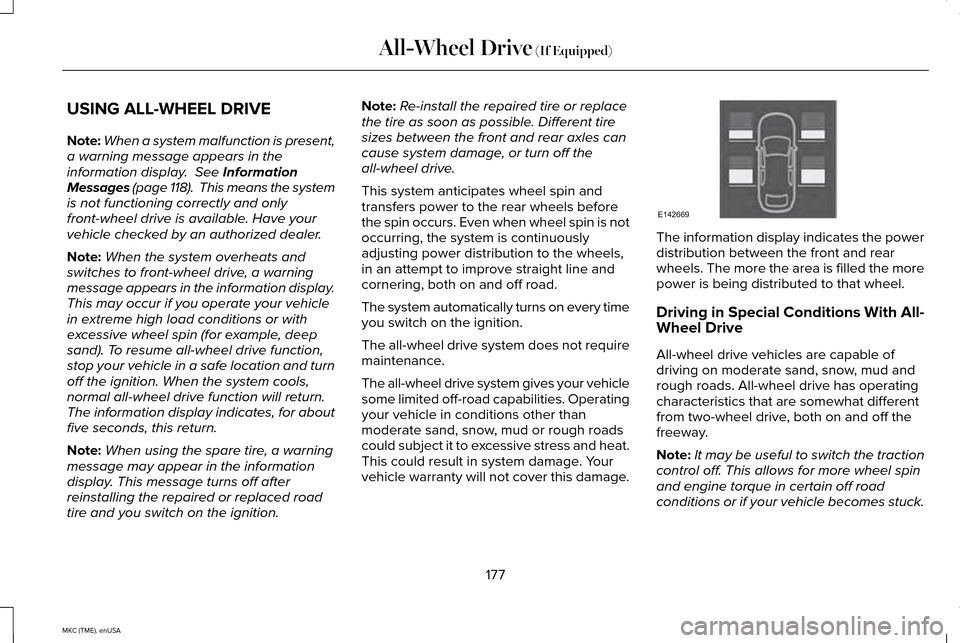
vehicle warranty will not cover this damage. The information display indicates the power
distribution between the front and rear
wheels. The more the area is filled the more
power is being distributed to that wheel.
Driving in Special Conditions With All-
Wheel Drive
All-wheel drive vehicles are capable of
driving on moderate sand, snow, mud and
rough roads. All-wheel drive has operating
characteristics that are somewhat different
from two-wheel drive, both on and off the
freeway.
Note:
It may be useful to switch the traction
control off. This allows for more wheel spin
and engine torque in certain off road
conditions or if your vehicle becomes stuck.
177
MKC (TME), enUSA All-Wheel Drive
(If Equipped)E142669