page 92 LINCOLN MKC 2015 Owners Manual
[x] Cancel search | Manufacturer: LINCOLN, Model Year: 2015, Model line: MKC, Model: LINCOLN MKC 2015Pages: 490, PDF Size: 4.74 MB
Page 331 of 490
When Inflating Your Tires
When putting air into your tires (such as at a
gas station or in your garage), the tire
pressure monitoring system may not respond
immediately to the air added to your tires.
It may take up to two minutes of driving over
20 mph (32 km/h) for the light to turn off after
you have filled your tires to the
recommended inflation pressure
How Temperature Affects Your Tire
Pressure
The tire pressure monitoring system monitors
tire pressure in each pneumatic tire. While
driving in a normal manner, a typical
passenger tire inflation pressure may
increase about 2 to 4 psi (14 to 28 kPa) from
a cold start situation. If the vehicle is
stationary overnight with the outside
temperature significantly lower than the
daytime temperature, the tire pressure may
decrease about 3 psi (21 kPa) for a drop of
30°F (17°C) in ambient temperature. This
lower pressure value may be detected by
the tire pressure monitoring system as being
significantly lower than the recommended
inflation pressure and activate the system
warning light for low tire pressure. If the low
tire pressure warning light is on, visually
check each tire to verify that no tire is flat. If
one or more tires are flat, repair as
necessary. Check the air pressure in the road
tires. If any tire is under-inflated, carefully
drive the vehicle to the nearest location
where air can be added to the tires. Inflate
all the tires to the recommended inflation
pressure.
CHANGING A ROAD WHEEL
WARNINGS
The use of tire sealants may damage
your tire pressure monitoring system
and should not be used. However, if you
must use a sealant, the tire pressure
monitoring system sensor and valve stem on
the wheel must be replaced by an authorized
dealer. See Tire Pressure Monitoring System
(page 324). If the tire pressure monitor
sensor becomes damaged, it will no longer
function. Note:
The tire pressure monitoring system
indicator light will illuminate when the spare
tire is in use. To restore the full function of
the monitoring system, all road wheels
equipped with tire pressure monitoring
sensors must be mounted on the vehicle.
If you get a flat tire while driving, do not apply
the brake heavily. Instead, gradually
decrease your speed. Hold the steering
wheel firmly and slowly move to a safe place
on the side of the road.
Have a flat serviced by an authorized dealer
in order to prevent damage to the tire
pressure monitoring system sensors. See
Tire Pressure Monitoring System (page 324).
Replace the spare tire with a road tire as
soon as possible. During repairing or
replacing of the flat tire, have the authorized
dealer inspect the tire pressure monitoring
system sensor for damage.
328
MKC (TME), enUSA Wheels and Tires
Page 335 of 490
13. Remove the jack and fully tighten the
lug nuts in the order shown. See
Technical Specifications (page 334).
Stowing the flat tire
1. Put the jack and lug wrench away. Make
sure the jack is fastened so it does not
rattle when you drive.
2. Unblock the wheels.
3. Stow the flat tire on the floor in the cargo
area. Secure with the flat tire retainer
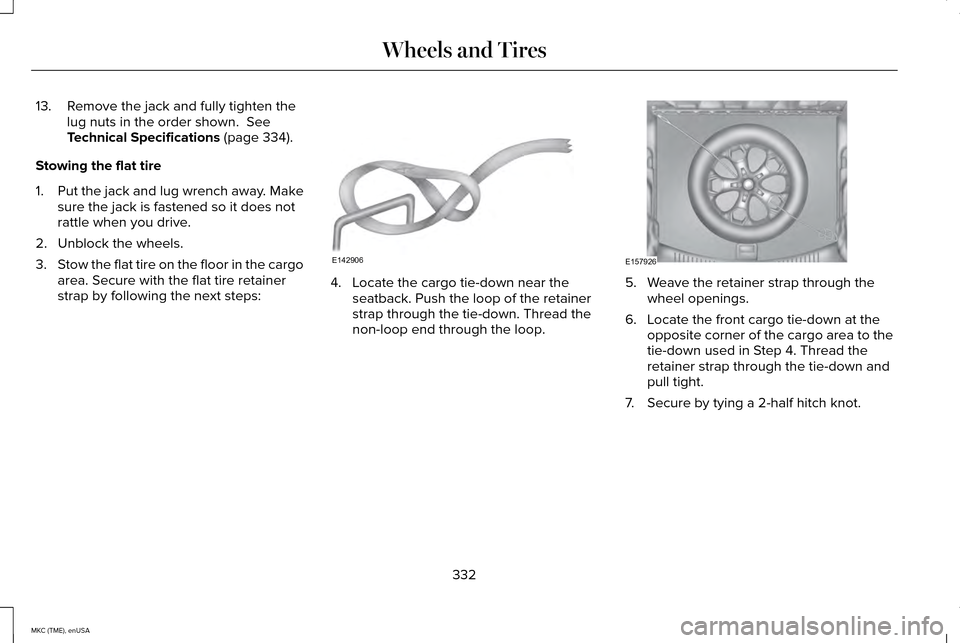
strap by following the next steps: 4. Locate the cargo tie-down near the
seatback. Push the loop of the retainer
strap through the tie-down. Thread the
non-loop end through the loop. 5. Weave the retainer strap through the
wheel openings.
6. Locate the front cargo tie-down at the opposite corner of the cargo area to the
tie-down used in Step 4. Thread the
retainer strap through the tie-down and
pull tight.
7. Secure by tying a 2-half hitch knot.
332
MKC (TME), enUSA Wheels and TiresE142906 E157926
Page 341 of 490
2.3L EcoBoost engine
2.0L EcoBoost engine
Component
CYFS-12Y-2 / SP-537
CYFS-12Y-2 / SP-537
Spark plugs 3
FP70
Cabin air filter
WW-2250 (driver side)
Windshield wiper blade
WW-1575 (passenger side)WW-1106 (rear window)
1 Failure to use the correct air filter element may result in severe engi\
ne damage. The customer warranty may be void for any damage to the
engine if the correct air filter element is not used.
2 Only use the specified replacement oil filter. The use of a non-specified oil filter can result in engine damage.
3 For spark plug replacement, see your authorized dealer. Replace the spark plugs at the appropriate intervals. See Scheduled Maintenance
(page 451).
Note:
Replace the spark plugs with ones that meet Ford material and design spec\
ifications for your vehicle, such as Motorcraft or equivalent
replacement parts. The customer warranty may be void for any damage to t\
he engine if such spark plugs are not used.
338
MKC (TME), enUSA Capacities and Specifications
Page 347 of 490
1
Ford recommends using Motorcraft (Ford) DOT 4 LV High Performance Brake Fluid or equivalent meeting WSS-M6C65-A2. Use of any fluid
other than the recommended fluid may cause degraded brake performance and not meet the Ford performance standards. Keep brake fluid
clean and dry. Contamination with dirt, water, petroleum products or other materials may result in brake system damage and possible failure.
2 Approximate dry fill capacity. Actual amount may vary during fluid changes.
3 Automatic transmissions that require Motorcraft MERCON LV transmission fluid should only use Motorcraft MERCON LV transmission fluid.
Use of any fluid other than the recommended fluid may cause transmission\
damage.
Change the automatic transmission fluid at the correct service interval.\
See Scheduled Maintenance (page 451).
4 See your authorized dealer for fluid level checking or filling.
5 Use of synthetic or synthetic blend motor oil is not mandatary. Your engine has been designed to use Motorcraft engine oils or equivalent\
oils that meet Ford’ s oil specification. It is also acceptable to use an engine oil of recom\
mended viscosity grade that meets API SN requirements
and displays the API Certification Mark for gasoline engines.
6 Do not use oils labeled as API SN unless the label also displays the API\
certification mark. These oils do not meet the requirements of your
vehicle's engine and emissions system.
7 Do not use supplemental engine oil additives. They are unnecessary and c\
ould lead to engine damage that is not covered by Ford’ s warranty.
8 Add the coolant type originally equipped in your vehicle.
9 See the Warning below: WARNING
The air conditioning refrigerant system contains refrigerant R-134a unde\
r high pressure. Opening the air conditioning refrigerant system
can cause personal injury. Have the air conditioning refrigerant system serviced only by qualifie\
d personnel.
344
MKC (TME), enUSA Capacities and Specifications
Page 350 of 490
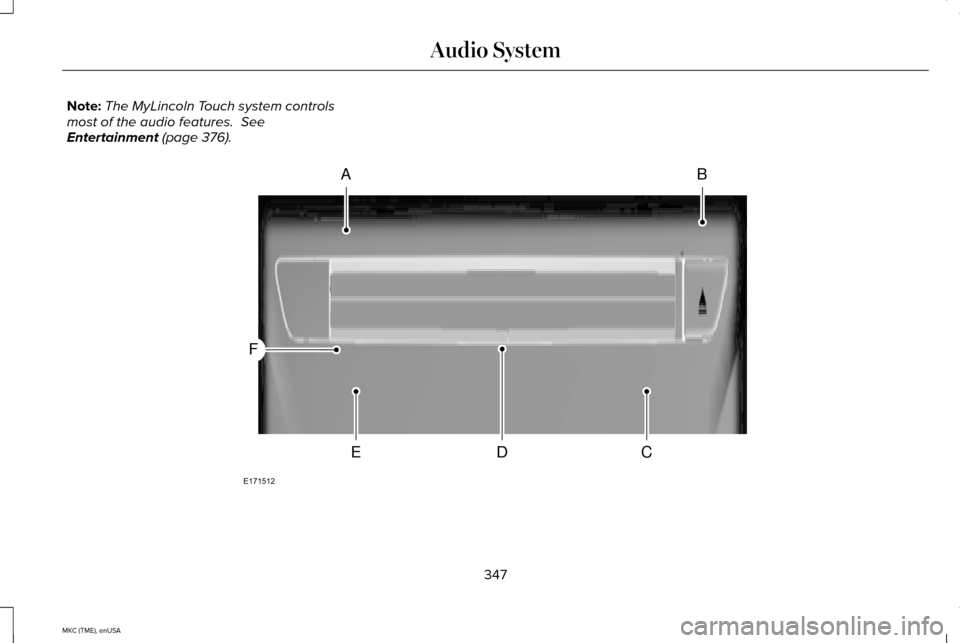
Note:
The MyLincoln Touch system controls
most of the audio features. See
Entertainment (page 376). 347
MKC (TME), enUSA Audio SystemAB
CDE
F
E171512
Page 352 of 490
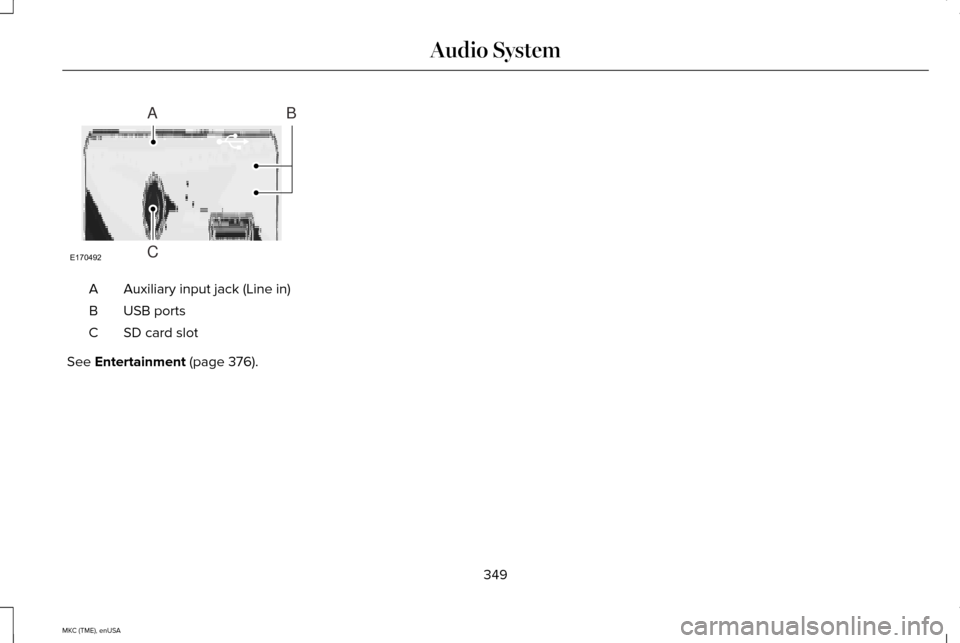
Auxiliary input jack (Line in)
A
USB ports
B
SD card slot
C
See Entertainment (page 376).
349
MKC (TME), enUSA Audio SystemE170492
A
C
B
Page 363 of 490
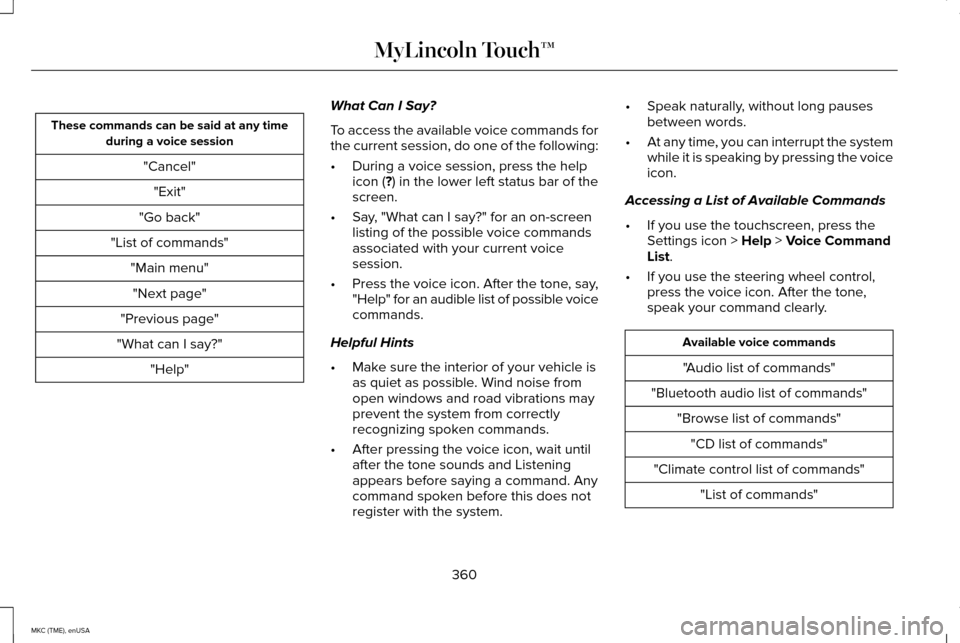
These commands can be said at any time
during a voice session
"Cancel""Exit"
"Go back"
"List of commands" "Main menu""Next page"
"Previous page"
"What can I say?" "Help" What Can I Say?
To access the available voice commands for
the current session, do one of the following:
•
During a voice session, press the help
icon (?) in the lower left status bar of the
screen.
• Say, "What can I say?" for an on-screen
listing of the possible voice commands
associated with your current voice
session.
• Press the voice icon. After the tone, say,
"Help" for an audible list of possible voice
commands.
Helpful Hints
• Make sure the interior of your vehicle is
as quiet as possible. Wind noise from
open windows and road vibrations may
prevent the system from correctly
recognizing spoken commands.
• After pressing the voice icon, wait until
after the tone sounds and Listening
appears before saying a command. Any
command spoken before this does not
register with the system. •
Speak naturally, without long pauses
between words.
• At any time, you can interrupt the system
while it is speaking by pressing the voice
icon.
Accessing a List of Available Commands
• If you use the touchscreen, press the
Settings icon >
Help > Voice Command
List.
• If you use the steering wheel control,
press the voice icon. After the tone,
speak your command clearly. Available voice commands
"Audio list of commands"
"Bluetooth audio list of commands" "Browse list of commands""CD list of commands"
"Climate control list of commands" "List of commands"
360
MKC (TME), enUSA MyLincoln Touch™
Page 365 of 490
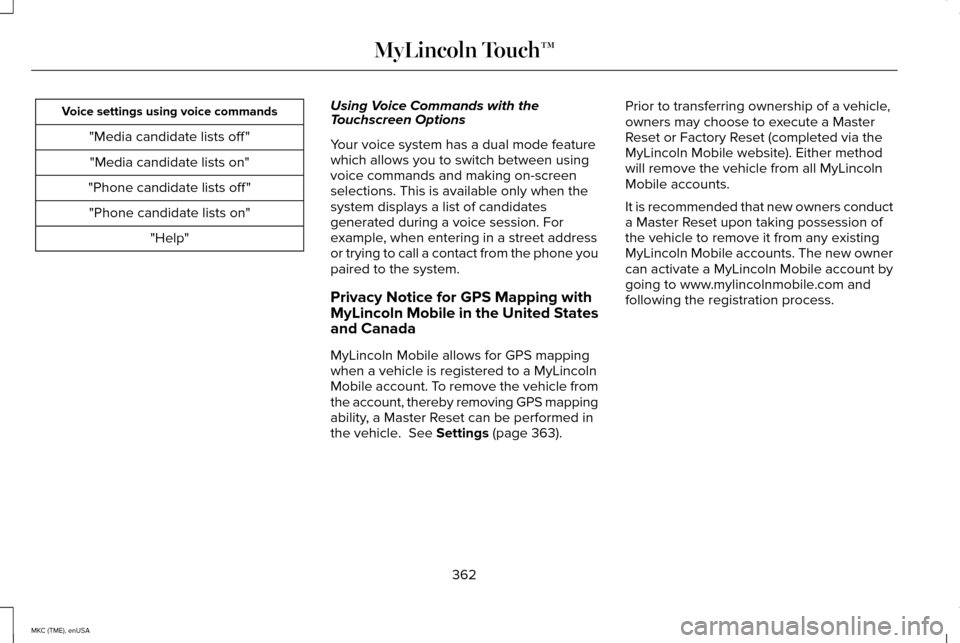
Voice settings using voice commands
"Media candidate lists off ""Media candidate lists on"
"Phone candidate lists off " "Phone candidate lists on" "Help" Using Voice Commands with the
Touchscreen Options
Your voice system has a dual mode feature
which allows you to switch between using
voice commands and making on-screen
selections. This is available only when the
system displays a list of candidates
generated during a voice session. For
example, when entering in a street address
or trying to call a contact from the phone you
paired to the system.
Privacy Notice for GPS Mapping with
MyLincoln Mobile in the United States
and Canada
MyLincoln Mobile allows for GPS mapping
when a vehicle is registered to a MyLincoln
Mobile account. To remove the vehicle from
the account, thereby removing GPS mapping
ability, a Master Reset can be performed in
the vehicle. See Settings (page 363).Prior to transferring ownership of a vehicle,
owners may choose to execute a Master
Reset or Factory Reset (completed via the
MyLincoln Mobile website). Either method
will remove the vehicle from all MyLincoln
Mobile accounts.
It is recommended that new owners conduct
a Master Reset upon taking possession of
the vehicle to remove it from any existing
MyLincoln Mobile accounts. The new owner
can activate a MyLincoln Mobile account by
going to www.mylincolnmobile.com and
following the registration process.
362
MKC (TME), enUSA MyLincoln Touch™
Page 369 of 490
Vehicle Health Report
Switch Automatic Reminders on and off and
set the mileage interval at which you would
like to receive the reports. Press ? for more
information on these selections.
When done making your selections, press
Run Vehicle Health Report Now if you want
your report.
You can find more information on Vehicle
Health Report in this chapter.
See
Information (page 403).
Camera Settings
This menu allows you to access settings for
your camera settings. Press the Settings icon >
Vehicle
> Camera Settings, then select
from the following settings:
• Enhanced Park Aids.
• Rear Camera Delay.
You can find more information on the rear
view camera in another chapter.
See Rear
View Camera (page 199).
Enable Valet Mode
Valet mode allows you to lock the system.
No information is accessible until the system
is unlocked with the correct PIN. You can
create your own four-digit PIN to lock and
unlock the system. 1. Press the Settings icon >
Vehicle >
Enable Valet Mode.
2. When prompted, enter a four-digit PIN.
After you press
Continue, the system locks
until you enter the PIN again.
Note: If the system locks, and you need to
reset the PIN, enter 3681 and the system
unlocks.
Settings
Access and adjust system settings, voice
features, as well as phone, navigation and
wireless settings.
System Press the Settings icon >
Settings
> System, then select from the
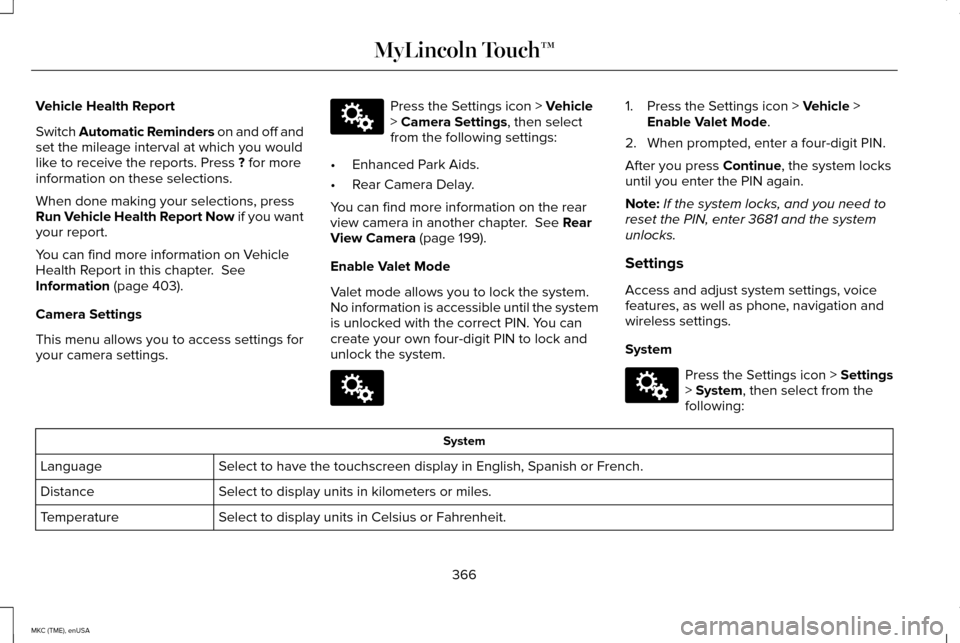
following: System
Select to have the touchscreen display in English, Spanish or French.
Language
Select to display units in kilometers or miles.
Distance
Select to display units in Celsius or Fahrenheit.
Temperature
366
MKC (TME), enUSA MyLincoln Touch™E142607 E142607 E142607
Page 375 of 490
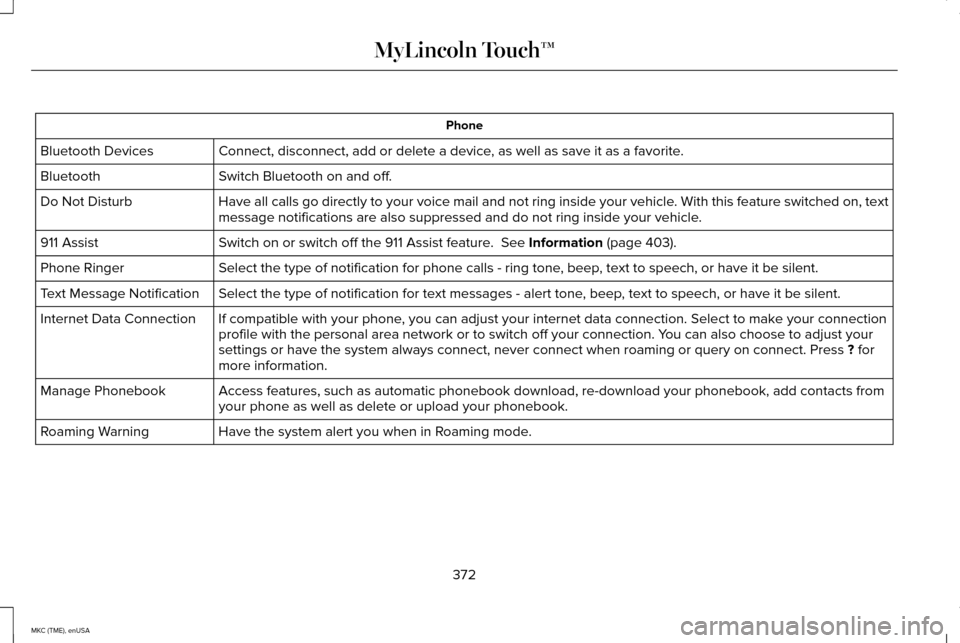
Phone
Connect, disconnect, add or delete a device, as well as save it as a favorite.
Bluetooth Devices
Switch Bluetooth on and off.
Bluetooth
Have all calls go directly to your voice mail and not ring inside your v\
ehicle. With this feature switched on, text
message notifications are also suppressed and do not ring inside your ve\
hicle.
Do Not Disturb
Switch on or switch off the 911 Assist feature. See Information (page 403).
911 Assist
Select the type of notification for phone calls - ring tone, beep, text to speech, or have it be silent.
Phone Ringer
Select the type of notification for text messages - alert tone, beep, text to speech, or have it be silent.
Text Message Notification
If compatible with your phone, you can adjust your internet data connection. Select to make your connection
profile with the personal area network or to switch off your connection.\
You can also choose to adjust your
settings or have the system always connect, never connect when roaming o\
r query on connect. Press
? for
more information.
Internet Data Connection
Access features, such as automatic phonebook download, re-download your \
phonebook, add contacts from
your phone as well as delete or upload your phonebook.
Manage Phonebook
Have the system alert you when in Roaming mode.
Roaming Warning
372
MKC (TME), enUSA MyLincoln Touch™