trailer LINCOLN MKC 2015 Owners Manual
[x] Cancel search | Manufacturer: LINCOLN, Model Year: 2015, Model line: MKC, Model: LINCOLN MKC 2015Pages: 490, PDF Size: 4.74 MB
Page 6 of 490
Storage Compartments
Center Console..............................................157
Overhead Console........................................157
Ticket Holders
................................................157
Starting and Stopping the Engine
General Information......................................158
Keyless Starting
.............................................158
Starting a Gasoline Engine.........................159
Engine Block Heater.....................................161
Fuel and Refueling
Safety Precautions
........................................163
Fuel Quality
.....................................................164
Running Out of Fuel
.....................................164
Refueling.........................................................166
Fuel Consumption
.........................................167
Emission Control System
............................168
Transmission
Automatic Transmission................................171 All-Wheel Drive
Using All-Wheel Drive...................................177
Brakes
General Information
......................................182
Hints on Driving With Anti-Lock Brakes
..........................................................182
Electric Parking Brake
..................................183
Hill Start Assist...............................................185
Traction Control
Principle of Operation..................................187
Using Traction Control
.................................187
Stability Control
Principle of Operation..................................189
Using Stability Control.................................190
Parking Aids
Parking Aid
.......................................................191
Active Park Assist..........................................193
Rear View Camera........................................199 Cruise Control
Principle of Operation.................................203
Using Cruise Control...................................203
Using Adaptive Cruise Control.................204
Driving Aids
Driver Alert
......................................................212
Lane Keeping System..................................213
Blind Spot Information System
..................218
Steering..........................................................223
Collision Warning System
..........................224
Drive Control
.................................................227
Load Carrying
Rear Under Floor Storage..........................229
Luggage Covers...........................................229
Roof Racks and Load Carriers
..................229
Load Limit
.......................................................230
Towing
Towing a Trailer
.............................................239
Trailer Sway Control....................................239
Recommended Towing Weights..............240
3
MKC (TME), enUSA Table of Contents
Page 78 of 490
If the liftgate falls after the liftgate has
stopped in the open position, you may hear
four short warning tones. This indicates
excessive weight on the gate or a possible
gas strut failure. Have an authorized dealer
check the system if you still have the issue
after you remove the load.
Opening and Closing the Liftgate
WARNING
Make sure all persons are clear of the
power liftgate area before using the
power liftgate control. Note:
Be careful when opening or closing
the liftgate in a garage or other enclosed
area to avoid damaging the liftgate.
Note: Do not leave the liftgate open while
driving. This could damage the liftgate and
its components. Note:
You can stop the liftgate movement
direction with a second press of the
instrument panel button or the button on the
liftgate trim, a second double press of the
transmitter button, or by using a kicking
motion with your foot for a hands-free liftgate
(if equipped).
From the Instrument Panel Press the instrument panel button.
With the Remote Control Press the remote control button
twice within three seconds.
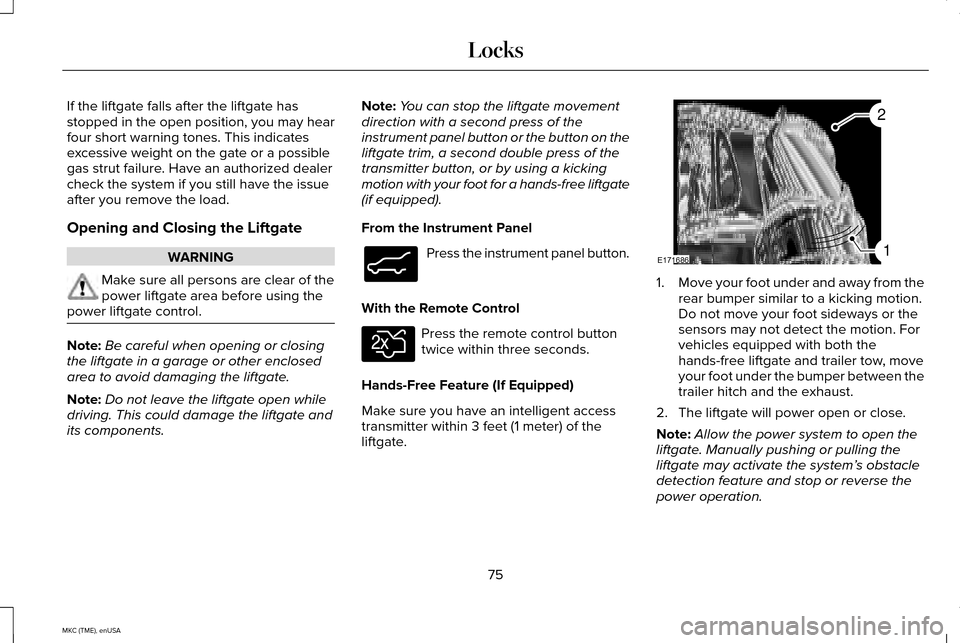
Hands-Free Feature (If Equipped)
Make sure you have an intelligent access
transmitter within 3 feet (1 meter) of the
liftgate. 1.
Move your foot under and away from the
rear bumper similar to a kicking motion.
Do not move your foot sideways or the
sensors may not detect the motion. For
vehicles equipped with both the
hands-free liftgate and trailer tow, move
your foot under the bumper between the
trailer hitch and the exhaust.
2. The liftgate will power open or close.
Note: Allow the power system to open the
liftgate. Manually pushing or pulling the
liftgate may activate the system’ s obstacle
detection feature and stop or reverse the
power operation.
75
MKC (TME), enUSA LocksE138633 E138630 E171686
2
1
Page 110 of 490
Variations:
Distance-to-empty
Fuel gauge position
Driving type (fuel economy conditions)
35 miles to 80 miles (56 km to 129 km)
1/16th
Highway driving
35 miles (56km)
1/16th
Severe duty driving (trailer towing, extended idle)
Engine Coolant Temperature Gauge
Indicates engine coolant temperature. At
normal operating temperature, the level
indicator will be in the normal range. If the
engine coolant temperature exceeds the
normal range, stop your vehicle as soon as
safely possible, switch off the engine and let
the engine cool. WARNING
Never remove the coolant reservoir
cap while the engine is running or hot. WARNING LAMPS AND
INDICATORS
The following warning lamps and indicators
will alert you to a vehicle condition that may
become serious. Some lamps will illuminate
when you start your vehicle to make sure
they work. If any lamps remain on after
starting your vehicle, refer to the respective
system warning lamp for further information.
Note:
Some warning indicators appear in
the information display and function the
same as a warning lamp, but do not display
when you start your vehicle. Adaptive Cruise Control (If Equipped) The speed control system indicator
light changes color to indicate
what mode the system is in:
See
Using Adaptive Cruise Control (page 204).
On (white light): Illuminates when you turn
the adaptive cruise control system on. Turns
off when you turn the speed control system
off.
Engaged (green light): Illuminates when the
adaptive cruise control system engages.
Turns off when the speed control system is
disengaged.
107
MKC (TME), enUSA Instrument ClusterE144524
Page 167 of 490
•
Fuels can also be harmful if absorbed
through the skin. If fuel is splashed on
the skin, clothing or both, promptly
remove contaminated clothing and wash
skin thoroughly with soap and water.
Repeated or prolonged skin contact with
fuel liquid or vapor causes skin irritation.
• Be particularly careful if you are taking
“Antabuse ” or other forms of disulfiram
for the treatment of alcoholism. Breathing
gasoline vapors, or skin contact could
cause an adverse reaction. In sensitive
individuals, serious personal injury or
sickness may result. If fuel is splashed on
the skin, promptly wash skin thoroughly
with soap and water. Consult a physician
immediately if you experience an adverse
reaction.
FUEL QUALITY
Note: Do not use fuel additive products in
your fuel tank. We recommend you use only
high quality fuel without additives or other
engine treatments. Note:
Your warranty will not cover any
vehicle damage, loss of vehicle performance
or repairs to your vehicle, caused by the use
of fuel not recommended.
Choosing the Right Fuel
Use only unleaded gasoline or unleaded
gasoline blended with a maximum of 15%
ethanol in your gasoline vehicle.
Do not use:
• Fuels containing more than 15% ethanol
or E-85 fuel.
• Fuels containing methanol.
• Fuels containing metallic-based additives,
including manganese-based compounds.
• Prohibited by law, you cannot use leaded
fuel.
• Fuels containing the octane booster
additive, methylcyclopentadienyl
manganese tricarbonyl (MMT).
Note: Use of any fuel other than
recommended fuel can cause powertrain
damage, impair the emission control system
or cause loss of vehicle performance. Your
warranty may not cover these damages. Octane Recommendations
We recommend regular unleaded gasoline
with a pump (R+M)/2 octane rating of 87.
Some stations offer fuels posted as regular
with an octane rating below 87, particularly
in high altitude areas. We do not recommend
fuels with an octane rating below 87.
To provide improved performance, we
recommend premium fuel for severe duty
usage such as trailer tow.
Do not be concerned if your engine
sometimes knocks lightly. However, if it
knocks heavily while you are using fuel with
the recommended octane rating, see your
authorized dealer to prevent any engine
damage.
RUNNING OUT OF FUEL
Avoid running out of fuel because this
situation may have an adverse effect on
powertrain components.
If you have run out of fuel:
164
MKC (TME), enUSA Fuel and Refueling
Page 187 of 490
Applying the electric parking brake
when the vehicle is moving
WARNINGS
Applying the electric parking brake
while moving will result in use of the
anti-lock braking system. Do not use the
electric parking brake system when the
vehicle is moving unless the normal brake
system is unable to stop the vehicle. With the exception of emergency
conditions (for example, the brake
pedal does not work or is blocked), do not
apply the electric parking brake while the
vehicle is moving. On bends, or poor road
surfaces or weather conditions, emergency
braking can cause the vehicle to skid out of
control or off the road. If you apply the electric parking brake when
your vehicle is moving, the brake system
warning lamp will illuminate and a warning
chime will sound. See Instrument Cluster
(page 105). If your vehicle speed is above 4 mph (6
km/h), the braking force is applied as long
as the switch is applied. Release or press the
switch or press the accelerator pedal to stop
the braking force.
Releasing the electric parking brake
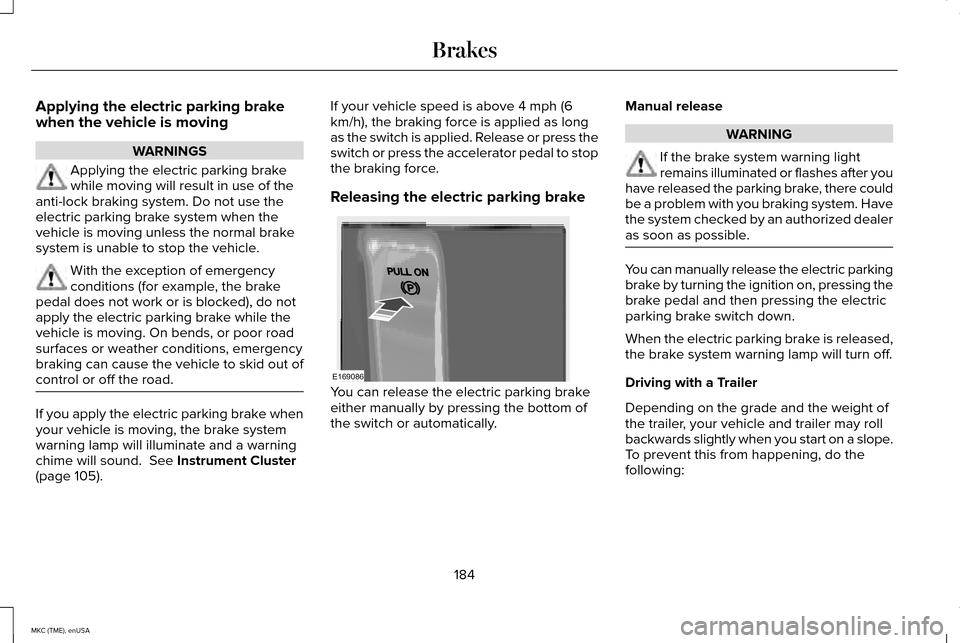
You can release the electric parking brake
either manually by pressing the bottom of
the switch or automatically.Manual release WARNING
If the brake system warning light
remains illuminated or flashes after you
have released the parking brake, there could
be a problem with you braking system. Have
the system checked by an authorized dealer
as soon as possible. You can manually release the electric parking
brake by turning the ignition on, pressing the
brake pedal and then pressing the electric
parking brake switch down.
When the electric parking brake is released,
the brake system warning lamp will turn off.
Driving with a Trailer
Depending on the grade and the weight of
the trailer, your vehicle and trailer may roll
backwards slightly when you start on a slope.
To prevent this from happening, do the
following:
184
MKC (TME), enUSA BrakesE169086
Page 194 of 490
PARKING AID (If Equipped)
WARNINGS
To help avoid personal injury, please
read and understand the limitations of
the system as contained in this section.
Sensing is only an aid for some (generally
large and fixed) objects when moving in
reverse on a flat surface at parking speeds.
Traffic control systems, inclement weather,
air brakes, and external motors and fans may
also affect the function of the sensing
system; this may include reduced
performance or a false activation. To help avoid personal injury, always
use caution when in R (Reverse) and
when using the sensing system. This system is not designed to prevent
contact with small or moving objects.
The system is designed to provide a warning
to assist the driver in detecting large
stationary objects to avoid damaging the
vehicle. The system may not detect smaller
objects, particularly those close to the
ground. WARNINGS
Certain add-on devices such as large
trailer hitches, bike or surfboard racks
and any device that may block the normal
detection zone of the system, may create
false beeps. Note:
Keep the sensors, located on the
bumper or fascia, free from snow, ice and
large accumulations of dirt. If the sensors
are covered, the system’ s accuracy can be
affected. Do not clean the sensors with sharp
objects.
Note: If your vehicle sustains damage to the
bumper or fascia, leaving it misaligned or
bent, the sensing zone may be altered
causing inaccurate measurement of
obstacles or false alarms.
Note: If your vehicle is equipped with
MyKey®, it is possible to prevent turning the
sensing system off.
See MyKey™ (page 62).
The sensing system warns the driver of
obstacles within a certain range of the
bumper area. The system turns on
automatically whenever the ignition is
switched on. When receiving a detection warning, the
radio volume is reduced to a predetermined
level. After the warning goes away, the radio
volume returns to the previous level.
The system can be switched off through the
information display menu or from the pop-up
message that appears once the transmission
is shifted into
R. See General Information
(page 112).
If a fault is present in the system, a warning
message appears in the information display
and does not allow the driver to switch the
faulted system on.
See Information
Messages (page 118).
Rear Sensing System
The rear sensors are only active when the
transmission is in
R. As the vehicle moves
closer to the obstacle, the rate of the audible
warning increases. When the obstacle is
fewer than 10 inches (25 centimeters) away,
the warning sounds continuously. If a
191
MKC (TME), enUSA Parking Aids
Page 196 of 490
The system sounds an audible warning when
obstacles are near either bumper in the
following manner:
•
Objects detected by the front sensors
are indicated by a high-pitched tone from
the front radio speakers.
• Objects detected by the rear sensors are
indicated by a lower pitched tone from
the rear radio speakers.
• The sensing system reports the obstacle
which is closest to the front or rear of the
vehicle. For example, if an obstacle is 24
inches (60 centimeters) from the front of
the vehicle and, at the same time, an
obstacle is only 16 inches (40
centimeters) from the rear of the vehicle,
the lower pitched tone sounds.
• An alternating warning sounds from the
front and rear if there are objects at both
bumpers that are closer than 10 inches
(25 centimeters).
For specific information on the reverse
sensing portion of the system, refer to that
section. ACTIVE PARK ASSIST (If Equipped) WARNING
Designed to be a supplementary park
aid, this system may not work in all
conditions. This system cannot replace the
driver’ s attention and judgment. The driver
is responsible for avoiding hazards and
maintaining a safe distance and speed, even
when the system is in use. Note:
The driver is always responsible for
controlling the vehicle, supervising the
system and intervening if required.
Note: The sensors may not detect objects
in heavy rain or other conditions that cause
disruptive reflections.
Note: The sensors may not detect objects
with surfaces that absorb ultrasonic waves.
Note: Whenever the battery is disconnected
or a new battery installed, you need to drive
your vehicle a short distance and your speed
must exceed 12.4 mph (20 km/h) so the
system can recalibrate the steering angle
data. The system detects an available parallel
parking space and automatically steers your
vehicle into the space (hands-free) while you
control the accelerator, gearshift and brakes.
The system visually and audibly instructs you
to park the vehicle.
The system may not function correctly if
something passes between the front bumper
and the parking space (a pedestrian or
cyclist) or if the edge of the neighboring
parked vehicle is high off the ground (for
example, a bus, tow truck or flatbed truck).
Do not use the system if:
•
You have attached a foreign object (bike
rack or trailer) to the front or rear of your
vehicle or attached close to the sensors
• You have attached an overhanging
object (surfboard) to the roof
• The front bumper or side sensors are
damaged or obstructed by a foreign
object (front bumper cover)
• A mini-spare tire is in use
193
MKC (TME), enUSA Parking Aids
Page 199 of 490
•
Driving above 6 mph (10 km/h) during
automatic steering.
• Turning off the traction control system.
Certain vehicle conditions can also
deactivate the system, such as:
• Traction control has activated on a
slippery or loose surface.
• There is an anti-lock brake system
activation or failure.
• Something touches the steering wheel.
If a problem occurs with the system, a
warning message is displayed, followed by
a tone. Occasional system messages may
occur in normal operation. For recurring or
frequent system faults, contact an authorized
dealer to have your vehicle serviced. Park Out Assist (If Equipped) WARNING
Designed to be a supplementary park
aid, this system may not work in all
conditions. This system cannot replace the
driver’ s attention and judgment. The driver
is responsible for avoiding hazards and
maintaining a safe distance and speed, even
when the system is in use. Note:
The driver is always responsible for
controlling the vehicle, supervising the
system and intervening if required.
Note: The sensors may not detect objects
in heavy rain or other conditions that cause
disruptive reflections.
Note: The sensors may not detect objects
with surfaces that absorb ultrasonic waves.
The system determines the clearance to the
front and rear of your vehicle and
automatically steers your vehicle out of a
parallel parking space (hands-free) while you
control the accelerator, gearshift and brakes.
The system visually and audibly instructs you
to enter traffic. The system may not function correctly if
something passes between the front bumper
and the parking space (a pedestrian or
cyclist) or if the edge of the neighboring
parked vehicle is high off the ground (for
example, a bus, tow truck or flatbed truck).
Do not use the system if:
•
You have attached a foreign object (bike
rack or trailer) to the front or rear of your
vehicle or attached close to the sensors.
• You have attached an overhanging
object (surfboard) to the roof.
• The front bumper or side sensors are
damaged or obstructed by a foreign
object (front bumper cover).
• A mini-spare tire is in use.
Using Park Out Assist While your vehicle is at rest in a
parallel parking space, press the
button located on the right side of
the center stack.
196
MKC (TME), enUSA Parking AidsE146186
Page 203 of 490
WARNINGS
Use caution when turning camera
features on or off while in Reverse (R).
Make sure your vehicle is not moving. The rear view camera system provides a
video image of the area behind your vehicle.
During operation, lines will appear in the
display that represent your vehicle
’s path
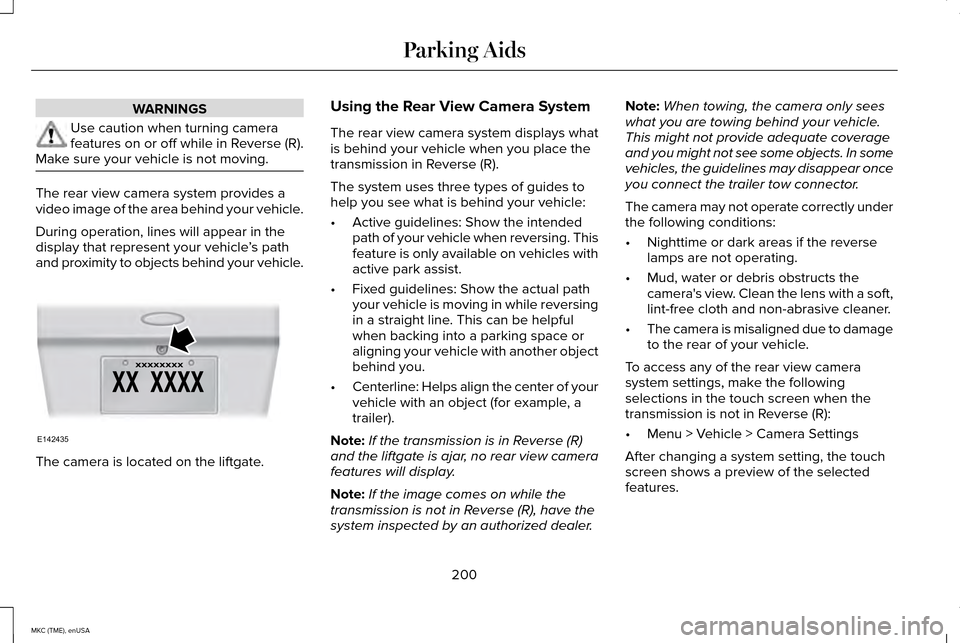
and proximity to objects behind your vehicle. The camera is located on the liftgate. Using the Rear View Camera System
The rear view camera system displays what
is behind your vehicle when you place the
transmission in Reverse (R).
The system uses three types of guides to
help you see what is behind your vehicle:
•
Active guidelines: Show the intended
path of your vehicle when reversing. This
feature is only available on vehicles with
active park assist.
• Fixed guidelines: Show the actual path
your vehicle is moving in while reversing
in a straight line. This can be helpful
when backing into a parking space or
aligning your vehicle with another object
behind you.
• Centerline: Helps align the center of your
vehicle with an object (for example, a
trailer).
Note: If the transmission is in Reverse (R)
and the liftgate is ajar, no rear view camera
features will display.
Note: If the image comes on while the
transmission is not in Reverse (R), have the
system inspected by an authorized dealer. Note:
When towing, the camera only sees
what you are towing behind your vehicle.
This might not provide adequate coverage
and you might not see some objects. In some
vehicles, the guidelines may disappear once
you connect the trailer tow connector.
The camera may not operate correctly under
the following conditions:
• Nighttime or dark areas if the reverse
lamps are not operating.
• Mud, water or debris obstructs the
camera's view. Clean the lens with a soft,
lint-free cloth and non-abrasive cleaner.
• The camera is misaligned due to damage
to the rear of your vehicle.
To access any of the rear view camera
system settings, make the following
selections in the touch screen when the
transmission is not in Reverse (R):
• Menu > Vehicle > Camera Settings
After changing a system setting, the touch
screen shows a preview of the selected
features.
200
MKC (TME), enUSA Parking AidsE142435
Page 212 of 490
System Not Available
Conditions that can cause the system to
deactivate or prevent the system from
activating when requested include:
•
A blocked sensor.
• High brake temperature.
• A failure in the system or a related
system. Blocked Sensor WARNINGS
Do not use the system when towing a
trailer with aftermarked trailer brake
controls. Aftermarket trailer brakes will not
function properly when you switch the
system on because the brakes are
electronically controlled. Failing to do so may
result in loss of vehicle control, which could
result in serious injury. Do not use tire sizes other than those
recommended because this can affect
the normal operation of the system. Failing
to do so may result in a loss of vehicle
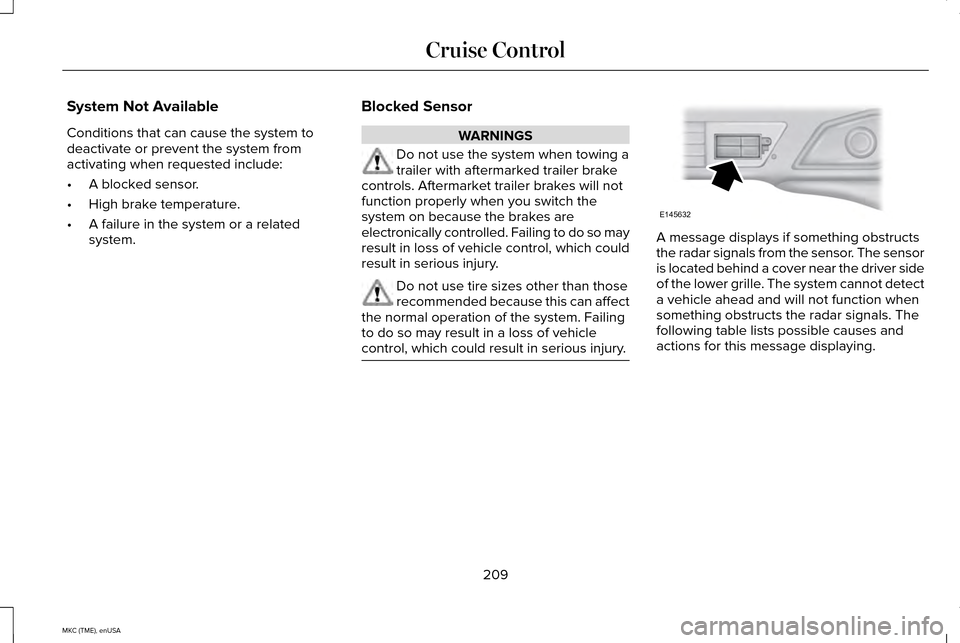
control, which could result in serious injury. A message displays if something obstructs
the radar signals from the sensor. The sensor
is located behind a cover near the driver side
of the lower grille. The system cannot detect
a vehicle ahead and will not function when
something obstructs the radar signals. The
following table lists possible causes and
actions for this message displaying.
209
MKC (TME), enUSA Cruise ControlE145632