transmission service LINCOLN MKC 2015 Owners Manual
[x] Cancel search | Manufacturer: LINCOLN, Model Year: 2015, Model line: MKC, Model: LINCOLN MKC 2015Pages: 490, PDF Size: 4.74 MB
Page 7 of 490
Essential Towing Checks.............................241
Transporting the Vehicle............................243
Towing the Vehicle on Four Wheels........244
Driving Hints
Breaking-In.....................................................246
Economical Driving......................................246
Driving Through Water................................247
Floor Mats.......................................................247
Roadside Emergencies
Roadside Assistance
...................................249
Hazard Warning Flashers
...........................250
Fuel Shutoff
...................................................250
Jump Starting the Vehicle...........................251
Post-Crash Alert System.............................253
Customer Assistance
Getting the Services You Need
................254
In California (U.S. Only)...............................255
The Better Business Bureau (BBB) Auto Line Program (U.S. Only)........................256 Utilizing the Mediation/Arbitration Program
(Canada Only)
...........................................257
Getting Assistance Outside the U.S. and Canada.......................................................257
Ordering Additional Owner's Literature....................................................259
Reporting Safety Defects (U.S. Only)......259
Reporting Safety Defects (Canada Only)............................................................260
Fuses
Fuse Specification Chart
.............................261
Changing a Fuse...........................................277
Maintenance
General Information
.....................................278
Opening and Closing the Hood
...............279
Under Hood Overview -
2.0L
EcoBoost™..................................................280
Under Hood Overview -
2.3L
EcoBoost™..................................................282
Engine Oil Dipstick
.......................................283
Engine Oil Check
..........................................283
Oil Change Indicator Reset........................284 Engine Coolant Check................................284
Automatic Transmission Fluid Check......287
Brake Fluid Check
........................................288
Power Steering Fluid Check ......................
288
Washer Fluid Check....................................288
Fuel Filter
.......................................................288
Changing the 12V Battery..........................288
Checking the Wiper Blades
........................291
Changing the Wiper Blades.......................291
Adjusting the Headlamps..........................292
Removing a Headlamp
...............................293
Changing a Bulb
...........................................293
Bulb Specification Chart
.............................295
Changing the Engine Air Filter..................297
Vehicle Care
General Information....................................299
Cleaning Products
.......................................299
Cleaning the Exterior..................................299
Waxing
............................................................300
Cleaning the Engine.....................................301
Cleaning the Windows and Wiper Blades..........................................................301
4
MKC (TME), enUSA Table of Contents
Page 8 of 490
Cleaning the Interior...................................302
Cleaning the Instrument Panel and
Instrument Cluster Lens.........................303
Cleaning Leather Seats..............................304
Repairing Minor Paint Damage.................305
Cleaning the Alloy Wheels........................305
Vehicle Storage
............................................305
Wheels and Tires
General Information
.....................................308
Tire Care
..........................................................310
Using Snow Chains......................................323
Tire Pressure Monitoring System.............324
Changing a Road Wheel............................328
Technical Specifications.............................334
Capacities and Specifications
Engine Specifications
..................................336
Motorcraft Parts.............................................337
Vehicle Identification Number
..................339
Vehicle Certification Label
.........................339
Transmission Code Designation..............340
Technical Specifications..............................341 Audio System
General Information.....................................345
Audio unit -
Vehicles With: Premium AM/
FM/CD.........................................................346
Media Hub
......................................................348
MyLincoln Touch ™
General Information
.....................................350
Settings...........................................................363
Entertainment................................................376
Phone..............................................................396
Information.....................................................403
Climate.............................................................414
Navigation.......................................................418
Accessories
Accessories...................................................428
Appendices
End User License Agreement
...................430
Extended Service Plan (ESP)
Extended Service Plan (ESP).....................448 Scheduled Maintenance
General Maintenance Information............451
Normal Scheduled Maintenance
.............455
Special Operating Conditions Scheduled Maintenance.............................................459
Scheduled Maintenance Record
..............463
5
MKC (TME), enUSA Table of Contents
Page 63 of 490
Vehicles with automatic climate control can
be configured to operate when the vehicle
is remote started. See Automatic Climate
Control (page 136). A manual climate control
system will run at the setting it was set to
when you switched the vehicle off.
Many states and provinces have restrictions
for the use of remote start. Check your local
and state or provincial laws for specific
requirements regarding remote start
systems.
The remote start system will not work if:
• The ignition is on.
• The alarm system is triggered.
• You disable the feature.
• The hood is open.
• The transmission is not in
P.
• The vehicle battery voltage is too low.
• The service engine soon light is on. Remote Starting the Vehicle
Note:
You must press each button within
three seconds of each other. Your vehicle
will not remote start if you do not follow this
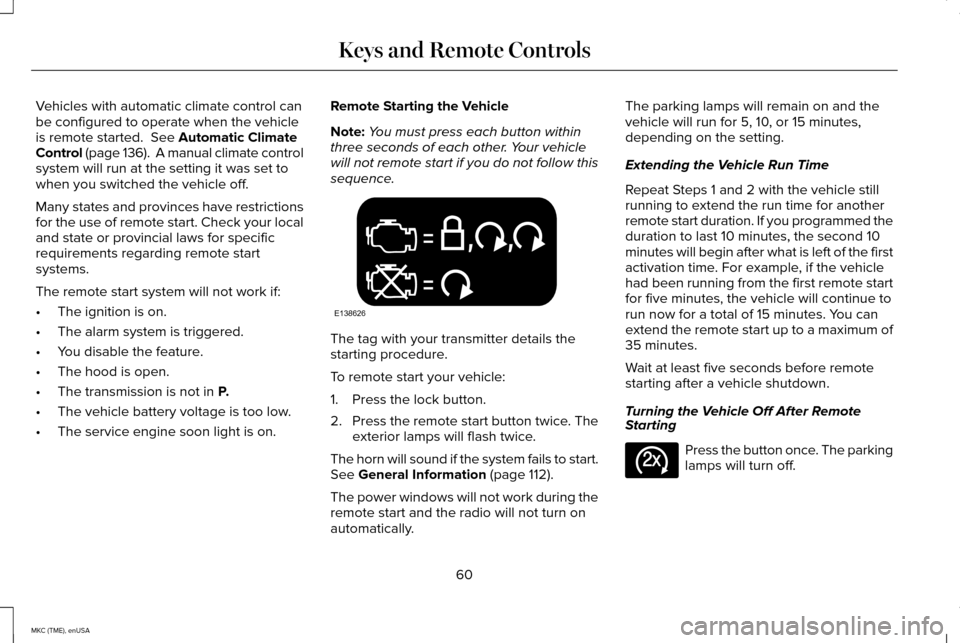
sequence. The tag with your transmitter details the
starting procedure.
To remote start your vehicle:
1. Press the lock button.
2.
Press the remote start button twice. The
exterior lamps will flash twice.
The horn will sound if the system fails to start.
See
General Information (page 112).
The power windows will not work during the
remote start and the radio will not turn on
automatically. The parking lamps will remain on and the
vehicle will run for 5, 10, or 15 minutes,
depending on the setting.
Extending the Vehicle Run Time
Repeat Steps 1 and 2 with the vehicle still
running to extend the run time for another
remote start duration. If you programmed the
duration to last 10 minutes, the second 10
minutes will begin after what is left of the first
activation time. For example, if the vehicle
had been running from the first remote start
for five minutes, the vehicle will continue to
run now for a total of 15 minutes. You can
extend the remote start up to a maximum of
35 minutes.
Wait at least five seconds before remote
starting after a vehicle shutdown.
Turning the Vehicle Off After Remote
Starting
Press the button once. The parking
lamps will turn off.
60
MKC (TME), enUSA Keys and Remote ControlsE138626 E138625
Page 122 of 490

Action
Message
The system has disabled the automatic braking.
Normal Cruise Active Automatic Braking
Turned Off
A radar malfunction is preventing the adaptive cruise control from engag\
ing.
Front Sensor Not Aligned
The adaptive cruise has reinstated controls to the driver.
Adaptive Cruise - Driver Resume Control
The vehicle speed is too slow to activate the adaptive cruise.
Adaptive Cruise Speed Too Low to
Activate
The adaptive cruise is automatically adjusting the gap distance and the \
driver needs to shift the transmission into a lower gear.
Adaptive Cruise Shift Down
AdvanceTrac ™ Action
Message
The system detects a malfunction due to a blocked sensor.
Service AdvanceTrac
The driver has disabled or enabled the traction control.
AdvanceTrac Off On
119
MKC (TME), enUSA Information Displays
Page 136 of 490
Transmission
Action
Message
See an authorized dealer.
Transmission Malfunction Service Now
The transmission is overheating and needs to cool. Stop in a safe place as soon as possible.
Transmission Overheating Stop Safely
See an authorized dealer.
Transmission Service Required
The transmission is getting hot. Stop to let it cool.
Transmission Too Hot Press Brake
The transmission has overheated and has limited functionality. See Automatic Transmission
(page 171).
Transmission Limited Function See Manual
The transmission is too cold. Wait for it to warm up before you drive.
Transmission Warming Up Please Wait
A reminder to shift into park. In addition, this message is typical afte\
r reconnecting or rechargingthe battery until you cycle the ignition to the on mode.
See Changing the 12V Battery (page
288).
Transmission Not in Park
The transmission has adjusted the shift strategy.
Transmission Adjusted
The transmission is adjusting the shift strategy.
Transmission Adapt Mode
The transmission is locked and unable to select gears.
Transmission Indicate Mode Lockup On
The transmission is unlocked and free to select gears.
Transmission Indicate Mode Lockup Off
You have selected an invalid gear.
Invalid Gear Selection
You need to depress the brake pedal.
Press Brake Pedal
133
MKC (TME), enUSA Information Displays
Page 137 of 490
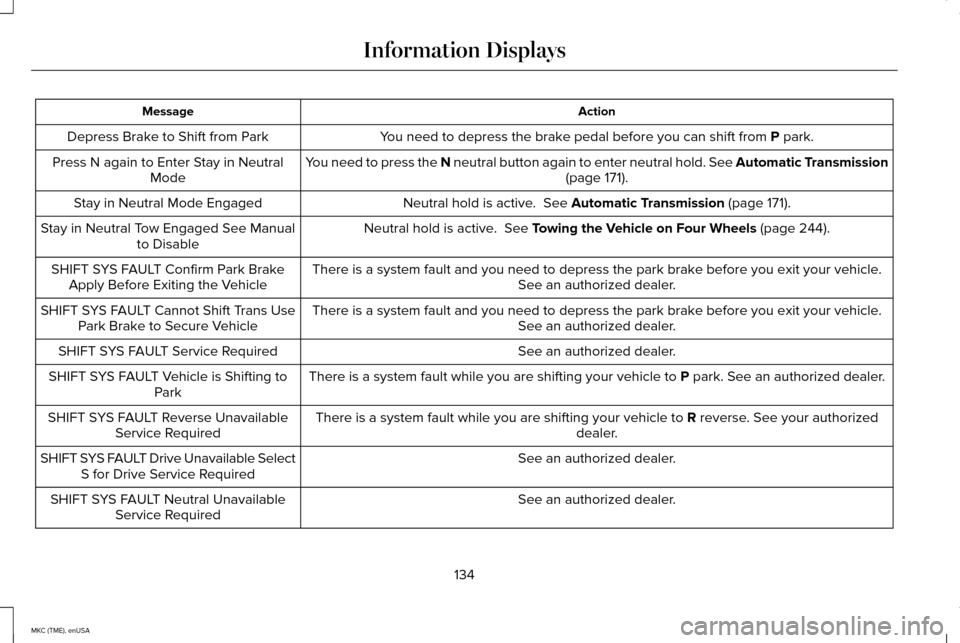
Action
Message
You need to depress the brake pedal before you can shift from P park.
Depress Brake to Shift from Park
You need to press the N neutral button again to enter neutral hold. See Automatic Transmission (page
171).
Press N again to Enter Stay in Neutral
Mode
Neutral hold is active.
See Automatic Transmission (page 171).
Stay in Neutral Mode Engaged
Neutral hold is active.
See Towing the Vehicle on Four Wheels (page 244).
Stay in Neutral Tow Engaged See Manual
to Disable
There is a system fault and you need to depress the park brake before you exit your vehicle. See an authorized dealer.
SHIFT SYS FAULT Confirm Park Brake
Apply Before Exiting the Vehicle
There is a system fault and you need to depress the park brake before you exit your vehicle.See an authorized dealer.
SHIFT SYS FAULT Cannot Shift Trans Use
Park Brake to Secure Vehicle
See an authorized dealer.
SHIFT SYS FAULT Service Required
There is a system fault while you are shifting your vehicle to
P park. See an authorized dealer.
SHIFT SYS FAULT Vehicle is Shifting to
Park
There is a system fault while you are shifting your vehicle to
R reverse. See your authorized
dealer.
SHIFT SYS FAULT Reverse Unavailable
Service Required
See an authorized dealer.
SHIFT SYS FAULT Drive Unavailable Select
S for Drive Service Required
See an authorized dealer.
SHIFT SYS FAULT Neutral Unavailable
Service Required
134
MKC (TME), enUSA Information Displays
Page 173 of 490
You can correct these temporary
malfunctions by filling the fuel tank with good
quality fuel, properly closing the fuel fill inlet
or letting the electrical system dry out. After
three driving cycles without these or any
other temporary malfunctions present, the
service engine soon indicator should stay off
the next time you start the engine. A driving
cycle consists of a cold engine startup
followed by mixed city/highway driving. No
additional vehicle service is required.
If the service engine soon indicator remains
on, have your vehicle serviced at the first
available opportunity. Although some
malfunctions detected by the OBD-II may not
have symptoms that are apparent, continued
driving with the service engine soon indicator
on can result in increased emissions, lower
fuel economy, reduced engine and
transmission smoothness, and lead to more
costly repairs.
Readiness for Inspection/Maintenance
(I/M) Testing
Some state/provincial and local governments
may have Inspection/Maintenance (I/M)
programs to inspect the emission control
equipment on your vehicle. Failure to pass
this inspection could prevent you from
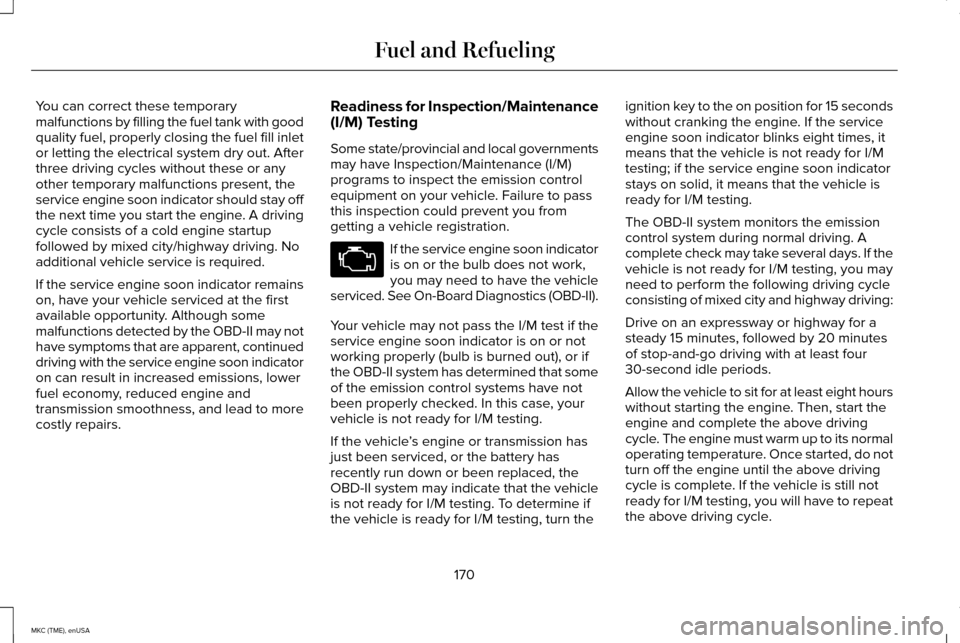
getting a vehicle registration. If the service engine soon indicator
is on or the bulb does not work,
you may need to have the vehicle
serviced. See On-Board Diagnostics (OBD-II).
Your vehicle may not pass the I/M test if the
service engine soon indicator is on or not
working properly (bulb is burned out), or if
the OBD-II system has determined that some
of the emission control systems have not
been properly checked. In this case, your
vehicle is not ready for I/M testing.
If the vehicle ’s engine or transmission has
just been serviced, or the battery has
recently run down or been replaced, the
OBD-II system may indicate that the vehicle
is not ready for I/M testing. To determine if
the vehicle is ready for I/M testing, turn the ignition key to the on position for 15 seconds
without cranking the engine. If the service
engine soon indicator blinks eight times, it
means that the vehicle is not ready for I/M
testing; if the service engine soon indicator
stays on solid, it means that the vehicle is
ready for I/M testing.
The OBD-II system monitors the emission
control system during normal driving. A
complete check may take several days. If the
vehicle is not ready for I/M testing, you may
need to perform the following driving cycle
consisting of mixed city and highway driving:
Drive on an expressway or highway for a
steady 15 minutes, followed by 20 minutes
of stop-and-go driving with at least four
30-second idle periods.
Allow the vehicle to sit for at least eight hours
without starting the engine. Then, start the
engine and complete the above driving
cycle. The engine must warm up to its normal
operating temperature. Once started, do not
turn off the engine until the above driving
cycle is complete. If the vehicle is still not
ready for I/M testing, you will have to repeat
the above driving cycle.
170
MKC (TME), enUSA Fuel and Refueling
Page 200 of 490
The touchscreen displays a message
requesting an indication of direction. Use the
direction indicator to signal which side of
your vehicle you want to exit the parking
space.
Note:
If there is no vehicle in front of you,
the Park Out Assist feature cannot be
activated.
Automatic Steering out of a Parking
Space
The system determines a suitable clearance
to the front and rear of your vehicle. The
touchscreen displays a message to shift to
Reverse (R), Drive (D) or Sport (S). When you shift the transmission into R
(Reverse), D (Drive) or S (Sport), with your
hands off the wheel (and nothing obstructing
its movement), your vehicle steers itself to
exit the space. If there is not sufficient
clearance to the vehicle in front of you, the
system displays instructions to move your
vehicle back and forth in the space. Parking
Aid is enabled to avoid contact to the
neighboring vehicles.
When automatic steering is finished, the
touchscreen displays a message informing
you to take control and a tone sounds,
indicating the completion of the Park Out
Assist process.
Note:
The driver is responsible for checking
traffic conditions at all times. Deactivating the Park Out Assist
Feature
Manually deactivate the system by:
•
Pressing the active park assist button.
• Grabbing the steering wheel.
• Driving above 6 mph (10 km/h) during
automatic steering.
• Turning off the traction control system.
Certain vehicle conditions can also
deactivate the system, such as:
• Traction control has activated on a
slippery or loose surface.
• There is an anti-lock brake system
activation or failure.
• Something touches the steering wheel.
If a problem occurs with the system, a
warning message is displayed, followed by
a tone. Occasional system messages may
occur in normal operation. For recurring or
frequent system faults, contact an authorized
dealer to have your vehicle serviced.
197
MKC (TME), enUSA Parking Aids
Page 291 of 490
Have an authorized dealer check and change
the transmission fluid and filter at the correct
service interval. See Scheduled
Maintenance (page 451). Your transmission
does not consume fluid. However, the fluid
level should be checked if the transmission
is not working properly, (i.e., if the
transmission slips or shifts slowly) or if you
notice some sign of fluid leakage.
Do not use supplemental transmission fluid
additives, treatments or cleaning agents. The
use of these materials may affect
transmission operation and result in damage
to internal transmission components.
BRAKE FLUID CHECK
Fluid levels between the MIN and MAX lines
are within the normal operating range; there
is no need to add fluid. If the fluid levels are
outside of the normal operating range, the
performance of the system could be
compromised; seek service from your
authorized dealer immediately. POWER STEERING FLUID CHECK
Your vehicle is equipped with an electric
power steering (EPS) system. There is no
fluid reservoir to check or fill.
WASHER FLUID CHECK
WARNING
If you operate your vehicle in
temperatures below 40°F (5°C), use
washer fluid with antifreeze protection.
Failure to use washer fluid with antifreeze
protection in cold weather could result in
impaired windshield vision and increase the
risk of injury or accident. Note:
The front and rear washer systems
are supplied from the same reservoir.
Add fluid to fill the reservoir if the level is low.
Only use a washer fluid that meets Ford
specifications.
See Capacities and
Specifications (page 336). State or local regulations on volatile organic
compounds may restrict the use of methanol,
a common windshield washer antifreeze
additive. Washer fluids containing
non-methanol antifreeze agents should be
used only if they provide cold weather
protection without damaging the vehicle
’s
paint finish, wiper blades or washer system.
FUEL FILTER
Your vehicle is equipped with a lifetime fuel
filter that is integrated with the fuel tank.
Regular maintenance or replacement is not
needed.
CHANGING THE 12V BATTERY WARNINGS
Batteries normally produce explosive
gases which can cause personal injury.
Therefore, do not allow flames, sparks or
lighted substances to come near the battery.
When working near the battery, always shield
your face and protect your eyes. Always
provide proper ventilation.
288
MKC (TME), enUSA Maintenance
Page 333 of 490
•
Wet weather driving capability.
• All-wheel driving capability
When driving with the full-size dissimilar
spare wheel and tire assembly additional
caution should be given to:
• Towing a trailer.
• Driving vehicles equipped with a camper
body.
• Driving vehicles with a load on the cargo
rack.
Drive cautiously when using a full-size
dissimilar spare wheel and tire assembly and
seek service as soon as possible.
Tire Change Procedure WARNINGS
When one of the front wheels is off the
ground, the transmission alone will not
prevent your vehicle from moving or slipping
off the jack, even if your vehicle is in park
(P). WARNINGS
To help prevent your vehicle from
moving when you change a tire, be
sure the parking brake is set, then block (in
both directions) the wheel that is diagonally
opposite (other side and end of your vehicle)
to the tire being changed. If your vehicle slips off the jack, you or
someone else could be seriously
injured. Do not attempt to change a tire on the
side of the vehicle close to moving
traffic. Pull far enough off the road to avoid
the danger of being hit when operating the
jack or changing the wheel. To lessen the risk of personal injury,
do not put any part of your body under
your vehicle while changing a tire. Do not
start the engine when your vehicle is on the
jack. The jack is only meant for changing the
tire. Note:
Passengers should not remain in your
vehicle when the vehicle is being jacked. 1. Park on a level surface, set the parking
brake and activate the hazard flashers.
2. Place the transmission in park (P) and
turn the engine off.
3. Remove the carpeted wheel cover.
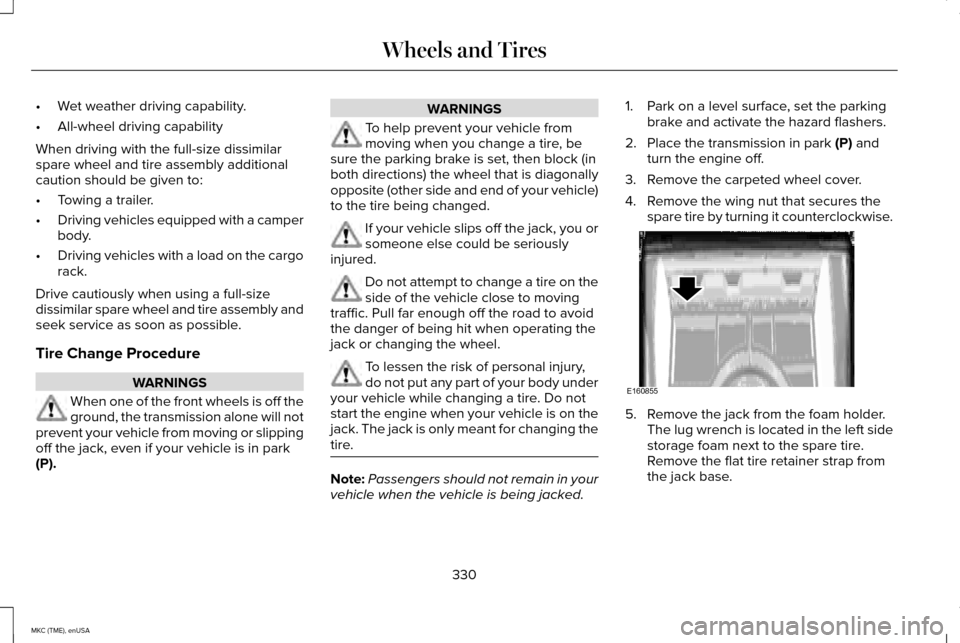
4. Remove the wing nut that secures the spare tire by turning it counterclockwise. 5. Remove the jack from the foam holder.
The lug wrench is located in the left side
storage foam next to the spare tire.
Remove the flat tire retainer strap from
the jack base.
330
MKC (TME), enUSA Wheels and TiresE160855