lock LINCOLN MKC 2017 Owners Manual
[x] Cancel search | Manufacturer: LINCOLN, Model Year: 2017, Model line: MKC, Model: LINCOLN MKC 2017Pages: 538, PDF Size: 4.8 MB
Page 343 of 538
13. Remove the jack and fully tighten the
lug nuts in the order shown. See
Technical Specifications (page 342).
Stowing the flat tire
1. Put the jack and lug wrench away. Make
sure the jack is fastened so it does not
rattle when you drive.
2. Unblock the wheels.
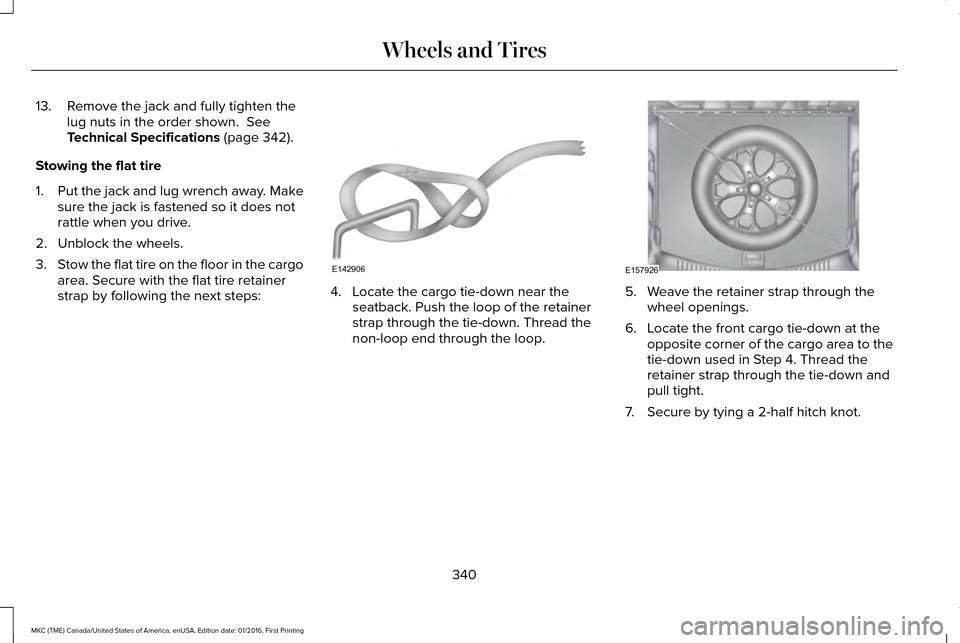
3. Stow the flat tire on the floor in the cargo
area. Secure with the flat tire retainer
strap by following the next steps: 4. Locate the cargo tie-down near the
seatback. Push the loop of the retainer
strap through the tie-down. Thread the
non-loop end through the loop. 5. Weave the retainer strap through the
wheel openings.
6. Locate the front cargo tie-down at the opposite corner of the cargo area to the
tie-down used in Step 4. Thread the
retainer strap through the tie-down and
pull tight.
7. Secure by tying a 2-half hitch knot.
340
MKC (TME) Canada/United States of America, enUSA, Edition date: 01/2016, First Printing Wheels and TiresE142906 E157926
Page 357 of 538
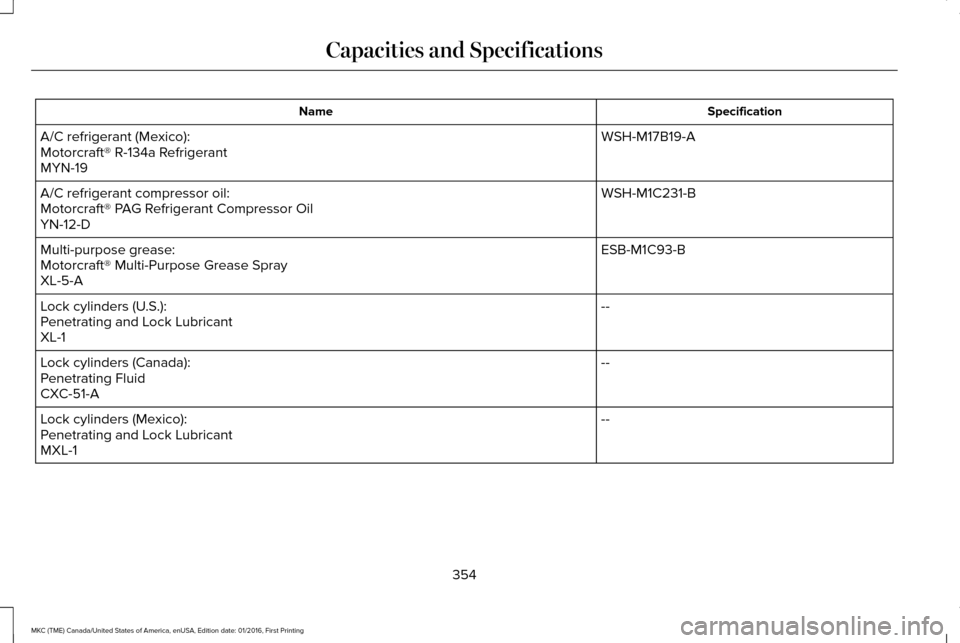
Specification
Name
WSH-M17B19-A
A/C refrigerant (Mexico):
Motorcraft® R-134a Refrigerant
MYN-19
WSH-M1C231-B
A/C refrigerant compressor oil:
Motorcraft® PAG Refrigerant Compressor Oil
YN-12-D
ESB-M1C93-B
Multi-purpose grease:
Motorcraft® Multi-Purpose Grease Spray
XL-5-A
--
Lock cylinders (U.S.):
Penetrating and Lock Lubricant
XL-1
--
Lock cylinders (Canada):
Penetrating Fluid
CXC-51-A
--
Lock cylinders (Mexico):
Penetrating and Lock Lubricant
MXL-1
354
MKC (TME) Canada/United States of America, enUSA, Edition date: 01/2016, First Printing Capacities and Specifications
Page 363 of 538
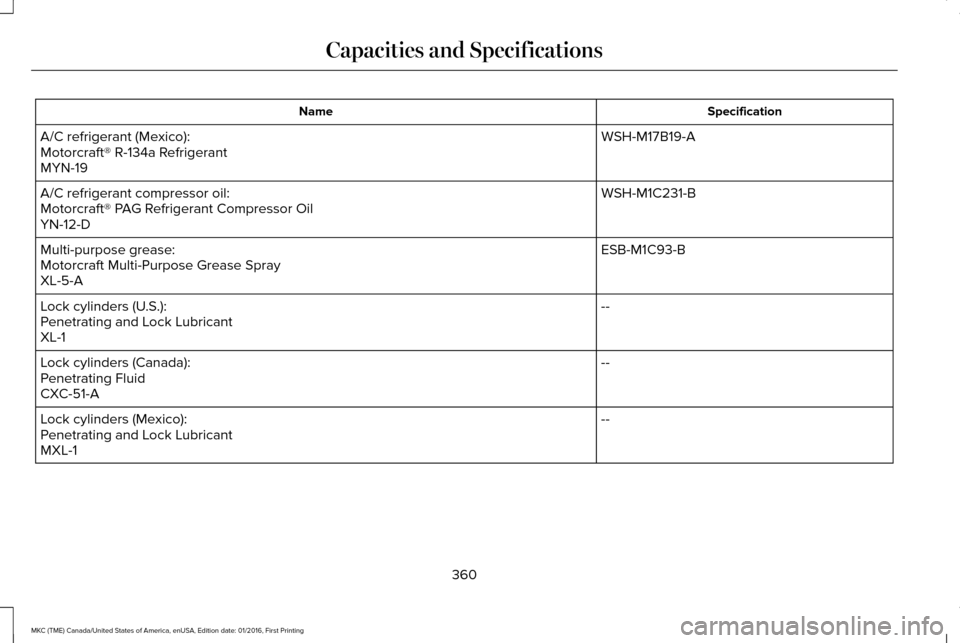
Specification
Name
WSH-M17B19-A
A/C refrigerant (Mexico):
Motorcraft® R-134a Refrigerant
MYN-19
WSH-M1C231-B
A/C refrigerant compressor oil:
Motorcraft® PAG Refrigerant Compressor Oil
YN-12-D
ESB-M1C93-B
Multi-purpose grease:
Motorcraft Multi-Purpose Grease Spray
XL-5-A
--
Lock cylinders (U.S.):
Penetrating and Lock Lubricant
XL-1
--
Lock cylinders (Canada):
Penetrating Fluid
CXC-51-A
--
Lock cylinders (Mexico):
Penetrating and Lock Lubricant
MXL-1
360
MKC (TME) Canada/United States of America, enUSA, Edition date: 01/2016, First Printing Capacities and Specifications
Page 371 of 538

Action and Description
Menu Item
Item
This bar displays icons and messages pertaining to current system activi\
ties including climate
settings, voice commands and phone functions such as text messages.
Status Bar
A
This button is available on the main screens. Pressing it takes you to the home screen view.
Home
B
This shows the current time. You can set the clock manually or have it controlled by the vehicle's
GPS location. See Settings (page 434).
Clock
C
This displays the current outside temperature.
Outside Temperature
D
You can touch any of the buttons on this bar to select a feature.
Feature Bar
E
The touchscreen allows you quick access to
all of your comfort, navigation,
communication and entertainment options.
Using the status and feature bar you can
quickly select the feature you want to use. Note:
Your system is equipped with a feature
that allows you to access and control audio
features for 10 minutes after you switch the
ignition off (and no doors open). The Status Bar
Additional icons also display in the status bar
depending on market, vehicle options and
current operation. If a feature is not active,
the icon does not display. Certain icons may
move to the left or right depending on what
options are active.
368
MKC (TME) Canada/United States of America, enUSA, Edition date: 01/2016, First Printing SYNC™ 3
Page 384 of 538
•
Essential for keeping up with the latest
software and connected features.
• Access to customer support for any
questions you may have.
• Maintain account permissions.
Visit the website to sign up and register. Website
owner.lincoln.com
www.syncmyride.ca
www.syncmaroute.ca
MyLincoln Mobile ™ with Embedded
Modem (If Equipped)
Connect to your vehicle using the MyLincoln
Mobile app on your smartphone. The
embedded modem in your vehicle
communicates with the app and allows you
to start, lock, unlock and locate your vehicle
remotely. The app also connects you with
other vehicle resources like a parking locator,
roadside assistance, dealer locations and
Lincoln Support. MyLincoln Mobile is supported by Android and iPhone and it is
available through the App Store and Google
Play. The MyLincoln mobile app is available
through a free download. Services included
for four years. Text and data rates apply to
usage.
Updating Your System
You can choose to download the update
onto a USB drive or use Wi-Fi to deliver
automatic updates.
USB Updates
To use the USB update you need to log into
your owner account and visit the SYNC
software update page.
Website
owner.lincoln.com
www.syncmyride.ca
www.syncmaroute.ca
The website notifies you if an update is
available. You can then select to download
the update. You will need an empty USB drive. Please
check the website for minimum
requirements. Once you have inserted the
USB drive into your computer, choose to start
the download. Follow the instructions
provided to download the files to the USB
drive.
The installation of most files occurs in the
background, and does not interrupt your use
of the system. Navigation updates cannot be
installed in the background, because the files
are too large.
To install the update in your vehicle, remove
anything that is plugged in the USB ports on
the media hub and plug in the USB drive
containing the update. When the USB drive
is plugged in, the installation should begin
immediately. After a successful installation,
the update is available the next time the
vehicle is started.
381
MKC (TME) Canada/United States of America, enUSA, Edition date: 01/2016, First Printing SYNC™ 3
Page 393 of 538

Once you have provided the digits of the phone number, you can say the following commands:
Description
Voice Command
If the full number was not entered with the first command, you can conti\
nue saying the number.
<0-9>
Tells SYNC 3 to make the phone call.
Dial
Tells SYNC 3 to erase the last block of digits stated.
Delete
Tells SYNC 3 to erase the entire number.
Clear
Text Message Voice Commands
To access text message options, press the voice button and say: Description
Voice command
Listen to Message You can say the number of the message you would like to hear.
Listen to text message ___
Reply to Message
390
MKC (TME) Canada/United States of America, enUSA, Edition date: 01/2016, First Printing SYNC™ 3
Page 405 of 538
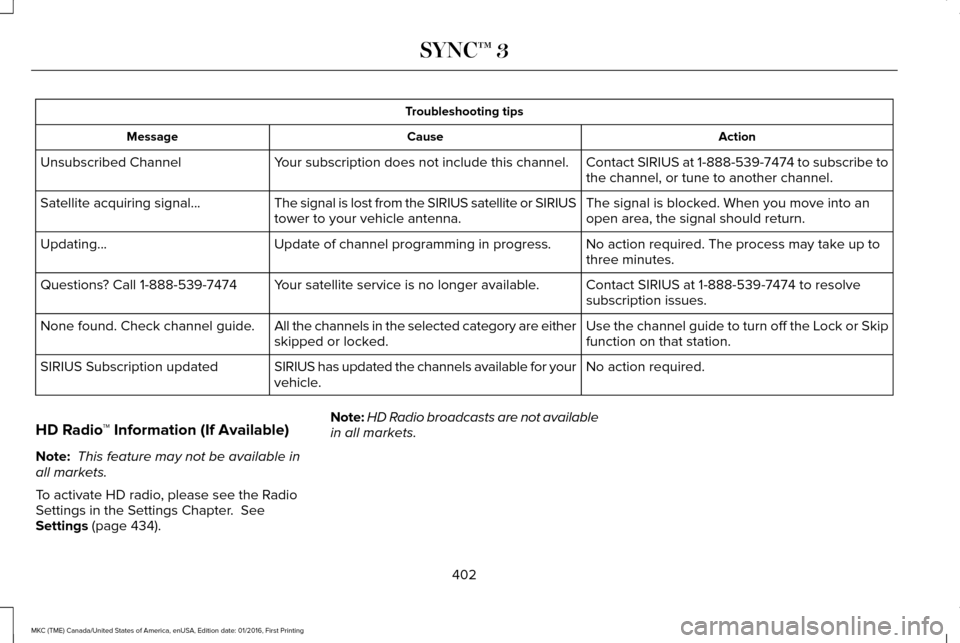
Troubleshooting tips
Action
Cause
Message
Contact SIRIUS at 1-888-539-7474 to subscribe to
the channel, or tune to another channel.
Your subscription does not include this channel.
Unsubscribed Channel
The signal is blocked. When you move into an
open area, the signal should return.
The signal is lost from the SIRIUS satellite or SIRIUS
tower to your vehicle antenna.
Satellite acquiring signal\b
No action required. The process may take up to
three minutes.
Update of channel programming in progress.
Updating\b
Contact SIRIUS at 1-888-539-7474 to resolve
subscription issues.
Your satellite service is no longer available.
Questions? Call 1-888-539-7474
Use the channel guide to turn off the Lock or Skip
function on that station.
All the channels in the selected category are either
skipped or locked.
None found. Check channel guide.
No action required.
SIRIUS has updated the channels available for your
vehicle.
SIRIUS Subscription updated
HD Radio ™ Information (If Available)
Note: This feature may not be available in
all markets.
To activate HD radio, please see the Radio
Settings in the Settings Chapter. See
Settings (page 434). Note:
HD Radio broadcasts are not available
in all markets.
402
MKC (TME) Canada/United States of America, enUSA, Edition date: 01/2016, First Printing SYNC™ 3
Page 414 of 538
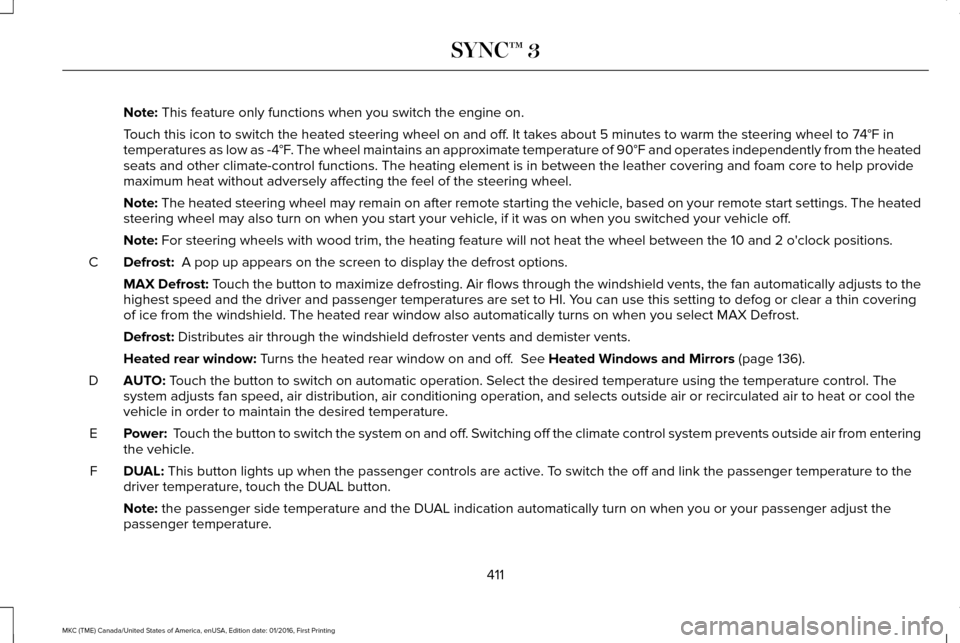
Note: This feature only functions when you switch the engine on.
Touch this icon to switch the heated steering wheel on and off. It takes about 5 minutes to warm the steering wheel to 74°F in
temperatures as low as -4°F. The wheel maintains an approximate temperature of 90°F and operates independently from the heated\
seats and other climate-control functions. The heating element is in bet\
ween the leather covering and foam core to help provide
maximum heat without adversely affecting the feel of the steering wheel.\
Note:
The heated steering wheel may remain on after remote starting the vehic\
le, based on your remote start settings. The heated
steering wheel may also turn on when you start your vehicle, if it was on when you switched your vehicle off.
Note:
For steering wheels with wood trim, the heating feature will not heat t\
he wheel between the 10 and 2 o'clock positions.
Defrost:
A pop up appears on the screen to display the defrost options.
C
MAX Defrost: Touch the button to maximize defrosting. Air flows through the windshield\
vents, the fan automatically adjusts to the
highest speed and the driver and passenger temperatures are set to HI. Y\
ou can use this setting to defog or clear a thin covering
of ice from the windshield. The heated rear window also automatically tu\
rns on when you select MAX Defrost.
Defrost:
Distributes air through the windshield defroster vents and demister vent\
s.
Heated rear window:
Turns the heated rear window on and off. See Heated Windows and Mirrors (page 136).
AUTO:
Touch the button to switch on automatic operation. Select the desired tem\
perature using the temperature control. The
system adjusts fan speed, air distribution, air conditioning operation, \
and selects outside air or recirculated air to heat or cool the
vehicle in order to maintain the desired temperature.
D
Power:
Touch the button to switch the system on and off. Switching off the climate control system prevents outside air from enteri\
ng
the vehicle.
E
DUAL:
This button lights up when the passenger controls are active. To switch the off and link the passenger temperature to the
driver temperature, touch the DUAL button.
F
Note:
the passenger side temperature and the DUAL indication automatically turn on when you or your passenger adjust th\
e
passenger temperature.
411
MKC (TME) Canada/United States of America, enUSA, Edition date: 01/2016, First Printing SYNC™ 3
Page 440 of 538
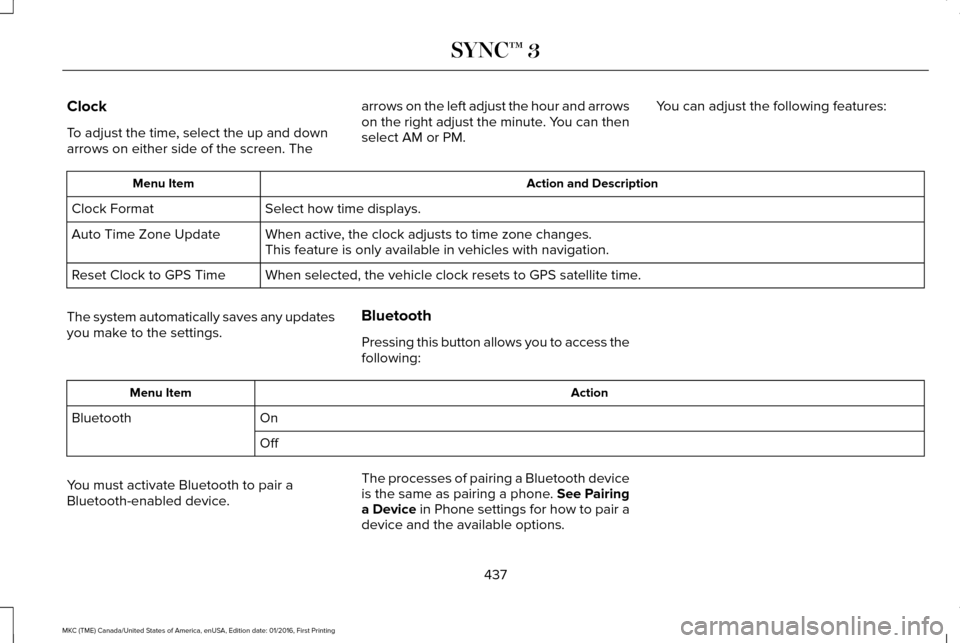
Clock
To adjust the time, select the up and down
arrows on either side of the screen. The
arrows on the left adjust the hour and arrows
on the right adjust the minute. You can then
select AM or PM.
You can adjust the following features: Action and Description
Menu Item
Select how time displays.
Clock Format
When active, the clock adjusts to time zone changes.
Auto Time Zone Update
This feature is only available in vehicles with navigation.
When selected, the vehicle clock resets to GPS satellite time.
Reset Clock to GPS Time
The system automatically saves any updates
you make to the settings. Bluetooth
Pressing this button allows you to access the
following: Action
Menu Item
On
Bluetooth
Off
You must activate Bluetooth to pair a
Bluetooth-enabled device. The processes of pairing a Bluetooth device
is the same as pairing a phone. See Pairing
a Device in Phone settings for how to pair a
device and the available options.
437
MKC (TME) Canada/United States of America, enUSA, Edition date: 01/2016, First Printing SYNC™ 3
Page 454 of 538

Menu Item
Enable this option to remove additional voice prompts and confirmations.\
Advanced Mode
Enable this option to have the system confirm a contacts name with you b\
efore
making a call.
Phone Confirmation
Enable this option to have the system display a list of available voice \
commands
when the voice button is pressed.
Voice Command List
Valet Mode
Valet mode allows you to lock the system.
No information is accessible until the system
is unlocked with the correct PIN.
When you select valet mode a pop up
appears informing you that a four digit code
must be entered to enable and disable valet
mode. You can use any PIN you chose but
you must use the same PIN to disable valet
mode. The system asks you to input the
code. Note:
If the system is locked and you cannot
remember the PIN, please contact the
Customer Relationship Center.
For Lincoln
United States: 1-800-521-4140
Canada: 1-800-387-9333
To enable valet mode, enter your chosen
PIN. The system then asks to confirm your
PIN by reentering it. The system then locks.
To unlock the system, enter the same pin
number. The system reconnects to your
phone and all of your options are available
again. SYNC™ 3 TROUBLESHOOTING
Your SYNC 3 system is easy to use.
However, should questions arise, please
refer to the tables below.
To check your cell phone's compatibility, visit
the Ford or Lincoln website.
Website
owner.lincoln.com
www.syncmyride.ca
www.syncmaroute.ca
451
MKC (TME) Canada/United States of America, enUSA, Edition date: 01/2016, First Printing SYNC™ 3