Check transmission LINCOLN MKC 2017 User Guide
[x] Cancel search | Manufacturer: LINCOLN, Model Year: 2017, Model line: MKC, Model: LINCOLN MKC 2017Pages: 538, PDF Size: 4.8 MB
Page 249 of 538
Trailer lamps are required on most towed
vehicles. Make sure all running lights, brake
lights, turn signals and hazard lights are
working.
Before Towing a Trailer
Practice turning, stopping and backing up to
get the feel of your vehicle-trailer
combination before starting on a trip. When
turning, make wider turns so the trailer
wheels clear curbs and other obstacles.
When Towing a Trailer
•
Do not drive faster than 70 mph (113
km/h) during the first 500 miles (800
kilometers).
• Do not make full-throttle starts.
• Check your hitch, electrical connections
and trailer wheel lug nuts thoroughly after
you have traveled 50 miles (80
kilometers).
• When stopped in congested or heavy
traffic during hot weather, place the
gearshift in position P to aid engine and
transmission cooling and to help A/C
performance. •
Turn off the speed control with heavy
loads or in hilly terrain. The speed control
may turn off automatically when you are
towing on long, steep grades.
• Shift to a lower gear when driving down
a long or steep hill. Do not apply the
brakes continuously, as they may
overheat and become less effective.
• If your transmission is equipped with a
Grade Assist or Tow/Haul feature, use
this feature when towing. This provides
engine braking and helps eliminate
excessive transmission shifting for
optimum fuel economy and transmission
cooling.
• Allow more distance for stopping with a
trailer attached. Anticipate stops and
brake gradually.
• Avoid parking on a grade. However, if
you must park on a grade:
1. Turn the steering wheel to point your vehicle tires away from traffic flow.
2. Set your vehicle parking brake.
3. Place the automatic transmission in position
P. 4. Place wheel chocks in front and back of
the trailer wheels. (Chocks not included
with vehicle.)
Launching or Retrieving a Boat or
Personal Watercraft (PWC)
Note: Disconnect the wiring to the trailer
before
backing the trailer into the water.
Note: Reconnect the wiring to the trailer
after
removing the trailer from the water.
When backing down a ramp during boat
launching or retrieval:
• Do not allow the static water level to rise
above the bottom edge of the rear
bumper.
• Do not allow waves to break higher than
6 inches (15 centimeters) above the
bottom edge of the rear bumper.
Exceeding these limits may allow water to
enter vehicle components:
• Causing internal damage to the
components.
• Affecting driveability, emissions, and
reliability.
246
MKC (TME) Canada/United States of America, enUSA, Edition date: 01/2016, First Printing Towing
Page 253 of 538
•
Driving on flat terrain offers improved fuel
economy as compared to driving on hilly
terrain.
• Transmissions give their best fuel
economy when operated in the top cruise
gear and with steady pressure on the gas
pedal.
• Four-wheel-drive operation (if equipped)
is less fuel efficient than two-wheel-drive
operation.
• Close the windows for high-speed
driving.
DRIVING THROUGH WATER WARNING
Do not drive through flowing or deep
water as you may lose control of your
vehicle. Note:
Driving through standing water can
cause vehicle damage.
Note: Engine damage can occur if water
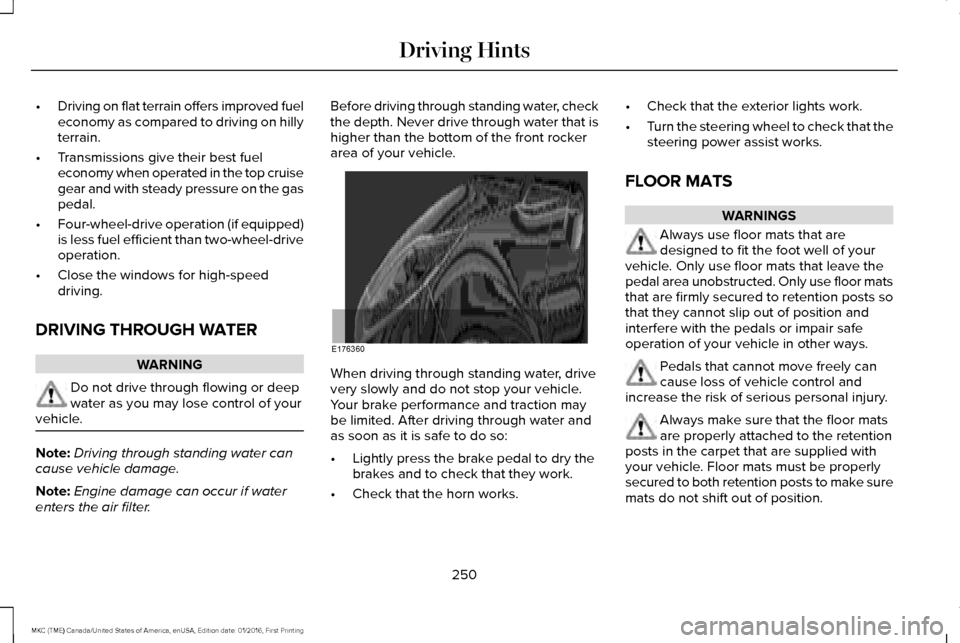
enters the air filter. Before driving through standing water, check
the depth. Never drive through water that is
higher than the bottom of the front rocker
area of your vehicle.
When driving through standing water, drive
very slowly and do not stop your vehicle.
Your brake performance and traction may
be limited. After driving through water and
as soon as it is safe to do so:
•
Lightly press the brake pedal to dry the
brakes and to check that they work.
• Check that the horn works. •
Check that the exterior lights work.
• Turn the steering wheel to check that the
steering power assist works.
FLOOR MATS WARNINGS
Always use floor mats that are
designed to fit the foot well of your
vehicle. Only use floor mats that leave the
pedal area unobstructed. Only use floor mats
that are firmly secured to retention posts so
that they cannot slip out of position and
interfere with the pedals or impair safe
operation of your vehicle in other ways. Pedals that cannot move freely can
cause loss of vehicle control and
increase the risk of serious personal injury. Always make sure that the floor mats
are properly attached to the retention
posts in the carpet that are supplied with
your vehicle. Floor mats must be properly
secured to both retention posts to make sure
mats do not shift out of position.
250
MKC (TME) Canada/United States of America, enUSA, Edition date: 01/2016, First Printing Driving HintsE176360
Page 298 of 538
You have limited engine power when in the
fail-safe mode, so drive your vehicle with
caution. Your vehicle will not be able to
maintain high-speed operation and the
engine will run rough. Remember that the
engine is capable of completely shutting
down automatically to prevent engine
damage, therefore:
1. Pull off the road as soon as safely
possible and switch the engine off.
2. Arrange for your vehicle to be taken to an authorized dealer.
3. If this is not possible, wait a short period
for the engine to cool.
4. Check the coolant level and replenish if low.
5. Re-start the engine and take your vehicle
to an authorized dealer.
Note: Driving your vehicle without repairing
the engine problem increases the chance of
engine damage. Take your vehicle to an
authorized dealer as soon as possible. AUTOMATIC TRANSMISSION
FLUID CHECK
The automatic transmission does not have
a transmission fluid dipstick.
The automatic transmission does not
consume fluid. However, the fluid level
should be checked if the transmission is not
working properly, for example if the
transmission slips or shifts slowly or if you
notice some sign of fluid leakage.
Note:
Transmission fluid should be checked
by an authorized dealer. If required, fluid
should be added by an authorized dealer.
Do not use supplemental transmission fluid
additives, treatments or cleaning agents. The
use of these materials may affect
transmission operation and result in damage
to internal transmission components. BRAKE FLUID CHECK WARNINGS
Do not use any fluid other than the
recommended brake fluid as this will
reduce brake efficiency. Use of incorrect fluid
could result in the loss of vehicle control,
serious personal injury or death. Only use brake fluid from a sealed
container. Contamination with dirt,
water, petroleum products or other materials
may result in brake system damage or failure.
Failure to adhere to this warning could result
in the loss of vehicle control, serious
personal injury or death. Do not allow the fluid to touch your
skin or eyes. If this happens, rinse the
affected areas immediately with plenty of
water and contact your physician. A fluid level between the MAX and
MIN lines is within the normal
operating range and there is no need to add
fluid. A fluid level not in the normal operating
range could compromise the performance
of the system. Have your vehicle checked
immediately. 295
MKC (TME) Canada/United States of America, enUSA, Edition date: 01/2016, First Printing Maintenance
Page 479 of 538
Multi-Point inspection
Steering and linkage
Exterior lamps operation
Tires (including spare) for wear and proper pressure**
Fluid levels *
; fill if necessary
Windshield for cracks, chips or pits
For oil and fluid leaks
Washer spray and wiper operation
Half-shaft dust boots
* Brake, coolant recovery reservoir, automatic transmission and window washer
** If your vehicle is equipped with a temporary mobility kit, check the tir\
e sealant expiration Use By date on the canister. Replace as needed.
Be sure to ask your dealership service
advisor or technician about the multi-point
vehicle inspection. It is a comprehensive way
to perform a thorough inspection of your
vehicle. Your checklist gives you immediate
feedback on the overall condition of your
vehicle. NORMAL SCHEDULED
MAINTENANCE
Intelligent Oil-Life Monitor™
Your vehicle is equipped with an Intelligent
Oil-Life Monitor that determines when you
should change the engine oil based on how
your vehicle is used. By using several
important factors in its calculations, the
monitor helps reduce the cost of owning your
vehicle and reduces environmental waste at
the same time.This means you do not have to remember to
change the oil on a mileage-based schedule.
Your vehicle lets you know when an oil
change is due by displaying a message in
the information display.
The following table provides examples of
vehicle use and its impact on oil change
intervals. It is a guideline only. Actual oil
change intervals depend on several factors
and generally decrease with severity of use.
476
MKC (TME) Canada/United States of America, enUSA, Edition date: 01/2016, First Printing Scheduled Maintenance
Page 481 of 538
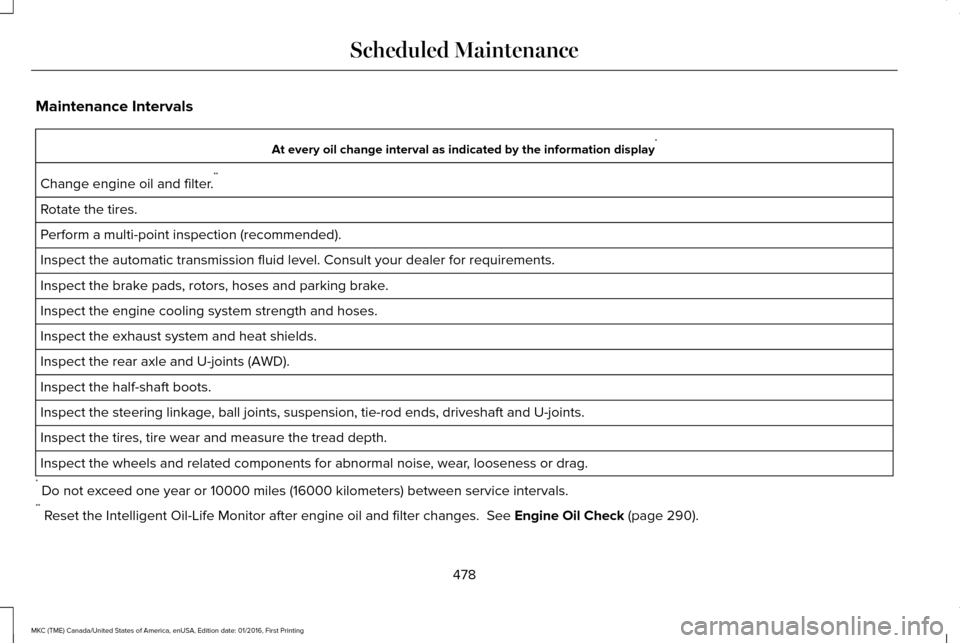
Maintenance Intervals
At every oil change interval as indicated by the information display
*
Change engine oil and filter. **
Rotate the tires.
Perform a multi-point inspection (recommended).
Inspect the automatic transmission fluid level. Consult your dealer for \
requirements.
Inspect the brake pads, rotors, hoses and parking brake.
Inspect the engine cooling system strength and hoses.
Inspect the exhaust system and heat shields.
Inspect the rear axle and U-joints (AWD).
Inspect the half-shaft boots.
Inspect the steering linkage, ball joints, suspension, tie-rod ends, driveshaft and U-joints.
Inspect the tires, tire wear and measure the tread depth.
Inspect the wheels and related components for abnormal noise, wear, looseness or drag.
* Do not exceed one year or 10000 miles (16000 kilometers) between service interv\
als.
** Reset the Intelligent Oil-Life Monitor after engine oil and filter change\
s. See Engine Oil Check (page 290).
478
MKC (TME) Canada/United States of America, enUSA, Edition date: 01/2016, First Printing Scheduled Maintenance
Page 486 of 538
\
Change engine oil and filter. **
Every 5000 miles (8000 km)
or six months
Perform multi-point inspection.
Change automatic tra")
Operating in dusty or sandy conditions (such as unpaved or dusty roads)\
Change engine oil and filter. **
Every 5000 miles (8000 km)
or six months
Perform multi-point inspection.
Change automatic transmission fluid.
Every 30000 miles (48000
km)
Change the PTU and rear axle fluid (AWD). See Axle and PTU Maintenance\
items under Exceptions later in
this section.
* This is an optional feature.
** Reset your Intelligent Oil-Life Monitor after engine oil and filter chang\
es.
See Engine Oil Check (page 290).
Exceptions
There are several exceptions to the Normal
Schedule: Axle and PTU Maintenance
The Power Transfer Unit (PTU) and rear axle
(AWD only) in your vehicle does not require
any normal scheduled maintenance unless
the vehicle has experienced extended
periods of extreme/severe duty cycle driving
or the PTU and/or the rear axle has been
submerged in water. Checking the PTU and
rear axle fluid is not necessary unless the
unit shows signs of leakage. Contact an
authorized dealer for service.California Fuel Filter Replacement
If you register your vehicle in California, the
California Air Resources Board has
determined that the failure to perform this
maintenance item does not nullify the
emission warranty or limit recall liability
before the completion of your vehicle's
useful life. Ford Motor Company, however,
urges you to have all recommended
maintenance services performed at the
specified intervals and to record all vehicle
service.
483
MKC (TME) Canada/United States of America, enUSA, Edition date: 01/2016, First Printing Scheduled Maintenance
Page 528 of 538
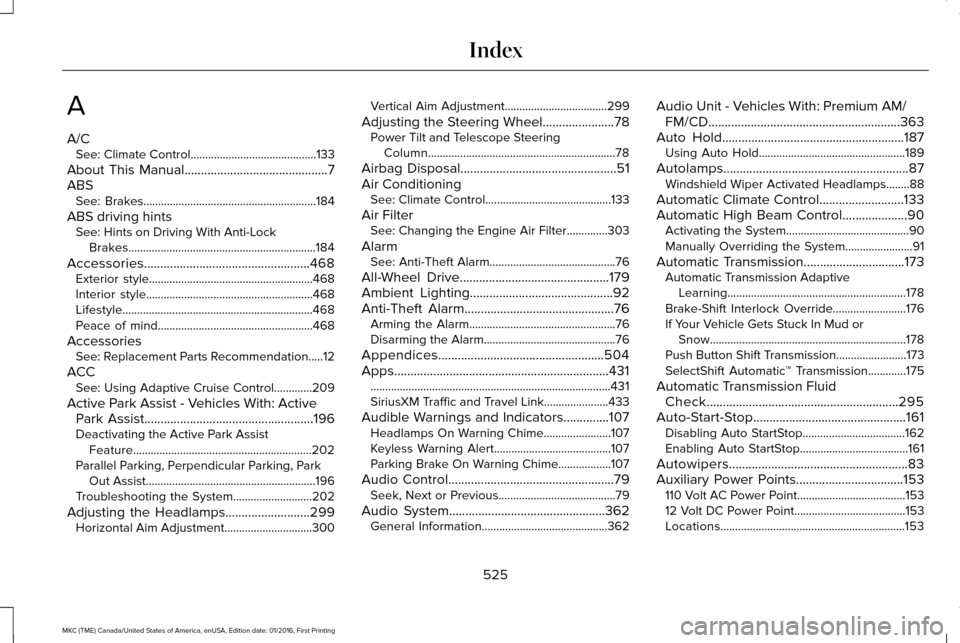
A
A/C
See: Climate Control...........................................133
About This Manual............................................7
ABS See: Brakes...........................................................184
ABS driving hints See: Hints on Driving With Anti-Lock
Brakes................................................................184
Accessories...................................................468 Exterior style........................................................468
Interior style.........................................................468
Lifestyle.................................................................468
Peace of mind.....................................................468
Accessories See: Replacement Parts Recommendation.....12
ACC See: Using Adaptive Cruise Control.............209
Active Park Assist - Vehicles With: Active Park Assist
....................................................196
Deactivating the Active Park Assist
Feature.............................................................202
Parallel Parking, Perpendicular Parking, Park Out Assist..........................................................196
Troubleshooting the System...........................
202
Adjusting the Headlamps
..........................299
Horizontal Aim Adjustment..............................300 Vertical Aim Adjustment...................................299
Adjusting the Steering Wheel......................78 Power Tilt and Telescope Steering
Column................................................................78
Airbag Disposal
................................................51
Air Conditioning See: Climate Control...........................................133
Air Filter See: Changing the Engine Air Filter..............303
Alarm See: Anti-Theft Alarm...........................................76
All-Wheel Drive
..............................................179
Ambient Lighting............................................92
Anti-Theft Alarm..............................................76
Arming the Alarm..................................................76
Disarming the Alarm.............................................76
Appendices...................................................504
Apps
..................................................................431
........................................................................\
..........431
SiriusXM Traffic and Travel Link......................433
Audible Warnings and Indicators..............107 Headlamps On Warning Chime.......................
107
Keyless Warning Alert........................................107
Parking Brake On Warning Chime
..................107
Audio Control
...................................................79
Seek, Next or Previous........................................79
Audio System
................................................362
General Information...........................................362 Audio Unit - Vehicles With: Premium AM/
FM/CD...........................................................363
Auto Hold........................................................187 Using Auto Hold..................................................189
Autolamps.........................................................87 Windshield Wiper Activated Headlamps........88
Automatic Climate Control..........................133
Automatic High Beam Control
....................90
Activating the System..........................................90
Manually Overriding the System.......................91
Automatic Transmission...............................173 Automatic Transmission Adaptive
Learning.............................................................178
Brake-Shift Interlock Override.........................176
If Your Vehicle Gets Stuck In Mud or Snow...................................................................178
Push Button Shift Transmission........................173
SelectShift Automatic ™ Transmission.............175
Automatic Transmission Fluid Check
...........................................................295
Auto-Start-Stop...............................................161 Disabling Auto StartStop...................................162
Enabling Auto StartStop.....................................161
Autowipers.......................................................83
Auxiliary Power Points.................................153 110 Volt AC Power Point.....................................153
12 Volt DC Power Point......................................153
Locations...............................................................153
525
MKC (TME) Canada/United States of America, enUSA, Edition date: 01/2016, First Printing Index