Sun LINCOLN MKC 2017 User Guide
[x] Cancel search | Manufacturer: LINCOLN, Model Year: 2017, Model line: MKC, Model: LINCOLN MKC 2017Pages: 538, PDF Size: 4.8 MB
Page 313 of 538
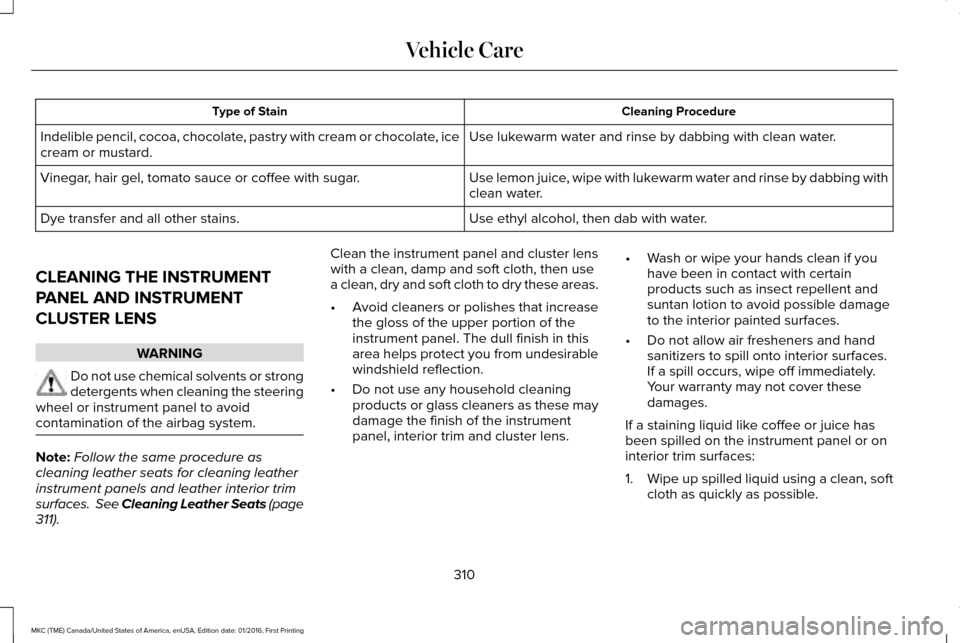
Cleaning Procedure
Type of Stain
Use lukewarm water and rinse by dabbing with clean water.
Indelible pencil, cocoa, chocolate, pastry with cream or chocolate, ice
cream or mustard.
Use lemon juice, wipe with lukewarm water and rinse by dabbing with
clean water.
Vinegar, hair gel, tomato sauce or coffee with sugar.
Use ethyl alcohol, then dab with water.
Dye transfer and all other stains.
CLEANING THE INSTRUMENT
PANEL AND INSTRUMENT
CLUSTER LENS WARNING
Do not use chemical solvents or strong
detergents when cleaning the steering
wheel or instrument panel to avoid
contamination of the airbag system. Note:
Follow the same procedure as
cleaning leather seats for cleaning leather
instrument panels and leather interior trim
surfaces. See Cleaning Leather Seats (page
311). Clean the instrument panel and cluster lens
with a clean, damp and soft cloth, then use
a clean, dry and soft cloth to dry these areas.
•
Avoid cleaners or polishes that increase
the gloss of the upper portion of the
instrument panel. The dull finish in this
area helps protect you from undesirable
windshield reflection.
• Do not use any household cleaning
products or glass cleaners as these may
damage the finish of the instrument
panel, interior trim and cluster lens. •
Wash or wipe your hands clean if you
have been in contact with certain
products such as insect repellent and
suntan lotion to avoid possible damage
to the interior painted surfaces.
• Do not allow air fresheners and hand
sanitizers to spill onto interior surfaces.
If a spill occurs, wipe off immediately.
Your warranty may not cover these
damages.
If a staining liquid like coffee or juice has
been spilled on the instrument panel or on
interior trim surfaces:
1. Wipe up spilled liquid using a clean, soft
cloth as quickly as possible.
310
MKC (TME) Canada/United States of America, enUSA, Edition date: 01/2016, First Printing Vehicle Care
Page 315 of 538
CLEANING THE ALLOY WHEELS (If
Equipped)
Note: Do not apply a cleaning chemical to
warm or hot wheel rims and covers.
Note: Some automatic car washes may
cause damage to the finish on your wheel
rims and covers.
Note: Industrial-strength or heavy-duty
cleaners in combination with brush agitation
to remove brake dust and dirt, could wear
away the clear coat finish over a period time.
Note: Do not use hydrofluoric acid-based or
high caustic-based wheel cleaners, steel
wool, fuels or strong household detergents.
Note: If you intend parking your vehicle for
an extended period after cleaning the
wheels with a wheel cleaner, drive your
vehicle for a few minutes before doing so.
This will reduce the risk of increased
corrosion of the brake discs.
Alloy wheels and wheel covers are coated
with a clear coat paint finish. To maintain
their condition we recommend that you: •
Clean the wheels weekly using
Motorcraft Wheel and Tire Cleaner. Apply
using manufacturer's instructions.
• Use a sponge to remove heavy deposits
of dirt and brake dust accumulation.
• Rinse thoroughly with a strong stream of
water when you have completed the
cleaning process.
• To remove tar and grease, use Motorcraft
Bug and Tar Remover.
VEHICLE STORAGE
If you plan on storing your vehicle for 30
days or more, read the following
maintenance recommendations to make sure
your vehicle stays in good operating
condition.
We engineer and test all motor vehicles and
their components for reliable, regular driving.
Under various conditions, long-term storage
may lead to degraded engine performance
or failure unless you use specific precautions
to preserve engine components. General
•
Store all vehicles in a dry, ventilated
place.
• Protect from sunlight, if possible.
• If vehicles are stored outside, they
require regular maintenance to protect
against rust and damage.
Body
• Wash your vehicle thoroughly to remove
dirt, grease, oil, tar or mud from exterior
surfaces, rear-wheel housing and the
underside of front fenders.
• Periodically wash your vehicle if it is
stored in exposed locations.
• Touch-up exposed or primed metal to
prevent rust.
• Cover chrome and stainless steel parts
with a thick coat of auto wax to prevent
discoloration. Re-wax as necessary when
you wash your vehicle.
• Lubricate all hood, door and luggage
compartment hinges and latches with a
light grade oil.
312
MKC (TME) Canada/United States of America, enUSA, Edition date: 01/2016, First Printing Vehicle Care
Page 322 of 538
*Standard load: A class of P-metric or
Metric tires designed to carry a
maximum load at set pressure. For
example: For P-metric tires
35 psi
(2.4 bar) or 36 psi (2.5 bar) depending
on tires size and for Metric tires 36 psi
(2.5 bar). Increasing the inflation
pressure beyond this pressure will not
increase the tire ’s load carrying
capability.
*
Extra load: A class of P-metric or Metric
tires designed to carry a heavier
maximum load at
42 psi (2.9 bar).
Increasing the inflation pressure beyond
this pressure will not increase the tire ’s
load carrying capability.
*
kPa: Kilopascal, a metric unit of air
pressure.
*PSI: Pounds per square inch, a standard
unit of air pressure.
*
Cold tire pressure: The tire pressure
when the vehicle has been stationary
and out of direct sunlight for an hour or
more and prior to the vehicle being
driven for
1 mi (1.6 km). *
Recommended inflation pressure: The
cold inflation pressure found on the
Safety Compliance Certification Label
(affixed to either the door hinge pillar,
door-latch post, or the door edge that
meets the door-latch post, next to the
driver's seating position), or Tire Label
located on the B-Pillar or the edge of the
driver door.
*
B-pillar: The structural member at the
side of the vehicle behind the front door.
*
Bead area of the tire: Area of the tire
next to the rim.
*
Sidewall of the tire: Area between the
bead area and the tread.
*
Tread area of the tire: Area of the
perimeter of the tire that contacts the
road when mounted on the vehicle.
*
Rim: The metal support (wheel) for a
tire or a tire and tube assembly upon
which the tire beads are seated. Information Contained on the Tire
Sidewall
Both United States and Canada Federal
regulations require tire manufacturers
to place standardized information on the
sidewall of all tires. This information
identifies and describes the fundamental
characteristics of the tire and also
provides a U.S. DOT Tire Identification
Number for safety standard certification
and in case of a recall.
319
MKC (TME) Canada/United States of America, enUSA, Edition date: 01/2016, First Printing Wheels and Tires
Page 366 of 538
Do not expose discs to direct sunlight or heat
sources for extended periods.
MP3 and WMA Track and Folder
Structure
Audio systems capable of recognizing and
playing MP3 and WMA individual tracks and
folder structures work as follows:
•
There are two different modes for MP3
and WMA disc playback: MP3 and WMA
track mode (system default) and MP3 and
WMA folder mode.
• MP3 and WMA track mode ignores any
folder structure on the MP3 and WMA
disc. The player numbers each MP3 and
WMA track on the disc (noted by the MP3
or WMA file extension) from T001 to a
maximum of T255. The maximum number
of playable MP3 and WMA files may be
less depending on the structure of the
CD and exact model of radio present. •
MP3 and WMA folder mode represents
a folder structure consisting of one level
of folders. The CD player numbers all
MP3 and WMA tracks on the disc (noted
by the MP3 or WMA file extension) and
all folders containing MP3 and WMA files,
from F001 (folder) T001 (track) to F253
T255.
• Creating discs with only one level of
folders helps with navigation through the
disc files.
If you are burning your own MP3 and WMA
discs, it is important to understand how the
system reads the structures you create. While
various files may be present (files with
extensions other than MP3 and WMA), only
files with the MP3 and WMA extension are
played; other files are ignored by the system.
This enables you to use the same MP3 and
WMA disc for a variety of tasks on your work
computer, home computer and your
in-vehicle system. In track mode, the system displays and plays
the structure as if it were only one level deep
(all MP3 and WMA files play, regardless of
being in a specific folder). In folder mode,
the system only plays the MP3 and WMA files
in the current folder.
AUDIO UNIT - VEHICLES WITH:
PREMIUM AM/FM/CD
WARNING
Driving while distracted can result in
loss of vehicle control, crash and injury.
We strongly recommend that you use
extreme caution when using any device that
may take your focus off the road. Your
primary responsibility is the safe operation
of your vehicle. We recommend against the
use of any hand-held device while driving
and encourage the use of voice-operated
systems when possible. Make sure you are
aware of all applicable local laws that may
affect the use of electronic devices while
driving. 363
MKC (TME) Canada/United States of America, enUSA, Edition date: 01/2016, First Printing Audio System
Page 534 of 538
Media Hub......................................................365
Memory Function..........................................143 Easy Entry and Exit Feature..............................144
Linking a PreSet Position to your Remote
Control or Intelligent Access Key...............144
Saving a PreSet Position...................................143
Message Center See: Information Displays.................................
108
Mirrors See: Heated Windows and Mirrors.................136
See: Windows and Mirrors.................................93
Mobile Communications Equipment
...........14
Moonroof..........................................................98 Bounce-Back..........................................................99
Opening and Closing the Moonroof................99
Power Sunscreen.................................................99
Venting the Moonroof.........................................99
Motorcraft Parts - 2.0L EcoBoost™...........346
Motorcraft Parts - 2.3L EcoBoost™
............347
MyKey Troubleshooting.................................61
MyKey™..............................................................58 Principle of Operation.........................................58
N
Navigation......................................................420 cityseeker.............................................................430
Destination Mode...............................................422 Map Mode.............................................................421
Navigation Map Updates..................................430
Navigation Menu.................................................427
SiriusXM Traffic and Travel Link......................430
Waypoints.............................................................429
Normal Scheduled Maintenance..............476 Intelligent Oil-Life Monitor™..............................476
Maintenance Intervals.......................................478
O
Oil Change Indicator Reset........................291
Oil Check See: Engine Oil Check......................................290
Opening and Closing the Hood...............286 Opening the Hood.............................................286
Ordering Additional Owner's Literature.....................................................264
Obtaining a French Owner’ s Manual............264
Overhead Console.......................................155
P
Parking Aids
....................................................194
Principle of Operation........................................194
Passive Anti-Theft System............................75 SecuriLock®............................................................75 PATS
See: Passive Anti-Theft System........................75
Perchlorate........................................................12
Personal Safety System ™
..............................40
How Does the Personal Safety System
Work?...................................................................40
Phone
...............................................................413
During a Phone Call............................................418
Making Calls..........................................................417
Pairing Your Cell Phone for the First
Time....................................................................413
Phone Menu..........................................................414
Receiving Calls.....................................................418
Smartphone Connectivity................................420
Text Messaging....................................................419
Post-Crash Alert System............................256
Power Door Locks See: Locking and Unlocking..............................63
Power Liftgate
.................................................68
Hands-Free Feature..............................................71
Obstacle Detection................................................71
Opening and Closing the Liftgate....................
69
Setting the Liftgate Open Height......................70
Stopping the Liftgate Movement......................70
Power Seats.....................................................141 Power Lumbar......................................................143
Power Windows
..............................................93
Accessory Delay...................................................94
531
MKC (TME) Canada/United States of America, enUSA, Edition date: 01/2016, First Printing Index
Page 536 of 538
Ambient Lighting................................................449
Bluetooth..............................................................437
Clock......................................................................437
Display..................................................................450
General..................................................................447
Media Player........................................................435
Mobile Apps.........................................................445
Navigation............................................................443
Phone....................................................................438
Radio......................................................................442
Sound....................................................................434
Valet Mode............................................................451
Vehicle...................................................................449
Voice Control.......................................................450
Wi-Fi.......................................................................448
Side Airbags.....................................................47
Sitting in the Correct Position....................138
Snow Chains See: Using Snow Chains...................................331
Special Notices.................................................13
New Vehicle Limited Warranty...........................13
Notice to Owners of Pickup Trucks and Utility Type Vehicles.....................................................14
On Board Diagnostics Data Link Connector............................................................13
Special Instructions...............................................13
Using Your Vehicle as an Ambulance...............
14
Using Your Vehicle With a Snowplow...............14 Special Operating Conditions Scheduled
Maintenance
...............................................480
Exceptions............................................................483
Speed Control See: Cruise Control...........................................208
Stability Control
.............................................192
Principle of Operation........................................192
Starting a Gasoline Engine.........................157 Automatic Engine Shutdown............................158
Failure to Start......................................................158
Fast Restart...........................................................157
Guarding Against Exhaust Fumes..................159
Important Ventilating Information...................159
Stopping the Engine When Your Vehicle is
Moving...............................................................159
Stopping the Engine When Your Vehicle is Stationary..........................................................159
Starting and Stopping the Engine.............156 General Information............................................156
Steering..........................................................229 Electric Power Steering....................................229
Steering Wheel
................................................78
Storage Compartments...............................155
Sunroof See: Moonroof.......................................................98
Sun Visors.........................................................98 Illuminated Vanity Mirror.....................................
98 Supplementary Restraints System
..............41
Principle of Operation...........................................41
Symbols Glossary
..............................................7
SYNC™ 3..........................................................366
General Information...........................................366
SYNC™ 3 Troubleshooting
...........................451
T
Tailgate See: Power Liftgate..............................................68
Technical Specifications See: Capacities and Specifications...............344
The Better Business Bureau (BBB) Auto Line Program (U.S. Only) ...........................
261
Ticket Holders................................................155
Tire Care..........................................................317
Glossary of Tire Terminology...........................318
Information About Uniform Tire Quality
Grading..............................................................317
Information Contained on the Tire Sidewall.............................................................319
Temperature A B C..............................................318
Traction AA A B C................................................318
Treadwear.............................................................318
Tire Pressure Monitoring System.............332 Changing Tires With a Tire Pressure
Monitoring System.........................................333
533
MKC (TME) Canada/United States of America, enUSA, Edition date: 01/2016, First Printing Index