air condition LINCOLN MKC 2017 User Guide
[x] Cancel search | Manufacturer: LINCOLN, Model Year: 2017, Model line: MKC, Model: LINCOLN MKC 2017Pages: 538, PDF Size: 4.8 MB
Page 54 of 538
•
The knee airbag(s) may deploy based on
crash severity and occupant conditions.
• The design of the Safety Canopy is to
inflate in certain side impact crashes and
when a certain likelihood of rollover is
detected by the rollover sensor. The
Safety Canopy may activate in other
types of crashes if the vehicle
experiences sufficient sideways motion
or deformation, or a certain likelihood of
rollover.
AIRBAG DISPOSAL
Contact your authorized dealer as soon as
possible. Airbags must be disposed of by
qualified personnel.
51
MKC (TME) Canada/United States of America, enUSA, Edition date: 01/2016, First Printing Supplementary Restraints System
Page 89 of 538
GENERAL INFORMATION
Condensation in Lamp Assemblies
Exterior lamps have vents to accommodate
normal changes in air pressure.
Condensation can be a natural by-product
of this design. When moist air enters the
lamp assembly through the vents, there is a
possibility that condensation can occur when
the temperature is cold. When normal
condensation occurs, a fine mist can form on
the interior of the lens. The fine mist
eventually clears and exits through the vents
during normal operation.
Clearing time may take as long as 48 hours
under dry weather conditions.
Examples of acceptable condensation are:
•
The presence of a fine mist (no streaks,
drip marks or large droplets).
• A fine mist covers less than 50% of the
lens. Examples of unacceptable condensation are:
•
A water puddle inside the lamp.
• Streaks, drip marks or large droplets
present on the interior of the lens.
If you see any unacceptable condensation,
have your vehicle checked by an authorized
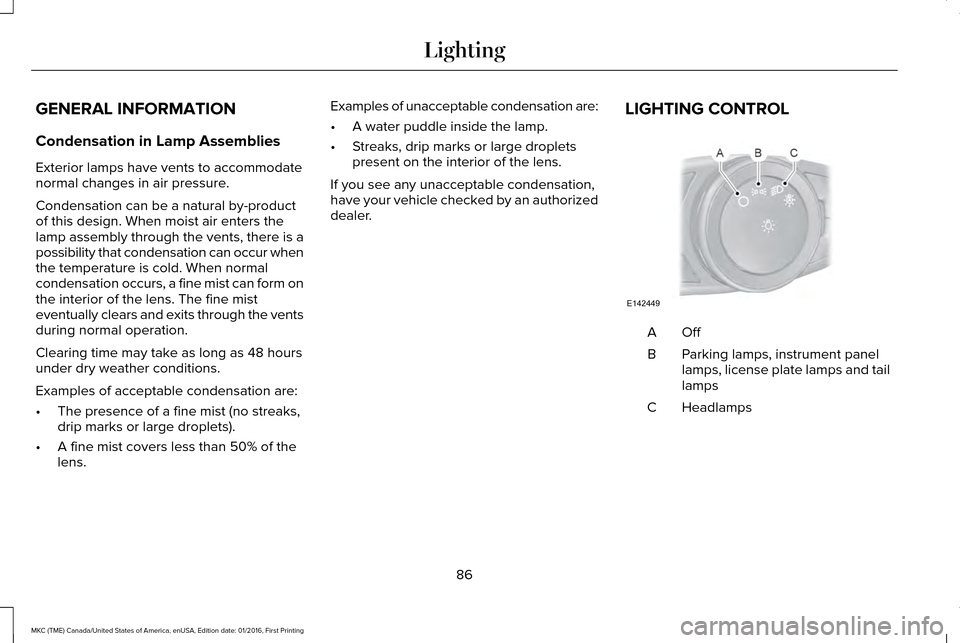
dealer. LIGHTING CONTROL OffA
Parking lamps, instrument panel
lamps, license plate lamps and tail
lamps
B
Headlamps
C
86
MKC (TME) Canada/United States of America, enUSA, Edition date: 01/2016, First Printing LightingE142449
Page 93 of 538
When switched off in the information display,
the daytime running lamps are off in all
lighting control switch positions.
AUTOMATIC HIGH BEAM
CONTROL (If Equipped)
The system automatically turns on the high
beams if it is dark enough and no other traffic
is present. When it detects the headlights of
an approaching vehicle, the rear lamps of
the preceding vehicle or street lighting, the
system turns off the high beams before they
distract other drivers. The low beams remain
on.
Note: If it appears that automatic high beam
is not functioning properly, check the
windshield in front of the camera for a
blockage. A clear view of the road is
required for proper system operation. Make
sure that authorized personnel repair any
windshield damage in the area of the
camera's field of view. Note:
If the system detects a blockage such
as bird droppings, bug splatter, snow or ice,
and you do not observe changes, the system
may go into low beam mode until you clear
the blockage. A message may also appear
in the information display noting the front
camera is blocked.
Note: Typical road dust, dirt and water spots
do not affect the performance of the
automatic high beam control. However, in
cold or inclement weather conditions, you
may notice a decrease in the availability of
the automatic high beam control, especially
at start up. If you want to change the beam
state independently of the system, you may
switch the high beams on or off using the
lighting control switch. Automatic high beam
control resumes when conditions are correct.
Note: Modification of your vehicle ride height
such as using much larger tires, may
degrade feature performance.
A camera sensor, centrally mounted behind
the windshield of your vehicle, continuously
monitors conditions to decide when to switch
the high beams off and on. Once the system is active, the high beams
switch on if:
•
The ambient light level is low enough.
• There is no traffic in front of the vehicle.
• The vehicle speed is greater than
approximately 31 mph (50 km/h).
The high beams turn off if:
• The system detects the headlamps of an
approaching vehicle or the rear lamps of
a preceding vehicle.
• Vehicle speed falls below approximately
26 mph (42 km/h)
.
• The ambient light level is high enough
that high beams are not required.
• The system detects severe rain, snow or
fog.
• The camera is blocked.
Activating the System
Switch on the system in the information
display and switch the lighting control to the
autolamps position.
See Information
Displays (page 108). See Autolamps (page
87).
90
MKC (TME) Canada/United States of America, enUSA, Edition date: 01/2016, First Printing Lighting
Page 137 of 538
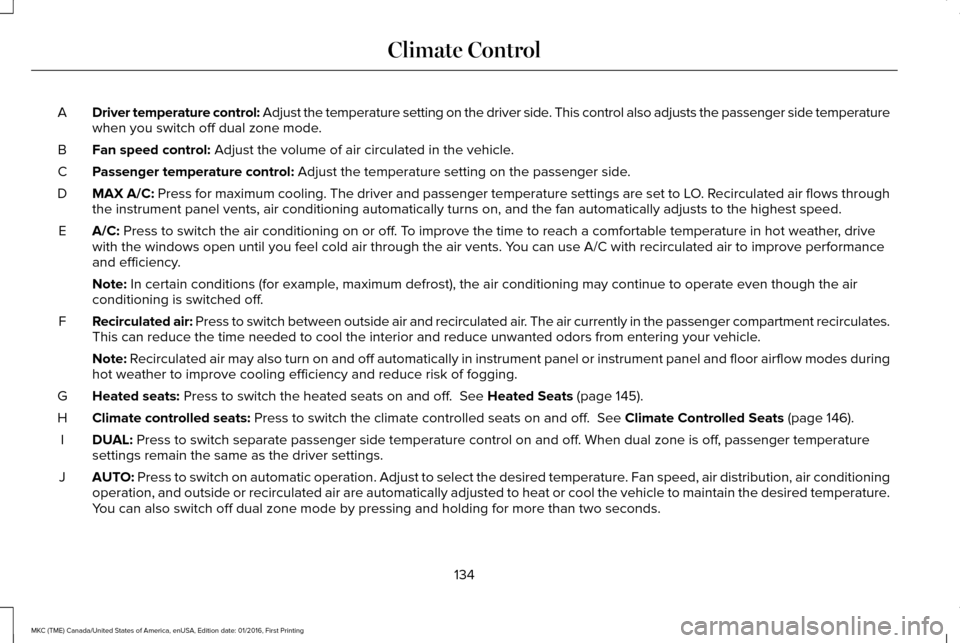
Driver temperature control: Adjust the temperature setting on the driver side. This control also adjusts the passenger side temperature
when you switch off dual zone mode.
A
Fan speed control: Adjust the volume of air circulated in the vehicle.
B
Passenger temperature control:
Adjust the temperature setting on the passenger side.
C
MAX A/C:
Press for maximum cooling. The driver and passenger temperature setting\
s are set to LO. Recirculated air flows through
the instrument panel vents, air conditioning automatically turns on, and\
the fan automatically adjusts to the highest speed.
D
A/C:
Press to switch the air conditioning on or off. To improve the time to reach a comfortable temperature in hot weather, drive
with the windows open until you feel cold air through the air vents. You can use A/C with recirculated air to improve performance
and efficiency.
E
Note:
In certain conditions (for example, maximum defrost), the air conditioning may continue to operate even t\
hough the air
conditioning is switched off.
Recirculated air: Press to switch between outside air and recirculated air. The air currently in the passenger compartment recirculates.
This can reduce the time needed to cool the interior and reduce unwanted\
odors from entering your vehicle.
F
Note:
Recirculated air may also turn on and off automatically in instrument pan\
el or instrument panel and floor airflow modes during
hot weather to improve cooling efficiency and reduce risk of fogging.
Heated seats:
Press to switch the heated seats on and off. See Heated Seats (page 145).
G
Climate controlled seats:
Press to switch the climate controlled seats on and off. See Climate Controlled Seats (page 146).
H
DUAL:
Press to switch separate passenger side temperature control on and off. When dual zone is off, passenger temperature
settings remain the same as the driver settings.
I
AUTO:
Press to switch on automatic operation. Adjust to select the desired te\
mperature. Fan speed, air distribution, air conditioning
operation, and outside or recirculated air are automatically adjusted to\
heat or cool the vehicle to maintain the desired temperature .
You can also switch off dual zone mode by pressing and holding for more t\
han two seconds.
J
134
MKC (TME) Canada/United States of America, enUSA, Edition date: 01/2016, First Printing Climate Control
Page 140 of 538
CABIN AIR FILTER
Your vehicle is equipped with a cabin air
filter, which gives you and your passengers
the following benefits:
•
It improves your driving comfort by
reducing particle concentration.
• It improves the interior compartment
cleanliness.
• It protects the climate control
components from particle deposits.
Your cabin air filter is located inside the
instrument panel and left of the glove box.
Note: Make sure you have a cabin air filter
installed at all times. This prevents foreign
objects from entering the system. Running
the system without a filter in place could
result in degradation or damage to the
system.
Replace the filter at regular intervals. See
Maintenance (page 286).
For additional cabin air filter information, or
to replace the filter, see an authorized dealer. REMOTE START
The remote start feature allows you to
pre-condition the interior of your vehicle. The
climate control system works to achieve
comfort according to your pre-selected
settings.
Note:
You cannot adjust the system during
remote start operation. You cannot switch
on the displays or indicators during remote
start.
Switch the ignition on to return the system
to its previous settings. The following
features remain on if they automatically
turned on during remote start, or remain off
if they did not turn on during remote start.
• Heated seats.
• Cooled seats.
• Heated steering wheel.
• Heated mirrors.
• Heated rear window.
Note: Passenger heated and cooled seats
only remain on during remote start if they
were on when you switched the vehicle off. You can adjust the default remote start
settings using the information display
controls.
See Information Displays (page
108).
Automatic Settings
In hot weather, the system is set to 72°F
(22°C). The cooled seats are set to high (if
available, and selected to AUTO in the
information display).
In moderate weather, the system either heats
or cools (based on pre-selected settings).
The rear defroster, heated mirrors and
heated seats do not automatically switch on.
In cold weather, the system is set to 72°F
(22°C). The heated and cooled seats and
heated steering wheel are set to high (if
available, and selected to AUTO in the
information display). The rear defroster and
heated mirrors automatically switch on.
137
MKC (TME) Canada/United States of America, enUSA, Edition date: 01/2016, First Printing Climate Control
Page 165 of 538
If the instrument cluster is
equipped with a grey Auto
StartStop indicator light, it is
illuminated when automatic engine stop is
not available due to one of the above noted
conditions not being met.
Automatic Engine Restart
Any of the following conditions will result in
an automatic restart of the engine:
• Your foot is removed from the brake
pedal.
• You press the accelerator pedal.
• You press the accelerator and the brake
pedal at the same time.
• The driver safety belt becomes
unfastened or the driver door is ajar.
• The transmission is moved from drive (D).
• Your vehicle is moving.
• The interior compartment does not meet
customer comfort when air conditioning
or heat is on.
• Fogging of the windows could occur and
the air conditioning is on. •
The battery is not within optimal
operating conditions.
• The maximum engine off time is
exceeded.
• When you press the Auto StartStop
button while the engine is stopped
automatically.
• The heated windshield is turned on.
Any of the following conditions may result in
an automatic restart of the engine:
• The blower fan speed is increased or the
climate control temperature is changed.
• An electrical accessory is turned on or
plugged in. Disabling Auto StartStop
Press the Auto StartStop button located on
the center console to switch the system off.
The button will illuminate. The system will
only be deactivated for the current ignition
cycle. Press the button again to restore Auto
StartStop function.
162
MKC (TME) Canada/United States of America, enUSA, Edition date: 01/2016, First Printing Unique Driving CharacteristicsE146361 E223639
Page 182 of 538
USING ALL-WHEEL DRIVE
Note:
When a system malfunction is present,
a warning message appears in the
information display. See Information
Messages (page 114). This means the system
is not functioning correctly and only
front-wheel drive is available. Have your
vehicle checked by an authorized dealer.
Note: When the system overheats and
switches to front-wheel drive, a warning
message appears in the information display.
This may occur if you operate your vehicle
in extreme high load conditions or with
excessive wheel spin (for example, deep
sand). To resume all-wheel drive function,
stop your vehicle in a safe location and turn
off the ignition. When the system cools,
normal all-wheel drive function will return.
The information display indicates, for about
five seconds, this return.
Note: When using the spare tire, a warning
message may appear in the information
display. This message turns off after
reinstalling the repaired or replaced road
tire and you switch on the ignition. Note:
Re-install the repaired tire or replace
the tire as soon as possible. Different tire
sizes between the front and rear axles can
cause system damage, or turn off the
all-wheel drive.
This system anticipates wheel spin and
transfers power to the rear wheels before
the spin occurs. Even when wheel spin is not
occurring, the system is continuously
adjusting power distribution to the wheels,
in an attempt to improve straight line and
cornering, both on and off road.
The system automatically turns on every time
you switch on the ignition.
The all-wheel drive system does not require
maintenance.
The all-wheel drive system gives your vehicle
some limited off-road capabilities. Operating
your vehicle in conditions other than
moderate sand, snow, mud or rough roads
could subject it to excessive stress and heat.
This could result in system damage. Your
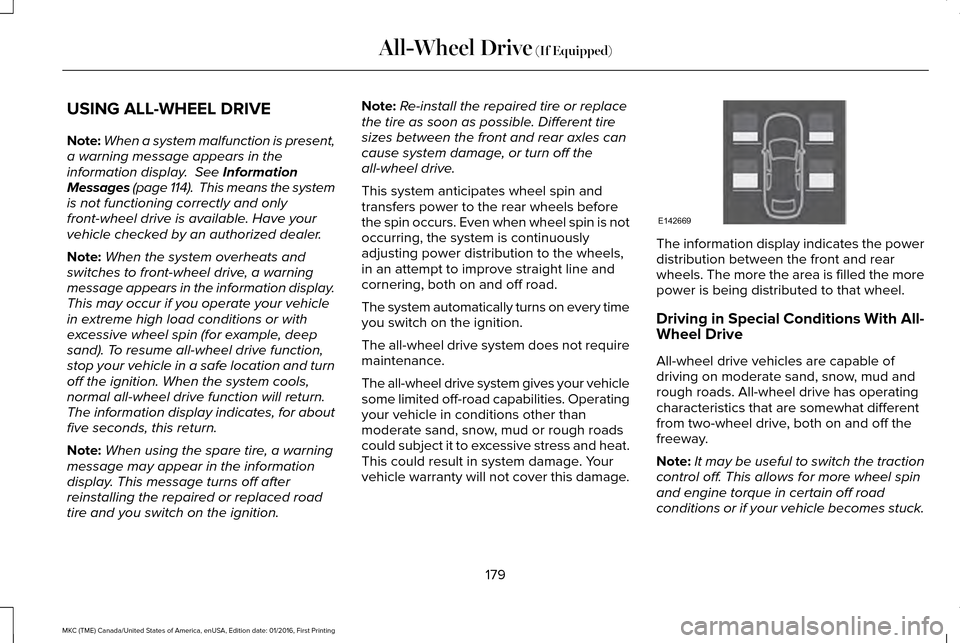
vehicle warranty will not cover this damage. The information display indicates the power
distribution between the front and rear
wheels. The more the area is filled the more
power is being distributed to that wheel.
Driving in Special Conditions With All-
Wheel Drive
All-wheel drive vehicles are capable of
driving on moderate sand, snow, mud and
rough roads. All-wheel drive has operating
characteristics that are somewhat different
from two-wheel drive, both on and off the
freeway.
Note:
It may be useful to switch the traction
control off. This allows for more wheel spin
and engine torque in certain off road
conditions or if your vehicle becomes stuck.
179
MKC (TME) Canada/United States of America, enUSA, Edition date: 01/2016, First Printing All-Wheel Drive
(If Equipped)E142669
Page 183 of 538
When driving at slow speeds off road under
high load conditions, use a low gear when
possible. Low gear operation will maximize
the engine and transmission cooling
capability.
Under severe operating conditions, the air
conditioning may cycle on and off to prevent
the engine from overheating.
Basic Operating Principles
•
Drive slower in strong crosswinds that
can affect the normal steering
characteristics of your vehicle.
• When driving your vehicle on surfaces
made slippery by loose sand, water,
gravel, snow or ice proceed with care.
If Your Vehicle leaves the Road
If your vehicle leaves the road, reduce your
vehicle speed and avoid severe braking.
Once you have reduced your vehicle speed,
ease your vehicle back onto the road. Do
not turn the steering wheel sharply while
returning your vehicle to the road. It may be safer to stay on the shoulder of the
road and slow down gradually before
returning to the road. You may lose control
if you do not slow down or if you turn the
steering wheel too sharply or abruptly.
It may be less risky to strike small objects,
such as freeway reflectors, with minor
damage to your vehicle rather than attempt
an abrupt dangerous direction change.
Remember, your primary concern should be
your safety and the safety of others.
Emergency Maneuvers
If you must make a sudden emergency
direction change, avoid over-driving your
vehicle. Turn the steering wheel only as
rapidly and as far as you need to avoid the
emergency. Apply smooth pressure to the
accelerator pedal or brake pedal as needed.
Avoid abrupt steering, acceleration and
braking changes. Abrupt changes could
increase the risk of vehicle roll over, loss of
vehicle control and personal injury. Use all
available road surface to bring your vehicle
to under control.In the event of an emergency stop, avoid
skidding and do not attempt any sharp
steering wheel movements.
Your vehicle responds differently to steering,
accelerating and braking on different road
surfaces when changing from one type of
surface to another.
Sand
When driving over sand, avoid driving at
excessive speeds. This will cause your
vehicle momentum to work against you. Your
vehicle could become stuck that may require
assistance from another vehicle. Remember,
if you proceed with caution you may be able
to back out the way you came.
Do not drive in deep sand for an extended
period. This will cause the all-wheel drive
system to overheat. You will see a warning
message in the information display. See
Information Messages (page 114).
180
MKC (TME) Canada/United States of America, enUSA, Edition date: 01/2016, First Printing All-Wheel Drive
(If Equipped)
Page 200 of 538
•
Something passes between the front
bumper and the parking space (a
pedestrian or cyclist).
• The edge of the neighboring parked
vehicle is high off the ground (for
example, a bus, tow truck or flatbed
truck).
• The weather conditions are poor (heavy
rain, snow, fog, etc).
Note: Keep the sensors, located on the
bumper or fascia, free from snow, ice and
large accumulations of dirt. Covered sensors
can affect the system's accuracy. Do not
clean the sensors with sharp objects. Note:
The sensors may not detect objects
with surfaces that absorb ultrasonic waves
or cause ultrasonic interference (motorcycle
exhaust, truck air brakes or horns).
Do not use the system if:
• You have attached a bike rack, trailer or
other object near the sensors on the front
or rear of your vehicle.
• You have attached an overhanging
object (surfboard) to the roof.
• A foreign object damages or obstructs
the front or rear bumper or side sensors.
• The correct tire size is not in use on your
vehicle (for example, a mini-spare tire). Using Active Park Assist - Parallel Parking Press the button located on the
center console near the gearshift
lever or the right side of the center
stack once.
When driving at a speed less than 22 mph
(35 km/h) the system automatically scans
both sides of your vehicle for an available
parking space. The system displays a
message and a corresponding graphic to
indicate it is searching for a parking space.
Use the direction indicator to select
searching either to the left-hand side or
right-hand side of your vehicle. If the
direction indicators are not used, the system
defaults to the passenger side of your
vehicle.
197
MKC (TME) Canada/United States of America, enUSA, Edition date: 01/2016, First Printing Parking AidsE146186
Page 227 of 538
The Blind Spot Information System
illuminates an amber alert indicator in the
outside mirror on the side of your vehicle the
approaching vehicle is coming from. When
the Blind Spot Information System is alerting
on a vehicle and the corresponding turn
signal is ON, the Blind Spot Information
System alert indicator flashes as an
increased warning level.
The alert indicator dims when the system
detects nighttime darkness.
Note:
The alert indicator flashes in case of
an alert and the turn signal is set to that side
at the same time.
System Sensor Blockage WARNING
To help avoid injuries, NEVER use the
Blind Spot Information System as a
replacement for using the interior and
exterior mirrors or looking over your shoulder
before changing lanes. The Blind Spot
Information System is not a replacement for
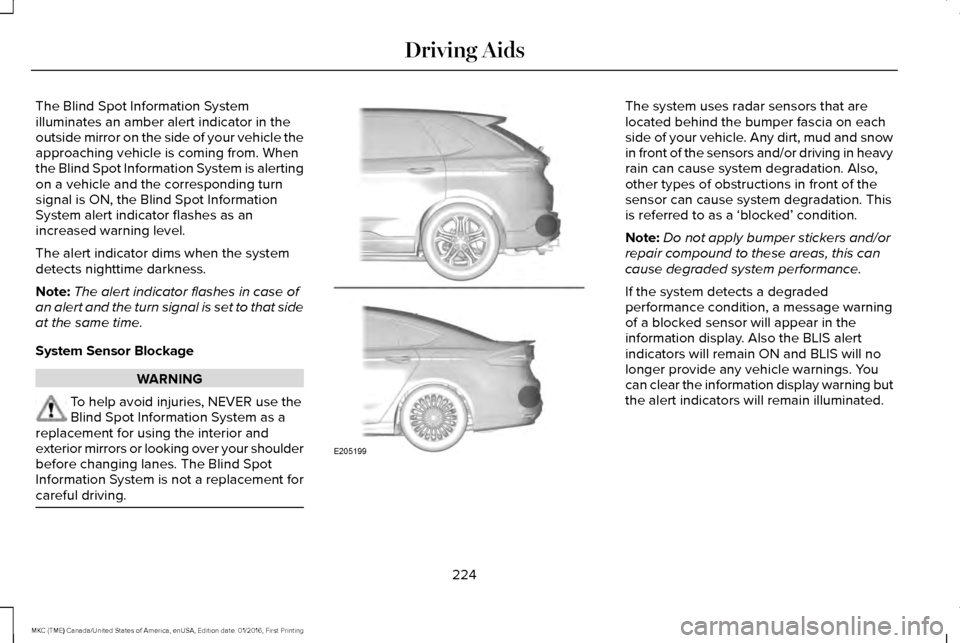
careful driving. The system uses radar sensors that are
located behind the bumper fascia on each
side of your vehicle. Any dirt, mud and snow
in front of the sensors and/or driving in heavy
rain can cause system degradation. Also,
other types of obstructions in front of the
sensor can cause system degradation. This
is referred to as a ‘blocked’ condition.
Note:
Do not apply bumper stickers and/or
repair compound to these areas, this can
cause degraded system performance.
If the system detects a degraded
performance condition, a message warning
of a blocked sensor will appear in the
information display. Also the BLIS alert
indicators will remain ON and BLIS will no
longer provide any vehicle warnings. You
can clear the information display warning but
the alert indicators will remain illuminated.
224
MKC (TME) Canada/United States of America, enUSA, Edition date: 01/2016, First Printing Driving AidsE205199