alerts LINCOLN MKC 2017 User Guide
[x] Cancel search | Manufacturer: LINCOLN, Model Year: 2017, Model line: MKC, Model: LINCOLN MKC 2017Pages: 538, PDF Size: 4.8 MB
Page 436 of 538
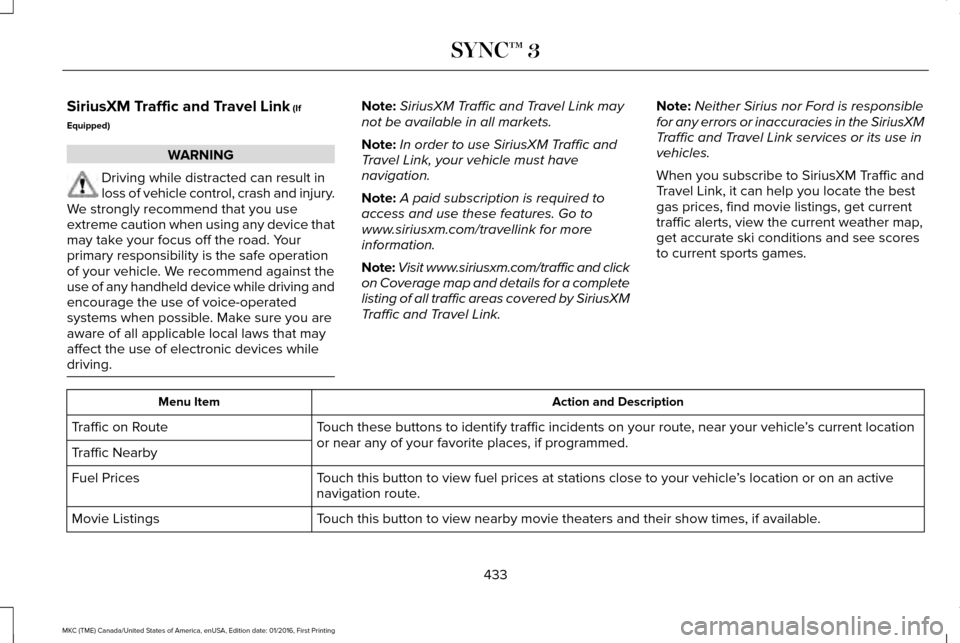
SiriusXM Traffic and Travel Link (If
Equipped) WARNING
Driving while distracted can result in
loss of vehicle control, crash and injury.
We strongly recommend that you use
extreme caution when using any device that
may take your focus off the road. Your
primary responsibility is the safe operation
of your vehicle. We recommend against the
use of any handheld device while driving and
encourage the use of voice-operated
systems when possible. Make sure you are
aware of all applicable local laws that may
affect the use of electronic devices while
driving. Note:
SiriusXM Traffic and Travel Link may
not be available in all markets.
Note: In order to use SiriusXM Traffic and
Travel Link, your vehicle must have
navigation.
Note: A paid subscription is required to
access and use these features. Go to
www.siriusxm.com/travellink for more
information.
Note: Visit www.siriusxm.com/traffic and click
on Coverage map and details for a complete
listing of all traffic areas covered by SiriusXM
Traffic and Travel Link. Note:
Neither Sirius nor Ford is responsible
for any errors or inaccuracies in the SiriusXM
Traffic and Travel Link services or its use in
vehicles.
When you subscribe to SiriusXM Traffic and
Travel Link, it can help you locate the best
gas prices, find movie listings, get current
traffic alerts, view the current weather map,
get accurate ski conditions and see scores
to current sports games. Action and Description
Menu Item
Touch these buttons to identify traffic incidents on your route, near your vehicle ’s current location
or near any of your favorite places, if programmed.
Traffic on Route
Traffic Nearby
Touch this button to view fuel prices at stations close to your vehicle ’s location or on an active
navigation route.
Fuel Prices
Touch this button to view nearby movie theaters and their show times, if \
available.
Movie Listings
433
MKC (TME) Canada/United States of America, enUSA, Edition date: 01/2016, First Printing SYNC™ 3
Page 441 of 538
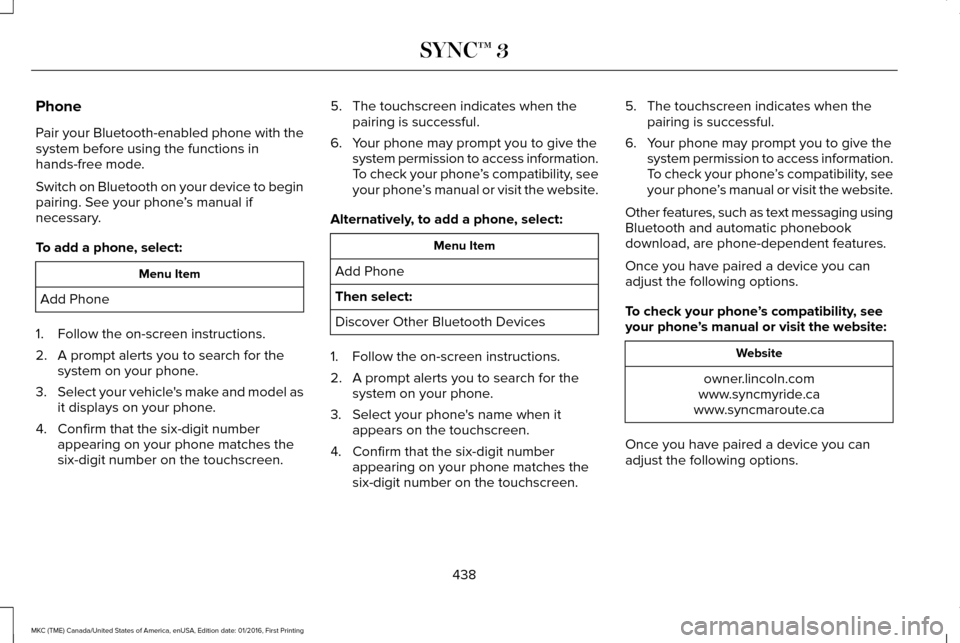
Phone
Pair your Bluetooth-enabled phone with the
system before using the functions in
hands-free mode.
Switch on Bluetooth on your device to begin
pairing. See your phone
’s manual if
necessary.
To add a phone, select: Menu Item
Add Phone
1. Follow the on-screen instructions.
2. A prompt alerts you to search for the system on your phone.
3. Select your vehicle's make and model as
it displays on your phone.
4. Confirm that the six-digit number appearing on your phone matches the
six-digit number on the touchscreen. 5. The touchscreen indicates when the
pairing is successful.
6. Your phone may prompt you to give the system permission to access information.
To check your phone ’s compatibility, see
your phone ’s manual or visit the website.
Alternatively, to add a phone, select: Menu Item
Add Phone
Then select:
Discover Other Bluetooth Devices
1. Follow the on-screen instructions.
2. A prompt alerts you to search for the system on your phone.
3. Select your phone's name when it appears on the touchscreen.
4. Confirm that the six-digit number appearing on your phone matches the
six-digit number on the touchscreen. 5. The touchscreen indicates when the
pairing is successful.
6. Your phone may prompt you to give the system permission to access information.
To check your phone ’s compatibility, see
your phone ’s manual or visit the website.
Other features, such as text messaging using
Bluetooth and automatic phonebook
download, are phone-dependent features.
Once you have paired a device you can
adjust the following options.
To check your phone ’s compatibility, see
your phone ’s manual or visit the website: Website
owner.lincoln.com
www.syncmyride.ca
www.syncmaroute.ca
Once you have paired a device you can
adjust the following options.
438
MKC (TME) Canada/United States of America, enUSA, Edition date: 01/2016, First Printing SYNC™ 3
Page 444 of 538
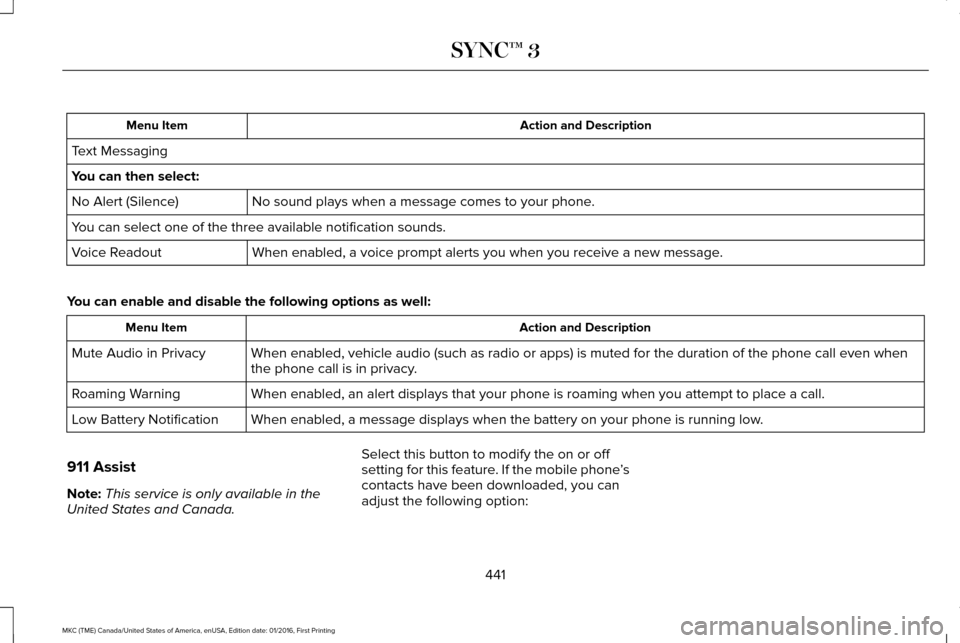
Action and Description
Menu Item
Text Messaging
You can then select: No sound plays when a message comes to your phone.
No Alert (Silence)
You can select one of the three available notification sounds.
When enabled, a voice prompt alerts you when you receive a new message.
Voice Readout
You can enable and disable the following options as well: Action and Description
Menu Item
When enabled, vehicle audio (such as radio or apps) is muted for the d\
uration of the phone call even when
the phone call is in privacy.
Mute Audio in Privacy
When enabled, an alert displays that your phone is roaming when you atte\
mpt to place a call.
Roaming Warning
When enabled, a message displays when the battery on your phone is runni\
ng low.
Low Battery Notification
911 Assist
Note: This service is only available in the
United States and Canada. Select this button to modify the on or off
setting for this feature. If the mobile phone
’s
contacts have been downloaded, you can
adjust the following option:
441
MKC (TME) Canada/United States of America, enUSA, Edition date: 01/2016, First Printing SYNC™ 3
Page 451 of 538
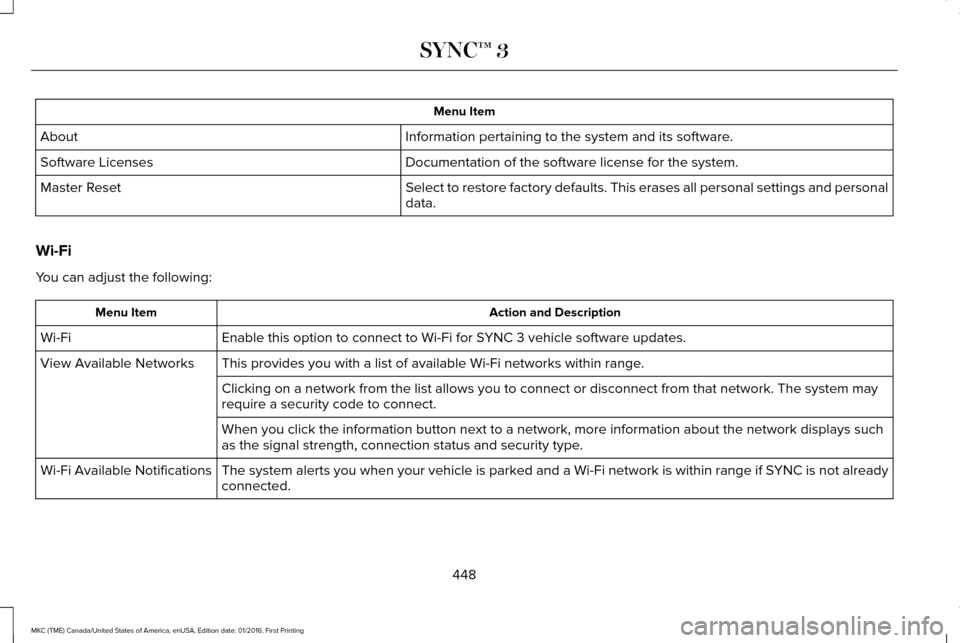
Menu Item
Information pertaining to the system and its software.
About
Documentation of the software license for the system.
Software Licenses
Select to restore factory defaults. This erases all personal settings an\
d personal
data.
Master Reset
Wi-Fi
You can adjust the following: Action and Description
Menu Item
Enable this option to connect to Wi-Fi for SYNC 3 vehicle software updates.
Wi-Fi
This provides you with a list of available Wi-Fi networks within range.
View Available Networks
Clicking on a network from the list allows you to connect or disconnect \
from that network. The system may
require a security code to connect.
When you click the information button next to a network, more informatio\
n about the network displays such
as the signal strength, connection status and security type.
The system alerts you when your vehicle is parked and a Wi-Fi network is within range if SYNC is not already
connected.
Wi-Fi Available Notifications
448
MKC (TME) Canada/United States of America, enUSA, Edition date: 01/2016, First Printing SYNC™ 3
Page 530 of 538
Climate Controlled Seats............................146
Cooled Seats........................................................147
Collision Warning System..........................230 Principle Of Operation......................................230
Coolant Check See: Engine Coolant Check.............................291
Crash Sensors and Airbag Indicator
..........49
Creating a MyKey...........................................59 Programming or Changing Configurable
Settings...............................................................60
Cross Traffic Alert
.........................................225
False Alerts..........................................................229
Switching the System Off and On..................229
System Errors......................................................229
System Lights, Messages and Audible
Alerts.................................................................228
System Limitations.............................................228
Using the System...............................................225
Cruise Control
.................................................80
Principle of Operation.......................................208
Type 1.......................................................................80
Type 2......................................................................80
Cruise control See: Using Cruise Control...............................208
Customer Assistance
..................................259 D
Data Recording
..................................................9
Event Data Recording...........................................10
Service Data Recording.........................................9
Daytime Running Lamps...............................89 Type 1 - Conventional
(Non-Configurable)..........................................89
Type 2 - Configurable..........................................89
Direction Indicators.........................................91
Drive Control
.................................................233
LINCOLN DRIVE CONTROL............................233
Driver Alert
......................................................217
Using Driver Alert................................................217
Driver and Passenger Airbags
....................42
Children and Airbags...........................................43
Proper Driver and Front Passenger Seating
Adjustment.........................................................43
Driver Knee Airbag.........................................48
Driving Aids.....................................................217
Driving Hints
..................................................249
Driving Through Water...............................250
DRL See: Daytime Running Lamps...........................89
E
Economical Driving......................................249 Electric Parking Brake..................................185
Applying the electric parking brake...............185
Applying the electric parking brake when the
vehicle is moving............................................186
Battery With No Charge.....................................187
Releasing the electric parking brake.............186
Emission Control System
.............................170
On-Board Diagnostics (OBD-II).........................171
Readiness for Inspection/Maintenance (I/M)
Testing................................................................172
End User License Agreement
...................504
VEHICLE SOFTWARE END USER LICENSE
AGREEMENT (EULA) ....................................504
Engine Block Heater....................................160 Using the Engine Block Heater.......................160
Engine Coolant Check.................................291 Adding Engine Coolant....................................293
Checking the Engine Coolant..........................
291
Recycled Engine Coolant.................................293
Severe Climates.................................................293
What You Should Know About Fail-Safe Cooling.............................................................294
Engine Immobilizer See: Passive Anti-Theft System........................75
Engine Oil Check.........................................290 Adding Engine Oil..............................................290
Engine Oil Dipstick......................................290
527
MKC (TME) Canada/United States of America, enUSA, Edition date: 01/2016, First Printing Index