center console LINCOLN MKC 2017 User Guide
[x] Cancel search | Manufacturer: LINCOLN, Model Year: 2017, Model line: MKC, Model: LINCOLN MKC 2017Pages: 538, PDF Size: 4.8 MB
Page 195 of 538
PRINCIPLE OF OPERATION
WARNINGS
Vehicle modifications involving braking
system, aftermarket roof racks,
suspension, steering system, tire
construction and wheel and tire size may
change the handling characteristics of your
vehicle and may adversely affect the
performance of the electronic stability control
system. In addition, installing any stereo
loudspeakers may interfere with and
adversely affect the electronic stability
control system. Install any aftermarket stereo
loudspeaker as far as possible from the front
center console, the tunnel, and the front
seats in order to minimize the risk of
interfering with the electronic stability control
sensors. Reducing the effectiveness of the
electronic stability control system could lead
to an increased risk of loss of vehicle control,
vehicle rollover, personal injury and death. WARNINGS
Remember that even advanced
technology cannot defy the laws of
physics. It’ s always possible to lose control
of a vehicle due to inappropriate driver input
for the conditions. Aggressive driving on any
road condition can cause you to lose control
of your vehicle increasing the risk of personal
injury or property damage. Activation of the
electronic stability control system is an
indication that at least some of the tires have
exceeded their ability to grip the road; this
could reduce the operator’ s ability to control
the vehicle potentially resulting in a loss of
vehicle control, vehicle rollover, personal
injury and death. If your electronic stability
control system activates, SLOW DOWN. The system automatically turns on each time
you switch the ignition on.
If a fault occurs in either the stability control
or the traction control system, you may
experience the following conditions:•
The stability and traction control light
illuminates steadily.
• The stability control and traction control
systems do not enhance your vehicle's
ability to maintain traction of the wheels.
If a driving condition activates either the
stability control or the traction control system
you may experience the following conditions:
• The stability and traction control light
flashes.
• Your vehicle slows down.
• Reduced engine power.
• A vibration in the brake pedal.
• The brake pedal is stiffer than usual.
• If the driving condition is severe and your
foot is not on the brake, the brake pedal
may move as the system applies higher
brake force.
The stability control system has several
features built into it to help you maintain
control of your vehicle:
192
MKC (TME) Canada/United States of America, enUSA, Edition date: 01/2016, First Printing Stability Control
Page 200 of 538
•
Something passes between the front
bumper and the parking space (a
pedestrian or cyclist).
• The edge of the neighboring parked
vehicle is high off the ground (for
example, a bus, tow truck or flatbed
truck).
• The weather conditions are poor (heavy
rain, snow, fog, etc).
Note: Keep the sensors, located on the
bumper or fascia, free from snow, ice and
large accumulations of dirt. Covered sensors
can affect the system's accuracy. Do not
clean the sensors with sharp objects. Note:
The sensors may not detect objects
with surfaces that absorb ultrasonic waves
or cause ultrasonic interference (motorcycle
exhaust, truck air brakes or horns).
Do not use the system if:
• You have attached a bike rack, trailer or
other object near the sensors on the front
or rear of your vehicle.
• You have attached an overhanging
object (surfboard) to the roof.
• A foreign object damages or obstructs
the front or rear bumper or side sensors.
• The correct tire size is not in use on your
vehicle (for example, a mini-spare tire). Using Active Park Assist - Parallel Parking Press the button located on the
center console near the gearshift
lever or the right side of the center
stack once.
When driving at a speed less than 22 mph
(35 km/h) the system automatically scans
both sides of your vehicle for an available
parking space. The system displays a
message and a corresponding graphic to
indicate it is searching for a parking space.
Use the direction indicator to select
searching either to the left-hand side or
right-hand side of your vehicle. If the
direction indicators are not used, the system
defaults to the passenger side of your
vehicle.
197
MKC (TME) Canada/United States of America, enUSA, Edition date: 01/2016, First Printing Parking AidsE146186
Page 202 of 538
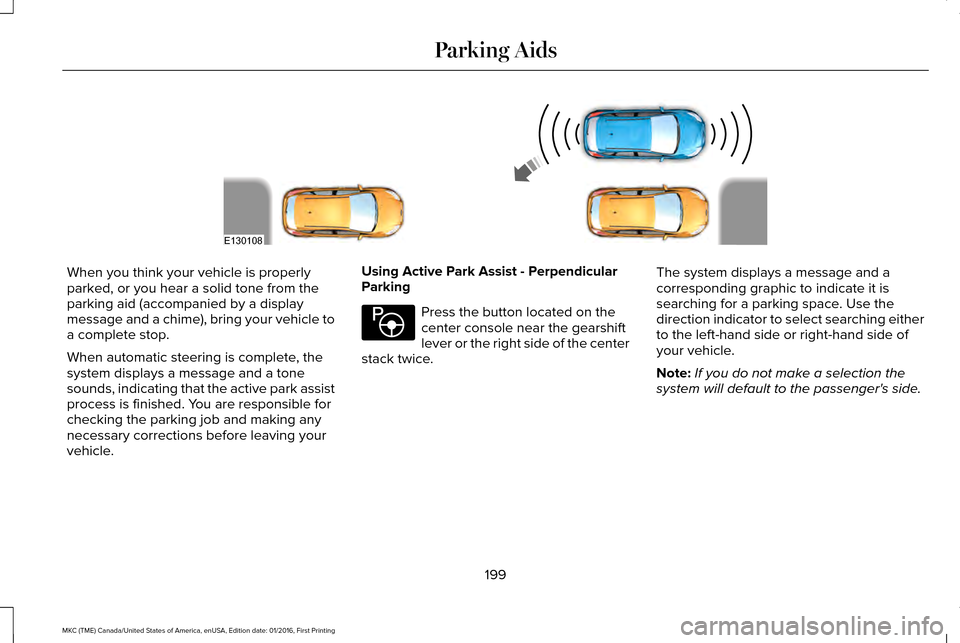
When you think your vehicle is properly
parked, or you hear a solid tone from the
parking aid (accompanied by a display
message and a chime), bring your vehicle to
a complete stop.
When automatic steering is complete, the
system displays a message and a tone
sounds, indicating that the active park assist
process is finished. You are responsible for
checking the parking job and making any
necessary corrections before leaving your
vehicle.
Using Active Park Assist - Perpendicular
Parking Press the button located on the
center console near the gearshift
lever or the right side of the center
stack twice. The system displays a message and a
corresponding graphic to indicate it is
searching for a parking space. Use the
direction indicator to select searching either
to the left-hand side or right-hand side of
your vehicle.
Note:
If you do not make a selection the
system will default to the passenger's side.
199
MKC (TME) Canada/United States of America, enUSA, Edition date: 01/2016, First Printing Parking AidsE130108 E146186
Page 368 of 538

CD slot: Insert a CD.
A
Eject:
Press to eject a CD.
B
TUNE:
In radio mode, adjust to manually search through the radio frequency band. In SIRIUS \
mode, the system selects the previous
or next channel. If you select a specific category (Jazz, Rock, News, etc.), turn to find the previous or next channel in the sele\
cted
category.
C
Seek, Fast Forward and Reverse:
In radio mode, select a frequency band and press either button. The system stops at t\
he first
station it finds in that direction. In CD mode, press to select the next or previous track. Press and hold to move qui\
ckly forward or
backward through the current track.
D
Volume and Power:
Press to switch the system on and off. Turn to adjust the volume.
E
MEDIA HUB
(If Equipped)
You can locate the media hub inside the
center console or on the instrument panel. See your SYNC information.
365
MKC (TME) Canada/United States of America, enUSA, Edition date: 01/2016, First Printing Audio SystemE211463
Page 412 of 538
USB Ports
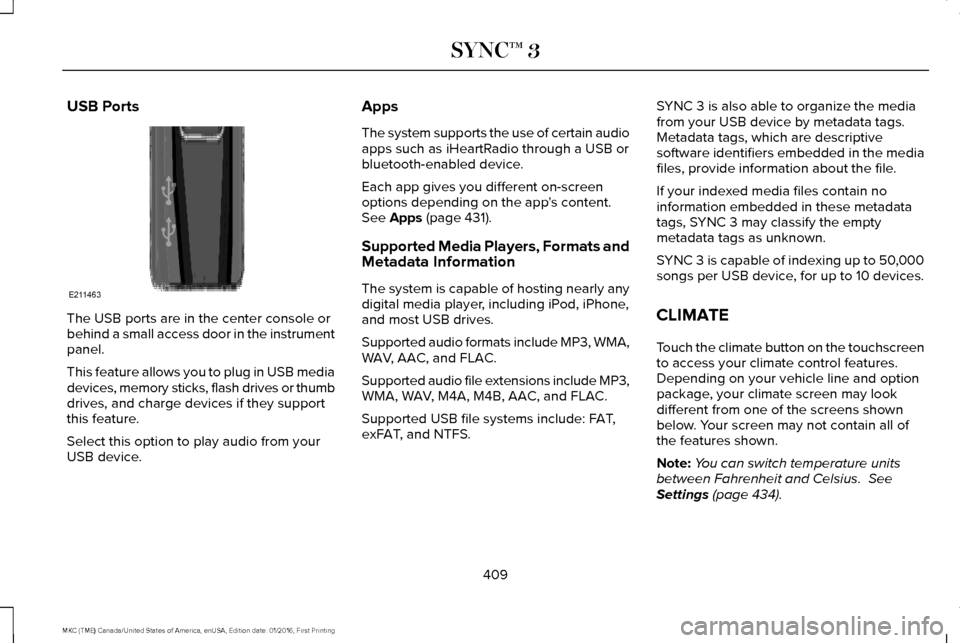
The USB ports are in the center console or
behind a small access door in the instrument
panel.
This feature allows you to plug in USB media
devices, memory sticks, flash drives or thumb
drives, and charge devices if they support
this feature.
Select this option to play audio from your
USB device. Apps
The system supports the use of certain audio
apps such as iHeartRadio through a USB or
bluetooth-enabled device.
Each app gives you different on-screen
options depending on the app's content.
See Apps (page 431).
Supported Media Players, Formats and
Metadata Information
The system is capable of hosting nearly any
digital media player, including iPod, iPhone,
and most USB drives.
Supported audio formats include MP3, WMA,
WAV, AAC, and FLAC.
Supported audio file extensions include MP3,
WMA, WAV, M4A, M4B, AAC, and FLAC.
Supported USB file systems include: FAT,
exFAT, and NTFS. SYNC 3 is also able to organize the media
from your USB device by metadata tags.
Metadata tags, which are descriptive
software identifiers embedded in the media
files, provide information about the file.
If your indexed media files contain no
information embedded in these metadata
tags, SYNC 3 may classify the empty
metadata tags as unknown.
SYNC 3 is capable of indexing up to 50,000
songs per USB device, for up to 10 devices.
CLIMATE
Touch the climate button on the touchscreen
to access your climate control features.
Depending on your vehicle line and option
package, your climate screen may look
different from one of the screens shown
below. Your screen may not contain all of
the features shown.
Note:
You can switch temperature units
between Fahrenheit and Celsius.
See
Settings (page 434).
409
MKC (TME) Canada/United States of America, enUSA, Edition date: 01/2016, First Printing SYNC™ 3E211463
Page 529 of 538
AWD
See: All-Wheel Drive...........................................179
B
Battery See: Changing the 12V Battery......................296
Blind Spot Information System.................223
Switching the System Off and On..................225
System Errors......................................................225
Using the System...............................................223
Bonnet Lock See: Opening and Closing the Hood............286
Booster Seats..................................................25 Types of Booster Seats.......................................26
Brake Fluid Check.......................................295
Brakes..............................................................184 General Information............................................184
Breaking-In.....................................................249
Bulb Specification Chart
..............................301
C
Cabin Air Filter................................................137
California Proposition 65................................11
Capacities and Specifications - 2.0L EcoBoost™...................................................350
Specifications.......................................................351 Capacities and Specifications - 2.3L
EcoBoost™....................................................356
Specifications......................................................357
Capacities and Specifications
...................344
Car Wash See: Cleaning the Exterior...............................306
Center Console.............................................155
Changing a Bulb...........................................300 Front Direction Indicator...................................301
High Intensity Discharge Headlamp.............300
LED Lamps............................................................301
License Plate Lamp.............................................301
Changing a Fuse..........................................283 Fuses.....................................................................283
Changing a Road Wheel.............................336 Dissimilar Spare Wheel and Tire Assembly
Information.......................................................337
Tire Change Procedure....................................
338
Changing the 12V Battery..........................296
Changing the Engine Air Filter.................303
Changing the Wiper Blades......................298 Front Wiper Blades............................................298
Rear Window Wiper Blade...............................299
Checking MyKey System Status.................60 MyKey Distance....................................................60
Number of Admin Keys........................................61
Number of MyKeys...............................................60
Checking the Wiper Blades.......................298 Child Restraint and Seatbelt
Maintenance..................................................38
Child Restraint Positioning
...........................28
Child Safety.......................................................17
General Information...............................................17
Child Safety Locks..........................................29 Left-Hand Side.......................................................30
Right-Hand Side....................................................30
Cleaning Leather Seats................................311
Cleaning Products
.......................................305
Cleaning the Alloy Wheels.........................312
Cleaning the Engine
....................................307
Cleaning the Exterior..................................306 Exterior Chrome Parts.......................................306
Exterior Plastic Parts..........................................307
Stripes or Graphics.............................................307
Underbody...........................................................307
Under Hood.........................................................307
Cleaning the Instrument Panel and Instrument Cluster Lens............................310
Cleaning the Interior....................................308 Cleaning Black Label or Presidential
Interior..............................................................309
Cleaning the Windows and Wiper Blades...........................................................308
Clearing All MyKeys.......................................60
Climate............................................................409
Climate Control..............................................133
526
MKC (TME) Canada/United States of America, enUSA, Edition date: 01/2016, First Printing Index
Page 534 of 538
Media Hub......................................................365
Memory Function..........................................143 Easy Entry and Exit Feature..............................144
Linking a PreSet Position to your Remote
Control or Intelligent Access Key...............144
Saving a PreSet Position...................................143
Message Center See: Information Displays.................................
108
Mirrors See: Heated Windows and Mirrors.................136
See: Windows and Mirrors.................................93
Mobile Communications Equipment
...........14
Moonroof..........................................................98 Bounce-Back..........................................................99
Opening and Closing the Moonroof................99
Power Sunscreen.................................................99
Venting the Moonroof.........................................99
Motorcraft Parts - 2.0L EcoBoost™...........346
Motorcraft Parts - 2.3L EcoBoost™
............347
MyKey Troubleshooting.................................61
MyKey™..............................................................58 Principle of Operation.........................................58
N
Navigation......................................................420 cityseeker.............................................................430
Destination Mode...............................................422 Map Mode.............................................................421
Navigation Map Updates..................................430
Navigation Menu.................................................427
SiriusXM Traffic and Travel Link......................430
Waypoints.............................................................429
Normal Scheduled Maintenance..............476 Intelligent Oil-Life Monitor™..............................476
Maintenance Intervals.......................................478
O
Oil Change Indicator Reset........................291
Oil Check See: Engine Oil Check......................................290
Opening and Closing the Hood...............286 Opening the Hood.............................................286
Ordering Additional Owner's Literature.....................................................264
Obtaining a French Owner’ s Manual............264
Overhead Console.......................................155
P
Parking Aids
....................................................194
Principle of Operation........................................194
Passive Anti-Theft System............................75 SecuriLock®............................................................75 PATS
See: Passive Anti-Theft System........................75
Perchlorate........................................................12
Personal Safety System ™
..............................40
How Does the Personal Safety System
Work?...................................................................40
Phone
...............................................................413
During a Phone Call............................................418
Making Calls..........................................................417
Pairing Your Cell Phone for the First
Time....................................................................413
Phone Menu..........................................................414
Receiving Calls.....................................................418
Smartphone Connectivity................................420
Text Messaging....................................................419
Post-Crash Alert System............................256
Power Door Locks See: Locking and Unlocking..............................63
Power Liftgate
.................................................68
Hands-Free Feature..............................................71
Obstacle Detection................................................71
Opening and Closing the Liftgate....................
69
Setting the Liftgate Open Height......................70
Stopping the Liftgate Movement......................70
Power Seats.....................................................141 Power Lumbar......................................................143
Power Windows
..............................................93
Accessory Delay...................................................94
531
MKC (TME) Canada/United States of America, enUSA, Edition date: 01/2016, First Printing Index