instrument cluster LINCOLN MKC 2017 Owner's Manual
[x] Cancel search | Manufacturer: LINCOLN, Model Year: 2017, Model line: MKC, Model: LINCOLN MKC 2017Pages: 538, PDF Size: 4.8 MB
Page 191 of 538
Switch Auto Hold off during vehicle or trailer
towing.
Note:
In case of a malfunction in the system
while Auto Hold actively holds the vehicle
(for example, low power supply), a message
appears in the information display. If you see
this message, press the brake pedal
immediately.
Note: Auto Hold only activates if the system
recognizes it is applying enough brake
pressure. On a steep hill or incline, you may
need to press the brake pedal to activate
the Auto Hold system.
Note: When the parking brake automatically
applies, the red brake lamp appears. This is
normal. When you press the accelerator
pedal, the drive away release feature
automatically releases the parking brake.
Note: Auto Hold works on all road gradients
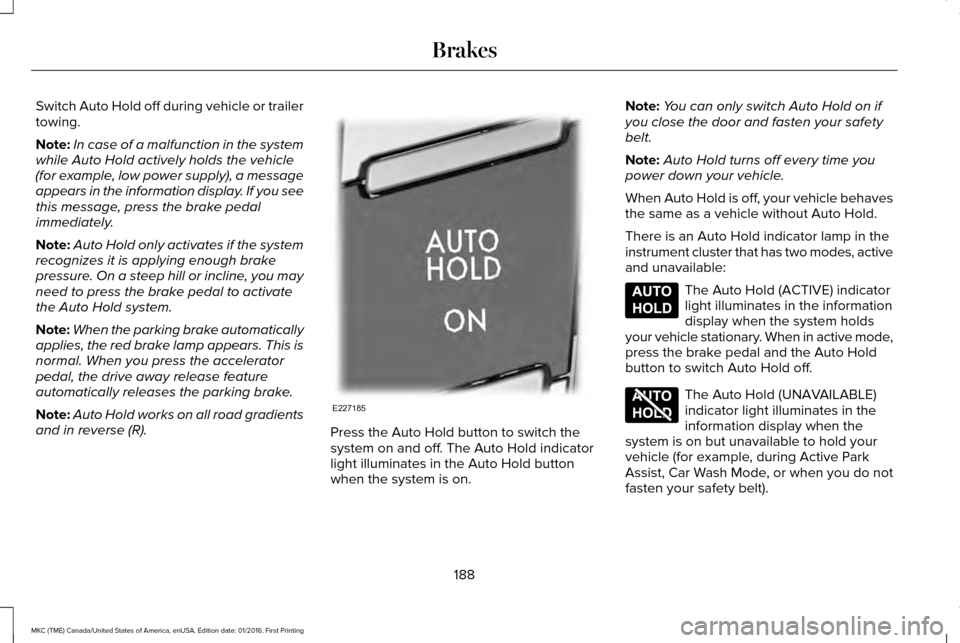
and in reverse (R). Press the Auto Hold button to switch the
system on and off. The Auto Hold indicator
light illuminates in the Auto Hold button
when the system is on.Note:
You can only switch Auto Hold on if
you close the door and fasten your safety
belt.
Note: Auto Hold turns off every time you
power down your vehicle.
When Auto Hold is off, your vehicle behaves
the same as a vehicle without Auto Hold.
There is an Auto Hold indicator lamp in the
instrument cluster that has two modes, active
and unavailable: The Auto Hold (ACTIVE) indicator
light illuminates in the information
display when the system holds
your vehicle stationary. When in active mode,
press the brake pedal and the Auto Hold
button to switch Auto Hold off. The Auto Hold (UNAVAILABLE)
indicator light illuminates in the
information display when the
system is on but unavailable to hold your
vehicle (for example, during Active Park
Assist, Car Wash Mode, or when you do not
fasten your safety belt).
188
MKC (TME) Canada/United States of America, enUSA, Edition date: 01/2016, First Printing BrakesE227185 E197933 E197934
Page 211 of 538
PRINCIPLE OF OPERATION
Cruise control lets you maintain a set speed
without keeping your foot on the accelerator
pedal. You can use cruise control when your
vehicle speed is greater than 20 mph
(30 km/h).
USING CRUISE CONTROL WARNINGS
Do not use cruise control on winding
roads, in heavy traffic or when the road
surface is slippery. This could result in loss
of vehicle control, serious injury or death. When you are going downhill, your
vehicle speed may increase above the
set speed. The system will not apply the
brakes but a warning displays. Note:
Cruise control will disengage if the
vehicle speed decreases more than 10 mph
(16 km/h)
below the set speed while driving
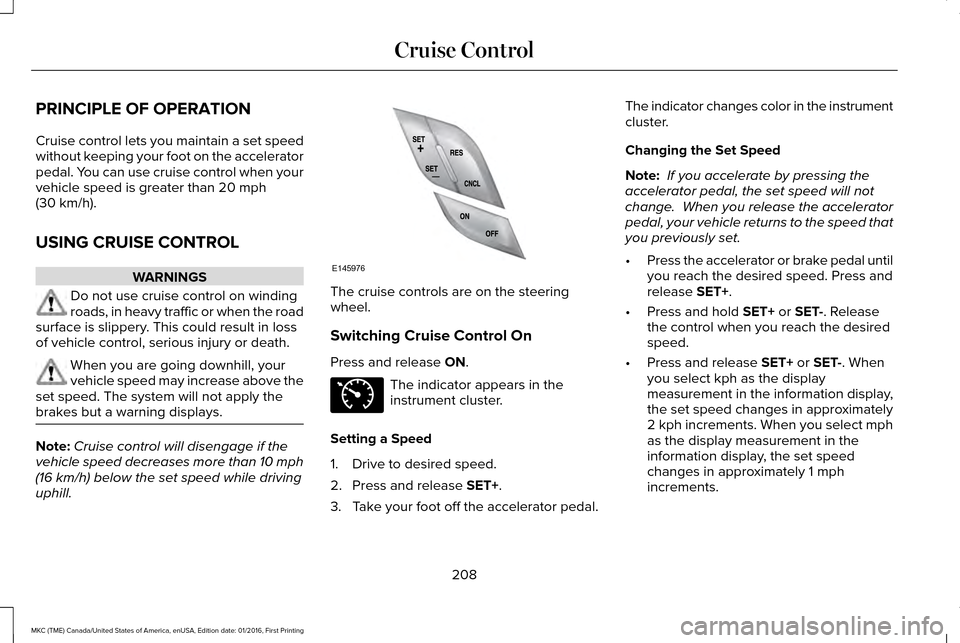
uphill. The cruise controls are on the steering
wheel.
Switching Cruise Control On
Press and release
ON.
The indicator appears in the
instrument cluster.
Setting a Speed
1. Drive to desired speed.
2. Press and release
SET+.
3. Take your foot off the accelerator pedal. The indicator changes color in the instrument
cluster.
Changing the Set Speed
Note:
If you accelerate by pressing the
accelerator pedal, the set speed will not
change. When you release the accelerator
pedal, your vehicle returns to the speed that
you previously set.
• Press the accelerator or brake pedal until
you reach the desired speed. Press and
release
SET+.
• Press and hold
SET+ or SET-. Release
the control when you reach the desired
speed.
• Press and release
SET+ or SET-. When
you select kph as the display
measurement in the information display,
the set speed changes in approximately
2 kph increments. When you select mph
as the display measurement in the
information display, the set speed
changes in approximately 1 mph
increments.
208
MKC (TME) Canada/United States of America, enUSA, Edition date: 01/2016, First Printing Cruise ControlE145976 E71340
Page 213 of 538
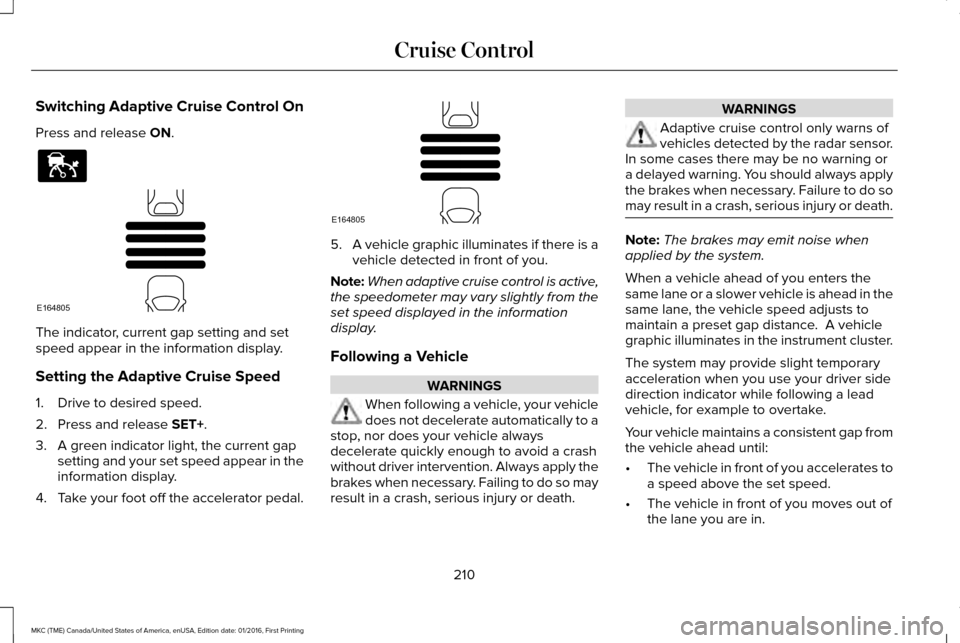
Switching Adaptive Cruise Control On
Press and release ON.
The indicator, current gap setting and set
speed appear in the information display.
Setting the Adaptive Cruise Speed
1. Drive to desired speed.
2. Press and release
SET+.
3. A green indicator light, the current gap setting and your set speed appear in the
information display.
4. Take your foot off the accelerator pedal. 5.
A vehicle graphic illuminates if there is a
vehicle detected in front of you.
Note: When adaptive cruise control is active,
the speedometer may vary slightly from the
set speed displayed in the information
display.
Following a Vehicle WARNINGS
When following a vehicle, your vehicle
does not decelerate automatically to a
stop, nor does your vehicle always
decelerate quickly enough to avoid a crash
without driver intervention. Always apply the
brakes when necessary. Failing to do so may
result in a crash, serious injury or death. WARNINGS
Adaptive cruise control only warns of
vehicles detected by the radar sensor.
In some cases there may be no warning or
a delayed warning. You should always apply
the brakes when necessary. Failure to do so
may result in a crash, serious injury or death. Note:
The brakes may emit noise when
applied by the system.
When a vehicle ahead of you enters the
same lane or a slower vehicle is ahead in the
same lane, the vehicle speed adjusts to
maintain a preset gap distance. A vehicle
graphic illuminates in the instrument cluster.
The system may provide slight temporary
acceleration when you use your driver side
direction indicator while following a lead
vehicle, for example to overtake.
Your vehicle maintains a consistent gap from
the vehicle ahead until:
• The vehicle in front of you accelerates to
a speed above the set speed.
• The vehicle in front of you moves out of
the lane you are in.
210
MKC (TME) Canada/United States of America, enUSA, Edition date: 01/2016, First Printing Cruise ControlE144529 E164805 E164805
Page 221 of 538
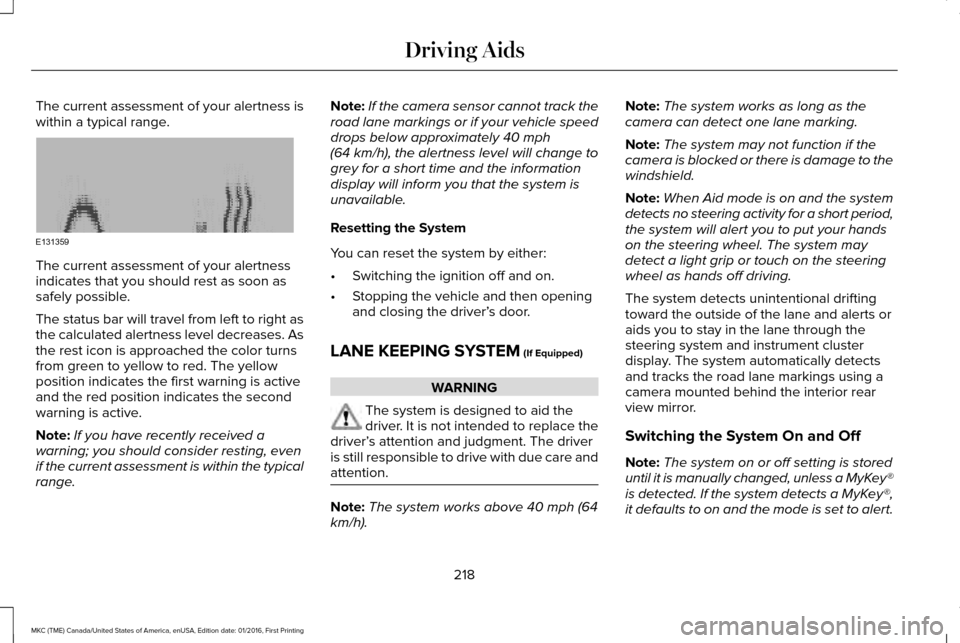
The current assessment of your alertness is
within a typical range.
The current assessment of your alertness
indicates that you should rest as soon as
safely possible.
The status bar will travel from left to right as
the calculated alertness level decreases. As
the rest icon is approached the color turns
from green to yellow to red. The yellow
position indicates the first warning is active
and the red position indicates the second
warning is active.
Note:
If you have recently received a
warning; you should consider resting, even
if the current assessment is within the typical
range. Note:
If the camera sensor cannot track the
road lane markings or if your vehicle speed
drops below approximately 40 mph
(64 km/h), the alertness level will change to
grey for a short time and the information
display will inform you that the system is
unavailable.
Resetting the System
You can reset the system by either:
• Switching the ignition off and on.
• Stopping the vehicle and then opening
and closing the driver’ s door.
LANE KEEPING SYSTEM
(If Equipped) WARNING
The system is designed to aid the
driver. It is not intended to replace the
driver’ s attention and judgment. The driver
is still responsible to drive with due care and
attention. Note:
The system works above 40 mph (64
km/h). Note:
The system works as long as the
camera can detect one lane marking.
Note: The system may not function if the
camera is blocked or there is damage to the
windshield.
Note: When Aid mode is on and the system
detects no steering activity for a short period,
the system will alert you to put your hands
on the steering wheel. The system may
detect a light grip or touch on the steering
wheel as hands off driving.
The system detects unintentional drifting
toward the outside of the lane and alerts or
aids you to stay in the lane through the
steering system and instrument cluster
display. The system automatically detects
and tracks the road lane markings using a
camera mounted behind the interior rear
view mirror.
Switching the System On and Off
Note: The system on or off setting is stored
until it is manually changed, unless a MyKey®
is detected. If the system detects a MyKey®,
it defaults to on and the mode is set to alert.
218
MKC (TME) Canada/United States of America, enUSA, Edition date: 01/2016, First Printing Driving AidsE131359
Page 294 of 538
1. Remove the engine oil filler cap.
2. Add engine oil that meets Ford
specifications. See Capacities and
Specifications (page 344).
3. Wipe off any spilled oil.
4. Replace the engine oil filler cap. Turn it clockwise until you feel a strong
resistance.
Note: Do not add oil further than the
maximum mark. Oil levels above the
maximum mark may cause engine damage.
Note: Soak up any spillage with an
absorbent cloth immediately.
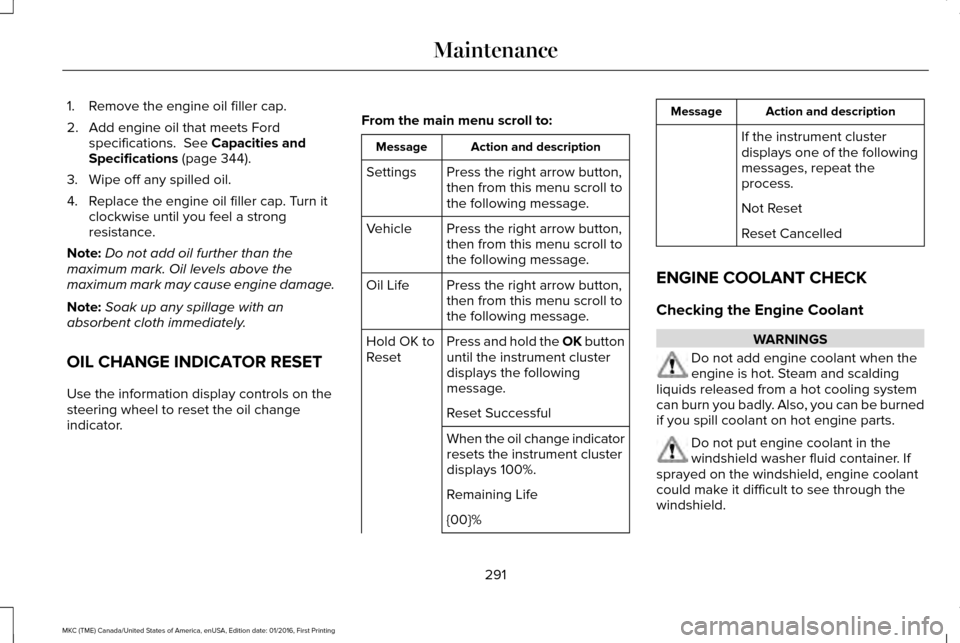
OIL CHANGE INDICATOR RESET
Use the information display controls on the
steering wheel to reset the oil change
indicator. From the main menu scroll to: Action and description
Message
Press the right arrow button,
then from this menu scroll to
the following message.
Settings
Press the right arrow button,
then from this menu scroll to
the following message.
Vehicle
Press the right arrow button,
then from this menu scroll to
the following message.
Oil Life
Press and hold the OK button
until the instrument cluster
displays the following
message.
Hold OK to
Reset
Reset Successful
When the oil change indicator
resets the instrument cluster
displays 100%.
Remaining Life
{00}% Action and description
Message
If the instrument cluster
displays one of the following
messages, repeat the
process.
Not Reset
Reset Cancelled
ENGINE COOLANT CHECK
Checking the Engine Coolant WARNINGS
Do not add engine coolant when the
engine is hot. Steam and scalding
liquids released from a hot cooling system
can burn you badly. Also, you can be burned
if you spill coolant on hot engine parts. Do not put engine coolant in the
windshield washer fluid container. If
sprayed on the windshield, engine coolant
could make it difficult to see through the
windshield.
291
MKC (TME) Canada/United States of America, enUSA, Edition date: 01/2016, First Printing Maintenance
Page 313 of 538
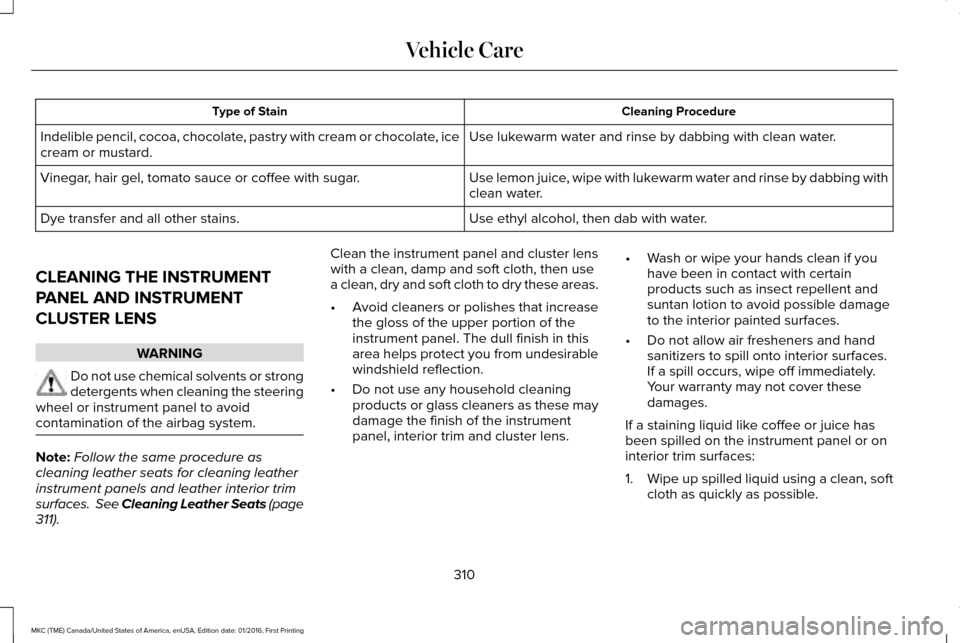
Cleaning Procedure
Type of Stain
Use lukewarm water and rinse by dabbing with clean water.
Indelible pencil, cocoa, chocolate, pastry with cream or chocolate, ice
cream or mustard.
Use lemon juice, wipe with lukewarm water and rinse by dabbing with
clean water.
Vinegar, hair gel, tomato sauce or coffee with sugar.
Use ethyl alcohol, then dab with water.
Dye transfer and all other stains.
CLEANING THE INSTRUMENT
PANEL AND INSTRUMENT
CLUSTER LENS WARNING
Do not use chemical solvents or strong
detergents when cleaning the steering
wheel or instrument panel to avoid
contamination of the airbag system. Note:
Follow the same procedure as
cleaning leather seats for cleaning leather
instrument panels and leather interior trim
surfaces. See Cleaning Leather Seats (page
311). Clean the instrument panel and cluster lens
with a clean, damp and soft cloth, then use
a clean, dry and soft cloth to dry these areas.
•
Avoid cleaners or polishes that increase
the gloss of the upper portion of the
instrument panel. The dull finish in this
area helps protect you from undesirable
windshield reflection.
• Do not use any household cleaning
products or glass cleaners as these may
damage the finish of the instrument
panel, interior trim and cluster lens. •
Wash or wipe your hands clean if you
have been in contact with certain
products such as insect repellent and
suntan lotion to avoid possible damage
to the interior painted surfaces.
• Do not allow air fresheners and hand
sanitizers to spill onto interior surfaces.
If a spill occurs, wipe off immediately.
Your warranty may not cover these
damages.
If a staining liquid like coffee or juice has
been spilled on the instrument panel or on
interior trim surfaces:
1. Wipe up spilled liquid using a clean, soft
cloth as quickly as possible.
310
MKC (TME) Canada/United States of America, enUSA, Edition date: 01/2016, First Printing Vehicle Care
Page 469 of 538
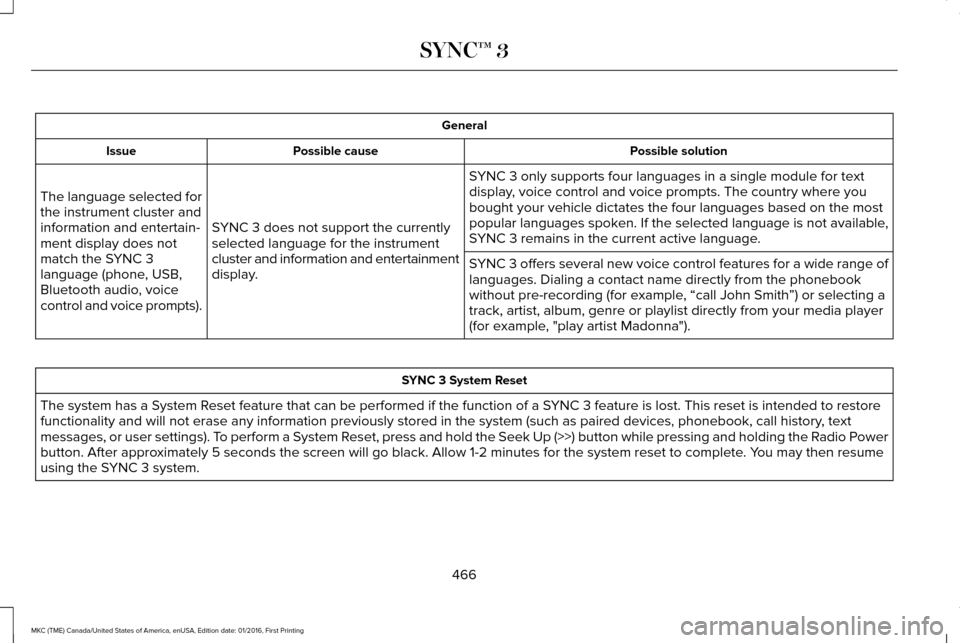
General
Possible solution
Possible cause
Issue
SYNC 3 only supports four languages in a single module for text
display, voice control and voice prompts. The country where you
bought your vehicle dictates the four languages based on the most
popular languages spoken. If the selected language is not available,
SYNC 3 remains in the current active language.
SYNC 3 does not support the currently
selected language for the instrument
cluster and information and entertainment
display.
The language selected for
the instrument cluster and
information and entertain-
ment display does not
match the SYNC 3
language (phone, USB,
Bluetooth audio, voice
control and voice prompts).
SYNC 3 offers several new voice control features for a wide range of
languages. Dialing a contact name directly from the phonebook
without pre-recording (for example, “call John Smith
”) or selecting a
track, artist, album, genre or playlist directly from your media player
(for example, "play artist Madonna"). SYNC 3 System Reset
The system has a System Reset feature that can be performed if the function of a SYNC 3 feature is lost. This reset is intended to restore
functionality and will not erase any information previously stored in th\
e system (such as paired devices, phonebook, call history , text
messages, or user settings). To perform a System Reset, press and hold the Seek Up (>>) button while pressing and holdin\
g the Radio Power
button. After approximately 5 seconds the screen will go black. Allow 1-2 minutes for the s\
ystem reset to complete. You may then resume
using the SYNC 3 system.
466
MKC (TME) Canada/United States of America, enUSA, Edition date: 01/2016, First Printing SYNC™ 3
Page 529 of 538
AWD
See: All-Wheel Drive...........................................179
B
Battery See: Changing the 12V Battery......................296
Blind Spot Information System.................223
Switching the System Off and On..................225
System Errors......................................................225
Using the System...............................................223
Bonnet Lock See: Opening and Closing the Hood............286
Booster Seats..................................................25 Types of Booster Seats.......................................26
Brake Fluid Check.......................................295
Brakes..............................................................184 General Information............................................184
Breaking-In.....................................................249
Bulb Specification Chart
..............................301
C
Cabin Air Filter................................................137
California Proposition 65................................11
Capacities and Specifications - 2.0L EcoBoost™...................................................350
Specifications.......................................................351 Capacities and Specifications - 2.3L
EcoBoost™....................................................356
Specifications......................................................357
Capacities and Specifications
...................344
Car Wash See: Cleaning the Exterior...............................306
Center Console.............................................155
Changing a Bulb...........................................300 Front Direction Indicator...................................301
High Intensity Discharge Headlamp.............300
LED Lamps............................................................301
License Plate Lamp.............................................301
Changing a Fuse..........................................283 Fuses.....................................................................283
Changing a Road Wheel.............................336 Dissimilar Spare Wheel and Tire Assembly
Information.......................................................337
Tire Change Procedure....................................
338
Changing the 12V Battery..........................296
Changing the Engine Air Filter.................303
Changing the Wiper Blades......................298 Front Wiper Blades............................................298
Rear Window Wiper Blade...............................299
Checking MyKey System Status.................60 MyKey Distance....................................................60
Number of Admin Keys........................................61
Number of MyKeys...............................................60
Checking the Wiper Blades.......................298 Child Restraint and Seatbelt
Maintenance..................................................38
Child Restraint Positioning
...........................28
Child Safety.......................................................17
General Information...............................................17
Child Safety Locks..........................................29 Left-Hand Side.......................................................30
Right-Hand Side....................................................30
Cleaning Leather Seats................................311
Cleaning Products
.......................................305
Cleaning the Alloy Wheels.........................312
Cleaning the Engine
....................................307
Cleaning the Exterior..................................306 Exterior Chrome Parts.......................................306
Exterior Plastic Parts..........................................307
Stripes or Graphics.............................................307
Underbody...........................................................307
Under Hood.........................................................307
Cleaning the Instrument Panel and Instrument Cluster Lens............................310
Cleaning the Interior....................................308 Cleaning Black Label or Presidential
Interior..............................................................309
Cleaning the Windows and Wiper Blades...........................................................308
Clearing All MyKeys.......................................60
Climate............................................................409
Climate Control..............................................133
526
MKC (TME) Canada/United States of America, enUSA, Edition date: 01/2016, First Printing Index
Page 533 of 538
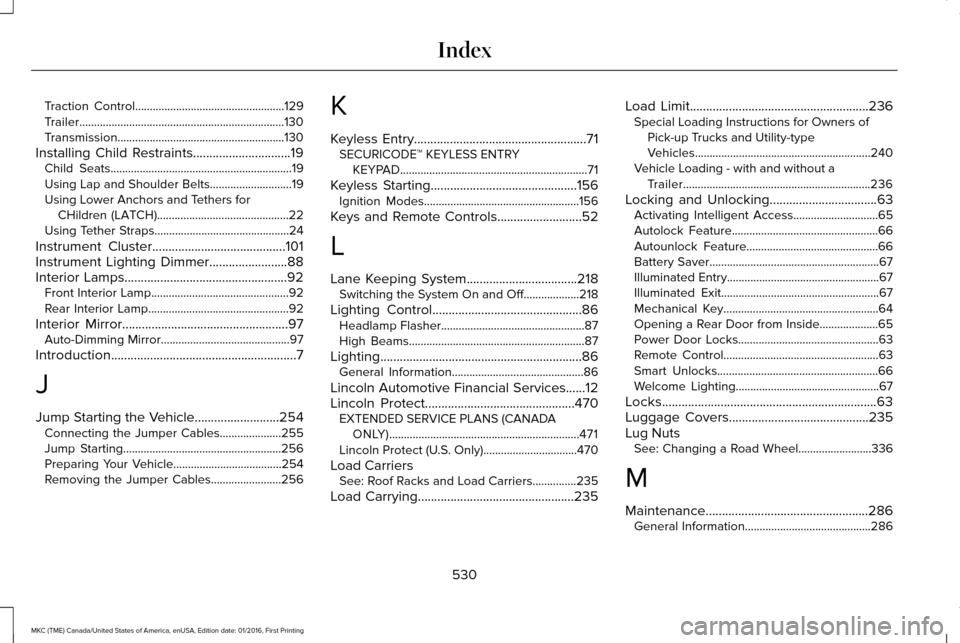
Traction Control...................................................129
Trailer......................................................................130
Transmission.........................................................130
Installing Child Restraints..............................19
Child Seats..............................................................19
Using Lap and Shoulder Belts............................19
Using Lower Anchors and Tethers for
CHildren (LATCH).............................................22
Using Tether Straps..............................................24
Instrument Cluster.........................................101
Instrument Lighting Dimmer........................88
Interior Lamps..................................................92 Front Interior Lamp...............................................92
Rear Interior Lamp................................................92
Interior Mirror
...................................................97
Auto-Dimming Mirror............................................97
Introduction
.........................................................7
J
Jump Starting the Vehicle
..........................254
Connecting the Jumper Cables.....................255
Jump Starting......................................................256
Preparing Your Vehicle.....................................254
Removing the Jumper Cables........................
256 K
Keyless Entry.....................................................71
SECURICODE™ KEYLESS ENTRY
KEYPAD................................................................71
Keyless Starting.............................................156 Ignition Modes.....................................................156
Keys and Remote Controls..........................52
L
Lane Keeping System..................................218 Switching the System On and Off...................218
Lighting Control
..............................................86
Headlamp Flasher.................................................87
High Beams............................................................87
Lighting..............................................................86 General Information.............................................86
Lincoln Automotive Financial Services......12
Lincoln Protect
..............................................470
EXTENDED SERVICE PLANS (CANADA
ONLY).................................................................471
Lincoln Protect (U.S. Only)................................470
Load Carriers See: Roof Racks and Load Carriers...............235
Load Carrying
................................................235 Load Limit.......................................................236
Special Loading Instructions for Owners of
Pick-up Trucks and Utility-type
Vehicles............................................................240
Vehicle Loading - with and without a Trailer................................................................236
Locking and Unlocking
.................................63
Activating Intelligent Access.............................65
Autolock Feature..................................................66
Autounlock Feature.............................................66
Battery Saver..........................................................67
Illuminated Entry....................................................67
Illuminated Exit......................................................67
Mechanical Key.....................................................64
Opening a Rear Door from Inside....................65
Power Door Locks................................................63
Remote Control.....................................................63
Smart Unlocks.......................................................66
Welcome Lighting.................................................67
Locks..................................................................63
Luggage Covers
...........................................235
Lug Nuts See: Changing a Road Wheel.........................336
M
Maintenance..................................................286 General Information...........................................286
530
MKC (TME) Canada/United States of America, enUSA, Edition date: 01/2016, First Printing Index