Auto hold LINCOLN MKC 2017 Owners Manual
[x] Cancel search | Manufacturer: LINCOLN, Model Year: 2017, Model line: MKC, Model: LINCOLN MKC 2017Pages: 538, PDF Size: 4.8 MB
Page 6 of 538
Auxiliary Power Points
Auxiliary Power Points.................................153
Storage Compartments
Center Console.............................................155
Overhead Console.......................................155
Ticket Holders
................................................155
Starting and Stopping the Engine
General Information
......................................156
Keyless Starting.............................................156
Starting a Gasoline Engine.........................157
Engine Block Heater....................................160
Unique Driving Characteristics
Auto-Start-Stop...............................................161
Fuel and Refueling
Safety Precautions
........................................164
Fuel Quality
.....................................................165
Fuel Filler Funnel Location.........................166
Running Out of Fuel
.....................................166 Refueling..........................................................167
Fuel Consumption
.........................................169
Emission Control System
.............................170
Transmission
Automatic Transmission...............................173
All-Wheel Drive
Using All-Wheel Drive..................................179
Brakes
General Information
......................................184
Hints on Driving With Anti-Lock Brakes
..........................................................184
Electric Parking Brake..................................185
Auto Hold........................................................187
Traction Control
Principle of Operation
..................................190
Using Traction Control
.................................190
Stability Control
Principle of Operation
..................................192 Using Stability Control.................................193
Parking Aids
Principle of Operation..................................194
Rear Parking Aid............................................195
Front Parking Aid..........................................195
Active Park Assist - Vehicles With: Active
Park Assist..................................................196
Rear View Camera.......................................204
Cruise Control
Principle of Operation.................................208
Using Cruise Control...................................208
Using Adaptive Cruise Control.................209
Driving Aids
Driver Alert
......................................................217
Lane Keeping System..................................218
Blind Spot Information System
.................223
Cross Traffic Alert
.........................................225
Steering..........................................................229
Collision Warning System..........................230
Drive Control
.................................................233
3
MKC (TME) Canada/United States of America, enUSA, Edition date: 01/2016, First Printing Table of Contents
Page 23 of 538
When installing a child safety seat with
combination lap and shoulder belts:
•
Use the correct safety belt buckle for that
seating position.
• Insert the belt tongue into the proper
buckle until you hear a snap and feel it
latch. Make sure the tongue is securely
fastened in the buckle.
• Keep the buckle release button pointing
up and away from the safety seat, with
the tongue between the child seat and
the release button, to prevent accidental
unbuckling.
• Place the vehicle seat upon which the
child seat will be installed in the upright
position.
• Put the safety belt in the automatic
locking mode. See Step 5. This vehicle
does not require the use of a locking clip.
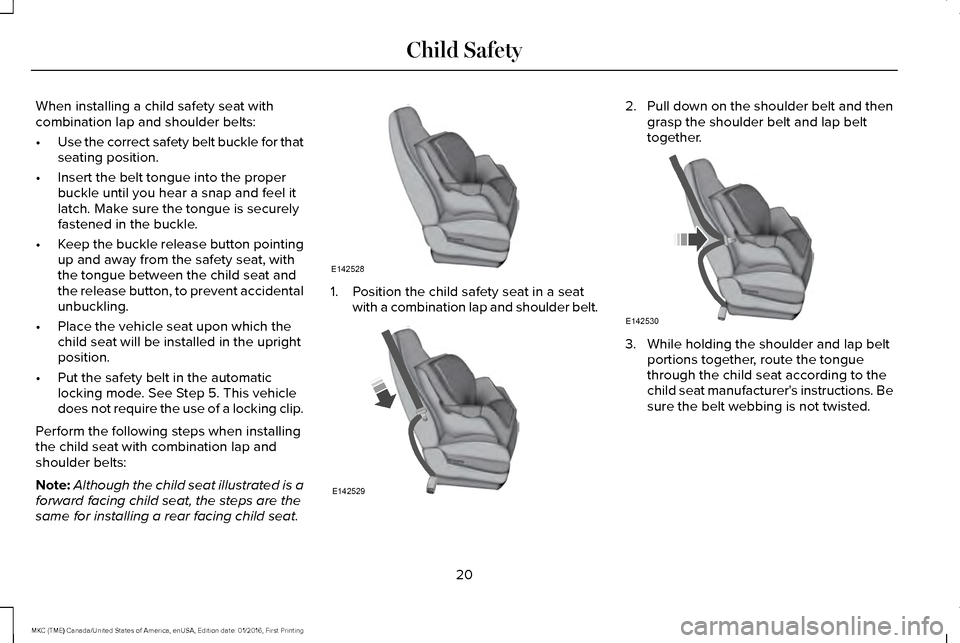
Perform the following steps when installing
the child seat with combination lap and
shoulder belts:
Note: Although the child seat illustrated is a
forward facing child seat, the steps are the
same for installing a rear facing child seat. 1. Position the child safety seat in a seat
with a combination lap and shoulder belt. 2.
Pull down on the shoulder belt and then
grasp the shoulder belt and lap belt
together. 3. While holding the shoulder and lap belt
portions together, route the tongue
through the child seat according to the
child seat manufacturer's instructions. Be
sure the belt webbing is not twisted.
20
MKC (TME) Canada/United States of America, enUSA, Edition date: 01/2016, First Printing Child SafetyE142528 E142529 E142530
Page 34 of 538
PRINCIPLE OF OPERATION
WARNINGS
Always drive and ride with your
seatback upright and the lap belt snug
and low across the hips. To reduce the risk of injury, make sure
children sit where they can be properly
restrained. Never let a passenger hold a child on
his or her lap while your vehicle is
moving. The passenger cannot protect the
child from injury in a crash. All occupants of your vehicle, including
the driver, should always properly wear
their safety belts, even when an airbag
supplemental restraint system is provided. WARNINGS
It is extremely dangerous to ride in a
cargo area, inside or outside of a
vehicle. In a crash, people riding in these
areas are more likely to be seriously injured
or killed. Do not allow people to ride in any
area of your vehicle that is not equipped with
seats and safety belts. Be sure everyone in
your vehicle is in a seat and using a safety
belt properly. In a rollover crash, an unbelted person
is significantly more likely to die than
a person wearing a safety belt. Each seating position in your vehicle
has a specific safety belt assembly
which is made up of one buckle and one
tongue that are designed to be used as a
pair. 1) Use the shoulder belt on the outside
shoulder only. Never wear the shoulder belt
under the arm. 2) Never swing the safety belt
around your neck over the inside shoulder.
3) Never use a single belt for more than one
person. When possible, all children 12 years old
and under should be properly
restrained in a rear seating position. WARNINGS
Safety belts and seats can become hot
in a vehicle that has been closed up in
sunny weather; they could burn a small child.
Check seat covers and buckles before you
place a child anywhere near them. Front and rear seat occupants,
including pregnant women, should
wear safety belts for optimum protection in
an accident. All seating positions in this vehicle have lap
and shoulder safety belts. All occupants of
the vehicle should always properly wear their
safety belts, even when an airbag
supplemental restraint system is provided.
The safety belt system consists of:
•
lap and shoulder safety belts
• shoulder safety belt with automatic
locking mode, (except driver safety belt)
• height adjuster at the front outboard
seating positions
31
MKC (TME) Canada/United States of America, enUSA, Edition date: 01/2016, First Printing Seatbelts
Page 91 of 538
When the lighting control is in the autolamps
position, the headlamps will automatically
turn on in low light situations or when wipers
activate.
If equipped, the following also activate when
the lighting control is in the autolamps
position and you switch them on in the
information display:
•
Configurable daytime running lamps.
• Automatic high beam control.
• Adaptive headlamp control.
The headlamps remain on for a period of
time after you switch the ignition off. Use the
information display controls to adjust the
period of time that the headlamps remain
on. See Information Displays (page 108).
Note: With the headlamps in the autolamps
position, you cannot switch the high beam
headlamps on until the autolamps system
turns the headlamps on. Note:
If the lighting control switch is in the
autolamps position and the headlamps are
off, the parking lamps will light as signature
lighting. If the headlamps are on, or the
lighting control switch is in the parking lamps
position, the parking lamps will not light as
signature lighting.
Windshield Wiper Activated Headlamps
The windshield wiper activated headlamps
turn on within 10 seconds when you switch
the windshield wipers on and the lighting
control switch is in the autolamps position.
They will turn off approximately 60 seconds
after you switch the windshield wipers off.
The headlamps will not turn on by wiper
activation:
• During a mist wipe.
• When the wipers are on to clear washer
fluid during a wash condition.
• If the wipers are in intermittent mode.
Note: If you have autolamps and autowipers
switched on, the low beam headlamps will
turn on automatically when the windshield
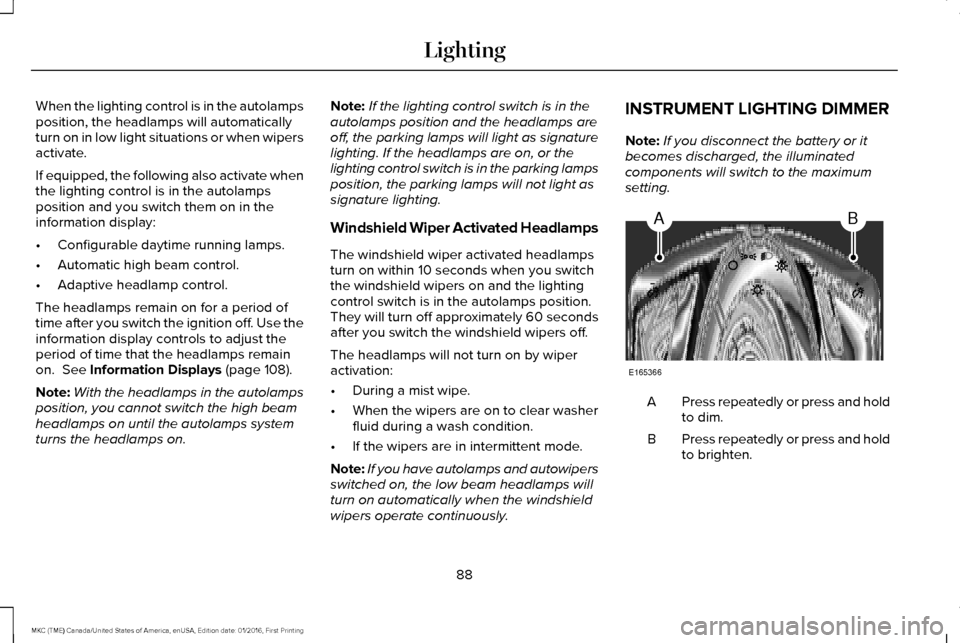
wipers operate continuously. INSTRUMENT LIGHTING DIMMER
Note:
If you disconnect the battery or it
becomes discharged, the illuminated
components will switch to the maximum
setting. Press repeatedly or press and hold
to dim.
A
Press repeatedly or press and hold
to brighten.
B
88
MKC (TME) Canada/United States of America, enUSA, Edition date: 01/2016, First Printing LightingAB
E165366
Page 96 of 538
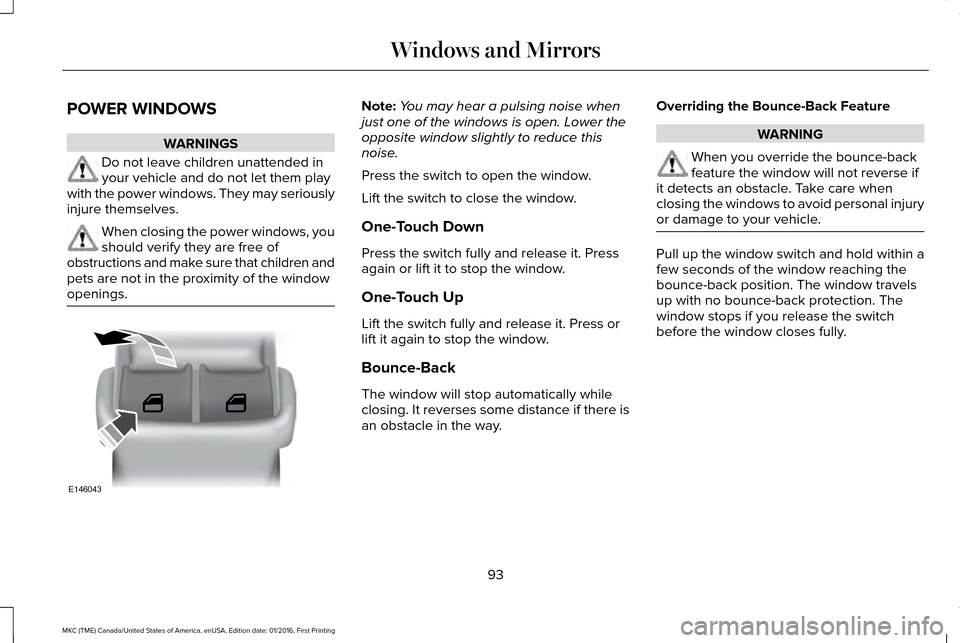
POWER WINDOWS
WARNINGS
Do not leave children unattended in
your vehicle and do not let them play
with the power windows. They may seriously
injure themselves. When closing the power windows, you
should verify they are free of
obstructions and make sure that children and
pets are not in the proximity of the window
openings. Note:
You may hear a pulsing noise when
just one of the windows is open. Lower the
opposite window slightly to reduce this
noise.
Press the switch to open the window.
Lift the switch to close the window.
One-Touch Down
Press the switch fully and release it. Press
again or lift it to stop the window.
One-Touch Up
Lift the switch fully and release it. Press or
lift it again to stop the window.
Bounce-Back
The window will stop automatically while
closing. It reverses some distance if there is
an obstacle in the way. Overriding the Bounce-Back Feature WARNING
When you override the bounce-back
feature the window will not reverse if
it detects an obstacle. Take care when
closing the windows to avoid personal injury
or damage to your vehicle. Pull up the window switch and hold within a
few seconds of the window reaching the
bounce-back position. The window travels
up with no bounce-back protection. The
window stops if you release the switch
before the window closes fully.
93
MKC (TME) Canada/United States of America, enUSA, Edition date: 01/2016, First Printing Windows and MirrorsE146043
Page 102 of 538
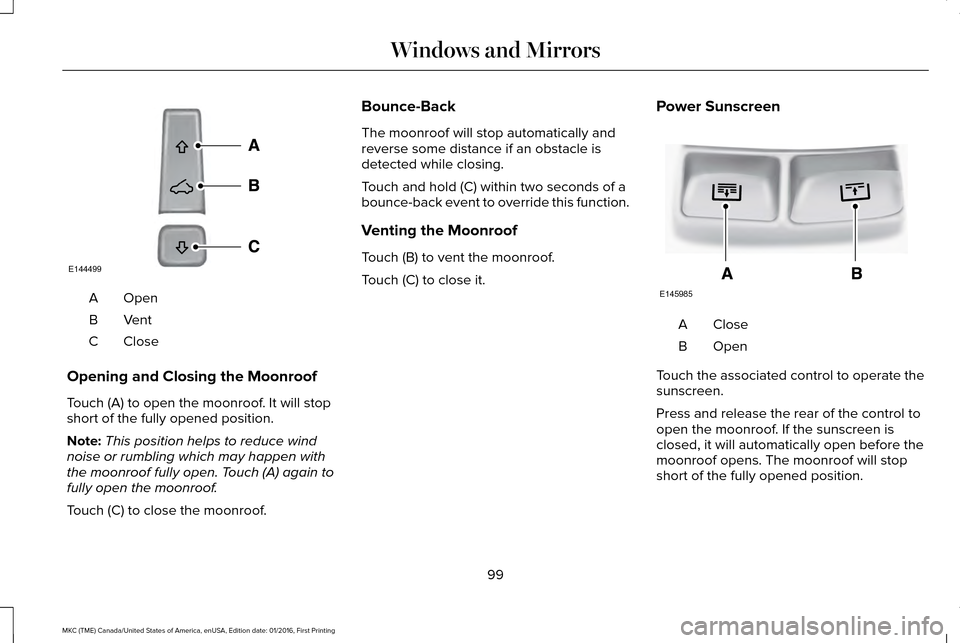
OpenA
VentB
CloseC
Opening and Closing the Moonroof
Touch (A) to open the moonroof. It will stop
short of the fully opened position.
Note: This position helps to reduce wind
noise or rumbling which may happen with
the moonroof fully open. Touch (A) again to
fully open the moonroof.
Touch (C) to close the moonroof. Bounce-Back
The moonroof will stop automatically and
reverse some distance if an obstacle is
detected while closing.
Touch and hold (C) within two seconds of a
bounce-back event to override this function.
Venting the Moonroof
Touch (B) to vent the moonroof.
Touch (C) to close it.
Power Sunscreen CloseA
OpenB
Touch the associated control to operate the
sunscreen.
Press and release the rear of the control to
open the moonroof. If the sunscreen is
closed, it will automatically open before the
moonroof opens. The moonroof will stop
short of the fully opened position.
99
MKC (TME) Canada/United States of America, enUSA, Edition date: 01/2016, First Printing Windows and MirrorsE144499 E145985
Page 107 of 538
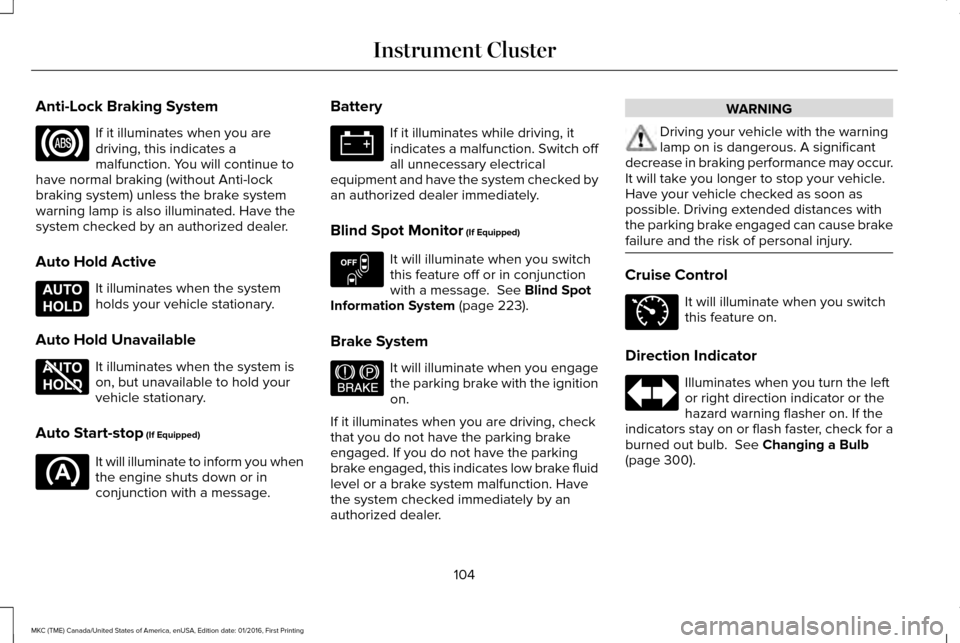
Anti-Lock Braking System
If it illuminates when you are
driving, this indicates a
malfunction. You will continue to
have normal braking (without Anti-lock
braking system) unless the brake system
warning lamp is also illuminated. Have the
system checked by an authorized dealer.
Auto Hold Active It illuminates when the system
holds your vehicle stationary.
Auto Hold Unavailable It illuminates when the system is
on, but unavailable to hold your
vehicle stationary.
Auto Start-stop (If Equipped) It will illuminate to inform you when
the engine shuts down or in
conjunction with a message. Battery If it illuminates while driving, it
indicates a malfunction. Switch off
all unnecessary electrical
equipment and have the system checked by
an authorized dealer immediately.
Blind Spot Monitor
(If Equipped) It will illuminate when you switch
this feature off or in conjunction
with a message.
See Blind Spot
Information System (page 223).
Brake System It will illuminate when you engage
the parking brake with the ignition
on.
If it illuminates when you are driving, check
that you do not have the parking brake
engaged. If you do not have the parking
brake engaged, this indicates low brake fluid
level or a brake system malfunction. Have
the system checked immediately by an
authorized dealer. WARNING
Driving your vehicle with the warning
lamp on is dangerous. A significant
decrease in braking performance may occur.
It will take you longer to stop your vehicle.
Have your vehicle checked as soon as
possible. Driving extended distances with
the parking brake engaged can cause brake
failure and the risk of personal injury. Cruise Control
It will illuminate when you switch
this feature on.
Direction Indicator Illuminates when you turn the left
or right direction indicator or the
hazard warning flasher on. If the
indicators stay on or flash faster, check for a
burned out bulb.
See Changing a Bulb
(page 300).
104
MKC (TME) Canada/United States of America, enUSA, Edition date: 01/2016, First Printing Instrument Cluster E197933 E197934 E151262 E144522 E71340
Page 115 of 538
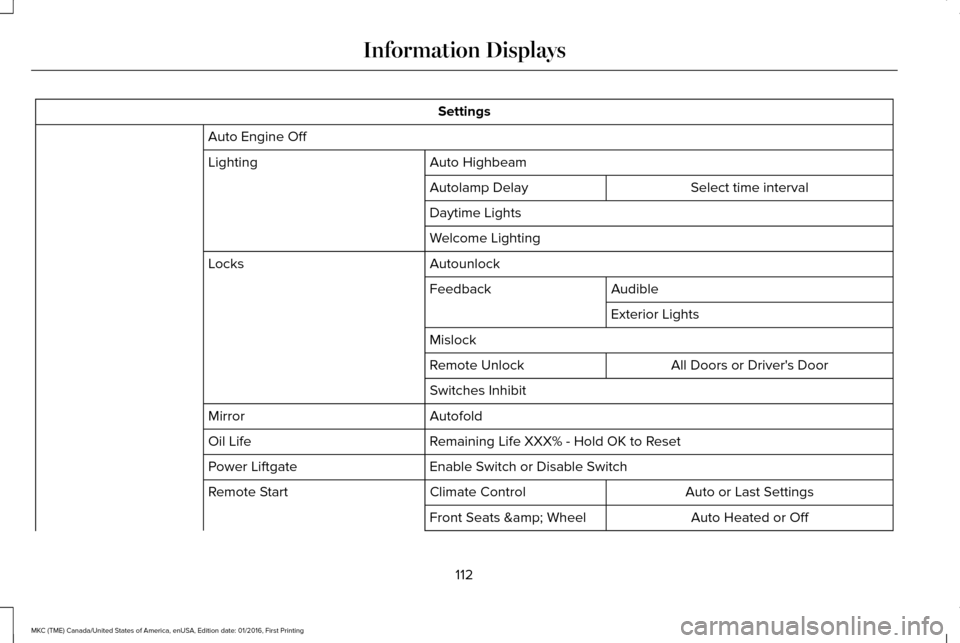
Settings
Auto Engine Off Auto Highbeam
Lighting
Select time interval
Autolamp Delay
Daytime Lights
Welcome Lighting
Autounlock
Locks
Audible
Feedback
Exterior Lights
Mislock All Doors or Driver's Door
Remote Unlock
Switches Inhibit
Autofold
Mirror
Remaining Life XXX% - Hold OK to Reset
Oil Life
Enable Switch or Disable Switch
Power Liftgate
Auto or Last Settings
Climate Control
Remote Start
Auto Heated or Off
Front Seats & Wheel
112
MKC (TME) Canada/United States of America, enUSA, Edition date: 01/2016, First Printing Information Displays
Page 125 of 538
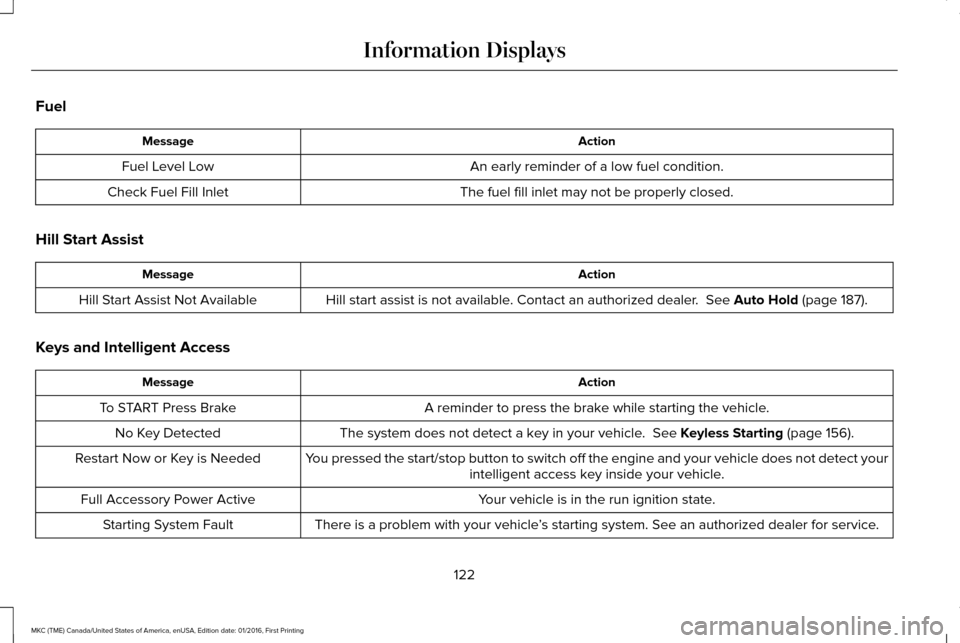
Fuel
Action
Message
An early reminder of a low fuel condition.
Fuel Level Low
The fuel fill inlet may not be properly closed.
Check Fuel Fill Inlet
Hill Start Assist Action
Message
Hill start assist is not available. Contact an authorized dealer. See Auto Hold (page 187).
Hill Start Assist Not Available
Keys and Intelligent Access Action
Message
A reminder to press the brake while starting the vehicle.
To START Press Brake
The system does not detect a key in your vehicle.
See Keyless Starting (page 156).
No Key Detected
You pressed the start/stop button to switch off the engine and your vehic\
le does not detect yourintelligent access key inside your vehicle.
Restart Now or Key is Needed
Your vehicle is in the run ignition state.
Full Accessory Power Active
There is a problem with your vehicle’s starting system. See an authorized dealer for service.
Starting System Fault
122
MKC (TME) Canada/United States of America, enUSA, Edition date: 01/2016, First Printing Information Displays
Page 134 of 538
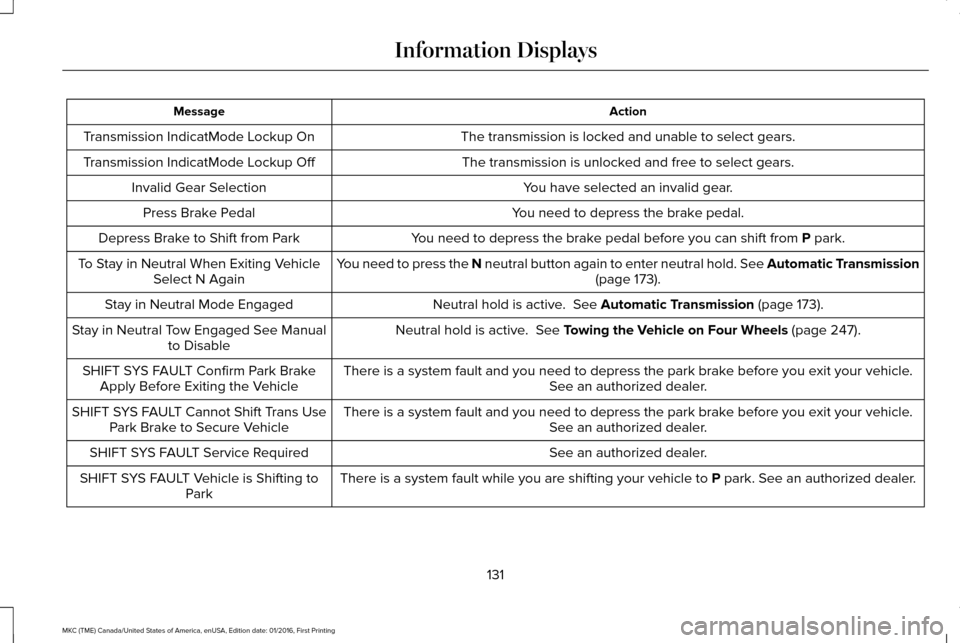
Action
Message
The transmission is locked and unable to select gears.
Transmission IndicatMode Lockup On
The transmission is unlocked and free to select gears.
Transmission IndicatMode Lockup Off
You have selected an invalid gear.
Invalid Gear Selection
You need to depress the brake pedal.
Press Brake Pedal
You need to depress the brake pedal before you can shift from P park.
Depress Brake to Shift from Park
You need to press the N neutral button again to enter neutral hold. See Automatic Transmission (page
173).
To Stay in Neutral When Exiting Vehicle
Select N Again
Neutral hold is active.
See Automatic Transmission (page 173).
Stay in Neutral Mode Engaged
Neutral hold is active.
See Towing the Vehicle on Four Wheels (page 247).
Stay in Neutral Tow Engaged See Manual
to Disable
There is a system fault and you need to depress the park brake before you exit your vehicle. See an authorized dealer.
SHIFT SYS FAULT Confirm Park Brake
Apply Before Exiting the Vehicle
There is a system fault and you need to depress the park brake before you exit your vehicle.See an authorized dealer.
SHIFT SYS FAULT Cannot Shift Trans Use
Park Brake to Secure Vehicle
See an authorized dealer.
SHIFT SYS FAULT Service Required
There is a system fault while you are shifting your vehicle to
P park. See an authorized dealer.
SHIFT SYS FAULT Vehicle is Shifting to
Park
131
MKC (TME) Canada/United States of America, enUSA, Edition date: 01/2016, First Printing Information Displays