front grille LINCOLN MKC 2017 Owners Manual
[x] Cancel search | Manufacturer: LINCOLN, Model Year: 2017, Model line: MKC, Model: LINCOLN MKC 2017Pages: 538, PDF Size: 4.8 MB
Page 218 of 538
System Not Available
Conditions that can cause the system to
deactivate or prevent the system from
activating when requested include:
•
A blocked sensor.
• High brake temperature.
• A failure in the system or a related
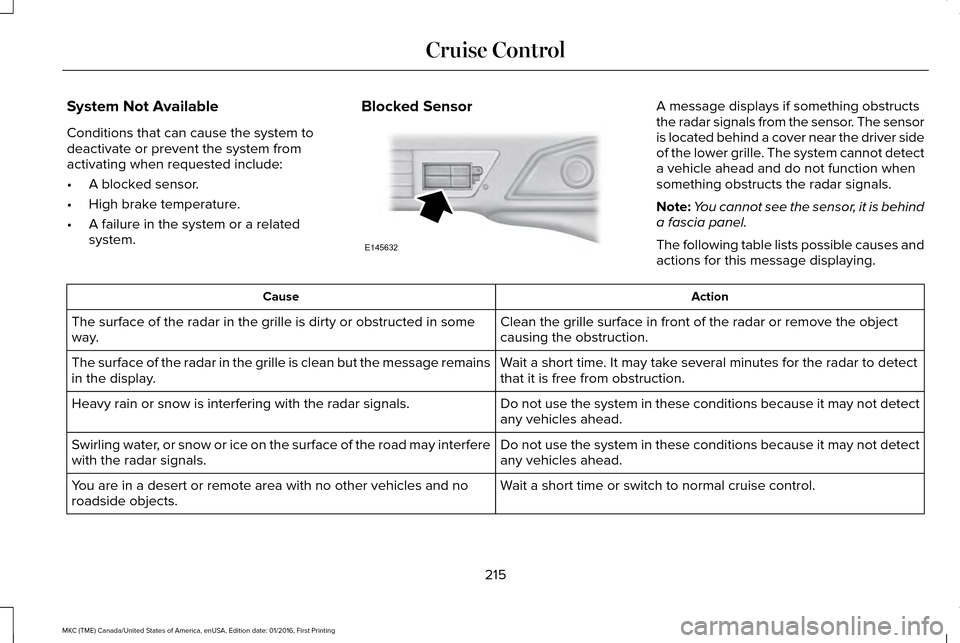
system. Blocked Sensor A message displays if something obstructs
the radar signals from the sensor. The sensor
is located behind a cover near the driver side
of the lower grille. The system cannot detect
a vehicle ahead and do not function when
something obstructs the radar signals.
Note:
You cannot see the sensor, it is behind
a fascia panel.
The following table lists possible causes and
actions for this message displaying. Action
Cause
Clean the grille surface in front of the radar or remove the object
causing the obstruction.
The surface of the radar in the grille is dirty or obstructed in some
way.
Wait a short time. It may take several minutes for the radar to detect
that it is free from obstruction.
The surface of the radar in the grille is clean but the message remains
in the display.
Do not use the system in these conditions because it may not detect
any vehicles ahead.
Heavy rain or snow is interfering with the radar signals.
Do not use the system in these conditions because it may not detect
any vehicles ahead.
Swirling water, or snow or ice on the surface of the road may interfere
with the radar signals.
Wait a short time or switch to normal cruise control.
You are in a desert or remote area with no other vehicles and no
roadside objects.
215
MKC (TME) Canada/United States of America, enUSA, Edition date: 01/2016, First Printing Cruise ControlE145632
Page 235 of 538
Action
Cause
Clean the radar sensor cover or remove the obstruction
The radar sensor cover in the grille is dirty or obstructed
Wait a short time. The radar may take several minutes to reset afteryou remove the obstruction
The surface of the radar sensor cover is clean but the message
remains in the display
The collision warning system is temporarily disabled. Shortly after
weather conditions improve, the collision warning system automatically reactivates
Heavy rain, spray, snow or fog in the air interferes with the radar
signals
The collision warning system is temporarily disabled. Shortly after
weather conditions improve, the collision warning system automatically reactivates
Swirling water, snow or ice on the road surface interferes with the
radar signals
System Limitations WARNING
The collision warning system
’s brake
support only reduces collision speed
if you first apply your brakes. You must brake
as you would in any typical braking situation. Due to the nature of radar technology, there
may be certain instances where vehicles do
not provide a collision warning. These
include: •
Stationary vehicles or vehicles moving
below 6 mph (10 km/h).
• Pedestrians or objects in the roadway.
• Oncoming vehicles in the same lane.
• Severe weather conditions (see blocked
sensor section).
• Debris build-up on the grille near the
headlamps (see blocked sensor section).
• Small distance to vehicle ahead.
• Large steering wheel and pedal
movements (very active driving style). Damage to the front end of the vehicle may
alter the radar sensor's coverage area. This
may result in missed or false collision
warnings. Have an authorized dealer check
your radar sensor for proper coverage and
operation.
232
MKC (TME) Canada/United States of America, enUSA, Edition date: 01/2016, First Printing Driving Aids