remote battery LINCOLN MKC 2017 Owners Manual
[x] Cancel search | Manufacturer: LINCOLN, Model Year: 2017, Model line: MKC, Model: LINCOLN MKC 2017Pages: 538, PDF Size: 4.8 MB
Page 15 of 538
WARNINGS
Battery posts, terminals and related
accessories contain lead and lead
compounds, chemicals known to the State
of California to cause cancer and
reproductive harm. Batteries also contain
other chemicals known to the State of
California to cause cancer. Wash your hands
after handling. PERCHLORATE
Certain components in your vehicle such as
airbag modules, seatbelt pretensioners and
remote control batteries may contain
perchlorate material. Special handling may
apply for service or vehicle end of life
disposal.
For more information visit: Web Address
www.dtsc.ca.gov/hazard- ouswaste/perchlorate
LINCOLN AUTOMOTIVE
FINANCIAL SERVICES
Lincoln Automotive Financial Services offers
a full range of financing and lease plans to
help you acquire your vehicle. We are
dedicated to providing answers, information
and a truly extraordinary experience.
Use the options below to contact us with
questions about your account or financing
and we will respond promptly: Web Address
www.LincolnAFS.com
Phone: 1-888-498-8801
Mail: Lincoln Automotive Financial Services P.O. Box 542000
Omaha, NE 68154-8000
REPLACEMENT PARTS
RECOMMENDATION
We have built your vehicle to the highest
standards using quality parts. We
recommend that you demand the use of
genuine Ford and Motorcraft parts whenever
your vehicle requires scheduled
maintenance or repair. You can clearly
identify genuine Ford and Motorcraft parts
by looking for the Ford, FoMoCo or
Motorcraft branding on the parts or their
packaging.
Scheduled Maintenance and
Mechanical Repairs
One of the best ways for you to make sure
that your vehicle provides years of service
is to have it maintained in line with our
recommendations using parts that conform
to the specifications detailed in this Owner’
s
Manual. Genuine Ford and Motorcraft parts
meet or exceed these specifications.
12
MKC (TME) Canada/United States of America, enUSA, Edition date: 01/2016, First Printing Introduction
Page 55 of 538
GENERAL INFORMATION ON
RADIO FREQUENCIES
This device complies with Part 15 of the FCC
Rules and with Industry Canada
license-exempt RSS standard(s). Operation
is subject to the following two conditions: (1)
This device may not cause harmful
interference, and (2) This device must accept
any interference received, including
interference that may cause undesired
operation.
Note:
Changes or modifications not
expressively approved by the party
responsible for compliance could void the
user's authority to operate the equipment.
The term IC before the radio certification
number only signifies that Industry Canada
technical specifications were met. The typical operating range for your
transmitter is approximately 33 feet (10
meters). Vehicles with the remote start
feature will have a greater range. One of the
following could cause a decrease in
operating range:
•
weather conditions
• nearby radio towers
• structures around the vehicle
• other vehicles parked next to your
vehicle
Other short-distance radio transmitters, such
as amateur radios, medical equipment,
wireless headphones, remote controls and
alarm systems may operate on the same
frequency as your remote control. If other
transmitters are operating on those
frequencies, you may not be able to use your
remote control. Using your remote control
near some types of electronic equipment,
such as USB devices, computers or cell
phones can interfere with remote operation.
Operating your remote control near metal or
metallic-finished purses, bags or clothing can
interfere with remote operation. You can lock
and unlock the doors with the key. Note:
Make sure to lock your vehicle before
leaving it unattended.
Note: If you are in range, the remote control
will operate if you press any button
unintentionally.
Intelligent Access
The system uses a radio frequency signal to
communicate with your vehicle and authorize
your vehicle to unlock when one of the
following conditions are met:
• You touch the inside of any exterior door
handle within
3 ft (1 m) proximity of an
intelligent access key.
• You press the luggage compartment
button.
• You press a button on the transmitter.
If excessive radio frequency interference is
present in the area or if the transmitter
battery is low, you may need to mechanically
unlock your door. You can use the
mechanical key blade in your intelligent
access key to open the driver door in this
situation.
See Remote Control (page 53).
52
MKC (TME) Canada/United States of America, enUSA, Edition date: 01/2016, First Printing Keys and Remote Controls
Page 56 of 538
REMOTE CONTROL
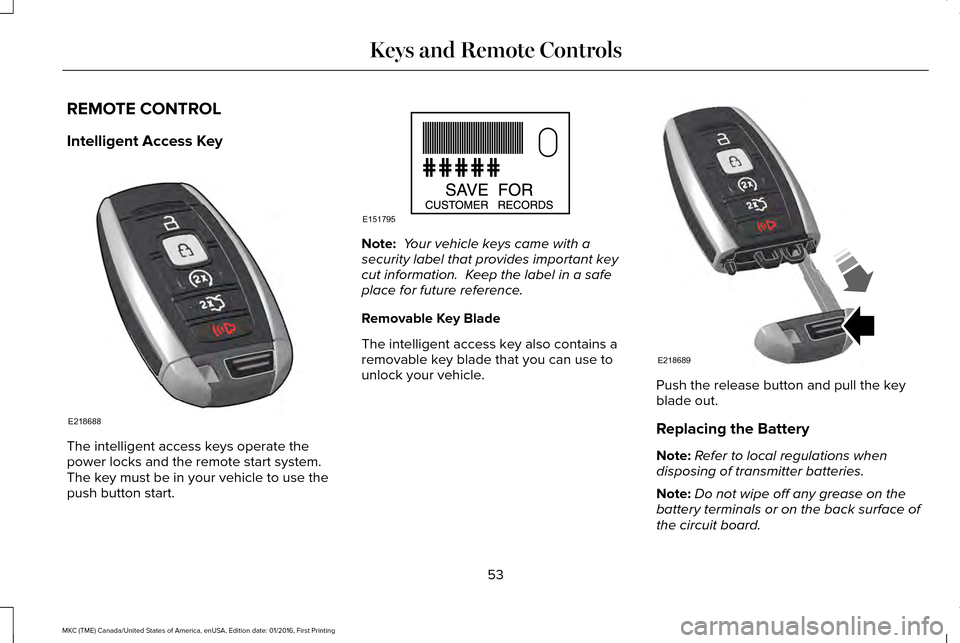
Intelligent Access Key
The intelligent access keys operate the
power locks and the remote start system.
The key must be in your vehicle to use the
push button start. Note:
Your vehicle keys came with a
security label that provides important key
cut information. Keep the label in a safe
place for future reference.
Removable Key Blade
The intelligent access key also contains a
removable key blade that you can use to
unlock your vehicle. Push the release button and pull the key
blade out.
Replacing the Battery
Note:
Refer to local regulations when
disposing of transmitter batteries.
Note: Do not wipe off any grease on the
battery terminals or on the back surface of
the circuit board.
53
MKC (TME) Canada/United States of America, enUSA, Edition date: 01/2016, First Printing Keys and Remote ControlsE218688 E151795 E218689
Page 57 of 538
Note:
Replacing the battery does not erase
the programmed key from your vehicle. The
transmitter should operate normally.
A message appears in the information
display when the remote control battery is
low. See Information Messages (page 114).
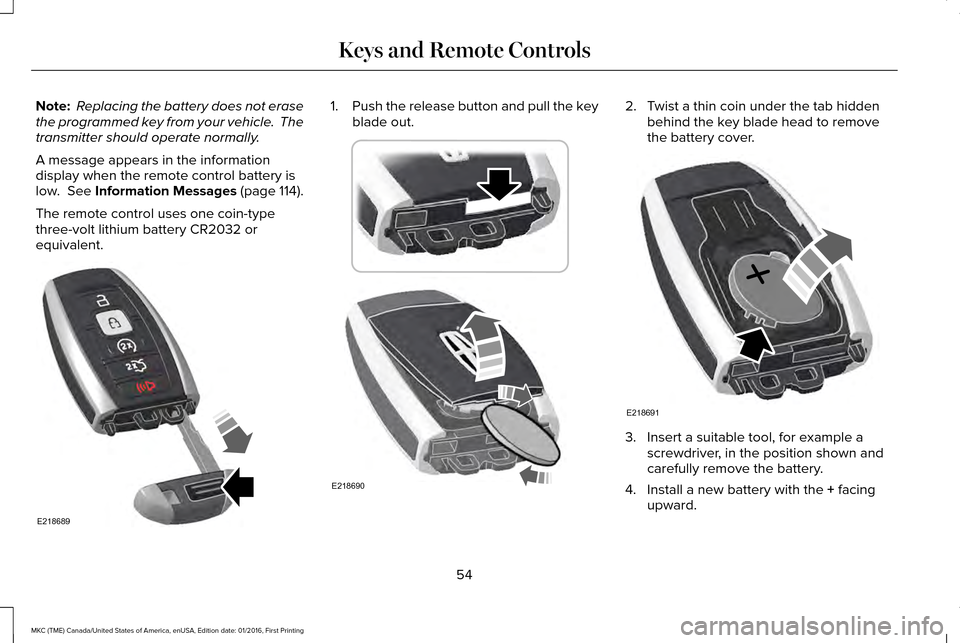
The remote control uses one coin-type
three-volt lithium battery CR2032 or
equivalent. 1.
Push the release button and pull the key
blade out. 2. Twist a thin coin under the tab hidden
behind the key blade head to remove
the battery cover. 3. Insert a suitable tool, for example a
screwdriver, in the position shown and
carefully remove the battery.
4. Install a new battery with the
+ facing
upward.
54
MKC (TME) Canada/United States of America, enUSA, Edition date: 01/2016, First Printing Keys and Remote ControlsE218689 E218690 E218691
Page 58 of 538
5. Reinstall the battery cover and the key
blade.
Car Finder Press the button twice within three
seconds. A tone sounds and the
direction indicators will flash. We
recommend you use this method to locate
your vehicle, rather than using the panic
alarm.
Sounding the Panic Alarm
Note: The panic alarm only operates when
the ignition is off. Press the button to sound the
panic alarm. Press the button
again or switch the ignition on to
turn it off. Remote Start WARNING
To avoid exhaust fumes, do not use
remote start if your vehicle is parked
indoors or in areas that are not well
ventilated. Note:
Do not use remote start if your fuel
level is low. The remote start button is on the
transmitter.
This feature allows you to start your vehicle
from the outside. The transmitter has an
extended operating range.
If your vehicle has automatic climate control,
you can configure it to operate when you
remote start your vehicle. See Climate
Control (page 133).
Many states and provinces have restrictions
for the use of remote start. Check your local
and state or provincial laws for specific
requirements regarding remote start
systems. The remote start system does not work if any
of the following occur:
•
The ignition is on.
• The anti-theft alarm triggers.
• You switch the feature off in the
information display.
• The hood is open.
• The transmission is not in park (P).
• The battery voltage is below the
minimum operating voltage.
Remote Control Feedback (If Equipped)
An LED on the remote control provides status
feedback of remote start or stop commands.
55
MKC (TME) Canada/United States of America, enUSA, Edition date: 01/2016, First Printing Keys and Remote ControlsE138623 E138624 E138625
Page 70 of 538
Note:
The doors will not autounlock if you
electronically lock your vehicle after you
switch the ignition off and before you open
the driver door.
Enabling or Disabling
You can enable or disable the autounlock
feature in the information display or an
authorized dealer can do it for you. See
General Information (page 108).
Illuminated Entry
The interior lamps and select exterior lamps
will light when you unlock the doors with the
remote control.
The system turns off the lights if:
• You start your vehicle.
• You press the remote control lock button.
• They are on for 25 seconds.
The lights will not turn off if:
• You switch them on with the lamp
control.
• Any door is open. Illuminated Exit
The interior lamps and select exterior lamps
will light when all doors are closed and you
switch the ignition off.
The lamps turn off if all the doors remain
closed and either of the following occurs:
•
After 25 seconds elapse.
• You lock your vehicle from the outside.
Battery Saver
If you leave the courtesy lamps or dome
lamps on and switch the ignition off, this
feature turns them off after some time.
Accessory Mode Battery Saver for
Intelligent Access Keys
If you leave your vehicle with the ignition on,
it will turn off 15 minutes after you close all
of the doors. Welcome Lighting
This feature lights select exterior lighting as
you approach your vehicle. You must have
an intelligent access key with you. The
feature turns off when you open a door,
liftgate, or unlock your vehicle. Welcome
lighting remains on for 25 seconds or until
you start your vehicle.
The feature is active when:
•
The feature is configured on in the
information display.
See General
Information (page 108).
• The ignition is off.
• All doors and the liftgate are closed.
• You lock your vehicle.
The feature is not active when:
• Your vehicle detects the intelligent
access key is inside.
• The intelligent access key is in close
range of the vehicle for more than two
minutes.
• The anti-theft alarm triggers.
67
MKC (TME) Canada/United States of America, enUSA, Edition date: 01/2016, First Printing Locks
Page 73 of 538
Note:
Allow the power system to open the
liftgate. Manually pushing or pulling the
liftgate may activate the system’ s obstacle
detection feature and stop the power
operation or reverse its direction. Manually
interfering with the liftgate motion may also
replicate a strut failure.
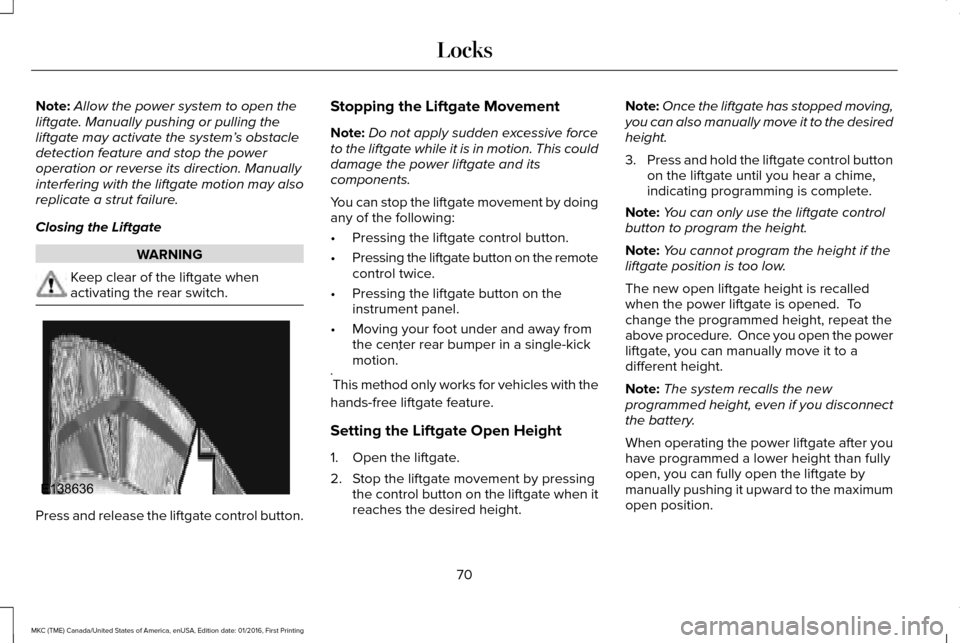
Closing the Liftgate WARNING
Keep clear of the liftgate when
activating the rear switch.
Press and release the liftgate control button. Stopping the Liftgate Movement
Note:
Do not apply sudden excessive force
to the liftgate while it is in motion. This could
damage the power liftgate and its
components.
You can stop the liftgate movement by doing
any of the following:
• Pressing the liftgate control button.
• Pressing the liftgate button on the remote
control twice.
• Pressing the liftgate button on the
instrument panel.
• Moving your foot under and away from
the center rear bumper in a single-kick
motion. *
* This method only works for vehicles with the
hands-free liftgate feature.
Setting the Liftgate Open Height
1. Open the liftgate.
2. Stop the liftgate movement by pressing the control button on the liftgate when it
reaches the desired height. Note:
Once the liftgate has stopped moving,
you can also manually move it to the desired
height.
3. Press and hold the liftgate control button
on the liftgate until you hear a chime,
indicating programming is complete.
Note: You can only use the liftgate control
button to program the height.
Note: You cannot program the height if the
liftgate position is too low.
The new open liftgate height is recalled
when the power liftgate is opened. To
change the programmed height, repeat the
above procedure. Once you open the power
liftgate, you can manually move it to a
different height.
Note: The system recalls the new
programmed height, even if you disconnect
the battery.
When operating the power liftgate after you
have programmed a lower height than fully
open, you can fully open the liftgate by
manually pushing it upward to the maximum
open position.
70
MKC (TME) Canada/United States of America, enUSA, Edition date: 01/2016, First Printing LocksE138636
Page 151 of 538
(If Equipped)
HomeLink Wireless Control System
WARNINGS
Make sure that the garage door and
security device are free from
obstruction when you are programming. Do
not program the system with the vehicle in
the garage. Do not use the system with any garage
door opener that does not have the
safety stop and reverse feature as required
by U.S. Federal Safety Standards (this
includes any garage door opener
manufactured before April 1, 1982). A garage
door opener which cannot detect an object,
signaling the door to stop and reverse, does
not meet current federal safety standards.
Using a garage door opener without these
features increases the risk of serious injury
or death. Note:
Make sure you keep the original
remote control transmitter for use in other
vehicles as well as for future system
programming. Note:
We recommend that upon the sale or
lease termination of your vehicle, you erase
the programmed function buttons for security
reasons. See Erasing the Function Button
Codes.
Note: You can program a maximum of three
devices. To change or replace any of the
three devices after it has been initially
programmed, you must first erase the current
settings. See
Erasing the Function Button
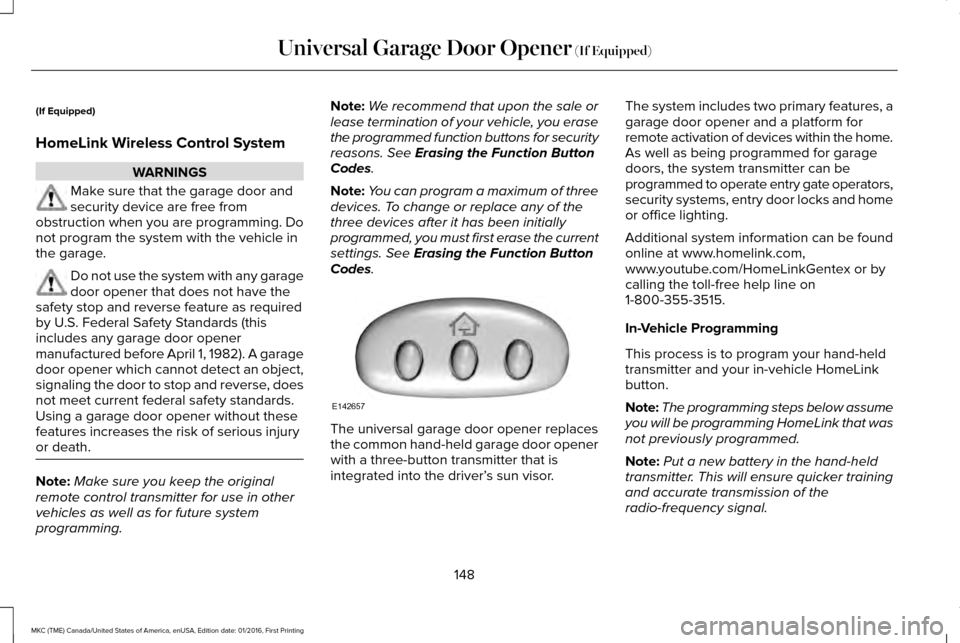
Codes. The universal garage door opener replaces
the common hand-held garage door opener
with a three-button transmitter that is
integrated into the driver’
s sun visor.The system includes two primary features, a
garage door opener and a platform for
remote activation of devices within the home.
As well as being programmed for garage
doors, the system transmitter can be
programmed to operate entry gate operators,
security systems, entry door locks and home
or office lighting.
Additional system information can be found
online at www.homelink.com,
www.youtube.com/HomeLinkGentex or by
calling the toll-free help line on
1-800-355-3515.
In-Vehicle Programming
This process is to program your hand-held
transmitter and your in-vehicle HomeLink
button.
Note:
The programming steps below assume
you will be programming HomeLink that was
not previously programmed.
Note: Put a new battery in the hand-held
transmitter. This will ensure quicker training
and accurate transmission of the
radio-frequency signal.
148
MKC (TME) Canada/United States of America, enUSA, Edition date: 01/2016, First Printing Universal Garage Door Opener
(If Equipped)E142657
Page 160 of 538
Note:
You may have to press the push
button ignition switch twice to switch the
ignition on.
Start: Starts the engine.
• Press the brake pedal, and then press
the button for any length of time. An
indicator light on the button illuminates
when then ignition is on and when the
engine starts.
STARTING A GASOLINE ENGINE
When you start the engine, the idle speed
increases, this helps to warm up the engine.
If the engine idle speed does not slow down
automatically, have your vehicle checked by
an authorized dealer.
Note: If your vehicle is equipped with remote
start, you can start your vehicle with the
remote, and then drive away by pressing the
brake pedal and pushing a button on the
transmission. This allows you to drive away
without pressing the engine start button. Before starting the engine, check the
following:
•
Make sure all occupants have fastened
their safety belts.
• Make sure the headlamps and electrical
accessories are off.
• Make sure the parking brake is on.
• Put the transmission in
P.
Note: Do not touch the accelerator pedal.
1. Fully press the brake pedal.
2. Press the button.
The system does not function if:
• The key frequencies are jammed.
• The key battery has no charge.
If you are unable to start the engine, do the
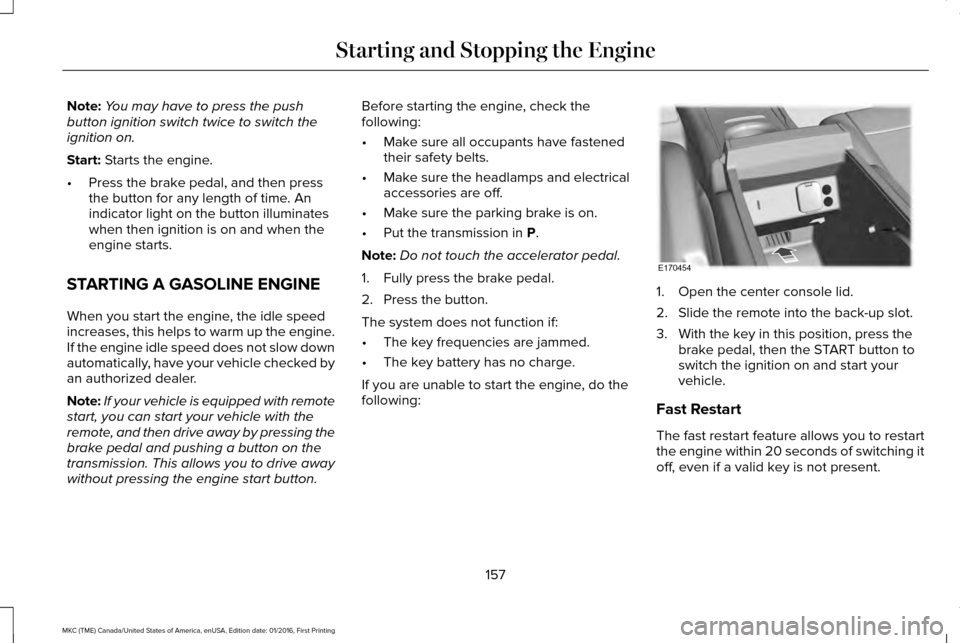
following: 1. Open the center console lid.
2. Slide the remote into the back-up slot.
3. With the key in this position, press the
brake pedal, then the START button to
switch the ignition on and start your
vehicle.
Fast Restart
The fast restart feature allows you to restart
the engine within 20 seconds of switching it
off, even if a valid key is not present.
157
MKC (TME) Canada/United States of America, enUSA, Edition date: 01/2016, First Printing Starting and Stopping the EngineE170454
Page 532 of 538
Owner Checks and Services...........................474
Protecting Your Investment..............................472
Why Maintain Your Vehicle?.............................472
Why Maintain Your Vehicle at Your
Dealership?......................................................472
Getting Assistance Outside the U.S. and Canada.........................................................263
Getting the Services You Need................259 Away From Home..............................................259
Global Opening and Closing.......................94 Closing the Windows...........................................94
Opening the Windows.........................................94
H
Hazard Warning Flashers...........................253
Headlamp Adjusting See: Adjusting the Headlamps.......................
299
Headlamp Exit Delay.....................................89
Headlamp Removal See: Removing a Headlamp............................300
Head Restraints
.............................................138
Adjusting the Head Restraint...........................140
Heated Seats..................................................145 Front Seats............................................................145
Rear Seats.............................................................146
Heated Steering Wheel..................................81 Heated Windows and Mirrors....................136
Heated Exterior Mirrors.....................................
136
Heated Rear Window.........................................136
Heated Wiper Park..............................................136
Heating See: Climate Control...........................................133
Hints on Controlling the Interior Climate..........................................................135
Cooling the Interior Quickly..............................136
General Hints........................................................135
Heating the Interior Quickly.............................135
Recommended Settings for Cooling .............136
Recommended Settings for Heating..............135
Side Window Defogging in Cold Weather.............................................................136
Hints on Driving With Anti-Lock Brakes............................................................184
Home Screen
................................................384
Hood Lock See: Opening and Closing the Hood............286
I
In California (U.S. Only)...............................260
Information Display Control
.........................80
Information Displays.....................................108 General Information............................................108 Information Messages
...................................114
Active Park.............................................................114
Adaptive Cruise Control.....................................115
AdvanceTrac ™........................................................116
Airbag......................................................................116
Alarm.......................................................................116
All-Wheel Drive......................................................117
Automatic Engine Shutdown.............................117
Auto Start-Stop......................................................118
Battery and Charging System...........................119
Blind Spot Information and Cross Traffic Alert System...............................................................120
Collision Warning System.................................120
Doors and Locks...................................................121
Driver Alert.............................................................121
Fuel........................................................................\
.122
Hill Start Assist.....................................................122
Keys and Intelligent Access.............................
122
Lane Keeping System........................................123
Maintenance.........................................................124
MyKey.....................................................................125
Park Aid..................................................................126
Park Brake.............................................................126
Power Steering.....................................................127
Remote Start.........................................................128
Seats.......................................................................128
Starting System ...................................................128
Tire Pressure Monitoring System....................
129
529
MKC (TME) Canada/United States of America, enUSA, Edition date: 01/2016, First Printing Index