windshield washer LINCOLN MKC 2017 Owners Manual
[x] Cancel search | Manufacturer: LINCOLN, Model Year: 2017, Model line: MKC, Model: LINCOLN MKC 2017Pages: 538, PDF Size: 4.8 MB
Page 5 of 538
Security
Passive Anti-Theft System............................75
Anti-Theft Alarm..............................................76
Steering Wheel
Adjusting the Steering Wheel......................78
Audio Control
...................................................79
Voice Control
...................................................80
Cruise Control
.................................................80
Information Display Control
.........................80
Heated Steering Wheel..................................81
Wipers and Washers
Windshield Wipers
.........................................82
Autowipers.......................................................83
Windshield Washers
.......................................84
Rear Window Wiper and Washers..............84
Lighting
General Information.......................................86
Lighting Control
..............................................86
Autolamps.........................................................87
Instrument Lighting Dimmer........................88 Headlamp Exit Delay.....................................89
Daytime Running Lamps...............................89
Automatic High Beam Control
....................90
Direction Indicators.........................................91
Welcome Lighting
............................................91
Interior Lamps..................................................92
Ambient Lighting
............................................92
Windows and Mirrors
Power Windows
..............................................93
Global Opening and Closing.......................94
Exterior Mirrors
................................................94
Interior Mirror
...................................................97
Sun Visors.........................................................98
Moonroof..........................................................98
Instrument Cluster
Gauges..............................................................101
Warning Lamps and Indicators..................103
Audible Warnings and Indicators..............107
Information Displays
General Information......................................108 Information Messages
...................................114
Climate Control
Automatic Climate Control..........................133
Hints on Controlling the Interior Climate.........................................................135
Heated Windows and Mirrors....................136
Cabin Air Filter................................................137
Remote Start
...................................................137
Seats
Sitting in the Correct Position....................138
Head Restraints
.............................................138
Power Seats.....................................................141
Memory Function..........................................143
Rear Seats.......................................................144
Heated Seats..................................................145
Climate Controlled Seats
............................146
Rear Seat Armrest.........................................147
Universal Garage Door Opener
Universal Garage Door Opener
................148
2
MKC (TME) Canada/United States of America, enUSA, Edition date: 01/2016, First Printing Table of Contents
Page 85 of 538
WINDSHIELD WIPERS
Note:
Fully defrost the windshield before you
switch the windshield wipers on.
Note: Make sure you switch the windshield
wipers and vehicle power off before using
an automatic car wash.
Note: If streaks or smears appear on the
windshield, clean the windshield and the
wiper blades. See Checking the Wiper
Blades (page 298). If that does not resolve
the issue, install new wiper blades. See
Changing the Wiper Blades (page 298).
Note: Do not operate the wipers on a dry
windshield. This may scratch the glass,
damage the wiper blades or cause the wiper
motor to burn out. Always use the windshield
washers before wiping a dry windshield.
Note: When wiping on dry glass, the wipers
may switch to the next lower operating mode
(low-speed or intermittent). The previous
operation mode may resume after the
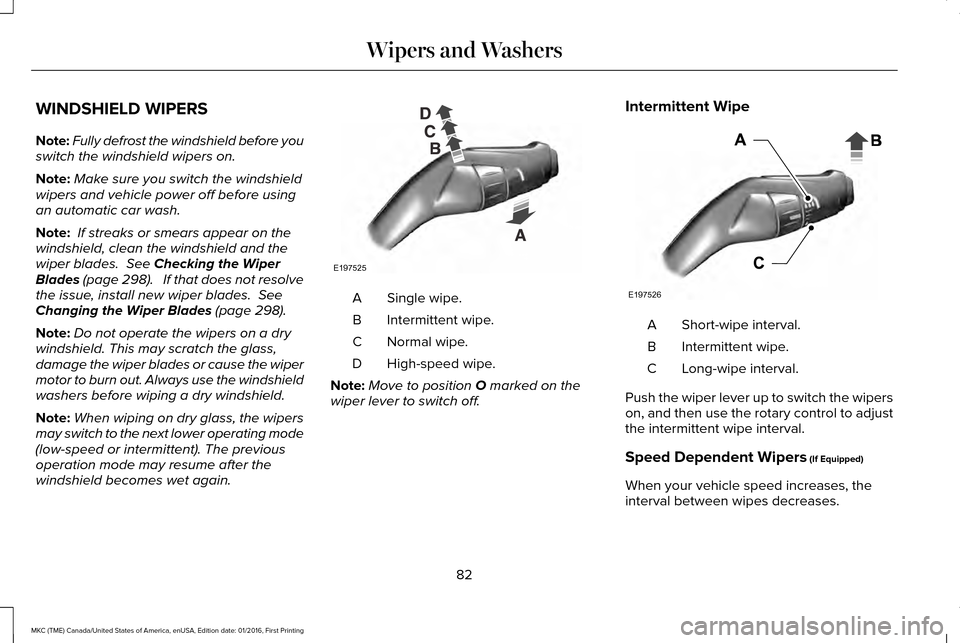
windshield becomes wet again. Single wipe.
A
Intermittent wipe.
B
Normal wipe.
C
High-speed wipe.
D
Note: Move to position
O marked on the
wiper lever to switch off. Intermittent Wipe
Short-wipe interval.
A
Intermittent wipe.
B
Long-wipe interval.
C
Push the wiper lever up to switch the wipers
on, and then use the rotary control to adjust
the intermittent wipe interval.
Speed Dependent Wipers
(If Equipped)
When your vehicle speed increases, the
interval between wipes decreases.
82
MKC (TME) Canada/United States of America, enUSA, Edition date: 01/2016, First Printing Wipers and WashersE197525 E197526
Page 86 of 538
AUTOWIPERS (If Equipped)
Note: Fully defrost the windshield before
you switch the windshield wipers on.
Note: Make sure you switch the windshield
wipers and ignition off before using an
automatic car wash.
Autowipers uses a rain sensor located in the
area around the interior mirror. The rain
sensor monitors the amount of moisture on
the windshield and automatically turns the
wipers on. It will adjust the wiper speed by
the amount of moisture that the sensor
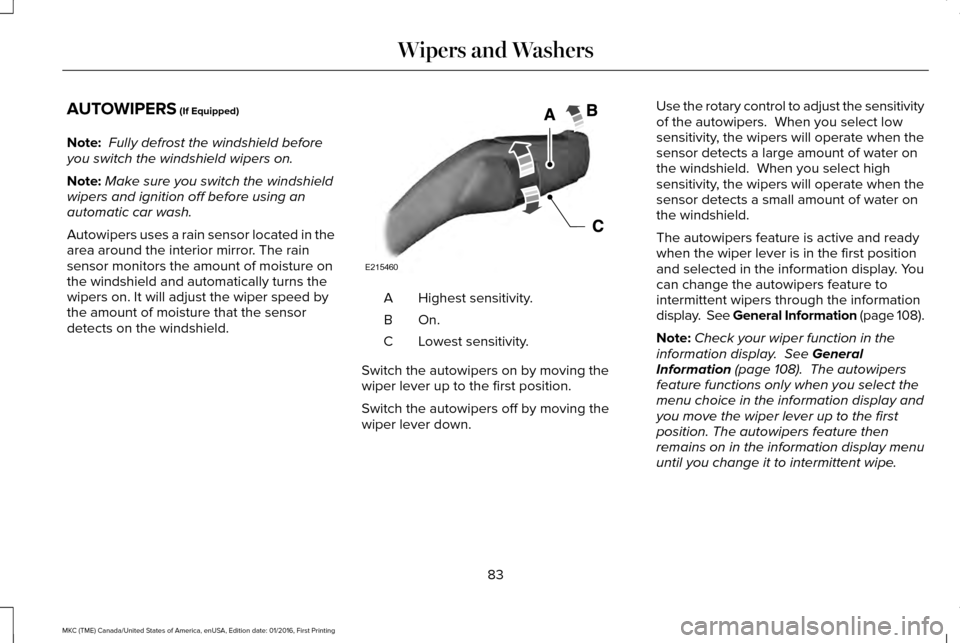
detects on the windshield. Highest sensitivity.
A
On.B
Lowest sensitivity.
C
Switch the autowipers on by moving the
wiper lever up to the first position.
Switch the autowipers off by moving the
wiper lever down. Use the rotary control to adjust the sensitivity
of the autowipers. When you select low
sensitivity, the wipers will operate when the
sensor detects a large amount of water on
the windshield. When you select high
sensitivity, the wipers will operate when the
sensor detects a small amount of water on
the windshield.
The autowipers feature is active and ready
when the wiper lever is in the first position
and selected in the information display. You
can change the autowipers feature to
intermittent wipers through the information
display. See General Information (page 108).
Note:
Check your wiper function in the
information display.
See General
Information (page 108). The autowipers
feature functions only when you select the
menu choice in the information display and
you move the wiper lever up to the first
position. The autowipers feature then
remains on in the information display menu
until you change it to intermittent wipe.
83
MKC (TME) Canada/United States of America, enUSA, Edition date: 01/2016, First Printing Wipers and WashersE215460
Page 87 of 538
Note:
If you switch autolamps on in
conjunction with autowipers, your low beam
headlamps turn on automatically when the
rain sensor activates the windshield wipers
continuously. See General Information
(page 108).
Keep the outside of the windshield clean.
The rain sensor is very sensitive and the
wipers may operate if dirt, mist or insects hit
the windshield.
Wet or winter driving conditions with ice,
snow or salty road mist can cause
inconsistent and unexpected wiping or
smearing. In these conditions, you can do
the following to help keep your windshield
clear:
• Lower the sensitivity of the autowipers
to reduce the amount of smearing.
• Switch to normal or high-speed wipe by
moving the wiper lever up.
• Switch the autowipers off and switch
intermittent mode on through the
information display.
See General
Information (page 108).
• Switch the autowipers off by moving the
wiper lever down. Note:
Clean the windshield and wiper blades
if they begin to leave streaks or smears. If
that does not resolve the issue, install new
wiper blades.
See Changing the Wiper
Blades (page 298).
WINDSHIELD WASHERS
Note: Do not operate the washers when the
washer reservoir is empty. This may cause
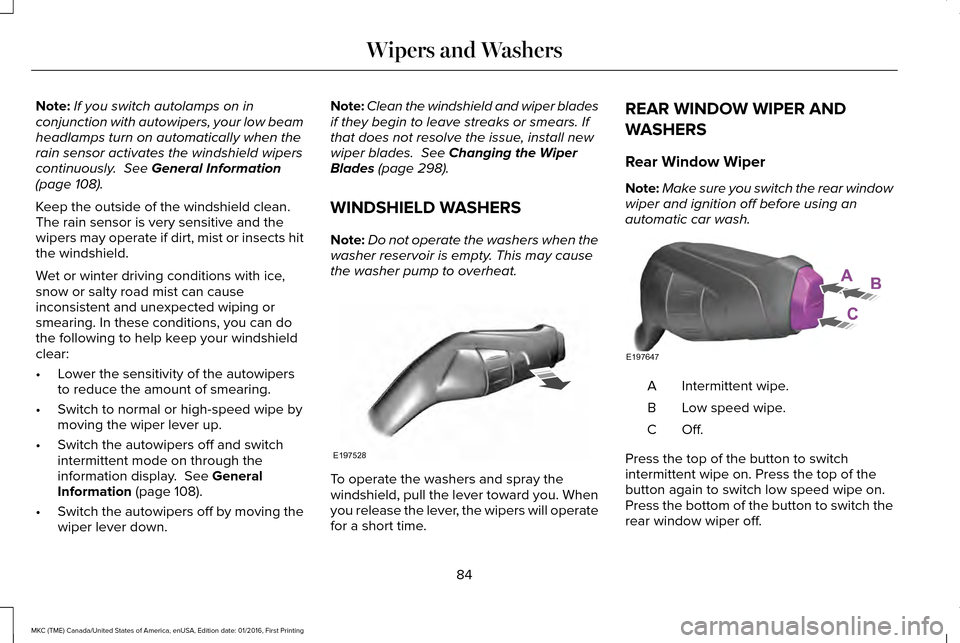
the washer pump to overheat. To operate the washers and spray the
windshield, pull the lever toward you. When
you release the lever, the wipers will operate
for a short time.REAR WINDOW WIPER AND
WASHERS
Rear Window Wiper
Note:
Make sure you switch the rear window
wiper and ignition off before using an
automatic car wash. Intermittent wipe.
A
Low speed wipe.
B
Off.C
Press the top of the button to switch
intermittent wipe on. Press the top of the
button again to switch low speed wipe on.
Press the bottom of the button to switch the
rear window wiper off.
84
MKC (TME) Canada/United States of America, enUSA, Edition date: 01/2016, First Printing Wipers and WashersE197528 E197647
Page 91 of 538
When the lighting control is in the autolamps
position, the headlamps will automatically
turn on in low light situations or when wipers
activate.
If equipped, the following also activate when
the lighting control is in the autolamps
position and you switch them on in the
information display:
•
Configurable daytime running lamps.
• Automatic high beam control.
• Adaptive headlamp control.
The headlamps remain on for a period of
time after you switch the ignition off. Use the
information display controls to adjust the
period of time that the headlamps remain
on. See Information Displays (page 108).
Note: With the headlamps in the autolamps
position, you cannot switch the high beam
headlamps on until the autolamps system
turns the headlamps on. Note:
If the lighting control switch is in the
autolamps position and the headlamps are
off, the parking lamps will light as signature
lighting. If the headlamps are on, or the
lighting control switch is in the parking lamps
position, the parking lamps will not light as
signature lighting.
Windshield Wiper Activated Headlamps
The windshield wiper activated headlamps
turn on within 10 seconds when you switch
the windshield wipers on and the lighting
control switch is in the autolamps position.
They will turn off approximately 60 seconds
after you switch the windshield wipers off.
The headlamps will not turn on by wiper
activation:
• During a mist wipe.
• When the wipers are on to clear washer
fluid during a wash condition.
• If the wipers are in intermittent mode.
Note: If you have autolamps and autowipers
switched on, the low beam headlamps will
turn on automatically when the windshield
wipers operate continuously. INSTRUMENT LIGHTING DIMMER
Note:
If you disconnect the battery or it
becomes discharged, the illuminated
components will switch to the maximum
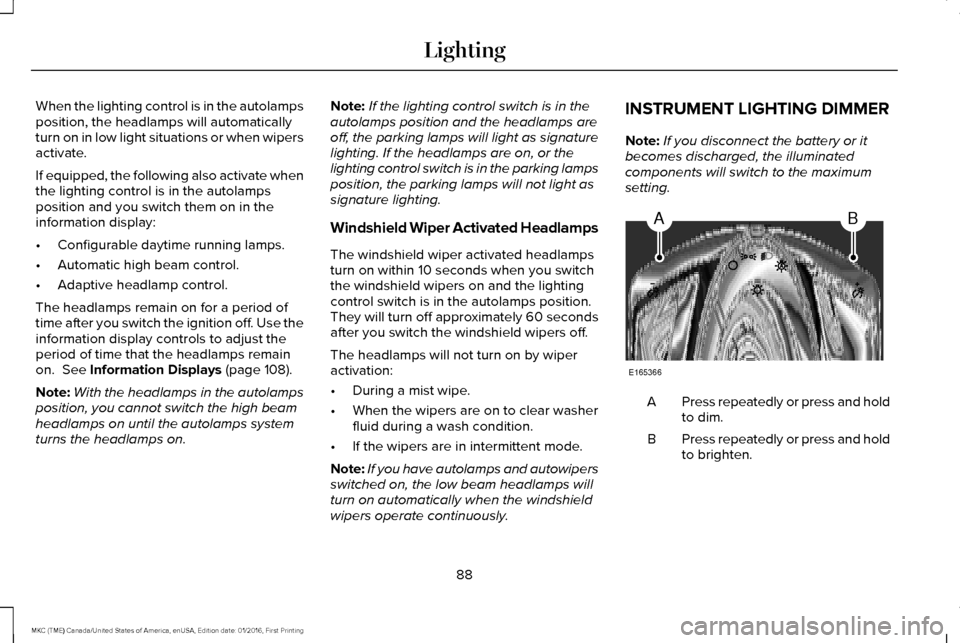
setting. Press repeatedly or press and hold
to dim.
A
Press repeatedly or press and hold
to brighten.
B
88
MKC (TME) Canada/United States of America, enUSA, Edition date: 01/2016, First Printing LightingAB
E165366
Page 109 of 538
Low Tire Pressure Warning
It will illuminate when your tire
pressure is low. If the lamp remains
on with the engine running or
when driving, check your tire pressure as
soon as possible.
It will also illuminate momentarily when you
switch the ignition on to confirm the lamp is
functional. If it does not illuminate when you
switch the ignition on, or begins to flash at
any time, have the system checked by an
authorized dealer.
Low Washer Fluid It will illuminate when the
windshield washer fluid is low.
Parking Lamps It will illuminate when you switch
the parking lamps on. Powertrain Fault Illuminates when the system has
detected a powertrain or an
all-wheel drive fault. Contact an
authorized dealer as soon as possible.
Service Engine Soon If the service engine soon indicator
light stays illuminated after you
start the engine, it indicates that
the On Board Diagnostics system (OBD) has
detected a malfunction of your vehicle
emissions control system. Refer to On board
diagnostics (OBD) in the Fuel and Refueling
chapter for more information about having
your vehicle serviced. See Emission Control
System (page 170).
If the light is blinking, engine misfire is
occurring which could damage your catalytic
converter. Drive in a moderate fashion (avoid
heavy acceleration and deceleration) and
have your vehicle serviced immediately. WARNING
Under engine misfire conditions,
excessive exhaust temperatures could
damage the catalytic converter, the fuel
system, interior floor coverings or other
vehicle components, possibly causing a fire.
Have your vehicle checked as soon as
possible. When you first switch the ignition on, before
engine start, the service engine soon
indicator light illuminates to check the bulb
and to indicate whether your vehicle is ready
for inspection maintenance testing.
Normally, the service engine soon light will
stay on until you crank the engine, and then
turn itself off if no malfunctions are present.
However, if after 15 seconds the service
engine soon light blinks eight times, it means
that your vehicle is not ready for inspection
maintenance testing. See Emission Control
System
(page 170).
106
MKC (TME) Canada/United States of America, enUSA, Edition date: 01/2016, First Printing Instrument Cluster E132353
Page 273 of 538
Protected components
Fuse amp rating
Fuse
Cooling fan 1 (750W).
50A 2
Cooling fan 2 (600W).
40A 2
F18
Cooling fan 2 (750W).
50A 2
Anti-lock brake system module run/start.
5A 1
F19
Horn relay.
20A 1
F20
Brake pedal switch.
10A 1
F21
Windshield wipers and washer.
25A 1
F22
Run/start relay coil.
5A 1
F23
Transmission range control module.
20A 1
F24
Air conditioning clutch relay.
10A 1
F25
Powertrain control module relay coil.
5A 1
F26
Washer pump relay.
10A 1
F27
270
MKC (TME) Canada/United States of America, enUSA, Edition date: 01/2016, First Printing Fuses
Page 276 of 538
Protected components
Fuse amp rating
Fuse
Electronic transmission pump B+ feed (vehicles equipped
with stop/start).
30A 1
F47
Not used.
—
F48
1 Mini fuse.
2 J-case fuse. Circuits switched
Relay
Run start.
R1
Horn.
R2
Fuel pump.
R3
Rear window washer pump.
R4
Cooling fan relay 3 (750W).
R5
Windshield wipers.
R6
Cooling fan relay 1 (600W).
R7
Cooling fan relay 5 (750W).
Starter.
R8
Not used.
R9
273
MKC (TME) Canada/United States of America, enUSA, Edition date: 01/2016, First Printing Fuses
Page 292 of 538
Engine coolant reservoir
A
Engine oil dipstick
B
Engine oil filler cap
C
Brake fluid reservoir
D
Battery
E
Power distribution box
F
Air filter assembly
G
Windshield washer fluid reservoir
H
289
MKC (TME) Canada/United States of America, enUSA, Edition date: 01/2016, First Printing Maintenance
Page 294 of 538
1. Remove the engine oil filler cap.
2. Add engine oil that meets Ford
specifications. See Capacities and
Specifications (page 344).
3. Wipe off any spilled oil.
4. Replace the engine oil filler cap. Turn it clockwise until you feel a strong
resistance.
Note: Do not add oil further than the
maximum mark. Oil levels above the
maximum mark may cause engine damage.
Note: Soak up any spillage with an
absorbent cloth immediately.
OIL CHANGE INDICATOR RESET
Use the information display controls on the
steering wheel to reset the oil change
indicator. From the main menu scroll to: Action and description
Message
Press the right arrow button,
then from this menu scroll to
the following message.
Settings
Press the right arrow button,
then from this menu scroll to
the following message.
Vehicle
Press the right arrow button,
then from this menu scroll to
the following message.
Oil Life
Press and hold the OK button
until the instrument cluster
displays the following
message.
Hold OK to
Reset
Reset Successful
When the oil change indicator
resets the instrument cluster
displays 100%.
Remaining Life
{00}% Action and description
Message
If the instrument cluster
displays one of the following
messages, repeat the
process.
Not Reset
Reset Cancelled
ENGINE COOLANT CHECK
Checking the Engine Coolant WARNINGS
Do not add engine coolant when the
engine is hot. Steam and scalding
liquids released from a hot cooling system
can burn you badly. Also, you can be burned
if you spill coolant on hot engine parts. Do not put engine coolant in the
windshield washer fluid container. If
sprayed on the windshield, engine coolant
could make it difficult to see through the
windshield.
291
MKC (TME) Canada/United States of America, enUSA, Edition date: 01/2016, First Printing Maintenance