instrument panel LINCOLN MKC 2018 User Guide
[x] Cancel search | Manufacturer: LINCOLN, Model Year: 2018, Model line: MKC, Model: LINCOLN MKC 2018Pages: 571, PDF Size: 4.39 MB
Page 138 of 571
Dual
Press to switch on temperature control forthe right-hand side of the vehicle. When dualzone is off, right-hand temperature settingsremain the same as the left-hand settings.
Auto
Press to switch on automatic operation.Adjust to select the desired temperature. Fanspeed, air distribution, air conditioningoperation, and outside or recirculated airadjust to heat or cool the vehicle to maintainthe desired temperature. You can also switchoff dual zone mode by pressing and holdingfor more than two seconds.
Power
Press to switch the system on and off. Whenthe system is off, it prevents outside air fromentering the vehicle.
Defrost
Press to distribute air through the windshieldair vents and de-mister. Air directed to theinstrument panel and footwell air vents turnsoff. You can also use this setting to defogand clear the windshield of a thin coveringof ice.
Heated Rear Window
Press to switch the heated rear window onand off. See Heated Windows and Mirrors(page 136).
HINTS ON CONTROLLING THE
INTERIOR CLIMATE
General Hints
Note:Prolonged use of recirculated air maycause the windows to fog up.
Note:You may feel a small amount of airfrom the footwell air vents regardless of theair distribution setting.
Note:To reduce humidity build-up insideyour vehicle, do not drive with the systemswitched off or with recirculated air alwaysswitched on.
Note:Do not place objects under the frontseats as this may interfere with the airflowto the rear seats.
Note:Remove any snow, ice or leaves fromthe air intake area at the base of thewindshield.
Note:To improve the time to reach acomfortable temperature in hot weather,drive with the windows open until you feelcold air through the air vents.
Automatic Climate Control
Note:Adjusting the settings when yourvehicle interior is extremely hot or cold is notnecessary.
Note:The system adjusts to heat or cool theinterior to the temperature you select asquickly as possible.
Note:For the system to function efficiently,the instrument panel and side air ventsshould be fully open.
135
MKC (TME) Canada/United States of America, JJ7J 19A321 AA enUSA, Edition date: 201707, Second Printing
Climate Control
Page 178 of 571
AUTOMATIC TRANSMISSION
WARNINGS
Always fully apply the parking brakeand make sure you shift into park (P).Failure to follow this instruction could resultin personal injury or death.
Do not apply the brake pedal andaccelerator pedal simultaneously.Applying both pedals simultaneously formore than a few seconds will limit engineperformance, which may result in difficultymaintaining speed in traffic and could leadto serious injury.
Note:Under certain conditions, you may notbe able to shift out of park (P) unless theintelligent access key is inside the vehicle.
Push Button Shift Transmission
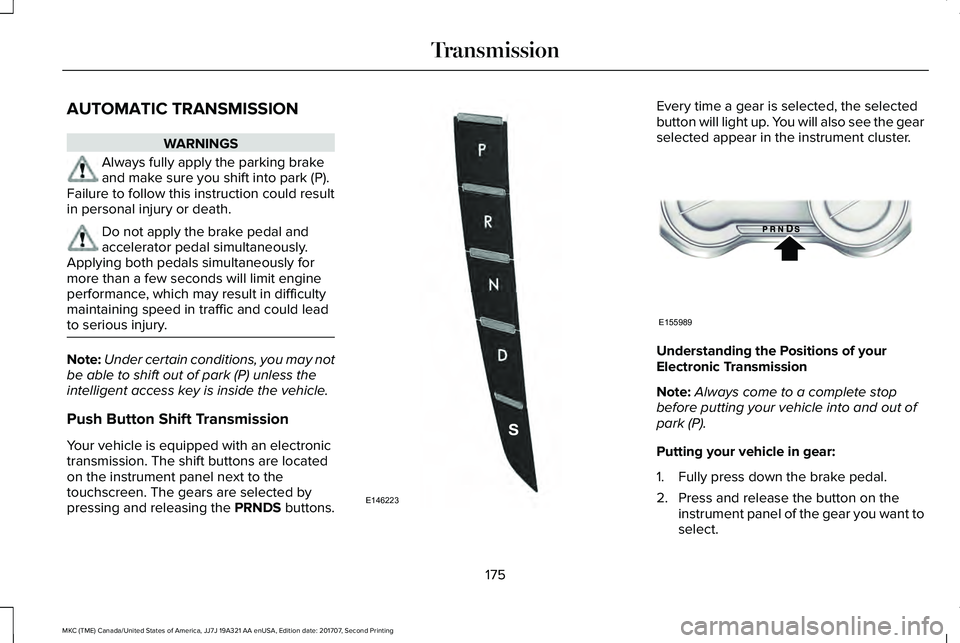
Your vehicle is equipped with an electronictransmission. The shift buttons are locatedon the instrument panel next to thetouchscreen. The gears are selected bypressing and releasing the PRNDS buttons.
Every time a gear is selected, the selectedbutton will light up. You will also see the gearselected appear in the instrument cluster.
Understanding the Positions of yourElectronic Transmission
Note:Always come to a complete stopbefore putting your vehicle into and out ofpark (P).
Putting your vehicle in gear:
1. Fully press down the brake pedal.
2. Press and release the button on theinstrument panel of the gear you want toselect.
175
MKC (TME) Canada/United States of America, JJ7J 19A321 AA enUSA, Edition date: 201707, Second Printing
TransmissionE146223 E155989
Page 182 of 571
WARNINGS
When doing this procedure, you needto take the transmission out of park (P)which means your vehicle can roll freely. Toavoid unwanted vehicle movement, alwaysfully apply the parking brake prior to doingthis procedure. Use wheels chocks ifappropriate.
If the parking brake is fully released,but the brake warning lamp remainsilluminated, the brakes may not be workingproperly. Have your vehicle checked as soonas possible.
Note:See your authorized dealer as soonas possible if this procedure is used.
Note:For some markets this feature isdisabled.
Note:This feature will only function if your12-volt battery has power. If vehicle batteryvoltage is not sufficient, an external 12-voltpower source (for example, jumper cables,battery charger or jump pack) may berequired to function the interlock overrideswitch.
Use the brake-shift interlock override tomove your transmission from the parkposition in the event of an electricalmalfunction. If your vehicle has a deadbattery, an external power source will berequired.
1. Apply the parking brake and turn yourignition off before performing thisprocedure.
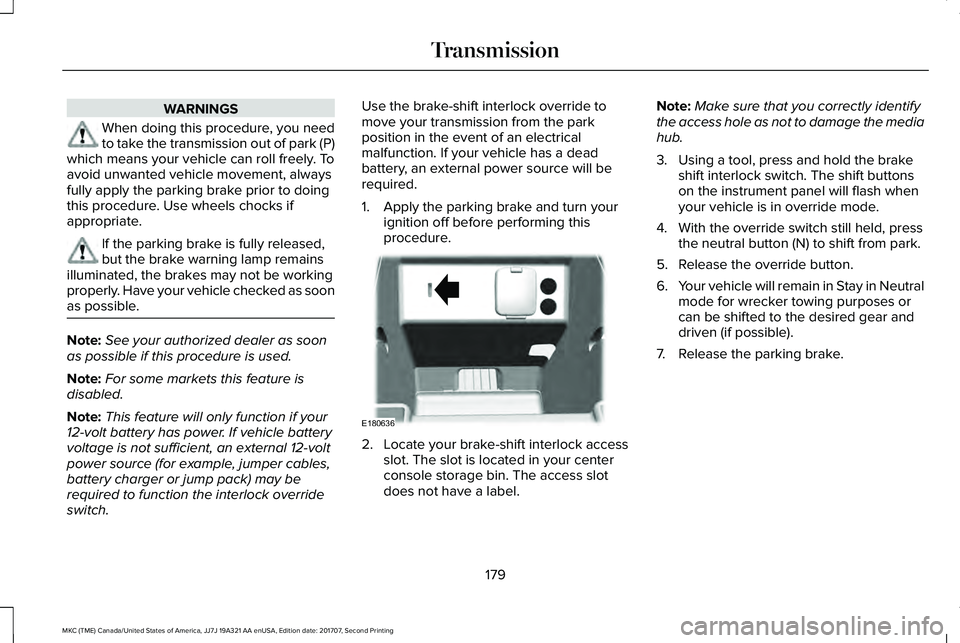
2. Locate your brake-shift interlock accessslot. The slot is located in your centerconsole storage bin. The access slotdoes not have a label.
Note:Make sure that you correctly identifythe access hole as not to damage the mediahub.
3. Using a tool, press and hold the brakeshift interlock switch. The shift buttonson the instrument panel will flash whenyour vehicle is in override mode.
4. With the override switch still held, pressthe neutral button (N) to shift from park.
5. Release the override button.
6.Your vehicle will remain in Stay in Neutralmode for wrecker towing purposes orcan be shifted to the desired gear anddriven (if possible).
7. Release the parking brake.
179
MKC (TME) Canada/United States of America, JJ7J 19A321 AA enUSA, Edition date: 201707, Second Printing
TransmissionE180636
Page 190 of 571
HINTS ON DRIVING WITH ANTI-
LOCK BRAKES
The anti-lock braking system does noteliminate the risks when:
•You drive too closely to the vehicle infront of you.
•Your vehicle is hydroplaning.
•You take corners too fast.
•The road surface is poor.
Note: If the system activates, the brakepedal may pulse and may travel further. Maintain pressure on the brake pedal. Youmay also hear a noise from the system. Thisis normal.
ELECTRIC PARKING BRAKE
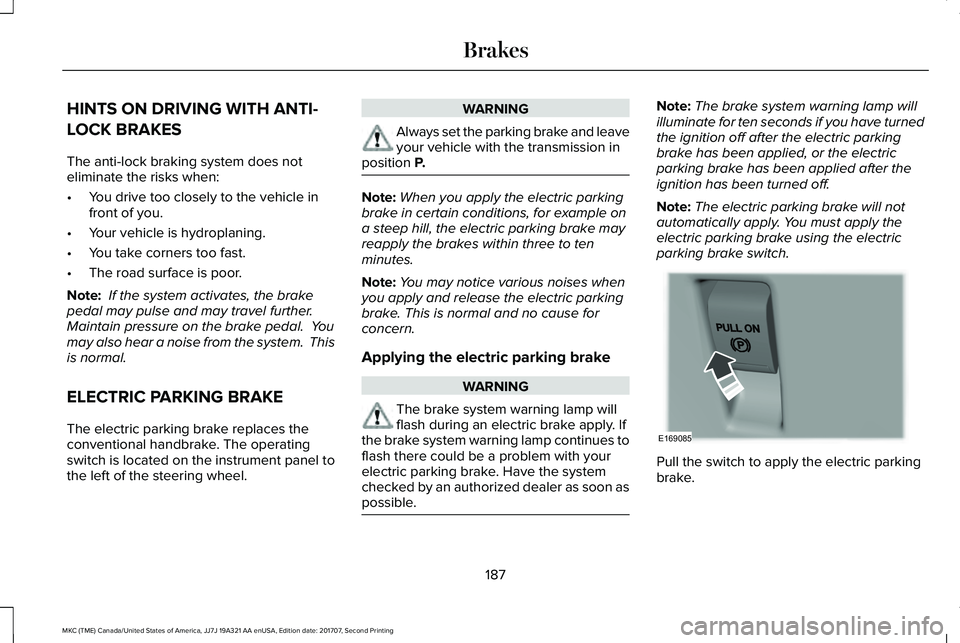
The electric parking brake replaces theconventional handbrake. The operatingswitch is located on the instrument panel tothe left of the steering wheel.
WARNING
Always set the parking brake and leaveyour vehicle with the transmission inposition P.
Note:When you apply the electric parkingbrake in certain conditions, for example ona steep hill, the electric parking brake mayreapply the brakes within three to tenminutes.
Note:You may notice various noises whenyou apply and release the electric parkingbrake. This is normal and no cause forconcern.
Applying the electric parking brake
WARNING
The brake system warning lamp willflash during an electric brake apply. Ifthe brake system warning lamp continues toflash there could be a problem with yourelectric parking brake. Have the systemchecked by an authorized dealer as soon aspossible.
Note:The brake system warning lamp willilluminate for ten seconds if you have turnedthe ignition off after the electric parkingbrake has been applied, or the electricparking brake has been applied after theignition has been turned off.
Note:The electric parking brake will notautomatically apply. You must apply theelectric parking brake using the electricparking brake switch.
Pull the switch to apply the electric parkingbrake.
187
MKC (TME) Canada/United States of America, JJ7J 19A321 AA enUSA, Edition date: 201707, Second Printing
BrakesE169085
Page 196 of 571
PRINCIPLE OF OPERATION
The traction control system helps avoid drivewheel spin and loss of traction.
If your vehicle begins to slide, the systemapplies the brakes to individual wheels and,when needed, reduces engine power at thesame time. If the wheels spin whenaccelerating on slippery or loose surfaces,the system reduces engine power in orderto increase traction.
USING TRACTION CONTROL
WARNING
The stability and traction control lightilluminates steadily if the systemdetects a failure. Make sure you did notmanually disable the traction control systemusing the information display controls or theswitch. If the stability control and tractioncontrol light is still illuminating steadily, havethe system serviced by an authorized dealerimmediately. Operating your vehicle with thetraction control disabled could lead to anincreased risk of loss of vehicle control,vehicle rollover, personal injury and death.
The system automatically turns on each timeyou switch the ignition on.
If your vehicle is stuck in mud or snow,switching traction control off may bebeneficial as this allows the wheels to spin.
Note:When you switch traction control off,stability control remains fully active.
Switching the System Off
When you switch the system off or on, amessage appears in the information displayshowing system status.
You can switch the system off by either usingthe information display controls or the switch.
Using the Information Display Controls
You can switch this feature off or on in theinformation display. See General Information(page 109).
Using a Switch (If Equipped)
Use the traction control switch on theinstrument panel to switch the system off oron.
System Indicator Lights and Messages
The stability and traction controllight:
193
MKC (TME) Canada/United States of America, JJ7J 19A321 AA enUSA, Edition date: 201707, Second Printing
Traction ControlE138639
Page 257 of 571
If you need to arrange roadside assistancefor yourself, Lincoln Motor Companyreimburses a reasonable amount for towingto the nearest Lincoln dealership within100 mi (160 km). To obtain reimbursementinformation, United States clients, call1-800-521-4140. Clients need to submit theiroriginal receipts.
Vehicles Sold in Canada: GettingRoadside Assistance
To fully assist you should you have a vehicleconcern, Lincoln Motor Company offers acomplimentary roadside assistance program. This program is eligible within Canada or thecontinental United States.
This program is separate from the NewVehicle Limited Warranty, beginning fromthe original warranty start date and lasts thelife of the vehicle for the original owner.Subsequent owners receive coverage thatis concurrent with the 6 years or 70,000 mi(110,000 km) (whichever occurs first)powertrain warranty coverage period.
If you purchased your vehicle in Canada andrequire roadside assistance, please call1-800-387-9333.
Vehicles Sold in Canada: UsingRoadside Assistance
Complete the roadside assistanceidentification card and place it in your walletfor quick reference.
In Canada, this card is found in the WarrantyGuide in the glove compartment of yourvehicle.
Vehicles Sold in Canada: RoadsideAssistance Program Coverage
The service is available 24 hours a day,seven days a week.
Canadian roadside coverage and benefitsmay differ from the U.S. coverage.
For complete program coverage detailsreview your warranty guide, contact yourdealer, call us in Canada at 1-800-387-9333,or visit our website atwww.lincolncanada.com.
HAZARD FLASHERS
Note:The hazard flashers operate when theignition is in any position, or if the key is notin the ignition. If used when the vehicle is notrunning, the battery loses charge. As a result,there may be insufficient power to restartyour vehicle.
The flasher control is on theinstrument panel. Use your hazardflashers when your vehicle iscreating a safety hazard for other motorists.
•Press the flasher control and all front andrear direction indicators flash.
•Press the button again to switch them off.
FUEL SHUTOFF
WARNING
If your vehicle has been involved in acrash, have the fuel system checked.Failure to follow this instruction could resultin fire, personal injury or death.
254
MKC (TME) Canada/United States of America, JJ7J 19A321 AA enUSA, Edition date: 201707, Second Printing
Roadside Emergencies
Page 289 of 571
GENERAL INFORMATION
Have your vehicle serviced regularly to helpmaintain its roadworthiness and resale value.There is a large network of authorizeddealers that are there to help you with theirprofessional servicing expertise. We believethat their specially trained technicians arebest qualified to service your vehicle properlyand expertly. They are supported by a widerange of highly specialized tools developedspecifically for servicing your vehicle.
If your vehicle requires professional service,an authorized dealer can provide thenecessary parts and service. Check yourwarranty information to find out which partsand services are covered.
Use only recommended fuels, lubricants,fluids and service parts conforming tospecifications. Motorcraft® parts aredesigned and built to provide the bestperformance in your vehicle.
Precautions
•Do not work on a hot engine.
•Make sure that nothing gets caught inmoving parts.
•Do not work on a vehicle with the enginerunning in an enclosed space, unless youare sure you have enough ventilation.
•Keep all open flames and other burningmaterial (such as cigarettes) away fromthe battery and all fuel related parts.
Working with the Engine Off
1. Set the parking brake and shift to park(P).
2. Switch off the engine.
3. Block the wheels.
Working with the Engine On
WARNING
To reduce the risk of vehicle damageand/or personal burn injuries, do notstart your engine with the air cleanerremoved and do not remove it while theengine is running.
1. Set the parking brake and shift to park(P).
2. Block the wheels.
OPENING AND CLOSING THE
HOOD
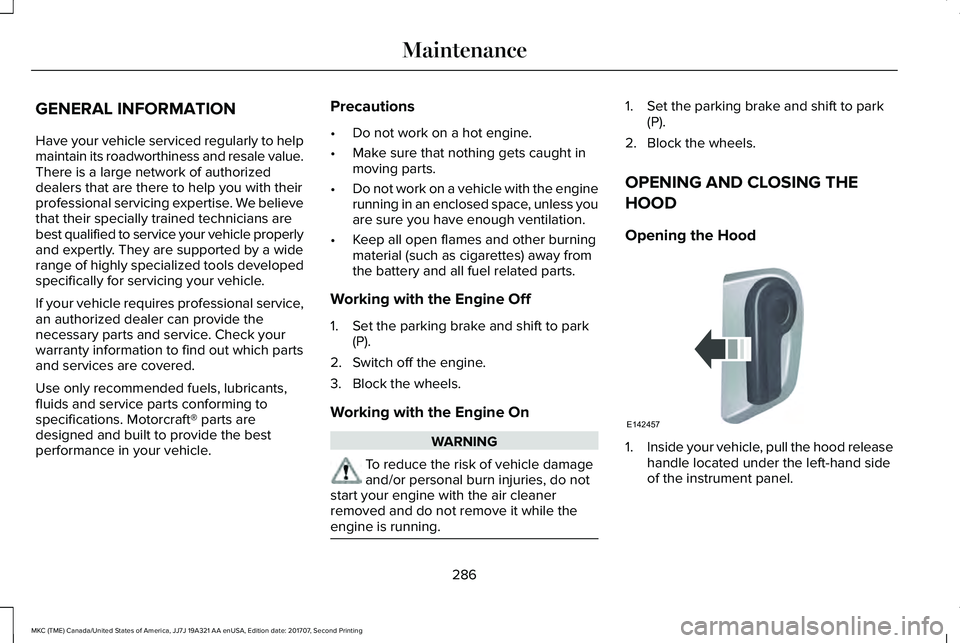
Opening the Hood
1.Inside your vehicle, pull the hood releasehandle located under the left-hand sideof the instrument panel.
286
MKC (TME) Canada/United States of America, JJ7J 19A321 AA enUSA, Edition date: 201707, Second Printing
MaintenanceE142457
Page 305 of 571
Trade numberFunction
LEDWelcome light
LEDApproach lamp
LED* Tail/brake lamp
LED* Turn lamp - rear
LED* Backup lamp
W5WLicense plate lamp
LED* High-mount brake lamp
LED* Interior lamps
* To replace these lamps, see your authorized dealer.
To replace instrument panel lights, see your authorized dealer.
302
MKC (TME) Canada/United States of America, JJ7J 19A321 AA enUSA, Edition date: 201707, Second Printing
Maintenance
Page 311 of 571
•Do not allow wax to come in contact withany non-body (low-gloss black) coloredtrim. The wax will discolor or stain theparts over time.
•Roof racks.
•Bumpers.
•Grained door handles.
•Side moldings.
•Mirror housings.
•Windshield cowl area.
•Do not apply wax to glass areas.
•After waxing, your car's paint should feelsmooth, and be free of streaks andsmudges.
CLEANING THE ENGINE
Engines are more efficient when they areclean because grease and dirt buildup keepthe engine warmer than normal.
When washing:
•Take care when using a power washerto clean the engine. The high-pressurefluid could penetrate the sealed partsand cause damage.
•Do not spray a hot engine with cold waterto avoid cracking the engine block orother engine components.
•Spray Motorcraft Engine Shampoo andDegreaser on all parts that requirecleaning and pressure rinse clean. InCanada, use Motorcraft Engine Shampoo.
•Never wash or rinse the engine while itis hot or running; water in the runningengine may cause internal damage.
•Never wash or rinse any ignition coil,spark plug wire or spark plug well, or thearea in and around these locations.
•Cover the battery, power distribution box,and air filter assembly to prevent waterdamage when cleaning the engine.
CLEANING THE WINDOWS AND
WIPER BLADES
Car wash chemicals and environmentalfallout can result in windshield and wiperblade contamination. Dirty windshield andwipers will result in poor windshield wiperoperation. Keep the windshield and wiperblades clean to maintain windshield wiperperformance.
To clean the windshield and wiper blades:
•Clean the windshield with a non-abrasiveglass cleaner. When cleaning the interiorof the windshield, avoid getting any glasscleaner on the instrument panel or doorpanels. Wipe any glass cleaner off thesesurfaces immediately.
•For windshields contaminated with treesap, chemicals, wax or bugs, clean theentire windshield using steel wool (nogreater than 0000 grade) in a circularmotion and rinse with water.
•Clean the wiper blades with isopropylrubbing alcohol or windshield washerconcentrate.
308
MKC (TME) Canada/United States of America, JJ7J 19A321 AA enUSA, Edition date: 201707, Second Printing
Vehicle Care
Page 314 of 571
CLEANING THE INSTRUMENT
PANEL AND INSTRUMENT
CLUSTER LENS
WARNING
Do not use chemical solvents or strongdetergents when cleaning the steeringwheel or instrument panel to avoidcontamination of the airbag system.
Note:Follow the same procedure ascleaning leather seats for cleaning leatherinstrument panels and leather interior trimsurfaces. See Cleaning Leather Seats (page311).
Clean the instrument panel and cluster lenswith a clean, damp and soft cloth, then usea clean, dry and soft cloth to dry these areas.
•Avoid cleaners or polishes that increasethe gloss of the upper portion of theinstrument panel. The dull finish in thisarea helps protect you from undesirablewindshield reflection.
•Do not use any household cleaningproducts or glass cleaners as these maydamage the finish of the instrumentpanel, interior trim and cluster lens.
•Wash or wipe your hands clean if youhave been in contact with certainproducts such as insect repellent andsuntan lotion to avoid possible damageto the interior painted surfaces.
•Do not allow air fresheners and handsanitizers to spill onto interior surfaces.If a spill occurs, wipe off immediately.Your warranty may not cover thesedamages.
If a staining liquid like coffee or juice hasbeen spilled on the instrument panel or oninterior trim surfaces:
1.Wipe up spilled liquid using a clean, softcloth as quickly as possible.
2. Use Motorcraft Premium Leather andVinyl Cleaner or a commercially availableleather cleaning product for automotiveinteriors. Test any cleaner or stainremover on an inconspicuous area.
3. Alternatively, wipe the surface with aclean, soft cloth and a mild soap andwater solution. Dry the area with a clean,soft cloth.
4.If necessary, apply more soap and watersolution or cleaning product to a clean,soft cloth and press it onto the soiledarea. Allow this to set at roomtemperature for 30 minutes.
5. Remove the soaked cloth, then with aclean, damp cloth, use a rubbing motionfor 60 seconds on the soiled area.
6. Dry the area with a clean, soft cloth.
CLEANING LEATHER SEATS
Note:Follow the same procedure ascleaning leather seats for cleaning leatherinstrument panels and leather interior trimsurfaces.
311
MKC (TME) Canada/United States of America, JJ7J 19A321 AA enUSA, Edition date: 201707, Second Printing
Vehicle Care