audio LINCOLN MKC 2018 Owner's Manual
[x] Cancel search | Manufacturer: LINCOLN, Model Year: 2018, Model line: MKC, Model: LINCOLN MKC 2018Pages: 571, PDF Size: 4.39 MB
Page 381 of 571
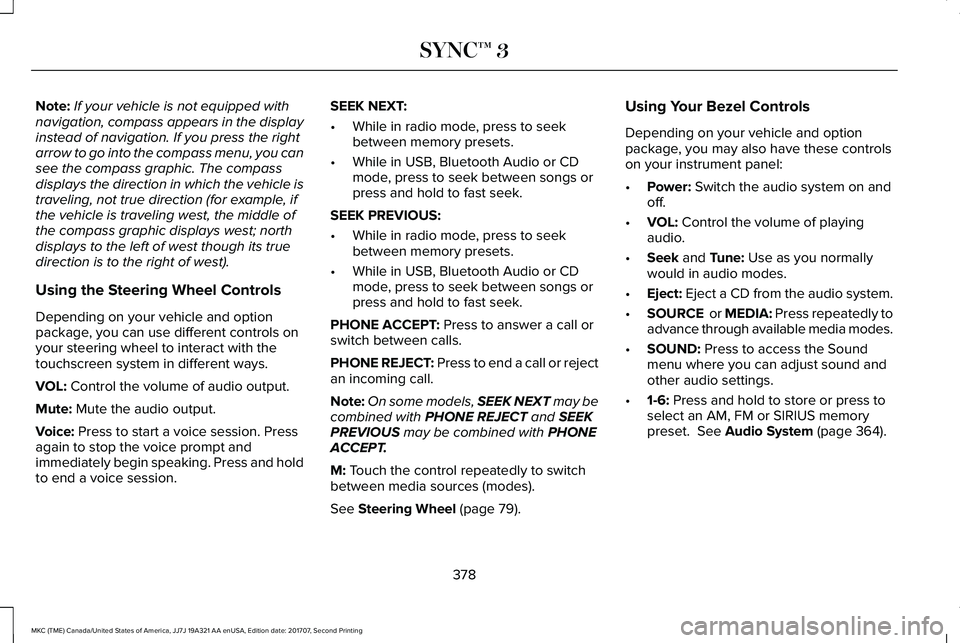
Note:If your vehicle is not equipped withnavigation, compass appears in the displayinstead of navigation. If you press the rightarrow to go into the compass menu, you cansee the compass graphic. The compassdisplays the direction in which the vehicle istraveling, not true direction (for example, ifthe vehicle is traveling west, the middle ofthe compass graphic displays west; northdisplays to the left of west though its truedirection is to the right of west).
Using the Steering Wheel Controls
Depending on your vehicle and optionpackage, you can use different controls onyour steering wheel to interact with thetouchscreen system in different ways.
VOL: Control the volume of audio output.
Mute: Mute the audio output.
Voice: Press to start a voice session. Pressagain to stop the voice prompt andimmediately begin speaking. Press and holdto end a voice session.
SEEK NEXT:
•While in radio mode, press to seekbetween memory presets.
•While in USB, Bluetooth Audio or CDmode, press to seek between songs orpress and hold to fast seek.
SEEK PREVIOUS:
•While in radio mode, press to seekbetween memory presets.
•While in USB, Bluetooth Audio or CDmode, press to seek between songs orpress and hold to fast seek.
PHONE ACCEPT: Press to answer a call orswitch between calls.
PHONE REJECT: Press to end a call or rejectan incoming call.
Note:On some models, SEEK NEXT may becombined with PHONE REJECT and SEEKPREVIOUS may be combined with PHONEACCEPT.
M: Touch the control repeatedly to switchbetween media sources (modes).
See Steering Wheel (page 79).
Using Your Bezel Controls
Depending on your vehicle and optionpackage, you may also have these controlson your instrument panel:
•Power: Switch the audio system on andoff.
•VOL: Control the volume of playingaudio.
•Seek and Tune: Use as you normallywould in audio modes.
•Eject: Eject a CD from the audio system.
•SOURCE or MEDIA: Press repeatedly toadvance through available media modes.
•SOUND: Press to access the Soundmenu where you can adjust sound andother audio settings.
•1-6: Press and hold to store or press toselect an AM, FM or SIRIUS memorypreset. See Audio System (page 364).
378
MKC (TME) Canada/United States of America, JJ7J 19A321 AA enUSA, Edition date: 201707, Second Printing
SYNC™ 3
Page 389 of 571
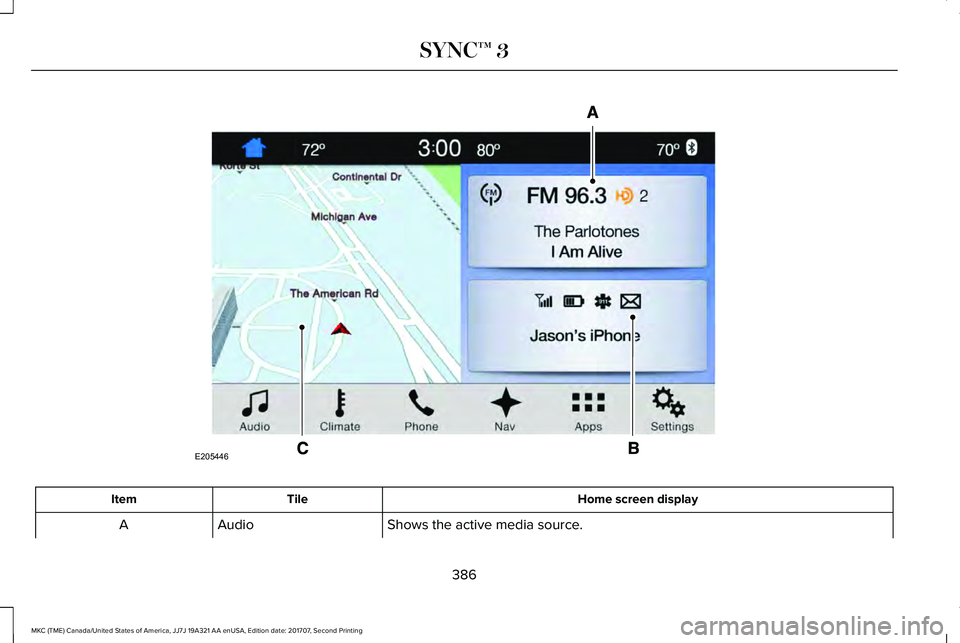
Home screen displayTileItem
Shows the active media source.AudioA
386
MKC (TME) Canada/United States of America, JJ7J 19A321 AA enUSA, Edition date: 201707, Second Printing
SYNC™ 3E205446
Page 390 of 571
Home screen displayTileItem
If your vehicle does not have navigation, this space contains the compass.
The name of the connected phone appears on the screen. The status of the phonefeatures also appear. This includes signal strength, battery charge, 911 assist settingstate (On or Off ), text messaging and roaming.
PhoneB
This map displays your current location or current route in real time.Navigation1CWhen you have navigation active, you also see the next turn and the length of timeand distance to your destination.If your vehicle does not have navigation, this space contains the audio information.
1 If equipped.
You can touch any of the feature displays toaccess that feature.
Anytime you select the home button, thesystem returns you to this screen.
USING VOICE RECOGNITION
The SYNC 3 system allows you to use voicecommands, to control features like audio andclimate controls. By using voice commands,you can keep your hands on the wheel andyour eyes on the road.
You can access each feature controlled bySYNC 3 through a variety of commands.
To activate the SYNC 3 voicecommands push the voice buttonon the steering wheel and wait forthe prompt.
___ is a dynamic listing, meaning that it canbe the name of anything, such as artist, thename of contact or number. The context andthe description of the command tell you whatto say for this dynamic option.
There are some commands that work forevery feature, these commands are:
387
MKC (TME) Canada/United States of America, JJ7J 19A321 AA enUSA, Edition date: 201707, Second Printing
SYNC™ 3E142599
Page 392 of 571
Audio Voice Commands
___ is a dynamic listing, meaning that foraudio voice commands it can be the name
of a Sirius channel or a channel number, aradio frequency number, or the name of anartist, album, song or a genre.
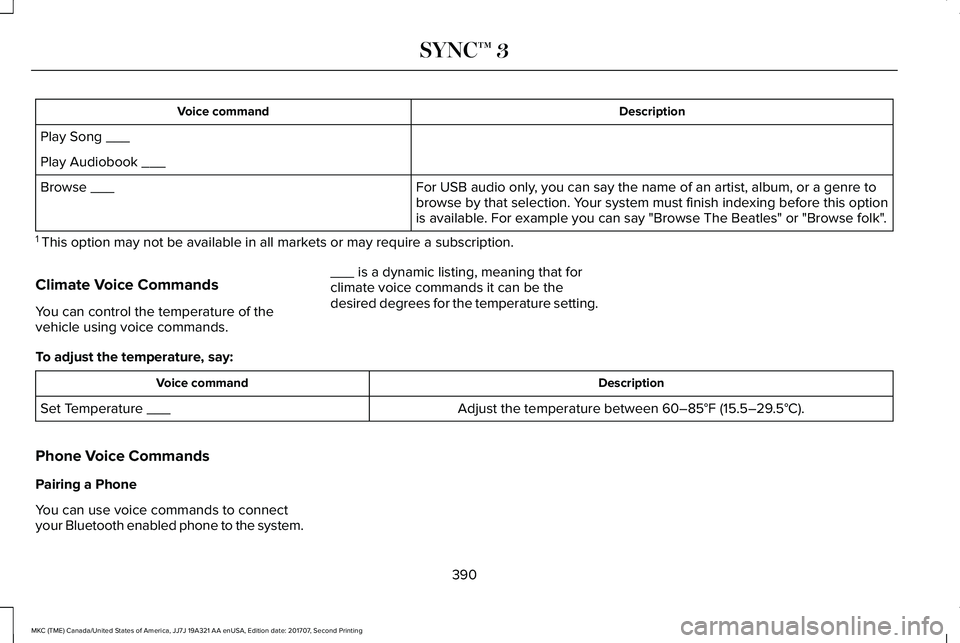
To control the media features, press the voice button and when prompted, say:
DescriptionVoice command
You can say the Sirius channel name or number such as "Sirius channel 16".1Sirius Channel ___
You can also turn to a Sirius channel by saying the channel's name, such as "The Pulse".
Allows you to tune to a specific FM or AM frequency such as "FM 88.7" or "AM1580".AM ___
FM ___
Allows you to tune to a specific HD frequency such as “FM 88.7 HD 1”.1FM ___ HD ___
Allows you to listen to music on your Bluetooth-connected device.Bluetooth Audio
Allows you to listen to music on your USB connected device.USB
For USB audio only, you can say the name of an artist, album, song or a genreto listen to that selection. Your system must finish indexing before this optionis available. For example, you could say "Play artist, The Beatles" or "Play song,Penny Lane".
Play Genre ___
Play Playlist ___
Play Artist ___
Play Album ___
Play Podcast ___
389
MKC (TME) Canada/United States of America, JJ7J 19A321 AA enUSA, Edition date: 201707, Second Printing
SYNC™ 3
Page 393 of 571
DescriptionVoice command
Play Song ___
Play Audiobook ___
For USB audio only, you can say the name of an artist, album, or a genre tobrowse by that selection. Your system must finish indexing before this optionis available. For example you can say "Browse The Beatles" or "Browse folk".
Browse ___
1 This option may not be available in all markets or may require a subscription.
Climate Voice Commands
You can control the temperature of thevehicle using voice commands.
___ is a dynamic listing, meaning that forclimate voice commands it can be thedesired degrees for the temperature setting.
To adjust the temperature, say:
DescriptionVoice command
Adjust the temperature between 60–85°F (15.5–29.5°C).Set Temperature ___
Phone Voice Commands
Pairing a Phone
You can use voice commands to connectyour Bluetooth enabled phone to the system.
390
MKC (TME) Canada/United States of America, JJ7J 19A321 AA enUSA, Edition date: 201707, Second Printing
SYNC™ 3
Page 403 of 571
Menu item
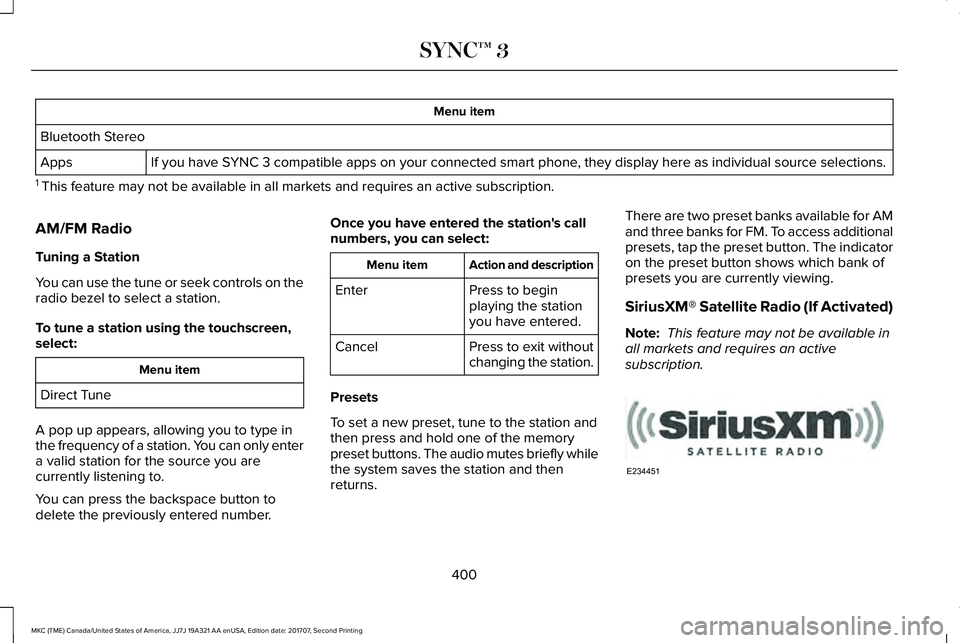
Bluetooth Stereo
If you have SYNC 3 compatible apps on your connected smart phone, they display here as individual source selections.Apps
1 This feature may not be available in all markets and requires an active subscription.
AM/FM Radio
Tuning a Station
You can use the tune or seek controls on theradio bezel to select a station.
To tune a station using the touchscreen,select:
Menu item
Direct Tune
A pop up appears, allowing you to type inthe frequency of a station. You can only entera valid station for the source you arecurrently listening to.
You can press the backspace button todelete the previously entered number.
Once you have entered the station's callnumbers, you can select:
Action and descriptionMenu item
Press to beginplaying the stationyou have entered.
Enter
Press to exit withoutchanging the station.Cancel
Presets
To set a new preset, tune to the station andthen press and hold one of the memorypreset buttons. The audio mutes briefly whilethe system saves the station and thenreturns.
There are two preset banks available for AMand three banks for FM. To access additionalpresets, tap the preset button. The indicatoron the preset button shows which bank ofpresets you are currently viewing.
SiriusXM® Satellite Radio (If Activated)
Note: This feature may not be available inall markets and requires an activesubscription.
400
MKC (TME) Canada/United States of America, JJ7J 19A321 AA enUSA, Edition date: 201707, Second Printing
SYNC™ 3E234451
Page 405 of 571
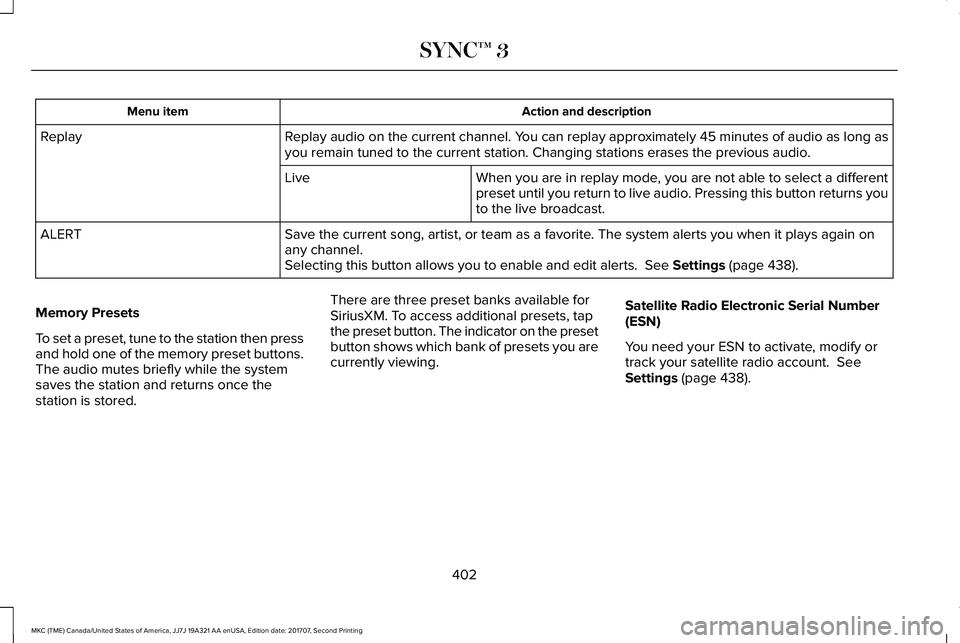
Action and descriptionMenu item
Replay audio on the current channel. You can replay approximately 45 minutes of audio as long asyou remain tuned to the current station. Changing stations erases the previous audio.Replay
When you are in replay mode, you are not able to select a differentpreset until you return to live audio. Pressing this button returns youto the live broadcast.
Live
Save the current song, artist, or team as a favorite. The system alerts you when it plays again onany channel.ALERT
Selecting this button allows you to enable and edit alerts. See Settings (page 438).
Memory Presets
To set a preset, tune to the station then pressand hold one of the memory preset buttons.The audio mutes briefly while the systemsaves the station and returns once thestation is stored.
There are three preset banks available forSiriusXM. To access additional presets, tapthe preset button. The indicator on the presetbutton shows which bank of presets you arecurrently viewing.
Satellite Radio Electronic Serial Number(ESN)
You need your ESN to activate, modify ortrack your satellite radio account. SeeSettings (page 438).
402
MKC (TME) Canada/United States of America, JJ7J 19A321 AA enUSA, Edition date: 201707, Second Printing
SYNC™ 3
Page 406 of 571
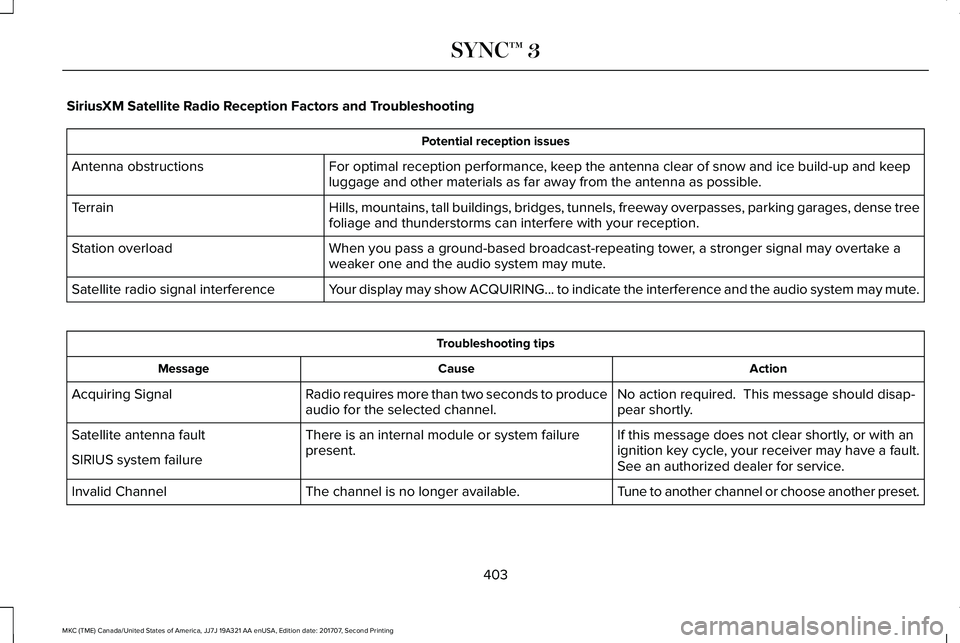
SiriusXM Satellite Radio Reception Factors and Troubleshooting
Potential reception issues
For optimal reception performance, keep the antenna clear of snow and ice build-up and keepluggage and other materials as far away from the antenna as possible.Antenna obstructions
Hills, mountains, tall buildings, bridges, tunnels, freeway overpasses, parking garages, dense treefoliage and thunderstorms can interfere with your reception.Terrain
When you pass a ground-based broadcast-repeating tower, a stronger signal may overtake aweaker one and the audio system may mute.Station overload
Your display may show ACQUIRING... to indicate the interference and the audio system may mute.Satellite radio signal interference
Troubleshooting tips
ActionCauseMessage
No action required. This message should disap-pear shortly.Radio requires more than two seconds to produceaudio for the selected channel.Acquiring Signal
If this message does not clear shortly, or with anignition key cycle, your receiver may have a fault.See an authorized dealer for service.
There is an internal module or system failurepresent.Satellite antenna fault
SIRIUS system failure
Tune to another channel or choose another preset.The channel is no longer available.Invalid Channel
403
MKC (TME) Canada/United States of America, JJ7J 19A321 AA enUSA, Edition date: 201707, Second Printing
SYNC™ 3
Page 408 of 571
HD Radio technology is the digital evolutionof analog AM/FM radio. Your system has aspecial receiver that allows it to receivedigital broadcasts (where available) inaddition to the analog broadcasts, it alreadyreceives. Digital broadcasts provide a bettersound quality than analog broadcasts withfree, crystal-clear audio and no static ordistortion. For more information, and a guideto available stations and programming,please visit:
Website
www.hdradio.com
When HD Radio is on and you tune to astation broadcasting HD Radio technology,you may notice the following indicators onyour screen:
The HD logo is grey when acquiring a digitalstation, and then changes to orange whendigital audio is playing. When this logo isavailable, you may also see Title and Artistfields on-screen.
The multicast indicator appears in FM mode(only) if the current station is broadcastingmultiple digital broadcasts. The highlightednumbers signify available digital channelswhere new or different content is available.HD1 signifies the main programming statusand is available in analog and digitalbroadcasts. Other multicast stations (HD2through HD7) are only available digitally.
Note: There is also an additional feature forstations that have more than 1 HD multicast(For example, HD1 or HD2). The HD logo andRadio text appears as a button. Pressing thisbutton allows you cycle through all of theHD stations on that specific frequency. Forexample, if you are on 101.1 and it has HD1,HD2, HD3, pressing the button repeatedlycauses the radio to cycle through the HDstations in a cyclic increasing order.
405
MKC (TME) Canada/United States of America, JJ7J 19A321 AA enUSA, Edition date: 201707, Second Printing
SYNC™ 3E142616
Page 409 of 571
When HD Radio broadcasts are active, you can access the following functions:
Action and descriptionMessage
Allows you to save an active channel as a memory preset. Touch and hold a memory preset slotuntil the sound returns. There is a brief mute while the radio saves the station. Sound returnswhen the channel saves. When switching to an HD2 or HD3 memory preset, the sound mutesbefore the digital audio plays, because the system has to reacquire the digital signal.
Presets
Note:As with any station you save, you cannot access the saved station if your vehicle is outside the station’s reception area.
HD Radio Reception and Station Troubleshooting
Potential reception issues
If you are listening to a multicast station and you are on the fringe of the reception area, the stationmay mute due to weak signal strength.Reception area
If you are listening to HD1, the system changes back to the analog broadcast until the digitalbroadcast is available again. However, if you are listening to any of the possible HD2-HD7 multicastchannels, the station mutes and stays muted unless it is able to connect to the digital signal again.
When the system first receives a station (aside from HD2-HD7 multicast stations), it first plays thestation in the analog version. Once the receiver verifies the station is an HD Radio station, it shiftsto the digital version. Depending on the station quality, you may hear a slight sound change whenthe station changes from analog to digital. Blending is the shift from analog to digital sound ordigital back to analog sound.
Station blending
406
MKC (TME) Canada/United States of America, JJ7J 19A321 AA enUSA, Edition date: 201707, Second Printing
SYNC™ 3