audio LINCOLN MKC 2018 Owners Manual
[x] Cancel search | Manufacturer: LINCOLN, Model Year: 2018, Model line: MKC, Model: LINCOLN MKC 2018Pages: 571, PDF Size: 4.39 MB
Page 5 of 571
Keyless Entry..................................................69
Liftgate
Power Liftgate.................................................72
Security
Passive Anti-Theft System...........................76
Anti-Theft Alarm.............................................77
Steering Wheel
Adjusting the Steering Wheel - VehiclesWith: Manual Adjustable SteeringColumn.........................................................79
Adjusting the Steering Wheel - VehiclesWith: Power Adjustable Steering Column.........................................................................79
Audio Control..................................................81
Voice Control...................................................81
Cruise Control................................................82
Information Display Control........................82
Heated Steering Wheel...............................82
Wipers and Washers
Windshield Wipers........................................83
Autowipers......................................................84
Windshield Washers.....................................85
Rear Window Wiper and Washers............85
Lighting
General Information......................................87
Lighting Control..............................................87
Autolamps.......................................................88
Instrument Lighting Dimmer.......................89
Headlamp Exit Delay....................................90
Daytime Running Lamps.............................90
Automatic High Beam Control...................90
Front Fog Lamps............................................92
Direction Indicators.......................................92
Welcome Lighting..........................................92
Interior Lamps.................................................93
Ambient Lighting...........................................94
Windows and Mirrors
Power Windows.............................................95
Global Opening and Closing......................96
Exterior Mirrors...............................................96
Interior Mirror..................................................99
Sun Visors......................................................100
Moonroof.......................................................100
Instrument Cluster
Gauges...........................................................103
Warning Lamps and Indicators.................104
Audible Warnings and Indicators.............108
Information Displays
General Information....................................109
Information Messages..................................114
Climate Control
Automatic Climate Control.........................133
Hints on Controlling the Interior Climate.......................................................................135
Heated Windows and Mirrors...................136
Cabin Air Filter...............................................137
Remote Start..................................................137
Seats
Sitting in the Correct Position...................138
Head Restraints............................................138
2
MKC (TME) Canada/United States of America, JJ7J 19A321 AA enUSA, Edition date: 201707, Second Printing
Table of Contents
Page 8 of 571
Changing the 12V Battery.........................296
Checking the Wiper Blades......................297
Changing the Wiper Blades.....................298
Adjusting the Headlamps.........................299
Removing a Headlamp..............................300
Changing a Bulb..........................................300
Bulb Specification Chart.............................301
Changing the Engine Air Filter................303
Vehicle Care
General Information...................................305
Cleaning Products......................................305
Cleaning the Exterior.................................306
Waxing............................................................307
Cleaning the Engine...................................308
Cleaning the Windows and Wiper Blades......................................................................308
Cleaning the Interior..................................309
Cleaning the Instrument Panel andInstrument Cluster Lens..........................311
Cleaning Leather Seats...............................311
Repairing Minor Paint Damage.................312
Cleaning the Wheels...................................312
Vehicle Storage............................................313
Body Styling Kits...........................................314
Wheels and Tires
General Information.....................................315
Tire Care.........................................................318
Using Snow Chains......................................331
Tire Pressure Monitoring System............332
Changing a Road Wheel............................337
Technical Specifications............................342
Capacities and Specifications
Engine Specifications - 2.0L/2.0LEcoBoost™.................................................344
Engine Specifications - 2.3L/2.3LEcoBoost™.................................................345
Motorcraft Parts - 2.0L/2.0L EcoBoost™......................................................................346
Motorcraft Parts - 2.3L/2.3L EcoBoost™......................................................................347
Vehicle Identification Number.................348
Vehicle Certification Label........................348
Transmission Code Designation.............349
Capacities and Specifications - 2.0LEcoBoost™.................................................350
Capacities and Specifications - 2.3LEcoBoost™.................................................356
Audio System
General Information....................................364
Audio Unit.....................................................365
USB Port........................................................367
SYNC™ 3
General Information....................................368
Home Screen...............................................385
Using Voice Recognition...........................387
Entertainment...............................................397
Climate.............................................................411
Phone..............................................................416
Navigation.....................................................424
Apps................................................................435
Settings..........................................................438
SYNC™ 3 Troubleshooting........................458
5
MKC (TME) Canada/United States of America, JJ7J 19A321 AA enUSA, Edition date: 201707, Second Printing
Table of Contents
Page 21 of 571
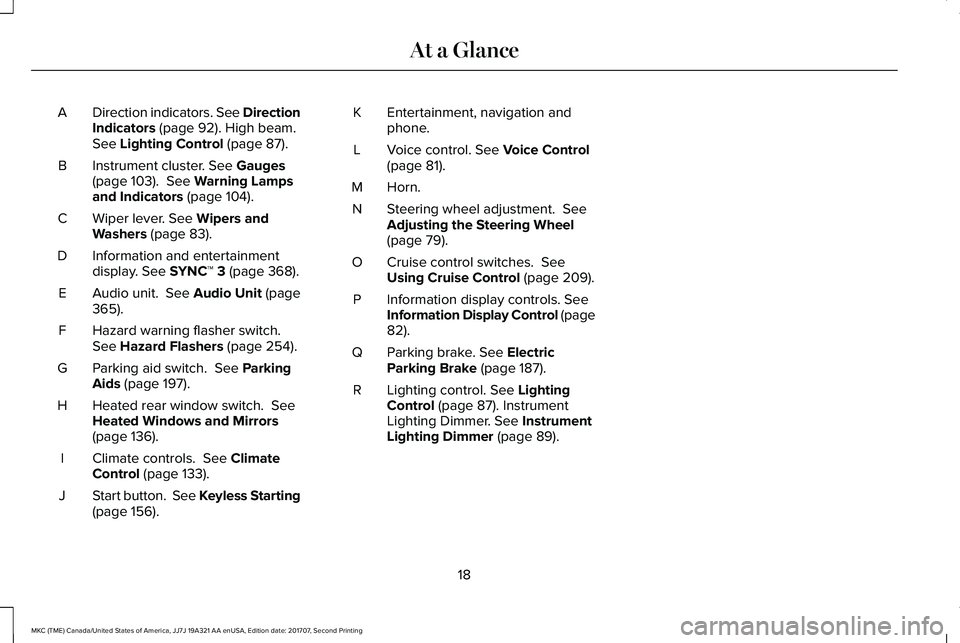
Direction indicators. See DirectionIndicators (page 92). High beam.See Lighting Control (page 87).
A
Instrument cluster. See Gauges(page 103). See Warning Lampsand Indicators (page 104).
B
Wiper lever. See Wipers andWashers (page 83).C
Information and entertainmentdisplay. See SYNC™ 3 (page 368).D
Audio unit. See Audio Unit (page365).E
Hazard warning flasher switch.See Hazard Flashers (page 254).F
Parking aid switch. See ParkingAids (page 197).G
Heated rear window switch. SeeHeated Windows and Mirrors(page 136).
H
Climate controls. See ClimateControl (page 133).I
Start button. See Keyless Starting(page 156).J
Entertainment, navigation andphone.K
Voice control. See Voice Control(page 81).L
Horn.M
Steering wheel adjustment. SeeAdjusting the Steering Wheel(page 79).
N
Cruise control switches. SeeUsing Cruise Control (page 209).O
Information display controls. SeeInformation Display Control (page82).
P
Parking brake. See ElectricParking Brake (page 187).Q
Lighting control. See LightingControl (page 87). InstrumentLighting Dimmer. See InstrumentLighting Dimmer (page 89).
R
18
MKC (TME) Canada/United States of America, JJ7J 19A321 AA enUSA, Edition date: 201707, Second Printing
At a Glance
Page 62 of 571
PRINCIPLE OF OPERATION
MyKey allows you to program keys withrestricted driving modes to promote gooddriving habits. You can program therestrictions to all keys but one. Any keys thatyou did not program are administrator keysor admin keys.
You can use admin keys to:
•Create a MyKey with certain vehiclerestrictions.
•Program certain MyKey settings.
•Clear all MyKey restrictions.
After you program a MyKey, you can viewthe following information through theinformation display:
•The total number of admin keys andMyKeys for your vehicle.
•The total distance a MyKey drivertraveled with your vehicle.
Note:Every MyKey receives the samerestrictions and settings. You cannotprogram them individually.
Note:For vehicles equipped with apush-button start switch: When both a MyKeyand an admin key are present when youstart your vehicle, the system recognizes theadmin key only.
Standard Settings
Not every vehicle includes the features listedbelow. If your vehicle has this equipment,then you cannot change the followingsettings when using a MyKey:
•Seatbelt reminder or Belt-Minder™. MyKeymutes the audio system until drivers, andin some instances, passengers, fastentheir seatbelts. Note: If your vehicleincludes an AM/FM radio or a very basicaudio system, then the radio may notmute.
•Earlier low-fuel warning. The low-fuelwarning activates earlier for MyKeydrivers, giving them more time to refuel.
•Certain driver alerts, stability systems orparking aids turn on automatically whenyou use the MyKey system. For example,Blind Spot Information System (BLIS),cross traffic alert, lane departure warningor forward collision warning. Note: MyKeydrivers may be able to turn the lanedeparture warning feature off, but thisfeature turns back on automatically withevery new key cycle.
•Restricted touchscreen operation in somemarkets. For example, MyKey mayprevent manual navigation destinationinput while the vehicle is in any gearother than park (P) or when the vehiclereaches a certain rate of speed.
•Satellite radio adult content restrictions,if this feature is available in your market.
Optional Settings
You can configure certain vehicle featuresettings when you first create a MyKey. Youcan also change the settings afterward withan admin key.
59
MKC (TME) Canada/United States of America, JJ7J 19A321 AA enUSA, Edition date: 201707, Second Printing
MyKey™
Page 63 of 571
Note:Not every feature applies to everyvehicle in every market. When they areavailable for your vehicle, then they appearin your information display, providing choicesto switch them on or off, or to select a morespecific setting.
•Various vehicle speed limits so theMyKey driver cannot exceed certainspeeds. The information display showswarnings followed by an audible tonewhen the MyKey driver reaches the setspeed. You cannot override the setspeed by fully depressing the acceleratorpedal.
WARNING
Do not set MyKey maximum speed limitto a limit that will prevent the driverfrom maintaining a safe speed consideringposted speed limits and prevailing roadconditions. The driver is always responsibleto drive in accordance with local laws andprevailing conditions. Failure to do so couldresult in accident or injury.
•Various vehicle speed reminders soMyKey drivers know when their vehiclespeed approaches the limits. Warningsappear in your information display and atone sounds when the MyKey driversexceed the set vehicle speed.
•The audio system's maximum volumelimits to 45% so MyKey drivers canconcentrate on the road. A messageappears in the information display whenMyKey drivers attempt to exceed thelimited volume. MyKey also disables theautomatic volume control. Note: If yourvehicle includes an AM/FM radio or avery basic audio system, then the radiomay not limit.
•Always on setting. This setting forcescertain features to remain on and activefor MyKey drivers. For example, E911 oremergency assistance and the do notdisturb features stay on even if a MyKeydriver uses the feature's control to switchit off. When you select, you will not beable to turn off Advance Trac or tractioncontrol (if your vehicle has this feature).
CREATING A MYKEY
Use the information display to create aMyKey.
1. Switch the ignition on using the key orthe transmitter you want to program. Ifyour vehicle has a push-button start,place the transmitter into the backup slot.See Passive Anti-Theft System (page76).
2.Access the main menu in the informationdisplay and then scroll through themenus to begin programming yourMyKey. See Information Displays (page109).
3. Follow the instructions in the display.
4. A confirmation message appears in thedisplay after you finish programming yourMyKey. The programmed restrictionsapply when you key off, open and closedriver door and restart your vehicle withthe programmed key or transmitter.
Note:Make sure you label the programmedMyKey so you can distinguish it from theadmin keys.
60
MKC (TME) Canada/United States of America, JJ7J 19A321 AA enUSA, Edition date: 201707, Second Printing
MyKey™
Page 84 of 571
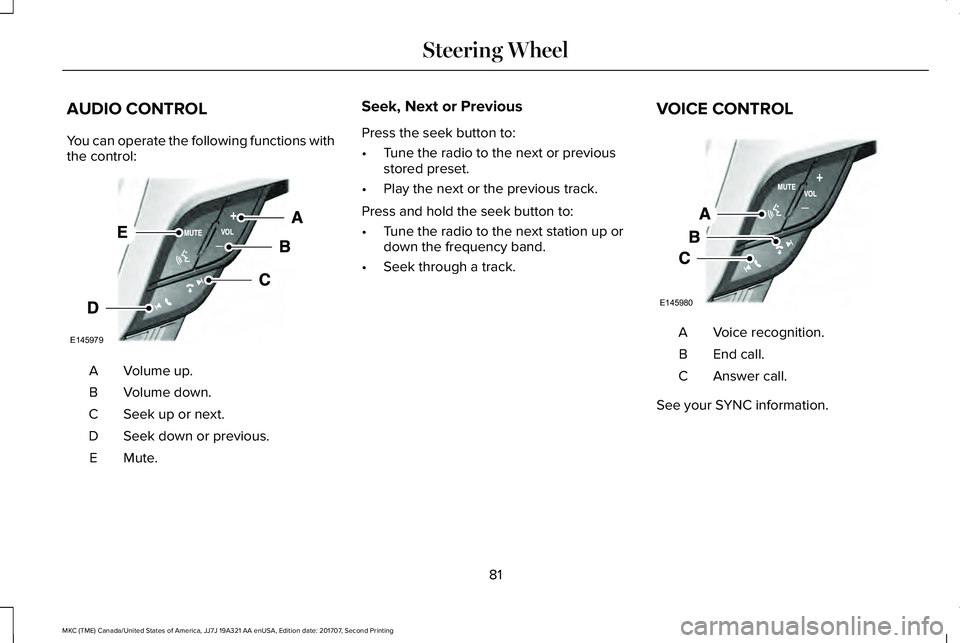
AUDIO CONTROL
You can operate the following functions withthe control:
Volume up.A
Volume down.B
Seek up or next.C
Seek down or previous.D
Mute.E
Seek, Next or Previous
Press the seek button to:
•Tune the radio to the next or previousstored preset.
•Play the next or the previous track.
Press and hold the seek button to:
•Tune the radio to the next station up ordown the frequency band.
•Seek through a track.
VOICE CONTROL
Voice recognition.A
End call.B
Answer call.C
See your SYNC information.
81
MKC (TME) Canada/United States of America, JJ7J 19A321 AA enUSA, Edition date: 201707, Second Printing
Steering WheelE145979 E145980
Page 128 of 571
MyKey
ActionMessage
You cannot program a MyKey.MyKey not Created
MyKey is active.MyKey Active Drive Safely
When switching on your vehicle and MyKey is in use, displays that the MyKey speed limit is on.Speed Limited to XX MPH/km/h
MyKey is in use and the MyKey speed limit is on and the vehicle speed is approaching 80 mph(130 km/h).Near Vehicle Top Speed
You have reached the speed limit set for your MyKey.Vehicle at Top Speed of MyKey Setting
You have an active MyKey with a programmed set speed limit.Check Speed Drive Safely
Belt-Minder turns on with a MyKey in use.Buckle Up to Unmute Audio
With a MyKey in use, AdvanceTrac turns on.AdvanceTrac On - MyKey Setting
With a MyKey in use, traction control turns on.Traction Control On - MyKey Setting
With a MyKey in use, park aid is always on.MyKey Park Aid Cannot be Deactivated
With a MyKey in use, lane keeping alert turns on.Lane Keeping Alert On MyKey Setting
125
MKC (TME) Canada/United States of America, JJ7J 19A321 AA enUSA, Edition date: 201707, Second Printing
Information Displays
Page 201 of 571
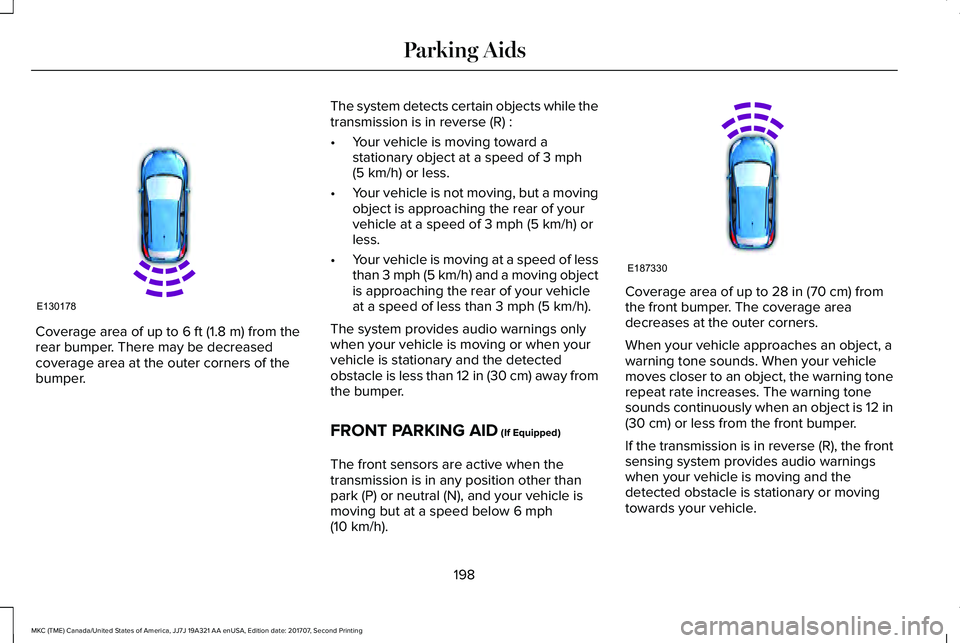
Coverage area of up to 6 ft (1.8 m) from therear bumper. There may be decreasedcoverage area at the outer corners of thebumper.
The system detects certain objects while thetransmission is in reverse (R) :
•Your vehicle is moving toward astationary object at a speed of 3 mph(5 km/h) or less.
•Your vehicle is not moving, but a movingobject is approaching the rear of yourvehicle at a speed of 3 mph (5 km/h) orless.
•Your vehicle is moving at a speed of lessthan 3 mph (5 km/h) and a moving objectis approaching the rear of your vehicleat a speed of less than 3 mph (5 km/h).
The system provides audio warnings onlywhen your vehicle is moving or when yourvehicle is stationary and the detectedobstacle is less than 12 in (30 cm) away fromthe bumper.
FRONT PARKING AID (If Equipped)
The front sensors are active when thetransmission is in any position other thanpark (P) or neutral (N), and your vehicle ismoving but at a speed below 6 mph(10 km/h).
Coverage area of up to 28 in (70 cm) fromthe front bumper. The coverage areadecreases at the outer corners.
When your vehicle approaches an object, awarning tone sounds. When your vehiclemoves closer to an object, the warning tonerepeat rate increases. The warning tonesounds continuously when an object is 12 in(30 cm) or less from the front bumper.
If the transmission is in reverse (R), the frontsensing system provides audio warningswhen your vehicle is moving and thedetected obstacle is stationary or movingtowards your vehicle.
198
MKC (TME) Canada/United States of America, JJ7J 19A321 AA enUSA, Edition date: 201707, Second Printing
Parking AidsE130178 E187330
Page 202 of 571
If the transmission is in drive (D) or any otherforward gear (for example, low (L), sport (S)or any forward gear in a manualtransmission), the front sensing systemprovides audio warnings when your vehicleis moving below a speed of 7 mph (12 km/h)and an obstacle is located inside thedetection area.
ACTIVE PARK ASSIST (If Equipped)
Parallel Parking, Parallel Park OutAssist
WARNINGS
You must remain in your vehicle whenthe system turns on. At all times, youare responsible for controlling your vehicle,supervising the system and intervening, ifrequired. Failure to take care may result inthe loss of control of your vehicle, seriouspersonal injury or death.
The sensors may not detect objects inheavy rain or other conditions thatcause interference.
WARNINGS
Active park assist does not apply thebrakes under any circumstances.
The system is designed to aid thedriver. It is not intended to replace yourattention and judgment. You are stillresponsible to drive with due care andattention.
Note:Active Park Assist is a multi-stepprocess and may require you to shift yourtransmission multiple times. Follow theon-screen instructions until you complete theparking process.
Note:The Blind Spot Information Systemdoes not detect traffic alongside or behindyour vehicle during an Active Park Assistmaneuver.
Active Park Assist detects an availableparallel parking space and automaticallysteers your vehicle into the space(hands-free) while you control theaccelerator, gearshift and brakes. The systemvisually and audibly guides you to park yourvehicle.
If you are uncomfortable with the proximityto any vehicle or object, you may choose tooverride the system by grabbing the steeringwheel or by pressing the Active Park Assistbutton.
Parallel Park Out Assist automatically steersyour vehicle out of a parallel parking space(hands-free) while you control theaccelerator, gearshift and brakes. The systemvisually and audibly guides you to entertraffic.
The system may not correctly operate in anyof the following conditions:
•You use a spare tire or a tire significantlyworn more than the other tires.
•One or more tires are improperly inflated.
•You try to park on a tight curve.
•Something passes between the frontbumper and the parking space. Forexample, a pedestrian or cyclist.
199
MKC (TME) Canada/United States of America, JJ7J 19A321 AA enUSA, Edition date: 201707, Second Printing
Parking Aids
Page 235 of 571
The brake support system assists you inreducing any collision speed by pre-chargingthe brakes. If the risk of collision continuesto increases after the audio-visual warning,the brake support prepares the brake systemfor rapid braking. The system does notautomatically activate the brakes, but if thebrake pedal is pressed even lightly, thebrakes apply full stopping power.
Using the Collision Warning System
WARNING
The collision warning system's brakesupport reduces collision speed onlyif you brake your vehicle before any collision.You must press your brake pedal as youwould in any typical braking situation.
You can use your information display controlto adjust the warning system's sensitivity toany one of three possible settings. SeeGeneral Information (page 109).
Note:When possible, the manufacturerrecommends using the highest sensitivitysetting. If warnings are too frequent, you canreduce your system's sensitivity. Reducedsensitivity causes fewer and later systemwarnings. See General Information (page109).
Blocked Sensors
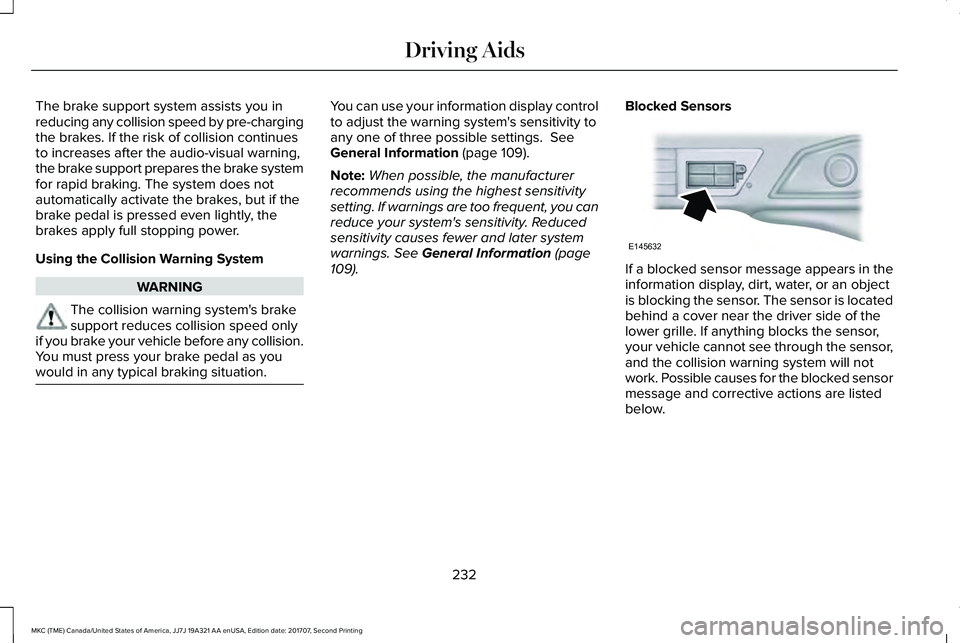
If a blocked sensor message appears in theinformation display, dirt, water, or an objectis blocking the sensor. The sensor is locatedbehind a cover near the driver side of thelower grille. If anything blocks the sensor,your vehicle cannot see through the sensor,and the collision warning system will notwork. Possible causes for the blocked sensormessage and corrective actions are listedbelow.
232
MKC (TME) Canada/United States of America, JJ7J 19A321 AA enUSA, Edition date: 201707, Second Printing
Driving AidsE145632