steering wheel LINCOLN MKC 2018 Service Manual
[x] Cancel search | Manufacturer: LINCOLN, Model Year: 2018, Model line: MKC, Model: LINCOLN MKC 2018Pages: 571, PDF Size: 4.39 MB
Page 318 of 571
GENERAL INFORMATION
The recommended tire inflation pressuresare found on the Tire Label which is locatedon the B-pillar or the edge of the driver door.This information can also be found on theSafety Compliance Certification Label, affixedto either the door hinge pillar, door-latchpost, or the door edge that meets thedoor-latch post; next to the driver’s seatingposition.
We strongly recommend maintaining thesetire pressures at all times. Failure to followthe tire pressure recommendations cancause uneven treadwear patterns, reducedfuel economy, and adversely affect the wayyour vehicle handles.
Note:Check and set the tire pressure at theambient temperature in which you areintending to drive your vehicle and when thetires are cold.
Note:Check your tire pressures at least onceper month.
If your vehicle has a spare tire, set thepressure to the highest value given for yourvehicle and tire size combination.
Use only approved wheels and tire sizes,using other sizes could damage your vehicle.
If you change the diameter of the factoryinstalled tires, the speedometer may notdisplay the correct speed. Take your vehicleto an authorized dealer and have the enginemanagement system reprogrammed.
If you intend to change the size of the factoryinstalled tires, check the suitability with anauthorized dealer.
Additional information related to thefunctionality and maintenance of your tirescan be found in the Wheels and Tire section.See Tire Care (page 318).
Notice to utility vehicle and truckowners
WARNINGS
Vehicles with a higher center of gravity(utility and four-wheel drive vehicles)handle differently than vehicles with a lowercenter of gravity (passenger cars). Avoidsharp turns, excessive speed and abruptsteering in these vehicles. Failure to drivecautiously increases the risk of losing controlof your vehicle, vehicle rollover, personalinjury and death.
In a rollover crash, an unbelted personis significantly more likely to die thana person wearing a seatbelt.
315
MKC (TME) Canada/United States of America, JJ7J 19A321 AA enUSA, Edition date: 201707, Second Printing
Wheels and Tires
Page 320 of 571
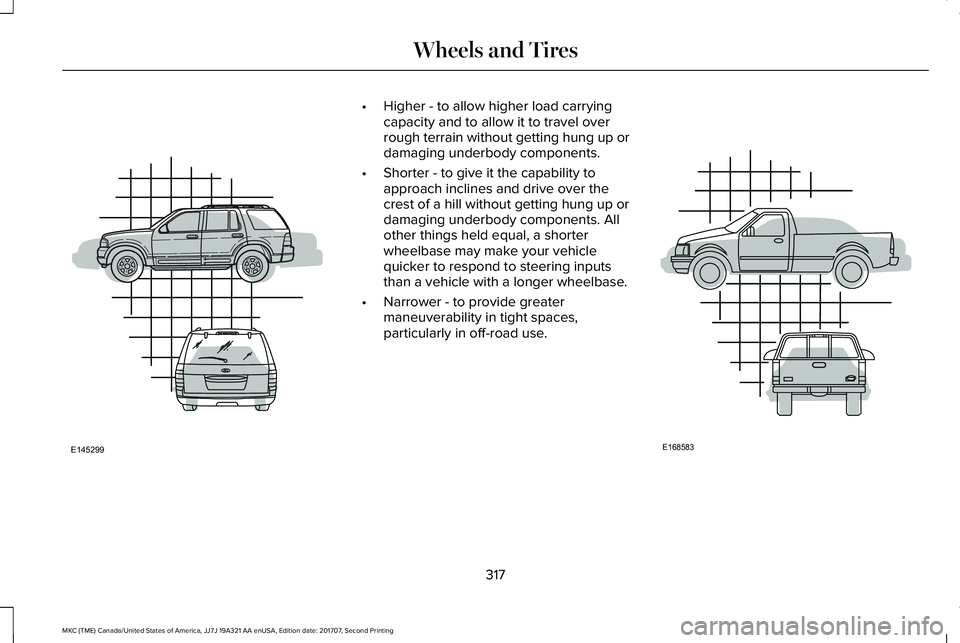
•Higher - to allow higher load carryingcapacity and to allow it to travel overrough terrain without getting hung up ordamaging underbody components.
•Shorter - to give it the capability toapproach inclines and drive over thecrest of a hill without getting hung up ordamaging underbody components. Allother things held equal, a shorterwheelbase may make your vehiclequicker to respond to steering inputsthan a vehicle with a longer wheelbase.
•Narrower - to provide greatermaneuverability in tight spaces,particularly in off-road use.
317
MKC (TME) Canada/United States of America, JJ7J 19A321 AA enUSA, Edition date: 201707, Second Printing
Wheels and TiresE145299 E168583
Page 332 of 571
WARNINGS
The use of non-recommended tiresand wheels could cause steering,suspension, axle, transfer case or powertransfer unit failure. If you havequestions regarding tire replacement,contact your authorized dealer as soonas possible.
To reduce the risk of serious injury,when mounting replacement tiresand wheels, you should not exceed themaximum pressure indicated on thesidewall of the tire to set the beadswithout additional precautions listedbelow. If the beads do not seat at themaximum pressure indicated,re-lubricate and try again.
When inflating the tire for mounting
pressures up to 20 psi (1.38 bar)greater than the maximum pressure onthe tire sidewall, the followingprecautions must be taken to protectthe person mounting the tire:
•Make sure that you have the correcttire and wheel size.
•Lubricate the tire bead and wheelbead seat area again.
•Stand at a minimum of 12 feet (3.66meters) away from the wheel and tire
assembly.
•Use both eye and ear protection.
WARNING
Always inflate steel carcass tireswith a remote air fill with the personinflating standing at a minimum of 12 ft(3.66 m) away from the wheel and tireassembly.
Important: Remember to replace thewheel valve stems when the road tires
are replaced on your vehicle.
It is recommended that the two fronttires or two rear tires generally bereplaced as a pair.
The tire pressure sensors mounted inthe wheels (originally installed on yourvehicle) are not designed to be used inaftermarket wheels.
The use of wheels or tires notrecommended by Ford Motor Companymay affect the operation of your tirepressure monitoring system.
If the tire pressure monitoring systemindicator is flashing, your system ismalfunctioning. Your replacement tiremight be incompatible with your tirepressure monitoring system, or somecomponent of the system may bedamaged.
Safety Practices
WARNINGS
If your vehicle is stuck in snow,mud or sand, do not rapidly spinthe tires; spinning the tires can tear thetire and cause an explosion. A tire canexplode in as little as three to fiveseconds.
329
MKC (TME) Canada/United States of America, JJ7J 19A321 AA enUSA, Edition date: 201707, Second Printing
Wheels and Tires
Page 334 of 571
Note:Your vehicle may be equippedwith a dissimilar spare wheel and tireassembly. A dissimilar spare wheel andtire assembly is defined as a sparewheel and tire assembly that is differentin brand, size or appearance from theroad tires and wheels. If you have adissimilar spare wheel and tireassembly, it is intended for temporaryuse only and should not be used in atire rotation.
Note:After having your tires rotated,inflation pressure must be checked andadjusted to the vehicle requirements.
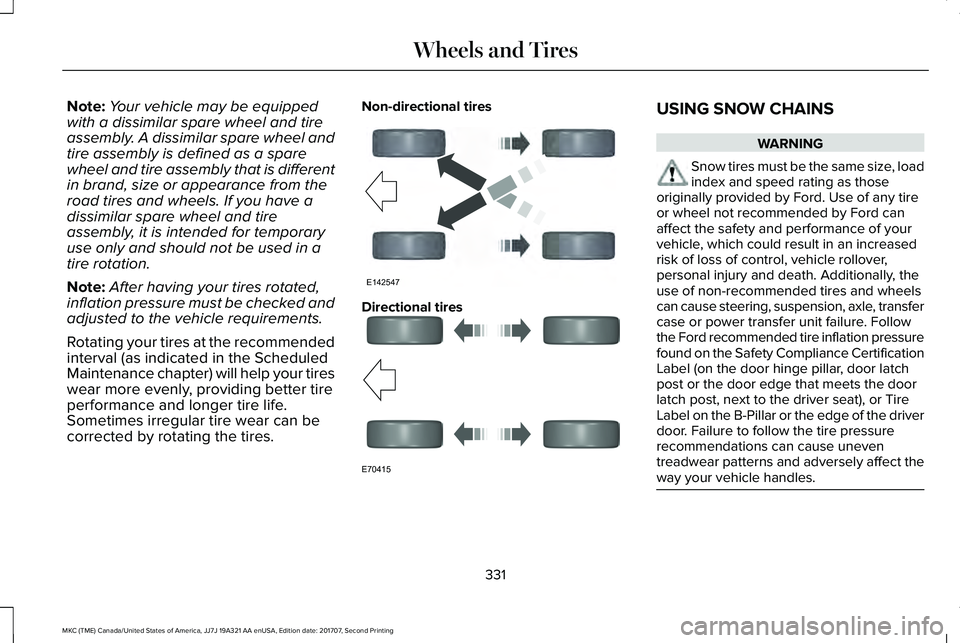
Rotating your tires at the recommendedinterval (as indicated in the ScheduledMaintenance chapter) will help your tireswear more evenly, providing better tire
performance and longer tire life.Sometimes irregular tire wear can becorrected by rotating the tires.
Non-directional tires
Directional tires
USING SNOW CHAINS
WARNING
Snow tires must be the same size, loadindex and speed rating as thoseoriginally provided by Ford. Use of any tireor wheel not recommended by Ford canaffect the safety and performance of yourvehicle, which could result in an increasedrisk of loss of control, vehicle rollover,personal injury and death. Additionally, theuse of non-recommended tires and wheelscan cause steering, suspension, axle, transfercase or power transfer unit failure. Followthe Ford recommended tire inflation pressurefound on the Safety Compliance CertificationLabel (on the door hinge pillar, door latchpost or the door edge that meets the doorlatch post, next to the driver seat), or TireLabel on the B-Pillar or the edge of the driverdoor. Failure to follow the tire pressurerecommendations can cause uneventreadwear patterns and adversely affect theway your vehicle handles.
331
MKC (TME) Canada/United States of America, JJ7J 19A321 AA enUSA, Edition date: 201707, Second Printing
Wheels and TiresE142547 E70415
Page 341 of 571
If you get a flat tire when driving, do notapply the brake heavily. Instead, graduallydecrease your speed. Hold the steeringwheel firmly and slowly move to a safe placeon the side of the road.
Have a flat serviced by an authorized dealerin order to prevent damage to the tirepressure monitoring system sensors. SeeTire Pressure Monitoring System (page 332).Replace the spare tire with a road tire assoon as possible. During repairing orreplacing of the flat tire, have the authorizeddealer inspect the tire pressure monitoringsystem sensor for damage.
Dissimilar Spare Wheel and TireAssembly Information
WARNING
Failure to follow these guidelines couldresult in an increased risk of loss ofvehicle control, injury or death.
If you have a dissimilar spare wheel and tire,then it is intended for temporary use only.This means that if you need to use it, youshould replace it as soon as possible with aroad wheel and tire assembly that is thesame size and type as the road tires andwheels that were originally provided by Ford.If the dissimilar spare tire or wheel isdamaged, it should be replaced rather thanrepaired.
A dissimilar spare wheel and tire assemblyis defined as a spare wheel and tire assemblythat is different in brand, size or appearancefrom the road tires and wheels and can beone of three types:
1. T-type mini-spare: This spare tire beginswith the letter T for tire size and may haveTemporary Use Only molded in the sidewall.
2. Full-size dissimilar spare with label onwheel: This spare tire has a label on thewheel that states: THIS WHEEL AND TIREASSEMBLY FOR TEMPORARY USE ONLY.
When driving with one of the dissimilar sparetires listed above, do not:
•Exceed 50 mph (80 km/h).
•Load the vehicle beyond maximumvehicle load rating listed on the SafetyCompliance Label.
•Tow a trailer.
•Use snow chains on the end of thevehicle with the dissimilar spare tire.
•Use more than one dissimilar spare tireat a time.
•Use commercial car washing equipment.
•Try to repair the dissimilar spare tire.
Use of one of the dissimilar spare tires listedabove at any one wheel location can lead toimpairment of the following:
•Handling, stability and brakingperformance.
•Comfort and noise.
•Ground clearance and parking at curbs.
•Winter weather driving capability.
•Wet weather driving capability.
•All-wheel driving capability
3. Full-size dissimilar spare without labelon wheel
338
MKC (TME) Canada/United States of America, JJ7J 19A321 AA enUSA, Edition date: 201707, Second Printing
Wheels and Tires
Page 375 of 571
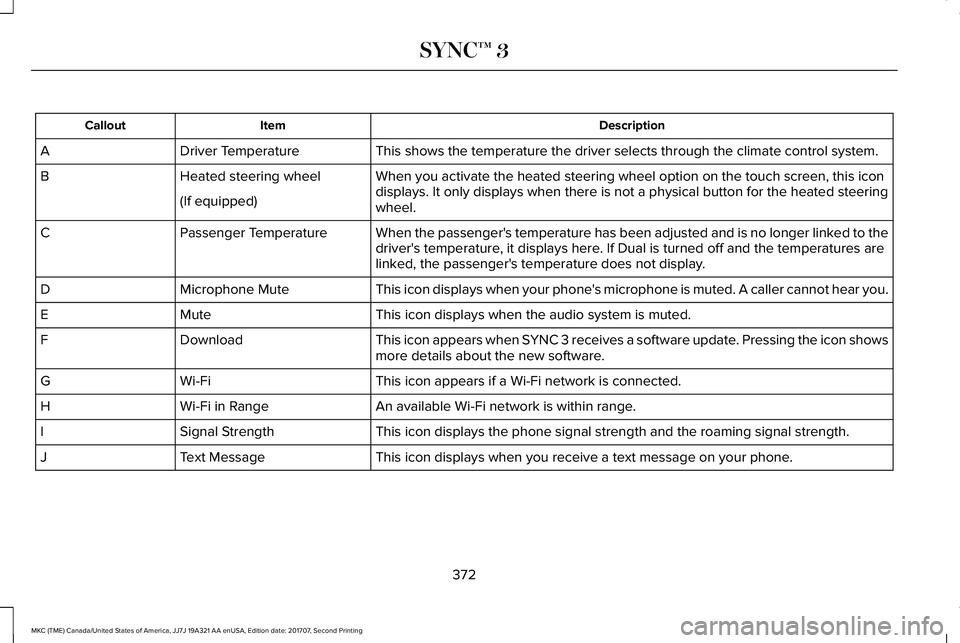
DescriptionItemCallout
This shows the temperature the driver selects through the climate control system.Driver TemperatureA
When you activate the heated steering wheel option on the touch screen, this icondisplays. It only displays when there is not a physical button for the heated steeringwheel.
Heated steering wheelB
(If equipped)
When the passenger's temperature has been adjusted and is no longer linked to thedriver's temperature, it displays here. If Dual is turned off and the temperatures arelinked, the passenger's temperature does not display.
Passenger TemperatureC
This icon displays when your phone's microphone is muted. A caller cannot hear you.Microphone MuteD
This icon displays when the audio system is muted.MuteE
This icon appears when SYNC 3 receives a software update. Pressing the icon showsmore details about the new software.DownloadF
This icon appears if a Wi-Fi network is connected.Wi-FiG
An available Wi-Fi network is within range.Wi-Fi in RangeH
This icon displays the phone signal strength and the roaming signal strength.Signal StrengthI
This icon displays when you receive a text message on your phone.Text MessageJ
372
MKC (TME) Canada/United States of America, JJ7J 19A321 AA enUSA, Edition date: 201707, Second Printing
SYNC™ 3
Page 380 of 571
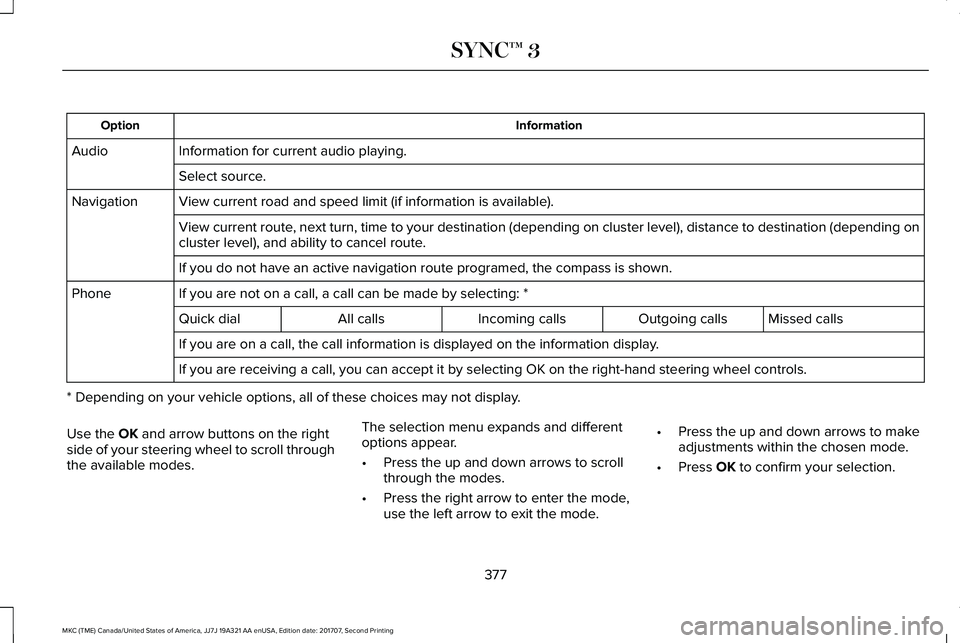
InformationOption
Information for current audio playing.Audio
Select source.
View current road and speed limit (if information is available).Navigation
View current route, next turn, time to your destination (depending on cluster level), distance to destination (depending oncluster level), and ability to cancel route.
If you do not have an active navigation route programed, the compass is shown.
If you are not on a call, a call can be made by selecting: *Phone
Missed callsOutgoing callsIncoming callsAll callsQuick dial
If you are on a call, the call information is displayed on the information display.
If you are receiving a call, you can accept it by selecting OK on the right-hand steering wheel controls.
* Depending on your vehicle options, all of these choices may not display.
Use the OK and arrow buttons on the rightside of your steering wheel to scroll throughthe available modes.
The selection menu expands and differentoptions appear.
•Press the up and down arrows to scrollthrough the modes.
•Press the right arrow to enter the mode,use the left arrow to exit the mode.
•Press the up and down arrows to makeadjustments within the chosen mode.
•Press OK to confirm your selection.
377
MKC (TME) Canada/United States of America, JJ7J 19A321 AA enUSA, Edition date: 201707, Second Printing
SYNC™ 3
Page 381 of 571
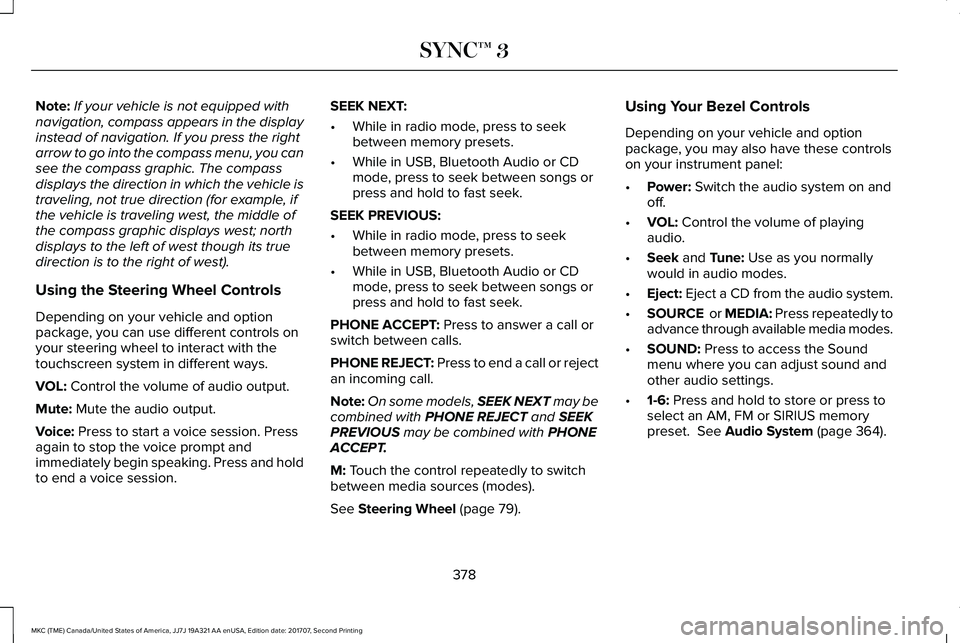
Note:If your vehicle is not equipped withnavigation, compass appears in the displayinstead of navigation. If you press the rightarrow to go into the compass menu, you cansee the compass graphic. The compassdisplays the direction in which the vehicle istraveling, not true direction (for example, ifthe vehicle is traveling west, the middle ofthe compass graphic displays west; northdisplays to the left of west though its truedirection is to the right of west).
Using the Steering Wheel Controls
Depending on your vehicle and optionpackage, you can use different controls onyour steering wheel to interact with thetouchscreen system in different ways.
VOL: Control the volume of audio output.
Mute: Mute the audio output.
Voice: Press to start a voice session. Pressagain to stop the voice prompt andimmediately begin speaking. Press and holdto end a voice session.
SEEK NEXT:
•While in radio mode, press to seekbetween memory presets.
•While in USB, Bluetooth Audio or CDmode, press to seek between songs orpress and hold to fast seek.
SEEK PREVIOUS:
•While in radio mode, press to seekbetween memory presets.
•While in USB, Bluetooth Audio or CDmode, press to seek between songs orpress and hold to fast seek.
PHONE ACCEPT: Press to answer a call orswitch between calls.
PHONE REJECT: Press to end a call or rejectan incoming call.
Note:On some models, SEEK NEXT may becombined with PHONE REJECT and SEEKPREVIOUS may be combined with PHONEACCEPT.
M: Touch the control repeatedly to switchbetween media sources (modes).
See Steering Wheel (page 79).
Using Your Bezel Controls
Depending on your vehicle and optionpackage, you may also have these controlson your instrument panel:
•Power: Switch the audio system on andoff.
•VOL: Control the volume of playingaudio.
•Seek and Tune: Use as you normallywould in audio modes.
•Eject: Eject a CD from the audio system.
•SOURCE or MEDIA: Press repeatedly toadvance through available media modes.
•SOUND: Press to access the Soundmenu where you can adjust sound andother audio settings.
•1-6: Press and hold to store or press toselect an AM, FM or SIRIUS memorypreset. See Audio System (page 364).
378
MKC (TME) Canada/United States of America, JJ7J 19A321 AA enUSA, Edition date: 201707, Second Printing
SYNC™ 3
Page 383 of 571
To make sure that 911 Assist works correctly:
•SYNC must be powered and workingproperly at the time of the incident andthroughout feature activation and use.
•The 911 Assist feature must be set onbefore the incident.
•You must pair and connect aBluetooth-enabled and compatible cellphone to SYNC.
•A connected Bluetooth-enabled phonemust have the ability to make andmaintain an outgoing call at the time ofthe incident.
•A connected Bluetooth-enabled phonemust have adequate network coverage,battery power and signal strength.
•The vehicle must have battery power andbe located in the U.S., Canada or in aterritory in which 911 is the emergencynumber.
In the Event of a Crash
Not all crashes will deploy an airbag oractivate the fuel pump shut-off (the triggersfor 911 Assist). If a connected cell phonesustains damage or loses its connection toSYNC during a crash, SYNC will search forand try to connect to a previously paired cellphone; SYNC will then attempt to call theemergency services.
Before making the call:
•SYNC provides a short window of time(about 10 seconds) to cancel the call. Ifyou fail to cancel the call, SYNC attemptsto dial 911.
•SYNC says the following, or a similarmessage: "SYNC will attempt to call 911,to cancel the call, press Cancel on yourscreen or press and hold the phonebutton on your steering wheel."
If you do not cancel the call, and SYNCmakes a successful call, a pre-recordedmessage plays for the 911 operator, and thenthe occupant(s) in your vehicle is able to talkwith the operator. Be prepared to provideyour name, phone number and locationimmediately, because not all 911 systems arecapable of receiving this informationelectronically.
911 Assist May Not Work If
•Your cellular phone or 911 Assisthardware sustains damage in a crash.
•The vehicle's battery or the SYNC systemhas no power.
•The phone(s) thrown from your vehicleare the ones paired and connected tothe system.
911 Assist Privacy Notice
When you switch on 911 Assist, it maydisclose to emergency services that yourvehicle has been in a crash involving thedeployment of an airbag or activation of thefuel pump shut-off. Certain versions orupdates to 911 Assist may also be capable
380
MKC (TME) Canada/United States of America, JJ7J 19A321 AA enUSA, Edition date: 201707, Second Printing
SYNC™ 3
Page 390 of 571
Home screen displayTileItem
If your vehicle does not have navigation, this space contains the compass.
The name of the connected phone appears on the screen. The status of the phonefeatures also appear. This includes signal strength, battery charge, 911 assist settingstate (On or Off ), text messaging and roaming.
PhoneB
This map displays your current location or current route in real time.Navigation1CWhen you have navigation active, you also see the next turn and the length of timeand distance to your destination.If your vehicle does not have navigation, this space contains the audio information.
1 If equipped.
You can touch any of the feature displays toaccess that feature.
Anytime you select the home button, thesystem returns you to this screen.
USING VOICE RECOGNITION
The SYNC 3 system allows you to use voicecommands, to control features like audio andclimate controls. By using voice commands,you can keep your hands on the wheel andyour eyes on the road.
You can access each feature controlled bySYNC 3 through a variety of commands.
To activate the SYNC 3 voicecommands push the voice buttonon the steering wheel and wait forthe prompt.
___ is a dynamic listing, meaning that it canbe the name of anything, such as artist, thename of contact or number. The context andthe description of the command tell you whatto say for this dynamic option.
There are some commands that work forevery feature, these commands are:
387
MKC (TME) Canada/United States of America, JJ7J 19A321 AA enUSA, Edition date: 201707, Second Printing
SYNC™ 3E142599