light LINCOLN MKC 2019 Owners Manual
[x] Cancel search | Manufacturer: LINCOLN, Model Year: 2019, Model line: MKC, Model: LINCOLN MKC 2019Pages: 581, PDF Size: 5.41 MB
Page 326 of 581
*Traction: The traction grades, fromhighest to lowest are AA, A, B, and C.The grades represent the tire's ability tostop on wet pavement as measuredunder controlled conditions on specifiedgovernment test surfaces of asphalt andconcrete. A tire marked C may havepoor traction performance.
*Temperature: The temperature gradesare A (the highest), B and C,representing the tire's resistance to thegeneration of heat and its ability todissipate heat when tested undercontrolled conditions on a specifiedindoor laboratory test wheel.
M. Maximum Inflation Pressure:Indicates the tire manufacturers'maximum permissible pressure or the
pressure at which the maximum loadcan be carried by the tire. This pressureis normally higher than the vehiclemanufacturer's recommended coldinflation pressure which can be foundon the Safety Compliance CertificationLabel (affixed to either the door hingepillar, door-latch post, or the door edgethat meets the door-latch post, next to
the driver's seating position), or TireLabel which is located on the B-Pillar orthe edge of the driver’s door. The coldinflation pressure should never be setlower than the recommended pressureon the vehicle label.
The tire suppliers may have additionalmarkings, notes or warnings such asstandard load or radial tubeless.
Additional Information Contained onthe Tire Sidewall for LT Type Tires
Note:Tire Quality Grades do not applyto this type of tire.
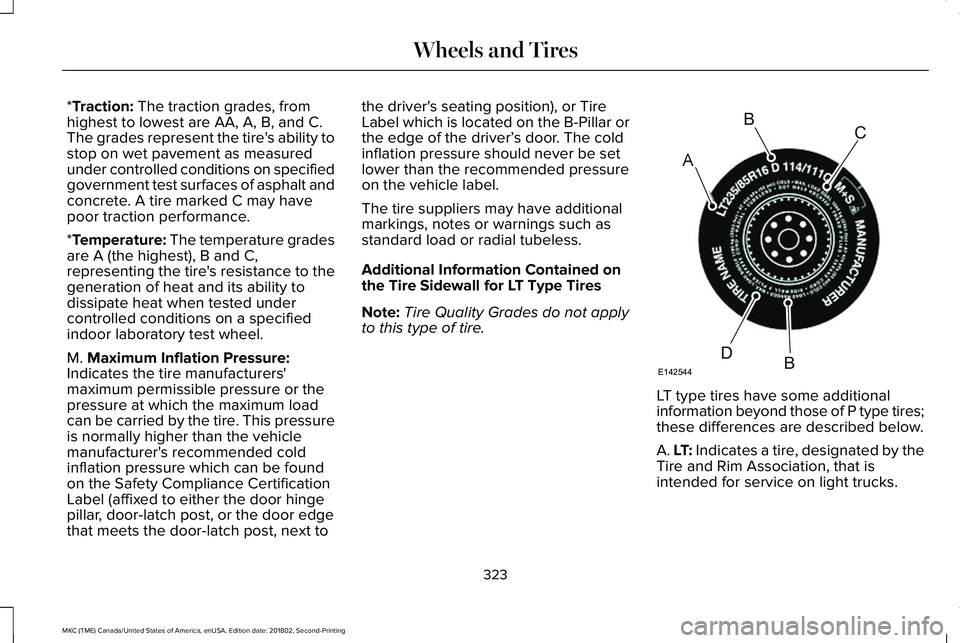
LT type tires have some additional
information beyond those of P type tires;these differences are described below.
A. LT: Indicates a tire, designated by theTire and Rim Association, that isintended for service on light trucks.
323
MKC (TME) Canada/United States of America, enUSA, Edition date: 201802, Second-Printing
Wheels and TiresA
BC
BDE142544
Page 327 of 581
B. Load Range and Load InflationLimits: Indicates the tire's load-carryingcapabilities and its inflation limits.
C. Maximum Load Dual lb (kg) at psi(kPa) cold: Indicates the maximum loadand tire pressure when the tire is usedas a dual, defined as four tires on therear axle (a total of six or more tires onthe vehicle).
D. Maximum Load Single lb (kg) at psi(kPa) cold: Indicates the maximum loadand tire pressure when the tire is usedas a single, defined as two tires (total)on the rear axle.
Information on T Type Tires
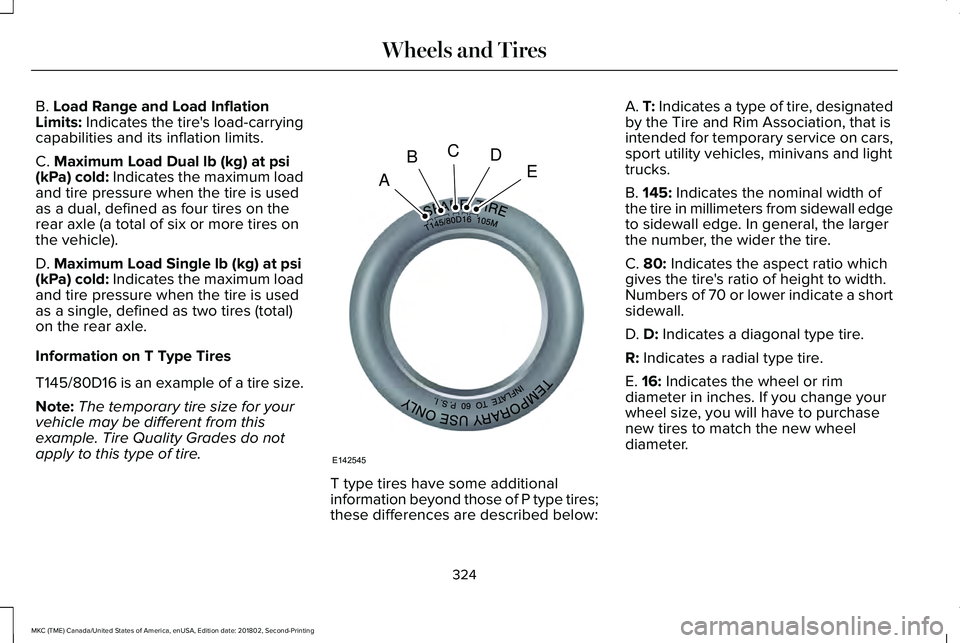
T145/80D16 is an example of a tire size.
Note:The temporary tire size for yourvehicle may be different from thisexample. Tire Quality Grades do notapply to this type of tire.
T type tires have some additionalinformation beyond those of P type tires;these differences are described below:
A. T: Indicates a type of tire, designatedby the Tire and Rim Association, that isintended for temporary service on cars,sport utility vehicles, minivans and lighttrucks.
B. 145: Indicates the nominal width ofthe tire in millimeters from sidewall edgeto sidewall edge. In general, the largerthe number, the wider the tire.
C. 80: Indicates the aspect ratio whichgives the tire's ratio of height to width.Numbers of 70 or lower indicate a shortsidewall.
D. D: Indicates a diagonal type tire.
R: Indicates a radial type tire.
E. 16: Indicates the wheel or rimdiameter in inches. If you change your
wheel size, you will have to purchasenew tires to match the new wheeldiameter.
324
MKC (TME) Canada/United States of America, enUSA, Edition date: 201802, Second-Printing
Wheels and TiresA
BCDE
E142545
Page 337 of 581
Check the tire pressure periodically (at leastmonthly) using an accurate tire gauge. SeeWhen Inflating Your Tires in this chapter.
Understanding Your Tire PressureMonitoring System
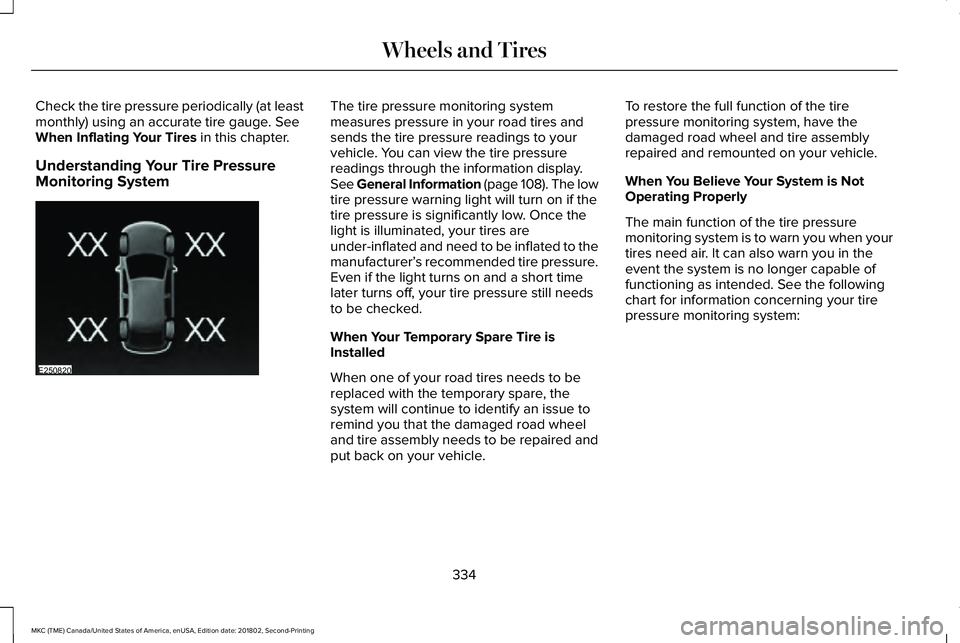
The tire pressure monitoring systemmeasures pressure in your road tires andsends the tire pressure readings to yourvehicle. You can view the tire pressurereadings through the information display.See General Information (page 108). The lowtire pressure warning light will turn on if thetire pressure is significantly low. Once thelight is illuminated, your tires areunder-inflated and need to be inflated to themanufacturer’s recommended tire pressure.Even if the light turns on and a short timelater turns off, your tire pressure still needsto be checked.
When Your Temporary Spare Tire isInstalled
When one of your road tires needs to bereplaced with the temporary spare, thesystem will continue to identify an issue toremind you that the damaged road wheeland tire assembly needs to be repaired andput back on your vehicle.
To restore the full function of the tirepressure monitoring system, have thedamaged road wheel and tire assemblyrepaired and remounted on your vehicle.
When You Believe Your System is NotOperating Properly
The main function of the tire pressuremonitoring system is to warn you when yourtires need air. It can also warn you in theevent the system is no longer capable offunctioning as intended. See the followingchart for information concerning your tirepressure monitoring system:
334
MKC (TME) Canada/United States of America, enUSA, Edition date: 201802, Second-Printing
Wheels and TiresE250820
Page 338 of 581
Customer action requiredPossible causeLow tire pressure warning light
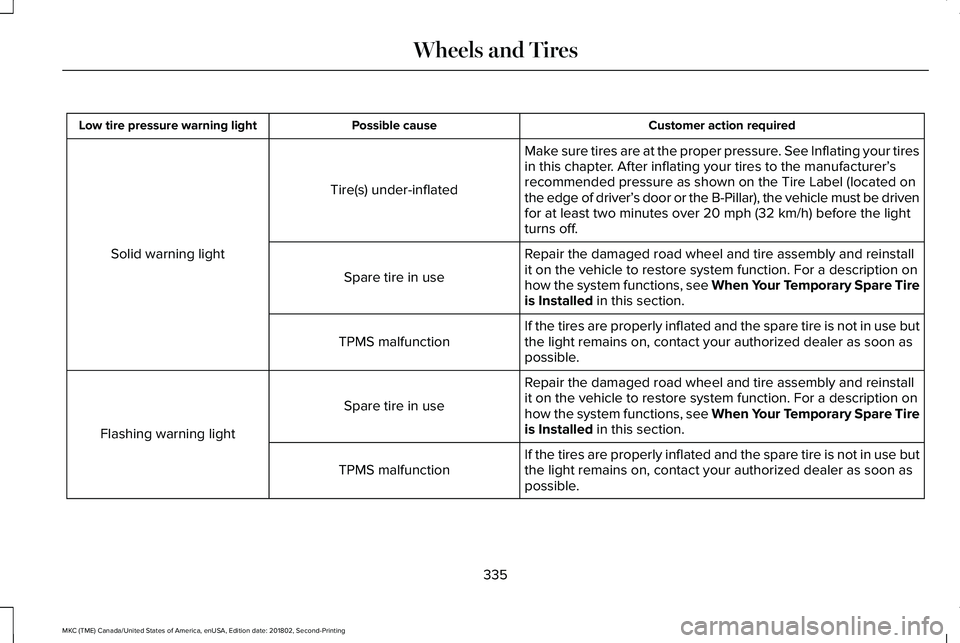
Make sure tires are at the proper pressure. See Inflating your tiresin this chapter. After inflating your tires to the manufacturer’srecommended pressure as shown on the Tire Label (located onthe edge of driver’s door or the B-Pillar), the vehicle must be drivenfor at least two minutes over 20 mph (32 km/h) before the lightturns off.
Tire(s) under-inflated
Solid warning lightRepair the damaged road wheel and tire assembly and reinstallit on the vehicle to restore system function. For a description onhow the system functions, see When Your Temporary Spare Tireis Installed in this section.
Spare tire in use
If the tires are properly inflated and the spare tire is not in use butthe light remains on, contact your authorized dealer as soon aspossible.TPMS malfunction
Repair the damaged road wheel and tire assembly and reinstallit on the vehicle to restore system function. For a description onhow the system functions, see When Your Temporary Spare Tireis Installed in this section.
Spare tire in use
Flashing warning light
If the tires are properly inflated and the spare tire is not in use butthe light remains on, contact your authorized dealer as soon aspossible.TPMS malfunction
335
MKC (TME) Canada/United States of America, enUSA, Edition date: 201802, Second-Printing
Wheels and Tires
Page 339 of 581
When Inflating Your Tires
WARNING: Do not use the tirepressure displayed in the information displayas a tire pressure gauge. Failure to followthis instruction could result in personal injuryor death.
When putting air into your tires (such as at agas station or in your garage), the tirepressure monitoring system may not respondimmediately to the air added to your tires.
It may take up to two minutes of driving over20 mph (32 km/h) for the light to turn off afteryou have filled your tires to therecommended inflation pressure.
How Temperature Affects Your TirePressure
The tire pressure monitoring system monitorstire pressure in each pneumatic tire. Whiledriving in a normal manner, a typicalpassenger tire inflation pressure mayincrease about 2–4 psi (14–28 kPa) from acold start situation. If the vehicle is stationaryovernight with the outside temperature
significantly lower than the daytimetemperature, the tire pressure may decreaseabout 3 psi (21 kPa) for a drop of 30°F (17°C)in ambient temperature. This lower pressurevalue may be detected by the tire pressuremonitoring system as being significantlylower than the recommended inflationpressure and activate the system warninglight for low tire pressure. If the low tirepressure warning light is on, visually checkeach tire to verify that no tire is flat. If one ormore tires are flat, repair as necessary.Check the air pressure in the road tires. Ifany tire is under-inflated, carefully drive thevehicle to the nearest location where air canbe added to the tires. Inflate all the tires tothe recommended inflation pressure.
CHANGING A ROAD WHEEL
WARNING: The tire pressuremonitoring system is not a substitute formanually checking tire pressures. You shouldperiodically check tire pressures using apressure gauge. Failure to correctly maintaintire pressures could increase the risk of tirefailure, loss of control, vehicle rollover andpersonal injury.
WARNING: If the tire pressure monitorsensor becomes damaged it may notfunction.
Note:You should only use tire sealants inroadside emergencies as they may causedamage to the tire pressure monitoringsystem sensor.
Note:The tire pressure monitoring systemindicator light illuminates when the sparetire is in use. To restore the full function ofthe monitoring system, all road wheelsequipped with tire pressure monitoringsensors must be mounted on the vehicle.
336
MKC (TME) Canada/United States of America, enUSA, Edition date: 201802, Second-Printing
Wheels and Tires
Page 366 of 581
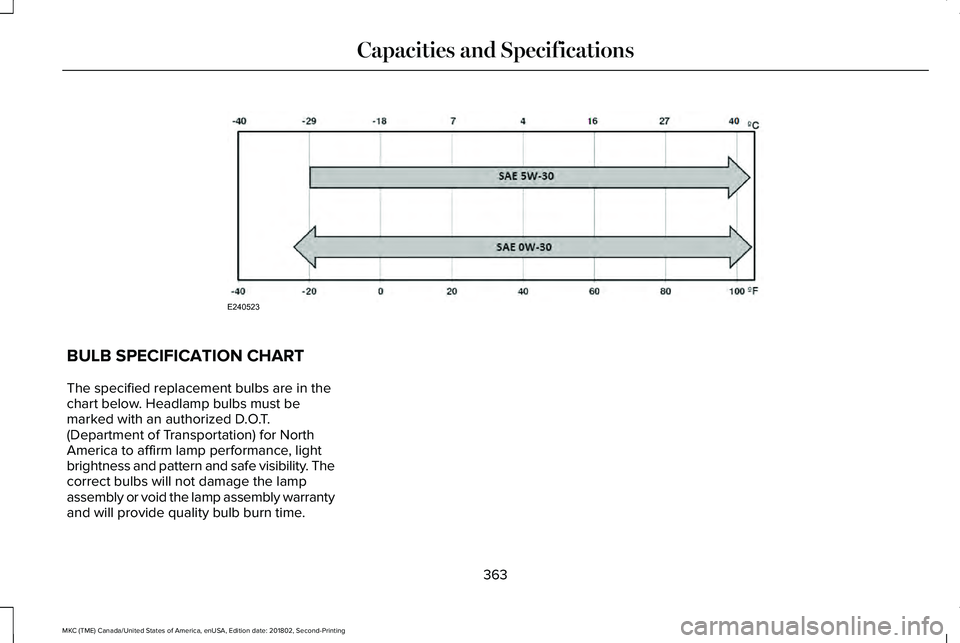
BULB SPECIFICATION CHART
The specified replacement bulbs are in thechart below. Headlamp bulbs must bemarked with an authorized D.O.T.(Department of Transportation) for NorthAmerica to affirm lamp performance, lightbrightness and pattern and safe visibility. Thecorrect bulbs will not damage the lampassembly or void the lamp assembly warrantyand will provide quality bulb burn time.
363
MKC (TME) Canada/United States of America, enUSA, Edition date: 201802, Second-Printing
Capacities and SpecificationsE240523
Page 367 of 581
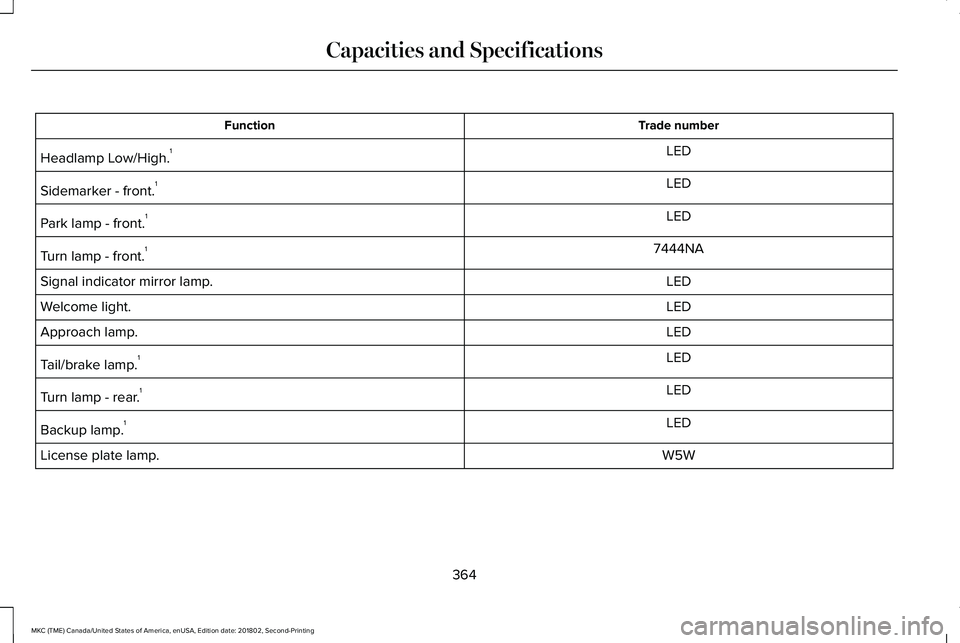
Trade numberFunction
LEDHeadlamp Low/High.1
LEDSidemarker - front.1
LEDPark lamp - front.1
7444NATurn lamp - front.1
LEDSignal indicator mirror lamp.
LEDWelcome light.
LEDApproach lamp.
LEDTail/brake lamp.1
LEDTurn lamp - rear.1
LEDBackup lamp.1
W5WLicense plate lamp.
364
MKC (TME) Canada/United States of America, enUSA, Edition date: 201802, Second-Printing
Capacities and Specifications
Page 368 of 581
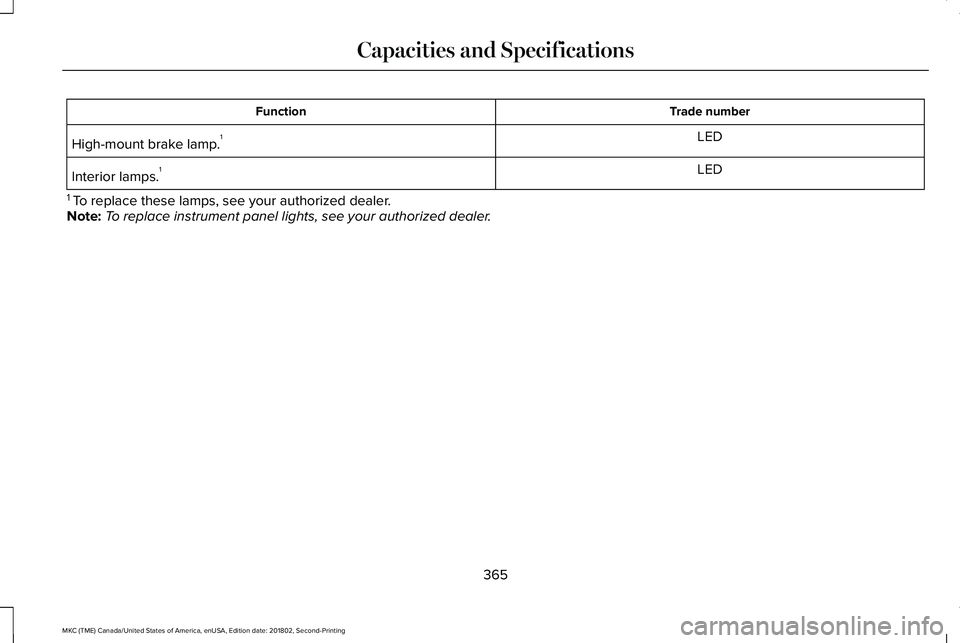
Trade numberFunction
LEDHigh-mount brake lamp.1
LEDInterior lamps.1
1 To replace these lamps, see your authorized dealer.Note:To replace instrument panel lights, see your authorized dealer.
365
MKC (TME) Canada/United States of America, enUSA, Edition date: 201802, Second-Printing
Capacities and Specifications
Page 370 of 581
CD and CD Player Information
Note:CD units play commercially pressed4.7 in (12 cm) audio compact discs only. Dueto technical incompatibility, certainrecordable and re-recordable compact discsmay not function correctly when used in thevehicle’s CD player.
Note: Do not insert CDs with homemadepaper (adhesive) labels into the CD playeras the label may peel and cause the CD tobecome jammed. You should use apermanent felt tip marker rather thanadhesive labels on your homemade CDs. Ballpoint pens may damage CDs. Ask anauthorized dealer for more information.
Note:Do not use any irregularly shapeddiscs or discs with a scratch protection filmattached.
Always handle discs by their edges only. Clean the disc with an approved CD cleaneronly. Wipe it from the center of the disctoward the edge. Do not clean in a circularmotion.
Do not expose discs to direct sunlight or heatsources for extended periods.
MP3 and WMA Track and FolderStructure
Audio systems capable of recognizing andplaying MP3 and WMA individual tracks andfolder structures work as follows:
•There are two different modes for MP3and WMA disc playback: MP3 and WMAtrack mode (system default) and MP3 andWMA folder mode.
•MP3 and WMA track mode ignores anyfolder structure on the MP3 and WMAdisc. The player numbers each MP3 andWMA track on the disc (noted by the MP3or WMA file extension) from T001 to amaximum of T255. The maximum numberof playable MP3 and WMA files may beless depending on the structure of theCD and exact model of radio present.
•MP3 and WMA folder mode representsa folder structure consisting of one levelof folders. The CD player numbers allMP3 and WMA tracks on the disc (notedby the MP3 or WMA file extension) andall folders containing MP3 and WMA files,from F001 (folder) T001 (track) to F253T255.
•Creating discs with only one level offolders helps with navigation through thedisc files.
If you are burning your own MP3 and WMAdiscs, it is important to understand how thesystem reads the structures you create. Whilevarious files may be present (files withextensions other than MP3 and WMA), onlyfiles with the MP3 and WMA extension areplayed; other files are ignored by the system.This enables you to use the same MP3 andWMA disc for a variety of tasks on your workcomputer, home computer and yourin-vehicle system.
367
MKC (TME) Canada/United States of America, enUSA, Edition date: 201802, Second-Printing
Audio System
Page 373 of 581
Tune
In radio mode, turn to search through theradio frequency band. In satellite radio mode,turn to find the previous or next availablesatellite radio station.
Seek, Fast Forward and Reverse
In radio mode, select a frequency band andpress either button. The system stops at thefirst station it finds in that direction. In CDmode, press to select the next or previoustrack. Press and hold to move quicklyforward or backward through the currenttrack. In satellite radio mode, press to selectthe next or previous satellite radio station. Ifyou select a specific category (such as jazz,rock or news), press to find the next orprevious station in the category you select.
Volume and Power
Turn to adjust the volume. Press to switchthe system on and off.
DIGITAL RADIO (If Equipped)
Note:HD Radio broadcasts are not availablein all markets.
HD Radio technology is the digital evolutionof analog AM/FM radio. Your system has aspecial receiver that allows it to receivedigital broadcasts (where available) inaddition to the analog broadcasts, it alreadyreceives. Digital broadcasts provide a bettersound quality than analog broadcasts withfree, crystal-clear audio and no static ordistortion. For more information, and a guideto available stations and programming,please visit www.hdradio.com.
When HD Radio is on and you tune to astation broadcasting HD Radio technology,you may notice the HD Radio logo on yourscreen. When this logo is available, you mayalso see Title and Artist fields on-screen.
The multicast indicator appears in FM mode(only) if the current station is broadcastingmultiple digital broadcasts. The highlightednumbers signify available digital channelswhere new or different content is available.HD1 signifies the main programming statusand is available in analog and digitalbroadcasts. Other multicast stations (HD2through HD7) are only available digitally.
When HD Radio broadcasts are active, youcan access the following functions:
•Memory presets allow you to save anactive channel as a memory preset.Touch and hold a memory preset slotuntil the sound returns. There is a briefmute while the radio saves the station.Sound returns when finished. Whenswitching to an HD2 or HD3 memorypreset, the sound mutes before thedigital audio plays, because the systemhas to reacquire the digital signal.
Note:As with any saved radio station, youcannot access the saved station if yourvehicle is outside the station’s receptionarea.
370
MKC (TME) Canada/United States of America, enUSA, Edition date: 201802, Second-Printing
Audio System