air condition LINCOLN MKC 2019 User Guide
[x] Cancel search | Manufacturer: LINCOLN, Model Year: 2019, Model line: MKC, Model: LINCOLN MKC 2019Pages: 581, PDF Size: 5.41 MB
Page 91 of 581
GENERAL INFORMATION
Condensation in the Exterior FrontLamps and Rear Lamps
Exterior front lamps and rear lamps havevents to accommodate normal changes inair pressure.
Condensation can be a natural by-productof this design. When moist air enters thelamp assembly through the vents, there is apossibility that condensation can occur whenthe temperature is cold. When normalcondensation occurs, a fine mist can form onthe interior of the lens. The fine misteventually clears and exits through the ventsduring normal operation.
Clearing time may take as long as 48 hoursunder dry weather conditions.
Examples of acceptable condensation are:
•The presence of a fine mist (no streaks,drip marks or large droplets).
•A fine mist covers less than 50% of thelens.
Examples of unacceptable condensation are:
•A water puddle inside the lamp.
•Streaks, drip marks or large dropletspresent on the interior of the lens.
If you see any unacceptable condensation,have your vehicle checked by an authorizeddealer.
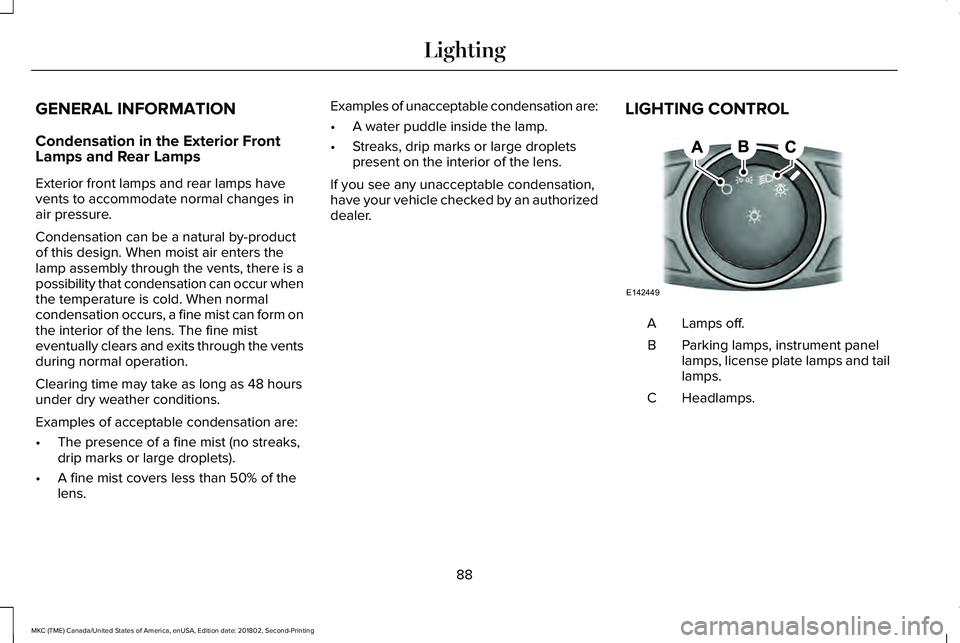
LIGHTING CONTROL
Lamps off.A
Parking lamps, instrument panellamps, license plate lamps and taillamps.
B
Headlamps.C
88
MKC (TME) Canada/United States of America, enUSA, Edition date: 201802, Second-Printing
LightingE142449
Page 136 of 581
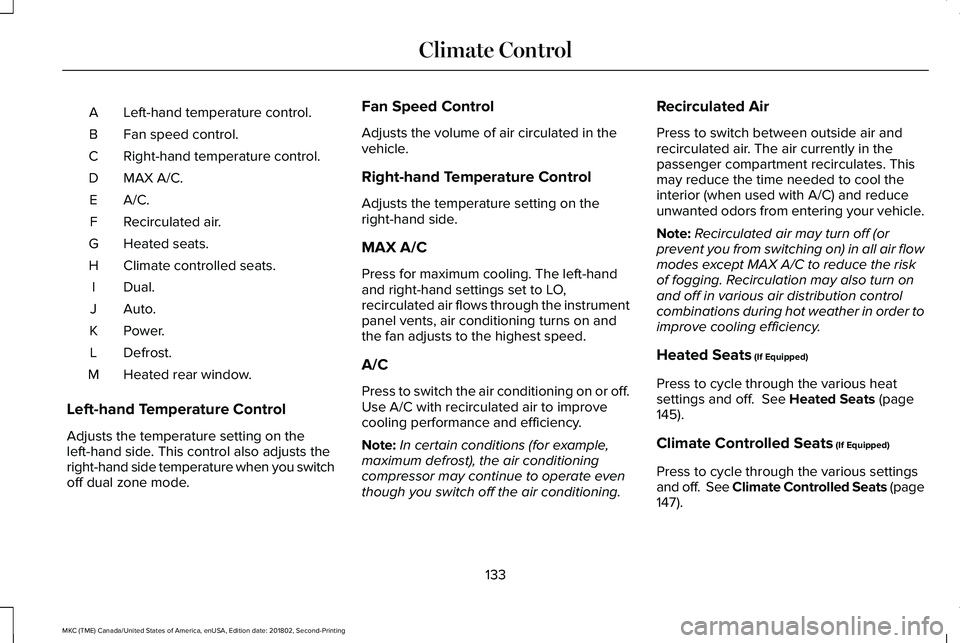
Left-hand temperature control.A
Fan speed control.B
Right-hand temperature control.C
MAX A/C.D
A/C.E
Recirculated air.F
Heated seats.G
Climate controlled seats.H
Dual.I
Auto.J
Power.K
Defrost.L
Heated rear window.M
Left-hand Temperature Control
Adjusts the temperature setting on theleft-hand side. This control also adjusts theright-hand side temperature when you switchoff dual zone mode.
Fan Speed Control
Adjusts the volume of air circulated in thevehicle.
Right-hand Temperature Control
Adjusts the temperature setting on theright-hand side.
MAX A/C
Press for maximum cooling. The left-handand right-hand settings set to LO,recirculated air flows through the instrumentpanel vents, air conditioning turns on andthe fan adjusts to the highest speed.
A/C
Press to switch the air conditioning on or off.Use A/C with recirculated air to improvecooling performance and efficiency.
Note:In certain conditions (for example,maximum defrost), the air conditioningcompressor may continue to operate eventhough you switch off the air conditioning.
Recirculated Air
Press to switch between outside air andrecirculated air. The air currently in thepassenger compartment recirculates. Thismay reduce the time needed to cool theinterior (when used with A/C) and reduceunwanted odors from entering your vehicle.
Note:Recirculated air may turn off (orprevent you from switching on) in all air flowmodes except MAX A/C to reduce the riskof fogging. Recirculation may also turn onand off in various air distribution controlcombinations during hot weather in order toimprove cooling efficiency.
Heated Seats (If Equipped)
Press to cycle through the various heatsettings and off. See Heated Seats (page145).
Climate Controlled Seats (If Equipped)
Press to cycle through the various settingsand off. See Climate Controlled Seats (page147).
133
MKC (TME) Canada/United States of America, enUSA, Edition date: 201802, Second-Printing
Climate Control
Page 137 of 581
Dual
Press to switch on temperature control forthe right-hand side of the vehicle. When dualzone is off, right-hand temperature settingsremain the same as the left-hand settings.
Auto
Press to switch on automatic operation.Adjust to select the desired temperature. Fanspeed, air distribution, air conditioningoperation, and outside or recirculated airadjust to heat or cool the vehicle to maintainthe desired temperature. You can also switchoff dual zone mode by pressing and holdingfor more than two seconds.
Power
Press to switch the system on and off. Whenthe system is off, it prevents outside air fromentering the vehicle.
Defrost
Press to distribute air through the windshieldair vents and de-mister. Air directed to theinstrument panel and footwell air vents turnsoff. You can also use this setting to defogand clear the windshield of a thin coveringof ice.
Heated Rear Window
Press to switch the heated rear window onand off. See Heated Rear Window (page135).
HINTS ON CONTROLLING THE
INTERIOR CLIMATE
General Hints
Note:Prolonged use of recirculated air maycause the windows to fog up.
Note:You may feel a small amount of airfrom the footwell air vents regardless of theair distribution setting.
Note:To reduce humidity build-up insideyour vehicle, do not drive with the systemswitched off or with recirculated air alwaysswitched on.
Note:Do not place objects under the frontseats as this may interfere with the airflowto the rear seats.
Note:Remove any snow, ice or leaves fromthe air intake area at the base of thewindshield.
Note:To improve the time to reach acomfortable temperature in hot weather,drive with the windows open until you feelcold air through the air vents.
Automatic Climate Control
Note:Adjusting the settings when yourvehicle interior is extremely hot or cold is notnecessary.
Note:The system adjusts to heat or cool theinterior to the temperature you select asquickly as possible.
Note:For the system to function efficiently,the instrument panel and side air ventsshould be fully open.
134
MKC (TME) Canada/United States of America, enUSA, Edition date: 201802, Second-Printing
Climate Control
Page 167 of 581
If the instrument cluster isequipped with a greyAuto-Start-Stop indicator light, it isilluminated when automatic engine stop isnot available due to one of the above notedconditions not being met.
Automatic Engine Restart
Any of the following conditions will result inan automatic restart of the engine:
•Your foot is removed from the brakepedal.
•You press the accelerator pedal.
•You press the accelerator and the brakepedal at the same time.
•The driver safety belt becomesunfastened or the driver door is ajar.
•The transmission is moved from drive (D).
•Your vehicle is moving.
•The interior compartment does not meetcustomer comfort when air conditioningor heat is on.
•Fogging of the windows could occur andthe air conditioning is on.
•The battery is not within optimaloperating conditions.
•The maximum engine off time isexceeded.
•When you press the Auto-Start-Stopbutton while the engine is stoppedautomatically.
•The heated windshield is turned on.
Any of the following conditions may result inan automatic restart of the engine:
•The blower fan speed is increased or theclimate control temperature is changed.
•An electrical accessory is turned on orplugged in.
Disabling Auto-Start-Stop
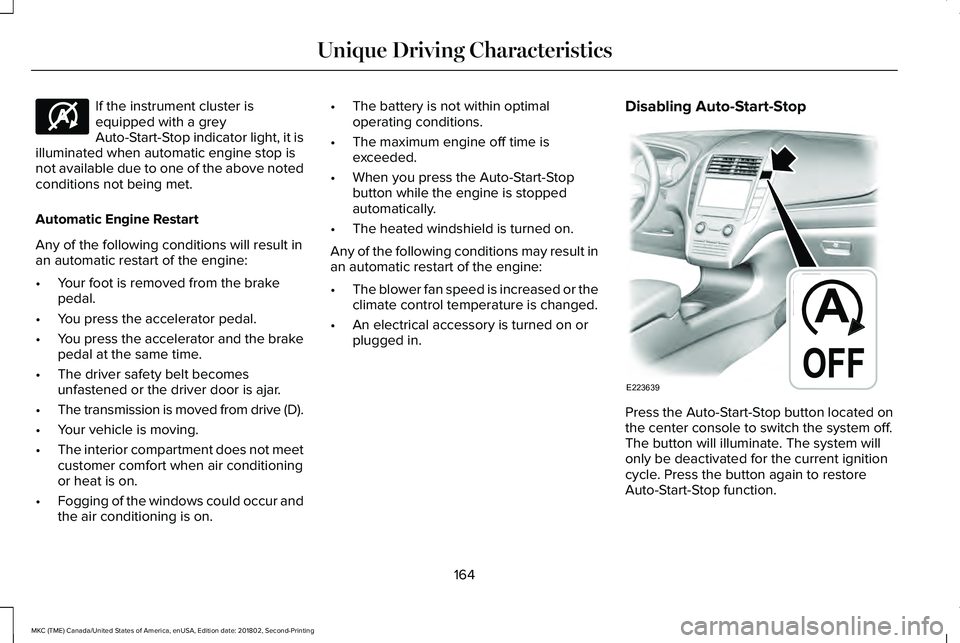
Press the Auto-Start-Stop button located onthe center console to switch the system off.The button will illuminate. The system willonly be deactivated for the current ignitioncycle. Press the button again to restoreAuto-Start-Stop function.
164
MKC (TME) Canada/United States of America, enUSA, Edition date: 201802, Second-Printing
Unique Driving CharacteristicsE146361 E223639
Page 170 of 581
Your vehicle is designed to operate onregular unleaded gasoline with a minimumpump (R+M)/2 octane rating of 87.
Some fuel stations, particularly those in highaltitude areas, offer fuels posted as regularunleaded gasoline with an octane ratingbelow 87. The use of these fuels could resultin engine damage that will not be coveredby the vehicle warranty.
For best overall vehicle and engineperformance, premium fuel with an octanerating of 91 or higher is recommended. Theperformance gained by using premium fuelis most noticeable in hot weather as well asother conditions, for example when towinga trailer. See Towing (page 245).
Do not be concerned if the enginesometimes knocks lightly. However, if theengine knocks heavily while using fuel withthe recommended octane rating, contact anauthorized dealer to prevent any enginedamage.
We recommend Top Tier detergentgasolines, where available to help minimizeengine deposits and maintain optimal vehicleand engine performance. For additionalinformation, refer to www.toptiergas.com.
Note:Use of any fuel for which the vehiclewas not designed can impair the emissioncontrol system, cause loss of vehicleperformance, and cause damage to theengine which may not be covered by thevehicle Warranty.
Do not use:
•Diesel fuel.
•Fuels containing kerosene or paraffin.
•Fuel containing more than 15% ethanolor E85 fuel.
•Fuels containing methanol.
•Fuels containing metallic-based additives,including manganese-based compounds.
•Fuels containing the octane boosteradditive, methylcyclopentadienylmanganese tricarbonyl (MMT).
•Leaded fuel, using leaded fuel isprohibited by law.
The use of fuels with metallic compoundssuch as methylcyclopentadienyl manganesetricarbonyl (commonly known as MMT), whichis a manganese-based fuel additive, willimpair engine performance and affect theemission control system.
FUEL FILLER FUNNEL LOCATION
The fuel filler funnel is under the luggagecompartment floor covering.
RUNNING OUT OF FUEL
Running out of fuel can cause damage notcovered by the vehicle Warranty.
If your vehicle runs out of fuel:
•Add a minimum of 1.3 gal (5 L) of fuel torestart the engine.
•You may need to switch the ignition fromoff to on several times after refueling toallow the fuel system to pump the fuelfrom the tank to the engine. Whenrestarting, cranking time takes a fewseconds longer than normal.
167
MKC (TME) Canada/United States of America, enUSA, Edition date: 201802, Second-Printing
Fuel and Refueling
Page 177 of 581
•An open or pinched sensor hose.
•Incorrect engine oil level.
•Incorrect fuel for climatic conditions.
•Incorrect engine oil viscosity for climacticconditions.
Note:Some vehicles have a lifetime fuel filterthat is integrated with the fuel tank. Regularmaintenance or replacement is not needed.
Note:If these checks do not help you correctthe concern, have your vehicle checked assoon as possible.
Noise Emissions Warranty, ProhibitedTampering Acts and Maintenance
On January 1, 1978, Federal regulationbecame effective governing the noiseemission on trucks over 10,000 lb (4,536 kg)Gross Vehicle Weight Rating (GVWR). Thepreceding statements concerning prohibitedtampering acts and maintenance, and thenoise warranty found in the Warranty Guide,are applicable to complete chassis cabs over10,000 lb (4,536 kg) GVWR.
CATALYTIC CONVERTER
WARNING: Do not park, idle or driveyour vehicle on dry grass or other dry groundcover. The emission system heats up theengine compartment and exhaust system,creating the risk of fire.
WARNING: The normal operatingtemperature of the exhaust system is veryhigh. Never work around or attempt to repairany part of the exhaust system until it hascooled. Use special care when workingaround the catalytic converter. The catalyticconverter heats up to a very hightemperature after only a short period ofengine operation and stays hot after theengine is switched off.
WARNING: Exhaust leaks may resultin entry of harmful and potentially lethalfumes into the passenger compartment. Ifyou smell exhaust fumes inside your vehicle,have your vehicle inspected immediately. Donot drive if you smell exhaust fumes.
Your vehicle has various emission controlcomponents and a catalytic converter thatenables it to comply with applicable exhaustemission standards.
To make sure that the catalytic converter andother emission control components continueto work properly:
•Do not crank the engine for more than10 seconds at a time.
•Do not run the engine with a spark pluglead disconnected.
•Do not push-start or tow-start yourvehicle. Use booster cables. See JumpStarting the Vehicle (page 256).
•Use only the specified fuel listed.
•Do not switch the ignition off when yourvehicle is moving.
•Avoid running out of fuel.
•Have the items listed in scheduledmaintenance information performedaccording to the specified schedule.
Note:Resulting component damage maynot be covered by the vehicle Warranty.
174
MKC (TME) Canada/United States of America, enUSA, Edition date: 201802, Second-Printing
Engine Emission Control
Page 186 of 581
USING ALL-WHEEL DRIVE
Note:When a system malfunction is present,a warning message appears in theinformation display. See InformationMessages (page 113). This means the systemis not functioning correctly and onlyfront-wheel drive is available. Have yourvehicle checked by an authorized dealer.
Note:When the system overheats andswitches to front-wheel drive, a warningmessage appears in the information display.This may occur if you operate your vehiclein extreme high load conditions or withexcessive wheel spin (for example, deepsand). To resume all-wheel drive function,stop your vehicle in a safe location and turnoff the ignition. When the system cools,normal all-wheel drive function will return.The information display indicates, for aboutfive seconds, this return.
Note:When using the spare tire, a warningmessage may appear in the informationdisplay. This message turns off afterreinstalling the repaired or replaced roadtire and you switch on the ignition.
Note:Re-install the repaired tire or replacethe tire as soon as possible. Different tiresizes between the front and rear axles cancause system damage, or turn off theall-wheel drive.
This system anticipates wheel spin andtransfers power to the rear wheels beforethe spin occurs. Even when wheel spin is notoccurring, the system is continuouslyadjusting power distribution to the wheels,in an attempt to improve straight line andcornering, both on and off road.
The system automatically turns on every timeyou switch on the ignition.
The all-wheel drive system does not requiremaintenance.
The all-wheel drive system gives your vehiclesome limited off-road capabilities. Operatingyour vehicle in conditions other thanmoderate sand, snow, mud or rough roadscould subject it to excessive stress and heat.This could result in system damage. Yourvehicle warranty will not cover this damage.
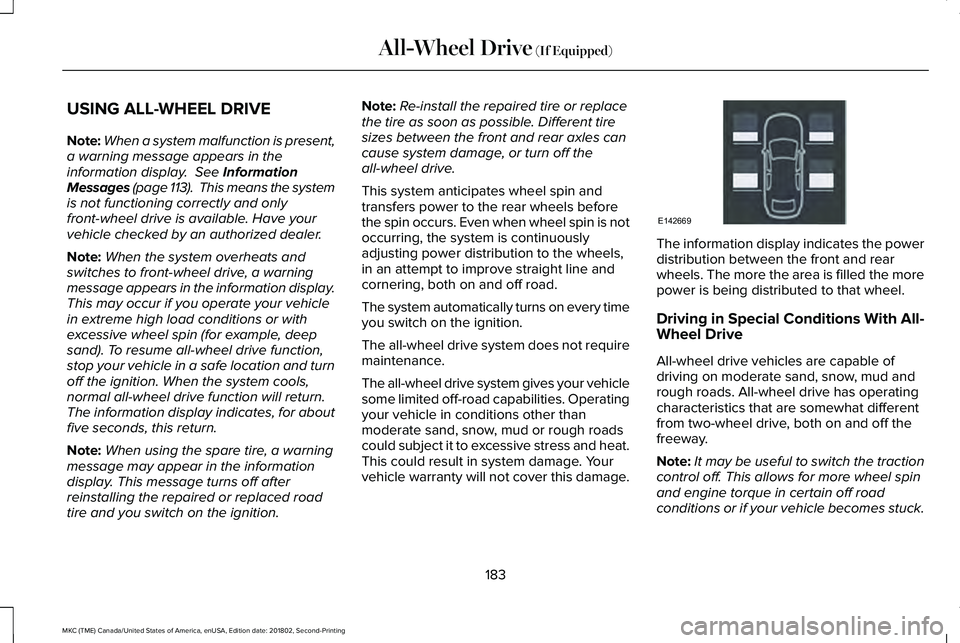
The information display indicates the powerdistribution between the front and rearwheels. The more the area is filled the morepower is being distributed to that wheel.
Driving in Special Conditions With All-Wheel Drive
All-wheel drive vehicles are capable ofdriving on moderate sand, snow, mud andrough roads. All-wheel drive has operatingcharacteristics that are somewhat differentfrom two-wheel drive, both on and off thefreeway.
Note:It may be useful to switch the tractioncontrol off. This allows for more wheel spinand engine torque in certain off roadconditions or if your vehicle becomes stuck.
183
MKC (TME) Canada/United States of America, enUSA, Edition date: 201802, Second-Printing
All-Wheel Drive (If Equipped)E142669
Page 187 of 581
When driving at slow speeds off road underhigh load conditions, use a low gear whenpossible. Low gear operation will maximizethe engine and transmission coolingcapability.
Under severe operating conditions, the airconditioning may cycle on and off to preventthe engine from overheating.
Basic Operating Principles
•Drive slower in strong crosswinds thatcan affect the normal steeringcharacteristics of your vehicle.
•When driving your vehicle on surfacesmade slippery by loose sand, water,gravel, snow or ice proceed with care.
If Your Vehicle leaves the Road
If your vehicle leaves the road, reduce yourvehicle speed and avoid severe braking.Once you have reduced your vehicle speed,ease your vehicle back onto the road. Donot turn the steering wheel sharply whilereturning your vehicle to the road.
It may be safer to stay on the shoulder of theroad and slow down gradually beforereturning to the road. You may lose controlif you do not slow down or if you turn thesteering wheel too sharply or abruptly.
It may be less risky to strike small objects,such as freeway reflectors, with minordamage to your vehicle rather than attemptan abrupt dangerous direction change.Remember, your primary concern should beyour safety and the safety of others.
Emergency Maneuvers
If you must make a sudden emergencydirection change, avoid over-driving yourvehicle. Turn the steering wheel only asrapidly and as far as you need to avoid theemergency. Apply smooth pressure to theaccelerator pedal or brake pedal as needed.Avoid abrupt steering, acceleration andbraking changes. Abrupt changes couldincrease the risk of vehicle roll over, loss ofvehicle control and personal injury. Use allavailable road surface to bring your vehicleto under control.
In the event of an emergency stop, avoidskidding and do not attempt any sharpsteering wheel movements.
Your vehicle responds differently to steering,accelerating and braking on different roadsurfaces when changing from one type ofsurface to another.
Sand
When driving over sand, avoid driving atexcessive speeds. This will cause yourvehicle momentum to work against you. Yourvehicle could become stuck that may requireassistance from another vehicle. Remember,if you proceed with caution you may be ableto back out the way you came.
Do not drive in deep sand for an extendedperiod. This will cause the all-wheel drivesystem to overheat. You will see a warningmessage in the information display. SeeInformation Messages (page 113).
184
MKC (TME) Canada/United States of America, enUSA, Edition date: 201802, Second-Printing
All-Wheel Drive (If Equipped)
Page 204 of 581
•The edge of the neighboring parkedvehicle is high off the ground. Forexample, a bus, tow truck or flatbedtruck.
•The weather conditions are poor. Forexample, during heavy rain, snow or fog.
Note: Keep the sensors on the bumper orfascia free from snow, ice and largeaccumulations of dirt. Covered sensors canaffect the system's accuracy. Do not cleanthe sensors with sharp objects.
Note:The sensors may not detect objectswith surfaces that absorb ultrasonic wavesor cause ultrasonic interference. Forexample, motorcycle exhaust, truck airbrakes or horns.
Note:Following a change in tire size, thesystem must recalibrate and operation maybe impaired for a short time.
Do not use the system if:
•You have attached a foreign object closeto the sensors on the front or rear of yourvehicle. For example, a bike rack ortrailer.
•You attach an overhanging object to theroof. For example, a surfboard.
•A foreign object damages or obstructsthe front or rear bumper or side sensors.
•The correct tire size is not in use on yourvehicle. For example, a mini-spare tire.
Using Active Park Assist - Parallel Parking
Press the Active Park Assist buttononce to search for a parallelparking space.
When driving at a speed less than 22 mph(35 km/h), the system automatically scansboth sides of your vehicle for an availableparking space. The system displays amessage and a corresponding graphic toindicate it is searching for a parking space.Use the direction indicator to selectsearching either to the left-hand side orright-hand side of your vehicle.
Note:If the direction indicators are not used,the system defaults to the passenger sideof your vehicle.
201
MKC (TME) Canada/United States of America, enUSA, Edition date: 201802, Second-Printing
Parking AidsE146186
Page 234 of 581
System Lights, Messages and AudibleAlerts
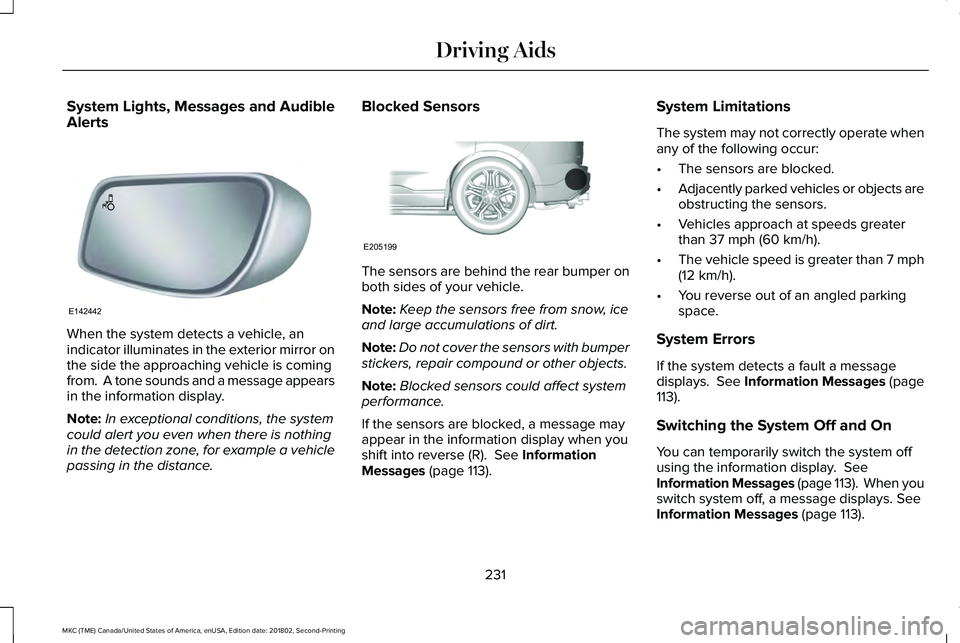
When the system detects a vehicle, anindicator illuminates in the exterior mirror onthe side the approaching vehicle is comingfrom. A tone sounds and a message appearsin the information display.
Note:In exceptional conditions, the systemcould alert you even when there is nothingin the detection zone, for example a vehiclepassing in the distance.
Blocked Sensors
The sensors are behind the rear bumper onboth sides of your vehicle.
Note:Keep the sensors free from snow, iceand large accumulations of dirt.
Note:Do not cover the sensors with bumperstickers, repair compound or other objects.
Note:Blocked sensors could affect systemperformance.
If the sensors are blocked, a message mayappear in the information display when youshift into reverse (R). See InformationMessages (page 113).
System Limitations
The system may not correctly operate whenany of the following occur:
•The sensors are blocked.
•Adjacently parked vehicles or objects areobstructing the sensors.
•Vehicles approach at speeds greaterthan 37 mph (60 km/h).
•The vehicle speed is greater than 7 mph(12 km/h).
•You reverse out of an angled parkingspace.
System Errors
If the system detects a fault a messagedisplays. See Information Messages (page113).
Switching the System Off and On
You can temporarily switch the system offusing the information display. SeeInformation Messages (page 113). When youswitch system off, a message displays. SeeInformation Messages (page 113).
231
MKC (TME) Canada/United States of America, enUSA, Edition date: 201802, Second-Printing
Driving AidsE142442 E205199