park assist LINCOLN MKC 2019 User Guide
[x] Cancel search | Manufacturer: LINCOLN, Model Year: 2019, Model line: MKC, Model: LINCOLN MKC 2019Pages: 581, PDF Size: 5.41 MB
Page 203 of 581
If the transmission is in drive (D) or any otherforward gear (for example, low (L), sport (S)or any forward gear in a manualtransmission), the front sensing systemprovides audio warnings when your vehicleis moving below a speed of 7 mph (12 km/h)and an obstacle is located inside thedetection area.
ACTIVE PARK ASSIST (If Equipped)
Parallel Parking, Parallel Park OutAssist
WARNING: You must remain in yourvehicle when the system turns on. At alltimes, you are responsible for controllingyour vehicle, supervising the system andintervening, if required. Failure to take caremay result in the loss of control of yourvehicle, serious personal injury or death.
WARNING: The sensors may not detectobjects in heavy rain or other conditions thatcause interference.
WARNING: Active park assist does notapply the brakes under any circumstances.
WARNING: The system is designed toaid the driver. It is not intended to replaceyour attention and judgment. You are stillresponsible to drive with due care andattention.
Note:Active Park Assist is a multi-stepprocess and may require you to shift yourtransmission multiple times. Follow theon-screen instructions until you complete theparking process.
Note:The Blind Spot Information Systemdoes not detect traffic alongside or behindyour vehicle during an Active Park Assistmaneuver.
Active Park Assist detects an availableparallel parking space and automaticallysteers your vehicle into the space(hands-free) while you control theaccelerator, gearshift and brakes. The systemvisually and audibly guides you to park yourvehicle.
If you are uncomfortable with the proximityto any vehicle or object, you may choose tooverride the system by grabbing the steeringwheel or by pressing the Active Park Assistbutton.
Parallel Park Out Assist automatically steersyour vehicle out of a parallel parking space(hands-free) while you control theaccelerator, gearshift and brakes. The systemvisually and audibly guides you to entertraffic.
The system may not correctly operate in anyof the following conditions:
•You use a spare tire or a tire significantlyworn more than the other tires.
•One or more tires are improperly inflated.
•You try to park on a tight curve.
•Something passes between the frontbumper and the parking space. Forexample, a pedestrian or cyclist.
200
MKC (TME) Canada/United States of America, enUSA, Edition date: 201802, Second-Printing
Parking Aids
Page 204 of 581
•The edge of the neighboring parkedvehicle is high off the ground. Forexample, a bus, tow truck or flatbedtruck.
•The weather conditions are poor. Forexample, during heavy rain, snow or fog.
Note: Keep the sensors on the bumper orfascia free from snow, ice and largeaccumulations of dirt. Covered sensors canaffect the system's accuracy. Do not cleanthe sensors with sharp objects.
Note:The sensors may not detect objectswith surfaces that absorb ultrasonic wavesor cause ultrasonic interference. Forexample, motorcycle exhaust, truck airbrakes or horns.
Note:Following a change in tire size, thesystem must recalibrate and operation maybe impaired for a short time.
Do not use the system if:
•You have attached a foreign object closeto the sensors on the front or rear of yourvehicle. For example, a bike rack ortrailer.
•You attach an overhanging object to theroof. For example, a surfboard.
•A foreign object damages or obstructsthe front or rear bumper or side sensors.
•The correct tire size is not in use on yourvehicle. For example, a mini-spare tire.
Using Active Park Assist - Parallel Parking
Press the Active Park Assist buttononce to search for a parallelparking space.
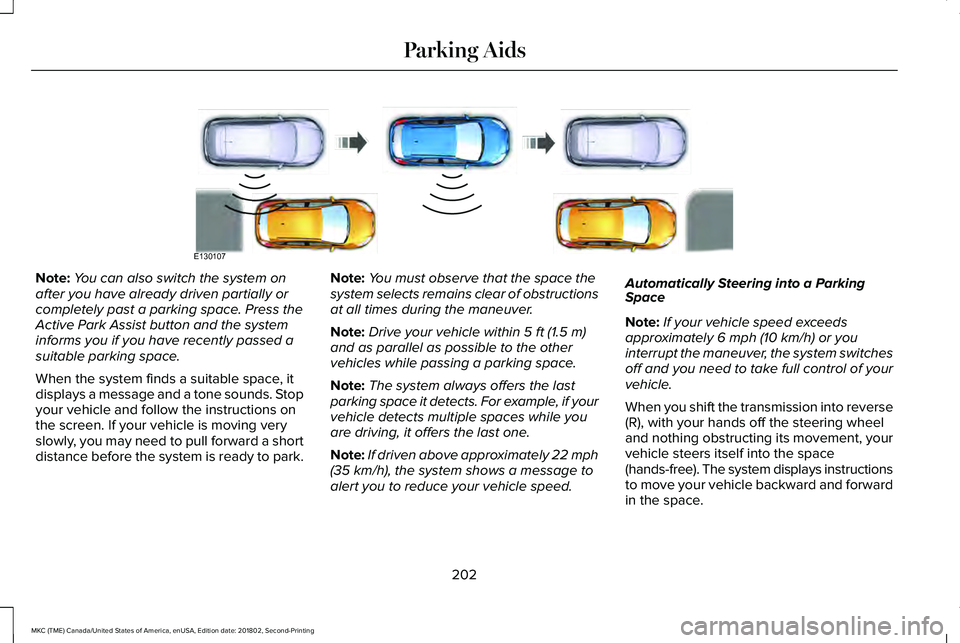
When driving at a speed less than 22 mph(35 km/h), the system automatically scansboth sides of your vehicle for an availableparking space. The system displays amessage and a corresponding graphic toindicate it is searching for a parking space.Use the direction indicator to selectsearching either to the left-hand side orright-hand side of your vehicle.
Note:If the direction indicators are not used,the system defaults to the passenger sideof your vehicle.
201
MKC (TME) Canada/United States of America, enUSA, Edition date: 201802, Second-Printing
Parking AidsE146186
Page 205 of 581
Note:You can also switch the system onafter you have already driven partially orcompletely past a parking space. Press theActive Park Assist button and the systeminforms you if you have recently passed asuitable parking space.
When the system finds a suitable space, itdisplays a message and a tone sounds. Stopyour vehicle and follow the instructions onthe screen. If your vehicle is moving veryslowly, you may need to pull forward a shortdistance before the system is ready to park.
Note:You must observe that the space thesystem selects remains clear of obstructionsat all times during the maneuver.
Note:Drive your vehicle within 5 ft (1.5 m)and as parallel as possible to the othervehicles while passing a parking space.
Note:The system always offers the lastparking space it detects. For example, if yourvehicle detects multiple spaces while youare driving, it offers the last one.
Note:If driven above approximately 22 mph(35 km/h), the system shows a message toalert you to reduce your vehicle speed.
Automatically Steering into a ParkingSpace
Note:If your vehicle speed exceedsapproximately 6 mph (10 km/h) or youinterrupt the maneuver, the system switchesoff and you need to take full control of yourvehicle.
When you shift the transmission into reverse(R), with your hands off the steering wheeland nothing obstructing its movement, yourvehicle steers itself into the space(hands-free). The system displays instructionsto move your vehicle backward and forwardin the space.
202
MKC (TME) Canada/United States of America, enUSA, Edition date: 201802, Second-Printing
Parking AidsE130107
Page 206 of 581
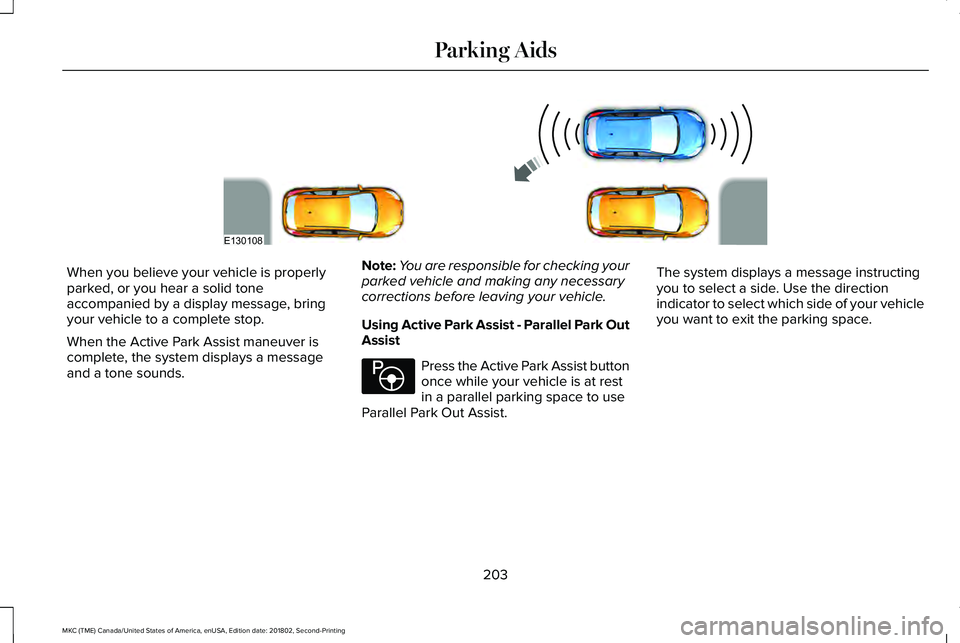
When you believe your vehicle is properlyparked, or you hear a solid toneaccompanied by a display message, bringyour vehicle to a complete stop.
When the Active Park Assist maneuver iscomplete, the system displays a messageand a tone sounds.
Note:You are responsible for checking yourparked vehicle and making any necessarycorrections before leaving your vehicle.
Using Active Park Assist - Parallel Park OutAssist
Press the Active Park Assist buttononce while your vehicle is at restin a parallel parking space to useParallel Park Out Assist.
The system displays a message instructingyou to select a side. Use the directionindicator to select which side of your vehicleyou want to exit the parking space.
203
MKC (TME) Canada/United States of America, enUSA, Edition date: 201802, Second-Printing
Parking AidsE130108 E146186
Page 207 of 581
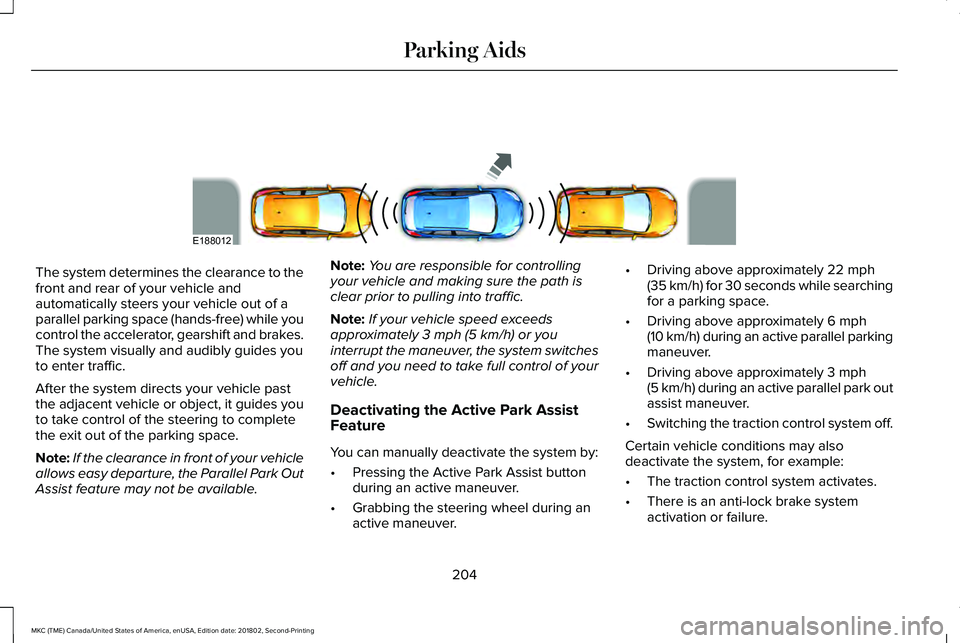
The system determines the clearance to thefront and rear of your vehicle andautomatically steers your vehicle out of aparallel parking space (hands-free) while youcontrol the accelerator, gearshift and brakes.The system visually and audibly guides youto enter traffic.
After the system directs your vehicle pastthe adjacent vehicle or object, it guides youto take control of the steering to completethe exit out of the parking space.
Note:If the clearance in front of your vehicleallows easy departure, the Parallel Park OutAssist feature may not be available.
Note:You are responsible for controllingyour vehicle and making sure the path isclear prior to pulling into traffic.
Note:If your vehicle speed exceedsapproximately 3 mph (5 km/h) or youinterrupt the maneuver, the system switchesoff and you need to take full control of yourvehicle.
Deactivating the Active Park AssistFeature
You can manually deactivate the system by:
•Pressing the Active Park Assist buttonduring an active maneuver.
•Grabbing the steering wheel during anactive maneuver.
•Driving above approximately 22 mph(35 km/h) for 30 seconds while searchingfor a parking space.
•Driving above approximately 6 mph(10 km/h) during an active parallel parkingmaneuver.
•Driving above approximately 3 mph(5 km/h) during an active parallel park outassist maneuver.
•Switching the traction control system off.
Certain vehicle conditions may alsodeactivate the system, for example:
•The traction control system activates.
•There is an anti-lock brake systemactivation or failure.
204
MKC (TME) Canada/United States of America, enUSA, Edition date: 201802, Second-Printing
Parking AidsE188012
Page 252 of 581
Trailer lamps are required on most towedvehicles. Make sure all running lights, brakelights, turn signals and hazard lights areworking.
Before Towing a Trailer
Practice turning, stopping and backing up toget the feel of your vehicle-trailercombination before starting on a trip. Whenturning, make wider turns so the trailerwheels clear curbs and other obstacles.
When Towing a Trailer
•Do not drive faster than 70 mph(113 km/h) during the first 500 mi(800 km).
•Do not make full-throttle starts.
•Check your hitch, electrical connectionsand trailer wheel lug nuts thoroughly afteryou have traveled 50 mi (80 km).
•When stopped in congested or heavytraffic during hot weather, place thetransmission in park (P) to aid engine andtransmission cooling and to help A/Cperformance.
•Turn off the speed control with heavyloads or in hilly terrain. The speed controlmay turn off automatically when you aretowing on long, steep grades.
•Shift to a lower gear when driving downa long or steep hill. Do not apply thebrakes continuously, as they mayoverheat and become less effective.
•If your transmission is equipped with aGrade Assist or Tow/Haul feature, usethis feature when towing. This providesengine braking and helps eliminateexcessive transmission shifting foroptimum fuel economy and transmissioncooling.
•Allow more distance for stopping with atrailer attached. Anticipate stops andbrake gradually.
•Avoid parking on a grade. However, ifyou must park on a grade:
1. Turn the steering wheel to point yourvehicle tires away from traffic flow.
2. Set your vehicle parking brake.
3. Place the transmission in park (P).
4. Place wheel chocks in front and back ofthe trailer wheels. Chocks are notincluded with your vehicle.
Launching or Retrieving a Boat orPersonal Watercraft (PWC)
Note:Disconnect the wiring to the trailerbefore backing the trailer into the water.
Note:Reconnect the wiring to the trailerafter removing the trailer from the water.
When backing down a ramp during boatlaunching or retrieval:
•Do not allow the static water level to riseabove the bottom edge of the rearbumper.
•Do not allow waves to break higher than6 in (15 cm) above the bottom edge ofthe rear bumper.
Exceeding these limits may allow water toenter vehicle components:
•Causing internal damage to thecomponents.
•Affecting driveability, emissions, andreliability.
249
MKC (TME) Canada/United States of America, enUSA, Edition date: 201802, Second-Printing
Towing
Page 276 of 581
Protected ComponentsFuse RatingFuse Number
Electronic power assist steering run/start.10A 2F40
Extended power module run/start.10A 2F41
Adaptive cruise control.10A 2F42Blind spot information system.Heads-up display.Rear video camera.(vehicles with stop/start)
Not used (spare).(vehicles without stop/start)
Not used.—F43
Heated rear window relay coil.5A 2F44Heated wiper park.Electronic transmission pump run/stop feed (vehiclesequipped with stop/start).
Transmission range control module run/start.5A 2F45
Heated rear window relay.40A 1F46Heated wiper park.
273
MKC (TME) Canada/United States of America, enUSA, Edition date: 201802, Second-Printing
Fuses
Page 394 of 581
Restricted features
Pairing a Bluetooth phone.Cellular Phone
Browsing of list entries is limited for phone contacts and recent phone calls.
Editing the keypad code.System Functionality
Enabling Valet Mode.
Editing settings while the rear view camera or active park assist are active.
Editing Wi-Fi settings.Wi-Fi
Editing the list of wireless networks.
Connecting to a new Wi-Fi network.
Viewing received text messages.Text Messages
Using the keyboard to enter a destination.Navigation
Adding or editing Navigation Favorites entries or Avoid Areas.
Creating a SYNC Owner Account
Why do I need a SYNC owner account?
•Essential for keeping up with the latestsoftware and connected features.
•Access to customer support for anyquestions you may have.
•Maintain account permissions.
Visit the website to sign up and register.
Website
www.owner.lincoln.comwww.syncmyride.ca
391
MKC (TME) Canada/United States of America, enUSA, Edition date: 201802, Second-Printing
SYNC™ 3
Page 488 of 581
Transferable Coverage
If you sell your vehicle before your LincolnProtect extended service plan coverageexpires, you can transfer any remainingcoverage to the new owner. Which shouldgive you and your potential buyer a littlemore peace of mind.
Less Cost to Properly Maintain Your Vehicle
Lincoln Protect extended service plan alsooffers a Premium Maintenance Plan thatcovers all scheduled maintenance, andselected wear items. The coverage isprepaid, so you never have to worry aboutthe cost of your vehicle’s maintenance.
Covered maintenance includes:
•Windshield wiper blades.
•Spark plugs.
•The clutch disc (if equipped).
•Brake pads and linings.
•Shock absorbers and struts.
•Engine cooling hoses, clamps ando-rings.
•Engine belts.
•Diesel exhaust fluid replenishment (ifequipped).
Interest Free Finance Options
Just a 10% down payment will provide youwith an affordable, no interest, no feepayment program allowing you all thesecurity and benefits Lincoln Protectextended service plan has to offer whilepaying over time. You are pre-approved withno credit check or hassles. To learn more,call our Lincoln Protect extended serviceplan specialists at 800-367-3377.
Complete the information below and mail to:
Lincoln Protect Extended Service PlanP.O. Box 321067Detroit, MI 48232
Lincoln Protect (CANADA ONLY)
You can get more protection for your vehicleby purchasing a Lincoln Protect extendedservice plan. Lincoln Protect extendedservice plan is the only service contractbacked by Lincoln Motor Company ofCanada, Limited. Depending on the plan youpurchase, Lincoln Protect extended serviceplan provides benefits such as:
•Rental reimbursement.
•Coverage for certain maintenance andwear items.
•Protection against repair costs after yourNew Vehicle Limited Warranty Coverageexpires.
•Roadside Assistance benefits.
485
MKC (TME) Canada/United States of America, enUSA, Edition date: 201802, Second-Printing
Lincoln Protect
Page 568 of 581
A
A/CSee: Climate Control..........................................132
About This Manual............................................7ABSSee: Brakes...........................................................188
ABS driving hintsSee: Hints on Driving With Anti-LockBrakes................................................................189
Accessories...................................................482Exterior Style.......................................................482Interior Style.........................................................482Lifestyle.................................................................482Peace of Mind.....................................................482
AccessoriesSee: Replacement Parts Recommendation.....14
ACCSee: Using Adaptive Cruise Control...............211
Active Park Assist........................................200Deactivating the Active Park AssistFeature.............................................................204Parallel Parking, Parallel Park OutAssist................................................................200Troubleshooting the System...........................205
Adjusting the Headlamps..........................300Horizontal Aim Adjustment...............................301Vertical Aim Adjustment...................................300
Adjusting the Steering Wheel - VehiclesWith: Manual Adjustable SteeringColumn...........................................................80Adjusting the Steering Wheel - VehiclesWith: Power Adjustable SteeringColumn...........................................................80End of Travel Position...........................................81Memory Feature.....................................................81
Airbag Disposal...............................................54Air ConditioningSee: Climate Control..........................................132
Air FilterSee: Changing the Engine Air Filter..............302
AlarmSee: Anti-Theft Alarm...........................................78
All-Wheel Drive..............................................183Ambient Lighting.............................................94Adjusting the Brightness.....................................94Changing the Color..............................................94Switching Ambient Lighting Off........................94Switching Ambient Lighting On........................94
Anti-Theft Alarm..............................................78Arming the Alarm..................................................78Disarming the Alarm.............................................78
Appendices.....................................................519Apps.................................................................442.................................................................................442SiriusXM Traffic and Travel Link......................443
At a Glance........................................................18Audible Warnings and Indicators..............107Headlamps On Warning Chime.......................107Keyless Warning Alert........................................107Parking Brake On Warning Chime..................107
Audio Control..................................................82Seek, Next or Previous........................................82
Audio System................................................366General Information...........................................366
Audio Unit......................................................368Seek, Fast Forward and Reverse...................370Tune ......................................................................370Volume and Power.............................................370
Auto Hold........................................................192Using Auto Hold..................................................194
Autolamps.........................................................89Windshield Wiper Activated Headlamps........90
Automatic Climate Control..........................132A/C...........................................................................133Auto ........................................................................134Climate Controlled Seats...................................133Defrost....................................................................134Dual.........................................................................134Fan Speed Control..............................................133Heated Rear Window.........................................134Heated Seats........................................................133Left-hand Temperature Control.......................133MAX A/C................................................................133
565
MKC (TME) Canada/United States of America, enUSA, Edition date: 201802, Second-Printing
Index