door lock LINCOLN MKC 2019 Owner's Manual
[x] Cancel search | Manufacturer: LINCOLN, Model Year: 2019, Model line: MKC, Model: LINCOLN MKC 2019Pages: 581, PDF Size: 5.41 MB
Page 99 of 581
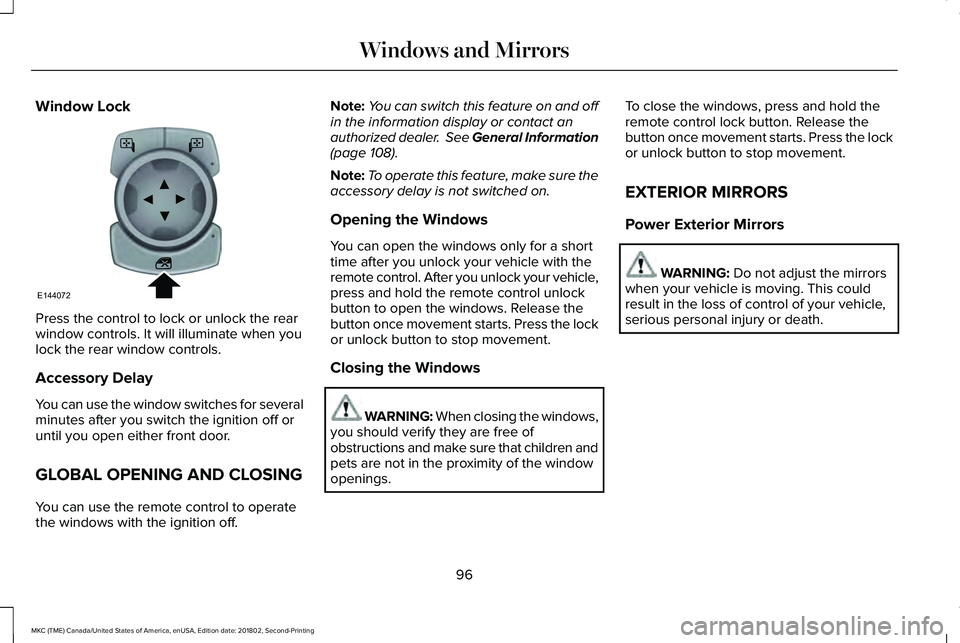
Window Lock
Press the control to lock or unlock the rearwindow controls. It will illuminate when youlock the rear window controls.
Accessory Delay
You can use the window switches for severalminutes after you switch the ignition off oruntil you open either front door.
GLOBAL OPENING AND CLOSING
You can use the remote control to operatethe windows with the ignition off.
Note:You can switch this feature on and offin the information display or contact anauthorized dealer. See General Information(page 108).
Note:To operate this feature, make sure theaccessory delay is not switched on.
Opening the Windows
You can open the windows only for a shorttime after you unlock your vehicle with theremote control. After you unlock your vehicle,press and hold the remote control unlockbutton to open the windows. Release thebutton once movement starts. Press the lockor unlock button to stop movement.
Closing the Windows
WARNING: When closing the windows,you should verify they are free ofobstructions and make sure that children andpets are not in the proximity of the windowopenings.
To close the windows, press and hold theremote control lock button. Release thebutton once movement starts. Press the lockor unlock button to stop movement.
EXTERIOR MIRRORS
Power Exterior Mirrors
WARNING: Do not adjust the mirrorswhen your vehicle is moving. This couldresult in the loss of control of your vehicle,serious personal injury or death.
96
MKC (TME) Canada/United States of America, enUSA, Edition date: 201802, Second-Printing
Windows and MirrorsE144072
Page 100 of 581
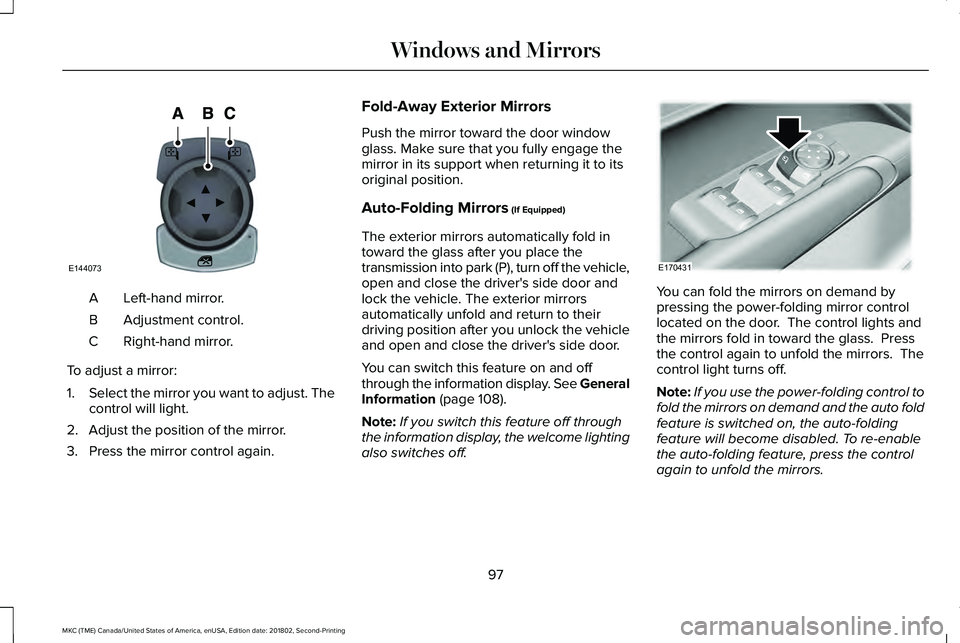
Left-hand mirror.A
Adjustment control.B
Right-hand mirror.C
To adjust a mirror:
1.Select the mirror you want to adjust. Thecontrol will light.
2. Adjust the position of the mirror.
3. Press the mirror control again.
Fold-Away Exterior Mirrors
Push the mirror toward the door windowglass. Make sure that you fully engage themirror in its support when returning it to itsoriginal position.
Auto-Folding Mirrors (If Equipped)
The exterior mirrors automatically fold intoward the glass after you place thetransmission into park (P), turn off the vehicle,open and close the driver's side door andlock the vehicle. The exterior mirrorsautomatically unfold and return to theirdriving position after you unlock the vehicleand open and close the driver's side door.
You can switch this feature on and offthrough the information display. See GeneralInformation (page 108).
Note:If you switch this feature off throughthe information display, the welcome lightingalso switches off.
You can fold the mirrors on demand bypressing the power-folding mirror controllocated on the door. The control lights andthe mirrors fold in toward the glass. Pressthe control again to unfold the mirrors. Thecontrol light turns off.
Note:If you use the power-folding control tofold the mirrors on demand and the auto foldfeature is switched on, the auto-foldingfeature will become disabled. To re-enablethe auto-folding feature, press the controlagain to unfold the mirrors.
97
MKC (TME) Canada/United States of America, enUSA, Edition date: 201802, Second-Printing
Windows and MirrorsE144073 E170431
Page 123 of 581
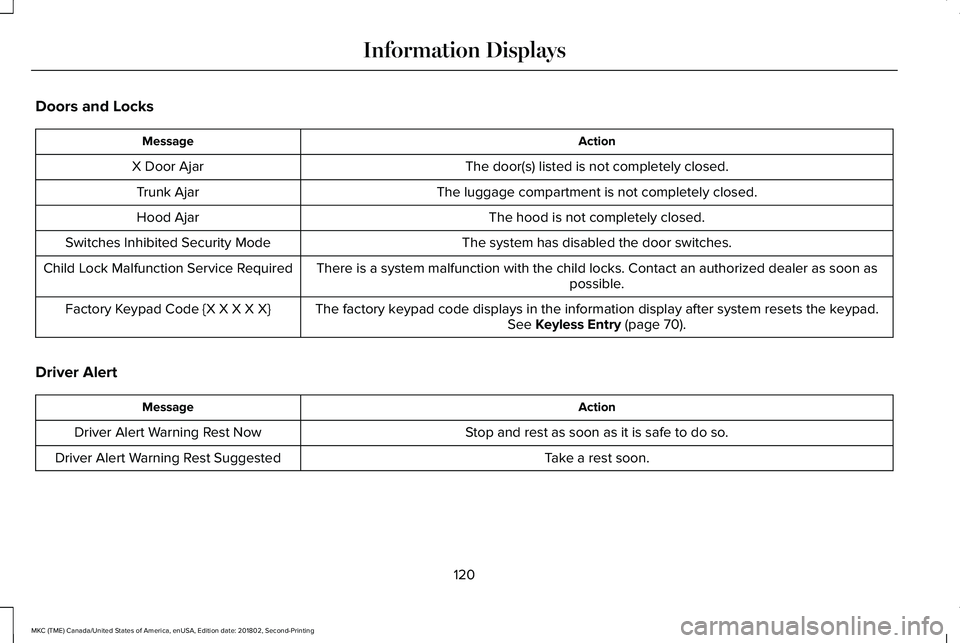
Doors and Locks
ActionMessage
The door(s) listed is not completely closed.X Door Ajar
The luggage compartment is not completely closed.Trunk Ajar
The hood is not completely closed.Hood Ajar
The system has disabled the door switches.Switches Inhibited Security Mode
There is a system malfunction with the child locks. Contact an authorized dealer as soon aspossible.Child Lock Malfunction Service Required
The factory keypad code displays in the information display after system resets the keypad.See Keyless Entry (page 70).Factory Keypad Code {X X X X X}
Driver Alert
ActionMessage
Stop and rest as soon as it is safe to do so.Driver Alert Warning Rest Now
Take a rest soon.Driver Alert Warning Rest Suggested
120
MKC (TME) Canada/United States of America, enUSA, Edition date: 201802, Second-Printing
Information Displays
Page 147 of 581
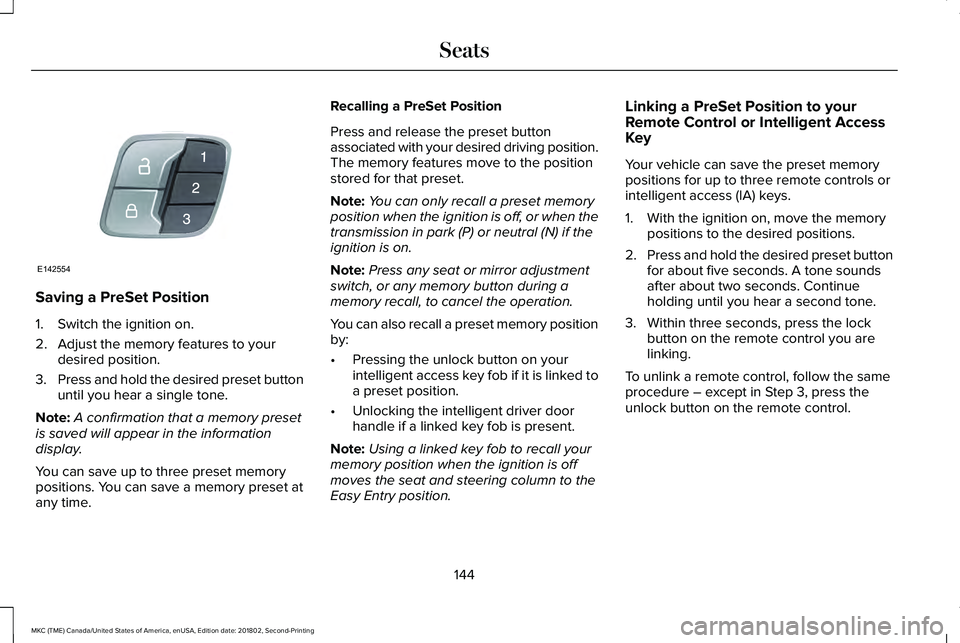
Saving a PreSet Position
1. Switch the ignition on.
2. Adjust the memory features to yourdesired position.
3.Press and hold the desired preset buttonuntil you hear a single tone.
Note:A confirmation that a memory presetis saved will appear in the informationdisplay.
You can save up to three preset memorypositions. You can save a memory preset atany time.
Recalling a PreSet Position
Press and release the preset buttonassociated with your desired driving position.The memory features move to the positionstored for that preset.
Note:You can only recall a preset memoryposition when the ignition is off, or when thetransmission in park (P) or neutral (N) if theignition is on.
Note:Press any seat or mirror adjustmentswitch, or any memory button during amemory recall, to cancel the operation.
You can also recall a preset memory positionby:
•Pressing the unlock button on yourintelligent access key fob if it is linked toa preset position.
•Unlocking the intelligent driver doorhandle if a linked key fob is present.
Note:Using a linked key fob to recall yourmemory position when the ignition is offmoves the seat and steering column to theEasy Entry position.
Linking a PreSet Position to yourRemote Control or Intelligent AccessKey
Your vehicle can save the preset memorypositions for up to three remote controls orintelligent access (IA) keys.
1. With the ignition on, move the memorypositions to the desired positions.
2.Press and hold the desired preset buttonfor about five seconds. A tone soundsafter about two seconds. Continueholding until you hear a second tone.
3. Within three seconds, press the lockbutton on the remote control you arelinking.
To unlink a remote control, follow the sameprocedure – except in Step 3, press theunlock button on the remote control.
144
MKC (TME) Canada/United States of America, enUSA, Edition date: 201802, Second-Printing
SeatsE142554
Page 152 of 581
HomeLink Wireless Control System
WARNING: Do not use the system withany garage door opener that does not havethe safety stop and reverse feature asrequired by U.S. Federal Safety Standards(this includes any garage door openermanufactured before April 1, 1982). A garagedoor opener which cannot detect an object,signaling the door to stop and reverse, doesnot meet current federal safety standards.Using a garage door opener without thesefeatures increases the risk of serious injuryor death.
Note:Make sure that the garage door andsecurity device are free from obstructionwhen you are programming. Do not programthe system with the vehicle in the garage.
Note:Make sure you keep the originalremote control transmitter for use in othervehicles as well as for future systemprogramming.
Note:We recommend that upon the sale orlease termination of your vehicle, you erasethe programmed function buttons for securityreasons. See Erasing the Function ButtonCodes.
Note:You can program a maximum of threedevices. To change or replace any of thethree devices after it has been initiallyprogrammed, you must first erase the currentsettings. See Erasing the Function ButtonCodes.
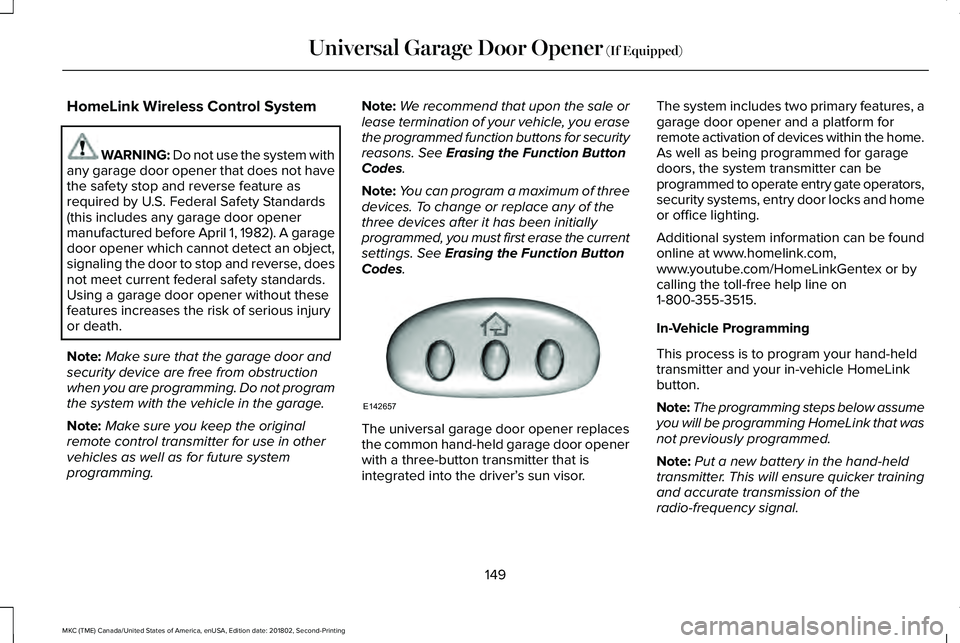
The universal garage door opener replacesthe common hand-held garage door openerwith a three-button transmitter that isintegrated into the driver’s sun visor.
The system includes two primary features, agarage door opener and a platform forremote activation of devices within the home.As well as being programmed for garagedoors, the system transmitter can beprogrammed to operate entry gate operators,security systems, entry door locks and homeor office lighting.
Additional system information can be foundonline at www.homelink.com,www.youtube.com/HomeLinkGentex or bycalling the toll-free help line on1-800-355-3515.
In-Vehicle Programming
This process is to program your hand-heldtransmitter and your in-vehicle HomeLinkbutton.
Note:The programming steps below assumeyou will be programming HomeLink that wasnot previously programmed.
Note:Put a new battery in the hand-heldtransmitter. This will ensure quicker trainingand accurate transmission of theradio-frequency signal.
149
MKC (TME) Canada/United States of America, enUSA, Edition date: 201802, Second-Printing
Universal Garage Door Opener (If Equipped)E142657
Page 164 of 581
ENGINE BLOCK HEATER (If Equipped)
WARNING: Failure to follow engineblock heater instructions could result inproperty damage or serious personal injury.
WARNING: Do not use your heater withungrounded electrical systems ortwo-pronged adapters. There is a risk ofelectrical shock.
WARNING: Do not fully close the hood,or allow it to drop under its own weight whenusing the engine block heater. This coulddamage the power cable and may cause anelectrical short resulting in fire, injury andproperty damage.
Note:The heater is most effective whenoutdoor temperatures are below 0°F (-18°C).
The heater acts as a starting aid by warmingthe engine coolant. This allows the climatecontrol system to respond quickly. Theequipment includes a heater element(installed in the engine block) and a wireharness. You can connect the system to agrounded 120-volt AC electrical source.
We recommend that you do the following fora safe and correct operation:
•Use a 16-gauge outdoor extension cordthat is product certified by Underwriter’sLaboratory (UL) or Canadian StandardsAssociation (CSA). This extension cordmust be suitable for use outdoors, in coldtemperatures, and be clearly markedSuitable for Use with OutdoorAppliances. Do not use an indoorextension cord outdoors. This couldresult in an electric shock or become afire hazard.
•Use as short an extension cord aspossible.
•Do not use multiple extension cords.
•Make sure that when in operation, theextension cord plug and heater cord plugconnections are free and clear of water.This could cause an electric shock or fire.
•Make sure your vehicle is parked in aclean area, clear of combustibles.
•Make sure the heater, heater cord andextension cord are firmly connected.
•Check for heat anywhere in the electricalhookup once the system has beenoperating for approximately 30 minutes.
•Make sure the system is unplugged andproperly stowed before starting anddriving your vehicle. Make sure theprotective cover seals the prongs of theblock heater cord plug when not in use.
•Make sure the heater system is checkedfor proper operation before winter.
Using the Engine Block Heater
Make sure the receptacle terminals are cleanand dry prior to use. Clean them with a drycloth if necessary.
161
MKC (TME) Canada/United States of America, enUSA, Edition date: 201802, Second-Printing
Starting and Stopping the Engine
Page 181 of 581
3. The gearshift button you select willilluminate and the selected gear willappear in the instrument cluster.
4. Release the brake pedal and yourtransmission will remain in the selectedgear.
Note:If you attempt to leave your vehiclewhile it is in gear, the vehicle willautomatically shift into park (P). Safety beltand door monitors determine your intent andmake the shift for you. During this time, amessage will appear in the informationdisplay screen prompting you to make theshift.
Note:To put your vehicle in gear with thedoor open, perform steps 1-4. See theAutomatic Return to Park section in thischapter for more information on this feature.
Park (P)
With the transmission in park (P), your vehiclelocks the transmission and prevents the frontwheels from turning. Always come to acomplete stop before putting your vehicleinto and out of park (P). An audible chimesounds once you select park (P).
When the ignition is turned off, the vehiclewill automatically shift into park (P). If theignition is turned off while the vehicle ismoving, it will first shift into neutral (N) untila slow enough speed is reached. The vehiclewill then shift into park (P) automatically.
Automatic Return to Park
Note:This feature will not operate when yourvehicle is in Stay in Neutral mode or neutraltow.
Your vehicle has a safety feature that willautomatically shift your vehicle into park (P)when any of the following conditions occur:
•You turn the ignition off
•You open the driver's door with yoursafety belt unlatched
•Your safety belt is unlatched while thedriver's door is open
If you turn the ignition off while your vehicleis moving, your vehicle will first shift intoneutral (N) until it slows down enough to shiftinto park (P) automatically.
Note:If you have waited an extended periodof time, (2-15 minutes) before starting yourvehicle, unlatching your safety belt will causethis feature to activate, even with the driver'sdoor closed.
Note:This feature may not work properly ifthe door ajar switch is malfunctioning. If yourdoor ajar indicator does not illuminate whenyou open the driver’s door or the indicatorilluminates with the driver’s door closed, seeyour authorized dealer.
Reverse (R)
With the transmission in reverse (R), yourvehicle will move backward. Always cometo a complete stop before shifting into andout of reverse (R).
Neutral (N)
With the transmission in neutral (N), you canstart your vehicle and it is free to roll. Holdthe brake pedal down while in this position.
178
MKC (TME) Canada/United States of America, enUSA, Edition date: 201802, Second-Printing
Transmission
Page 224 of 581
•Switching the ignition off and on.
•Stopping the vehicle and then openingand closing the driver’s door.
LANE KEEPING SYSTEM (If Equipped)
WARNING: You are responsible forcontrolling your vehicle at all times. Thesystem is designed to be an aid and doesnot relieve you of your responsibility to drivewith due care and attention. Failure to followthis instruction could result in the loss ofcontrol of your vehicle, personal injury ordeath.
WARNING: Always drive with due careand attention when using and operating thecontrols and features on your vehicle.
WARNING: In cold and severe weatherconditions the system may not function. Rain,snow and spray can all limit sensorperformance.
WARNING: The system will not operateif the sensor cannot track the road lanemarkings.
WARNING: The sensor may incorrectlytrack lane markings as other structures orobjects. This can result in a false or missedwarning.
WARNING: The system may notoperate properly if the sensor is blocked.Keep the windshield free from obstruction.
WARNING: If damage occurs in theimmediate area surrounding the sensor, haveyour vehicle checked as soon as possible.
WARNING: The system may notcorrectly operate if your vehicle is fitted witha suspension kit not approved by us.
Note:The system works above 40 mph(64 km/h).
Note:The system works as long as thecamera can detect one lane marking.
Note:When you select aid or alert and aidmode and the system detects no steeringactivity for a short period, the system alertsyou to put your hands on the steering wheel.The system may detect a light grip or touchon the steering wheel as hands off driving.
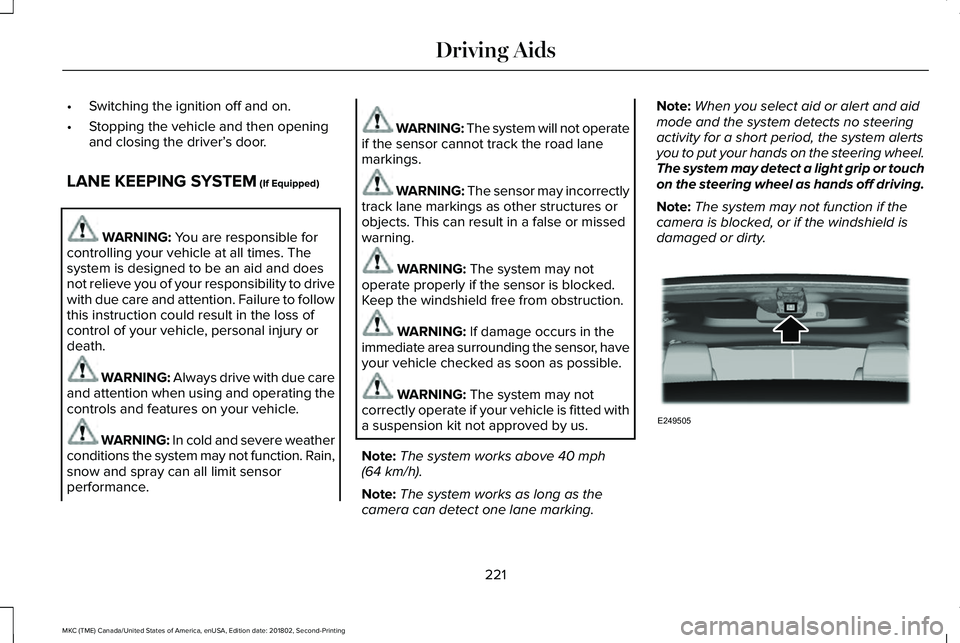
Note:The system may not function if thecamera is blocked, or if the windshield isdamaged or dirty.
221
MKC (TME) Canada/United States of America, enUSA, Edition date: 201802, Second-Printing
Driving AidsE249505
Page 279 of 581
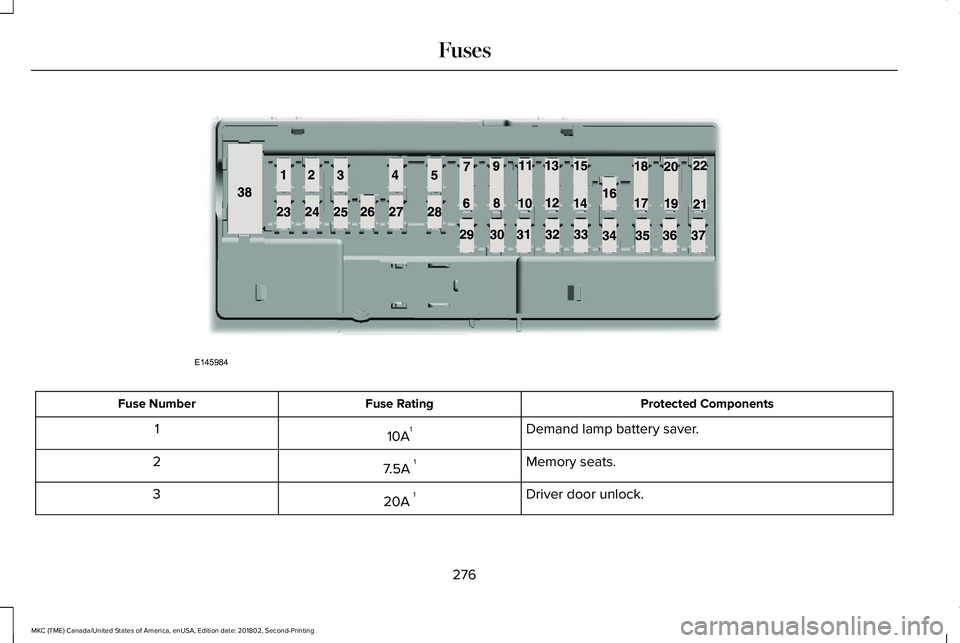
Protected ComponentsFuse RatingFuse Number
Demand lamp battery saver.10A11
Memory seats.7.5A 12
Driver door unlock.20A 13
276
MKC (TME) Canada/United States of America, enUSA, Edition date: 201802, Second-Printing
FusesE145984
Page 281 of 581
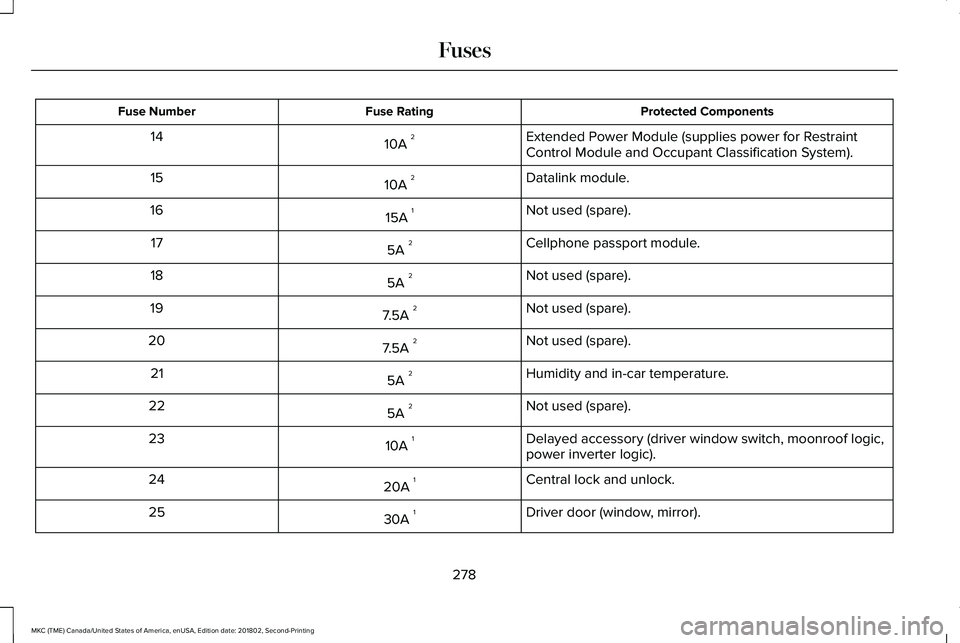
Protected ComponentsFuse RatingFuse Number
Extended Power Module (supplies power for RestraintControl Module and Occupant Classification System).10A 214
Datalink module.10A 215
Not used (spare).15A 116
Cellphone passport module.5A 217
Not used (spare).5A 218
Not used (spare).7.5A 219
Not used (spare).7.5A 220
Humidity and in-car temperature.5A 221
Not used (spare).5A 222
Delayed accessory (driver window switch, moonroof logic,power inverter logic).10A 123
Central lock and unlock.20A 124
Driver door (window, mirror).30A 125
278
MKC (TME) Canada/United States of America, enUSA, Edition date: 201802, Second-Printing
Fuses