seats LINCOLN MKC 2019 Owner's Manual
[x] Cancel search | Manufacturer: LINCOLN, Model Year: 2019, Model line: MKC, Model: LINCOLN MKC 2019Pages: 581, PDF Size: 5.41 MB
Page 139 of 581
CABIN AIR FILTER
The cabin air filter is under the instrumentpanel in the passenger footwell area orunder the center console on the passengerside.
The system filters airborne particles such asdust, spores and pollen in the air supplied toand recirculated in the interior of yourvehicle.
Make sure you have a cabin air filter installedat all times. Running the system without afilter in place could degrade or damage thesystem.
Your vehicle cabin air filter gives you andyour passengers the following benefits:
•It improves your driving comfort byreducing particle concentration.
•It improves the interior compartmentcleanliness.
•It protects the climate controlcomponents from particle deposits.
Change the air filter element at the properintervals. See Scheduled Maintenance(page 487).
For additional cabin air filter information, orto replace the filter, see an authorized dealer.
REMOTE START
The system adjusts the interior temperaturedepending on your chosen settings duringremote start.
You cannot adjust the climate control settingduring remote start operation. When youswitch the ignition on, the climate controlsystem returns to the previous settings. Youcan now make adjustments.
Some features may remain on if they turn onduring remote start:
•Driver heated seat.
•Driver ventilated seat.
•Heated steering wheel.
•Heated mirrors.
•Heated rear window.
•Windshield wiper de-icer.
Note:If the passenger heated or ventilatedseats are on when you switch the vehicleoff, they default to the driver setting whenyou switch the vehicle on.
You can adjust the default remote startsettings using the information displaycontrols. See Information Displays (page108).
Automatic Settings
In hot weather, the system sets to 72°F(22°C). The ventilated seats set to high (ifavailable, and if you select AUTO in theinformation display).
In moderate weather, the system heats orcools (based on pre-selected settings). Therear defroster, heated mirrors and heated orventilated seats do not turn on.
In cold weather, the system sets to 72°F(22°C). The heated seats and heated steeringwheel set to high (if available, and if youselect AUTO in the information display). Therear defroster and heated mirrors turn on.
136
MKC (TME) Canada/United States of America, enUSA, Edition date: 201802, Second-Printing
Climate Control
Page 140 of 581
SITTING IN THE CORRECT
POSITION
WARNING: Sitting improperly, out ofposition or with the seatback reclined too farcan take weight off the seat cushion andaffect the decision of the passenger sensingsystem, resulting in serious injury or deathin the event of a crash. Always sit uprightagainst your seat back, with your feet on thefloor.
WARNING: Do not recline the seatbacktoo far as this can cause the occupant toslide under the seatbelt, resulting in seriousinjury in the event of a collision.
WARNING: Do not place objects higherthan the top of the seat backrest. Failure tofollow this instruction could result in personalinjury or death in the event of a sudden stopor crash.
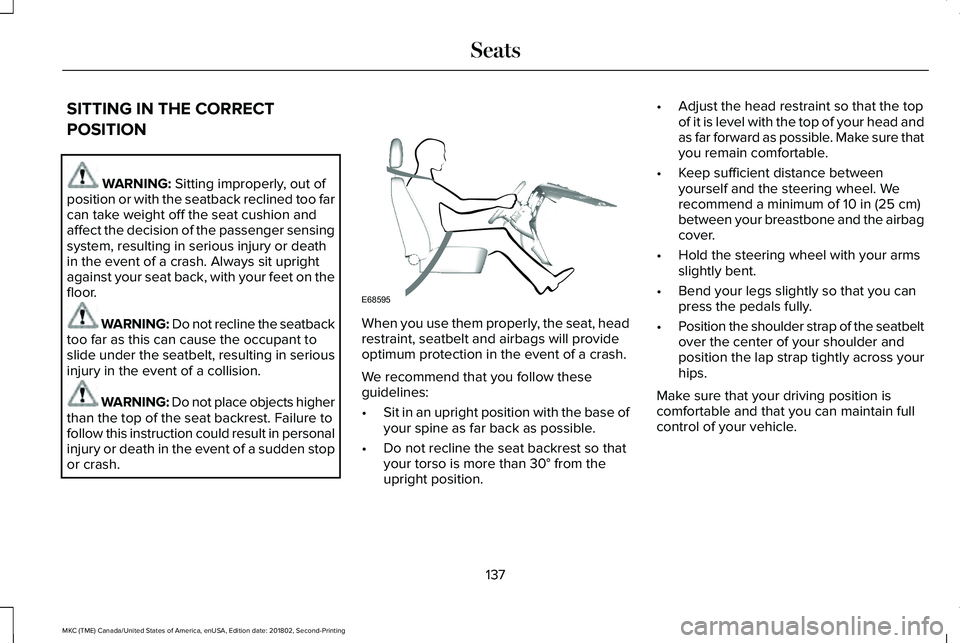
When you use them properly, the seat, headrestraint, seatbelt and airbags will provideoptimum protection in the event of a crash.
We recommend that you follow theseguidelines:
•Sit in an upright position with the base ofyour spine as far back as possible.
•Do not recline the seat backrest so thatyour torso is more than 30° from theupright position.
•Adjust the head restraint so that the topof it is level with the top of your head andas far forward as possible. Make sure thatyou remain comfortable.
•Keep sufficient distance betweenyourself and the steering wheel. Werecommend a minimum of 10 in (25 cm)between your breastbone and the airbagcover.
•Hold the steering wheel with your armsslightly bent.
•Bend your legs slightly so that you canpress the pedals fully.
•Position the shoulder strap of the seatbeltover the center of your shoulder andposition the lap strap tightly across yourhips.
Make sure that your driving position iscomfortable and that you can maintain fullcontrol of your vehicle.
137
MKC (TME) Canada/United States of America, enUSA, Edition date: 201802, Second-Printing
SeatsE68595
Page 141 of 581
HEAD RESTRAINTS
WARNING: Fully adjust the headrestraint before you sit in or operate yourvehicle. This will help minimize the risk ofneck injury in the event of a crash. Do notadjust the head restraint when your vehicleis moving.
WARNING: The head restraint is asafety device. Whenever possible it shouldbe installed and properly adjusted when theseat is occupied. Failure to adjust the headrestraint properly could reduce itseffectiveness during certain impacts.
Note:Adjust the seat backrest (front seatsonly) to an upright driving position beforeadjusting the head restraint. Adjust the headrestraint so that the top of it is level with thetop of your head and as far forward aspossible. Make sure that you remaincomfortable. If you are extremely tall, adjustthe head restraint to its highest position.
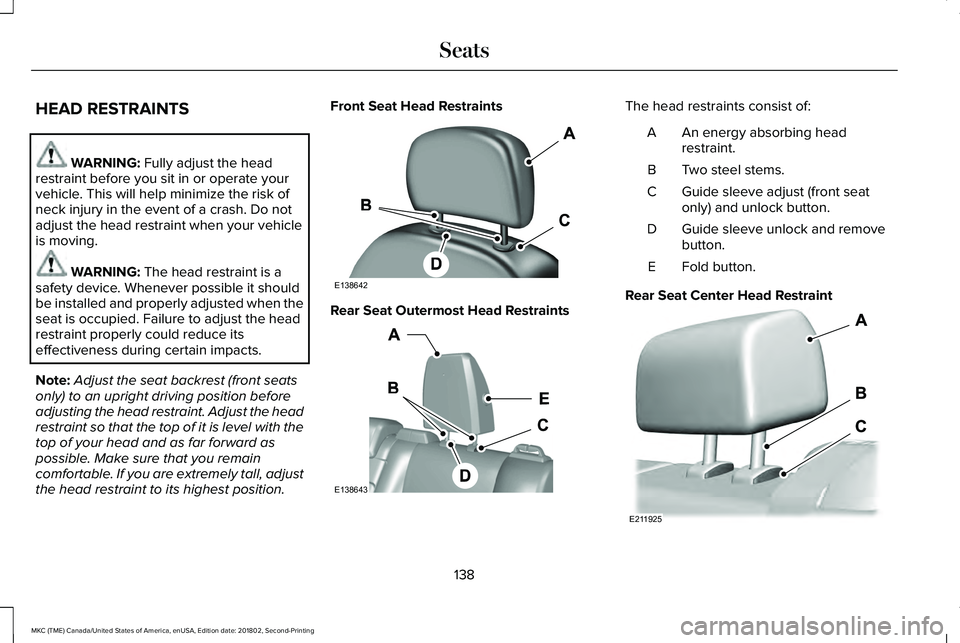
Front Seat Head Restraints
Rear Seat Outermost Head Restraints
The head restraints consist of:
An energy absorbing headrestraint.A
Two steel stems.B
Guide sleeve adjust (front seatonly) and unlock button.C
Guide sleeve unlock and removebutton.D
Fold button.E
Rear Seat Center Head Restraint
138
MKC (TME) Canada/United States of America, enUSA, Edition date: 201802, Second-Printing
SeatsE138642 E138643 E211925
Page 142 of 581
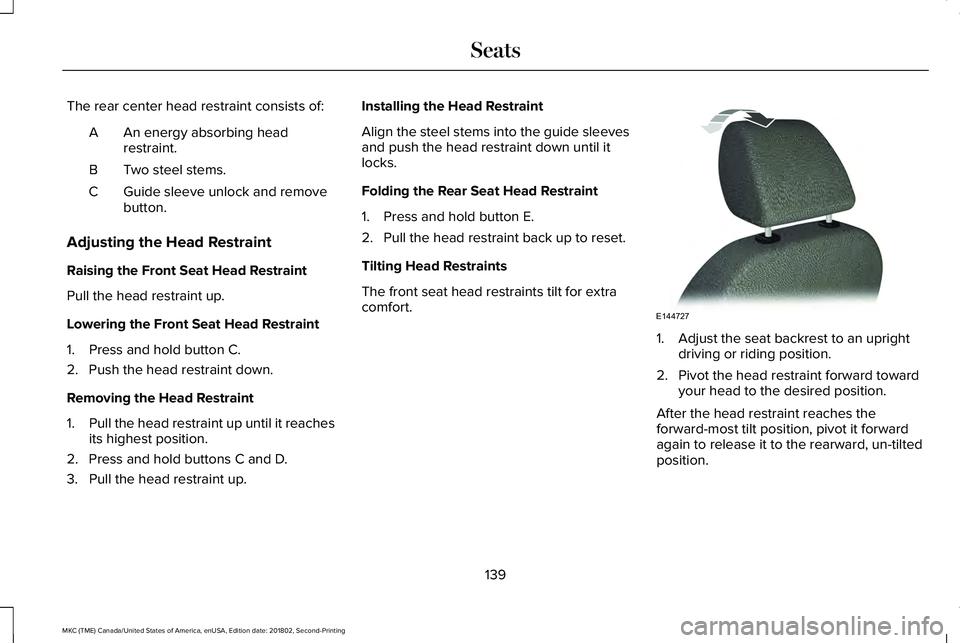
The rear center head restraint consists of:
An energy absorbing headrestraint.A
Two steel stems.B
Guide sleeve unlock and removebutton.C
Adjusting the Head Restraint
Raising the Front Seat Head Restraint
Pull the head restraint up.
Lowering the Front Seat Head Restraint
1. Press and hold button C.
2. Push the head restraint down.
Removing the Head Restraint
1.Pull the head restraint up until it reachesits highest position.
2. Press and hold buttons C and D.
3. Pull the head restraint up.
Installing the Head Restraint
Align the steel stems into the guide sleevesand push the head restraint down until itlocks.
Folding the Rear Seat Head Restraint
1. Press and hold button E.
2. Pull the head restraint back up to reset.
Tilting Head Restraints
The front seat head restraints tilt for extracomfort.
1. Adjust the seat backrest to an uprightdriving or riding position.
2. Pivot the head restraint forward towardyour head to the desired position.
After the head restraint reaches theforward-most tilt position, pivot it forwardagain to release it to the rearward, un-tiltedposition.
139
MKC (TME) Canada/United States of America, enUSA, Edition date: 201802, Second-Printing
SeatsE144727
Page 143 of 581
POWER SEATS
WARNING: Do not adjust the driverseat or seat backrest when your vehicle ismoving. This may result in sudden seatmovement, causing the loss of control of yourvehicle.
WARNING: Do not place cargo or anyobjects behind the seat backrest beforereturning it to the original position. Pull onthe seat backrest to make sure that it hasfully latched after returning the seat backrestto its original position. An unlatched seat maybecome dangerous if you stop suddenly orhave a crash.
140
MKC (TME) Canada/United States of America, enUSA, Edition date: 201802, Second-Printing
Seats
Page 144 of 581
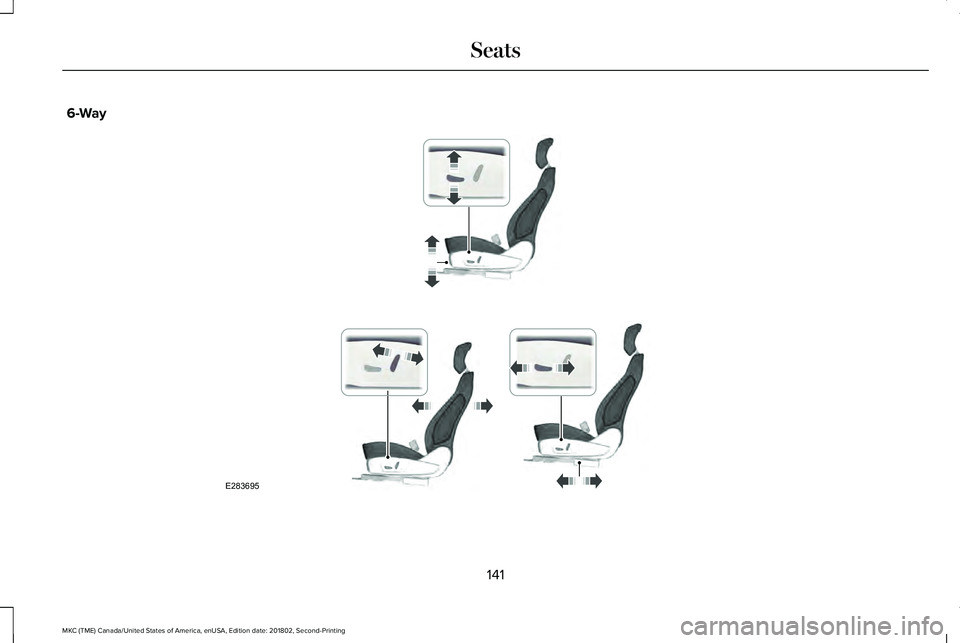
6-Way
141
MKC (TME) Canada/United States of America, enUSA, Edition date: 201802, Second-Printing
SeatsE283695
Page 145 of 581
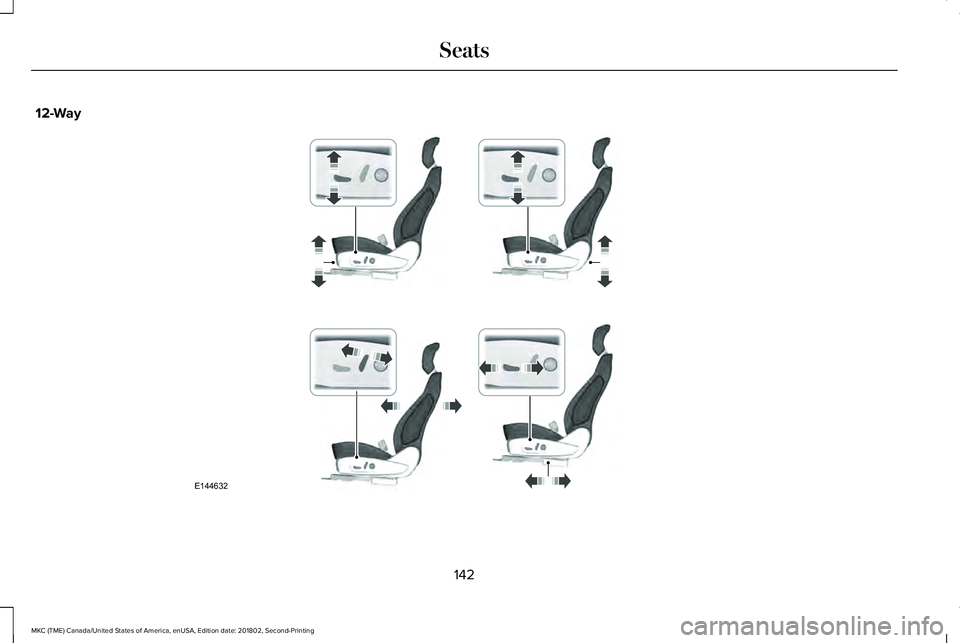
12-Way
142
MKC (TME) Canada/United States of America, enUSA, Edition date: 201802, Second-Printing
SeatsE144632
Page 146 of 581
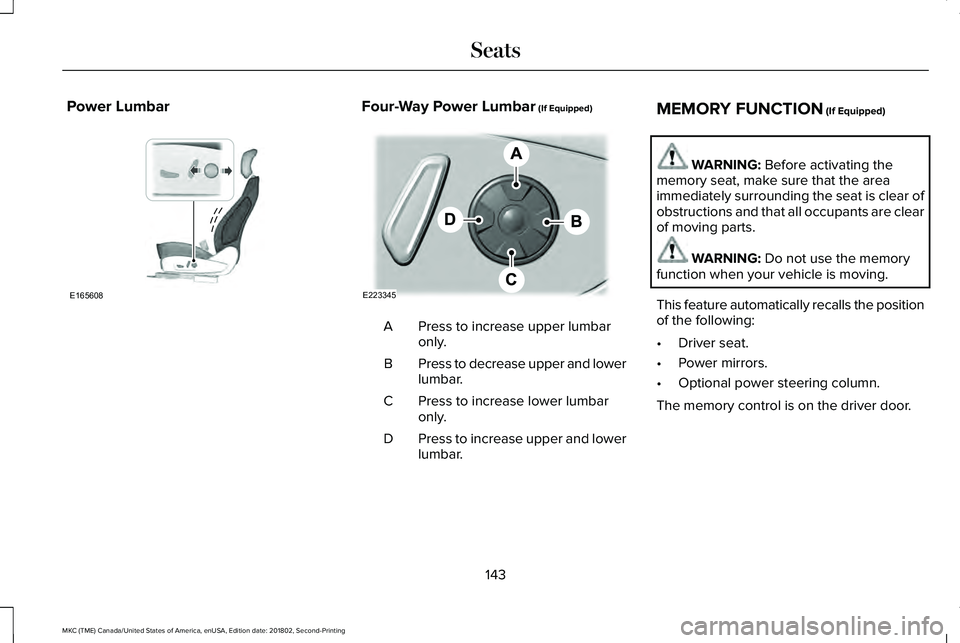
Power LumbarFour-Way Power Lumbar (If Equipped)
Press to increase upper lumbaronly.A
Press to decrease upper and lowerlumbar.B
Press to increase lower lumbaronly.C
Press to increase upper and lowerlumbar.D
MEMORY FUNCTION (If Equipped)
WARNING: Before activating thememory seat, make sure that the areaimmediately surrounding the seat is clear ofobstructions and that all occupants are clearof moving parts.
WARNING: Do not use the memoryfunction when your vehicle is moving.
This feature automatically recalls the positionof the following:
•Driver seat.
•Power mirrors.
•Optional power steering column.
The memory control is on the driver door.
143
MKC (TME) Canada/United States of America, enUSA, Edition date: 201802, Second-Printing
SeatsE165608 E223345
Page 147 of 581
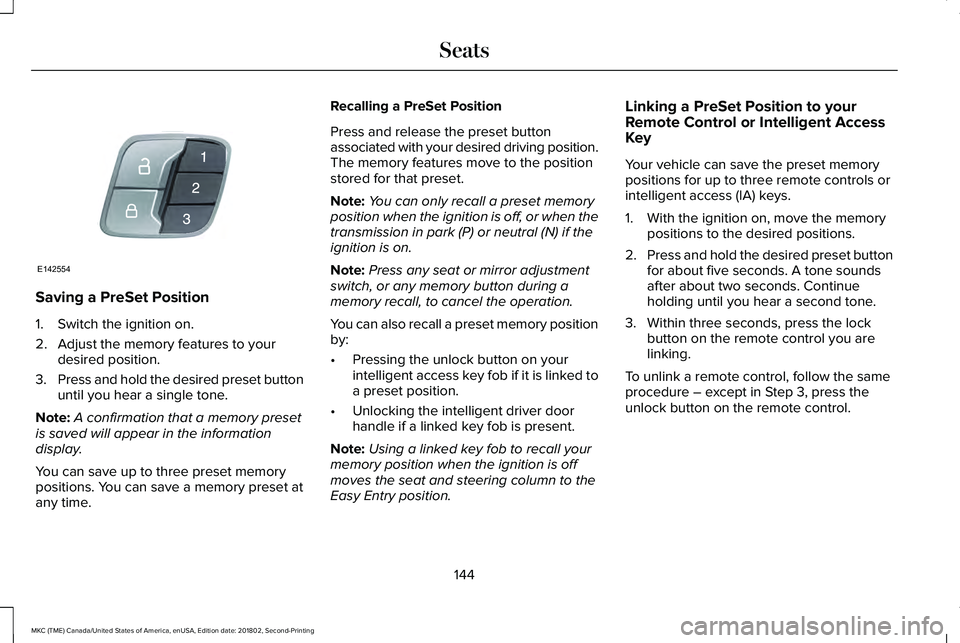
Saving a PreSet Position
1. Switch the ignition on.
2. Adjust the memory features to yourdesired position.
3.Press and hold the desired preset buttonuntil you hear a single tone.
Note:A confirmation that a memory presetis saved will appear in the informationdisplay.
You can save up to three preset memorypositions. You can save a memory preset atany time.
Recalling a PreSet Position
Press and release the preset buttonassociated with your desired driving position.The memory features move to the positionstored for that preset.
Note:You can only recall a preset memoryposition when the ignition is off, or when thetransmission in park (P) or neutral (N) if theignition is on.
Note:Press any seat or mirror adjustmentswitch, or any memory button during amemory recall, to cancel the operation.
You can also recall a preset memory positionby:
•Pressing the unlock button on yourintelligent access key fob if it is linked toa preset position.
•Unlocking the intelligent driver doorhandle if a linked key fob is present.
Note:Using a linked key fob to recall yourmemory position when the ignition is offmoves the seat and steering column to theEasy Entry position.
Linking a PreSet Position to yourRemote Control or Intelligent AccessKey
Your vehicle can save the preset memorypositions for up to three remote controls orintelligent access (IA) keys.
1. With the ignition on, move the memorypositions to the desired positions.
2.Press and hold the desired preset buttonfor about five seconds. A tone soundsafter about two seconds. Continueholding until you hear a second tone.
3. Within three seconds, press the lockbutton on the remote control you arelinking.
To unlink a remote control, follow the sameprocedure – except in Step 3, press theunlock button on the remote control.
144
MKC (TME) Canada/United States of America, enUSA, Edition date: 201802, Second-Printing
SeatsE142554
Page 148 of 581
Easy Entry and Exit Feature
If you enable the easy entry and exit feature,it automatically moves the driver seatposition rearward up to 2 in (5 cm) when youswitch the ignition off. The driver seat returnsto the previous position when you switch theignition on.
You can enable or disable this feature in theinformation display. See InformationDisplays (page 108).
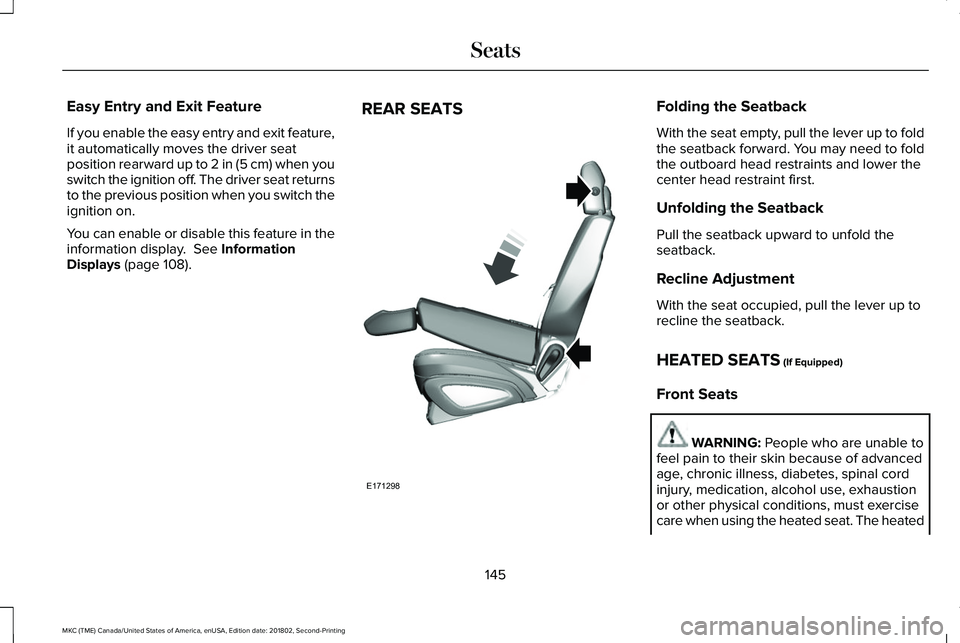
REAR SEATSFolding the Seatback
With the seat empty, pull the lever up to foldthe seatback forward. You may need to foldthe outboard head restraints and lower thecenter head restraint first.
Unfolding the Seatback
Pull the seatback upward to unfold theseatback.
Recline Adjustment
With the seat occupied, pull the lever up torecline the seatback.
HEATED SEATS (If Equipped)
Front Seats
WARNING: People who are unable tofeel pain to their skin because of advancedage, chronic illness, diabetes, spinal cordinjury, medication, alcohol use, exhaustionor other physical conditions, must exercisecare when using the heated seat. The heated
145
MKC (TME) Canada/United States of America, enUSA, Edition date: 201802, Second-Printing
SeatsE171298