wheel LINCOLN MKC 2019 Owner's Manual
[x] Cancel search | Manufacturer: LINCOLN, Model Year: 2019, Model line: MKC, Model: LINCOLN MKC 2019Pages: 581, PDF Size: 5.41 MB
Page 139 of 581
CABIN AIR FILTER
The cabin air filter is under the instrumentpanel in the passenger footwell area orunder the center console on the passengerside.
The system filters airborne particles such asdust, spores and pollen in the air supplied toand recirculated in the interior of yourvehicle.
Make sure you have a cabin air filter installedat all times. Running the system without afilter in place could degrade or damage thesystem.
Your vehicle cabin air filter gives you andyour passengers the following benefits:
•It improves your driving comfort byreducing particle concentration.
•It improves the interior compartmentcleanliness.
•It protects the climate controlcomponents from particle deposits.
Change the air filter element at the properintervals. See Scheduled Maintenance(page 487).
For additional cabin air filter information, orto replace the filter, see an authorized dealer.
REMOTE START
The system adjusts the interior temperaturedepending on your chosen settings duringremote start.
You cannot adjust the climate control settingduring remote start operation. When youswitch the ignition on, the climate controlsystem returns to the previous settings. Youcan now make adjustments.
Some features may remain on if they turn onduring remote start:
•Driver heated seat.
•Driver ventilated seat.
•Heated steering wheel.
•Heated mirrors.
•Heated rear window.
•Windshield wiper de-icer.
Note:If the passenger heated or ventilatedseats are on when you switch the vehicleoff, they default to the driver setting whenyou switch the vehicle on.
You can adjust the default remote startsettings using the information displaycontrols. See Information Displays (page108).
Automatic Settings
In hot weather, the system sets to 72°F(22°C). The ventilated seats set to high (ifavailable, and if you select AUTO in theinformation display).
In moderate weather, the system heats orcools (based on pre-selected settings). Therear defroster, heated mirrors and heated orventilated seats do not turn on.
In cold weather, the system sets to 72°F(22°C). The heated seats and heated steeringwheel set to high (if available, and if youselect AUTO in the information display). Therear defroster and heated mirrors turn on.
136
MKC (TME) Canada/United States of America, enUSA, Edition date: 201802, Second-Printing
Climate Control
Page 140 of 581
SITTING IN THE CORRECT
POSITION
WARNING: Sitting improperly, out ofposition or with the seatback reclined too farcan take weight off the seat cushion andaffect the decision of the passenger sensingsystem, resulting in serious injury or deathin the event of a crash. Always sit uprightagainst your seat back, with your feet on thefloor.
WARNING: Do not recline the seatbacktoo far as this can cause the occupant toslide under the seatbelt, resulting in seriousinjury in the event of a collision.
WARNING: Do not place objects higherthan the top of the seat backrest. Failure tofollow this instruction could result in personalinjury or death in the event of a sudden stopor crash.
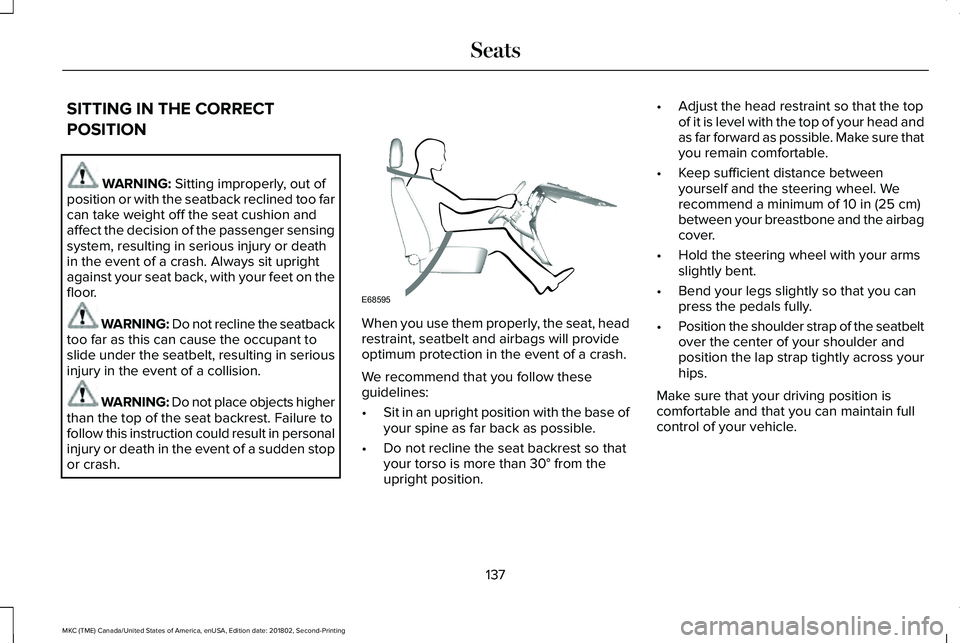
When you use them properly, the seat, headrestraint, seatbelt and airbags will provideoptimum protection in the event of a crash.
We recommend that you follow theseguidelines:
•Sit in an upright position with the base ofyour spine as far back as possible.
•Do not recline the seat backrest so thatyour torso is more than 30° from theupright position.
•Adjust the head restraint so that the topof it is level with the top of your head andas far forward as possible. Make sure thatyou remain comfortable.
•Keep sufficient distance betweenyourself and the steering wheel. Werecommend a minimum of 10 in (25 cm)between your breastbone and the airbagcover.
•Hold the steering wheel with your armsslightly bent.
•Bend your legs slightly so that you canpress the pedals fully.
•Position the shoulder strap of the seatbeltover the center of your shoulder andposition the lap strap tightly across yourhips.
Make sure that your driving position iscomfortable and that you can maintain fullcontrol of your vehicle.
137
MKC (TME) Canada/United States of America, enUSA, Edition date: 201802, Second-Printing
SeatsE68595
Page 166 of 581
AUTO-START-STOP (If Equipped)
WARNING: Always fully apply theparking brake. Make sure you shift into park(P) for vehicles with an automatictransmission. Switch the ignition off andremove the key whenever you leave yourvehicle.
WARNING: Before opening the hoodor performing any maintenance, fully applythe parking brake, shift into park (P) orneutral (N) and switch the ignition off.
WARNING: Always switch the ignitionoff before leaving the vehicle. If the ignitionis switched on an automatic restart mayoccur at any time.
WARNING: The system may requirethe engine to automatically restart when theauto-start-stop indicator illuminates green orflashes amber. Failure to follow thisinstruction could result in personal injury.
The system helps reduce fuel consumptionby automatically shutting off and restartingthe engine while your vehicle is stopped.The engine will restart automatically whenyou release the brake pedal. In somesituations, your vehicle may restartautomatically, for example:
•To maintain interior comfort
•To recharge the battery
Note:Power assist steering is turned offwhen the engine is off.
The Auto-Start-Stop system status isavailable at a glance within the informationdisplay. See Information Displays (page108).
Enabling Auto-Start-Stop
The system is automatically enabled everytime you start your vehicle if the followingconditions are met:
•The Auto-Start-Stop button is not pressed(not illuminated).
•Your vehicle exceeds an initial speed of3 mph (5 km/h) after the vehicle has beeninitially started.
•Your vehicle is stopped.
•Your foot is on the brake pedal.
•The transmission is in drive (D).
•The driver's door is closed.
•There is adequate brake vacuum.
•The interior compartment has beencooled or warmed to an acceptable level.
•The front windshield defroster is off.
•The steering wheel is not turned rapidlyor is not at a sharp angle.
•The vehicle is not on a steep road grade.
•The battery is within optimal operatingconditions (battery state of charge andtemperature in range).
•The engine coolant is at operatingtemperature.
•Elevation is below approximately10,000 ft (3,048 m).
•Ambient temperature is moderate.
The green Auto-Start-Stopindicator light on the instrumentcluster will illuminate to indicatewhen the automatic engine stop occurs.
163
MKC (TME) Canada/United States of America, enUSA, Edition date: 201802, Second-Printing
Unique Driving Characteristics
Page 181 of 581
3. The gearshift button you select willilluminate and the selected gear willappear in the instrument cluster.
4. Release the brake pedal and yourtransmission will remain in the selectedgear.
Note:If you attempt to leave your vehiclewhile it is in gear, the vehicle willautomatically shift into park (P). Safety beltand door monitors determine your intent andmake the shift for you. During this time, amessage will appear in the informationdisplay screen prompting you to make theshift.
Note:To put your vehicle in gear with thedoor open, perform steps 1-4. See theAutomatic Return to Park section in thischapter for more information on this feature.
Park (P)
With the transmission in park (P), your vehiclelocks the transmission and prevents the frontwheels from turning. Always come to acomplete stop before putting your vehicleinto and out of park (P). An audible chimesounds once you select park (P).
When the ignition is turned off, the vehiclewill automatically shift into park (P). If theignition is turned off while the vehicle ismoving, it will first shift into neutral (N) untila slow enough speed is reached. The vehiclewill then shift into park (P) automatically.
Automatic Return to Park
Note:This feature will not operate when yourvehicle is in Stay in Neutral mode or neutraltow.
Your vehicle has a safety feature that willautomatically shift your vehicle into park (P)when any of the following conditions occur:
•You turn the ignition off
•You open the driver's door with yoursafety belt unlatched
•Your safety belt is unlatched while thedriver's door is open
If you turn the ignition off while your vehicleis moving, your vehicle will first shift intoneutral (N) until it slows down enough to shiftinto park (P) automatically.
Note:If you have waited an extended periodof time, (2-15 minutes) before starting yourvehicle, unlatching your safety belt will causethis feature to activate, even with the driver'sdoor closed.
Note:This feature may not work properly ifthe door ajar switch is malfunctioning. If yourdoor ajar indicator does not illuminate whenyou open the driver’s door or the indicatorilluminates with the driver’s door closed, seeyour authorized dealer.
Reverse (R)
With the transmission in reverse (R), yourvehicle will move backward. Always cometo a complete stop before shifting into andout of reverse (R).
Neutral (N)
With the transmission in neutral (N), you canstart your vehicle and it is free to roll. Holdthe brake pedal down while in this position.
178
MKC (TME) Canada/United States of America, enUSA, Edition date: 201802, Second-Printing
Transmission
Page 182 of 581
Stay in Neutral mode
Stay in Neutral mode allows your vehicle tostay in neutral (N) when you exit the vehicle.Your vehicle must be stationary to enter thismode.
To enter Stay in Neutral mode:
1. Press the neutral (N) button on yourshifter assembly.
2. A message will appear in yourinformation display.
3. Press the neutral (N) button again toenter Stay in Neutral mode.
A message will appear in your informationdisplay screen when your vehicle hasentered Stay in Neutral mode.
Note:During this mode the N button willflash continuously and your instrumentcluster will display N as the selected gear.
Exiting Stay in Neutral mode
To disable Stay in Neutral mode selectanother gear. See the Putting the Vehiclein Gear for instructions on how to do this.
Entering a Carwash
Note:Always put your vehicle in Stay inNeutral mode when entering an automaticcar wash. Failure to do this could result invehicle damage not covered by warranty.
Drive (D)
The normal driving position for the best fueleconomy.
Sport (S)
Putting the vehicle in sport (S):
•Provides additional engine braking andextends lower gear operation to enhanceperformance for uphill climbs, hilly terrainor mountainous areas. This will increaseengine RPM during engine braking
•Provides additional lower gear operationthrough the automatic transmission shiftstrategy
•Provides gear selection more quickly andat higher engine speeds
SelectShift Automatic™ Transmission
Your SelectShift Automatic transmissiongives you the ability to change gearsmanually.
Paddle Shifters
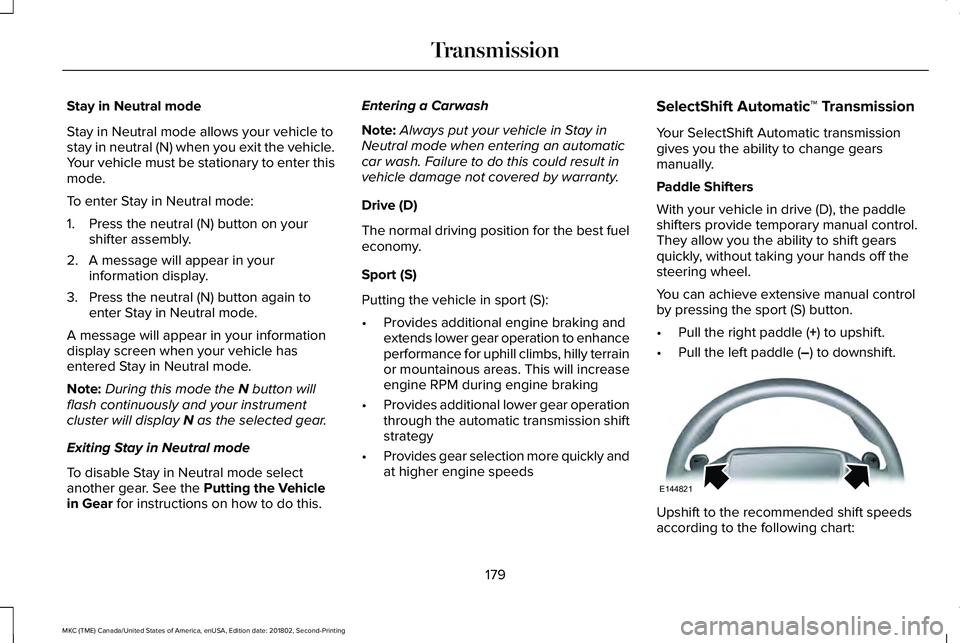
With your vehicle in drive (D), the paddleshifters provide temporary manual control.They allow you the ability to shift gearsquickly, without taking your hands off thesteering wheel.
You can achieve extensive manual controlby pressing the sport (S) button.
•Pull the right paddle (+) to upshift.
•Pull the left paddle (–) to downshift.
Upshift to the recommended shift speedsaccording to the following chart:
179
MKC (TME) Canada/United States of America, enUSA, Edition date: 201802, Second-Printing
TransmissionE144821
Page 184 of 581
Brake-Shift Interlock Override
WARNING: Do not drive your vehicleuntil you verify that the stoplamps areworking.
WARNING: When doing this procedure,you need to take the transmission out of park(P) which means your vehicle can roll freely.To avoid unwanted vehicle movement,always fully apply the parking brake prior todoing this procedure. Use wheels chocks ifappropriate.
WARNING: If the parking brake is fullyreleased, but the brake warning lampremains illuminated, the brakes may not beworking properly. Have your vehicle checkedas soon as possible.
Note:See your authorized dealer as soonas possible if this procedure is used.
Note:For some markets this feature isdisabled.
Note:This feature will only function if your12-volt battery has power. If vehicle batteryvoltage is not sufficient, an external 12-voltpower source (for example, jumper cables,battery charger or jump pack) may berequired to function the interlock overrideswitch.
Use the brake-shift interlock override tomove your transmission from the parkposition in the event of an electricalmalfunction. If your vehicle has a deadbattery, an external power source will berequired.
1. Apply the parking brake and turn yourignition off before performing thisprocedure.
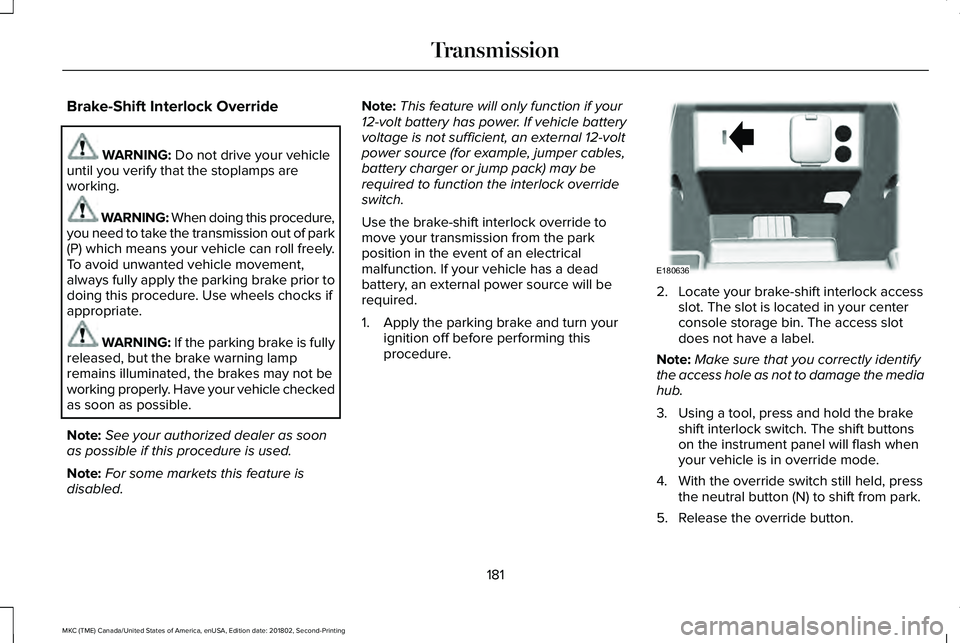
2. Locate your brake-shift interlock accessslot. The slot is located in your centerconsole storage bin. The access slotdoes not have a label.
Note:Make sure that you correctly identifythe access hole as not to damage the mediahub.
3. Using a tool, press and hold the brakeshift interlock switch. The shift buttonson the instrument panel will flash whenyour vehicle is in override mode.
4. With the override switch still held, pressthe neutral button (N) to shift from park.
5. Release the override button.
181
MKC (TME) Canada/United States of America, enUSA, Edition date: 201802, Second-Printing
TransmissionE180636
Page 186 of 581
USING ALL-WHEEL DRIVE
Note:When a system malfunction is present,a warning message appears in theinformation display. See InformationMessages (page 113). This means the systemis not functioning correctly and onlyfront-wheel drive is available. Have yourvehicle checked by an authorized dealer.
Note:When the system overheats andswitches to front-wheel drive, a warningmessage appears in the information display.This may occur if you operate your vehiclein extreme high load conditions or withexcessive wheel spin (for example, deepsand). To resume all-wheel drive function,stop your vehicle in a safe location and turnoff the ignition. When the system cools,normal all-wheel drive function will return.The information display indicates, for aboutfive seconds, this return.
Note:When using the spare tire, a warningmessage may appear in the informationdisplay. This message turns off afterreinstalling the repaired or replaced roadtire and you switch on the ignition.
Note:Re-install the repaired tire or replacethe tire as soon as possible. Different tiresizes between the front and rear axles cancause system damage, or turn off theall-wheel drive.
This system anticipates wheel spin andtransfers power to the rear wheels beforethe spin occurs. Even when wheel spin is notoccurring, the system is continuouslyadjusting power distribution to the wheels,in an attempt to improve straight line andcornering, both on and off road.
The system automatically turns on every timeyou switch on the ignition.
The all-wheel drive system does not requiremaintenance.
The all-wheel drive system gives your vehiclesome limited off-road capabilities. Operatingyour vehicle in conditions other thanmoderate sand, snow, mud or rough roadscould subject it to excessive stress and heat.This could result in system damage. Yourvehicle warranty will not cover this damage.
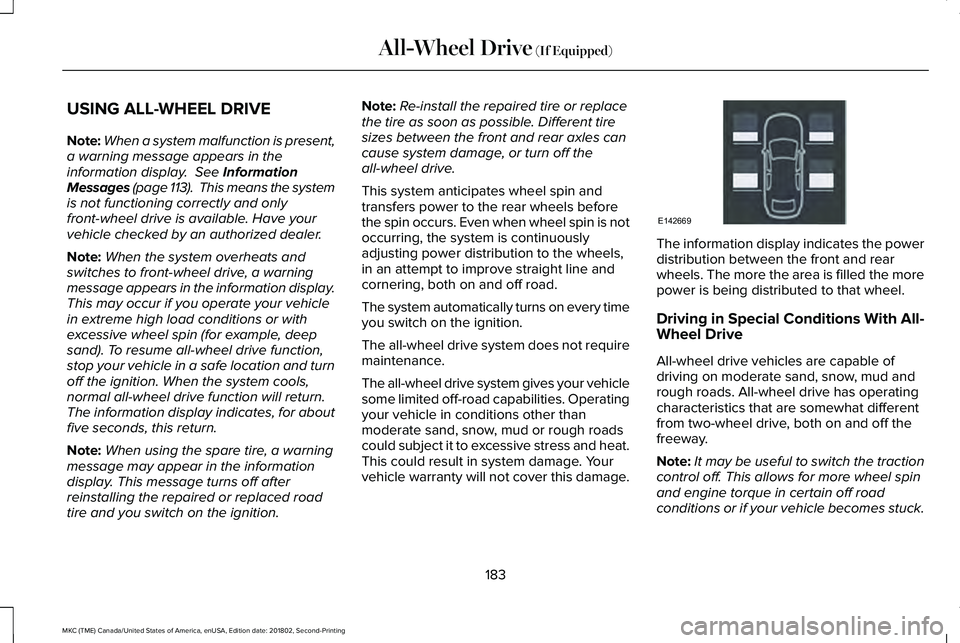
The information display indicates the powerdistribution between the front and rearwheels. The more the area is filled the morepower is being distributed to that wheel.
Driving in Special Conditions With All-Wheel Drive
All-wheel drive vehicles are capable ofdriving on moderate sand, snow, mud andrough roads. All-wheel drive has operatingcharacteristics that are somewhat differentfrom two-wheel drive, both on and off thefreeway.
Note:It may be useful to switch the tractioncontrol off. This allows for more wheel spinand engine torque in certain off roadconditions or if your vehicle becomes stuck.
183
MKC (TME) Canada/United States of America, enUSA, Edition date: 201802, Second-Printing
All-Wheel Drive (If Equipped)E142669
Page 187 of 581
When driving at slow speeds off road underhigh load conditions, use a low gear whenpossible. Low gear operation will maximizethe engine and transmission coolingcapability.
Under severe operating conditions, the airconditioning may cycle on and off to preventthe engine from overheating.
Basic Operating Principles
•Drive slower in strong crosswinds thatcan affect the normal steeringcharacteristics of your vehicle.
•When driving your vehicle on surfacesmade slippery by loose sand, water,gravel, snow or ice proceed with care.
If Your Vehicle leaves the Road
If your vehicle leaves the road, reduce yourvehicle speed and avoid severe braking.Once you have reduced your vehicle speed,ease your vehicle back onto the road. Donot turn the steering wheel sharply whilereturning your vehicle to the road.
It may be safer to stay on the shoulder of theroad and slow down gradually beforereturning to the road. You may lose controlif you do not slow down or if you turn thesteering wheel too sharply or abruptly.
It may be less risky to strike small objects,such as freeway reflectors, with minordamage to your vehicle rather than attemptan abrupt dangerous direction change.Remember, your primary concern should beyour safety and the safety of others.
Emergency Maneuvers
If you must make a sudden emergencydirection change, avoid over-driving yourvehicle. Turn the steering wheel only asrapidly and as far as you need to avoid theemergency. Apply smooth pressure to theaccelerator pedal or brake pedal as needed.Avoid abrupt steering, acceleration andbraking changes. Abrupt changes couldincrease the risk of vehicle roll over, loss ofvehicle control and personal injury. Use allavailable road surface to bring your vehicleto under control.
In the event of an emergency stop, avoidskidding and do not attempt any sharpsteering wheel movements.
Your vehicle responds differently to steering,accelerating and braking on different roadsurfaces when changing from one type ofsurface to another.
Sand
When driving over sand, avoid driving atexcessive speeds. This will cause yourvehicle momentum to work against you. Yourvehicle could become stuck that may requireassistance from another vehicle. Remember,if you proceed with caution you may be ableto back out the way you came.
Do not drive in deep sand for an extendedperiod. This will cause the all-wheel drivesystem to overheat. You will see a warningmessage in the information display. SeeInformation Messages (page 113).
184
MKC (TME) Canada/United States of America, enUSA, Edition date: 201802, Second-Printing
All-Wheel Drive (If Equipped)
Page 188 of 581
To resume operation, switch the ignition offand allow the system to cool down for aminimum of 15 minutes. After the system hascooled down, you will see a brief messagedisplay in the information display. SeeInformation Messages (page 113).
When driving at slow speeds in deep sandunder high outside temperatures, use a lowgear when possible. Low gear operation willmaximize the engine and transmissioncooling capability.
Tips when driving over sand:
•Keep all four wheels on the most solidarea of the trail.
•Shift to a lower gear.
•Apply the accelerator slowly.
•Drive steadily through the terrain.
•Avoid excessive wheel spin.
•Avoid reducing the tire pressures.
Mud and Water
Mud
Avoid sudden changes in vehicle speed ordirection when you are driving in mud. Evenall-wheel drive vehicles can lose traction inmud. If your vehicle does slide, steer in thedirection of the slide until you regain controlof your vehicle.
After driving through mud, clean off excessmud stuck to rotating driveshafts and tires.Excess mud stuck on tires and rotatingdriveshafts can cause an imbalance thatcould damage drive components.
Water
Drive slowly through high water. Traction orbrake capability may be limited.
When driving through water, determine thedepth and avoid water higher than thebottom of the wheel rims. If the ignitionsystem gets wet, your vehicle may stall.
Once through water, always try the brakes.Wet brakes will not stop your vehicle asquickly as dry brakes. Apply light pressureto the brake pedal while slowly moving thevehicle to dry the brakes.
Note:Driving through deep water maydamage the transmission. If the front or rearaxle is submerged in water, have the powertransfer unit (PTU) or rear axle serviced byan authorized dealer.
Driving on Hilly or Sloping Terrain
Although natural obstacles may make itnecessary to travel diagonally up or down ahill or steep incline, always try to drivestraight up or straight down the slopingterrain.
Note:To maintain traction and avoidpossibly rolling your vehicle, avoid turningon steep slopes or hills. When you drive ona hill, determine beforehand the route youwill use. Do not drive over a hill without firstseeing what is on the other side. Do not drivein reverse over a hill without the aid of anobserver.
185
MKC (TME) Canada/United States of America, enUSA, Edition date: 201802, Second-Printing
All-Wheel Drive (If Equipped)
Page 189 of 581
Start climbing a steep slope or hill in a lowgear rather than downshifting to a low gearfrom a high gear after you have started yourclimb. This reduces strain on the engine andthe possibility of stalling.
If your vehicle stalls, do not try to turnaround. Turning could cause the vehicle toroll over. Instead, reverse back to a safelocation.
Apply just enough power to the wheels toclimb the hill. Too much power will cause thetires to slip, spin or lose traction, and youcould lose control of your vehicle.
To avoid brake overheating, come down ahill in the same gear you used to go up thehill. Do not come down in neutral. Move thetransmission selector lever to a lower gear.When descending a steep hill, avoid suddenhard braking to keep the front wheels rollingand to maintain your vehicle's steering.
Your vehicle has anti-lock brakes. Apply thebrakes steadily. Do not pump the brakepedal.
Driving on Snow and Ice
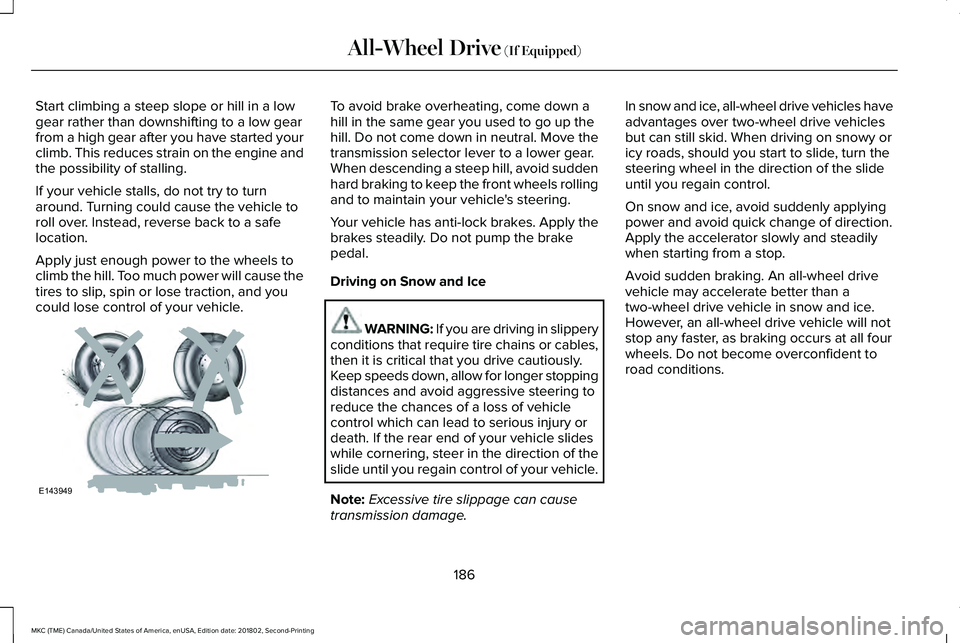
WARNING: If you are driving in slipperyconditions that require tire chains or cables,then it is critical that you drive cautiously.Keep speeds down, allow for longer stoppingdistances and avoid aggressive steering toreduce the chances of a loss of vehiclecontrol which can lead to serious injury ordeath. If the rear end of your vehicle slideswhile cornering, steer in the direction of theslide until you regain control of your vehicle.
Note:Excessive tire slippage can causetransmission damage.
In snow and ice, all-wheel drive vehicles haveadvantages over two-wheel drive vehiclesbut can still skid. When driving on snowy oricy roads, should you start to slide, turn thesteering wheel in the direction of the slideuntil you regain control.
On snow and ice, avoid suddenly applyingpower and avoid quick change of direction.Apply the accelerator slowly and steadilywhen starting from a stop.
Avoid sudden braking. An all-wheel drivevehicle may accelerate better than atwo-wheel drive vehicle in snow and ice.However, an all-wheel drive vehicle will notstop any faster, as braking occurs at all fourwheels. Do not become overconfident toroad conditions.
186
MKC (TME) Canada/United States of America, enUSA, Edition date: 201802, Second-Printing
All-Wheel Drive (If Equipped)E143949