fuel LINCOLN MKC 2019 Workshop Manual
[x] Cancel search | Manufacturer: LINCOLN, Model Year: 2019, Model line: MKC, Model: LINCOLN MKC 2019Pages: 581, PDF Size: 5.41 MB
Page 358 of 581
An oil that displays this symbol conforms tocurrent engine, emission system and fueleconomy performance standards of ILSAC.
Do not use supplemental engine oil additivesbecause they are unnecessary and couldlead to engine damage that may not becovered by your vehicle warranty.
Note:We recommend using DOT 4 LowViscosity (LV) High Performance Brake Fluidor equivalent meeting WSS-M6C65-A2. Useof any fluid other than the recommendedfluid may cause degraded brakeperformance and not meet our performancestandards. Keep brake fluid clean and dry.Contamination with dirt, water, petroleumproducts or other materials may result inbrake system damage and possible failure.
Note: Automatic transmissions that requireMERCON® LV transmission fluid should onlyuse MERCON® LV transmission fluid. Theuse of any other fluid may causetransmission damage.
Alternative Engine Oil for Extremely
Cold Climates
To improve engine cold start performance,we recommend that you use the followingalternative engine oil in extremely coldclimates, where the ambient temperaturereaches -22.0°F (-30°C) or below.
Materials
SpecificationName
WSS-M2C953-A1Engine oil - SAE 0W-30
355
MKC (TME) Canada/United States of America, enUSA, Edition date: 201802, Second-Printing
Capacities and SpecificationsE142732
Page 360 of 581
CapacityItem
5.7 qt (5.4 L)Engine oil (with oil filter).
8.1 qt (7.7 L)Engine coolant.
Between MIN/MAX on brake fluid reservoirBrake fluid.
2.4 pt (1.15 L)Rear differential fluid (All Wheel Drive).
17.9 fl oz (0.53 L)Power Transfer Unit (PTU) fluid (All Wheel Drive).
9.0 qt (8.5 L)1Automatic transmission fluid.
Fill as requiredWindshield washer fluid.
15.7 gal (59.4 L)Fuel tank.
24 oz (0.68 kg)A/C refrigerant.
2.7 fl oz (80.32 ml)A/C refrigerant compressor oil.
1 Approximate dry fill capacity. Actual amount may vary during fluid changes.
357
MKC (TME) Canada/United States of America, enUSA, Edition date: 201802, Second-Printing
Capacities and Specifications
Page 364 of 581
SpecificationName
-Lock cylinders (U.S.):Motorcraft® Penetrating and Lock LubricantXL-1
-Lock cylinders (Canada):Motorcraft® Penetrating FluidCXC-51-A
-Lock cylinders (Mexico):Motorcraft® Penetrating and Lock LubricantMXL-1
If you use oil and fluids that do not meet thedefined specification and viscosity grade,this may lead to:
•Component damage which is notcovered by the vehicle warranty.
•Longer engine cranking periods.
•Increased emission levels.
•Reduced engine performance.
•Reduced fuel economy.
•Degraded brake performance.
We recommend Motorcraft® motor oil foryour vehicle. If Motorcraft® oil is notavailable, use motor oils of therecommended viscosity grade that meet APISN requirements and display the APICertification Mark for gasoline engines. Donot use oil labeled with API SN servicecategory unless the label also displays theAPI certification mark.
361
MKC (TME) Canada/United States of America, enUSA, Edition date: 201802, Second-Printing
Capacities and SpecificationsE142732
Page 365 of 581
An oil that displays this symbol conforms tocurrent engine, emission system and fueleconomy performance standards of ILSAC.
Do not use supplemental engine oil additivesbecause they are unnecessary and couldlead to engine damage that may not becovered by your vehicle warranty.
Note:Ford recommends using DOT 4 LowViscosity (LV) High Performance Brake Fluidor equivalent meeting WSS-M6C65-A2. Useof any fluid other than the recommendedfluid may cause degraded brakeperformance and not meet the Fordperformance standards. Keep brake fluidclean and dry. Contamination with dirt,water, petroleum products or other materialsmay result in brake system damage andpossible failure.
Note: Automatic transmissions that requireMERCON® LV transmission fluid should onlyuse MERCON® LV transmission fluid. Theuse of any other fluid may causetransmission damage.
Alternative Engine Oil for Extremely
Cold Climates
To improve engine cold start performance,we recommend that you use the followingalternative engine oil in extremely coldclimates, where the ambient temperaturereaches -22.0°F (-30°C) or below.
Materials
SpecificationName
WSS-M2C953-A1Engine oil - SAE 0W-30
362
MKC (TME) Canada/United States of America, enUSA, Edition date: 201802, Second-Printing
Capacities and Specifications
Page 391 of 581
•DISP: Switch the display on or off. Youcan also touch the screen to switch thedisplay back on.
•Temperature, fan and climate controlbuttons: Control the temperature, fanspeed or settings of the climate controlsystem. See Climate Control (page 132).
911 Assist
WARNING: Unless the 911 Assistsetting is set on before a crash, the systemwill not dial for help which could delayresponse time, potentially increasing the riskof serious injury or death after a crash.
WARNING: Do not wait for 911 Assistto make an emergency call if you can do ityourself. Dial emergency servicesimmediately to avoid delayed response timewhich could increase the risk of serious injuryor death after a crash. If you do not hear 911Assist within five seconds of the crash, thesystem or phone may be damaged ornon-functional.
WARNING: Always place your phonein a secure location in your vehicle so it doesnot become a projectile or get damaged ina crash. Failure to do so may cause seriousinjury to someone or damage the phonewhich could prevent 911 Assist from workingproperly.
Note:The SYNC 911 Assist feature must beset on before the incident.
Note:The SYNC 911 Assist feature onlyoperates in the U.S., Canada or in a territoryin which 911 is the emergency number.
Note:Before setting this feature on, makesure that you read the 911 Assist PrivacyNotice later in this section for importantinformation.
Note:If any user sets 911 Assist to on or off,that setting applies for all paired phones. If911 Assist is switched off and the phone isconnected to SYNC, an icon displays on thestatus bar.
Note:Every phone operates differently.While SYNC 911 Assist works with mostcellular phones, some may have troubleusing this feature.
If a crash deploys an airbag (excluding kneeairbags and rear inflatable safety belts [ifequipped]) or activates the fuel pumpshut-off, your SYNC-equipped vehicle maybe able to contact emergency services bydialing 911 through a paired and connectedBluetooth-enabled phone. You can learnmore about the 911 Assist feature, by visiting:
Website
www.owner.lincoln.comwww.syncmyride.cawww.syncmaroute.ca
For important information about airbagdeployment and the fuel pump shut-offplease see the Supplementary Restrains andRoadside Emergencies sections of yourowner manual.
To switch 911 Assist on and off please viewthe settings information. See Settings (page445).
388
MKC (TME) Canada/United States of America, enUSA, Edition date: 201802, Second-Printing
SYNC™ 3
Page 392 of 581
To make sure that 911 Assist works correctly:
•SYNC must be powered and workingproperly at the time of the incident andthroughout feature activation and use.
•The 911 Assist feature must be set onbefore the incident.
•You must pair and connect aBluetooth-enabled and compatible cellphone to SYNC.
•A connected Bluetooth-enabled phonemust have the ability to make andmaintain an outgoing call at the time ofthe incident.
•A connected Bluetooth-enabled phonemust have adequate network coverage,battery power and signal strength.
•The vehicle must have battery power andbe located in the U.S., Canada or in aterritory in which 911 is the emergencynumber.
In the Event of a Crash
Not all crashes will deploy an airbag oractivate the fuel pump shut-off (the triggersfor 911 Assist). If a connected cell phonesustains damage or loses its connection toSYNC during a crash, SYNC will search forand try to connect to a previously paired cellphone; SYNC will then attempt to call theemergency services.
Before making the call:
•SYNC provides a short window of time(about 10 seconds) to cancel the call. Ifyou fail to cancel the call, SYNC attemptsto dial 911.
•SYNC says the following, or a similarmessage: "SYNC will attempt to call 911,to cancel the call, press Cancel on yourscreen or press and hold the phonebutton on your steering wheel."
If you do not cancel the call, and SYNCmakes a successful call, a pre-recordedmessage plays for the 911 operator, and thenthe occupant(s) in your vehicle is able to talkwith the operator. Be prepared to provideyour name, phone number and locationimmediately, because not all 911 systems arecapable of receiving this informationelectronically.
911 Assist May Not Work If
•Your cellular phone or 911 Assisthardware sustains damage in a crash.
•The vehicle's battery or the SYNC systemhas no power.
•The phone(s) thrown from your vehicleare the ones paired and connected tothe system.
911 Assist Privacy Notice
When you switch on 911 Assist, it maydisclose to emergency services that yourvehicle has been in a crash involving thedeployment of an airbag or activation of thefuel pump shut-off. Certain versions orupdates to 911 Assist may also be capable
389
MKC (TME) Canada/United States of America, enUSA, Edition date: 201802, Second-Printing
SYNC™ 3
Page 395 of 581
Website
www.syncmaroute.ca
Lincoln Connect with Lincoln Way
With a Lincoln Connect-equipped vehicle,you can use Lincoln Way® to track yourvehicle’s location and remotely accessvehicle features such as start, lock andunlock and vehicle status including fuel leveland approximate mileage. You can alsoschedule specific times to remotely start yourvehicle so it’s ready to hit the road as soonas you are. Lincoln Way® is available througha free download via the Apple App Store®or Google Play™. Message and data ratesmay apply. Services may be limited by mobilephone network coverage area.
•FCC: LHJ-FAN
•IC: 2807E-FAN
Updating Your System
You can choose to download the updateonto a USB drive or use Wi-Fi to deliverautomatic updates.
USB Updates
To use the USB update you need to log intoyour owner account and visit the SYNCsoftware update page.
Website
www.owner.lincoln.comwww.syncmyride.cawww.syncmaroute.ca
The website notifies you if an update isavailable. You can then select to downloadthe update.
You will need an empty USB drive. Pleasecheck the website for minimumrequirements. Once you have inserted theUSB drive into your computer, choose to startthe download. Follow the instructionsprovided to download the files to the USBdrive.
The installation of most files occurs in thebackground, and does not interrupt your useof the system. Navigation updates cannot beinstalled in the background, because the filesare too large.
To install the update in your vehicle, removeanything that is plugged in the USB ports onthe media hub and plug in the USB drivecontaining the update. When the USB driveis plugged in, the installation should beginimmediately. After a successful installation,the update is available the next time thevehicle is started.
Please reference the website for any furtheractions.
Updating Over Wi-Fi
To update your System over Wi-Fi yourvehicle must be within the range of a Wi-Fiaccess point. Data rates may apply.
392
MKC (TME) Canada/United States of America, enUSA, Edition date: 201802, Second-Printing
SYNC™ 3
Page 408 of 581
You can say the following commands to access SiriusXM Traffic and Travel Link:
DescriptionVoice command
Displays a list of traffic incidents.Show Traffic
Displays the current weather map.Show Weather Map
Displays a list of fuel prices.Show Fuel Prices
Displays the 5 day weather forecast.Show 5 Day Forecast
Help
Voice Settings Commands
You can say the following commands to access the voice settings:
DescriptionVoice command
Allows you to enter the voice settings functionality.Voice Settings
Sets standard prompting with longer prompts.Interaction Mode Standard
Sets advanced prompting with shorter prompts.Interaction Mode Advanced
Allows the system to confirm before making a phone call.Call Confirmation On
405
MKC (TME) Canada/United States of America, enUSA, Edition date: 201802, Second-Printing
SYNC™ 3
Page 435 of 581
Mute: Press to mute the audionavigation guidance. Press thebutton again to un-mute theguidance.
Points of Interest (POI) groupingicon: You can choose up to threePOI icons to display on the map. Ifthe chosen POIs are located closetogether or are at the same location a box isused to display a single category icon
instead of repeating the same icon, in orderto reduce clutter. When you select the boxon the map, a pop-up appears indicating howmany POIs are in this location. Select the popup to see a list of the available POIs. You canscroll through and select POIs from this list.
If your vehicle is low on charge or fuel,station icons automatically display on themap.
If you have subscribed to SiriusXM Trafficand Travel Link (where available), traffic flowwill be indicated on the map by green (clear),yellow (slowing), and red (stopped) roadhighlights. Traffic flow is indicated where theinformation is available and varies across theUS.
You can choose to display traffic icons onthe map representing twelve different typesof incidents. See Settings (page 445).
You can set a destination by hovering abovea location and selecting:
Button
Start
Destination Mode
To set a destination, press:
DescriptionMenu Item
Destination
Enter a navigation destination in any of the following formats:
Street AddressSearch
432
MKC (TME) Canada/United States of America, enUSA, Edition date: 201802, Second-Printing
SYNC™ 3E251780 E251779 E207754
Page 438 of 581
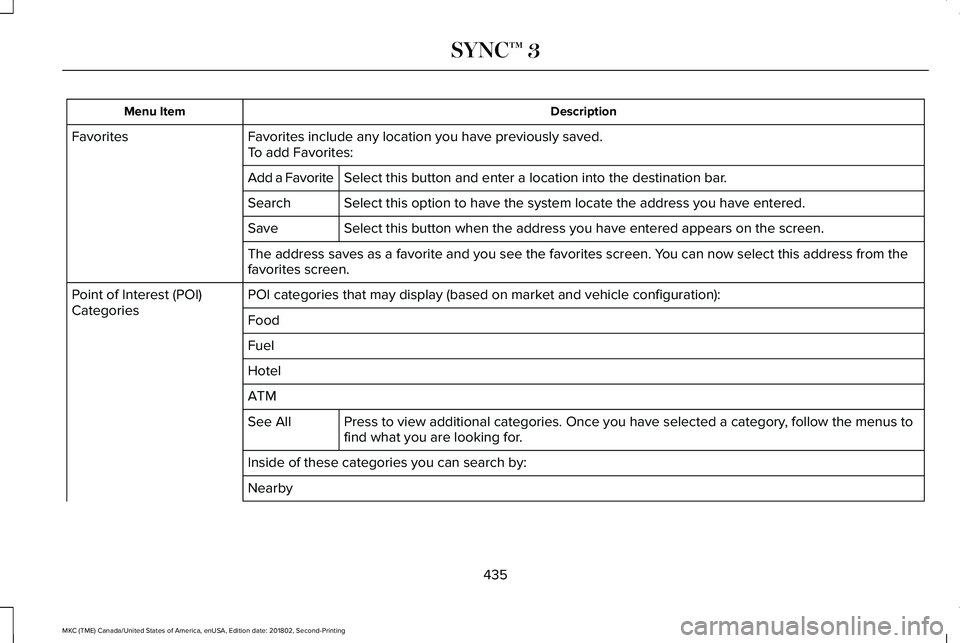
DescriptionMenu Item
Favorites include any location you have previously saved.FavoritesTo add Favorites:
Select this button and enter a location into the destination bar.Add a Favorite
Select this option to have the system locate the address you have entered.Search
Select this button when the address you have entered appears on the screen.Save
The address saves as a favorite and you see the favorites screen. You can now select this address from thefavorites screen.
POI categories that may display (based on market and vehicle configuration):Point of Interest (POI)CategoriesFood
Fuel
Hotel
ATM
Press to view additional categories. Once you have selected a category, follow the menus tofind what you are looking for.See All
Inside of these categories you can search by:
Nearby
435
MKC (TME) Canada/United States of America, enUSA, Edition date: 201802, Second-Printing
SYNC™ 3