steering wheel LINCOLN MKC 2019 Workshop Manual
[x] Cancel search | Manufacturer: LINCOLN, Model Year: 2019, Model line: MKC, Model: LINCOLN MKC 2019Pages: 581, PDF Size: 5.41 MB
Page 392 of 581
To make sure that 911 Assist works correctly:
•SYNC must be powered and workingproperly at the time of the incident andthroughout feature activation and use.
•The 911 Assist feature must be set onbefore the incident.
•You must pair and connect aBluetooth-enabled and compatible cellphone to SYNC.
•A connected Bluetooth-enabled phonemust have the ability to make andmaintain an outgoing call at the time ofthe incident.
•A connected Bluetooth-enabled phonemust have adequate network coverage,battery power and signal strength.
•The vehicle must have battery power andbe located in the U.S., Canada or in aterritory in which 911 is the emergencynumber.
In the Event of a Crash
Not all crashes will deploy an airbag oractivate the fuel pump shut-off (the triggersfor 911 Assist). If a connected cell phonesustains damage or loses its connection toSYNC during a crash, SYNC will search forand try to connect to a previously paired cellphone; SYNC will then attempt to call theemergency services.
Before making the call:
•SYNC provides a short window of time(about 10 seconds) to cancel the call. Ifyou fail to cancel the call, SYNC attemptsto dial 911.
•SYNC says the following, or a similarmessage: "SYNC will attempt to call 911,to cancel the call, press Cancel on yourscreen or press and hold the phonebutton on your steering wheel."
If you do not cancel the call, and SYNCmakes a successful call, a pre-recordedmessage plays for the 911 operator, and thenthe occupant(s) in your vehicle is able to talkwith the operator. Be prepared to provideyour name, phone number and locationimmediately, because not all 911 systems arecapable of receiving this informationelectronically.
911 Assist May Not Work If
•Your cellular phone or 911 Assisthardware sustains damage in a crash.
•The vehicle's battery or the SYNC systemhas no power.
•The phone(s) thrown from your vehicleare the ones paired and connected tothe system.
911 Assist Privacy Notice
When you switch on 911 Assist, it maydisclose to emergency services that yourvehicle has been in a crash involving thedeployment of an airbag or activation of thefuel pump shut-off. Certain versions orupdates to 911 Assist may also be capable
389
MKC (TME) Canada/United States of America, enUSA, Edition date: 201802, Second-Printing
SYNC™ 3
Page 399 of 581
Home screen displayTileItem
If your vehicle does not have navigation, this space contains the compass.
The name of the connected phone appears on the screen. The status of the phonefeatures also appear. This includes signal strength, battery charge, 911 assist settingstate (On or Off ), text messaging and roaming.
PhoneB
This map displays your current location or current route in real time.Navigation1CWhen you have navigation active, you also see the next turn and the length of timeand distance to your destination.If your vehicle does not have navigation, this space contains the audio information.
1 If equipped.
You can touch any of the feature displays toaccess that feature.
Anytime you select the home button, thesystem returns you to this screen.
USING VOICE RECOGNITION
The SYNC 3 system allows you to use voicecommands, to control features like audio andclimate controls. By using voice commands,you can keep your hands on the wheel andyour eyes on the road.
You can access each feature controlled bySYNC 3 through a variety of commands.
To activate the SYNC 3 voicecommands push the voice buttonon the steering wheel and wait forthe prompt.
___ is a dynamic listing, meaning that it canbe the name of anything, such as artist, thename of contact or number. The context andthe description of the command tell you whatto say for this dynamic option.
There are some commands that work forevery feature, these commands are:
396
MKC (TME) Canada/United States of America, enUSA, Edition date: 201802, Second-Printing
SYNC™ 3E142599
Page 425 of 581
Switching the Heated Exterior MirrorsOn and Off
Touch the button.
Switching the Heated Rear Window Onand Off
Touch the button to clear the rearwindow of thin ice and fog.
Switching the Heated Seats On and Off
Touch the button to cycle throughthe various heat settings and off.
Switching the Heated Steering WheelOn and Off
Touch the button.
Switching Maximum Air ConditioningOn and Off
Touch the button for maximumcooling.
Recirculated air flows through the instrumentpanel air vents, air conditioning turns on andthe blower motor adjusts to the highestspeed.
Switching Maximum Defrost On andOff
Touch the button for maximumdefrosting.
Air flows through the windshield air vents,and the blower motor adjusts to the highestspeed.
You can also use this setting to defog andclear the windshield of a thin covering of ice.
Note:To prevent window fogging, youcannot select recirculated air whenmaximum defrost is on.
Note:The heated rear window also turns onwhen you select maximum defrost.
Switching Recirculated Air On and Off
Touch the button to switchbetween outside air andrecirculated air.
The air currently in the passengercompartment recirculates. This may reducethe time needed to cool the interior, whenused with A/C, and reduce unwanted odorsfrom entering your vehicle.
Note:Recirculated air may turn off, orprevent you from switching on, in all air flowmodes except MAX A/C to reduce the riskof fogging. Recirculation may also turn onand off in various air distribution controlcombinations during hot weather to improvecooling efficiency.
Switching the Ventilated Seats On andOff
Touch the button to cycle throughthe various ventilated seat settingsand off.
Accessing Rear Climate Controls
Touch the button to accessadditional controls for the rearclimate system.
422
MKC (TME) Canada/United States of America, enUSA, Edition date: 201802, Second-Printing
SYNC™ 3E266189 E184884 E268558 E270447
Page 430 of 581
If your phone has a voice assistant feature,you may see a button to access it in themenu. You can also press and hold the voicebutton on the steering wheel to use thisfeature. See Voice Control (page 82).
Making Calls
There are many ways to make calls from theSYNC 3 system, including using voicecommands. See Using Voice Recognition(page 396). You can use the touchscreen toplace calls as well.
427
MKC (TME) Canada/United States of America, enUSA, Edition date: 201802, Second-Printing
SYNC™ 3
Page 431 of 581
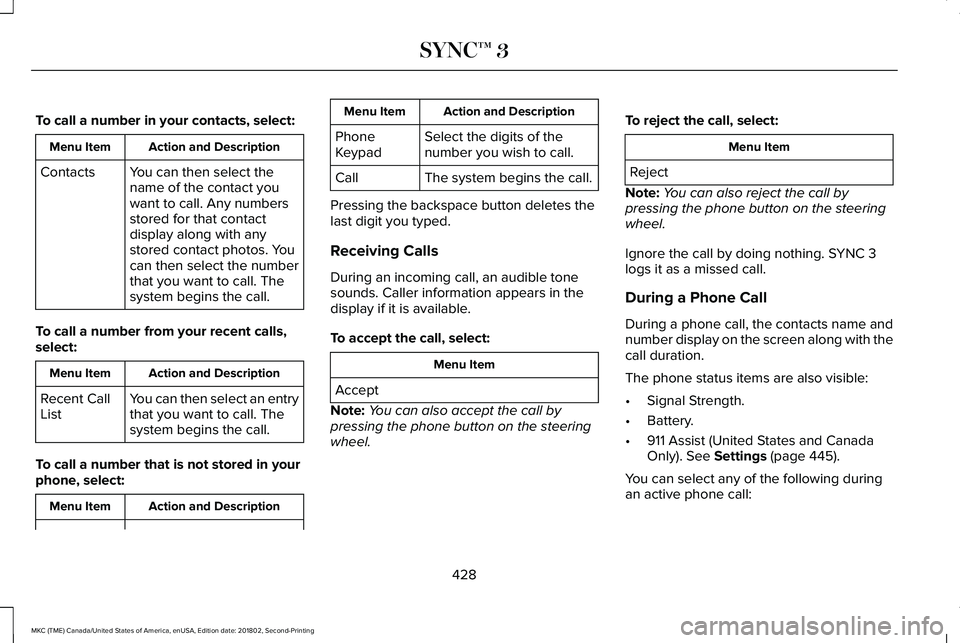
To call a number in your contacts, select:
Action and DescriptionMenu Item
You can then select thename of the contact youwant to call. Any numbersstored for that contactdisplay along with anystored contact photos. Youcan then select the numberthat you want to call. Thesystem begins the call.
Contacts
To call a number from your recent calls,select:
Action and DescriptionMenu Item
You can then select an entrythat you want to call. Thesystem begins the call.
Recent CallList
To call a number that is not stored in yourphone, select:
Action and DescriptionMenu Item
Action and DescriptionMenu Item
Select the digits of thenumber you wish to call.PhoneKeypad
The system begins the call.Call
Pressing the backspace button deletes thelast digit you typed.
Receiving Calls
During an incoming call, an audible tonesounds. Caller information appears in thedisplay if it is available.
To accept the call, select:
Menu Item
Accept
Note:You can also accept the call bypressing the phone button on the steeringwheel.
To reject the call, select:
Menu Item
Reject
Note:You can also reject the call bypressing the phone button on the steeringwheel.
Ignore the call by doing nothing. SYNC 3logs it as a missed call.
During a Phone Call
During a phone call, the contacts name andnumber display on the screen along with thecall duration.
The phone status items are also visible:
•Signal Strength.
•Battery.
•911 Assist (United States and CanadaOnly). See Settings (page 445).
You can select any of the following duringan active phone call:
428
MKC (TME) Canada/United States of America, enUSA, Edition date: 201802, Second-Printing
SYNC™ 3
Page 432 of 581
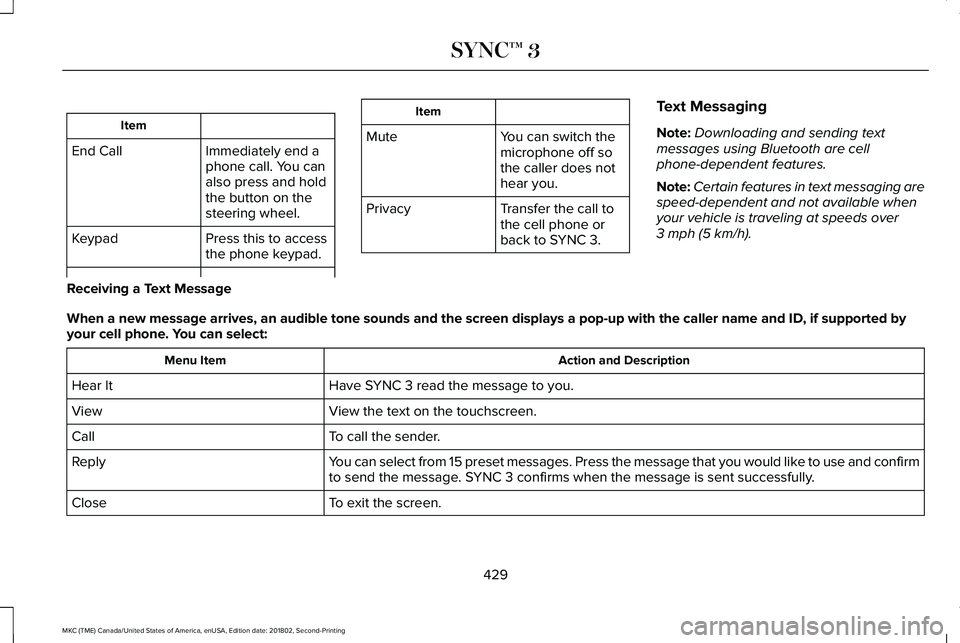
Item
Immediately end aphone call. You canalso press and holdthe button on thesteering wheel.
End Call
Press this to accessthe phone keypad.Keypad
Item
MuteYou can switch themicrophone off sothe caller does nothear you.
Transfer the call tothe cell phone orback to SYNC 3.
Privacy
Text Messaging
Note:Downloading and sending textmessages using Bluetooth are cellphone-dependent features.
Note:Certain features in text messaging arespeed-dependent and not available whenyour vehicle is traveling at speeds over3 mph (5 km/h).
Receiving a Text Message
When a new message arrives, an audible tone sounds and the screen displays a pop-up with the caller name and ID, if supported byyour cell phone. You can select:
Action and DescriptionMenu Item
Have SYNC 3 read the message to you.Hear It
View the text on the touchscreen.View
To call the sender.Call
You can select from 15 preset messages. Press the message that you would like to use and confirmto send the message. SYNC 3 confirms when the message is sent successfully.Reply
To exit the screen.Close
429
MKC (TME) Canada/United States of America, enUSA, Edition date: 201802, Second-Printing
SYNC™ 3
Page 445 of 581
HERE is the digital map provider for thenavigation application. If you find map dataerrors, you may report them directly to HEREby going to www.here.com/mapcreator.HERE evaluates all reported map errors andresponds with the result of their investigationby e-mail.
Map coverage includes the USA (includingPuerto Rico and the US Virgin Islands),Canada and Mexico.
APPS
The system enables voice, steering wheel,and touch screen control of SYNC 3 AppLinkenabled smartphone apps. When an app isrunning through AppLink, you can controlmain features of the app through voicecommands and steering wheel controls.
Note:Available AppLink enabled apps willvary by market.
Note:You must pair and connect yoursmartphone via Bluetooth to SYNC 3 toaccess AppLink.
Note:iPhone users need to connect thephone to the USB port.
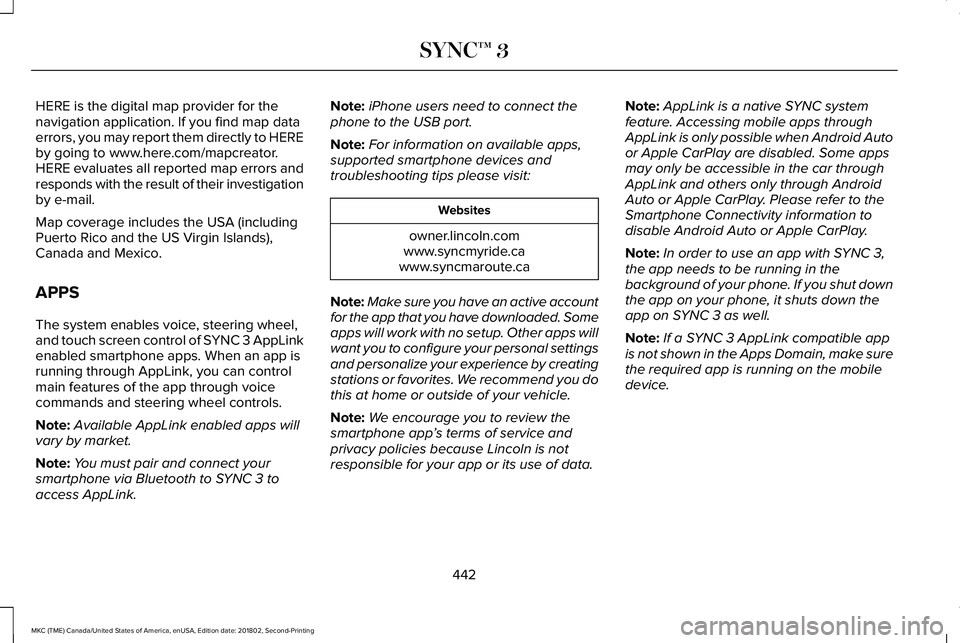
Note:For information on available apps,supported smartphone devices andtroubleshooting tips please visit:
Websites
owner.lincoln.comwww.syncmyride.cawww.syncmaroute.ca
Note:Make sure you have an active accountfor the app that you have downloaded. Someapps will work with no setup. Other apps willwant you to configure your personal settingsand personalize your experience by creatingstations or favorites. We recommend you dothis at home or outside of your vehicle.
Note:We encourage you to review thesmartphone app’s terms of service andprivacy policies because Lincoln is notresponsible for your app or its use of data.
Note:AppLink is a native SYNC systemfeature. Accessing mobile apps throughAppLink is only possible when Android Autoor Apple CarPlay are disabled. Some appsmay only be accessible in the car throughAppLink and others only through AndroidAuto or Apple CarPlay. Please refer to theSmartphone Connectivity information todisable Android Auto or Apple CarPlay.
Note:In order to use an app with SYNC 3,the app needs to be running in thebackground of your phone. If you shut downthe app on your phone, it shuts down theapp on SYNC 3 as well.
Note:If a SYNC 3 AppLink compatible appis not shown in the Apps Domain, make surethe required app is running on the mobiledevice.
442
MKC (TME) Canada/United States of America, enUSA, Edition date: 201802, Second-Printing
SYNC™ 3
Page 496 of 581
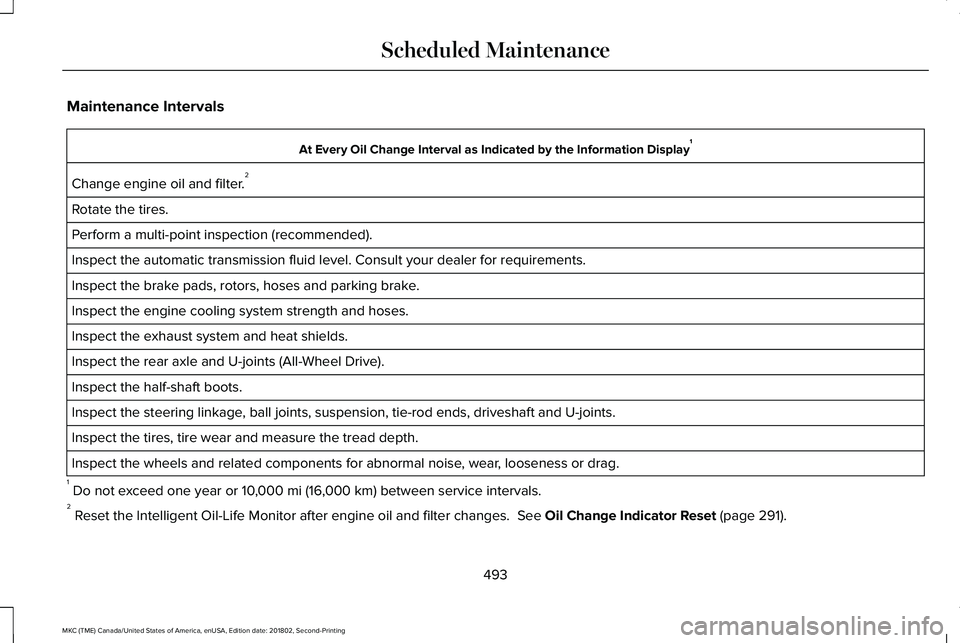
Maintenance Intervals
At Every Oil Change Interval as Indicated by the Information Display1
Change engine oil and filter.2
Rotate the tires.
Perform a multi-point inspection (recommended).
Inspect the automatic transmission fluid level. Consult your dealer for requirements.
Inspect the brake pads, rotors, hoses and parking brake.
Inspect the engine cooling system strength and hoses.
Inspect the exhaust system and heat shields.
Inspect the rear axle and U-joints (All-Wheel Drive).
Inspect the half-shaft boots.
Inspect the steering linkage, ball joints, suspension, tie-rod ends, driveshaft and U-joints.
Inspect the tires, tire wear and measure the tread depth.
Inspect the wheels and related components for abnormal noise, wear, looseness or drag.
1 Do not exceed one year or 10,000 mi (16,000 km) between service intervals.2 Reset the Intelligent Oil-Life Monitor after engine oil and filter changes. See Oil Change Indicator Reset (page 291).
493
MKC (TME) Canada/United States of America, enUSA, Edition date: 201802, Second-Printing
Scheduled Maintenance
Page 568 of 581
A
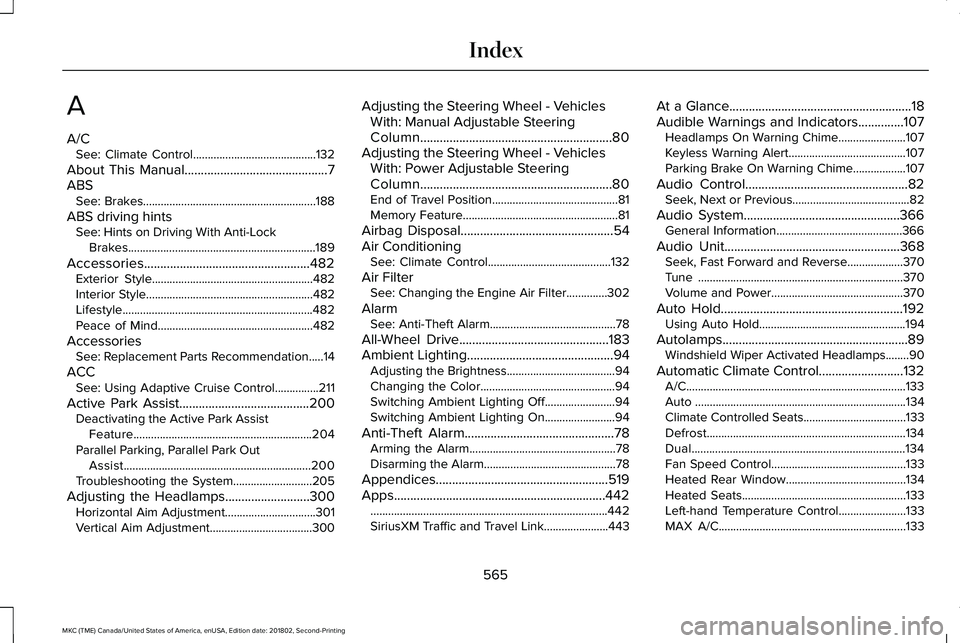
A/CSee: Climate Control..........................................132
About This Manual............................................7ABSSee: Brakes...........................................................188
ABS driving hintsSee: Hints on Driving With Anti-LockBrakes................................................................189
Accessories...................................................482Exterior Style.......................................................482Interior Style.........................................................482Lifestyle.................................................................482Peace of Mind.....................................................482
AccessoriesSee: Replacement Parts Recommendation.....14
ACCSee: Using Adaptive Cruise Control...............211
Active Park Assist........................................200Deactivating the Active Park AssistFeature.............................................................204Parallel Parking, Parallel Park OutAssist................................................................200Troubleshooting the System...........................205
Adjusting the Headlamps..........................300Horizontal Aim Adjustment...............................301Vertical Aim Adjustment...................................300
Adjusting the Steering Wheel - VehiclesWith: Manual Adjustable SteeringColumn...........................................................80Adjusting the Steering Wheel - VehiclesWith: Power Adjustable SteeringColumn...........................................................80End of Travel Position...........................................81Memory Feature.....................................................81
Airbag Disposal...............................................54Air ConditioningSee: Climate Control..........................................132
Air FilterSee: Changing the Engine Air Filter..............302
AlarmSee: Anti-Theft Alarm...........................................78
All-Wheel Drive..............................................183Ambient Lighting.............................................94Adjusting the Brightness.....................................94Changing the Color..............................................94Switching Ambient Lighting Off........................94Switching Ambient Lighting On........................94
Anti-Theft Alarm..............................................78Arming the Alarm..................................................78Disarming the Alarm.............................................78
Appendices.....................................................519Apps.................................................................442.................................................................................442SiriusXM Traffic and Travel Link......................443
At a Glance........................................................18Audible Warnings and Indicators..............107Headlamps On Warning Chime.......................107Keyless Warning Alert........................................107Parking Brake On Warning Chime..................107
Audio Control..................................................82Seek, Next or Previous........................................82
Audio System................................................366General Information...........................................366
Audio Unit......................................................368Seek, Fast Forward and Reverse...................370Tune ......................................................................370Volume and Power.............................................370
Auto Hold........................................................192Using Auto Hold..................................................194
Autolamps.........................................................89Windshield Wiper Activated Headlamps........90
Automatic Climate Control..........................132A/C...........................................................................133Auto ........................................................................134Climate Controlled Seats...................................133Defrost....................................................................134Dual.........................................................................134Fan Speed Control..............................................133Heated Rear Window.........................................134Heated Seats........................................................133Left-hand Temperature Control.......................133MAX A/C................................................................133
565
MKC (TME) Canada/United States of America, enUSA, Edition date: 201802, Second-Printing
Index
Page 570 of 581
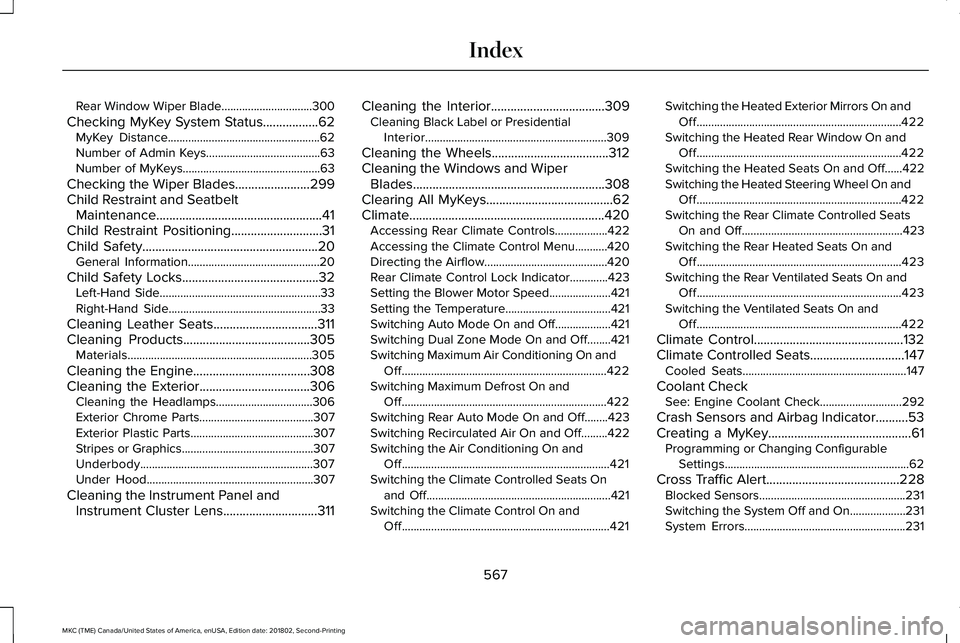
Rear Window Wiper Blade...............................300
Checking MyKey System Status.................62MyKey Distance....................................................62Number of Admin Keys.......................................63Number of MyKeys...............................................63
Checking the Wiper Blades.......................299Child Restraint and SeatbeltMaintenance...................................................41Child Restraint Positioning............................31Child Safety......................................................20General Information.............................................20
Child Safety Locks..........................................32Left-Hand Side.......................................................33Right-Hand Side....................................................33
Cleaning Leather Seats................................311Cleaning Products.......................................305Materials...............................................................305
Cleaning the Engine....................................308Cleaning the Exterior..................................306Cleaning the Headlamps.................................306Exterior Chrome Parts.......................................307Exterior Plastic Parts..........................................307Stripes or Graphics.............................................307Underbody...........................................................307Under Hood.........................................................307
Cleaning the Instrument Panel andInstrument Cluster Lens.............................311
Cleaning the Interior...................................309Cleaning Black Label or PresidentialInterior..............................................................309
Cleaning the Wheels....................................312Cleaning the Windows and WiperBlades...........................................................308Clearing All MyKeys.......................................62Climate............................................................420Accessing Rear Climate Controls..................422Accessing the Climate Control Menu...........420Directing the Airflow..........................................420Rear Climate Control Lock Indicator.............423Setting the Blower Motor Speed.....................421Setting the Temperature....................................421Switching Auto Mode On and Off...................421Switching Dual Zone Mode On and Off........421Switching Maximum Air Conditioning On andOff......................................................................422Switching Maximum Defrost On andOff......................................................................422Switching Rear Auto Mode On and Off........423Switching Recirculated Air On and Off.........422Switching the Air Conditioning On andOff.......................................................................421Switching the Climate Controlled Seats Onand Off...............................................................421Switching the Climate Control On andOff.......................................................................421
Switching the Heated Exterior Mirrors On andOff......................................................................422Switching the Heated Rear Window On andOff......................................................................422Switching the Heated Seats On and Off......422Switching the Heated Steering Wheel On andOff......................................................................422Switching the Rear Climate Controlled SeatsOn and Off.......................................................423Switching the Rear Heated Seats On andOff......................................................................423Switching the Rear Ventilated Seats On andOff......................................................................423Switching the Ventilated Seats On andOff......................................................................422
Climate Control..............................................132Climate Controlled Seats.............................147Cooled Seats........................................................147
Coolant CheckSee: Engine Coolant Check............................292
Crash Sensors and Airbag Indicator..........53Creating a MyKey............................................61Programming or Changing ConfigurableSettings...............................................................62
Cross Traffic Alert.........................................228Blocked Sensors..................................................231Switching the System Off and On...................231System Errors.......................................................231
567
MKC (TME) Canada/United States of America, enUSA, Edition date: 201802, Second-Printing
Index