parking brake LINCOLN MKC 2019 Owners Manual
[x] Cancel search | Manufacturer: LINCOLN, Model Year: 2019, Model line: MKC, Model: LINCOLN MKC 2019Pages: 581, PDF Size: 5.41 MB
Page 6 of 581
Memory Function.........................................143
Rear Seats......................................................145
Heated Seats.................................................145
Climate Controlled Seats...........................147
Universal Garage Door Opener
Universal Garage Door Opener...............149
Auxiliary Power Points
Auxiliary Power Points................................154
Storage Compartments
Center Console............................................156
Overhead Console......................................156
Rear Seat Armrest........................................156
Starting and Stopping the Engine
General Information.....................................157
Keyless Starting............................................157
Starting a Gasoline Engine........................158
Engine Block Heater....................................161
Unique Driving Characteristics
Auto-Start-Stop.............................................163
Fuel and Refueling
Safety Precautions.......................................166
Fuel Quality...................................................166
Fuel Filler Funnel Location.........................167
Running Out of Fuel.....................................167
Refueling........................................................169
Fuel Consumption........................................172
Engine Emission Control
Emission Law.................................................173
Catalytic Converter......................................174
Transmission
Automatic Transmission..............................177
All-Wheel Drive
Using All-Wheel Drive.................................183
Brakes
General Information.....................................188
Hints on Driving With Anti-Lock Brakes.......................................................................189
Electric Parking Brake.................................189
Hill Start Assist...............................................191
Auto Hold.......................................................192
Traction Control
Principle of Operation.................................195
Using Traction Control................................195
Stability Control
Principle of Operation.................................196
Using Stability Control................................197
Parking Aids
Principle of Operation.................................198
Rear Parking Aid...........................................198
Front Parking Aid.........................................199
Active Park Assist.......................................200
Rear View Camera......................................207
Cruise Control
Principle of Operation.................................210
3
MKC (TME) Canada/United States of America, enUSA, Edition date: 201802, Second-Printing
Table of Contents
Page 12 of 581
Windshield defrosting system
Interior luggage compartmentrelease
Jack
Keep out of reach of children
Lighting control
Low tire pressure warning
Maintain correct fluid level
Note operating instructions
Horn control
Panic alarm
Parking aid
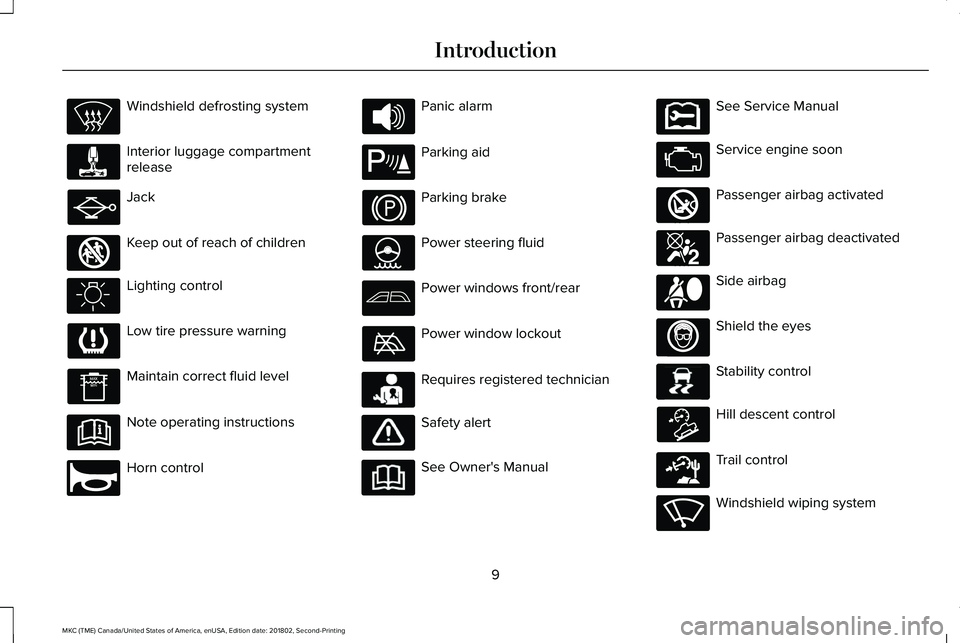
Parking brake
Power steering fluid
Power windows front/rear
Power window lockout
Requires registered technician
Safety alert
See Owner's Manual
See Service Manual
Service engine soon
Passenger airbag activated
Passenger airbag deactivated
Side airbag
Shield the eyes
Stability control
Hill descent control
Trail control
Windshield wiping system
9
MKC (TME) Canada/United States of America, enUSA, Edition date: 201802, Second-Printing
Introduction E161353 E270945 E139213 E231159 E231158 E270849 E270850 E167012 E138639 E163957 E271982 E270969
Page 22 of 581
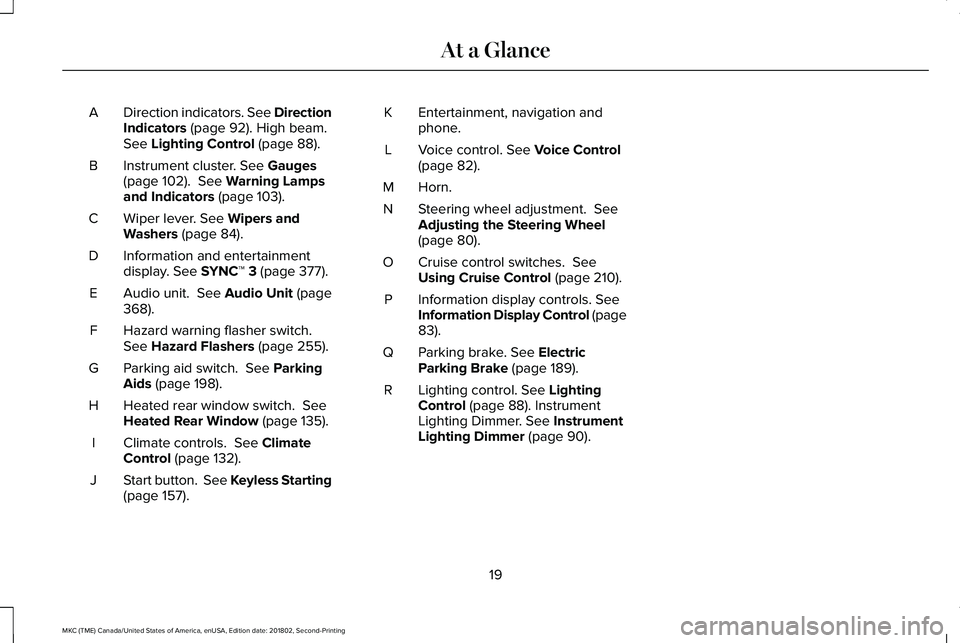
Direction indicators. See DirectionIndicators (page 92). High beam.See Lighting Control (page 88).
A
Instrument cluster. See Gauges(page 102). See Warning Lampsand Indicators (page 103).
B
Wiper lever. See Wipers andWashers (page 84).C
Information and entertainmentdisplay. See SYNC™ 3 (page 377).D
Audio unit. See Audio Unit (page368).E
Hazard warning flasher switch.See Hazard Flashers (page 255).F
Parking aid switch. See ParkingAids (page 198).G
Heated rear window switch. SeeHeated Rear Window (page 135).H
Climate controls. See ClimateControl (page 132).I
Start button. See Keyless Starting(page 157).J
Entertainment, navigation andphone.K
Voice control. See Voice Control(page 82).L
Horn.M
Steering wheel adjustment. SeeAdjusting the Steering Wheel(page 80).
N
Cruise control switches. SeeUsing Cruise Control (page 210).O
Information display controls. SeeInformation Display Control (page83).
P
Parking brake. See ElectricParking Brake (page 189).Q
Lighting control. See LightingControl (page 88). InstrumentLighting Dimmer. See InstrumentLighting Dimmer (page 90).
R
19
MKC (TME) Canada/United States of America, enUSA, Edition date: 201802, Second-Printing
At a Glance
Page 44 of 581
Deactivating and Activating the Belt-MinderFeature
WARNING: While the system allowsyou to deactivate it, this system is designedto improve your chances of being safelybelted and surviving an accident. Werecommend you leave the system activatedfor yourself and others who may use thevehicle.
Note:The driver and front passengerwarnings switch on and off independently.When you perform this procedure for oneseating position, do not buckle the otherposition as this will terminate the process.
Read Steps 1 - 4 thoroughly beforeproceeding with the programmingprocedure.
Before following the procedure, make surethat:
•The parking brake is set.
•The transmission is in park (P) or neutral(N).
•The ignition is off.
•The driver and front passenger safetybelts are unbuckled.
1. Switch the ignition on. Do not start thevehicle.
2. Wait until the safety belt warning lightturns off (about one minute). After Step2, wait an additional 5 seconds beforeproceeding with Step 3. Once you startStep 3, you must complete the procedurewithin 30 seconds.
3.For the seating position you are switchingoff, buckle then unbuckle the safety beltthree times at a moderate speed, endingin the unbuckled state. After Step 3, thesafety belt warning light turns on.
4. While the safety belt warning light is on,buckle and then unbuckle the safety belt.After Step 4, the safety belt warning lightflashes for confirmation.
•This will switch the feature off for thatseating position if it is currently on.
•This will switch the feature on for thatseating position if it is currently off.
CHILD RESTRAINT AND SEATBELT
MAINTENANCE
Inspect the vehicle seatbelts and child safetyseat systems periodically to make sure theywork properly and are not damaged. Inspectthe vehicle and child restraint seatbelts tomake sure there are no nicks, tears or cuts.Replace if necessary. All vehicle seatbeltassemblies, including retractors, buckles,front seatbelt buckle assemblies, bucklesupport assemblies (slide bar-if equipped),shoulder belt height adjusters (if equipped),shoulder belt guide on seat backrest (ifequipped), child safety seat LATCH andtether anchors, and attaching hardware,should be inspected after a crash. Read thechild restraint manufacturer's instructions foradditional inspection and maintenanceinformation specific to the child restraint.
41
MKC (TME) Canada/United States of America, enUSA, Edition date: 201802, Second-Printing
Seatbelts
Page 62 of 581
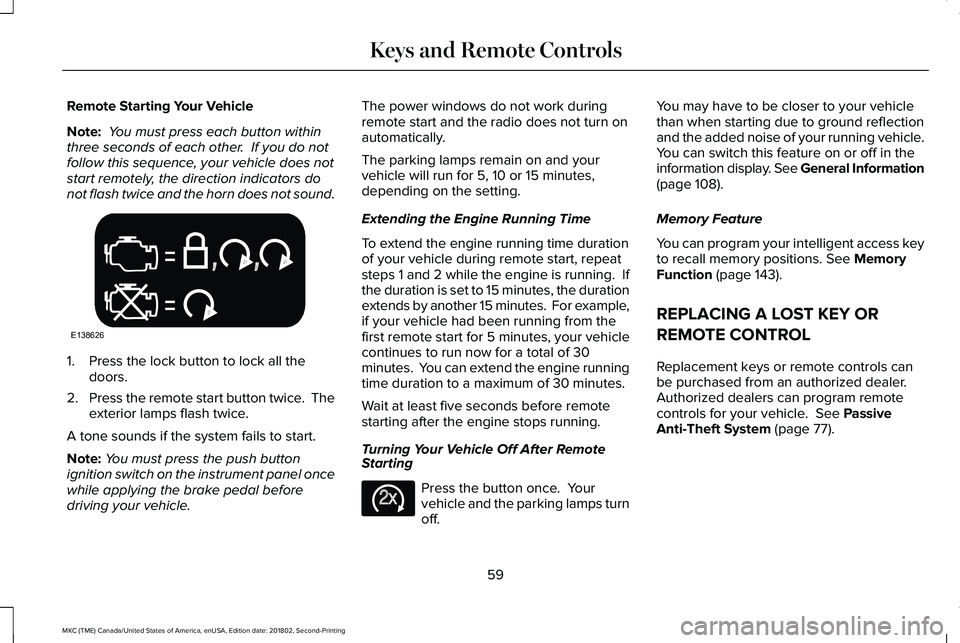
Remote Starting Your Vehicle
Note: You must press each button withinthree seconds of each other. If you do notfollow this sequence, your vehicle does notstart remotely, the direction indicators donot flash twice and the horn does not sound.
1. Press the lock button to lock all thedoors.
2.Press the remote start button twice. Theexterior lamps flash twice.
A tone sounds if the system fails to start.
Note:You must press the push buttonignition switch on the instrument panel oncewhile applying the brake pedal beforedriving your vehicle.
The power windows do not work duringremote start and the radio does not turn onautomatically.
The parking lamps remain on and yourvehicle will run for 5, 10 or 15 minutes,depending on the setting.
Extending the Engine Running Time
To extend the engine running time durationof your vehicle during remote start, repeatsteps 1 and 2 while the engine is running. Ifthe duration is set to 15 minutes, the durationextends by another 15 minutes. For example,if your vehicle had been running from thefirst remote start for 5 minutes, your vehiclecontinues to run now for a total of 30minutes. You can extend the engine runningtime duration to a maximum of 30 minutes.
Wait at least five seconds before remotestarting after the engine stops running.
Turning Your Vehicle Off After RemoteStarting
Press the button once. Yourvehicle and the parking lamps turnoff.
You may have to be closer to your vehiclethan when starting due to ground reflectionand the added noise of your running vehicle.You can switch this feature on or off in theinformation display. See General Information(page 108).
Memory Feature
You can program your intelligent access keyto recall memory positions. See MemoryFunction (page 143).
REPLACING A LOST KEY OR
REMOTE CONTROL
Replacement keys or remote controls canbe purchased from an authorized dealer.Authorized dealers can program remotecontrols for your vehicle. See PassiveAnti-Theft System (page 77).
59
MKC (TME) Canada/United States of America, enUSA, Edition date: 201802, Second-Printing
Keys and Remote ControlsE138626 E138625
Page 94 of 581
Type One - Conventional (Non-Configurable)
The daytime running lamps turn on when:
1. Switching the ignition on.
2. The transmission is not in park (P) forvehicles with automatic transmissions, orreleasing the parking brake for vehicleswith manual transmissions.
3. The lighting control is in the off, parkinglamp or autolamps positions.
4. The headlamps are off.
Type Two - Configurable
Switch the daytime running lamps on or offusing the information display. SeeInformation Displays (page 108).
The daytime running lamps turn on when:
1. The lamps are on in the informationdisplay.
2. Switching the ignition on.
3. The transmission is not in park (P) forvehicles with automatic transmissions, orreleasing the parking brake for vehicleswith manual transmissions.
4. The lighting control is in the autolampsposition.
5. The headlamps are off.
The other lighting control switch positionsdo not turn on the daytime running lamps.
If the daytime running lamps are off in theinformation display, the lamps stay off in allswitch positions.
AUTOMATIC HIGH BEAM
CONTROL (If Equipped)
WARNING: The system does notrelieve you of your responsibility to drive withdue care and attention. You may need tooverride the system if it does not turn thehigh beams on or off.
The system turns on high beams if it is darkenough and no other traffic is present. If itdetects an approaching vehicle’s headlampsor tail lamps, or street lighting ahead, thesystem turns off high beams before they candistract other road users. Low beams remainon.
Note:The system may not operate properlyif the sensor is blocked. Keep the windshieldfree from obstruction or damage.
Note:The system may not operate properlyin cold or inclement conditions. You canswitch on the high beams by overriding thesystem.
Note:If the system detects a blockage, forexample bird droppings, bug splatter, snowor ice, the system goes into low beam modeuntil you clear the blockage. A message mayappear in the information display if thecamera is blocked.
Note:Using much larger tires or equippingvehicle accessories such as snowplows canmodify your vehicle's ride height anddegrade automatic high beam controlperformance.
91
MKC (TME) Canada/United States of America, enUSA, Edition date: 201802, Second-Printing
Lighting
Page 108 of 581
Brake System Warning Lamp
WARNING: Driving your vehicle withthe warning lamp on is dangerous. Asignificant decrease in braking performancemay occur. It may take you longer to stopyour vehicle. Have your vehicle checked assoon as possible. Driving extended distanceswith the parking brake engaged can causebrake failure and the risk of personal injury.
Note:Indicators vary depending on region.
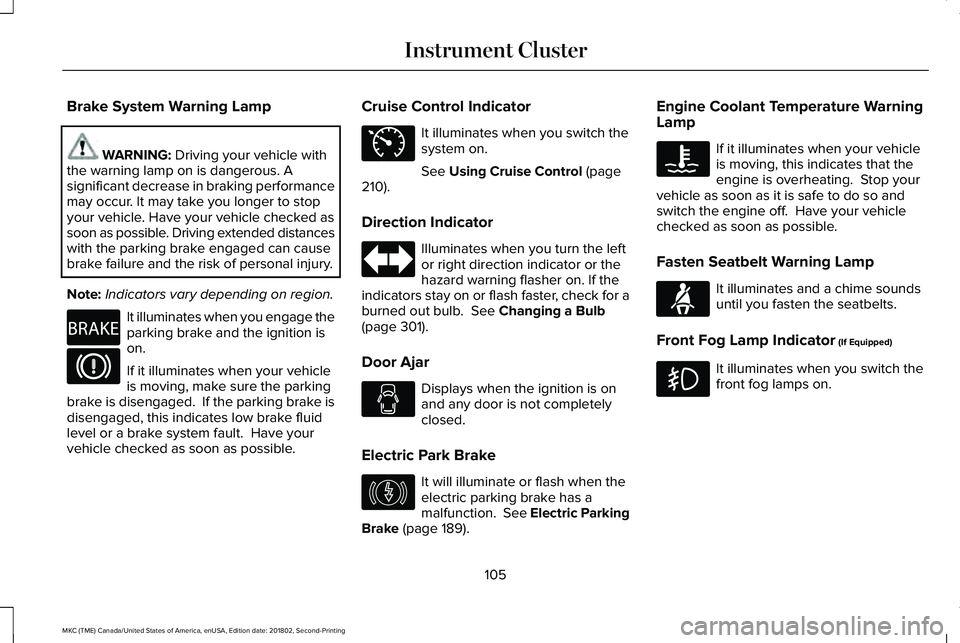
It illuminates when you engage theparking brake and the ignition ison.
If it illuminates when your vehicleis moving, make sure the parkingbrake is disengaged. If the parking brake isdisengaged, this indicates low brake fluidlevel or a brake system fault. Have yourvehicle checked as soon as possible.
Cruise Control Indicator
It illuminates when you switch thesystem on.
See Using Cruise Control (page210).
Direction Indicator
Illuminates when you turn the leftor right direction indicator or thehazard warning flasher on. If theindicators stay on or flash faster, check for aburned out bulb. See Changing a Bulb(page 301).
Door Ajar
Displays when the ignition is onand any door is not completelyclosed.
Electric Park Brake
It will illuminate or flash when theelectric parking brake has amalfunction. See Electric ParkingBrake (page 189).
Engine Coolant Temperature WarningLamp
If it illuminates when your vehicleis moving, this indicates that theengine is overheating. Stop yourvehicle as soon as it is safe to do so andswitch the engine off. Have your vehiclechecked as soon as possible.
Fasten Seatbelt Warning Lamp
It illuminates and a chime soundsuntil you fasten the seatbelts.
Front Fog Lamp Indicator (If Equipped)
It illuminates when you switch thefront fog lamps on.
105
MKC (TME) Canada/United States of America, enUSA, Edition date: 201802, Second-Printing
Instrument ClusterE270480 E71340 E146190 E71880
Page 110 of 581
Service Engine Soon
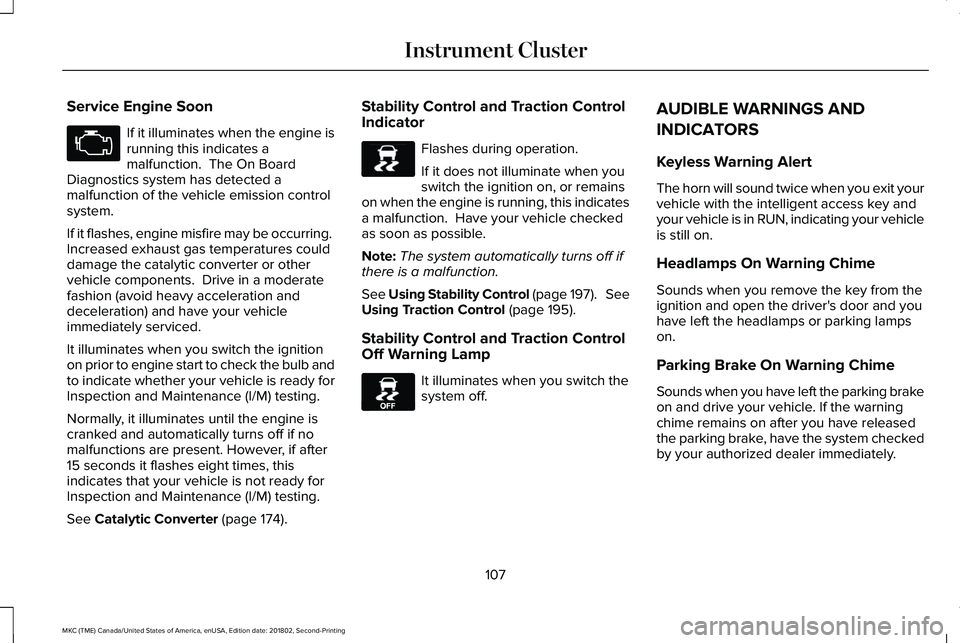
If it illuminates when the engine isrunning this indicates amalfunction. The On BoardDiagnostics system has detected amalfunction of the vehicle emission controlsystem.
If it flashes, engine misfire may be occurring. Increased exhaust gas temperatures coulddamage the catalytic converter or othervehicle components. Drive in a moderatefashion (avoid heavy acceleration anddeceleration) and have your vehicleimmediately serviced.
It illuminates when you switch the ignitionon prior to engine start to check the bulb andto indicate whether your vehicle is ready forInspection and Maintenance (I/M) testing.
Normally, it illuminates until the engine iscranked and automatically turns off if nomalfunctions are present. However, if after15 seconds it flashes eight times, thisindicates that your vehicle is not ready forInspection and Maintenance (I/M) testing.
See Catalytic Converter (page 174).
Stability Control and Traction ControlIndicator
Flashes during operation.
If it does not illuminate when youswitch the ignition on, or remainson when the engine is running, this indicatesa malfunction. Have your vehicle checkedas soon as possible.
Note:The system automatically turns off ifthere is a malfunction.
See Using Stability Control (page 197). SeeUsing Traction Control (page 195).
Stability Control and Traction ControlOff Warning Lamp
It illuminates when you switch thesystem off.
AUDIBLE WARNINGS AND
INDICATORS
Keyless Warning Alert
The horn will sound twice when you exit yourvehicle with the intelligent access key andyour vehicle is in RUN, indicating your vehicleis still on.
Headlamps On Warning Chime
Sounds when you remove the key from theignition and open the driver's door and youhave left the headlamps or parking lampson.
Parking Brake On Warning Chime
Sounds when you have left the parking brakeon and drive your vehicle. If the warningchime remains on after you have releasedthe parking brake, have the system checkedby your authorized dealer immediately.
107
MKC (TME) Canada/United States of America, enUSA, Edition date: 201802, Second-Printing
Instrument Cluster E138639 E130458
Page 128 of 581
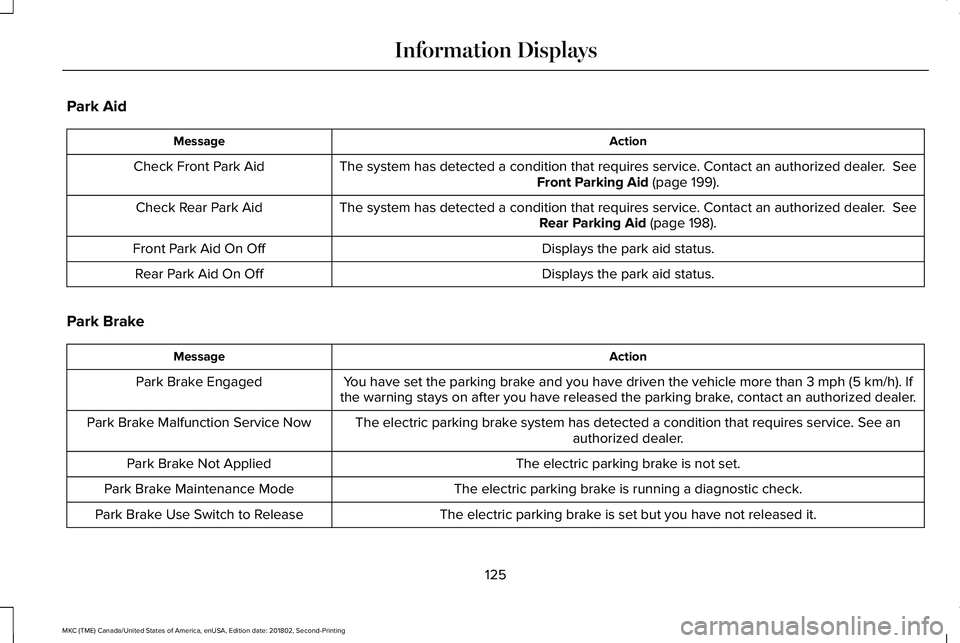
Park Aid
ActionMessage
The system has detected a condition that requires service. Contact an authorized dealer. SeeFront Parking Aid (page 199).Check Front Park Aid
The system has detected a condition that requires service. Contact an authorized dealer. SeeRear Parking Aid (page 198).Check Rear Park Aid
Displays the park aid status.Front Park Aid On Off
Displays the park aid status.Rear Park Aid On Off
Park Brake
ActionMessage
You have set the parking brake and you have driven the vehicle more than 3 mph (5 km/h). Ifthe warning stays on after you have released the parking brake, contact an authorized dealer.Park Brake Engaged
The electric parking brake system has detected a condition that requires service. See anauthorized dealer.Park Brake Malfunction Service Now
The electric parking brake is not set.Park Brake Not Applied
The electric parking brake is running a diagnostic check.Park Brake Maintenance Mode
The electric parking brake is set but you have not released it.Park Brake Use Switch to Release
125
MKC (TME) Canada/United States of America, enUSA, Edition date: 201802, Second-Printing
Information Displays
Page 129 of 581
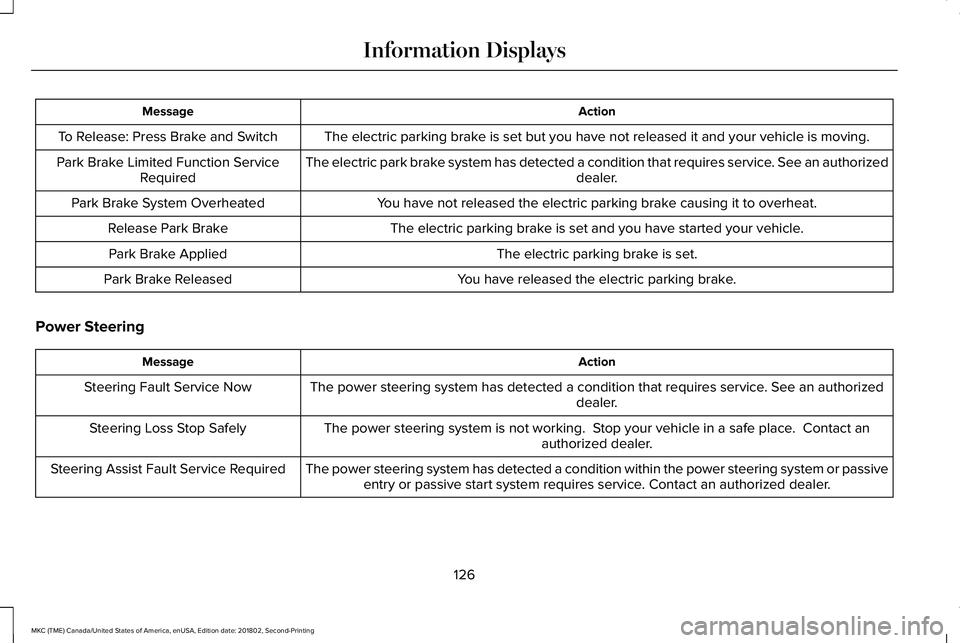
ActionMessage
The electric parking brake is set but you have not released it and your vehicle is moving.To Release: Press Brake and Switch
The electric park brake system has detected a condition that requires service. See an authorizeddealer.Park Brake Limited Function ServiceRequired
You have not released the electric parking brake causing it to overheat.Park Brake System Overheated
The electric parking brake is set and you have started your vehicle.Release Park Brake
The electric parking brake is set.Park Brake Applied
You have released the electric parking brake.Park Brake Released
Power Steering
ActionMessage
The power steering system has detected a condition that requires service. See an authorizeddealer.Steering Fault Service Now
The power steering system is not working. Stop your vehicle in a safe place. Contact anauthorized dealer.Steering Loss Stop Safely
The power steering system has detected a condition within the power steering system or passiveentry or passive start system requires service. Contact an authorized dealer.Steering Assist Fault Service Required
126
MKC (TME) Canada/United States of America, enUSA, Edition date: 201802, Second-Printing
Information Displays