reset LINCOLN MKS 2010 User Guide
[x] Cancel search | Manufacturer: LINCOLN, Model Year: 2010, Model line: MKS, Model: LINCOLN MKS 2010Pages: 358, PDF Size: 2.37 MB
Page 34 of 358
When the system has ejected the CD, the display will read REMOVE CD
#. If you do not remove the CD the system will reload the disc.
To auto eject all loaded discs–Press and hold
. The system will eject
all discs and prompt you when to remove them.
SEEK:Press
SEEKto access the previous/next track.
CAT (Category) / FLD (Folder):
In MP3 mode only–Press CAT/FOLD and then press
SEEKto
access the previous/next folder.
SCAN:Press for a brief sampling of all tracks on the current disc or
MP3folder.
DIRECT:
In CD mode–Press DIRECT. The display will read DIRECT TRACK
MODE SELECT TRACK. Enter the desired track number using the
memory preset buttons (0–9). The system will then begin playing that
track.
In MP3 folder mode–Press DIRECT and the memory preset buttons
(0–9) of the desired folder. The system will advance to that specific
folder.
TEXT:
In MP3 mode only–Press TEXT repeatedly to view Album (AL), Folder
(FL), Song (SO) and Artist (AR) in the display, if available.
In TEXT mode:Sometimes the display requires additional text to be
displayed. When theindicatorisactive,pressTEXT and then
press
SEEKto view the additional display text.
COMPRESSION:Press MENU repeatedly until COMPRESSION ON/OFF
appears in the display. Use
SEEKto toggle ON/OFF. When
COMPRESSION is ON, the system will bring the soft and loud CD
passages together for a more consistent listening level.
SHUFFLE:Press SHUFFLE to toggle on/off and begin/stop random play.
The system will only shuffle the disc currently playing.
Satellite Radio
Satellite radio is available only with a valid SIRIUS radio
subscription. Check with your authorized dealer for availability.
SIRIUS:Press repeatedly to access satellite radio mode, if equipped.
Press repeatedly to cycle through SAT1, SAT2 and SAT3 modes.
Entertainment Systems
34
2010 MKS(mks)
Owners Guide(own2002), 1st Printing
USA(fus)
Page 35 of 358
TUNE:Turn to go to the next / previous available SIRIUS satellite
station.
DIRECT:Press DIRECT then enter the desired channel (i.e. 002) using
the memory preset buttons (0–9). If you only enter one digit, press OK
and the system will go to that satellite channel. If you enter three digits,
the system will automatically go to that channel, if available. You may
cancel your entry by pressing DIRECT.
If an invalid station number is entered, INVALID CHANNEL will appear
in the display and the system will continue playing the current station.
SEEK:Press
SEEKto seek to the previous/next channel. If a
specific category is selected, (Jazz, Rock, News, etc.),
press
SEEKto seek to the previous/next channel in the selected
category. Press and hold
SEEKto fast seek through the
previous/next channels.
SCAN:Press SCAN for a brief sampling of all available SIRIUS satellite
channels. If a specific category is selected, (Jazz, Rock, News, etc.) press
SCAN for a brief sampling of all available SIRIUS satellite channels within
the selected category.
MEMORY PRESETS (0–9):There are 30 available presets, 10 each for
SAT1, SAT2 and SAT3. To save satellite channels in your memory
presets, tune to the desired channel then press and hold a memory
preset number (0–9) until sound returns.
TEXT:Press and release to display the artist and song title. While in
TEXT MODE, press again to scroll through the Artist (AR), Song (SO),
Channel (CH) and Category (CA).
In TEXT MODE:Sometimes the display requires additional text to be
displayed. When theindicatorisactive,pressTEXT and then
press
SEEKto view the additional display text.
CAT (Category) / FLD (Folder):Press to toggle between turning the
most recently selected satellite radio category on or off. The category
icon (CAT) will illuminate in the display when a specific category is
selected (the icon will not illuminate during CATEGORY ALL). If no
category has ever been selected, NO CATEGORY SELECTED will display.
Note:Separate categories can be set for SAT1, SAT2 or SAT3.
Refer toSatellite radio menufor further information on selecting a
satellite radio category.
Entertainment Systems
35
2010 MKS(mks)
Owners Guide(own2002), 1st Printing
USA(fus)
Page 37 of 358
d. DISABLE ALERTS/ENABLE ALERTS:Press OK to
enable/disable the satellite alert status which alerts you when your
selected songs are playing on a satellite radio channel. (The system
default is disabled.) SONG ALERTS ENABLED/DISABLED will appear
in the display. The menu listing will display the opposite state. For
example, if you have chosen to enable the song alerts, the menu
listing will read DISABLE as the alerts are currently on, so your other
optionistoturnthemoff.
•CHANNEL LOCKOUT MENU-Press OK to enter the Channel
Lockout menu. Press the
SEEKto scroll through the following
options:
a. LOCK/UNLOCK THIS CHANNEL:Press OK when
LOCK/UNLOCK THIS CHANNEL is displayed and the display will read
ENTER PIN. Enter your four-digit PIN number (initial PIN is 1234)
and the system will lock/unlock the channel and CHANNEL LOCKED
or UNLOCKED will be displayed.
Note: you must be tuned to the specific channel you want to
lock/unlock when using this feature.
b. CHANGE PIN:Press OK when CHANGE PIN is displayed. The
display will read ENTER OLD PIN. Enter your current (old) PIN
number and when the system accepts your entry it will display
ENTER NEW PIN. Enter your new four-digit PIN and the system will
save the new PIN and PIN SAVED will display.
c. UNLOCK ALL CHANNELS:Press OK when UNLOCK ALL
CHANNELS is displayed and the display will read ENTER PIN. Enter
your four-digit PIN and the system will unlock all channels and the
display will read CHANNEL UNLOCKED.
d. RESET PIN:Press OK when RESET PIN is displayed. The display
will read ARE YOUR SURE. Press OK again to automatically reset the
PIN number to its initial password setting (1234). PIN RESET TO
DEFAULT PIN will be displayed.
e. RETURN:Press OK when RETURN is displayed and the system
will exit back to the satellite radio menu.
Sound Adjustments
Press SOUND repeatedly to cycle through the following features:
BASS:Press
SEEKto adjust the level of bass.
TREBLE:Press
SEEKto adjust the level of treble.
BALANCE:Press
SEEKto adjust the audio between the left
(L) and right (R) speakers.
Entertainment Systems
37
2010 MKS(mks)
Owners Guide(own2002), 1st Printing
USA(fus)
Page 45 of 358
•Terrain: Hills, mountains, tall buildings, bridges, tunnels, freeway
overpasses, parking garages, dense tree foliage and thunderstorms can
interfere with your reception.
•Station overload: When you pass a ground based broadcast repeating
tower, a stronger signal may overtake a weaker one and result in an
audio mute.
Unlike AM/FM audible static, you will hear an audio mute when there is
a satellite radio signal interference. Your radio display may display NO
SIGNAL to indicate the interference.
SIRIUS satellite radio service:SIRIUS Satellite Radio is a subscription
based satellite radio service that broadcasts music, sports, news and
entertainment programming. A service fee is required in order to receive
SIRIUS service. Vehicles that are equipped with a factory installed
SIRIUS Satellite Radio system include:
•Hardware and limited subscription term, which begins on the date of
sale or lease of the vehicle.
•Use of online media player providing access to all SIRIUS music
channels over the internet using any computer connected to the
internet (U.S. customers only)
For information on extended subscription terms, contact SIRIUS at
1–888–539–7474.
Note:SIRIUS reserves the unrestricted right to change, rearrange, add
or delete programming including canceling, moving or adding particular
channels, and its prices, at any time, with or without notice to you. Ford
Motor Company shall not be responsible for any such programming
changes.
Satellite Radio Electronic Serial Number (ESN):This 12–digit
Satellite Serial Number is needed to activate, modify or track your
satellite radio account. You will need this number when communicating
with SIRIUS. While in Satellite Radio mode, you can view this number on
the radio display by pressing AUX and Preset 1 control simultaneously.
Entertainment Systems
45
2010 MKS(mks)
Owners Guide(own2002), 1st Printing
USA(fus)
Page 46 of 358
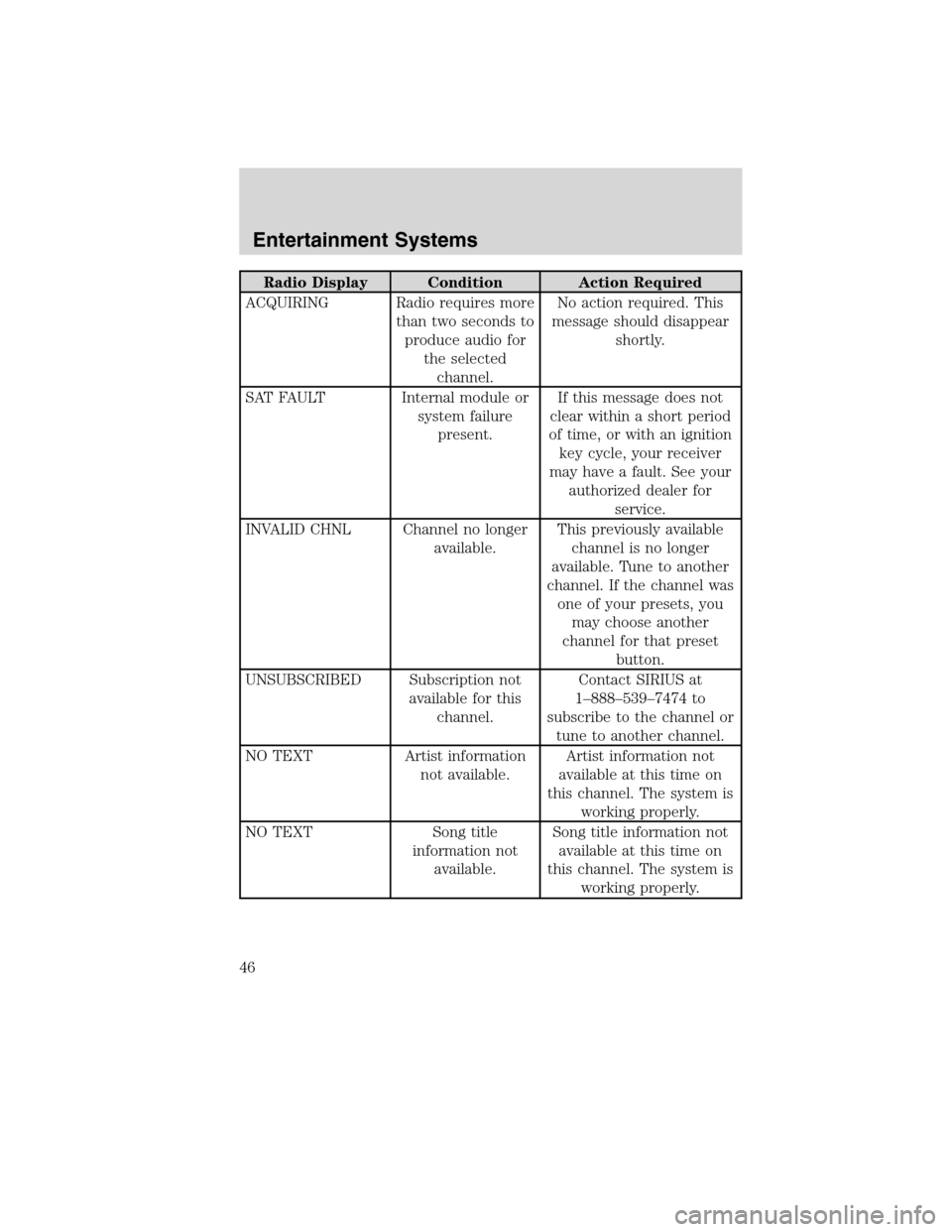
Radio Display Condition Action Required
ACQUIRING Radio requires more
than two seconds to
produce audio for
the selected
channel.No action required. This
message should disappear
shortly.
SAT FAULT Internal module or
system failure
present.If this message does not
clear within a short period
of time, or with an ignition
key cycle, your receiver
may have a fault. See your
authorized dealer for
service.
INVALID CHNL Channel no longer
available.This previously available
channel is no longer
available. Tune to another
channel. If the channel was
one of your presets, you
may choose another
channel for that preset
button.
UNSUBSCRIBED Subscription not
available for this
channel.Contact SIRIUS at
1–888–539–7474 to
subscribe to the channel or
tune to another channel.
NO TEXT Artist information
not available.Artist information not
available at this time on
this channel. The system is
working properly.
NO TEXT Song title
information not
available.Song title information not
available at this time on
this channel. The system is
working properly.
Entertainment Systems
46
2010 MKS(mks)
Owners Guide(own2002), 1st Printing
USA(fus)
Page 62 of 358
Note:If the battery is disconnected, discharged, or a new battery is
installed, the dimmer control requires re-calibration. Press the dimmer
control from the full dim position to the full on position to reset. This
will ensure that your displays are visible under all lighting conditions.
AIMING THE HEADLAMPS
The headlamps on your vehicle are properly aimed at the assembly plant.
If your vehicle has been in an accident, the alignment of your headlamps
should be checked by your authorized dealer.
Vertical aim adjustment
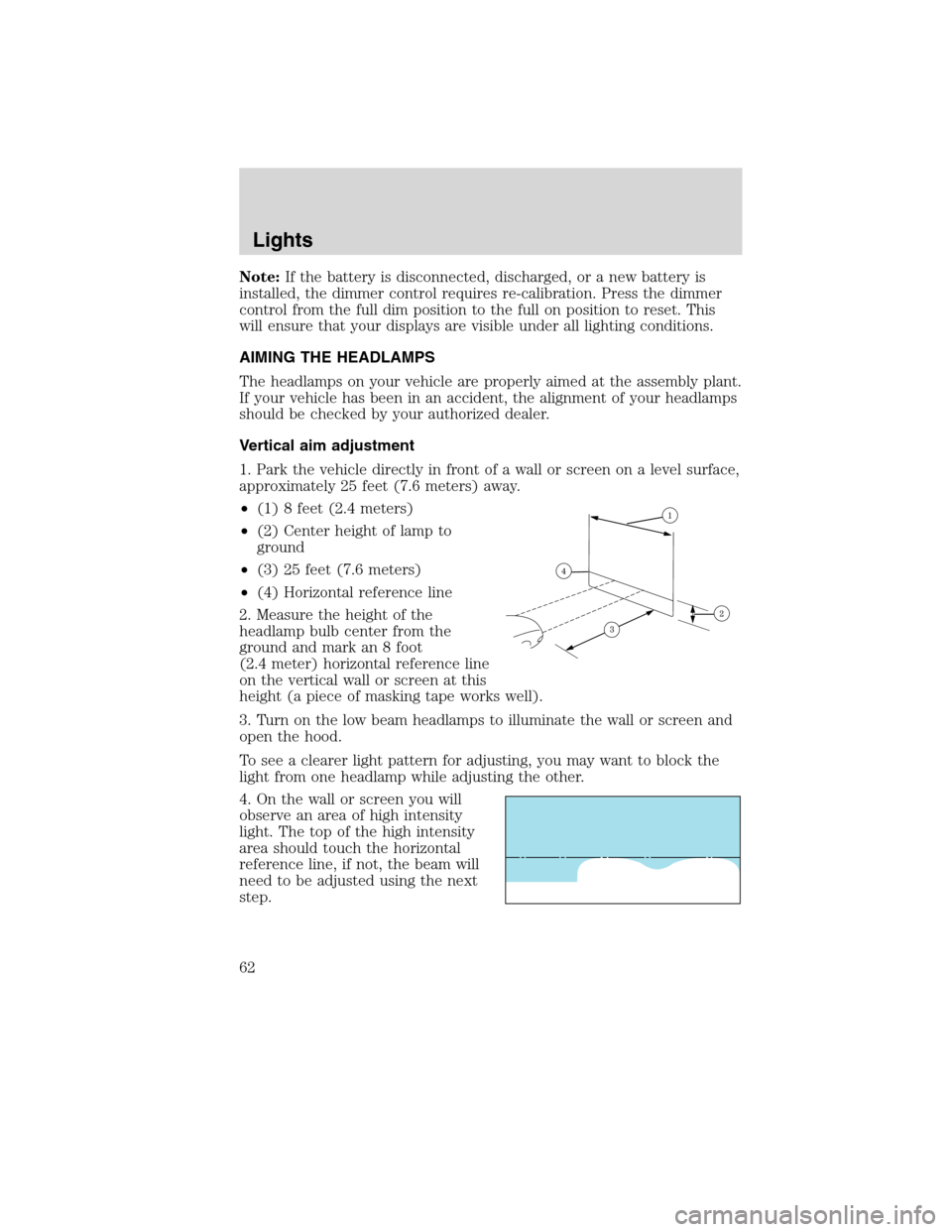
1. Park the vehicle directly in front of a wall or screen on a level surface,
approximately 25 feet (7.6 meters) away.
•(1) 8 feet (2.4 meters)
•(2) Center height of lamp to
ground
•(3) 25 feet (7.6 meters)
•(4) Horizontal reference line
2. Measure the height of the
headlamp bulb center from the
ground and mark an 8 foot
(2.4 meter) horizontal reference line
on the vertical wall or screen at this
height (a piece of masking tape works well).
3. Turn on the low beam headlamps to illuminate the wall or screen and
open the hood.
To see a clearer light pattern for adjusting, you may want to block the
light from one headlamp while adjusting the other.
4. On the wall or screen you will
observe an area of high intensity
light. The top of the high intensity
area should touch the horizontal
reference line, if not, the beam will
need to be adjusted using the next
step.
Lights
62
2010 MKS(mks)
Owners Guide(own2002), 1st Printing
USA(fus)
Page 72 of 358
Compass zone adjustment
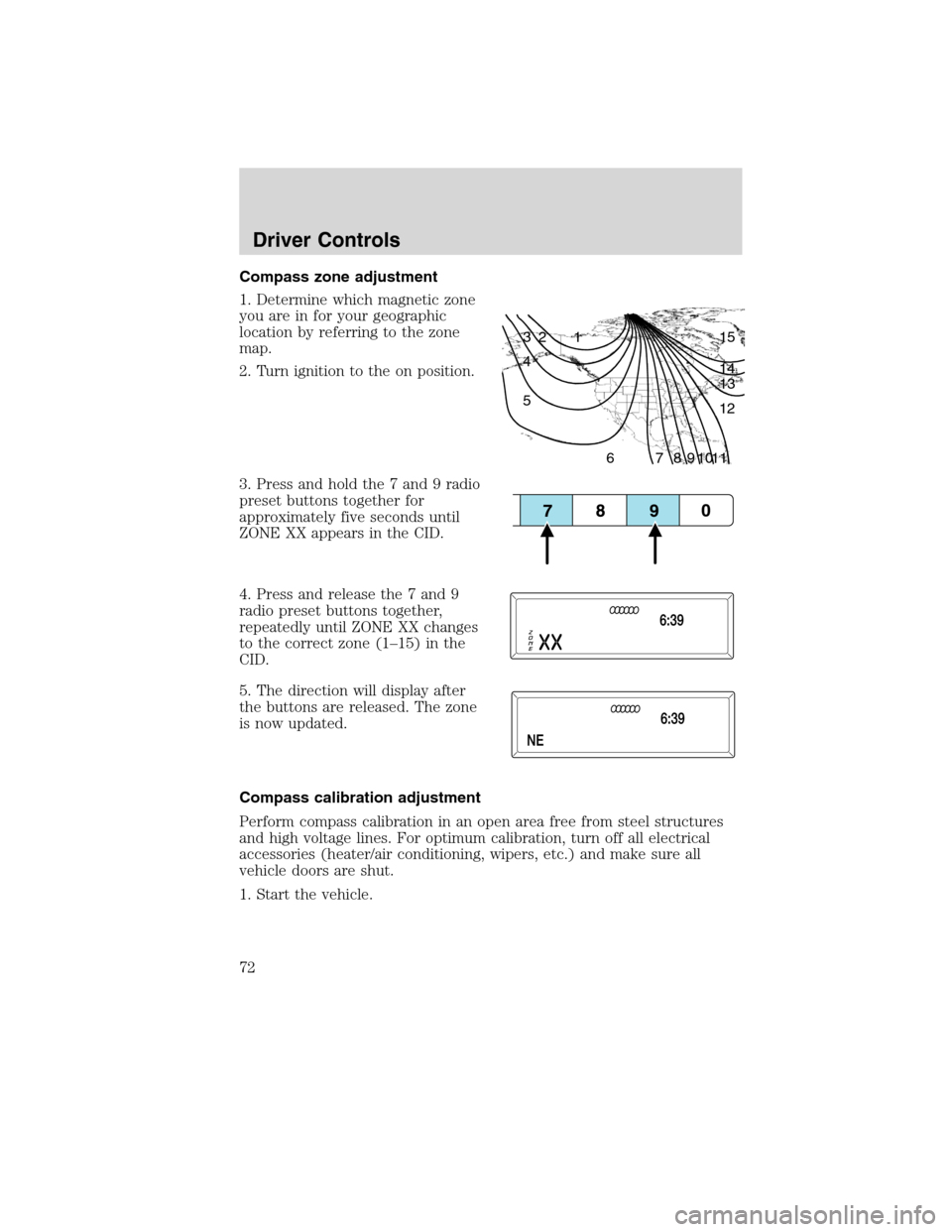
1. Determine which magnetic zone
you are in for your geographic
location by referring to the zone
map.
2. Turn ignition to the on position.
3. Press and hold the 7 and 9 radio
preset buttons together for
approximately five seconds until
ZONE XX appears in the CID.
4. Press and release the 7 and 9
radio preset buttons together,
repeatedly until ZONE XX changes
to the correct zone (1–15) in the
CID.
5. The direction will display after
the buttons are released. The zone
is now updated.
Compass calibration adjustment
Perform compass calibration in an open area free from steel structures
and high voltage lines. For optimum calibration, turn off all electrical
accessories (heater/air conditioning, wipers, etc.) and make sure all
vehicle doors are shut.
1. Start the vehicle.
1 2 3
4
5
6 7 8 9 101112 13 14 15
Driver Controls
72
2010 MKS(mks)
Owners Guide(own2002), 1st Printing
USA(fus)
Page 73 of 358
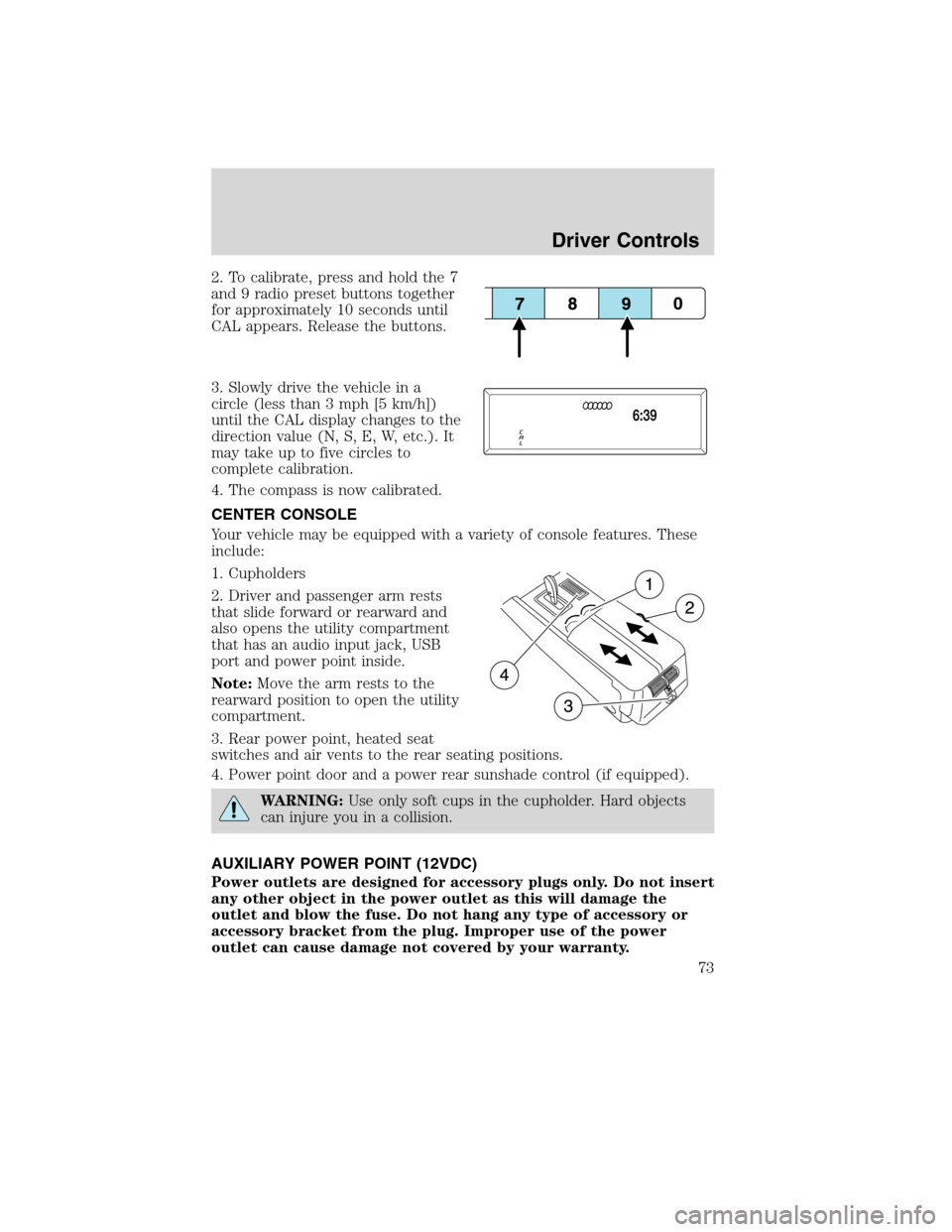
2. To calibrate, press and hold the 7
and 9 radio preset buttons together
for approximately 10 seconds until
CAL appears. Release the buttons.
3. Slowly drive the vehicle in a
circle (less than 3 mph [5 km/h])
until the CAL display changes to the
direction value (N, S, E, W, etc.). It
may take up to five circles to
complete calibration.
4. The compass is now calibrated.
CENTER CONSOLE
Your vehicle may be equipped with a variety of console features. These
include:
1. Cupholders
2. Driver and passenger arm rests
that slide forward or rearward and
also opens the utility compartment
that has an audio input jack, USB
port and power point inside.
Note:Move the arm rests to the
rearward position to open the utility
compartment.
3. Rear power point, heated seat
switches and air vents to the rear seating positions.
4. Power point door and a power rear sunshade control (if equipped).
WARNING:Use only soft cups in the cupholder. Hard objects
can injure you in a collision.
AUXILIARY POWER POINT (12VDC)
Power outlets are designed for accessory plugs only. Do not insert
any other object in the power outlet as this will damage the
outlet and blow the fuse. Do not hang any type of accessory or
accessory bracket from the plug. Improper use of the power
outlet can cause damage not covered by your warranty.
Driver Controls
73
2010 MKS(mks)
Owners Guide(own2002), 1st Printing
USA(fus)
Page 82 of 358
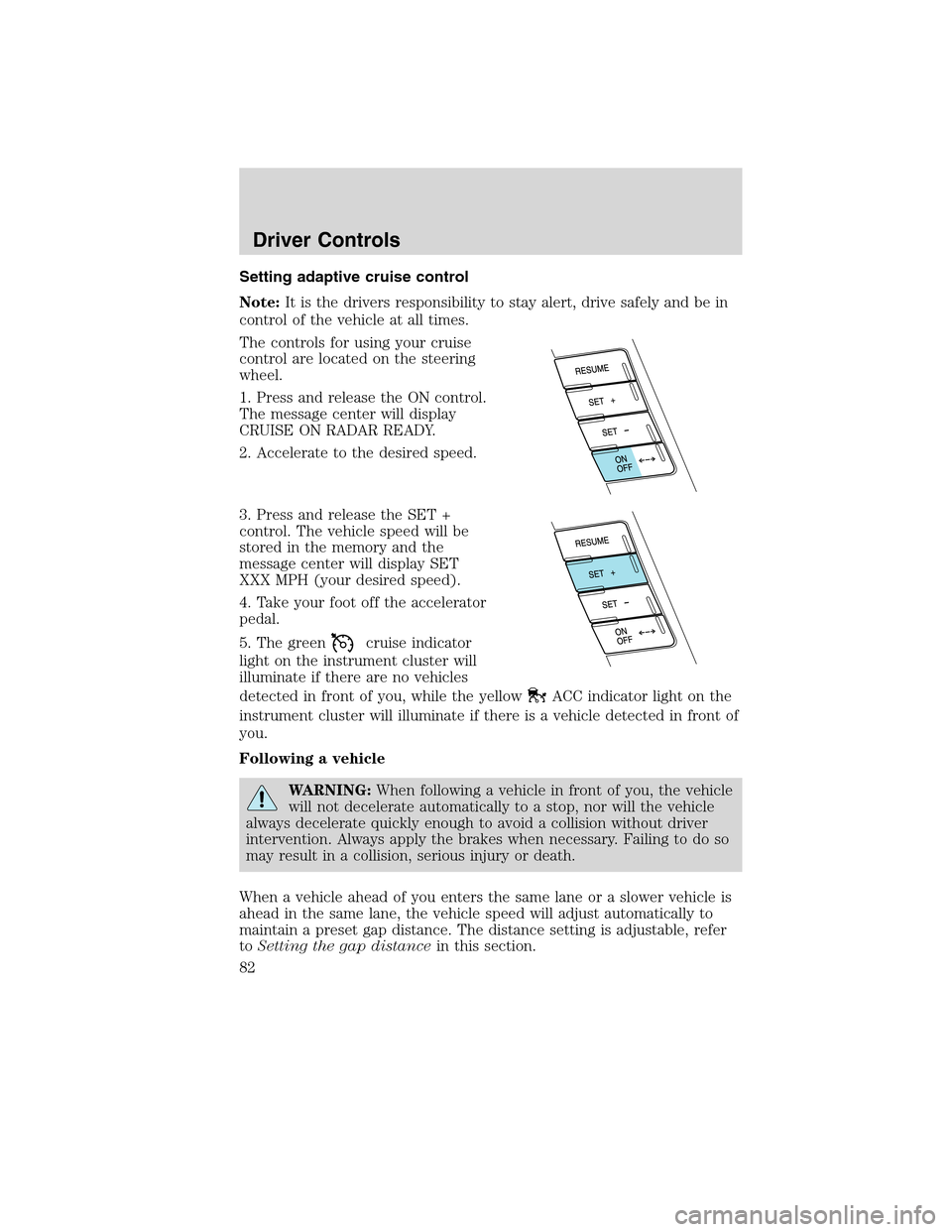
Setting adaptive cruise control
Note:It is the drivers responsibility to stay alert, drive safely and be in
control of the vehicle at all times.
The controls for using your cruise
control are located on the steering
wheel.
1. Press and release the ON control.
The message center will display
CRUISE ON RADAR READY.
2. Accelerate to the desired speed.
3. Press and release the SET +
control. The vehicle speed will be
stored in the memory and the
message center will display SET
XXX MPH (your desired speed).
4. Take your foot off the accelerator
pedal.
5. The green
cruise indicator
light on the instrument cluster will
illuminate if there are no vehicles
detected in front of you, while the yellow
ACC indicator light on the
instrument cluster will illuminate if there is a vehicle detected in front of
you.
Following a vehicle
WARNING:When following a vehicle in front of you, the vehicle
will not decelerate automatically to a stop, nor will the vehicle
always decelerate quickly enough to avoid a collision without driver
intervention. Always apply the brakes when necessary. Failing to do so
may result in a collision, serious injury or death.
When a vehicle ahead of you enters the same lane or a slower vehicle is
ahead in the same lane, the vehicle speed will adjust automatically to
maintain a preset gap distance. The distance setting is adjustable, refer
toSetting the gap distancein this section.
Driver Controls
82
2010 MKS(mks)
Owners Guide(own2002), 1st Printing
USA(fus)
Page 83 of 358
The yellowACC indicator light
in the instrument cluster will be
illuminated and the message center
will temporarily display a preset
GAP <--->.
The vehicle will maintain a constant distance between the vehicle ahead
until:
•The vehicle in front of you accelerates to a speed above the set speed.
•The vehicle in front of you moves out of your lane or out of view.
•The vehicle speed falls below 18 mph (30 km/h).
•A new gap distance is set.
The vehicle brakes will be automatically applied to slow the vehicle to
maintain a safe distance between the vehicle in front. The maximum
braking which is applied by the ACC system is limited and can be
overridden by the driver applying the brakes.
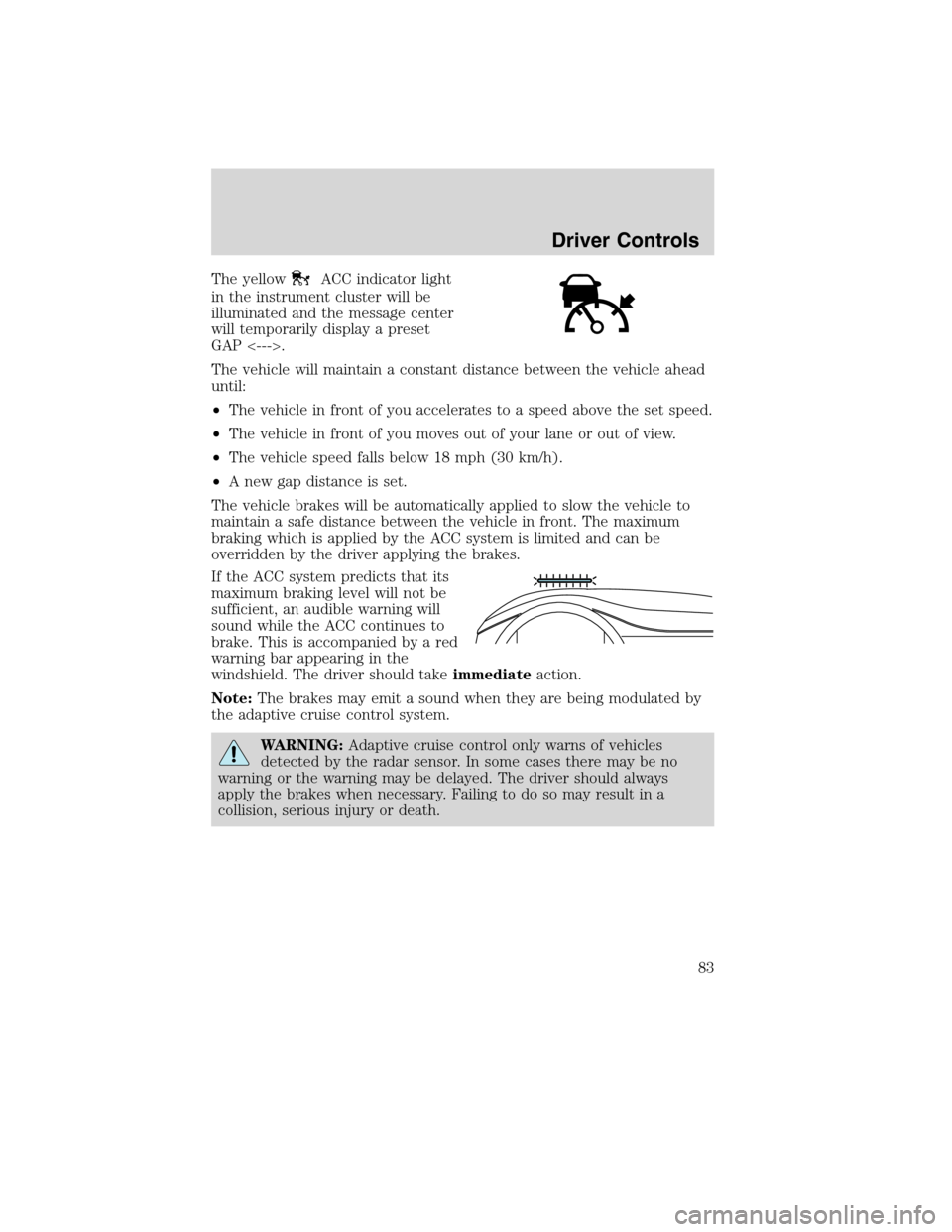
If the ACC system predicts that its
maximum braking level will not be
sufficient, an audible warning will
sound while the ACC continues to
brake. This is accompanied by a red
warning bar appearing in the
windshield. The driver should takeimmediateaction.
Note:The brakes may emit a sound when they are being modulated by
the adaptive cruise control system.
WARNING:Adaptive cruise control only warns of vehicles
detected by the radar sensor. In some cases there may be no
warning or the warning may be delayed. The driver should always
apply the brakes when necessary. Failing to do so may result in a
collision, serious injury or death.
Driver Controls
83
2010 MKS(mks)
Owners Guide(own2002), 1st Printing
USA(fus)