message center LINCOLN MKS 2010 Owner's Guide
[x] Cancel search | Manufacturer: LINCOLN, Model Year: 2010, Model line: MKS, Model: LINCOLN MKS 2010Pages: 358, PDF Size: 2.37 MB
Page 251 of 358
WARNING:The collision warning system’s brake support can
only help reduce the speed at which a collision occurs if the
driver applies the vehicle’s brakes. The brake pedal must be pressed
just like for any typical braking situation.
Blocked sensor
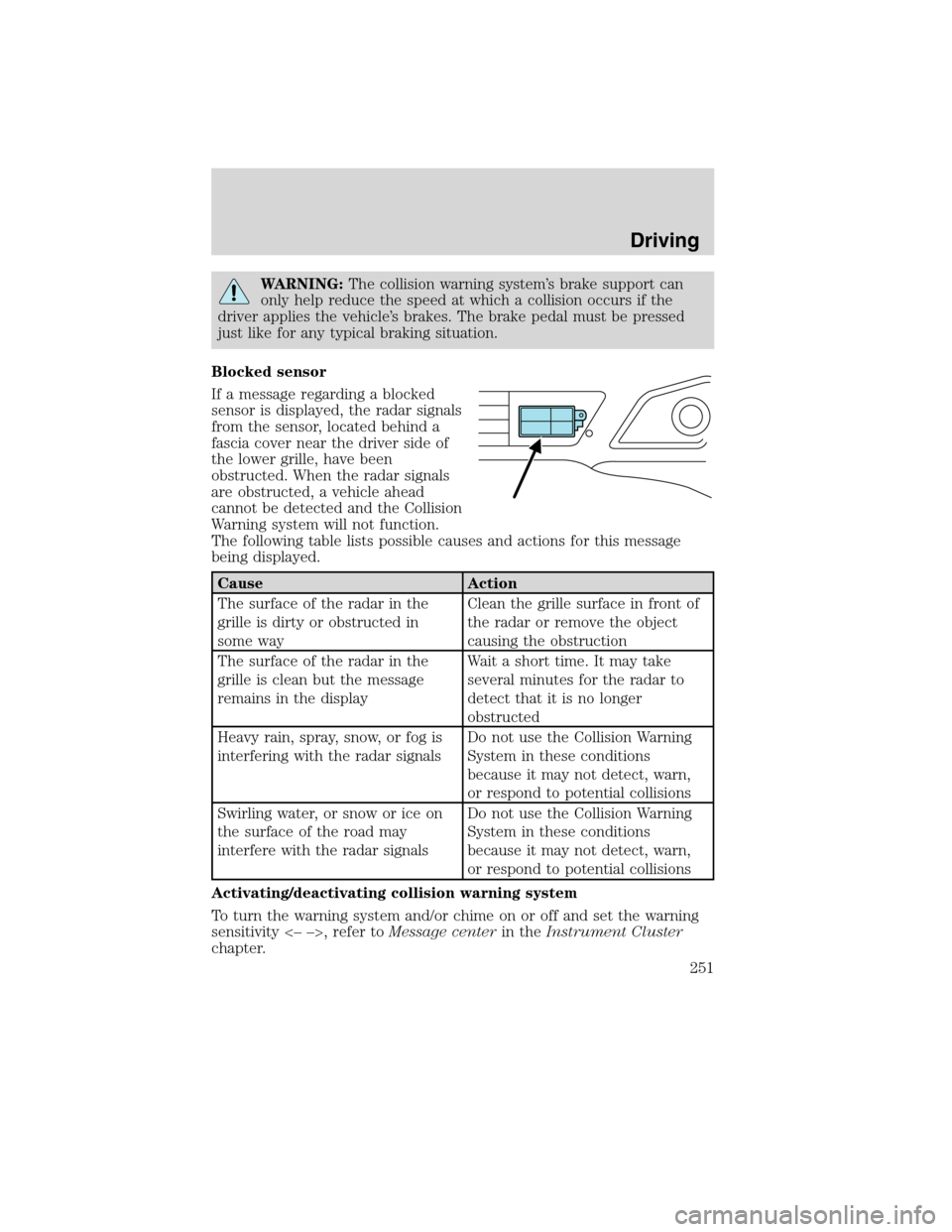
If a message regarding a blocked
sensor is displayed, the radar signals
from the sensor, located behind a
fascia cover near the driver side of
the lower grille, have been
obstructed. When the radar signals
are obstructed, a vehicle ahead
cannot be detected and the Collision
Warning system will not function.
The following table lists possible causes and actions for this message
being displayed.
Cause Action
The surface of the radar in the
grille is dirty or obstructed in
some wayClean the grille surface in front of
the radar or remove the object
causing the obstruction
The surface of the radar in the
grille is clean but the message
remains in the displayWait a short time. It may take
several minutes for the radar to
detect that it is no longer
obstructed
Heavy rain, spray, snow, or fog is
interfering with the radar signalsDo not use the Collision Warning
System in these conditions
because it may not detect, warn,
or respond to potential collisions
Swirling water, or snow or ice on
the surface of the road may
interfere with the radar signalsDo not use the Collision Warning
System in these conditions
because it may not detect, warn,
or respond to potential collisions
Activating/deactivating collision warning system
To turn the warning system and/or chime on or off and set the warning
sensitivity <– –>, refer toMessage centerin theInstrument Cluster
chapter.
Driving
251
2010 MKS(mks)
Owners Guide(own2002), 1st Printing
USA(fus)
Page 252 of 358
Note:If the system cannot be turned off in a MyKey™ equipped vehicle,
refer toMyKey™in theLocks and Securitychapter for more
information.
Note:If collision warnings are perceived as being too frequent or
disturbing then the warning sensitivity can be reduced, though the
manufacturer recommends using the highest sensitivity setting where
possible. Setting lower sensitivity would lead to fewer and later system
warnings. Refer to theMessage centerin theInstrument Cluster
chapter for instructions on reducing the sensitivity.
ACTIVE PARK ASSIST (APA) (IF EQUIPPED)
Active Park Assist (APA) will detect an available parallel parking space
and automatically steer the vehicle into the space (hands free) while you
control the accelerator, gearshift and brakes. The system will visually
and/or audibly instruct the driver to park the vehicle.
WARNING:This system is designed to be a supplementary park
aid. It is not intended to replace the driver’s attention and
judgment. The driver is responsible for avoiding hazards and
maintaining a safe distance and speed, even when the APA is in use.
Automatic Search for Parking Space
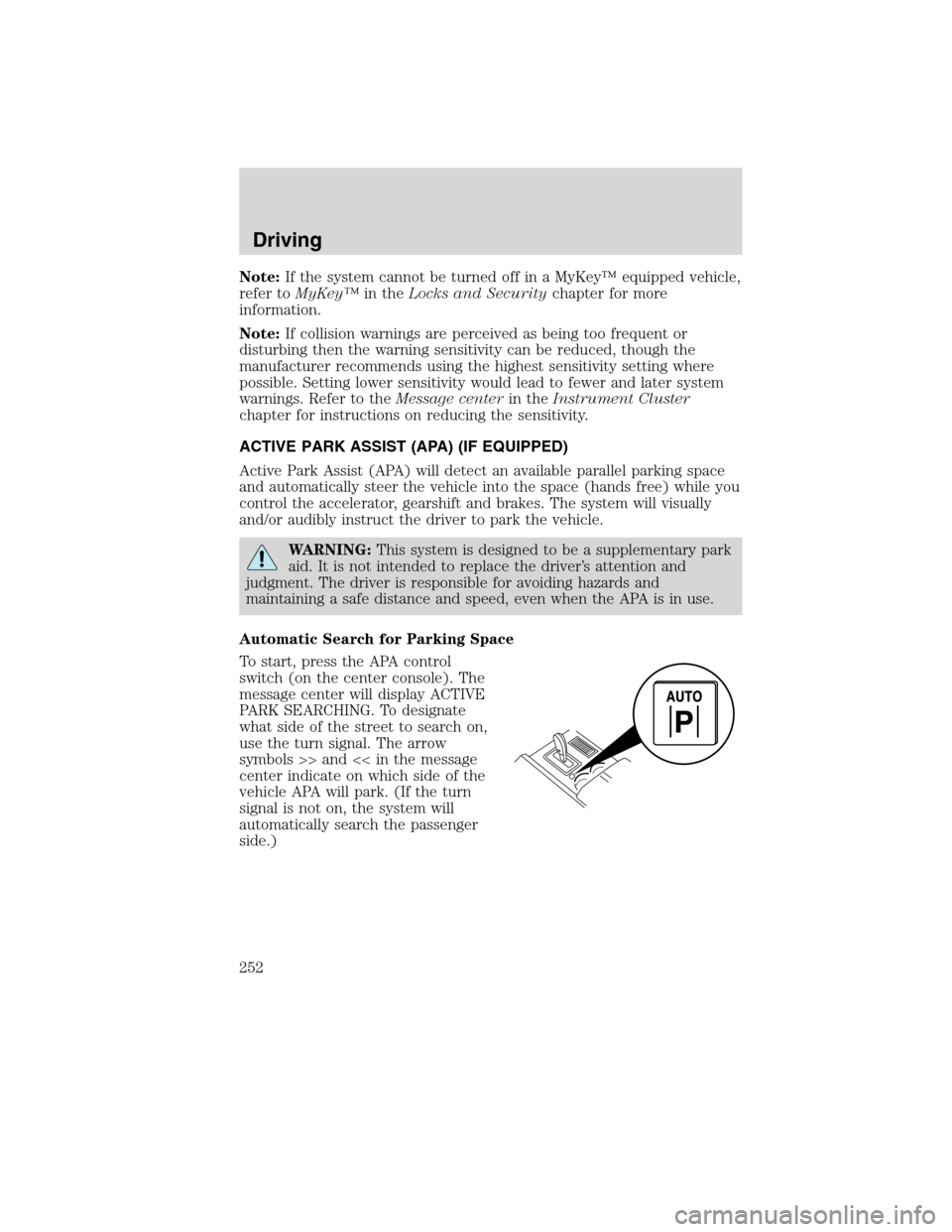
To start, press the APA control
switch (on the center console). The
message center will display ACTIVE
PARK SEARCHING. To designate
what side of the street to search on,
use the turn signal. The arrow
symbols >> and << in the message
center indicate on which side of the
vehicle APA will park. (If the turn
signal is not on, the system will
automatically search the passenger
side.)
Driving
252
2010 MKS(mks)
Owners Guide(own2002), 1st Printing
USA(fus)
Page 253 of 358
![LINCOLN MKS 2010 Owners Guide For best performance, the driver should drive the vehicle as parallel as
possible while passing a parking space. If driven too fast (above 18 mph
[30 km/h]) for the system to measure parking spaces, t](/img/15/6908/w960_6908-252.png "LINCOLN MKS 2010 Owners Guide For best performance, the driver should drive the vehicle as parallel as
possible while passing a parking space. If driven too fast (above 18 mph
[30 km/h]) for the system to measure parking spaces, t")
For best performance, the driver should drive the vehicle as parallel as
possible while passing a parking space. If driven too fast (above 18 mph
[30 km/h]) for the system to measure parking spaces, the message center
will display ACTIVE PARK REDUCE SPEED.
When the system has found a space, the message center will display
SPACE FOUND PULL FORWARD followed by a chime. Drive forward
until the message center displays SPACE FOUND STOP followed by a
chime. When you stop the vehicle in position to begin parking, the
message center displays REMOVE HANDS PUT IN REVERSE.
Automatic Steering into Parking Space
Automatic steering is activated when you stop the vehicle, remove your
hands from the steering wheel and select the R (Reverse) gear. Be sure
the steering wheel motion is not obstructed by any objects. The vehicle
will steer itself from this point on as you follow the instructions in the
message center to safely move the vehicle reverse and forward in the
space. You may cancel APA at anytime by grabbing the steering wheel or
by pressing the APA control switch. When the vehicle is in R (Reverse)
the message center displays BACK UP USE CAUTION.
Driving
253
2010 MKS(mks)
Owners Guide(own2002), 1st Printing
USA(fus)
Page 254 of 358
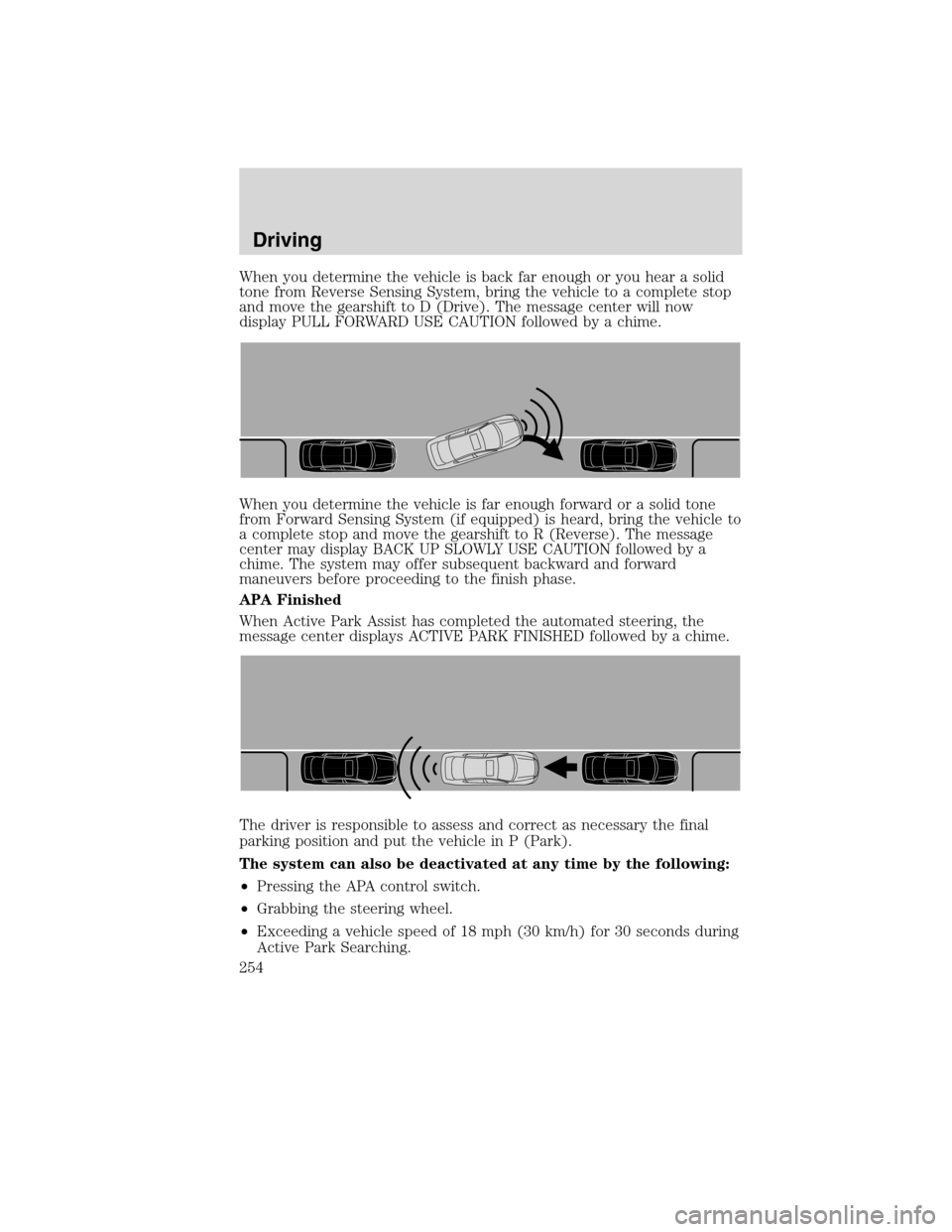
When you determine the vehicle is back far enough or you hear a solid
tone from Reverse Sensing System, bring the vehicle to a complete stop
and move the gearshift to D (Drive). The message center will now
display PULL FORWARD USE CAUTION followed by a chime.
When you determine the vehicle is far enough forward or a solid tone
from Forward Sensing System (if equipped) is heard, bring the vehicle to
a complete stop and move the gearshift to R (Reverse). The message
center may display BACK UP SLOWLY USE CAUTION followed by a
chime. The system may offer subsequent backward and forward
maneuvers before proceeding to the finish phase.
APA Finished
When Active Park Assist has completed the automated steering, the
message center displays ACTIVE PARK FINISHED followed by a chime.
The driver is responsible to assess and correct as necessary the final
parking position and put the vehicle in P (Park).
The system can also be deactivated at any time by the following:
•Pressing the APA control switch.
•Grabbing the steering wheel.
•Exceeding a vehicle speed of 18 mph (30 km/h) for 30 seconds during
Active Park Searching.
Driving
254
2010 MKS(mks)
Owners Guide(own2002), 1st Printing
USA(fus)
Page 257 of 358
Driving with blind spot mirrors
Before a lane change, check the
main mirror first, then check the
blind spot mirror. If no vehicles are
present in the blind spot mirror and
the traffic in the adjacent lane is at
a safe distance, signal that you are
going to change lanes. Glance over
your shoulder to verify traffic is
clear, and carefully change lanes.
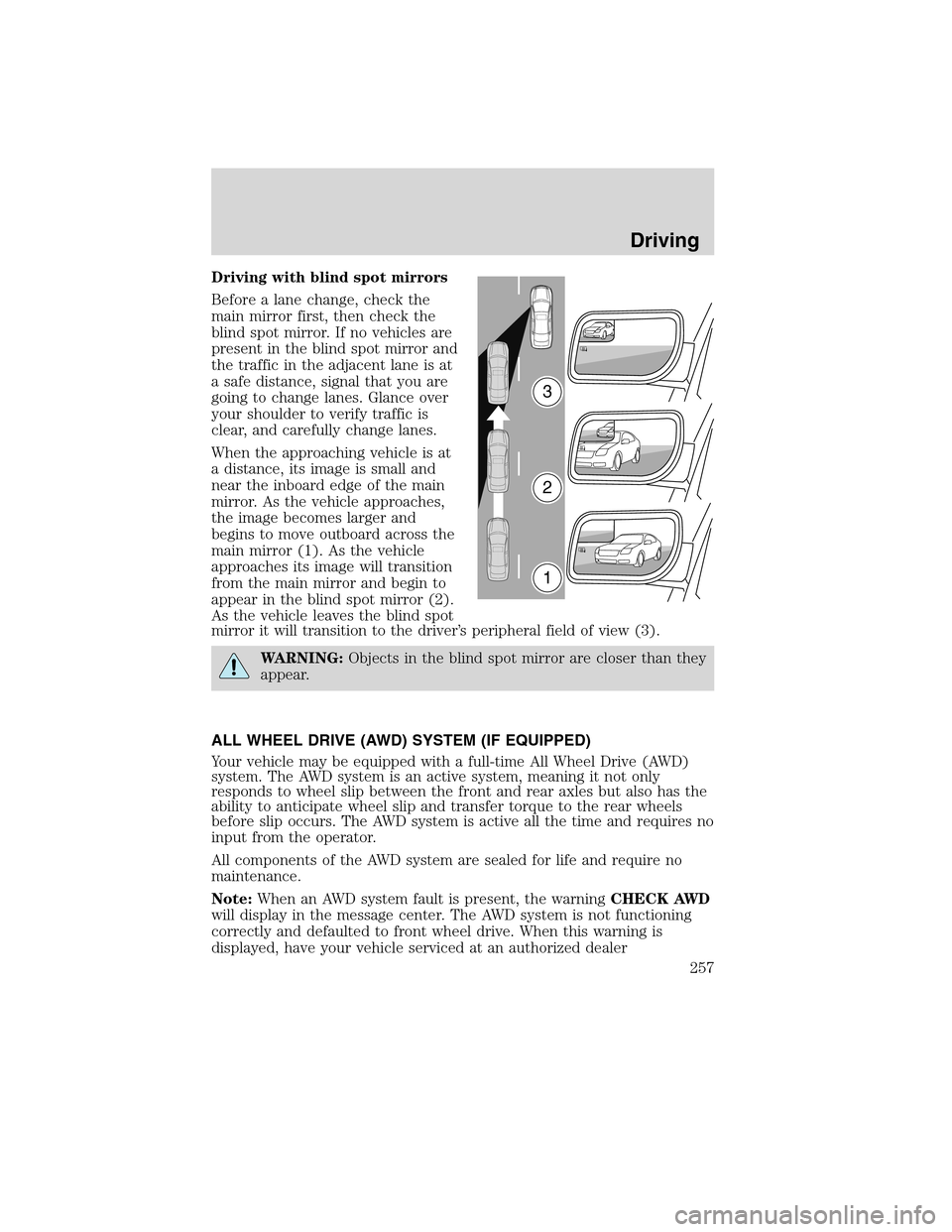
When the approaching vehicle is at
a distance, its image is small and
near the inboard edge of the main
mirror. As the vehicle approaches,
the image becomes larger and
begins to move outboard across the
main mirror (1). As the vehicle
approaches its image will transition
from the main mirror and begin to
appear in the blind spot mirror (2).
As the vehicle leaves the blind spot
mirror it will transition to the driver’s peripheral field of view (3).
WARNING:Objects in the blind spot mirror are closer than they
appear.
ALL WHEEL DRIVE (AWD) SYSTEM (IF EQUIPPED)
Your vehicle may be equipped with a full-time All Wheel Drive (AWD)
system. The AWD system is an active system, meaning it not only
responds to wheel slip between the front and rear axles but also has the
ability to anticipate wheel slip and transfer torque to the rear wheels
before slip occurs. The AWD system is active all the time and requires no
input from the operator.
All components of the AWD system are sealed for life and require no
maintenance.
Note:When an AWD system fault is present, the warningCHECK AWD
will display in the message center. The AWD system is not functioning
correctly and defaulted to front wheel drive. When this warning is
displayed, have your vehicle serviced at an authorized dealer
3
2
1
Driving
257
2010 MKS(mks)
Owners Guide(own2002), 1st Printing
USA(fus)
Page 258 of 358
If your vehicle is equipped with AWD, a spare tire of a different size
other than the tire provided should never be used. If the spare tire is
installed, the AWD system may disable automatically and enter front
wheel drive only mode to protect driveline components. This condition
may be indicated by anAWD OFFmessage in the message center (see
Message centersection in theInstrument Clusterchapter for more
information). If there is anAWD OFFmessage in the message center
from using the spare tire, this indicator should turn off after reinstalling
the repaired or replaced normal road tire and driving a short distance. It
is recommended to reinstall the repaired or replaced road tire as soon as
possible. Major dissimilar tire sizes between the front and rear axles
could cause the AWD system to stop functioning and default to front
wheel drive or damage the AWD system.
Note:TheAWD OFFmessage may also be displayed in the message
center if the AWD system has overheated and defaulted to front wheel
drive. This condition may occur if the vehicle was operated in extreme
conditions with excessive wheel slip, such as deep sand. To resume
normal AWD function as soon as possible, stop the vehicle in a safe
location and allow it to idle. TheAWD OFFmessage will turn off when
the system cools and normal AWD function returns.
Note:Your AWD vehicle is not intended for off-road use. The AWD
feature gives your vehicle some limited off-road capabilities in which
driving surfaces are relatively level, obstruction-free and otherwise
similar to normal on-road driving conditions. Operating your vehicle
under other than those conditions could subject the vehicle to excessive
stress which might result in damage which is not covered under your
warranty.
Driving on slippery surfaces with AWD vehicles
AWD vehicles are specially equipped for driving on sand, snow, mud and
rough roads and have operating characteristics that are somewhat
different from conventional vehicles, both on and off the highway.
When driving at slow speeds off-highway under high outside
temperatures, use a low gear when possible. A lower gear operation will
maximize the engine and transmission cooling capability.
Under severe operating conditions, the A/C may cycle on and off to
protect overheating of the engine.
Basic operating principles
•Drive slower in strong crosswinds which can affect the normal steering
characteristics of your vehicle.
Driving
258
2010 MKS(mks)
Owners Guide(own2002), 1st Printing
USA(fus)
Page 353 of 358
attaching with tether straps ..187
in front seat ............................180
in rear seat ..............................180
LATCH .....................................184
recommendations ...................178
Child safety seats - booster
seats ...........................................189
Cleaning your vehicle
engine compartment ..............300
instrument panel ....................302
interior .....................................303
plastic parts ............................301
washing ....................................298
waxing .....................................299
wheels ......................................299
wiper blades ............................301
Climate control (see Air
conditioning or Heating) ......48, 51
Clock adjust
AM/FM/CD/MP3 ........................32
Collision Warning System .........249
Compass, electronic ....................71
calibration .................................72
set zone adjustment .................72
Console
overhead ....................................70
Controls
power seat ...............................138
steering column ........................89
Coolant
checking and adding ..............316
refill capacities ................320, 340
specifications ..........................340
Cooled Seats ..............................140
Cruise control
(see Speed control) ....................79
Cupholder(s) .............................145
Customer Assistance ................265Ford Extended Service
Plan ..........................................349
Getting assistance outside the
U.S. and Canada .....................295
Getting roadside assistance ...265
Getting the service you
need .........................................291
Ordering additional owner’s
literature .................................296
Utilizing the
Mediation/Arbitration
Program ...................................295
D
Daytime running lamps
(see Lamps) ................................61
Defrost
rear window ..............................48
rear window and rearview
mirrors .......................................51
windshield ...........................48, 51
Dipstick
automatic transmission
fluid ..........................................335
engine oil .................................311
Doors
central unlocking ....................107
Driving under special
conditions ..........................259, 262
sand .........................................260
snow and ice ...........................262
through water .................261, 264
E
Electronic message center .........18
Emergencies, roadside
jump-starting ..........................283
running out of fuel .........283, 326
Emission control system ..........331
Index
353
2010 MKS(mks)
Owners Guide(own2002), 1st Printing
USA(fus)
Page 354 of 358
Engine ........................................343
cleaning ...................................300
coolant .....................................316
fail-safe cooling .......................321
idle speed control ...................314
lubrication specifications .......340
refill capacities ........................340
service points ..................308–309
Engine block heater .................230
Engine oil ..................................311
change oil soon warning,
message center .......................311
checking and adding ..............311
dipstick ....................................311
filter, specifications ........313, 339
recommendations ...................313
refill capacities ........................340
specifications ..........................340
Event data recording ....................7
Exhaust fumes ..........................229
F
Fail safe cooling ........................321
Fleet MyKey programming ......129
Fluid capacities .........................340
Fog lamps ....................................57
Four-Wheel Drive vehicles
driving off road .......................258
Fuel ............................................322
calculating fuel
economy ............................20, 328
cap ...........................................324
capacity ...................................340
choosing the right fuel ...........325
comparisons with EPA fuel
economy estimates .................331
detergent in fuel .....................326
filler funnel .............................326filling your vehicle with
fuel ...........................322, 324, 328
filter, specifications ........322, 339
improving fuel economy ........328
octane rating ...................325, 343
quality ......................................326
running out of fuel .........283, 326
safety information relating to
automotive fuels .....................322
Fuses ..........................................267
G
Garage door opener ....................92
Gas cap (see Fuel cap) ............324
Gas mileage
(see Fuel economy) .................328
Gauges .........................................17
H
Hazard flashers .........................266
Headlamps ...................................56
aiming ........................................62
autolamp system .......................56
bulb specifications ....................65
daytime running lights .............61
flash to pass ..............................61
high beam .................................58
turning on and off ....................56
Heated Seats .....................140–141
Heating
heating and air conditioning
system .................................48, 51
Homelink wireless control
system ..........................................93
Hood ..........................................307
I
Ignition ...............................224, 343
Index
354
2010 MKS(mks)
Owners Guide(own2002), 1st Printing
USA(fus)
Page 355 of 358
Illuminated visor mirror .............70
Infant seats
(see Safety seats) .....................180
Inspection/maintenance (I/M)
testing ........................................333
Instrument panel
cleaning ...................................302
cluster ........................................12
lighting up panel and
interior .......................................61
Intelligent Access Key ..............105
Intelligent Access with push
button start ...............................115
J
Jack ............................................275
positioning ...............................275
storage .....................................275
Jump-starting your vehicle ......283
K
Keyless entry system
autolock ...................................107
keypad .....................................122
locking and unlocking doors ..123
programming entry code .......122
Keys ...................................104, 126
positions of the ignition .........224
L
Lamps
autolamp system .......................56
bulb replacement
specifications chart ..................65
daytime running light ...............61
fog lamps ...................................57
headlamps .................................56headlamps, flash to pass ..........61
instrument panel, dimming .....61
interior lamps .....................63, 65
LATCH anchors .........................184
Lights, warning and indicator ....12
anti-lock brakes (ABS) ..........233
Load limits .................................214
Locks
autolock ...................................107
childproof ................................111
doors ........................................106
Lubricant specifications ...........340
Lug nuts ....................................282
Lumbar support, seats .............140
M
Message center .....................18–19
english/metric button ...............23
system check button ................23
warning messages .....................23
Mirrors ...................................77–78
automatic dimming rearview
mirror ........................................78
heated ............................48, 51, 79
programmable memory ..........117
side view mirrors (power) .......78
Moon roof ....................................91
Motorcraft parts ................304, 339
MyKey ........................................129
N
Navigation system .......................47
O
Octane rating ............................325
Index
355
2010 MKS(mks)
Owners Guide(own2002), 1st Printing
USA(fus)