wheel LINCOLN MKS 2015 Owners Manual
[x] Cancel search | Manufacturer: LINCOLN, Model Year: 2015, Model line: MKS, Model: LINCOLN MKS 2015Pages: 424, PDF Size: 3.96 MB
Page 366 of 424
Note: To prevent window fogging, you cannot select recirculated air when MAX Defrost is on.
Driver settings:
J
Touch the
+ or – to increase or decrease the air temperature on the passenger side of the vehicle.
Touch the heated seat icon to turn the heated seat off and on (if equipped).
Touch the climate-controlled seat icon to turn the climate-controlled seat off and on (if equipped).
Touch
MyTemp to select your preset temperature setpoint. Touch and hold MyTemp to save a new preset temperature setpoint.
Touch the heated steering wheel icon to turn the heated steering wheel on and off (if equipped).
Note: If your vehicle is equipped with a
wood-trimmed steering wheel, it does not heat
between the 10 o'clock and 2 o'clock positions.
Climate Control Voice Commands Press the voice button on the
steering wheel controls. When
prompted, say any of the following
commands: Climate control commands
"Climate automatic"
"Climate my temperature" "Climate off""Climate on" Climate control commands
"Climate temperature <15.5-29.5> degrees" "Climate temperature <60-85> degrees" "Help"
There are additional climate control
commands but in order to access them, you
have to say "Climate" first. When the system
is ready to listen, you may say any of the
following commands: "CLIMATE"
"A/C off""A/C on"
"Automatic" "CLIMATE"
"Defrost off" "Defrost on" "Dual off"
"Floor on"
"Fan decrease" "Fan increase"
"MAX A/C off" "MAX A/C on" "My temp" "Off""On"
363
MKS (), enUSA MyLincoln Touch
™E142599
Page 374 of 424
Navigation Map Updates
Annual navigation map updates are available
for purchase through your dealership, by
calling 1-866-4NAVTEQ (1-866-462-8837)
(in Mexico, call 01-800-557-5539) or going
to www.navigation.com/sync. You need to
specify the make and model of your vehicle
to determine if there is an update available.
Navigation Voice Commands
When in navigation mode, press
the voice button on the steering
wheel controls. After the tone, say
any of the following commands: Navigation system voice commands
"Cancel next waypoint" 1
"Cancel route" 1
"Destination" 2
"Destination
"Destination
"Destination intersection"
"Destination nearest
"Destination play nametags" "Destination POI"
"Destination POI category"
"Destination previous destination" "Destination street address"
"Detour"1
"Navigation" 3
"Navigation voice volume decrease" "Navigation voice volume increase"
"Repeat instruction" 1
"Show 3D"
"Show heading up" "Show map"
"Show north up" Navigation system voice commands
"Show route" 1
"Show turn list" 1
"Voice guidance off" "Voice guidance on" "Where am I?""Zoom in"
"Zoom out" "Help"
1 These commands are only available when
a navigation route is active.
2 If you say "Destination", you can then say
any command in the following "Destination"
chart.
3 If you say "Navigation", you can then say
any command in the following "Navigation"
chart.
371
MKS (), enUSA MyLincoln Touch
™E142599
Page 376 of 424
For a complete listing of the accessories that
are available for your vehicle, please contact
an authorized dealer or visit our online store
at Accessories.Lincoln.com (United States
only).
Lincoln Custom Accessories are available for
your vehicle through an authorized Lincoln
dealer. Lincoln Motor Company will repair or
replace any properly authorized
dealer-installed Lincoln Custom Accessories
found to be defective in factory-supplied
materials or workmanship during the
warranty period, as well as any component
damaged by the defective accessories.
Lincoln Motor Company will warrant your
vehicle through the warranty that provides
the greatest benefit:
•
24 months, unlimited mileage.
• The remainder of your new vehicle limited
warranty.
Contact an authorized dealer for details and
a copy of the warranty.
Exterior style
• Moonroof deflectors.
• Side-window deflectors.
• Splash guards.
• Car cover*. Interior style
•
All-weather floor mats.
• Carpeted floor mats.
• Rear seat entertainment*.
• Sport pedals.
Lifestyle
• Ash cup (smoker's packages).
• Cargo organization and management.
Peace of mind
• Locking fuel plug for capless fuel system.
• Wheel locks.
• Remote start.
• Vehicle security.
*The accessory manufacturer designs,
develops and therefore warrants Lincoln
Licensed Accessories, and does not design
or test these accessories to Lincoln Motor
Company engineering requirements. Contact
an authorized Lincoln dealer for the
manufacturer's limited warranty details and
request a copy of the Lincoln Licensed
Accessories product limited warranty from
the accessory manufacturer. For maximum vehicle performance, keep the
following information in mind when adding
accessories or equipment to your vehicle:
•
When adding accessories, equipment,
passengers and luggage to your vehicle,
do not exceed the total weight capacity
of the vehicle or of the front or rear axle
(GVWR or GAWR as indicated on the
Safety Compliance Certification label).
Consult an authorized dealer for specific
weight information.
• The Federal Communications
Commission (FCC) and Canadian Radio
Telecommunications Commission
(CRTC) regulate the use of mobile
communications systems that are
equipped with radio transmitters, for
example, two-way radios, telephones and
theft alarms. Any such equipment
installed in your vehicle should comply
with the Federal Communications
Commission (FCC) and Canadian Radio
Telecommunications Commission
(CRTC) regulations and should be
installed only by an authorized dealer.
373
MKS (), enUSA Accessories
Page 382 of 424
PRODUCT SUPPORT: Product support for
the SOFTWARE is not provided by MS, its
parent corporation Microsoft Corporation, or
their affiliates or subsidiaries. For product
support, please refer to FORD MOTOR
COMPANY instructions provided in the
documentation for the DEVICE. Should you
have any questions concerning this EULA, or
if you desire to contact FORD MOTOR
COMPANY for any other reason, please refer
to the address provided in the documentation
for the DEVICE.
No Liability for Certain Damages: EXCEPT
AS PROHIBITED BY LAW, FORD MOTOR
COMPANY, ANY THIRD PARTY SOFTWARE
OR SERVICES SUPPLIERS, MS, MICROSOFT
CORPORATION AND THEIR AFFILIATES
SHALL HAVE NO LIABILITY FOR ANY
INDIRECT, SPECIAL, CONSEQUENTIAL OR
INCIDENTAL DAMAGES ARISING FROM OR
IN CONNECTION WITH THE USE OR
PERFORMANCE OF THE SOFTWARE. THIS
LIMITATION SHALL APPLY EVEN IF ANY
REMEDY FAILS OF ITS ESSENTIAL
PURPOSE. IN NO EVENT SHALL MS,
MICROSOFT CORPORATION AND/OR THEIR
AFFILIATES BE LIABLE FOR ANY AMOUNT
IN EXCESS OF U.S. TWO HUNDRED FIFTY
DOLLARS (U.S. $250.00). •
THERE ARE NO WARRANTIES OTHER
THAN THOSE THAT MAY EXPRESSLY
BE PROVIDED FOR YOUR NEW VEHICLE.
Adobe
Contains Adobe® [Flash® Player] or [AIR®]
technology by Adobe Systems Incorporated.
This [Licensee Product] contains [Adobe®
Flash® Player] [Adobe® AIR®] software
under license from Adobe Systems
Incorporated, Copyright ©1995-2009 Adobe
Macromedia Software LLC. All rights
reserved. Adobe, Flash and AIR are
trademarks of Adobe Systems Incorporated.
End User Notice
Microsoft® Windows® Mobile for
Automotive Important Safety Information
This system Ford SYNC contains software
that is licensed to Manufacturer FORD
MOTOR COMPANY by an affiliate of
Microsoft Corporation pursuant to a license
agreement. Any removal, reproduction,
reverse engineering or other unauthorized
use of the software from this system in
violation of the license agreement is strictly
prohibited and may subject you to legal
action. Read and follow instructions: Before using
your Windows Automotive- based system,
read and follow all instructions and safety
information provided in this end user manual
("User's Guide"). Not following precautions
found in this User's Guide can lead to an
accident or other serious consequences.
Keep User's Guide in vehicle:
When kept
in the vehicle, the User's Guide will be a ready
reference for you and other users unfamiliar
with the Windows Automotive-based system.
Please make certain that before using the
system for the first time, all persons have
access to the User's Guide and read its
instructions and safety information carefully. WARNING
Operating certain parts of this system
while driving can distract your attention
away from the road, and possibly cause
an accident or other serious consequences.
Do not change system settings or enter data
non-verbally (using your hands) while driving.
Stop the vehicle in a safe and legal manner
before attempting these operations. This is
important since while setting up or changing
some functions you might be required to
distract your attention away from the road
and remove your hands from the wheel. 379
MKS (), enUSA Appendices
Page 383 of 424
General Operation
Voice Command Control: Functions within
the Windows Automotive-based system may
be accomplished using only voice
commands. Using voice commands while
driving allows you to operate the system
without removing your hands from the wheel.
Prolonged Views of Screen:
Do not access
any function requiring a prolonged view of
the screen while you are driving. Pull over in
a safe and legal manner before attempting
to access a function of the system requiring
prolonged attention. Even occasional short
scans to the screen may be hazardous if your
attention has been diverted away from your
driving task at a critical time.
Volume Setting:
Do not raise the volume
excessively. Keep the volume at a level where
you can still hear outside traffic and
emergency signals while driving. Driving while
unable to hear these sounds could cause an
accident.
Use of Speech Recognition Functions:
Speech recognition software is inherently a
statistical process which is subject to errors.
It is your responsibility to monitor any speech
recognition functions included in the system
and address any errors. Navigation Features:
Any navigation
features included in the system are intended
to provide turn by turn instructions to get you
to a desired destination. Please make certain
all persons using this system carefully read
and follow instructions and safety
information fully.
Distraction Hazard: Any navigation features
may require manual (non-verbal) setup.
Attempting to perform such set-up or insert
data while driving can seriously distract your
attention and could cause an accident or
other serious consequences. Stop the vehicle
in a safe and legal manner before attempting
these operations.
Let Your Judgment Prevail: Any navigation
features are provided only as an aid. Make
your driving decisions based on your
observations of local conditions and existing
traffic regulations. Any such feature is not a
substitute for your personal judgment. Any
route suggestions made by this system
should never replace any local traffic
regulations or your personal judgment or
knowledge of safe driving practices. Route Safety: Do not follow the route
suggestions if doing so would result in an
unsafe or illegal maneuver, if you would be
placed in an unsafe situation, or if you would
be directed into an area that you consider
unsafe. The driver is ultimately responsible
for the safe operation of the vehicle and
therefore, must evaluate whether it is safe
to follow the suggested directions.
Potential Map Inaccuracy:
Maps used by
this system may be inaccurate because of
changes in roads, traffic controls or driving
conditions. Always use good judgment and
common sense when following the
suggested routes.
Emergency Services:
Do not rely on any
navigation features included in the system
to route you to emergency services. Ask local
authorities or an emergency services operator
for these locations. Not all emergency
services such as police, fire stations, hospitals
and clinics are likely to be contained in the
map database for such navigation features.
380
MKS (), enUSA Appendices
Page 400 of 424
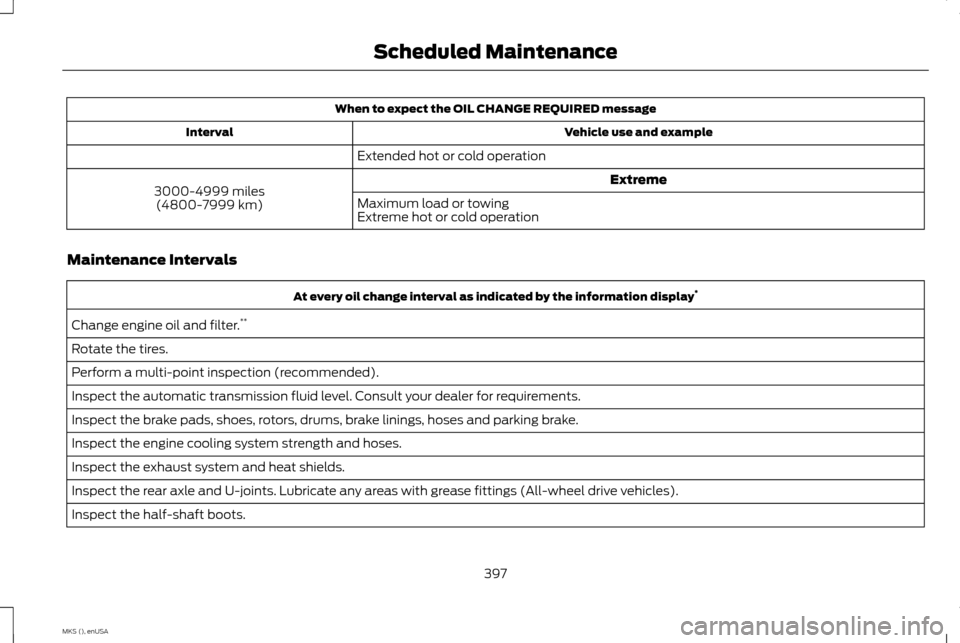
When to expect the OIL CHANGE REQUIRED message
Vehicle use and example
Interval
Extended hot or cold operation Extreme
3000-4999 miles
(4800-7999 km) Maximum load or towing
Extreme hot or cold operation
Maintenance Intervals At every oil change interval as indicated by the information display
*
Change engine oil and filter. **
Rotate the tires.
Perform a multi-point inspection (recommended).
Inspect the automatic transmission fluid level. Consult your dealer for requirements.
Inspect the brake pads, shoes, rotors, drums, brake linings, hoses and parking brake.
Inspect the engine cooling system strength and hoses.
Inspect the exhaust system and heat shields.
Inspect the rear axle and U-joints. Lubricate any areas with grease fittings (All-wheel drive vehicles).
Inspect the half-shaft boots.
397
MKS (), enUSA Scheduled Maintenance
Page 401 of 424
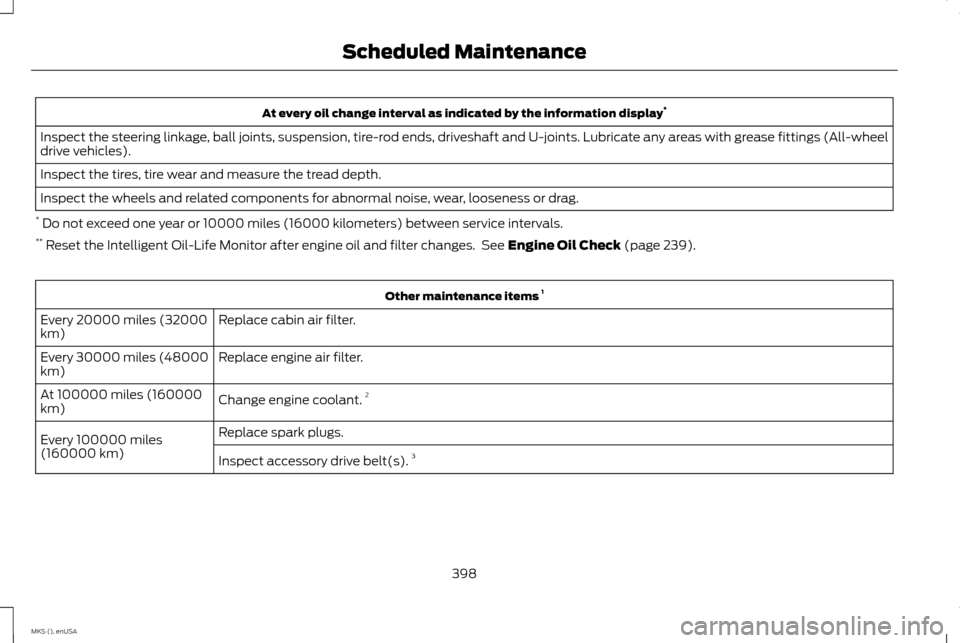
At every oil change interval as indicated by the information display
*
Inspect the steering linkage, ball joints, suspension, tire-rod ends, driveshaft and U-joints. Lubricate any areas with grease fittings (All-wheel
drive vehicles).
Inspect the tires, tire wear and measure the tread depth.
Inspect the wheels and related components for abnormal noise, wear, looseness or drag.
* Do not exceed one year or 10000 miles (16000 kilometers) between service intervals.
** Reset the Intelligent Oil-Life Monitor after engine oil and filter changes. See Engine Oil Check (page 239). Other maintenance items
1
Replace cabin air filter.
Every 20000 miles (32000
km)
Replace engine air filter.
Every 30000 miles (48000
km)
Change engine coolant.2
At 100000 miles (160000
km)
Replace spark plugs.
Every 100000 miles
(160000 km) Inspect accessory drive belt(s). 3
398
MKS (), enUSA Scheduled Maintenance
Page 404 of 424
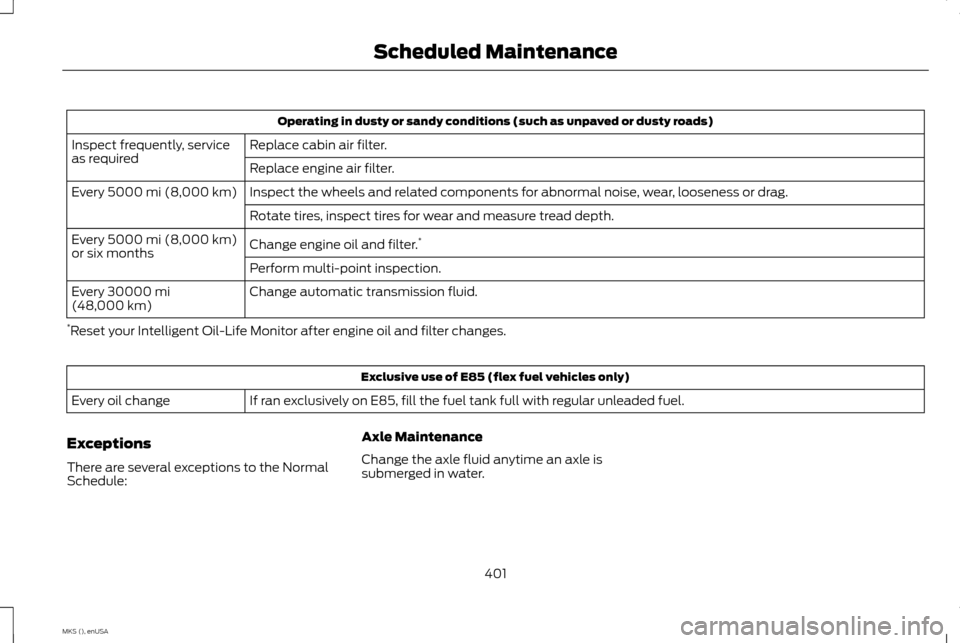
Operating in dusty or sandy conditions (such as unpaved or dusty roads)
Replace cabin air filter.
Inspect frequently, service
as required
Replace engine air filter.
Inspect the wheels and related components for abnormal noise, wear, looseness or drag.
Every 5000 mi (8,000 km)
Rotate tires, inspect tires for wear and measure tread depth.
Change engine oil and filter. *
Every
5000 mi (8,000 km)
or six months
Perform multi-point inspection.
Change automatic transmission fluid.
Every
30000 mi
(48,000 km)
* Reset your Intelligent Oil-Life Monitor after engine oil and filter changes. Exclusive use of E85 (flex fuel vehicles only)
If ran exclusively on E85, fill the fuel tank full with regular unleaded fuel.
Every oil change
Exceptions
There are several exceptions to the Normal
Schedule: Axle Maintenance
Change the axle fluid anytime an axle is
submerged in water.
401
MKS (), enUSA Scheduled Maintenance
Page 416 of 424
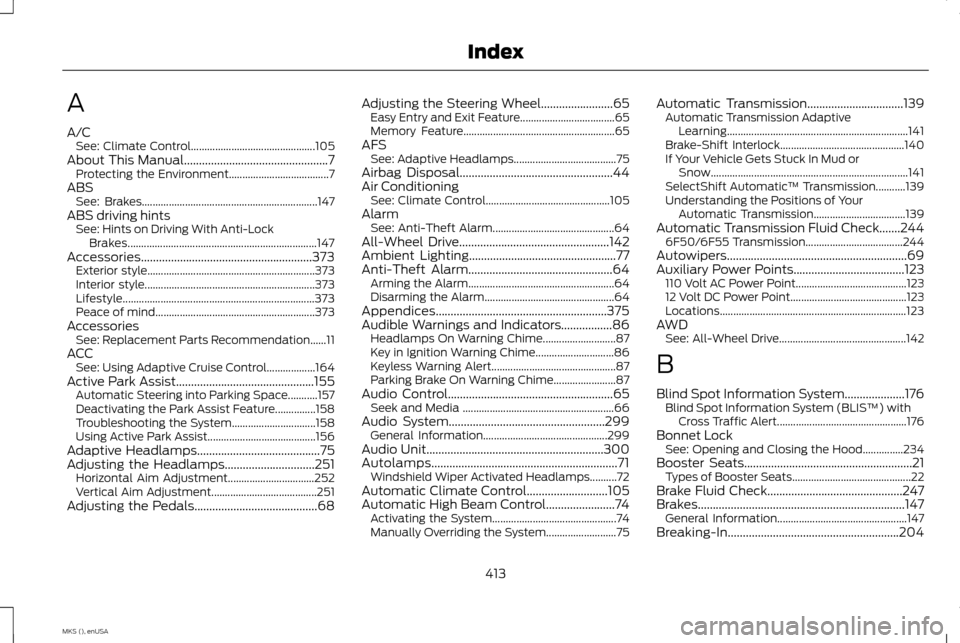
A
A/C
See: Climate Control.............................................. 105
About This Manual................................................7 Protecting the Environment..................................... 7
ABS See: Brakes................................................................. 147
ABS driving hints See: Hints on Driving With Anti-Lock
Brakes...................................................................... 147
Accessories.........................................................373 Exterior style.............................................................. 373
Interior style............................................................... 373
Lifestyle....................................................................... 373
Peace of mind........................................................... 373
Accessories See: Replacement Parts Recommendation......11
ACC See: Using Adaptive Cruise Control.................. 164
Active Park Assist..............................................155 Automatic Steering into Parking Space...........157
Deactivating the Park Assist Feature...............158
Troubleshooting the System............................... 158
Using Active Park Assist........................................ 156
Adaptive Headlamps.........................................75
Adjusting the Headlamps..............................251 Horizontal Aim Adjustment................................ 252
Vertical Aim Adjustment....................................... 251
Adjusting the Pedals.........................................68 Adjusting the Steering Wheel........................65
Easy Entry and Exit Feature................................... 65
Memory Feature........................................................ 65
AFS See: Adaptive Headlamps...................................... 75
Airbag Disposal...................................................44
Air Conditioning See: Climate Control.............................................. 105
Alarm See: Anti-Theft Alarm............................................. 64
All-Wheel Drive
..................................................142
Ambient Lighting.................................................77
Anti-Theft Alarm................................................64 Arming the Alarm...................................................... 64
Disarming the Alarm................................................ 64
Appendices.........................................................375
Audible Warnings and Indicators.................86 Headlamps On Warning Chime........................... 87
Key in Ignition Warning Chime............................. 86
Keyless Warning Alert.............................................. 87
Parking Brake On Warning Chime....................... 87
Audio Control
.......................................................65
Seek and Media ........................................................ 66
Audio System....................................................299 General Information.............................................. 299
Audio Unit
...........................................................300
Autolamps..............................................................71 Windshield Wiper Activated Headlamps..........72
Automatic Climate Control
...........................105
Automatic High Beam Control.......................74 Activating the System.............................................. 74
Manually Overriding the System.......................... 75Automatic Transmission
................................139
Automatic Transmission Adaptive
Learning................................................................... 141
Brake-Shift Interlock.............................................. 140
If Your Vehicle Gets Stuck In Mud or Snow........................................................................\
. 141
SelectShift Automatic ™ Transmission...........139
Understanding the Positions of Your Automatic Transmission.................................. 139
Automatic Transmission Fluid Check.......244 6F50/6F55 Transmission.................................... 244
Autowipers............................................................69
Auxiliary Power Points
.....................................123
110 Volt AC Power Point......................................... 123
12 Volt DC Power Point........................................... 123
Locations..................................................................... 123
AWD See: All-Wheel Drive............................................... 142
B
Blind Spot Information System....................176 Blind Spot Information System (BLIS ™) with
Cross Traffic Alert................................................ 176
Bonnet Lock See: Opening and Closing the Hood...............234
Booster Seats
........................................................21
Types of Booster Seats............................................ 22
Brake Fluid Check
.............................................247
Brakes.....................................................................147 General Information................................................ 147
Breaking-In.........................................................204
413
MKS (), enUSA Index
Page 417 of 424
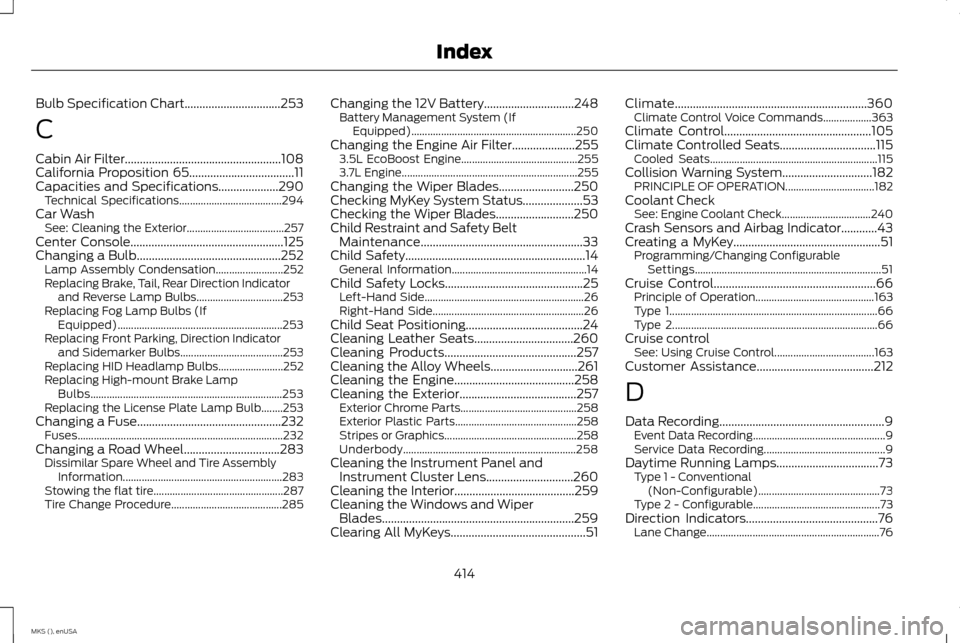
Bulb Specification Chart................................253
C
Cabin Air Filter....................................................108
California Proposition 65...................................11
Capacities and Specifications....................290 Technical Specifications...................................... 294
Car Wash See: Cleaning the Exterior.................................... 257
Center Console
...................................................125
Changing a Bulb................................................252
Lamp Assembly Condensation......................... 252
Replacing Brake, Tail, Rear Direction Indicator and Reverse Lamp Bulbs................................ 253
Replacing Fog Lamp Bulbs (If Equipped)............................................................. 253
Replacing Front Parking, Direction Indicator and Sidemarker Bulbs...................................... 253
Replacing HID Headlamp Bulbs........................ 252
Replacing High-mount Brake Lamp Bulbs....................................................................... 253
Replacing the License Plate Lamp Bulb........253
Changing a Fuse................................................232 Fuses........................................................................\
.... 232
Changing a Road Wheel
................................283
Dissimilar Spare Wheel and Tire Assembly
Information........................................................... 283
Stowing the flat tire................................................ 287
Tire Change Procedure......................................... 285Changing the 12V Battery..............................248
Battery Management System (If
Equipped)............................................................. 250
Changing the Engine Air Filter
.....................255
3.5L EcoBoost Engine........................................... 255
3.7L Engine................................................................. 255
Changing the Wiper Blades.........................250
Checking MyKey System Status....................53
Checking the Wiper Blades..........................250
Child Restraint and Safety Belt Maintenance......................................................33
Child Safety............................................................14 General Information.................................................. 14
Child Safety Locks..............................................25 Left-Hand Side........................................................... 26
Right-Hand Side........................................................ 26
Child Seat Positioning.......................................24
Cleaning Leather Seats.................................260
Cleaning Products
............................................257
Cleaning the Alloy Wheels.............................261
Cleaning the Engine
........................................258
Cleaning the Exterior.......................................257 Exterior Chrome Parts........................................... 258
Exterior Plastic Parts............................................. 258
Stripes or Graphics................................................. 258
Underbody................................................................ 258
Cleaning the Instrument Panel and Instrument Cluster Lens.............................260
Cleaning the Interior
........................................259
Cleaning the Windows and Wiper Blades................................................................259
Clearing All MyKeys.............................................51 Climate................................................................360
Climate Control Voice Commands.................. 363
Climate Control
.................................................105
Climate Controlled Seats................................115
Cooled Seats.............................................................. 115
Collision Warning System..............................182 PRINCIPLE OF OPERATION................................. 182
Coolant Check See: Engine Coolant Check................................. 240
Crash Sensors and Airbag Indicator............43
Creating a MyKey
.................................................51
Programming/Changing Configurable
Settings..................................................................... 51
Cruise Control
......................................................66
Principle of Operation............................................ 163
Type 1........................................................................\
..... 66
Type 2........................................................................\
.... 66
Cruise control See: Using Cruise Control..................................... 163
Customer Assistance
.......................................212
D
Data Recording
.......................................................9
Event Data Recording................................................. 9
Service Data Recording............................................. 9
Daytime Running Lamps..................................73 Type 1 - Conventional
(Non-Configurable)............................................. 73
Type 2 - Configurable............................................... 73
Direction Indicators
............................................76
Lane Change................................................................ 76
414
MKS (), enUSA Index