change time LINCOLN MKS 2015 User Guide
[x] Cancel search | Manufacturer: LINCOLN, Model Year: 2015, Model line: MKS, Model: LINCOLN MKS 2015Pages: 424, PDF Size: 3.96 MB
Page 164 of 424
The camera may not operate correctly under
the following conditions:
•
Nighttime or dark areas if the reverse
lamps are not operating.
• Mud, water or debris obstructs the
camera's view. Clean the lens with a soft,
lint-free cloth and non-abrasive cleaner.
• The camera is misaligned due to damage
to the rear of your vehicle.
To access any of the rear view camera
system settings, make the following
selections in the touch screen when the
transmission is not in Reverse (R):
• Menu > Vehicle > Rear View Camera
After changing a system setting, the touch
screen shows a preview of the selected
features.
Guidelines and the Centerline
Note: Active guidelines and fixed guidelines
are only available when the transmission is in
Reverse (R).
Note: The centerline is only available if Active
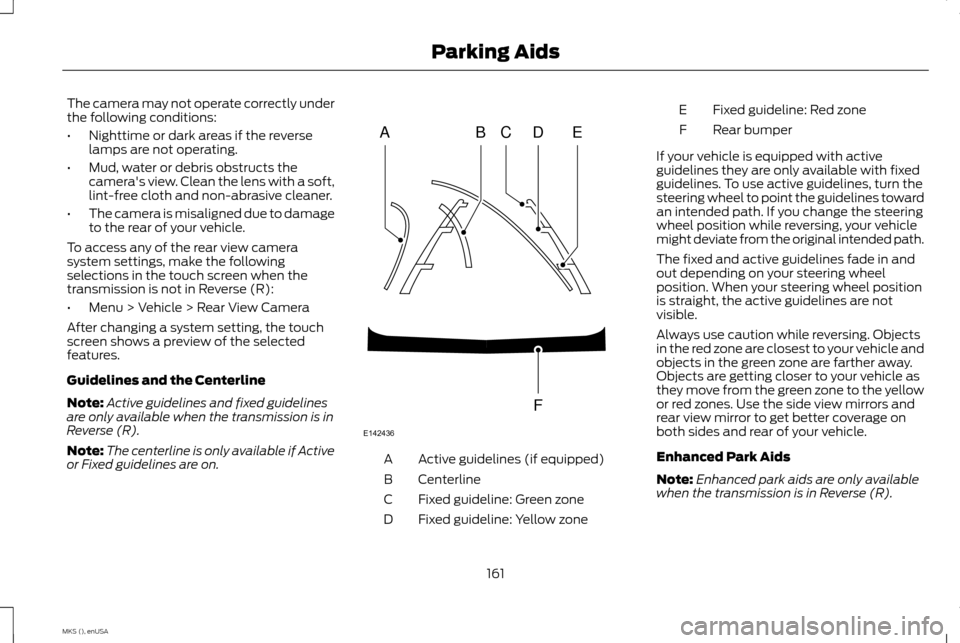
or Fixed guidelines are on. Active guidelines (if equipped)
A
Centerline
B
Fixed guideline: Green zone
C
Fixed guideline: Yellow zone
D Fixed guideline: Red zone
E
Rear bumper
F
If your vehicle is equipped with active
guidelines they are only available with fixed
guidelines. To use active guidelines, turn the
steering wheel to point the guidelines toward
an intended path. If you change the steering
wheel position while reversing, your vehicle
might deviate from the original intended path.
The fixed and active guidelines fade in and
out depending on your steering wheel
position. When your steering wheel position
is straight, the active guidelines are not
visible.
Always use caution while reversing. Objects
in the red zone are closest to your vehicle and
objects in the green zone are farther away.
Objects are getting closer to your vehicle as
they move from the green zone to the yellow
or red zones. Use the side view mirrors and
rear view mirror to get better coverage on
both sides and rear of your vehicle.
Enhanced Park Aids
Note: Enhanced park aids are only available
when the transmission is in Reverse (R).
161
MKS (), enUSA Parking AidsABCD
F
E
E142436
Page 170 of 424
Overriding Adaptive Cruise Control
WARNING
Whenever the driver is overriding the
system by pressing the accelerator
pedal, the system will not
automatically apply the brakes to maintain
separation from any vehicle ahead. You can override the set speed and gap
distance by pressing the accelerator pedal.
When you override the system, the
green indicator light illuminates
and the lead vehicle graphic does
not show in the information
display.
The system will resume operation when you
release the accelerator pedal. The vehicle
speed will decrease to the set speed, or a
lower speed if following a slower vehicle. Changing the Set Speed
•
Accelerate or brake to the desired speed,
then press SET upward and release.
• Increase or decrease the speed by holding
SET
upward or downward SET until the
desired set speed shows on the
information display. The vehicle speed
will gradually change to the selected
speed.
• Increase or decrease the speed in
increments of 1 mph (2km/h) by briefly
pressing
SET upward or downward.
The system may apply the brakes to slow
your vehicle to the new set speed. The set
speed will display continuously in the
information display while the system is
active.
Resuming the Set Speed
Note: Only use resume if you are aware of the
set speed and intend to return to it.
Press and release RES. The vehicle will return
to the previously set speed. The set speed
will display continuously in the information
display while the system is active. Low Speed Automatic Cancellation
The system is not functional at vehicle
speeds below 16 mph (26 km/h). An audible
alarm will sound and the automatic braking
releases if the vehicle drops below this speed.
Hilly Condition Usage
Note:
An audible alarm will sound and the
system will shut down if it is applying brakes
for an extended period of time. This allows the
brakes to cool down. The system will function
normally again when the brakes have cooled
down.
You should select a lower gear position when
the system is active in situations such as
prolonged downhill driving on steep grades,
for example in mountainous areas. The
system needs additional engine braking in
these situations to reduce the load on the
vehicle ’s regular brake system to prevent
them from overheating.
Switching the System Off
Note: The set speed memory erases when
you switch off the system.
Press and release OFF or turn off the ignition.
167
MKS (), enUSA Cruise ControlE144529
Page 175 of 424
The current assessment of your alertness
indicates that you should rest as soon as
safely possible.
The status bar will travel from left to right as
the calculated alertness level decreases. As
the rest icon is approached the color turns
from green to yellow to red. The yellow
position indicates the first warning is active
and the red position indicates the second
warning is active.
Note:
If you have recently received a warning;
you should consider resting, even if the current
assessment is with the typical range.
Note: If the camera sensor cannot track the
road lane markings or if your vehicle speed
drops below approximately 40 mph (64
km/h), the alertness level will change to grey
for a short time and the information display
will inform you that the system is unavailable.
Resetting the System
You can reset the system by either:
• Switching the ignition off and on.
• Stopping the vehicle and then opening
and closing the driver ’s door. LANE KEEPING SYSTEM (If Equipped) WARNING
The system is designed to aid the driver.
It is not intended to replace your
attention and judgment. You are still
responsible to drive with due care and
attention. Note:
The system works above 40 mph
(64 km/h).
Note: The system works as long as the
camera can detect one lane marking.
Note: The system may not function if the
camera is blocked or there is damage to the
windshield.
Note: When Aid mode is on and the system
detects no steering activity for a short period,
the system will alert you to put your hands on
the steering wheel. The system may detect a
light grip or touch on the steering wheel as
hands off driving. The system notifies you to stay in your lane
through the steering system and the
instrument cluster display when the front
camera detects an unintentional drift out of
your lane is likely to occur. The system
automatically detects and tracks the road
lane markings using a camera mounted
behind the interior rear view mirror.
Switching the System On and Off
Note:
The system on or off setting is stored
until it is manually changed, unless a MyKey®
is detected. If the system detects a MyKey®,
it defaults to on and the mode is set to alert.
Note: If a MyKey® is detected, pressing the
button will not affect the on or off status of
the system. You can only change the mode
and intensity settings. Press the button located on the
center console to switch the
system on or off.
172
MKS (), enUSA Driving AidsE173233
Page 177 of 424
•
Low
• Medium
• High
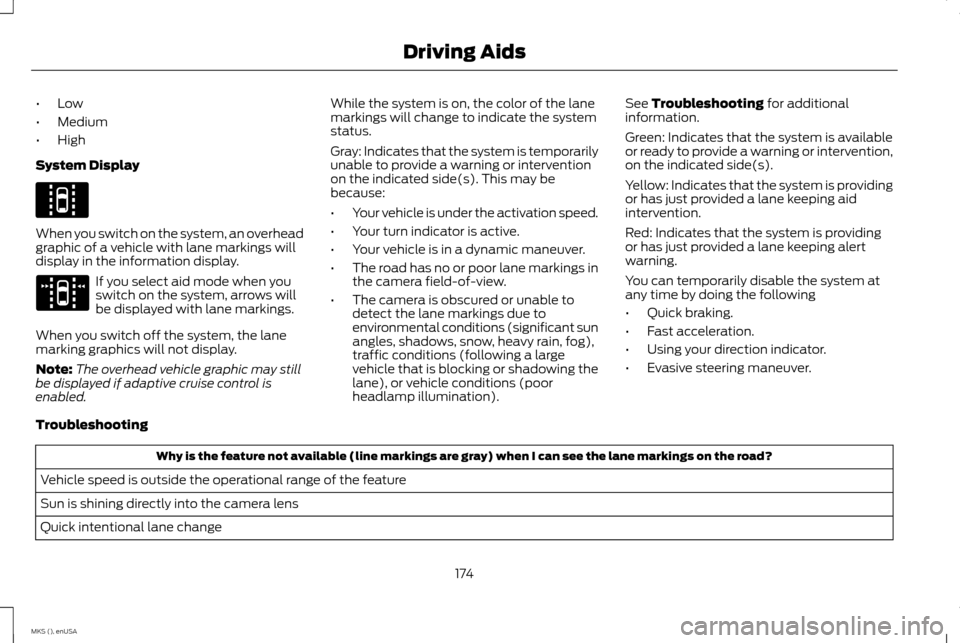
System Display When you switch on the system, an overhead
graphic of a vehicle with lane markings will
display in the information display.
If you select aid mode when you
switch on the system, arrows will
be displayed with lane markings.
When you switch off the system, the lane
marking graphics will not display.
Note: The overhead vehicle graphic may still
be displayed if adaptive cruise control is
enabled. While the system is on, the color of the lane
markings will change to indicate the system
status.
Gray: Indicates that the system is temporarily
unable to provide a warning or intervention
on the indicated side(s). This may be
because:
•
Your vehicle is under the activation speed.
• Your turn indicator is active.
• Your vehicle is in a dynamic maneuver.
• The road has no or poor lane markings in
the camera field-of-view.
• The camera is obscured or unable to
detect the lane markings due to
environmental conditions (significant sun
angles, shadows, snow, heavy rain, fog),
traffic conditions (following a large
vehicle that is blocking or shadowing the
lane), or vehicle conditions (poor
headlamp illumination). See Troubleshooting for additional
information.
Green: Indicates that the system is available
or ready to provide a warning or intervention,
on the indicated side(s).
Yellow: Indicates that the system is providing
or has just provided a lane keeping aid
intervention.
Red: Indicates that the system is providing
or has just provided a lane keeping alert
warning.
You can temporarily disable the system at
any time by doing the following
• Quick braking.
• Fast acceleration.
• Using your direction indicator.
• Evasive steering maneuver.
Troubleshooting Why is the feature not available (line markings are gray) when I can see the lane markings on the road?
Vehicle speed is outside the operational range of the feature
Sun is shining directly into the camera lens
Quick intentional lane change
174
MKS (), enUSA Driving AidsE144813 E173234
Page 188 of 424
DRIVE CONTROL
LINCOLN DRIVE CONTROL
Lincoln Drive Control delivers the Lincoln
driving experience through a suite of
sophisticated electronic vehicle systems.
These systems continuously monitor your
driving inputs and the road conditions to
optimize ride comfort, steering, handling,
powertrain response and sound. You can
preset your preferences for these systems
within the information display. Lincoln Drive
Control will respond to your preferences
based on what gear position you select. This
provides a single location to control multiple
systems performance settings.
Lincoln Drive Control consists of the following
systems:
•
Continuously controlled damping
dynamically adjusts the shock absorbers
stiffness in real time to match the road
surface and driver inputs. This system
continuously monitors your vehicle ’s
motion (roll, pitch, bounce), suspension
position, load, speed, road conditions, and
steering to adjust the suspension
damping for optimal vehicle control.
• Electronically power-assisted steering
adjusts steering effort and feel based on
your vehicle speed and your inputs.
• Active noise control utilizes your vehicle
electronics to enhance the acoustic
experience.
• Electronic stability control and traction
control maintain your vehicle control in
adverse conditions or high performance
driving.
• Electronic throttle control enhances the
powertrain response to your inputs.
Note: Active noise control is only available
with EcoBoost™ engines.
These systems have a range of modes which
you can choose from in order to customize
your ideal driving experience: •
Comfort – Provides a more relaxed
driving experience, maximizing comfort.
Your steering effort decreases and the
suspension movement is more fluid.
Comfort mode is ideal when you desire
enhanced traveling comfort.
• Normal – Delivers a balanced
combination of comfortable, controlled
ride and confident handling. This mode
provides an engaging drive experience
and a direct connection to the road
without sacrificing any of the composure
demanded from a luxury vehicle.
• Sport – Provides a sportier driving
experience. The suspension stiffens, with
an emphasis on handling and control. The
engine responds more directly to your
inputs and takes on a more powerful
tone. Sport mode is ideal for use during
more spirited driving.
Using Lincoln Drive Control
You can configure which of the Drive Control
modes are active when your vehicle is in Drive
(D) or in Sport (S). The configuration remains
active until modified from the main menu on
the information display.
To change your vehicle ’s Drive Control
settings from the main menu on the
information display:
185
MKS (), enUSA Driving Aids
Page 207 of 424
BREAKING-IN
You need to break in new tires for
approximately 300 miles (480 kilometers).
During this time, your vehicle may exhibit
some unusual driving characteristics.
Avoid driving too fast during the first 1000
miles (1600 kilometers). Vary your speed
frequently and change up through the gears
early. Do not labor the engine.
Do not tow during the first 1000 miles (1600
kilometers).
ECONOMICAL DRIVING
Fuel economy is affected by several things
such as how you drive, the conditions you
drive under and how you maintain your
vehicle.
There are some things to keep in mind that
may improve your fuel economy:
•
Accelerate and slow down in a smooth,
moderate fashion.
• Drive at steady speeds.
• Anticipate stops; slowing down may
eliminate the need to stop. •
Combine errands and minimize
stop-and-go driving.
•When running errands, go to the
furthest destination first and then
work your way back home.
• Close the windows for high-speed driving.
• Drive at reasonable speeds. (Traveling at
65 mph/105 kph uses about 15% less fuel
than traveling at 75 mph/121 kph).
• Keep the tires properly inflated and use
only the recommended size.
• Use the recommended engine oil.
• Perform all regularly scheduled
maintenance.
There are also some things you may want to
avoid doing because they reduce your fuel
economy:
• Avoid sudden or hard accelerations.
• Avoid revving the engine before turning
off the car.
• Avoid long idle periods.
• Do not warm up your vehicle on cold
mornings.
• Reduce the use of air conditioning and
heat.
• Avoid using speed control in hilly terrain. •
Do not rest your foot on the brake pedal
while driving.
• Avoid carrying unnecessary weight
(approximately 1 mpg [0.4
kilometers/liter] is lost for every 400 lbs
[180 kilograms] of weight carried).
• Avoid adding particular accessories to
your vehicle (e.g. bug deflectors,
rollbars/light bars, running boards, ski
racks).
• Avoid driving with the wheels out of
alignment.
DRIVING THROUGH WATER WARNING
Do not drive through flowing or deep
water as you may lose control of your
vehicle.
Note:
Driving through standing water can
cause vehicle damage.
Note: Engine damage can occur if water
enters the air filter.
Before driving through standing water, check
the depth. Never drive through water that is
higher than the bottom of the front rocker
area of your vehicle.
204
MKS (), enUSA Driving Hints
Page 217 of 424
You are required to submit your warranty
dispute to BBB AUTO LINE before asserting
in court any rights or remedies conferred by
California Civil Code Section 1793.22(b). You
are also required to use BBB AUTO LINE
before exercising rights or seeking remedies
created by the Federal Magnuson-Moss
Warranty Act, 15 U.S.C. sec. 2301 et seq. If
you choose to seek redress by pursuing rights
and remedies not created by California Civil
Code Section 1793.22(b) or the
Magnuson-Moss Warranty Act, resort to BBB
AUTO LINE is not required by those statutes.
THE BETTER BUSINESS
BUREAU (BBB) AUTO LINE
PROGRAM (U.S. ONLY)
Your satisfaction is important to Ford Motor
Company and to your dealer. If a warranty
concern has not been resolved using the
three-step procedure outlined earlier in this
chapter in the Getting the Services you need
section, you may be eligible to participate in
the BBB AUTO LINE program.
The BBB AUTO LINE program consists of two
parts – mediation and arbitration. During
mediation, a representative of the BBB will
contact both you and Ford Motor Company
to explore options for settlement of the
claim. If an agreement is not reached during
mediation or you do not want to participate
in mediation, and if your claim is eligible, you
may participate in the arbitration process. An
arbitration hearing will be scheduled so that
you can present your case in an informal
setting before an impartial person. The
arbitrator will consider the testimony
provided and make a decision after the
hearing.
Disputes submitted to the BBB AUTO LINE
program are usually decided within forty days
after you file your claim with the BBB. You
are not bound by the decision, and may reject
the decision and proceed to court where all
findings of the BBB Auto Line dispute, and
decision, are admissible in the court action.
Should you choose to accept the BBB AUTO
LINE decision, Ford is then bound by the
decision, and must comply with the decision
within 30 days of receipt of your acceptance
letter.BBB AUTO LINE Application: Using the
information provided below, please call or
write to request a program application. You
will be asked for your name and address,
general information about your new vehicle,
information about your warranty concerns,
and any steps you have already taken to try
to resolve them. A Customer Claim Form will
be mailed that will need to be completed,
signed and returned to the BBB along with
proof of ownership. Upon receipt, the BBB
will review the claim for eligibility under the
Program Summary Guidelines.
You can get more information by calling
BBB AUTO LINE at 1-800-955-5100, or
writing to:
BBB AUTO LINE
3033 Wilson Boulevard, Suite 600
Arlington, Virginia 22201
BBB AUTO LINE applications can also be
requested by calling the Ford Motor Company
Customer Relationship Center at
1-800-392-3673.
Note:
Ford Motor Company reserves the right
to change eligibility limitations, modify
procedures, or to discontinue this process at
any time without notice and without
obligation.
214
MKS (), enUSA Customer Assistance
Page 247 of 424
At this time, you may notice your engine
coolant temperature gauge needle move
toward the H and the POWER REDUCED
TO LOWER TEMP message may appear in
the information display.
You may notice a reduction in vehicle speed
caused by reduced engine power. In order to
manage the engine fluid temperatures, your
vehicle may enter this mode if certain
high-temperature and high-load conditions
take place. The amount of speed reduction
depends on many factors such as vehicle
loading, towing, grade and ambient
temperature. If this occurs, there is no need
to pull off the road. You can continue to drive
your vehicle while this message is active.
The air conditioning may also cycle on and
off during severe operating conditions to
protect overheating of the engine. When the
engine coolant temperature decreases to a
normal operating temperature, the air
conditioning will turn on once again.
If the engine coolant temperature gauge
moves fully into the red (hot) area, or if the
coolant temperature warning or service
engine soon messages appear in your
information display:
1. Pull off the road as soon as safely possible and shift the transmission into
P
. 2.
Leave the engine running until the coolant
temperature gauge needle moves away
from the red (hot) area. After several
minutes, if the temperature does not
drop, follow the remaining steps.
3. Switch the engine off and wait for it to cool before checking the coolant level.
4. If the coolant level is normal, restart your
engine and continue.
5. If the coolant is low, add coolant, and restart the engine. See
Adding Engine
Coolant or How Fail-Safe Cooling
Works in this chapter for more
information.
AUTOMATIC TRANSMISSION
FLUID CHECK
6F50/6F55 Transmission
(If Equipped) WARNINGS
The dipstick cap and surrounding
components may be hot, use gloves.
Use gloves when moving the air filter
assembly. Components will be hot. Note:
Automatic transmission fluid expands
when warmed. To obtain an accurate fluid
check, drive your vehicle until you warm it up,
approximately
20 mi (30 km). If you operate
your vehicle for an extended period at high
speeds, in city traffic during hot weather or
pulling a trailer, switch your vehicle off until it
reaches normal operating temperatures to
allow the fluid to cool before checking.
Depending on vehicle use, cooling times could
take up to 30 minutes or longer.
Refer to your scheduled maintenance
information for scheduled intervals for fluid
checks and changes. Your transmission does
not consume fluid. However, you should
check the fluid level if the transmission is not
working properly. For example, if the
transmission slips or shifts slowly or if you
notice some sign of a fluid leak.
1. Drive your vehicle 20 mi (30 km) or until it reaches normal operating temperature.
2. Park your vehicle on a level surface and engage the parking brake.
3. With the parking brake engaged and your
foot on the brake pedal, start the engine
and move the gearshift lever through all
of the gear ranges. Allow a minimum of
10 seconds for each gear to engage.
4. Put the gearshift lever in park (P) and leave the engine running.
244
MKS (), enUSA Maintenance
Page 255 of 424
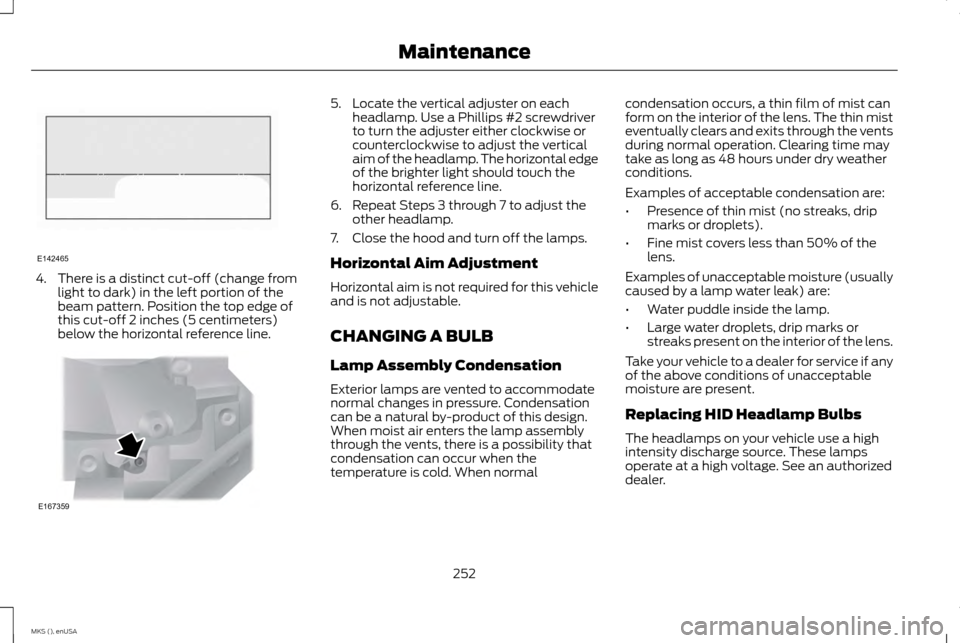
4. There is a distinct cut-off (change from
light to dark) in the left portion of the
beam pattern. Position the top edge of
this cut-off 2 inches (5 centimeters)
below the horizontal reference line. 5. Locate the vertical adjuster on each
headlamp. Use a Phillips #2 screwdriver
to turn the adjuster either clockwise or
counterclockwise to adjust the vertical
aim of the headlamp. The horizontal edge
of the brighter light should touch the
horizontal reference line.
6. Repeat Steps 3 through 7 to adjust the other headlamp.
7. Close the hood and turn off the lamps.
Horizontal Aim Adjustment
Horizontal aim is not required for this vehicle
and is not adjustable.
CHANGING A BULB
Lamp Assembly Condensation
Exterior lamps are vented to accommodate
normal changes in pressure. Condensation
can be a natural by-product of this design.
When moist air enters the lamp assembly
through the vents, there is a possibility that
condensation can occur when the
temperature is cold. When normal condensation occurs, a thin film of mist can
form on the interior of the lens. The thin mist
eventually clears and exits through the vents
during normal operation. Clearing time may
take as long as 48 hours under dry weather
conditions.
Examples of acceptable condensation are:
•
Presence of thin mist (no streaks, drip
marks or droplets).
• Fine mist covers less than 50% of the
lens.
Examples of unacceptable moisture (usually
caused by a lamp water leak) are:
• Water puddle inside the lamp.
• Large water droplets, drip marks or
streaks present on the interior of the lens.
Take your vehicle to a dealer for service if any
of the above conditions of unacceptable
moisture are present.
Replacing HID Headlamp Bulbs
The headlamps on your vehicle use a high
intensity discharge source. These lamps
operate at a high voltage. See an authorized
dealer.
252
MKS (), enUSA MaintenanceE142465 E167359
Page 270 of 424
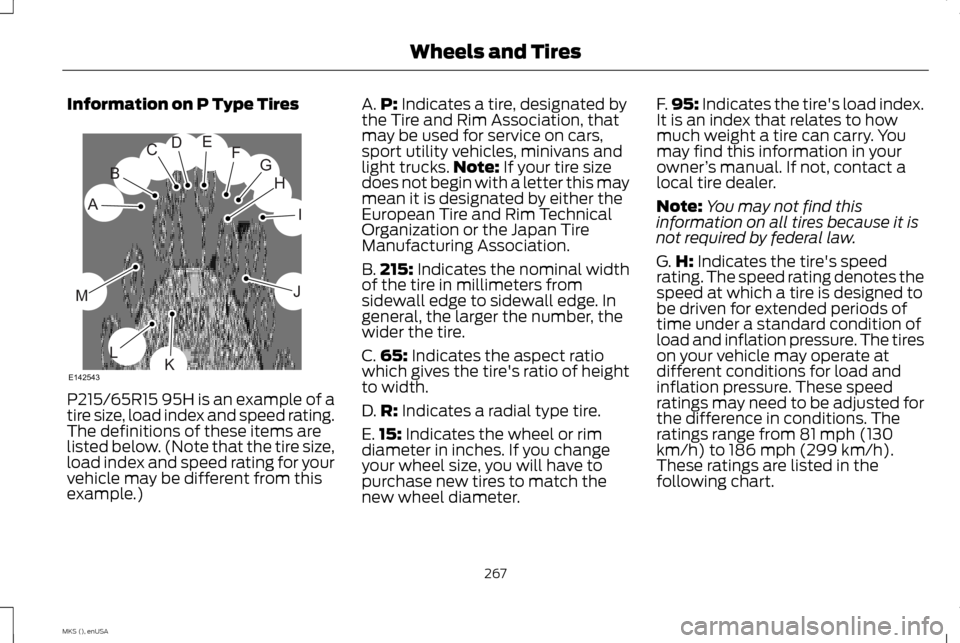
Information on P Type Tires
P215/65R15 95H is an example of a
tire size, load index and speed rating.
The definitions of these items are
listed below. (Note that the tire size,
load index and speed rating for your
vehicle may be different from this
example.) A.
P: Indicates a tire, designated by
the Tire and Rim Association, that
may be used for service on cars,
sport utility vehicles, minivans and
light trucks. Note:
If your tire size
does not begin with a letter this may
mean it is designated by either the
European Tire and Rim Technical
Organization or the Japan Tire
Manufacturing Association.
B. 215:
Indicates the nominal width
of the tire in millimeters from
sidewall edge to sidewall edge. In
general, the larger the number, the
wider the tire.
C. 65:
Indicates the aspect ratio
which gives the tire's ratio of height
to width.
D. R:
Indicates a radial type tire.
E. 15:
Indicates the wheel or rim
diameter in inches. If you change
your wheel size, you will have to
purchase new tires to match the
new wheel diameter. F.
95:
Indicates the tire's load index.
It is an index that relates to how
much weight a tire can carry. You
may find this information in your
owner ’s manual. If not, contact a
local tire dealer.
Note: You may not find this
information on all tires because it is
not required by federal law.
G. H:
Indicates the tire's speed
rating. The speed rating denotes the
speed at which a tire is designed to
be driven for extended periods of
time under a standard condition of
load and inflation pressure. The tires
on your vehicle may operate at
different conditions for load and
inflation pressure. These speed
ratings may need to be adjusted for
the difference in conditions. The
ratings range from 81 mph (130
km/h) to 186 mph (299 km/h).
These ratings are listed in the
following chart.
267
MKS (), enUSA Wheels and TiresH
I
J
KL
M
A
B
CDEFG
E142543