engine LINCOLN MKS 2015 User Guide
[x] Cancel search | Manufacturer: LINCOLN, Model Year: 2015, Model line: MKS, Model: LINCOLN MKS 2015Pages: 424, PDF Size: 3.96 MB
Page 92 of 424
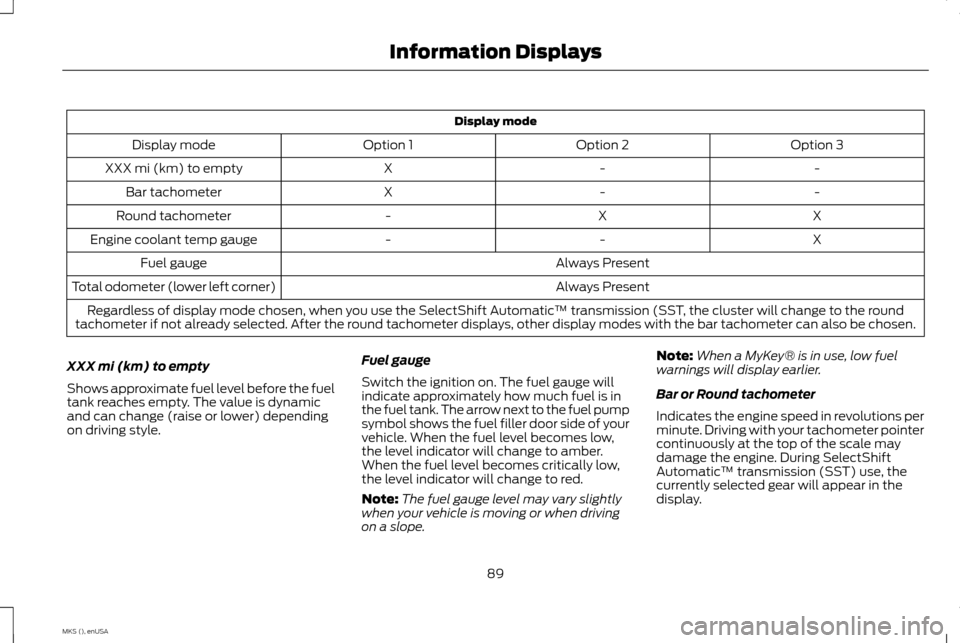
Display mode
Option 3
Option 2
Option 1
Display mode
-
-
X
XXX mi (km) to empty
-
-
X
Bar tachometer
X
X
-
Round tachometer
X
-
-
Engine coolant temp gauge
Always Present
Fuel gauge
Always Present
Total odometer (lower left corner)
Regardless of display mode chosen, when you use the SelectShift Automatic ™ transmission (SST, the cluster will change to the round
tachometer if not already selected. After the round tachometer displays, other display modes with the bar tachometer can also be chosen.
XXX mi (km) to empty
Shows approximate fuel level before the fuel
tank reaches empty. The value is dynamic
and can change (raise or lower) depending
on driving style. Fuel gauge
Switch the ignition on. The fuel gauge will
indicate approximately how much fuel is in
the fuel tank. The arrow next to the fuel pump
symbol shows the fuel filler door side of your
vehicle. When the fuel level becomes low,
the level indicator will change to amber.
When the fuel level becomes critically low,
the level indicator will change to red.
Note:
The fuel gauge level may vary slightly
when your vehicle is moving or when driving
on a slope. Note:
When a MyKey® is in use, low fuel
warnings will display earlier.
Bar or Round tachometer
Indicates the engine speed in revolutions per
minute. Driving with your tachometer pointer
continuously at the top of the scale may
damage the engine. During SelectShift
Automatic ™ transmission (SST) use, the
currently selected gear will appear in the
display.
89
MKS (), enUSA Information Displays
Page 93 of 424
Engine coolant temperature gauge
Indicates engine coolant temperature. At
normal operating temperature, the level
indicator will be in the normal range. If the
engine coolant temperature exceeds the
normal range, stop your vehicle as soon as
safely possible, switch off the engine and let
the engine cool.
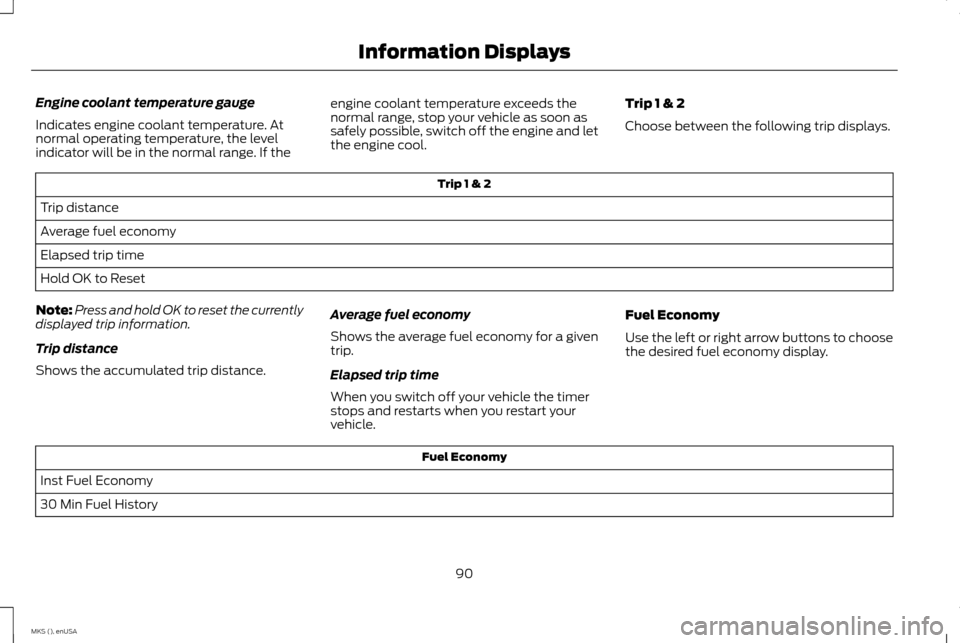
Trip 1 & 2
Choose between the following trip displays. Trip 1 & 2
Trip distance
Average fuel economy
Elapsed trip time
Hold OK to Reset
Note: Press and hold OK to reset the currently
displayed trip information.
Trip distance
Shows the accumulated trip distance. Average fuel economy
Shows the average fuel economy for a given
trip.
Elapsed trip time
When you switch off your vehicle the timer
stops and restarts when you restart your
vehicle.Fuel Economy
Use the left or right arrow buttons to choose
the desired fuel economy display. Fuel Economy
Inst Fuel Economy
30 Min Fuel History
90
MKS (), enUSA Information Displays
Page 95 of 424
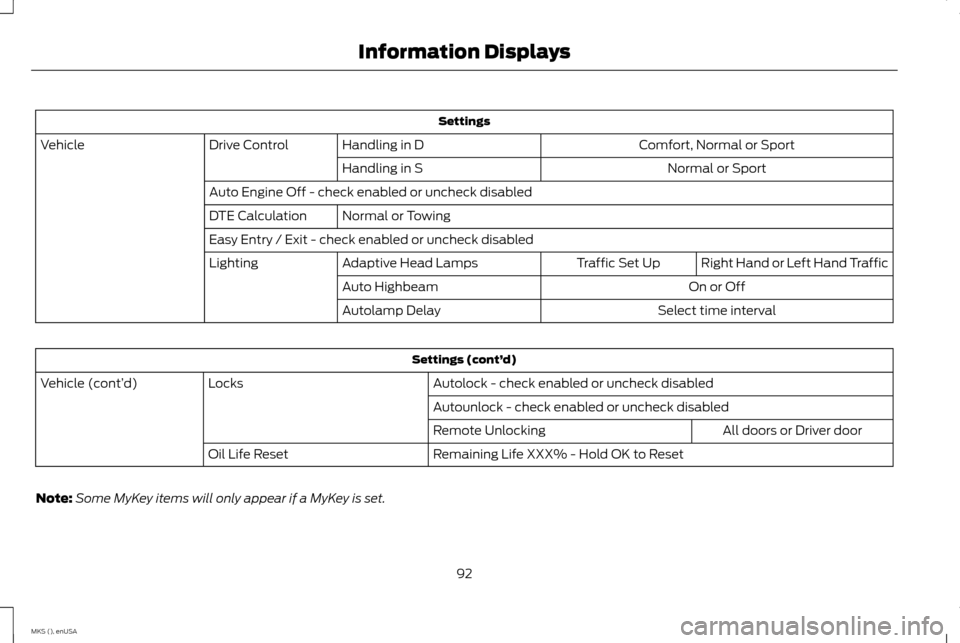
Settings
Comfort, Normal or Sport
Handling in D
Drive Control
Vehicle
Normal or Sport
Handling in S
Auto Engine Off - check enabled or uncheck disabled Normal or Towing
DTE Calculation
Easy Entry / Exit - check enabled or uncheck disabled
Right Hand or Left Hand Traffic
Traffic Set Up
Adaptive Head Lamps
Lighting
On or Off
Auto Highbeam
Select time interval
Autolamp Delay Settings (cont’
d)
Autolock - check enabled or uncheck disabled
Locks
Vehicle (cont’ d)
Autounlock - check enabled or uncheck disabledAll doors or Driver door
Remote Unlocking
Remaining Life XXX% - Hold OK to Reset
Oil Life Reset
Note: Some MyKey items will only appear if a MyKey is set.
92
MKS (), enUSA Information Displays
Page 99 of 424
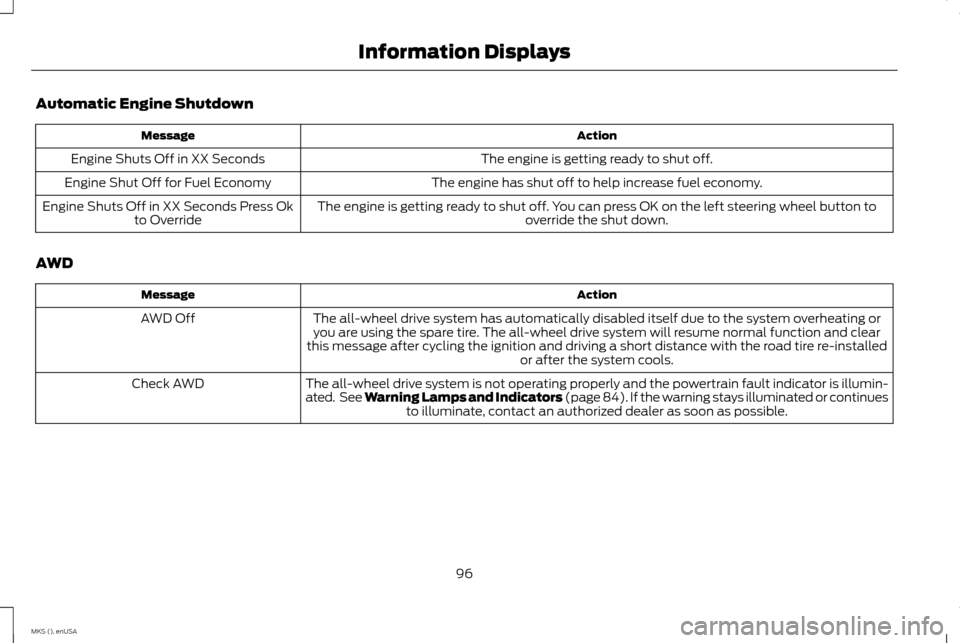
Automatic Engine Shutdown
Action
Message
The engine is getting ready to shut off.
Engine Shuts Off in XX Seconds
The engine has shut off to help increase fuel economy.
Engine Shut Off for Fuel Economy
The engine is getting ready to shut off. You can press OK on the left steering wheel button tooverride the shut down.
Engine Shuts Off in XX Seconds Press Ok
to Override
AWD Action
Message
The all-wheel drive system has automatically disabled itself due to the system overheating oryou are using the spare tire. The all-wheel drive system will resume normal function and clear
this message after cycling the ignition and driving a short distance with the road tire re-installed or after the system cools.
AWD Off
The all-wheel drive system is not operating properly and the powertrain fault indicator is illumin-
ated. See Warning Lamps and Indicators (page 84). If the warning stays illuminated or continuesto illuminate, contact an authorized dealer as soon as possible.
Check AWD
96
MKS (), enUSA Information Displays
Page 101 of 424
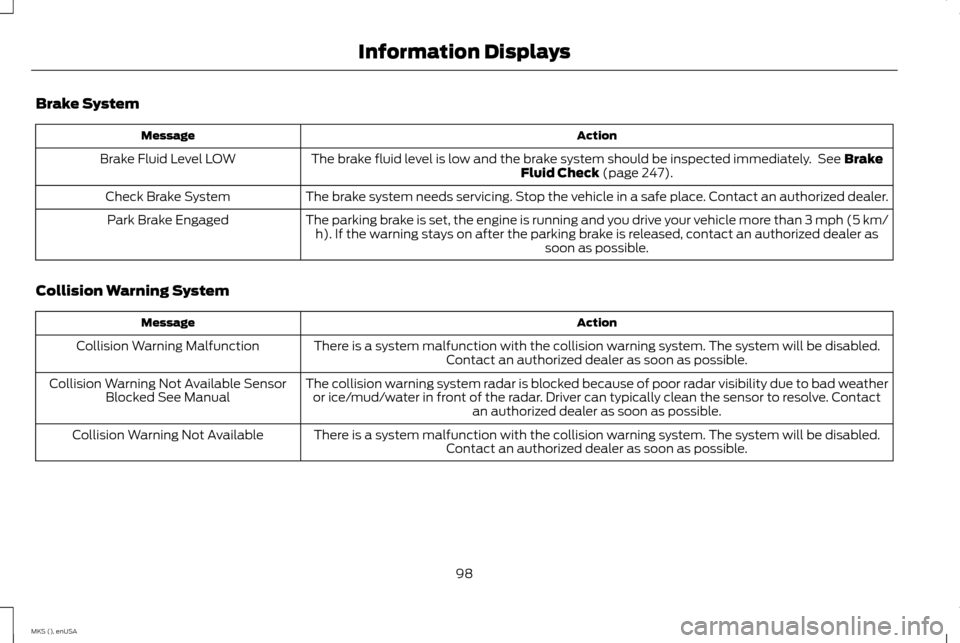
Brake System
Action
Message
The brake fluid level is low and the brake system should be inspected immediately. See Brake
Fluid Check (page 247).
Brake Fluid Level LOW
The brake system needs servicing. Stop the vehicle in a safe place. Contact an authorized dealer.
Check Brake System
The parking brake is set, the engine is running and you drive your vehicle more than 3 mph (5 km/h). If the warning stays on after the parking brake is released, contact an authorized dealer as soon as possible.
Park Brake Engaged
Collision Warning System Action
Message
There is a system malfunction with the collision warning system. The system will be disabled.Contact an authorized dealer as soon as possible.
Collision Warning Malfunction
The collision warning system radar is blocked because of poor radar visibility due to bad weatheror ice/mud/water in front of the radar. Driver can typically clean the sensor to resolve. Contact an authorized dealer as soon as possible.
Collision Warning Not Available Sensor
Blocked See Manual
There is a system malfunction with the collision warning system. The system will be disabled.Contact an authorized dealer as soon as possible.
Collision Warning Not Available
98
MKS (), enUSA Information Displays
Page 102 of 424
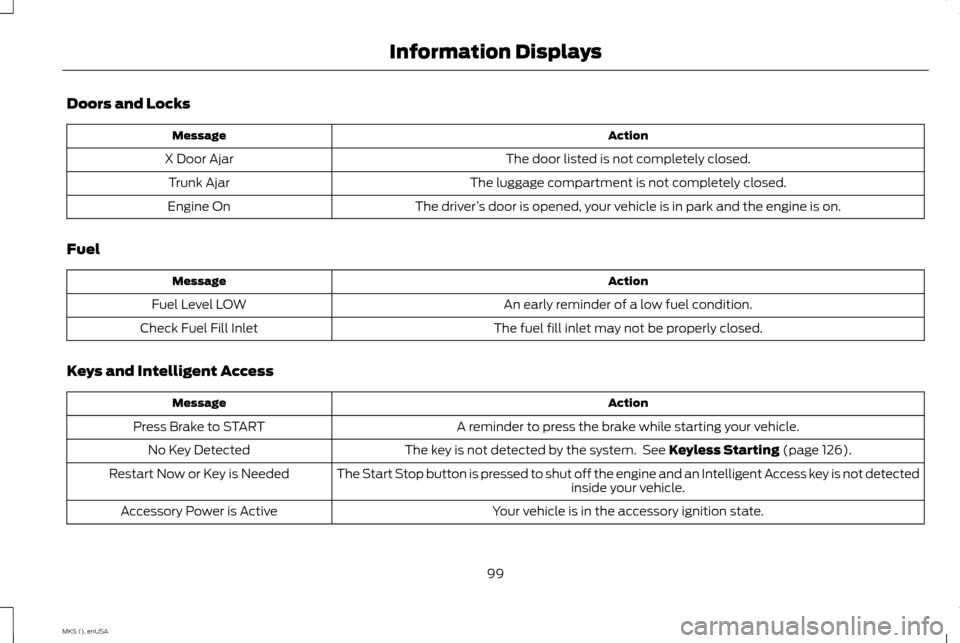
Doors and Locks
Action
Message
The door listed is not completely closed.
X Door Ajar
The luggage compartment is not completely closed.
Trunk Ajar
The driver’s door is opened, your vehicle is in park and the engine is on.
Engine On
Fuel Action
Message
An early reminder of a low fuel condition.
Fuel Level LOW
The fuel fill inlet may not be properly closed.
Check Fuel Fill Inlet
Keys and Intelligent Access Action
Message
A reminder to press the brake while starting your vehicle.
Press Brake to START
The key is not detected by the system. See Keyless Starting (page 126).
No Key Detected
The Start Stop button is pressed to shut off the engine and an Intelligent Access key is not detected inside your vehicle.
Restart Now or Key is Needed
Your vehicle is in the accessory ignition state.
Accessory Power is Active
99
MKS (), enUSA Information Displays
Page 104 of 424
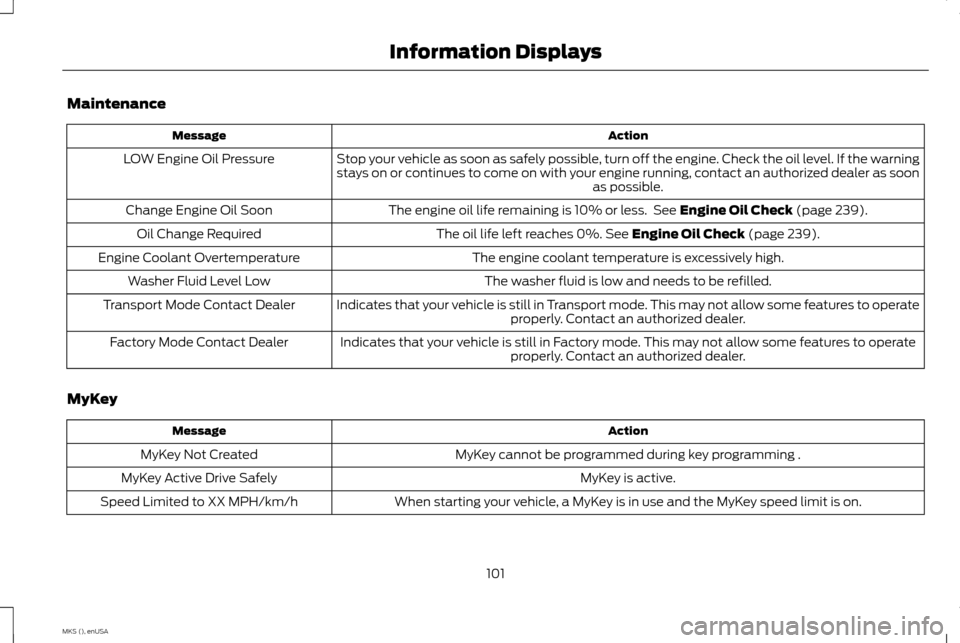
Maintenance
Action
Message
Stop your vehicle as soon as safely possible, turn off the engine. Check the oil level. If the warning
stays on or continues to come on with your engine running, contact an authorized dealer as soon as possible.
LOW Engine Oil Pressure
The engine oil life remaining is 10% or less. See Engine Oil Check (page 239).
Change Engine Oil Soon
The oil life left reaches 0%.
See Engine Oil Check (page 239).
Oil Change Required
The engine coolant temperature is excessively high.
Engine Coolant Overtemperature
The washer fluid is low and needs to be refilled.
Washer Fluid Level Low
Indicates that your vehicle is still in Transport mode. This may not allow some features to operateproperly. Contact an authorized dealer.
Transport Mode Contact Dealer
Indicates that your vehicle is still in Factory mode. This may not allow some features to operateproperly. Contact an authorized dealer.
Factory Mode Contact Dealer
MyKey Action
Message
MyKey cannot be programmed during key programming .
MyKey Not Created
MyKey is active.
MyKey Active Drive Safely
When starting your vehicle, a MyKey is in use and the MyKey speed limit is on.
Speed Limited to XX MPH/km/h
101
MKS (), enUSA Information Displays
Page 107 of 424
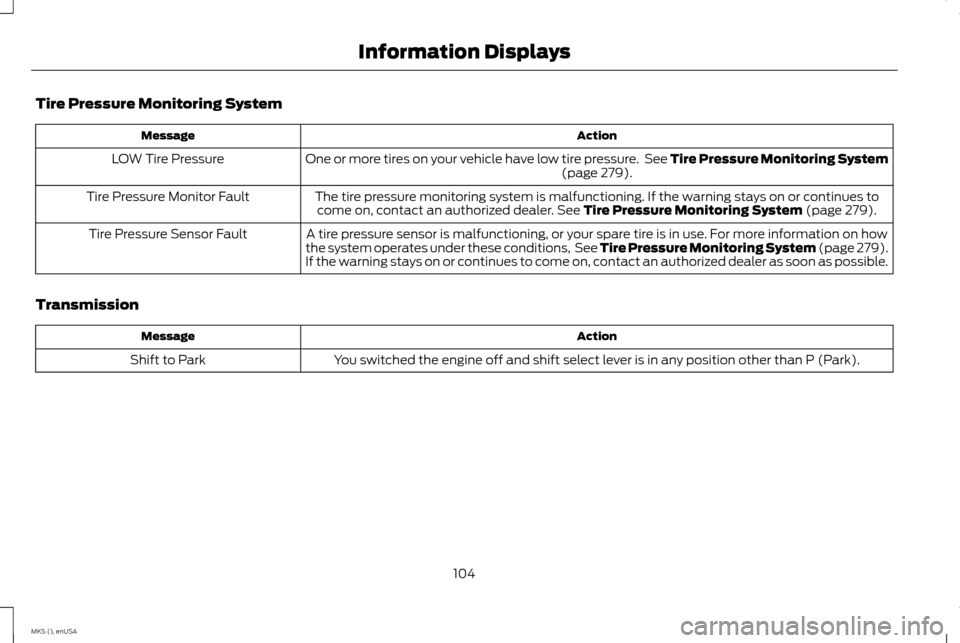
Tire Pressure Monitoring System
Action
Message
One or more tires on your vehicle have low tire pressure. See Tire Pressure Monitoring System (page 279).
LOW Tire Pressure
The tire pressure monitoring system is malfunctioning. If the warning stays on or continues tocome on, contact an authorized dealer.
See Tire Pressure Monitoring System (page 279).
Tire Pressure Monitor Fault
A tire pressure sensor is malfunctioning, or your spare tire is in use. For more information on how
the system operates under these conditions, See Tire Pressure Monitoring System (page 279).
If the warning stays on or continues to come on, contact an authorized dealer as soon as possible.
Tire Pressure Sensor Fault
Transmission Action
Message
You switched the engine off and shift select lever is in any position other than P (Park).
Shift to Park
104
MKS (), enUSA Information Displays
Page 110 of 424
Note:
If you select AUTO during cold outside
temperatures, the system directs airflow to
the windshield and side window vents. In
addition, the fan may run at a slower speed
until the engine warms up.
Note: If you select
AUTO during hot outside
temperatures, or when the inside of the vehicle
is hot, the system automatically uses
recirculated air to maximize interior cooling.
When the interior reaches the selected
temperature, the system automatically
switches to using outside air.
Heating the Interior Quickly
1. Press the
AUTO button.
2. Adjust the temperature control to the desired setting.
Recommended Settings for Heating
1. Press the
AUTO button.
2. Adjust the temperature control to the desired setting. Use 72°F (22°C) as a
starting point, then adjust the setting as
necessary.
Cooling the Interior Quickly
Press the
MAX A/C button. Recommended Settings for Cooling
1. Press the
AUTO button.
2. Adjust the temperature control to the desired setting. Use 72°F (22°C) as a
starting point, then adjust the setting as
necessary.
Side Window Defogging in Cold
Weather
1. Press the defrost button.
2. Adjust the temperature control to the desired setting. Use 72°F (22°C) as a
starting point, then adjust the setting as
necessary.
3. Direct the instrument panel side air vents
toward the side windows.
4. Close the instrument panel vents.
HEATED WINDOWS AND
MIRRORS
Heated Rear Window
Note: Make sure the engine is running before
operating the heated windows. Press the button to clear the
heated rear window of thin ice and
fog. Press the button to switch the
system off. The heated rear window will
automatically turn off after a short period of
time.
Do not use razor blades or other sharp
objects to clean or remove decals from
the inside of the heated rear window. This
may cause damage to the heated rear
window grid lines. The vehicle warranty
does not cover damage caused to the
heated rear window grid lines.
Heated Exterior Mirror
Note: Do not remove ice from the mirrors with
a scraper or adjust the mirror glass when it is
frozen in place. These actions could cause
damage to the glass and mirrors.
Note: Do not clean the mirror housing or glass
with harsh abrasives, fuel or other
petroleum-based cleaning products.
The heated exterior mirrors will remove ice,
mist and fog. When you switch the heated
rear window on, the heated exterior mirrors
will automatically turn on.
107
MKS (), enUSA Climate ControlE72507
Page 116 of 424
Note:
On vehicles with memory seats, to
prevent damage to the seat, the power seats
are designed to set a stopping position just
short of the end of the seat track. If the seat
encounters an object while moving forward or
backward, a new stopping position will be set.
To reset the seat to its normal stopping
position:
1. After encountering the new stopping position, press the power seat control
again to override.
2. Continue pressing the control until it reaches the end of the seat track.
3. Continue pressing the control for about two seconds. You will feel the seat
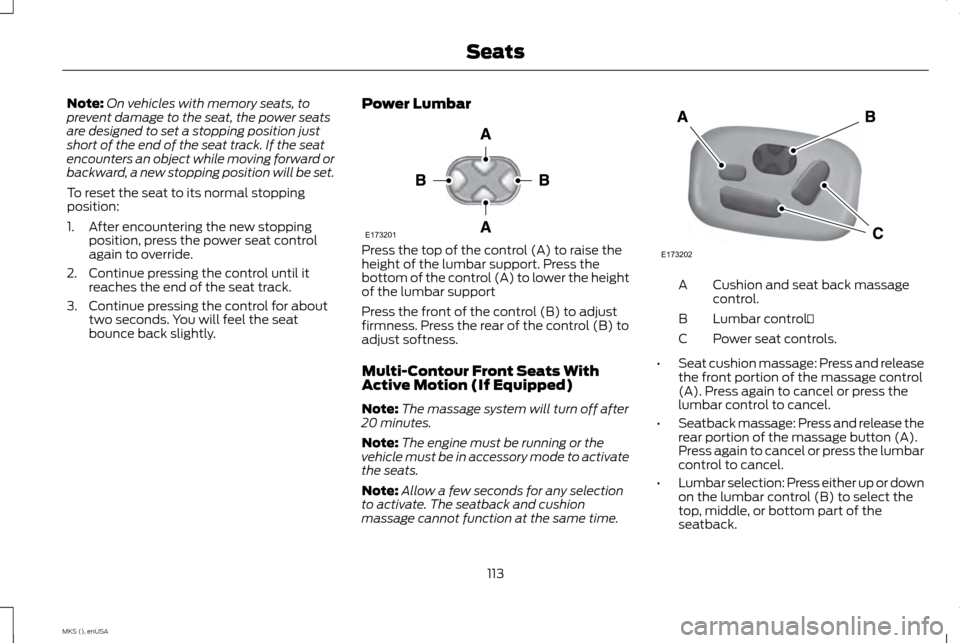
bounce back slightly. Power Lumbar Press the top of the control (A) to raise the
height of the lumbar support. Press the
bottom of the control (A) to lower the height
of the lumbar support
Press the front of the control (B) to adjust
firmness. Press the rear of the control (B) to
adjust softness.
Multi-Contour Front Seats With
Active Motion (If Equipped)
Note:
The massage system will turn off after
20 minutes.
Note: The engine must be running or the
vehicle must be in accessory mode to activate
the seats.
Note: Allow a few seconds for any selection
to activate. The seatback and cushion
massage cannot function at the same time. Cushion and seat back massage
control.
A
Lumbar control.
B
Power seat controls.
C
• Seat cushion massage: Press and release
the front portion of the massage control
(A). Press again to cancel or press the
lumbar control to cancel.
• Seatback massage: Press and release the
rear portion of the massage button (A).
Press again to cancel or press the lumbar
control to cancel.
• Lumbar selection: Press either up or down
on the lumbar control (B) to select the
top, middle, or bottom part of the
seatback.
113
MKS (), enUSA SeatsE173201 E173202