instrument cluster LINCOLN MKS 2015 User Guide
[x] Cancel search | Manufacturer: LINCOLN, Model Year: 2015, Model line: MKS, Model: LINCOLN MKS 2015Pages: 424, PDF Size: 3.96 MB
Page 143 of 424
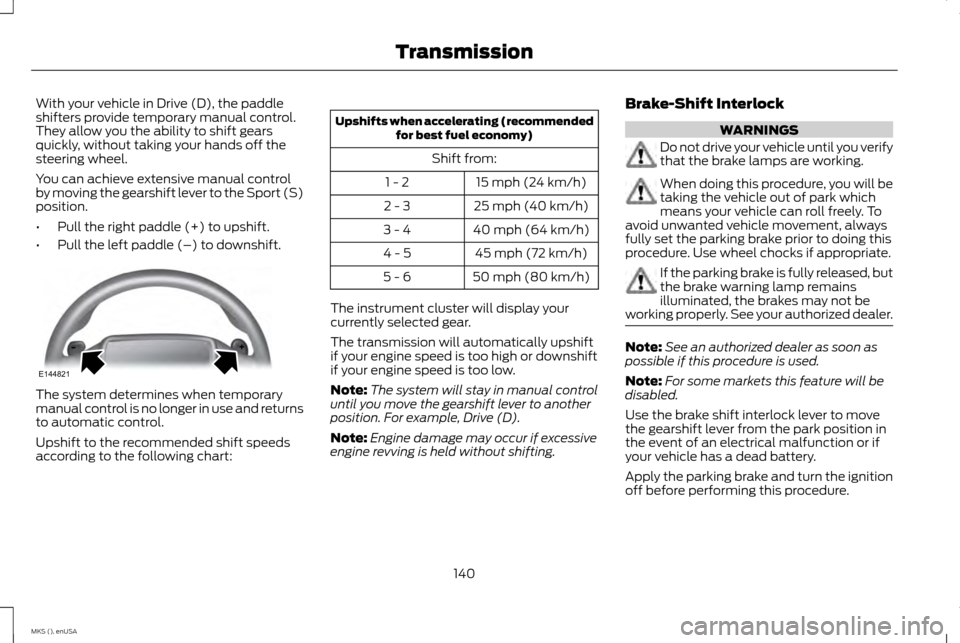
With your vehicle in Drive (D), the paddle
shifters provide temporary manual control.
They allow you the ability to shift gears
quickly, without taking your hands off the
steering wheel.
You can achieve extensive manual control
by moving the gearshift lever to the Sport (S)
position.
•
Pull the right paddle (+) to upshift.
• Pull the left paddle (–) to downshift. The system determines when temporary
manual control is no longer in use and returns
to automatic control.
Upshift to the recommended shift speeds
according to the following chart: Upshifts when accelerating (recommended
for best fuel economy)
Shift from: 15 mph (24 km/h)
1 - 2
25 mph (40 km/h)
2 - 3
40 mph (64 km/h)
3 - 4
45 mph (72 km/h)
4 - 5
50 mph (80 km/h)
5 - 6
The instrument cluster will display your
currently selected gear.
The transmission will automatically upshift
if your engine speed is too high or downshift
if your engine speed is too low.
Note: The system will stay in manual control
until you move the gearshift lever to another
position. For example, Drive (D).
Note: Engine damage may occur if excessive
engine revving is held without shifting. Brake-Shift Interlock WARNINGS
Do not drive your vehicle until you verify
that the brake lamps are working.
When doing this procedure, you will be
taking the vehicle out of park which
means your vehicle can roll freely. To
avoid unwanted vehicle movement, always
fully set the parking brake prior to doing this
procedure. Use wheel chocks if appropriate. If the parking brake is fully released, but
the brake warning lamp remains
illuminated, the brakes may not be
working properly. See your authorized dealer. Note:
See an authorized dealer as soon as
possible if this procedure is used.
Note: For some markets this feature will be
disabled.
Use the brake shift interlock lever to move
the gearshift lever from the park position in
the event of an electrical malfunction or if
your vehicle has a dead battery.
Apply the parking brake and turn the ignition
off before performing this procedure.
140
MKS (), enUSA TransmissionE144821
Page 166 of 424
PRINCIPLE OF OPERATION
Cruise control lets you maintain a set speed
without keeping your foot on the accelerator
pedal. You can use cruise control when your
vehicle speed is greater than 20 mph
(30 km/h).
USING CRUISE CONTROL WARNINGS
Do not use cruise control in heavy
traffic, on winding roads or when the
road surface is slippery. This could
result in loss of vehicle control, serious injury
or death. When you are going downhill, your
vehicle speed may increase above the
set speed. The system will not apply
the brakes. Change down a gear to assist the
system in maintaining the set speed. Failure
to do so could result in loss of vehicle control,
serious injury or death. Note:
Cruise control will disengage if the
vehicle speed decreases more than 10 mph
(16 km/h) below your set speed while driving
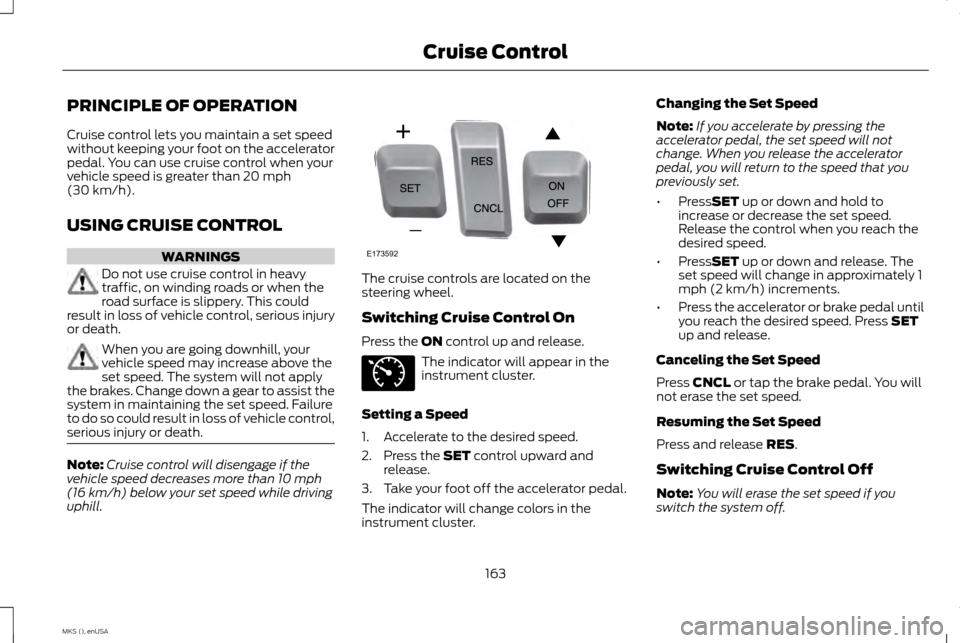
uphill. The cruise controls are located on the
steering wheel.
Switching Cruise Control On
Press the
ON control up and release.
The indicator will appear in the
instrument cluster.
Setting a Speed
1. Accelerate to the desired speed.
2. Press the
SET control upward and
release.
3. Take your foot off the accelerator pedal.
The indicator will change colors in the
instrument cluster. Changing the Set Speed
Note:
If you accelerate by pressing the
accelerator pedal, the set speed will not
change. When you release the accelerator
pedal, you will return to the speed that you
previously set.
• Press
SET up or down and hold to
increase or decrease the set speed.
Release the control when you reach the
desired speed.
• Press
SET up or down and release. The
set speed will change in approximately 1
mph (2 km/h) increments.
• Press the accelerator or brake pedal until
you reach the desired speed. Press
SET
up and release.
Canceling the Set Speed
Press
CNCL or tap the brake pedal. You will
not erase the set speed.
Resuming the Set Speed
Press and release
RES.
Switching Cruise Control Off
Note: You will erase the set speed if you
switch the system off.
163
MKS (), enUSA Cruise ControlE173592 E71340
Page 175 of 424
The current assessment of your alertness
indicates that you should rest as soon as
safely possible.
The status bar will travel from left to right as
the calculated alertness level decreases. As
the rest icon is approached the color turns
from green to yellow to red. The yellow
position indicates the first warning is active
and the red position indicates the second
warning is active.
Note:
If you have recently received a warning;
you should consider resting, even if the current
assessment is with the typical range.
Note: If the camera sensor cannot track the
road lane markings or if your vehicle speed
drops below approximately 40 mph (64
km/h), the alertness level will change to grey
for a short time and the information display
will inform you that the system is unavailable.
Resetting the System
You can reset the system by either:
• Switching the ignition off and on.
• Stopping the vehicle and then opening
and closing the driver ’s door. LANE KEEPING SYSTEM (If Equipped) WARNING
The system is designed to aid the driver.
It is not intended to replace your
attention and judgment. You are still
responsible to drive with due care and
attention. Note:
The system works above 40 mph
(64 km/h).
Note: The system works as long as the
camera can detect one lane marking.
Note: The system may not function if the
camera is blocked or there is damage to the
windshield.
Note: When Aid mode is on and the system
detects no steering activity for a short period,
the system will alert you to put your hands on
the steering wheel. The system may detect a
light grip or touch on the steering wheel as
hands off driving. The system notifies you to stay in your lane
through the steering system and the
instrument cluster display when the front
camera detects an unintentional drift out of
your lane is likely to occur. The system
automatically detects and tracks the road
lane markings using a camera mounted
behind the interior rear view mirror.
Switching the System On and Off
Note:
The system on or off setting is stored
until it is manually changed, unless a MyKey®
is detected. If the system detects a MyKey®,
it defaults to on and the mode is set to alert.
Note: If a MyKey® is detected, pressing the
button will not affect the on or off status of
the system. You can only change the mode
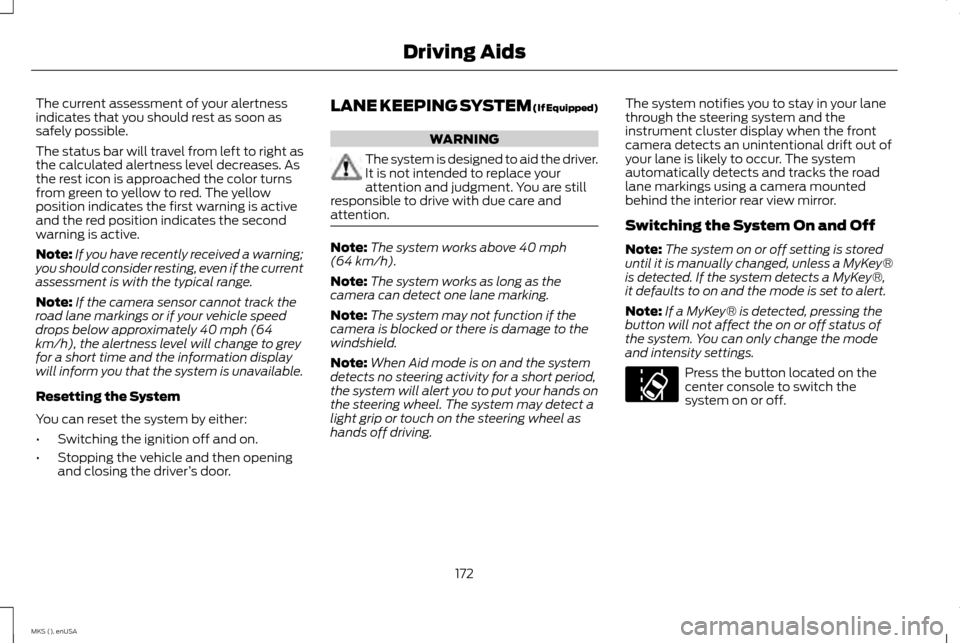
and intensity settings. Press the button located on the
center console to switch the
system on or off.
172
MKS (), enUSA Driving AidsE173233
Page 232 of 424
Protected components
Fuse amp rating
Fuse or relay number
Backlighting LED.
Interior lighting.
Right-hand direction indicators.
15A
13
Left-hand direction indicators.
15A
14
Stop lamp.
15A
15
Backup lamp.
Right front low beam.
10A
16
Left front low beam.
10A
17
Start button.
10A
18
Keypad illumination.
Brake-shift interlock.
Powertrain control module wake-up.
Immobilizer transceiver module.
Audio amplifiers.
20A
19
All lock motor relay and coil.
20A
20
Driver lock motor relay and coil.
Not used (spare).
10A
21
Horn relay.
20A
22
Steering wheel control module logic
15A
23
Instrument cluster.
Steering wheel control module.
15A
24
229
MKS (), enUSA Fuses
Page 263 of 424
•
If grease or tar is present on the material,
spot-clean the area first with Motorcraft
Spot and Stain Remover. In Canada, use
Motorcraft Multi-Purpose Cleaner.
• If a ring forms on the fabric after spot
cleaning, clean the entire area
immediately (but do not oversaturate)
or the ring will set.
• Do not use household cleaning products
or glass cleaners, which can stain and
discolor the fabric and affect the flame
retardant abilities of the seat materials.
CLEANING THE INSTRUMENT
PANEL AND INSTRUMENT
CLUSTER LENS WARNING
Do not use chemical solvents or strong
detergents when cleaning the steering
wheel or instrument panel to avoid
contamination of the airbag system. Note:
Follow the same procedure as cleaning
leather seats for cleaning leather instrument
panels and leather interior trim surfaces. See
Cleaning Leather Seats (page 260). Clean the instrument panel and cluster lens
with a clean, damp and soft cloth, then use
a clean, dry and soft cloth to dry these areas.
•
Avoid cleaners or polishes that increase
the gloss of the upper portion of the
instrument panel. The dull finish in this
area helps protect you from undesirable
windshield reflection.
• Do not use any household cleaning
products or glass cleaners as these may
damage the finish of the instrument
panel, interior trim and cluster lens.
• Wash or wipe your hands clean if you
have been in contact with certain
products such as insect repellent and
suntan lotion to avoid possible damage
to the interior painted surfaces.
• Do not allow air fresheners and hand
sanitizers to spill onto interior surfaces. If
a spill occurs, wipe off immediately. Your
warranty may not cover these damages.
If a staining liquid like coffee or juice has been
spilled on the instrument panel or on interior
trim surfaces:
1. Wipe up spilled liquid using a clean, soft cloth as quickly as possible. 2. Use Motorcraft Premium Leather and
Vinyl Cleaner or a commercially available
leather cleaning product for automotive
interiors. Test any cleaner or stain
remover on an inconspicuous area.
3. Alternatively, wipe the surface with a clean, soft cloth and a mild soap and
water solution. Dry the area with a clean,
soft cloth.
4. If necessary, apply more soap and water solution or cleaning product to a clean,
soft cloth and press it onto the soiled
area. Allow this to set at room
temperature for 30 minutes.
5. Remove the soaked cloth, then with a clean, damp cloth, use a rubbing motion
for 60 seconds on the soiled area.
6. Dry the area with a clean, soft cloth.
CLEANING LEATHER SEATS
(If
Equipped)
Note: Follow the same procedure as cleaning
leather seats for cleaning leather instrument
panels and leather interior trim surfaces.
For routine cleaning, wipe the surface with a
soft, damp cloth and a mild soap and water
solution. Dry the area with a clean, soft cloth.
260
MKS (), enUSA Vehicle Care
Page 312 of 424
Accessing and Adjusting Modes through Your Vehicle Information Display
The display is located on the right side of your
instrument cluster. It allows you to view and
make minor adjustments to active modes
without taking your hands off the wheel. For
example:
•
In Entertainment mode, you can view
what is now playing, change the audio
source (such as AM, FM and CD) and
scroll through memory presets.
• In Phone mode, you can accept or reject
an incoming call, or make a call by
choosing from select menus within the
Phone menu.
• If your vehicle is equipped with
Navigation, you can view the current route
or cancel a route. Note:
If your vehicle is not equipped with
Navigation, Compass appears in the display
instead of Navigation. If you press the right
arrow to go into the Compass menu, you can
see the compass graphic. The compass
displays the direction in which the vehicle is
traveling, not true direction (for example, if the
vehicle is traveling west, the middle of the
compass graphic displays west; north displays
to the left of west though its true direction is
to the right of west). Audio Sources and Memory Presets Use the OK and arrow buttons on the right
side of your steering wheel to scroll through
the available modes.
309
MKS (), enUSA MyLincoln Touch
™E173235 E173236
Page 417 of 424
Bulb Specification Chart................................253
C
Cabin Air Filter....................................................108
California Proposition 65...................................11
Capacities and Specifications....................290 Technical Specifications...................................... 294
Car Wash See: Cleaning the Exterior.................................... 257
Center Console
...................................................125
Changing a Bulb................................................252
Lamp Assembly Condensation......................... 252
Replacing Brake, Tail, Rear Direction Indicator and Reverse Lamp Bulbs................................ 253
Replacing Fog Lamp Bulbs (If Equipped)............................................................. 253
Replacing Front Parking, Direction Indicator and Sidemarker Bulbs...................................... 253
Replacing HID Headlamp Bulbs........................ 252
Replacing High-mount Brake Lamp Bulbs....................................................................... 253
Replacing the License Plate Lamp Bulb........253
Changing a Fuse................................................232 Fuses........................................................................\
.... 232
Changing a Road Wheel
................................283
Dissimilar Spare Wheel and Tire Assembly
Information........................................................... 283
Stowing the flat tire................................................ 287
Tire Change Procedure......................................... 285Changing the 12V Battery..............................248
Battery Management System (If
Equipped)............................................................. 250
Changing the Engine Air Filter
.....................255
3.5L EcoBoost Engine........................................... 255
3.7L Engine................................................................. 255
Changing the Wiper Blades.........................250
Checking MyKey System Status....................53
Checking the Wiper Blades..........................250
Child Restraint and Safety Belt Maintenance......................................................33
Child Safety............................................................14 General Information.................................................. 14
Child Safety Locks..............................................25 Left-Hand Side........................................................... 26
Right-Hand Side........................................................ 26
Child Seat Positioning.......................................24
Cleaning Leather Seats.................................260
Cleaning Products
............................................257
Cleaning the Alloy Wheels.............................261
Cleaning the Engine
........................................258
Cleaning the Exterior.......................................257 Exterior Chrome Parts........................................... 258
Exterior Plastic Parts............................................. 258
Stripes or Graphics................................................. 258
Underbody................................................................ 258
Cleaning the Instrument Panel and Instrument Cluster Lens.............................260
Cleaning the Interior
........................................259
Cleaning the Windows and Wiper Blades................................................................259
Clearing All MyKeys.............................................51 Climate................................................................360
Climate Control Voice Commands.................. 363
Climate Control
.................................................105
Climate Controlled Seats................................115
Cooled Seats.............................................................. 115
Collision Warning System..............................182 PRINCIPLE OF OPERATION................................. 182
Coolant Check See: Engine Coolant Check................................. 240
Crash Sensors and Airbag Indicator............43
Creating a MyKey
.................................................51
Programming/Changing Configurable
Settings..................................................................... 51
Cruise Control
......................................................66
Principle of Operation............................................ 163
Type 1........................................................................\
..... 66
Type 2........................................................................\
.... 66
Cruise control See: Using Cruise Control..................................... 163
Customer Assistance
.......................................212
D
Data Recording
.......................................................9
Event Data Recording................................................. 9
Service Data Recording............................................. 9
Daytime Running Lamps..................................73 Type 1 - Conventional
(Non-Configurable)............................................. 73
Type 2 - Configurable............................................... 73
Direction Indicators
............................................76
Lane Change................................................................ 76
414
MKS (), enUSA Index
Page 420 of 424
Information Messages......................................94
Adaptive Cruise Control.......................................... 95
AdvanceTrac ™........................................................... 95
Alarm........................................................................\
..... 95
Automatic Engine Shutdown............................... 96
AWD........................................................................\
....... 96
Battery and Charging System............................... 97
Blind Spot Information and Cross Traffic Alert System...................................................................... 97
Brake System.............................................................. 98
Collision Warning System...................................... 98
Doors and Locks........................................................ 99
Fuel........................................................................\
......... 99
Keys and Intelligent Access................................... 99
Lane Keeping System............................................ 100
Maintenance............................................................... 101
MyKey........................................................................\
.... 101
Park Aid....................................................................... 102
Power Steering......................................................... 103
Seats........................................................................\
..... 103
Tire Pressure Monitoring System...................... 104
Transmission............................................................. 104
Installing Child Seats
..........................................16
Child Seats.................................................................... 16
Using Lap and Shoulder Belts............................... 16
Using Lower Anchors and Tethers for CHildren (LATCH).................................................................... 19
Using Tether Straps.................................................. 20
Instrument Cluster
.............................................83
Instrument Lighting Dimmer...........................72 Interior Lamps......................................................76
Front Row Map Lamps............................................ 76
Second Row Map Lamps........................................ 77
Interior Luggage Compartment Release.................................................................61
Interior Mirror
.......................................................80
Auto-Dimming Mirror................................................ 81
Introduction.............................................................7
J
Jump Starting the Vehicle............................209 Connecting the Jumper Cables......................... 209
Jump Starting............................................................ 210
Preparing Your Vehicle......................................... 209
Removing the Jumper Cables............................. 210
K
Keyless Entry........................................................59 SECURICODE™ KEYLESS ENTRY
KEYPAD.................................................................... 59
Keyless Starting
.................................................126
Ignition Modes........................................................... 126
Keys and Remote Controls.............................45
L
Lane Keeping System
.......................................172
Switching the System On and Off..................... 172Lighting Control
....................................................71
Headlamp Flasher...................................................... 71
High Beams................................................................... 71
Lighting.....................................................................71
Lincoln Automotive Financial Services........11
Load Carrying
......................................................187
Load Limit.............................................................187
Special Loading Instructions for Owners of
Pick-up Trucks and Utility-type
Vehicles................................................................... 197
Vehicle Loading - with and without a Trailer....................................................................... 187
Locking and Unlocking.....................................56 Activating Intelligent Access ................................ 56
Autolock Feature (If Enabled).............................. 57
Battery Saver.............................................................. 58
Illuminated Entry....................................................... 58
Illuminated Exit.......................................................... 58
Luggage Compartment Release......................... 58
Power Door Locks..................................................... 56
Remote Control......................................................... 56
Smart Unlocks ........................................................... 57
Locks.......................................................................56
Lug Nuts See: Changing a Road Wheel............................. 283
M
Maintenance......................................................234 General Information............................................... 234
Media Hub
...........................................................302
417
MKS (), enUSA Index