power steering LINCOLN MKS 2015 User Guide
[x] Cancel search | Manufacturer: LINCOLN, Model Year: 2015, Model line: MKS, Model: LINCOLN MKS 2015Pages: 424, PDF Size: 3.96 MB
Page 185 of 424
Adaptive Learning
The electronic power steering system
adaptive learning helps correct road
irregularities and improves overall handling
and steering feel. It communicates with the
brake system to help operate advanced
stability control and accident avoidance
systems. Additionally, whenever the battery
is disconnected or a new battery installed,
you must drive your vehicle a short distance
before the system relearns the strategy and
reactivates all systems.
COLLISION WARNING SYSTEM
(If Equipped)
PRINCIPLE OF OPERATION
WARNINGS
This system is designed to be a
supplementary driving aid. It is not
intended to replace the driver
’s
attention, and judgment, or the need to apply
the brakes. This system does NOT activate
the brakes automatically. Failure to press the
brake pedal to activate the brakes may result
in a collision. WARNINGS
The collision warning system with
brake support cannot help prevent all
collisions. Do not rely on this system to
replace driver judgment and the need to
maintain distance and speed. Note:
The system does not detect, warn or
respond to potential collisions with vehicles
to the rear or sides of the vehicle.
Note: The collision warning system is active
at speeds above approximately 5 mph
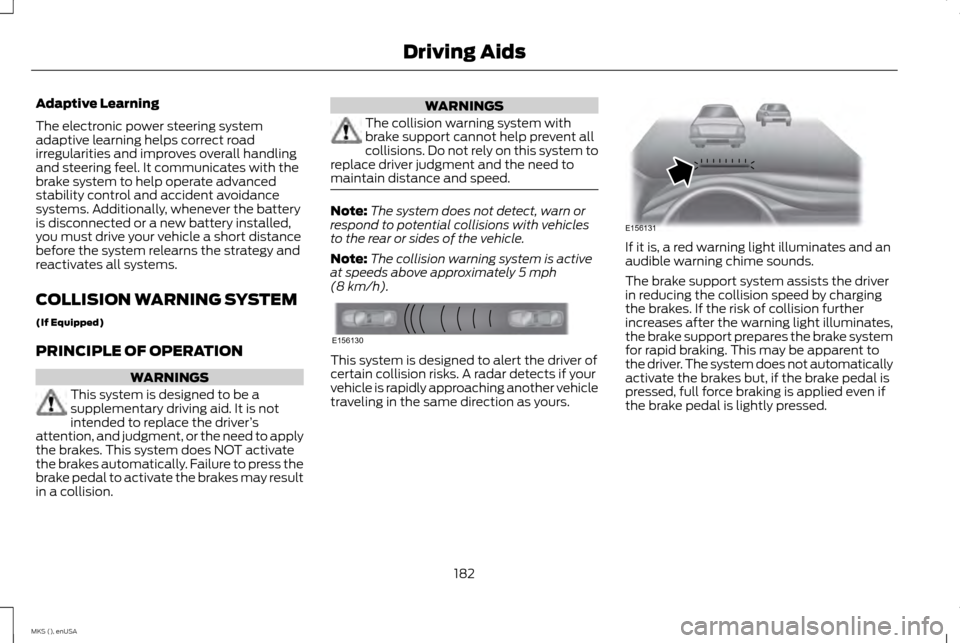
(8 km/h). This system is designed to alert the driver of
certain collision risks. A radar detects if your
vehicle is rapidly approaching another vehicle
traveling in the same direction as yours. If it is, a red warning light illuminates and an
audible warning chime sounds.
The brake support system assists the driver
in reducing the collision speed by charging
the brakes. If the risk of collision further
increases after the warning light illuminates,
the brake support prepares the brake system
for rapid braking. This may be apparent to
the driver. The system does not automatically
activate the brakes but, if the brake pedal is
pressed, full force braking is applied even if
the brake pedal is lightly pressed.
182
MKS (), enUSA Driving AidsE156130 E156131
Page 188 of 424
DRIVE CONTROL
LINCOLN DRIVE CONTROL
Lincoln Drive Control delivers the Lincoln
driving experience through a suite of
sophisticated electronic vehicle systems.
These systems continuously monitor your
driving inputs and the road conditions to
optimize ride comfort, steering, handling,
powertrain response and sound. You can
preset your preferences for these systems
within the information display. Lincoln Drive
Control will respond to your preferences
based on what gear position you select. This
provides a single location to control multiple
systems performance settings.
Lincoln Drive Control consists of the following
systems:
•
Continuously controlled damping
dynamically adjusts the shock absorbers
stiffness in real time to match the road
surface and driver inputs. This system
continuously monitors your vehicle ’s
motion (roll, pitch, bounce), suspension
position, load, speed, road conditions, and
steering to adjust the suspension
damping for optimal vehicle control.
• Electronically power-assisted steering
adjusts steering effort and feel based on
your vehicle speed and your inputs.
• Active noise control utilizes your vehicle
electronics to enhance the acoustic
experience.
• Electronic stability control and traction
control maintain your vehicle control in
adverse conditions or high performance
driving.
• Electronic throttle control enhances the
powertrain response to your inputs.
Note: Active noise control is only available
with EcoBoost™ engines.
These systems have a range of modes which
you can choose from in order to customize
your ideal driving experience: •
Comfort – Provides a more relaxed
driving experience, maximizing comfort.
Your steering effort decreases and the
suspension movement is more fluid.
Comfort mode is ideal when you desire
enhanced traveling comfort.
• Normal – Delivers a balanced
combination of comfortable, controlled
ride and confident handling. This mode
provides an engaging drive experience
and a direct connection to the road
without sacrificing any of the composure
demanded from a luxury vehicle.
• Sport – Provides a sportier driving
experience. The suspension stiffens, with
an emphasis on handling and control. The
engine responds more directly to your
inputs and takes on a more powerful
tone. Sport mode is ideal for use during
more spirited driving.
Using Lincoln Drive Control
You can configure which of the Drive Control
modes are active when your vehicle is in Drive
(D) or in Sport (S). The configuration remains
active until modified from the main menu on
the information display.
To change your vehicle ’s Drive Control
settings from the main menu on the
information display:
185
MKS (), enUSA Driving Aids
Page 208 of 424
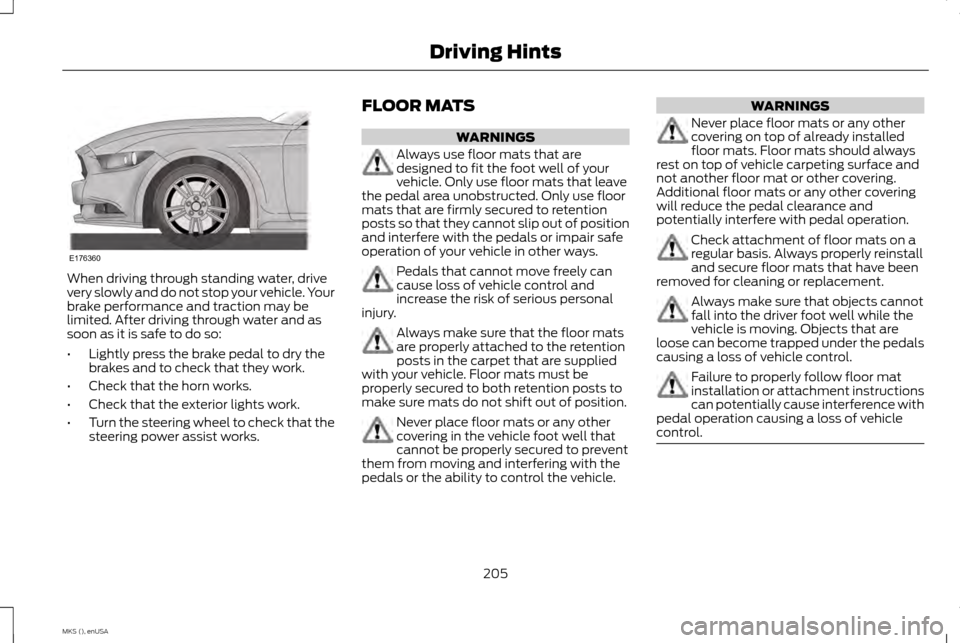
When driving through standing water, drive
very slowly and do not stop your vehicle. Your
brake performance and traction may be
limited. After driving through water and as
soon as it is safe to do so:
•
Lightly press the brake pedal to dry the
brakes and to check that they work.
• Check that the horn works.
• Check that the exterior lights work.
• Turn the steering wheel to check that the
steering power assist works. FLOOR MATS WARNINGS
Always use floor mats that are
designed to fit the foot well of your
vehicle. Only use floor mats that leave
the pedal area unobstructed. Only use floor
mats that are firmly secured to retention
posts so that they cannot slip out of position
and interfere with the pedals or impair safe
operation of your vehicle in other ways. Pedals that cannot move freely can
cause loss of vehicle control and
increase the risk of serious personal
injury. Always make sure that the floor mats
are properly attached to the retention
posts in the carpet that are supplied
with your vehicle. Floor mats must be
properly secured to both retention posts to
make sure mats do not shift out of position. Never place floor mats or any other
covering in the vehicle foot well that
cannot be properly secured to prevent
them from moving and interfering with the
pedals or the ability to control the vehicle. WARNINGS
Never place floor mats or any other
covering on top of already installed
floor mats. Floor mats should always
rest on top of vehicle carpeting surface and
not another floor mat or other covering.
Additional floor mats or any other covering
will reduce the pedal clearance and
potentially interfere with pedal operation. Check attachment of floor mats on a
regular basis. Always properly reinstall
and secure floor mats that have been
removed for cleaning or replacement. Always make sure that objects cannot
fall into the driver foot well while the
vehicle is moving. Objects that are
loose can become trapped under the pedals
causing a loss of vehicle control. Failure to properly follow floor mat
installation or attachment instructions
can potentially cause interference with
pedal operation causing a loss of vehicle
control. 205
MKS (), enUSA Driving HintsE176360
Page 228 of 424
Protected components
Fuse amp rating
Fuse or relay number
Not used.
-
85
Powertrain control module.
7.5A 1
86
Keep alive power and relay.
Canister vent solenoid.
Run/start relay.
5A 1
87
Run/start relay.
-
88
Front blower relay coil.
5A 1
89
Electrical power assist steering module.
Powertrain control module run/start.
10A 1
90
Adaptive cruise control module.
10A 1
91
Anti-lock brake system module.
10A 1
92
Adaptive headlamp module.
Rear window defroster relay.
5A 1
93
Passenger compartment fuse panel run/start.
30A 2
94
Not used.
-
95
Not used.
-
96
225
MKS (), enUSA Fuses
Page 232 of 424
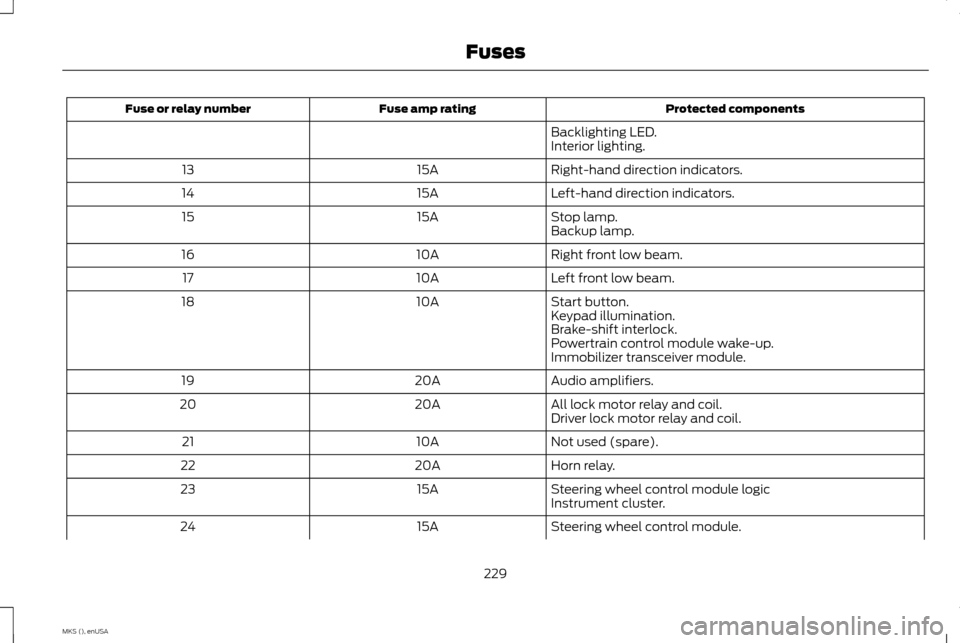
Protected components
Fuse amp rating
Fuse or relay number
Backlighting LED.
Interior lighting.
Right-hand direction indicators.
15A
13
Left-hand direction indicators.
15A
14
Stop lamp.
15A
15
Backup lamp.
Right front low beam.
10A
16
Left front low beam.
10A
17
Start button.
10A
18
Keypad illumination.
Brake-shift interlock.
Powertrain control module wake-up.
Immobilizer transceiver module.
Audio amplifiers.
20A
19
All lock motor relay and coil.
20A
20
Driver lock motor relay and coil.
Not used (spare).
10A
21
Horn relay.
20A
22
Steering wheel control module logic
15A
23
Instrument cluster.
Steering wheel control module.
15A
24
229
MKS (), enUSA Fuses
Page 234 of 424
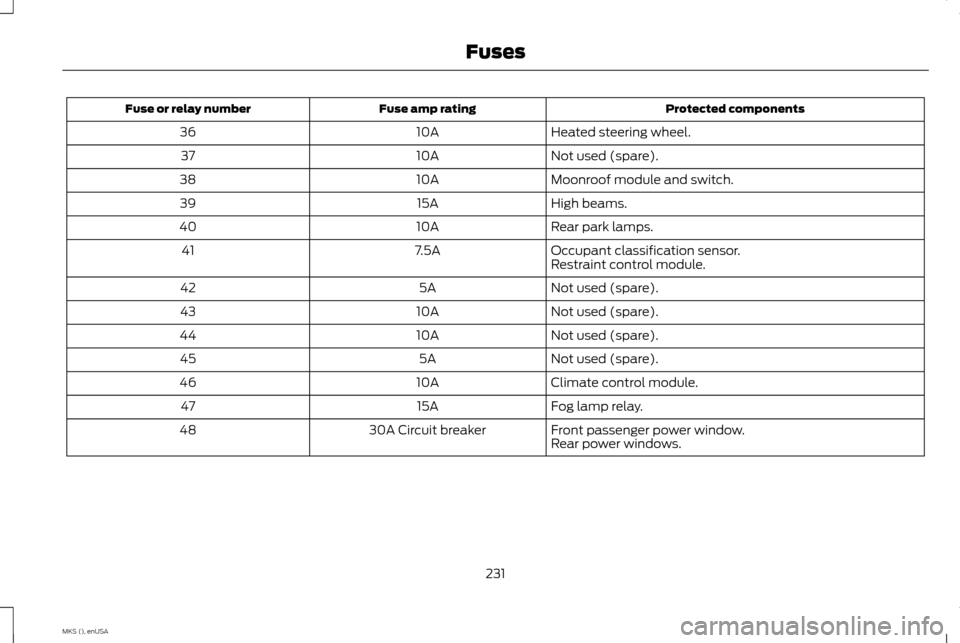
Protected components
Fuse amp rating
Fuse or relay number
Heated steering wheel.
10A
36
Not used (spare).
10A
37
Moonroof module and switch.
10A
38
High beams.
15A
39
Rear park lamps.
10A
40
Occupant classification sensor.
7.5A
41
Restraint control module.
Not used (spare).
5A
42
Not used (spare).
10A
43
Not used (spare).
10A
44
Not used (spare).
5A
45
Climate control module.
10A
46
Fog lamp relay.
15A
47
Front passenger power window.
30A Circuit breaker
48
Rear power windows.
231
MKS (), enUSA Fuses
Page 246 of 424
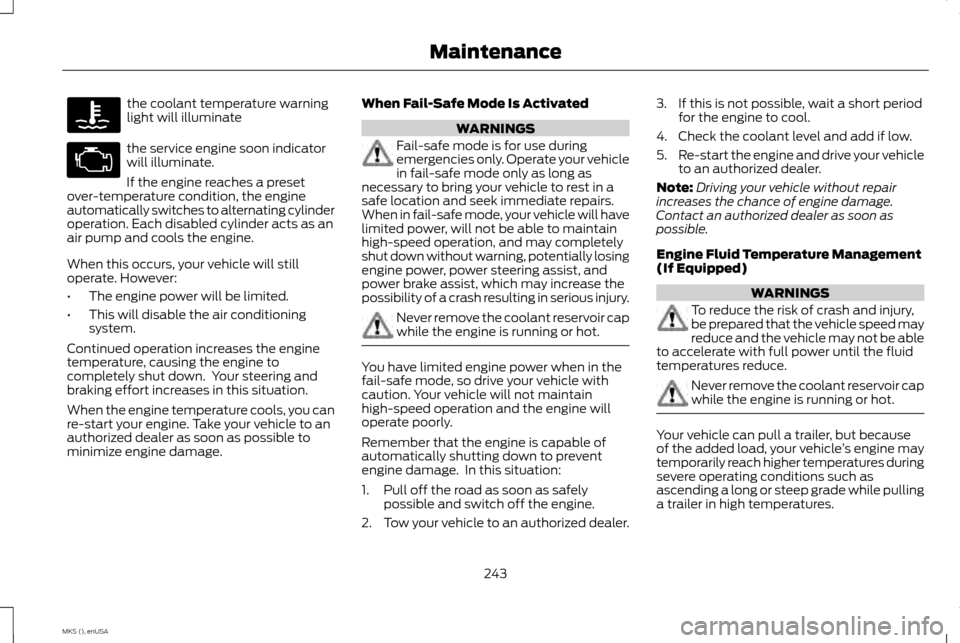
the coolant temperature warning
light will illuminate
the service engine soon indicator
will illuminate.
If the engine reaches a preset
over-temperature condition, the engine
automatically switches to alternating cylinder
operation. Each disabled cylinder acts as an
air pump and cools the engine.
When this occurs, your vehicle will still
operate. However:
• The engine power will be limited.
• This will disable the air conditioning
system.
Continued operation increases the engine
temperature, causing the engine to
completely shut down. Your steering and
braking effort increases in this situation.
When the engine temperature cools, you can
re-start your engine. Take your vehicle to an
authorized dealer as soon as possible to
minimize engine damage. When Fail-Safe Mode Is Activated WARNINGS
Fail-safe mode is for use during
emergencies only. Operate your vehicle
in fail-safe mode only as long as
necessary to bring your vehicle to rest in a
safe location and seek immediate repairs.
When in fail-safe mode, your vehicle will have
limited power, will not be able to maintain
high-speed operation, and may completely
shut down without warning, potentially losing
engine power, power steering assist, and
power brake assist, which may increase the
possibility of a crash resulting in serious injury. Never remove the coolant reservoir cap
while the engine is running or hot.
You have limited engine power when in the
fail-safe mode, so drive your vehicle with
caution. Your vehicle will not maintain
high-speed operation and the engine will
operate poorly.
Remember that the engine is capable of
automatically shutting down to prevent
engine damage. In this situation:
1. Pull off the road as soon as safely
possible and switch off the engine.
2. Tow your vehicle to an authorized dealer. 3. If this is not possible, wait a short period
for the engine to cool.
4. Check the coolant level and add if low.
5. Re-start the engine and drive your vehicle
to an authorized dealer.
Note: Driving your vehicle without repair
increases the chance of engine damage.
Contact an authorized dealer as soon as
possible.
Engine Fluid Temperature Management
(If Equipped) WARNINGS
To reduce the risk of crash and injury,
be prepared that the vehicle speed may
reduce and the vehicle may not be able
to accelerate with full power until the fluid
temperatures reduce. Never remove the coolant reservoir cap
while the engine is running or hot.
Your vehicle can pull a trailer, but because
of the added load, your vehicle
’s engine may
temporarily reach higher temperatures during
severe operating conditions such as
ascending a long or steep grade while pulling
a trailer in high temperatures.
243
MKS (), enUSA Maintenance
Page 250 of 424
Note:
Fluid level above the MAX level may
cause shift or engagement concerns or
possible damage. An overheating condition
can cause high fluid levels. If you operate your
vehicle for an extended period at high speeds,
in city traffic during hot weather or pulling a
trailer, you should switch your vehicle off until
your vehicle reaches normal operating
temperatures. Depending on vehicle use,
cooling times could take up to 30 minutes or
longer.
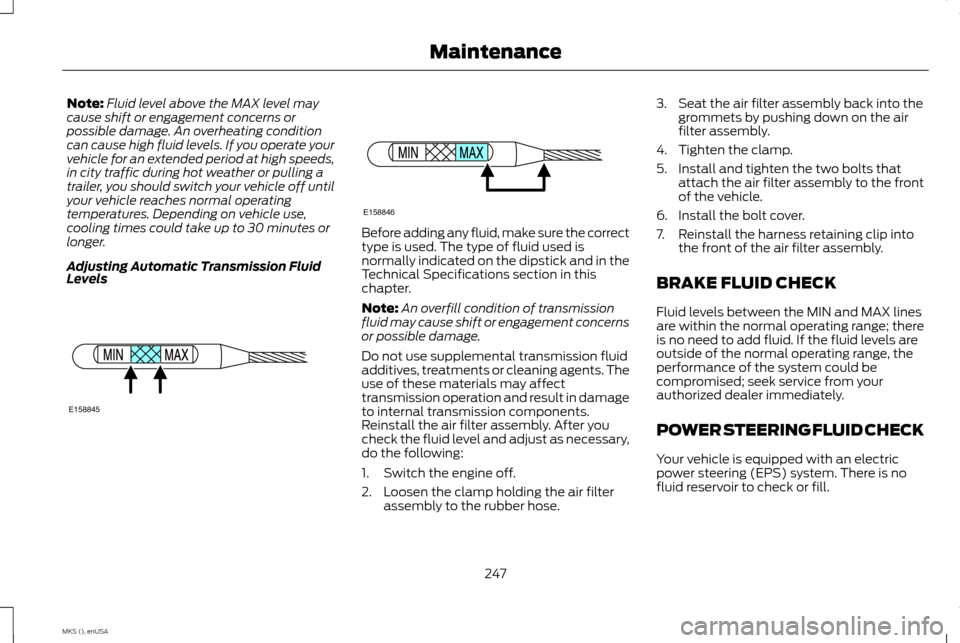
Adjusting Automatic Transmission Fluid
Levels Before adding any fluid, make sure the correct
type is used. The type of fluid used is
normally indicated on the dipstick and in the
Technical Specifications section in this
chapter.
Note:
An overfill condition of transmission
fluid may cause shift or engagement concerns
or possible damage.
Do not use supplemental transmission fluid
additives, treatments or cleaning agents. The
use of these materials may affect
transmission operation and result in damage
to internal transmission components.
Reinstall the air filter assembly. After you
check the fluid level and adjust as necessary,
do the following:
1. Switch the engine off.
2. Loosen the clamp holding the air filter assembly to the rubber hose. 3. Seat the air filter assembly back into the
grommets by pushing down on the air
filter assembly.
4. Tighten the clamp.
5. Install and tighten the two bolts that attach the air filter assembly to the front
of the vehicle.
6. Install the bolt cover.
7. Reinstall the harness retaining clip into the front of the air filter assembly.
BRAKE FLUID CHECK
Fluid levels between the MIN and MAX lines
are within the normal operating range; there
is no need to add fluid. If the fluid levels are
outside of the normal operating range, the
performance of the system could be
compromised; seek service from your
authorized dealer immediately.
POWER STEERING FLUID CHECK
Your vehicle is equipped with an electric
power steering (EPS) system. There is no
fluid reservoir to check or fill.
247
MKS (), enUSA MaintenanceE158845 E158846
Page 279 of 424
U.S. DOT Tire Identification
Number
Both U.S. and Canada Federal
regulations require tire
manufacturers to place
standardized information on the
sidewall of all tires. This information
identifies and describes the
fundamental characteristics of the
tire and also provides a U.S. DOT
Tire Identification Number for safety
standard certification and in case of
a recall.
This begins with the letters DOT and
indicates that the tire meets all
federal standards. The next two
numbers or letters are the plant
code designating where it was
manufactured, the next two are the
tire size code and the last four
numbers represent the week and
year the tire was built. For example,
the numbers 317 mean the 31st week
of 1997. After 2000 the numbers go
to four digits. For example, 2501
means the 25th week of 2001. The
numbers in between are
identification codes used for
traceability. This information is used
to contact customers if a tire defect
requires a recall.
Tire Replacement Requirements
Your vehicle is equipped with tires
designed to provide a safe ride and
handling capability.
WARNINGS
Only use replacement tires and
wheels that are the same size,
load index, speed rating and type
(such as P-metric versus LT-metric
or all-season versus all-terrain) as
those originally provided by Ford.
The recommended tire and wheel
size may be found on either the
Safety Compliance Certification
Label (affixed to either the door
hinge pillar, door-latch post, or the
door edge that meets the door-latch
post, next to the driver's seating
position), or the Tire Label which is WARNINGS
located on the B-Pillar or edge of
the driver ’s door. If this information
is not found on these labels then
you should contact your authorized
dealer as soon as possible. Use of
any tire or wheel not recommended
by Ford can affect the safety and
performance of your vehicle, which
could result in an increased risk of
loss of vehicle control, vehicle
rollover, personal injury and death.
Additionally the use of
non-recommended tires and wheels
could cause steering, suspension,
axle, transfer case or power transfer
unit failure. If you have questions
regarding tire replacement, contact
your authorized dealer as soon as
possible.
276
MKS (), enUSA Wheels and Tires
Page 308 of 424
SETTINGS
Press to select any of the following:
• Clock.
• Display.
• Sound.
• Vehicle.
• Settings.
• Help. HOME
Press to access your home screen.
Depending on your vehicle
’s option
package and software, your screens may vary
in appearance from the descriptions in this
section. Your features may also be limited
depending on your market. Check with an
authorized dealer for availability. INFORMATION
Press to select any of the following:
• Services.
• Travel Link.
• Alerts. •
Calendar.
• Apps.
ENTERTAINMENT
Press to select any of the following:
• AM.
• FM.
• SIRIUS.
• CD.
• USB.
• BT Stereo.
• SD Card.
• A/V In.
Using the Touch-Sensitive Controls
on Your System
To switch a feature on and off, just touch the
graphic with your finger. To get the best
performance from the touch-sensitive
controls:
• Do not press hard on the controls. They
are sensitive to light touch.
• Use your bare finger to touch the center
of a touch-control graphic. Touching
off-center of the graphic may affect
operation of a nearby control.
• Make sure your hands are clean and dry. •
Since the touchscreen operates based
on the touch of a finger, you may have
trouble using it if you are wearing gloves.
• Keep metal and other conductive
material away from the surface of the
touchscreen as this may cause electronic
interference (for example, inadvertently
switching on a feature other than the one
you meant to switch on).
Depending on your vehicle and option
package, you may also have these controls
on your bezel:
• Power: Switch the media or climate
features off and on.
• VOL:
Control the volume of playing
media.
• Seek
and Tune buttons: Use as you
normally would in media modes.
• Eject:
Eject a CD from the entertainment
system.
• Climate Control:
Control the
temperature, fan speed or settings of the
climate control system.
Using Your Steering Wheel Controls
You can use your steering wheel controls to
interact with the touchscreen system.
305
MKS (), enUSA MyLincoln Touch
™E142607 E142613 E142608