reset LINCOLN MKS 2015 Owners Manual
[x] Cancel search | Manufacturer: LINCOLN, Model Year: 2015, Model line: MKS, Model: LINCOLN MKS 2015Pages: 424, PDF Size: 3.96 MB
Page 7 of 424
Changing a Fuse................................................232
Maintenance
General Information........................................234
Opening and Closing the Hood...................234
Under Hood Overview -
3.5L
Ecoboost™.....................................................236
Under Hood Overview - 3.7L........................238
Engine Oil Dipstick...........................................239
Engine Oil Check...............................................239
Oil Change Indicator Reset...........................240
Engine Coolant Check....................................240
Automatic Transmission Fluid Check.......244
Brake Fluid Check.............................................247
Power Steering Fluid Check..........................247
Washer Fluid Check
........................................248
Fuel Filter
.............................................................248
Changing the 12V Battery..............................248
Checking the Wiper Blades..........................250
Changing the Wiper Blades.........................250
Adjusting the Headlamps..............................251
Changing a Bulb
................................................252
Bulb Specification Chart................................253
Changing the Engine Air Filter
.....................255 Vehicle Care
General Information
........................................257
Cleaning Products
............................................257
Cleaning the Exterior.......................................257
Waxing ..................................................................
258
Cleaning the Engine
........................................258
Cleaning the Windows and Wiper Blades
...............................................................259
Cleaning the Interior
........................................259
Cleaning the Instrument Panel and Instrument Cluster Lens
............................260
Cleaning Leather Seats
.................................260
Repairing Minor Paint Damage
....................261
Cleaning the Alloy Wheels.............................261
Vehicle Storage
.................................................262
Wheels and Tires
Tire Care..............................................................264
Using Snow Chains..........................................279
Tire Pressure Monitoring System................279
Changing a Road Wheel
................................283
Technical Specifications
...............................288
Capacities and Specifications
Engine Specifications
.....................................290
Motorcraft Parts................................................291 Vehicle Identification Number
......................291
Vehicle Certification Label
............................292
Transmission Code Designation.................293
Technical Specifications...............................294
Audio System
General Information
........................................299
Audio Unit
...........................................................300
Media Hub
...........................................................302
MyLincoln Touch ™
General Information
........................................303
Settings.................................................................313
Entertainment...................................................325
Phone
...................................................................344
Information..........................................................351
Climate................................................................360
Navigation...........................................................364
Accessories
Accessories.........................................................373
Appendices
End User License Agreement.......................375
4
MKS (), enUSA Table of Contents
Page 11 of 424
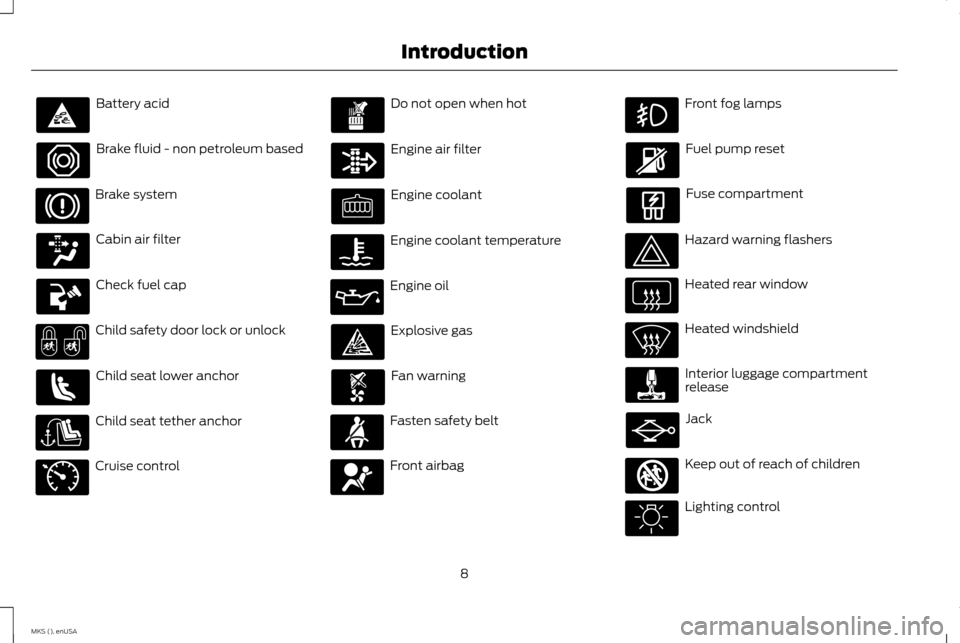
Battery acid
Brake fluid - non petroleum based
Brake system
Cabin air filter
Check fuel cap
Child safety door lock or unlock
Child seat lower anchor
Child seat tether anchor
Cruise control Do not open when hot
Engine air filter
Engine coolant
Engine coolant temperature
Engine oil
Explosive gas
Fan warning
Fasten safety belt
Front airbag Front fog lamps
Fuel pump reset
Fuse compartment
Hazard warning flashers
Heated rear window
Heated windshield
Interior luggage compartment
release
Jack
Keep out of reach of children
Lighting control
8
MKS (), enUSA Introduction E71340 E161353
Page 58 of 424
Potential Causes
Condition
· The vehicle has a remote start system that is recognized as an admin key. Clear all MyKeys by using
the remote start. See Using MyKey With Remote Start Systems (page 54).
I accidentally programmed all keys as
MyKeys.
· The vehicle's system does not recognize any programmed MyKeys. See Creating a MyKey (page
51).
·
An unknown key or fob has been created as a MyKey.
MyKey total includes one additional key.
· The vehicle has a remote start system. See Using MyKey With Remote Start Systems (page
54).
·
An unknown key or fob has been programmed to the vehicle as an admin key.
Admin key total includes one additional
key. · The vehicle has a remote start system. See Using MyKey With Remote Start Systems (page
54).
·
The MyKey user is not using the MyKey.
MyKey distances do not accumulate.
· An admin key holder cleared the MyKeys and created new MyKeys.
· The key system has been reset.
·
An admin fob is present at vehicle start.
No MyKey functions with the Intelligent
Access key. · No MyKeys are created. See Creating a MyKey (page 51).
55
MKS (), enUSA MyKey
™
Page 68 of 424
ADJUSTING THE STEERING
WHEEL
Note:
Make sure that you are sitting in the
correct position. See Sitting in the Correct
Position (page 109). WARNING
Do not adjust the steering wheel when
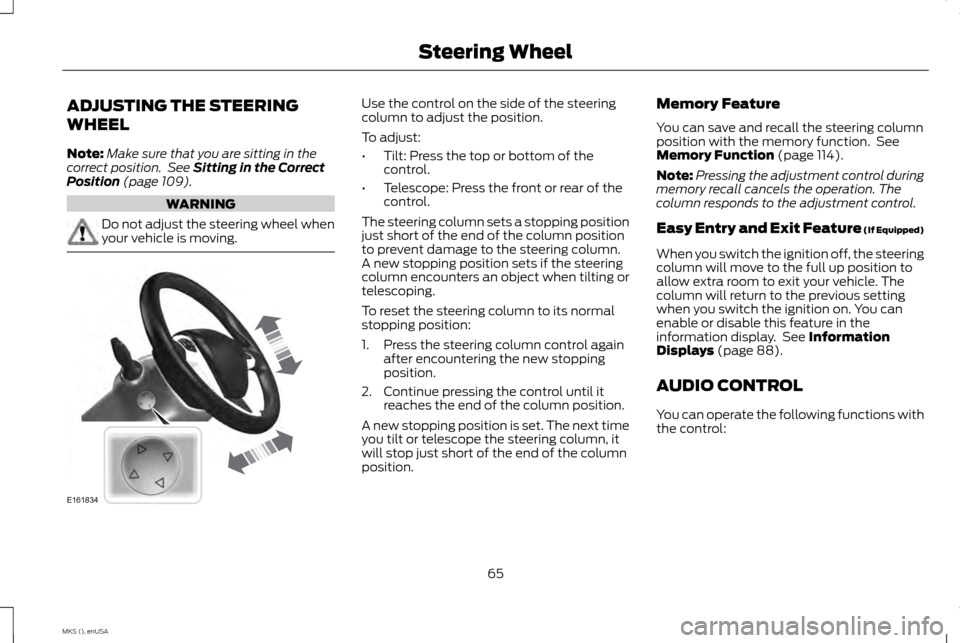
your vehicle is moving. Use the control on the side of the steering
column to adjust the position.
To adjust:
•
Tilt: Press the top or bottom of the
control.
• Telescope: Press the front or rear of the
control.
The steering column sets a stopping position
just short of the end of the column position
to prevent damage to the steering column.
A new stopping position sets if the steering
column encounters an object when tilting or
telescoping.
To reset the steering column to its normal
stopping position:
1. Press the steering column control again after encountering the new stopping
position.
2. Continue pressing the control until it reaches the end of the column position.
A new stopping position is set. The next time
you tilt or telescope the steering column, it
will stop just short of the end of the column
position. Memory Feature
You can save and recall the steering column
position with the memory function. See
Memory Function
(page 114).
Note: Pressing the adjustment control during
memory recall cancels the operation. The
column responds to the adjustment control.
Easy Entry and Exit Feature (If Equipped)
When you switch the ignition off, the steering
column will move to the full up position to
allow extra room to exit your vehicle. The
column will return to the previous setting
when you switch the ignition on. You can
enable or disable this feature in the
information display. See
Information
Displays (page 88).
AUDIO CONTROL
You can operate the following functions with
the control:
65
MKS (), enUSA Steering WheelE161834
Page 69 of 424
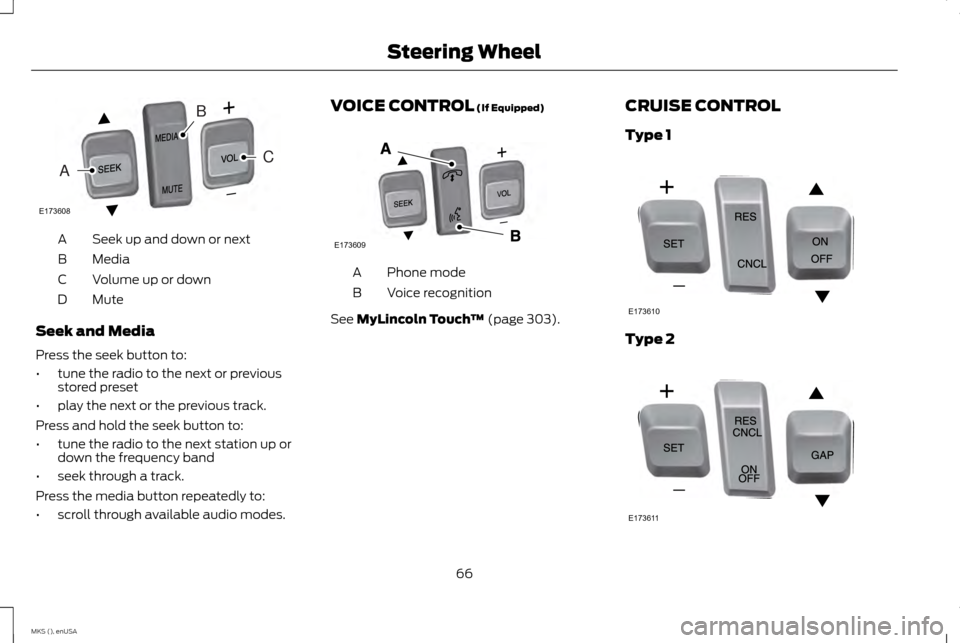
Seek up and down or next
A
Media
B
Volume up or down
C
Mute
D
Seek and Media
Press the seek button to:
• tune the radio to the next or previous
stored preset
• play the next or the previous track.
Press and hold the seek button to:
• tune the radio to the next station up or
down the frequency band
• seek through a track.
Press the media button repeatedly to:
• scroll through available audio modes. VOICE CONTROL (If Equipped)
Phone mode
A
Voice recognition
B
See
MyLincoln Touch ™ (page 303).CRUISE CONTROL
Type 1 Type 2
66
MKS (), enUSA Steering WheelE173608
CA
B E173609
V E173610 E173611
Page 93 of 424
Engine coolant temperature gauge
Indicates engine coolant temperature. At
normal operating temperature, the level
indicator will be in the normal range. If the
engine coolant temperature exceeds the
normal range, stop your vehicle as soon as
safely possible, switch off the engine and let
the engine cool.
Trip 1 & 2
Choose between the following trip displays. Trip 1 & 2
Trip distance
Average fuel economy
Elapsed trip time
Hold OK to Reset
Note: Press and hold OK to reset the currently
displayed trip information.
Trip distance
Shows the accumulated trip distance. Average fuel economy
Shows the average fuel economy for a given
trip.
Elapsed trip time
When you switch off your vehicle the timer
stops and restarts when you restart your
vehicle.Fuel Economy
Use the left or right arrow buttons to choose
the desired fuel economy display. Fuel Economy
Inst Fuel Economy
30 Min Fuel History
90
MKS (), enUSA Information Displays
Page 94 of 424
Note:
Press and hold OK to reset the currently
displayed fuel usage information.
Inst Fuel Economy
This display shows a visual graph of your
instantaneous fuel economy. 30 Min Fuel History
This display shows a bar chart of your fuel
history.
Driver Assist
Use the up or down arrow buttons to choose
between the following display options.
Note:
Some items are optional and may not
appear. Driver Assist
Traction Control - check enabled or uncheck disabled
Blindspot - check enabled or uncheck disabled High, Normal or Low
Sensitivity
Collision Warn
Cross Traffic - check enabled or uncheck disabled
—
Adaptive or Normal
Cruise Control
Driver Alert - check enabled or uncheck disabled
Alert, Aid or Both
Mode
Lane Keeping
High, Normal or Low
Intensity
Front Park Aid - check enabled or uncheck disabled
Rear Park Aid - check enabled or uncheck disabled
Settings
In this mode, you can configure different
driver setting choices. Note:
Some items are optional and may not
appear.
91
MKS (), enUSA Information Displays
Page 95 of 424
Settings
Comfort, Normal or Sport
Handling in D
Drive Control
Vehicle
Normal or Sport
Handling in S
Auto Engine Off - check enabled or uncheck disabled Normal or Towing
DTE Calculation
Easy Entry / Exit - check enabled or uncheck disabled
Right Hand or Left Hand Traffic
Traffic Set Up
Adaptive Head Lamps
Lighting
On or Off
Auto Highbeam
Select time interval
Autolamp Delay Settings (cont’
d)
Autolock - check enabled or uncheck disabled
Locks
Vehicle (cont’ d)
Autounlock - check enabled or uncheck disabledAll doors or Driver door
Remote Unlocking
Remaining Life XXX% - Hold OK to Reset
Oil Life Reset
Note: Some MyKey items will only appear if a MyKey is set.
92
MKS (), enUSA Information Displays
Page 114 of 424
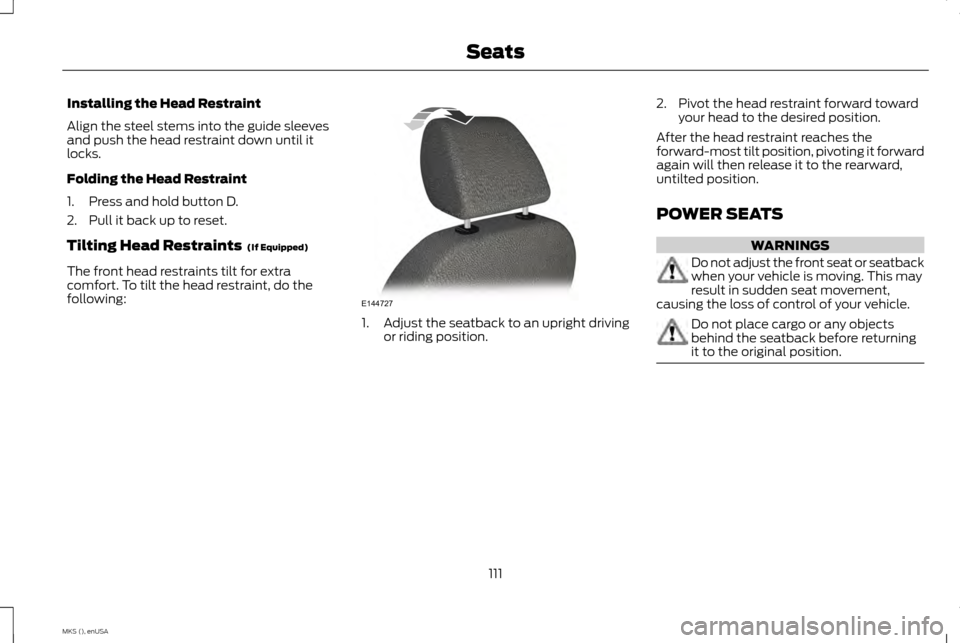
Installing the Head Restraint
Align the steel stems into the guide sleeves
and push the head restraint down until it
locks.
Folding the Head Restraint
1. Press and hold button D.
2. Pull it back up to reset.
Tilting Head Restraints (If Equipped)
The front head restraints tilt for extra
comfort. To tilt the head restraint, do the
following: 1.
Adjust the seatback to an upright driving
or riding position. 2. Pivot the head restraint forward toward
your head to the desired position.
After the head restraint reaches the
forward-most tilt position, pivoting it forward
again will then release it to the rearward,
untilted position.
POWER SEATS WARNINGS
Do not adjust the front seat or seatback
when your vehicle is moving. This may
result in sudden seat movement,
causing the loss of control of your vehicle. Do not place cargo or any objects
behind the seatback before returning
it to the original position.
111
MKS (), enUSA SeatsE144727
Page 116 of 424
Note:
On vehicles with memory seats, to
prevent damage to the seat, the power seats
are designed to set a stopping position just
short of the end of the seat track. If the seat
encounters an object while moving forward or
backward, a new stopping position will be set.
To reset the seat to its normal stopping
position:
1. After encountering the new stopping position, press the power seat control
again to override.
2. Continue pressing the control until it reaches the end of the seat track.
3. Continue pressing the control for about two seconds. You will feel the seat
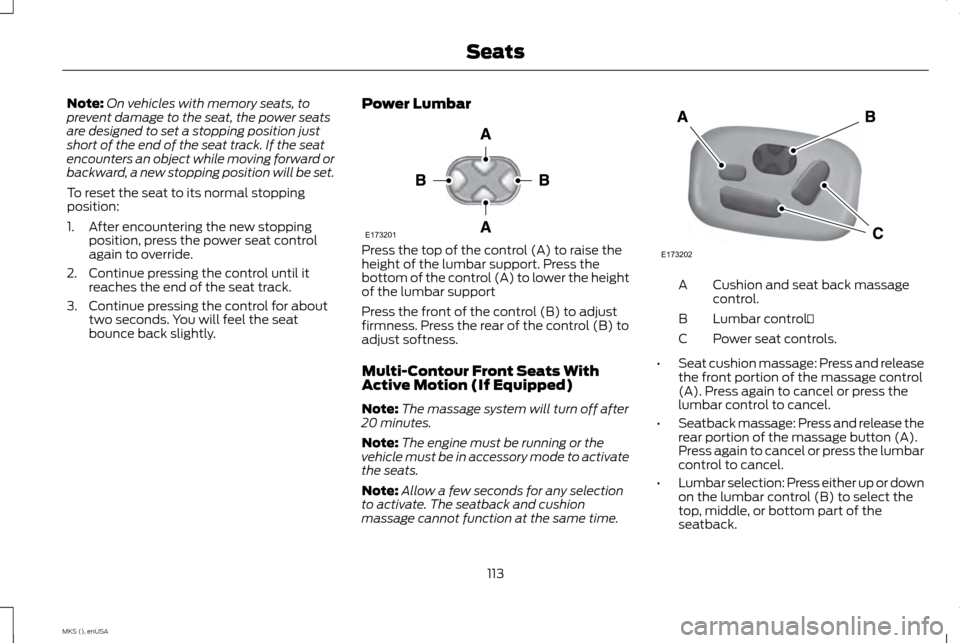
bounce back slightly. Power Lumbar Press the top of the control (A) to raise the
height of the lumbar support. Press the
bottom of the control (A) to lower the height
of the lumbar support
Press the front of the control (B) to adjust
firmness. Press the rear of the control (B) to
adjust softness.
Multi-Contour Front Seats With
Active Motion (If Equipped)
Note:
The massage system will turn off after
20 minutes.
Note: The engine must be running or the
vehicle must be in accessory mode to activate
the seats.
Note: Allow a few seconds for any selection
to activate. The seatback and cushion
massage cannot function at the same time. Cushion and seat back massage
control.
A
Lumbar control.
B
Power seat controls.
C
• Seat cushion massage: Press and release
the front portion of the massage control
(A). Press again to cancel or press the
lumbar control to cancel.
• Seatback massage: Press and release the
rear portion of the massage button (A).
Press again to cancel or press the lumbar
control to cancel.
• Lumbar selection: Press either up or down
on the lumbar control (B) to select the
top, middle, or bottom part of the
seatback.
113
MKS (), enUSA SeatsE173201 E173202