driver seat LINCOLN MKS 2016 User Guide
[x] Cancel search | Manufacturer: LINCOLN, Model Year: 2016, Model line: MKS, Model: LINCOLN MKS 2016Pages: 382, PDF Size: 3.81 MB
Page 46 of 382
WARNINGS
Do not lean your head on the door. The
curtain airbag could injure you as it
deploys from the headliner.
Do not attempt to service, repair, or
modify the curtain airbags, its fuses,
the A, B, or C pillar trim, or the headliner
on a vehicle containing curtain airbags as you
could be seriously injured or killed. Contact
your authorized dealer as soon as possible. All occupants of your vehicle including
the driver should always wear their
safety belts even when an airbag
supplemental restraint system and curtain
airbag is provided. Failure to properly wear
your safety belt could seriously increase the
risk of injury or death. To reduce risk of injury, do not obstruct
or place objects in the deployment path
of the curtain airbag.
If the curtain airbags have deployed,
the curtain airbags will not function
again. The curtain airbags (including
the A, B and C pillar trim and headliner) must
be inspected and serviced by an authorized
dealer. If the curtain airbag is not replaced,
the unrepaired area will increase the risk of
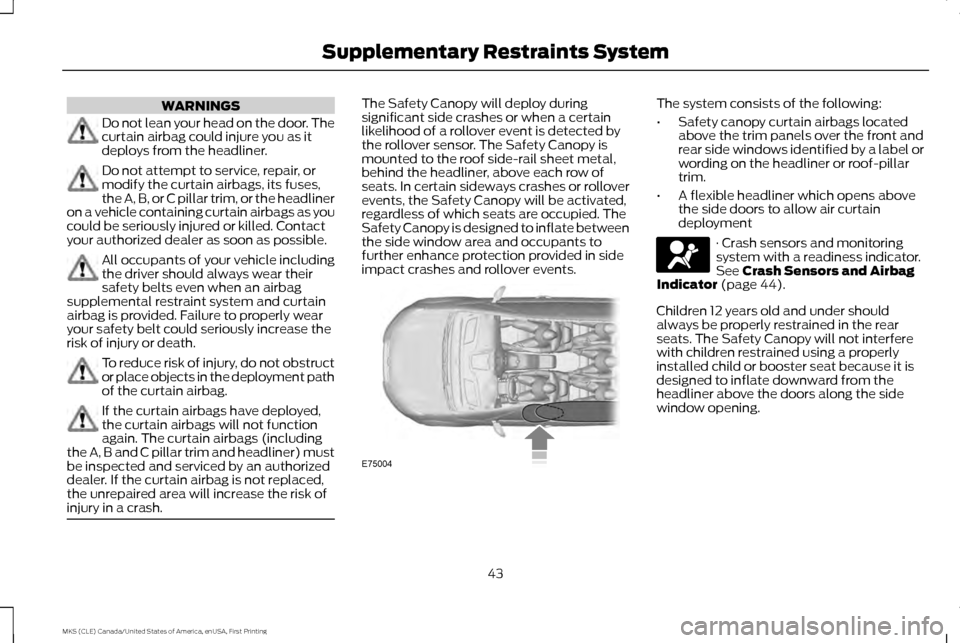
injury in a crash. The Safety Canopy will deploy during
significant side crashes or when a certain
likelihood of a rollover event is detected by
the rollover sensor. The Safety Canopy is
mounted to the roof side-rail sheet metal,
behind the headliner, above each row of
seats. In certain sideways crashes or rollover
events, the Safety Canopy will be activated,
regardless of which seats are occupied. The
Safety Canopy is designed to inflate between
the side window area and occupants to
further enhance protection provided in side
impact crashes and rollover events. The system consists of the following:
•
Safety canopy curtain airbags located
above the trim panels over the front and
rear side windows identified by a label or
wording on the headliner or roof-pillar
trim.
• A flexible headliner which opens above
the side doors to allow air curtain
deployment · Crash sensors and monitoring
system with a readiness indicator.
See Crash Sensors and Airbag
Indicator (page 44).
Children 12 years old and under should
always be properly restrained in the rear
seats. The Safety Canopy will not interfere
with children restrained using a properly
installed child or booster seat because it is
designed to inflate downward from the
headliner above the doors along the side
window opening.
43
MKS (CLE) Canada/United States of America, enUSA, First Printing Supplementary Restraints SystemE75004
Page 47 of 382
The design and development of the Safety
Canopy included recommended testing
procedures that were developed by a group
of automotive safety experts known as the
Side Airbag Technical Working Group. These
recommended testing procedures help
reduce the risk of injuries related to the
deployment of side airbags (including the
Safety Canopy).
CRASH SENSORS AND AIRBAG
INDICATOR
WARNING
Modifying or adding equipment to the
front end of the vehicle (including
frame, bumper, front end body
structure and tow hooks) may affect the
performance of the airbag system, increasing
the risk of injury. Do not modify the front end
of the vehicle. Your vehicle has a collection of crash and
occupant sensors which provide information
to the restraints control module. The
restraints control module deploys (activates)
the front seatbelt pretensioners, driver airbag,
passenger airbag, seat mounted side airbags
and the Safety Canopy. Based on the type of
crash, the restraints control module will
deploy the appropriate safety devices.
The restraints control module also monitors
the readiness of the above safety devices
plus the crash and occupant sensors. The
readiness of the safety system is indicated
by a warning indicator light in the instrument
cluster or by a backup tone if the warning
light is not working. Routine maintenance of
the airbag is not required.
A difficulty with the system is indicated by
one or more of the following:
The readiness light will not
illuminate immediately after the
ignition is turned on.
• The readiness light will either flash or stay
lit.
• A series of five beeps will be heard. The
tone pattern will repeat periodically until
the problem, the light or both are
repaired. If any of these things happen, even
intermittently, have the supplemental
restraint system serviced at an authorized
dealer immediately. Unless serviced, the
system may not function properly in the event
of a crash.
The seatbelt pretensioners and the front
airbag supplemental restraint system are
designed to activate when the vehicle
sustains frontal deceleration sufficient to
cause the restraints control module to deploy
a safety device.
The fact that the seatbelt pretensioners or
front airbags did not activate for both front
seat occupants in a crash does not mean that
something is wrong with the system. Rather,
it means the restraints control module
determined the accident conditions (crash
severity, belt usage) were not appropriate to
activate these safety devices.
•
The design of the front airbags is to
activate only in frontal and near-frontal
crashes (not rollovers, side impacts or
rear impacts) unless the crash causes
sufficient frontal deceleration.
• The design of the seatbelt pretensioners
is to activate in frontal, near-frontal and
side crashes and in rollovers.
44
MKS (CLE) Canada/United States of America, enUSA, First Printing Supplementary Restraints System
Page 53 of 382
PRINCIPLE OF OPERATION
MyKey allows you to program keys with
restricted driving modes to promote good
driving habits. All but one of the keys can be
activated with these restricted modes.
Any keys that remain unprogrammed are
referred to as administrator keys or admin
keys. They can be used to:
•
Create a MyKey.
• Program configurable MyKey settings.
• Clear all MyKey features.
When you have created a MyKey, you can
access the following information by using the
information display to determine:
• How many admin keys and MyKeys are
programmed to your vehicle.
• The total distance your vehicle traveled
with a MyKey.
Note: Switch the ignition on to use the system.
Note: All MyKeys are programmed to the
same settings. You cannot program them
individually. Note:
For vehicles equipped with a
push-button start, when both a MyKey and an
admin key are present, the admin key will be
recognized by the vehicle when you start the
vehicle.
Non-configurable Settings
The following settings cannot be changed by
an admin key user:
• Safety belt reminder. You cannot disable
this feature. The audio system will mute
when the front seat passengers’ safety
belts are not fastened.
• Early low fuel. The low-fuel warning
activates earlier, giving the MyKey user
more time to refuel.
• Driver assist features, if equipped on your
vehicle, are forced on: parking aid,
forward collision warning, lane departure
warning and Blind Spot Information
System (BLIS) with cross traffic alert.
• Satellite radio adult content restrictions,
if equipped on your vehicle. Configurable Settings
With an admin key, you can configure certain
MyKey settings when you first create a MyKey
and before you recycle the key or restart the
engine. You can also change the settings
afterward with an admin key.
•
A vehicle speed limit can be set. Warnings
will be shown in the display followed by
an audible tone when your vehicle
reaches the set speed. You cannot
override the set speed by fully depressing
the accelerator pedal or by setting cruise
control. WARNING
Do not set MyKey maximum speed limit
to a limit that will prevent the driver
from maintaining a safe speed
considering posted speed limits and
prevailing road conditions. The driver is
always responsible to drive in accordance
with local laws and prevailing conditions.
Failure to do so could result in accident or
injury. 50
MKS (CLE) Canada/United States of America, enUSA, First Printing MyKey
™
Page 96 of 382
Settings
Comfort, Normal or Sport
Handling in D
Drive Control
Vehicle
Normal or Sport
Handling in S
Auto Engine Off Normal or Towing
DTE Calculation
Easy Entry / Exit
Auto Highbeam
Lighting
Select time interval
Autolamp Delay
Autolock
Locks
Autounlock All Doors or Driver's Door
Remote Unlocking
Remaining Life XXX% - Hold OK to Reset
Oil Life Reset
Auto or Last Settings
Climate Control
Remote Start
Auto Heated or Off
Front Seats
Front Seats and Steering Wheel
5, 10 or 15 minutes
Duration
System
Remote Open
Windows
93
MKS (CLE) Canada/United States of America, enUSA, First Printing Information Displays
Page 117 of 382
•
Lumbar adjust: Press and hold the front
of the lumbar control (B) to increase the
firmness of the selected portion of the
seatback. Press and hold the rear of the
lumbar to decrease the firmness.
• Power seat controls (C).
We recommend first selecting the lumbar to
the desired setting and then selecting the
back or cushion massage setting.
MEMORY FUNCTION WARNINGS
Before activating the seat memory,
make sure that the area immediately
surrounding the seat is clear of
obstructions and that all occupants are clear
of moving parts. Do not use the memory function when
your vehicle is moving.
This function automatically recalls the
position of these features.
•
Driver seat.
• Power mirrors.
• Optional power adjustable pedals
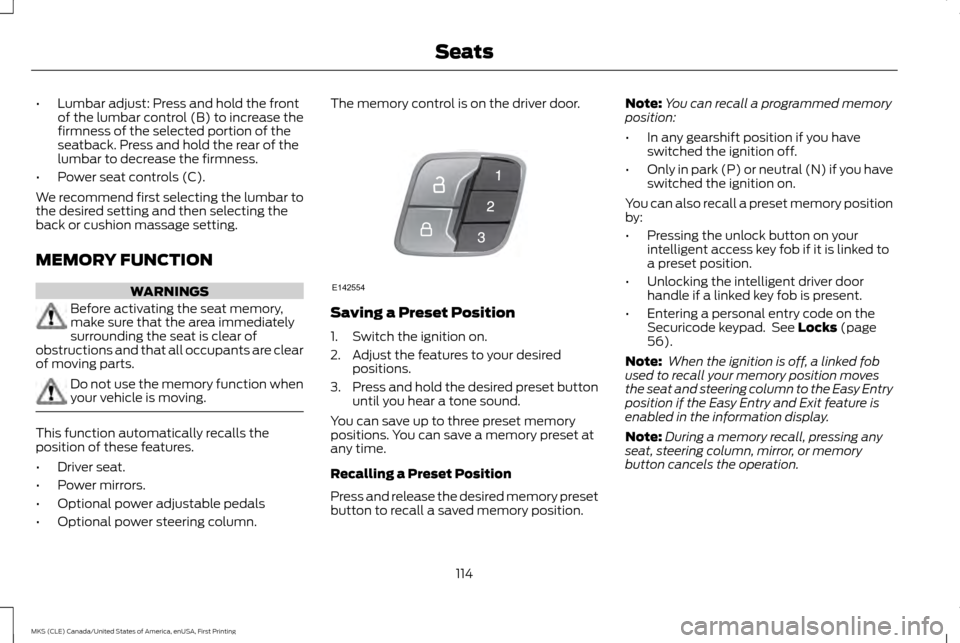
• Optional power steering column. The memory control is on the driver door.
Saving a Preset Position
1. Switch the ignition on.
2. Adjust the features to your desired
positions.
3. Press and hold the desired preset button
until you hear a tone sound.
You can save up to three preset memory
positions. You can save a memory preset at
any time.
Recalling a Preset Position
Press and release the desired memory preset
button to recall a saved memory position. Note:
You can recall a programmed memory
position:
• In any gearshift position if you have
switched the ignition off.
• Only in park (P) or neutral (N) if you have
switched the ignition on.
You can also recall a preset memory position
by:
• Pressing the unlock button on your
intelligent access key fob if it is linked to
a preset position.
• Unlocking the intelligent driver door
handle if a linked key fob is present.
• Entering a personal entry code on the
Securicode keypad. See Locks (page
56).
Note: When the ignition is off, a linked fob
used to recall your memory position moves
the seat and steering column to the Easy Entry
position if the Easy Entry and Exit feature is
enabled in the information display.
Note: During a memory recall, pressing any
seat, steering column, mirror, or memory
button cancels the operation.
114
MKS (CLE) Canada/United States of America, enUSA, First Printing SeatsE142554
Page 118 of 382
Linking a Preset Position to Your
Remote Control or Intelligent Access
Key
You can save the preset memory positions
for up to three remote controls or intelligent
access (IA) keys.
1. With the ignition on, move the memory
positions to the desired positions.
2. Press and hold the desired preset button
for five seconds. A tone sounds after
about two seconds. Continue holding
until you hear a second tone.
3. Within three seconds, press the lock button on the remote control you are
linking.
To unlink a remote control, follow the same
procedure – except in Step 3, press the
unlock button on the remote control.
Easy Entry and Exit Feature
If you enable the easy entry and exit feature,
it automatically moves the driver seat
position rearward up to two inches (five
centimeters) and the steering column up and
forward when you switch the ignition off.
When you switch the ignition on, the driver
seat and steering column return to the
previous position. You can enable or disable this feature in the
information display. See Information
Displays (page 89).
CLIMATE CONTROLLED SEATS
(If Equipped)
Heated Seats WARNING
Persons who are unable to feel pain to
the skin because of advanced age,
chronic illness, diabetes, spinal cord
injury, medication, alcohol use, exhaustion,
or other physical conditions, must exercise
care when using the seat heater. The seat
heater may cause burns even at low
temperatures, especially if used for long
periods of time. Do not place anything on the
seat that insulates against heat, such as a
blanket or cushion, because this may cause
the seat heater to overheat. Do not puncture
the seat with pins, needles, or other pointed
objects because this may damage the
heating element which may cause the seat
heater to overheat. An overheated seat may
cause serious personal injury. Note:
Do not do the following: •
Place heavy objects on the seat.
• Operate the seat heater if water or any
other liquid spills on the seat. Allow the
seat to dry thoroughly.
The heated seats will only function when the
engine is running. Press the heated seat symbol located on the
touchscreen to cycle through the various heat
settings and off. Warmer settings are
indicated by more indicator lights.
If the engine falls below 350 RPM while the
heated seats are on, the feature will turn
itself off. You will need to reactivate it.
After 60 minutes of operation, the heated
seats automatically turn off. Press the
symbol to switch the heated seats on.
115
MKS (CLE) Canada/United States of America, enUSA, First Printing SeatsE146322
Page 129 of 382
CENTER CONSOLE
Stow items in the cupholder carefully as
items may become loose during hard braking,
acceleration or collisions, including hot drinks
which may spill.
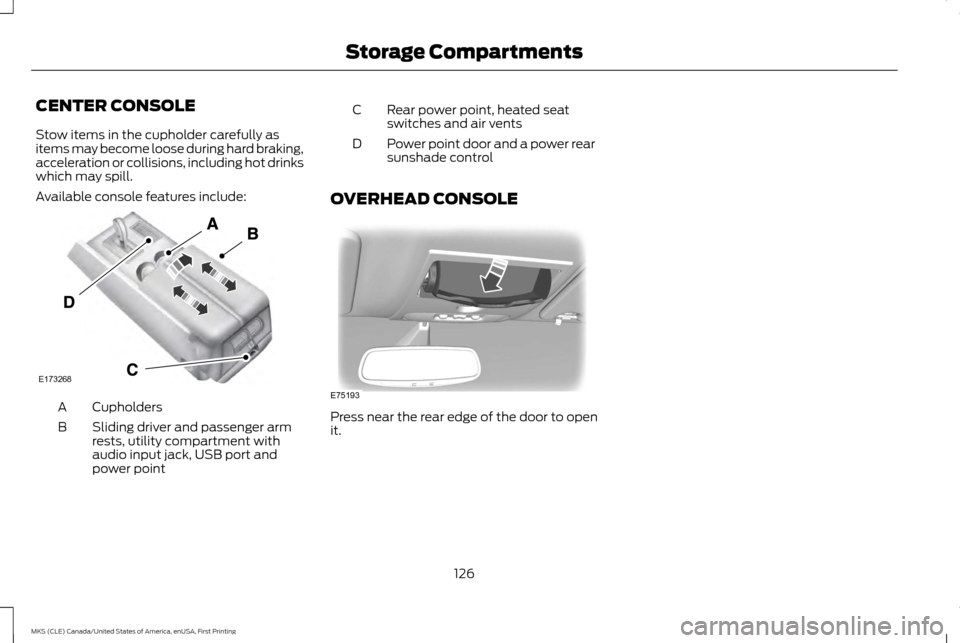
Available console features include:
Cupholders
A
Sliding driver and passenger arm
rests, utility compartment with
audio input jack, USB port and
power point
B Rear power point, heated seat
switches and air vents
C
Power point door and a power rear
sunshade control
D
OVERHEAD CONSOLE Press near the rear edge of the door to open
it.
126
MKS (CLE) Canada/United States of America, enUSA, First Printing Storage CompartmentsE173268 E75193
Page 148 of 382
Operating AWD Vehicles With
Mismatched Tires
WARNING
Only use replacement tires and wheels
that are the same size, load index,
speed rating and type (such as
P-metric versus LT-metric or all-season
versus all-terrain) as those originally provided
by Ford. The recommended tire and wheel
size may be found on either the Safety
Compliance Certification Label (affixed to
either the door hinge pillar, door-latch post,
or the door edge that meets the door-latch
post, next to the driver ’s seating position), or
the Tire Label which is located on the B-Pillar
or edge of the driver ’s door. If this information
is not found on these labels, then you should
contact your authorized dealer as soon as
possible. Use of any tire or wheel not
recommended by Ford can affect the safety
and performance of your vehicle, which could
result in an increased risk of loss of vehicle
control, vehicle rollover, personal injury and
death. Additionally the use of
non-recommended tires and wheels could
cause steering, suspension, axle, transfer
case or power transfer unit failure. If you have
questions regarding tire replacement, contact
your authorized dealer as soon as possible. Major dissimilar tire sizes between the front
and rear axles (for example, 17 inch low
profile tires on the front axle and 22 inch high
profile tires on the rear axle) could cause the
AWD system to stop functioning and default
to front-wheel drive or damage the AWD
system. However, the AWD system is capable
of tolerating any combination of new and
worn tires of the same original tire size. For
example, using 3 worn tread tires and 1 new
tread tire all of the same original tire size, can
be tolerated by the AWD system.
Driving In Special Conditions With
All-Wheel Drive (AWD)
AWD vehicles are equipped for driving on
sand, snow, mud and rough roads and have
operating characteristics that are somewhat
different from conventional vehicles, both on
and off the highway.
When driving at slow speeds in deep sand
under high outside temperatures, use a low
gear when possible. Lower gear operation
will maximize the engine and transmission
cooling capability.
Under severe operating conditions, the A/C
may cycle on and off to protect overheating
of the engine.
Basic operating principles in special
conditions
•
Drive slower in strong crosswinds which
can affect the normal steering
characteristics of your vehicle.
• Be extremely careful when driving on
pavement made slippery by loose sand,
water, gravel, snow or ice.
145
MKS (CLE) Canada/United States of America, enUSA, First Printing All-Wheel Drive (If Equipped)
Page 157 of 382
PRINCIPLE OF OPERATION
WARNINGS
Vehicle modifications involving braking
system, aftermarket roof racks,
suspension, steering system, tire
construction and wheel and tire size may
change the handling characteristics of your
vehicle and may adversely affect the
performance of the electronic stability
control system. In addition, installing any
stereo loudspeakers may interfere with and
adversely affect the electronic stability
control system. Install any aftermarket stereo
loudspeaker as far as possible from the front
center console, the tunnel, and the front
seats in order to minimize the risk of
interfering with the electronic stability control
sensors. Reducing the effectiveness of the
electronic stability control system could lead
to an increased risk of loss of vehicle control,
vehicle rollover, personal injury and death. Remember that even advanced
technology cannot defy the laws of
physics. It’
s always possible to lose
control of a vehicle due to inappropriate
driver input for the conditions. Aggressive
driving on any road condition can cause you
to lose control of your vehicle increasing the
risk of personal injury or property damage. WARNINGS
Activation of the electronic stability control
system is an indication that at least some of
the tires have exceeded their ability to grip
the road; this could reduce the operator ’s
ability to control the vehicle potentially
resulting in a loss of vehicle control, vehicle
rollover, personal injury and death. If your
electronic stability control system activates,
SLOW DOWN. The system automatically turns on each time
you switch the ignition on.
If a driving condition activates either the
stability control or the traction control system
you may experience the following conditions:
•
The stability and traction control light
flashes.
• Your vehicle slows down.
• Reduced engine power.
• A vibration in the brake pedal. •
The brake pedal is stiffer than usual.
• If the driving condition is severe and your
foot is not on the brake, the brake pedal
may move as the system applies higher
brake forces.
The stability control system has several
features built into it to help you maintain
control of your vehicle:
Electronic Stability Control
The system enhances your vehicle ’s ability
to prevent skids or lateral slides by applying
brakes to one or more of the wheels
individually and, if necessary, reducing engine
power.
154
MKS (CLE) Canada/United States of America, enUSA, First Printing Stability Control
Page 197 of 382
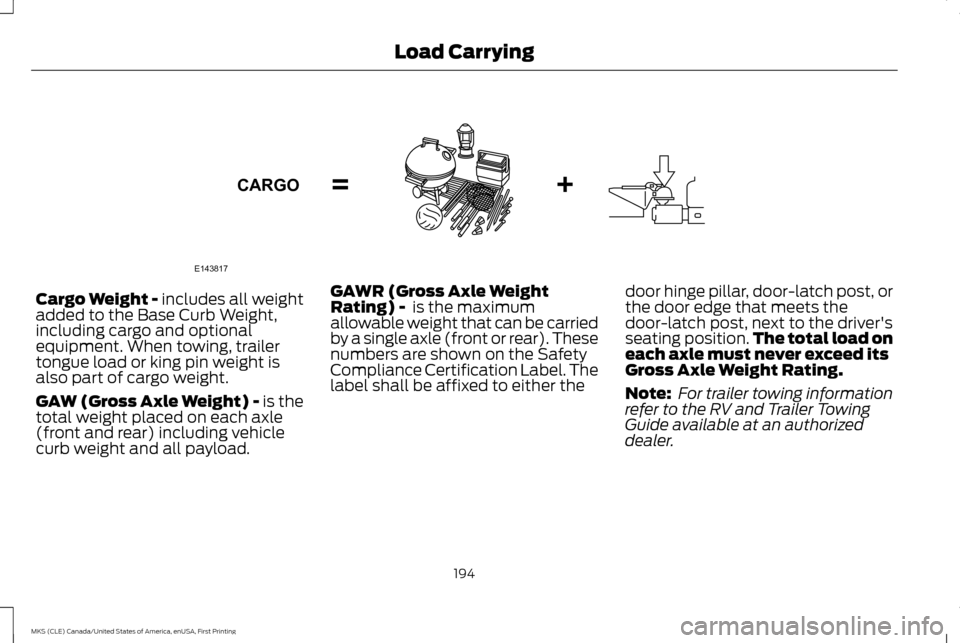
Cargo Weight - includes all weight
added to the Base Curb Weight,
including cargo and optional
equipment. When towing, trailer
tongue load or king pin weight is
also part of cargo weight.
GAW (Gross Axle Weight) - is the
total weight placed on each axle
(front and rear) including vehicle
curb weight and all payload.
GAWR (Gross Axle Weight
Rating) - is the maximum
allowable weight that can be carried
by a single axle (front or rear). These
numbers are shown on the Safety
Compliance Certification Label. The
label shall be affixed to either the door hinge pillar, door-latch post, or
the door edge that meets the
door-latch post, next to the driver's
seating position.
The total load on
each axle must never exceed its
Gross Axle Weight Rating.
Note: For trailer towing information
refer to the RV and Trailer Towing
Guide available at an authorized
dealer.
194
MKS (CLE) Canada/United States of America, enUSA, First Printing Load CarryingE143817CARGO