instrument cluster LINCOLN MKS 2016 User Guide
[x] Cancel search | Manufacturer: LINCOLN, Model Year: 2016, Model line: MKS, Model: LINCOLN MKS 2016Pages: 382, PDF Size: 3.81 MB
Page 144 of 382
SelectShift Automatic
™
Transmission (If Equipped)
Your SelectShift Automatic transmission
gives you the ability to change gears
manually.
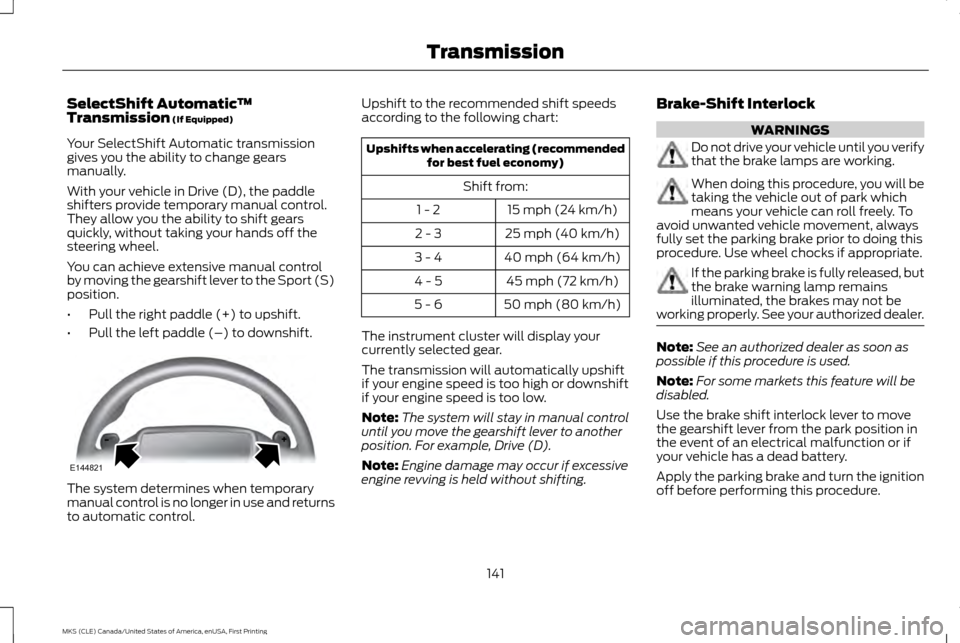
With your vehicle in Drive (D), the paddle
shifters provide temporary manual control.
They allow you the ability to shift gears
quickly, without taking your hands off the
steering wheel.
You can achieve extensive manual control
by moving the gearshift lever to the Sport (S)
position.
• Pull the right paddle (+) to upshift.
• Pull the left paddle (–) to downshift. The system determines when temporary
manual control is no longer in use and returns
to automatic control. Upshift to the recommended shift speeds
according to the following chart: Upshifts when accelerating (recommended
for best fuel economy)
Shift from: 15 mph (24 km/h)
1 - 2
25 mph (40 km/h)
2 - 3
40 mph (64 km/h)
3 - 4
45 mph (72 km/h)
4 - 5
50 mph (80 km/h)
5 - 6
The instrument cluster will display your
currently selected gear.
The transmission will automatically upshift
if your engine speed is too high or downshift
if your engine speed is too low.
Note: The system will stay in manual control
until you move the gearshift lever to another
position. For example, Drive (D).
Note: Engine damage may occur if excessive
engine revving is held without shifting. Brake-Shift Interlock WARNINGS
Do not drive your vehicle until you verify
that the brake lamps are working.
When doing this procedure, you will be
taking the vehicle out of park which
means your vehicle can roll freely. To
avoid unwanted vehicle movement, always
fully set the parking brake prior to doing this
procedure. Use wheel chocks if appropriate. If the parking brake is fully released, but
the brake warning lamp remains
illuminated, the brakes may not be
working properly. See your authorized dealer. Note:
See an authorized dealer as soon as
possible if this procedure is used.
Note: For some markets this feature will be
disabled.
Use the brake shift interlock lever to move
the gearshift lever from the park position in
the event of an electrical malfunction or if
your vehicle has a dead battery.
Apply the parking brake and turn the ignition
off before performing this procedure.
141
MKS (CLE) Canada/United States of America, enUSA, First Printing TransmissionE144821
Page 169 of 382
PRINCIPLE OF OPERATION
Cruise control lets you maintain a set speed
without keeping your foot on the accelerator
pedal. You can use cruise control when your
vehicle speed is greater than 20 mph
(30 km/h).
USING CRUISE CONTROL WARNINGS
Do not use cruise control on winding
roads, in heavy traffic or when the road
surface is slippery. This could result in
loss of vehicle control, serious injury or death. When you are going downhill, your
vehicle speed may increase above the
set speed. The system will not apply
the brakes. Change down a gear to assist the
system in maintaining the set speed. Failure
to do so could result in loss of vehicle control,
serious injury or death. Note:
Cruise control will disengage if the
vehicle speed decreases more than
10 mph
(16 km/h) below the set speed while driving
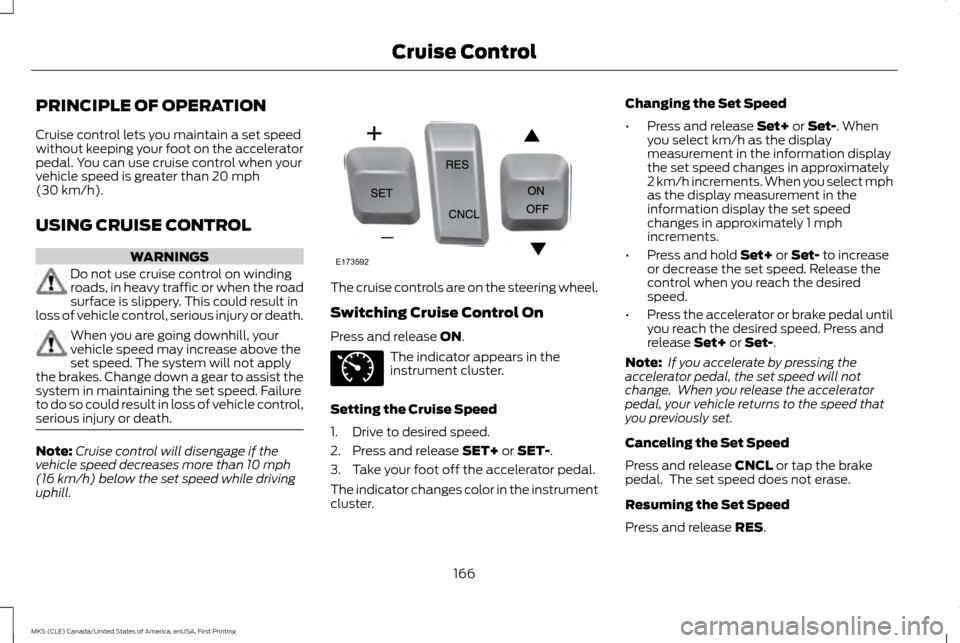
uphill. The cruise controls are on the steering wheel.
Switching Cruise Control On
Press and release
ON.
The indicator appears in the
instrument cluster.
Setting the Cruise Speed
1. Drive to desired speed.
2. Press and release
SET+ or SET-.
3. Take your foot off the accelerator pedal.
The indicator changes color in the instrument
cluster. Changing the Set Speed
•
Press and release
Set+ or Set-. When
you select km/h as the display
measurement in the information display
the set speed changes in approximately
2 km/h increments. When you select mph
as the display measurement in the
information display the set speed
changes in approximately 1 mph
increments.
• Press and hold
Set+ or Set- to increase
or decrease the set speed. Release the
control when you reach the desired
speed.
• Press the accelerator or brake pedal until
you reach the desired speed. Press and
release
Set+ or Set-.
Note: If you accelerate by pressing the
accelerator pedal, the set speed will not
change. When you release the accelerator
pedal, your vehicle returns to the speed that
you previously set.
Canceling the Set Speed
Press and release
CNCL or tap the brake
pedal. The set speed does not erase.
Resuming the Set Speed
Press and release
RES.
166
MKS (CLE) Canada/United States of America, enUSA, First Printing Cruise ControlE173592 E71340
Page 170 of 382
Switching Cruise Control Off
Press and release OFF when the system is
in stand by mode or switch the ignition off.
Note: You erase the set speed when you
switch the system off.
USING ADAPTIVE CRUISE
CONTROL
(If Equipped) WARNINGS
Always pay close attention to changing
road conditions when using adaptive
cruise control. The system does not
replace attentive driving. Failing to pay
attention to the road may result in a crash,
serious injury or death. Adaptive cruise control is not a crash
warning or avoidance system.
Adaptive cruise control will not detect
stationary or slow moving vehicles
below 6 mph (10 km/h).
Adaptive cruise control does not detect
pedestrians or objects in the road.
Adaptive cruise control does not detect
oncoming vehicles in the same lane. WARNINGS
Do not use the adaptive cruise control
when entering or leaving a highway, in
heavy traffic or on roads that are
winding, slippery or unpaved. Do not use the system in poor visibility,
for example fog, heavy rain, spray or
snow.
Do not use adaptive cruise control
when towing a trailer that has trailer
brakes. The auto-brake component of
the adaptive cruise control system does not
operate the trailer brakes. Using adaptive
cruise control when towing a trailer that has
trailer brakes may result in the loss of vehicle
control, which could result in serious injury. Do not use tire sizes other than those
recommended because this can affect
the normal operation of the system.
Failing to do so may result in a loss of vehicle
control, which could result in serious injury. Note:
It is your responsibility to stay alert, drive
safely and be in control of the vehicle at all
times.
The system adjusts your speed to maintain
a proper distance between you and the
vehicle in front of you in the same lane. You
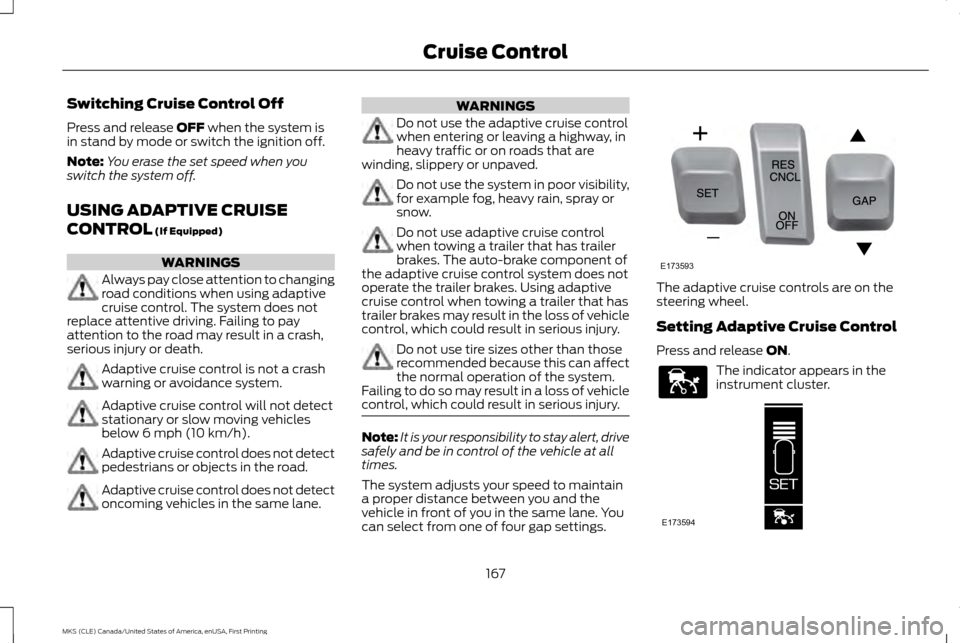
can select from one of four gap settings. The adaptive cruise controls are on the
steering wheel.
Setting Adaptive Cruise Control
Press and release
ON.
The indicator appears in the
instrument cluster.
167
MKS (CLE) Canada/United States of America, enUSA, First Printing Cruise ControlE173593 E144529 E173594
Page 171 of 382
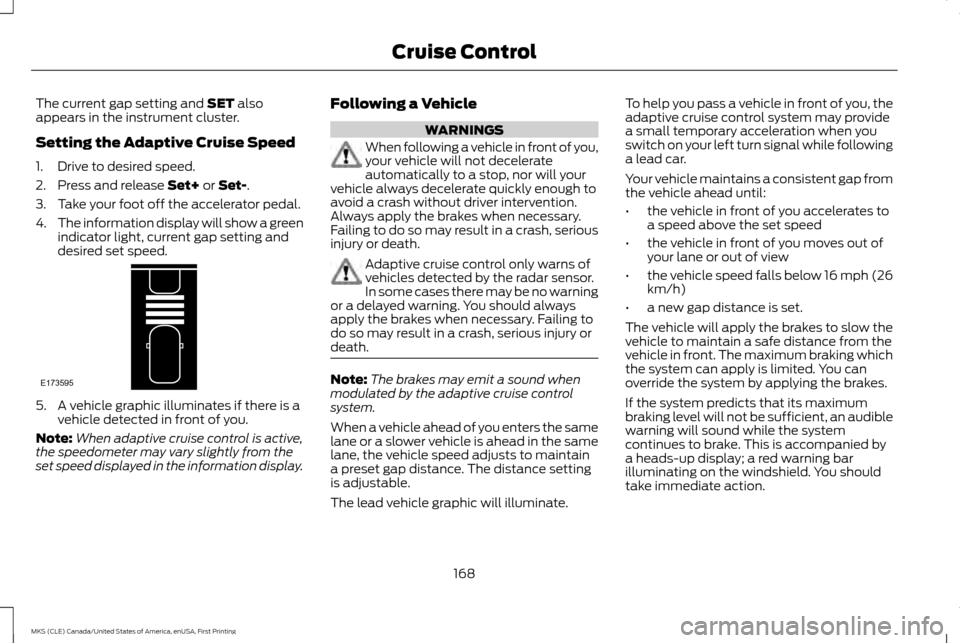
The current gap setting and SET also
appears in the instrument cluster.
Setting the Adaptive Cruise Speed
1. Drive to desired speed.
2. Press and release
Set+ or Set-.
3. Take your foot off the accelerator pedal.
4. The information display will show a green
indicator light, current gap setting and
desired set speed. 5. A vehicle graphic illuminates if there is a
vehicle detected in front of you.
Note: When adaptive cruise control is active,
the speedometer may vary slightly from the
set speed displayed in the information display. Following a Vehicle WARNINGS
When following a vehicle in front of you,
your vehicle will not decelerate
automatically to a stop, nor will your
vehicle always decelerate quickly enough to
avoid a crash without driver intervention.
Always apply the brakes when necessary.
Failing to do so may result in a crash, serious
injury or death. Adaptive cruise control only warns of
vehicles detected by the radar sensor.
In some cases there may be no warning
or a delayed warning. You should always
apply the brakes when necessary. Failing to
do so may result in a crash, serious injury or
death. Note:
The brakes may emit a sound when
modulated by the adaptive cruise control
system.
When a vehicle ahead of you enters the same
lane or a slower vehicle is ahead in the same
lane, the vehicle speed adjusts to maintain
a preset gap distance. The distance setting
is adjustable.
The lead vehicle graphic will illuminate. To help you pass a vehicle in front of you, the
adaptive cruise control system may provide
a small temporary acceleration when you
switch on your left turn signal while following
a lead car.
Your vehicle maintains a consistent gap from
the vehicle ahead until:
•
the vehicle in front of you accelerates to
a speed above the set speed
• the vehicle in front of you moves out of
your lane or out of view
• the vehicle speed falls below 16 mph (26
km/h)
• a new gap distance is set.
The vehicle will apply the brakes to slow the
vehicle to maintain a safe distance from the
vehicle in front. The maximum braking which
the system can apply is limited. You can
override the system by applying the brakes.
If the system predicts that its maximum
braking level will not be sufficient, an audible
warning will sound while the system
continues to brake. This is accompanied by
a heads-up display; a red warning bar
illuminating on the windshield. You should
take immediate action.
168
MKS (CLE) Canada/United States of America, enUSA, First Printing Cruise ControlE173595
Page 178 of 382
The current assessment of your alertness
indicates that you should rest as soon as
safely possible.
The status bar will travel from left to right as
the calculated alertness level decreases. As
the rest icon is approached the color turns
from green to yellow to red. The yellow
position indicates the first warning is active
and the red position indicates the second
warning is active.
Note:
If you have recently received a warning;
you should consider resting, even if the current
assessment is within the typical range.
Note: If the camera sensor cannot track the
road lane markings or if your vehicle speed
drops below approximately 40 mph
(64 km/h), the alertness level will change to
grey for a short time and the information
display will inform you that the system is
unavailable.
Resetting the System
You can reset the system by either:
• Switching the ignition off and on.
• Stopping the vehicle and then opening
and closing the driver ’s door. LANE KEEPING SYSTEM (If Equipped) WARNING
The system is designed to aid the driver.
It is not intended to replace your
attention and judgment. You are still
responsible to drive with due care and
attention. Note:
The system works above
40 mph
(64 km/h).
Note: The system works as long as the
camera can detect one lane marking.
Note: The system may not function if the
camera is blocked or there is damage to the
windshield.
Note: When Aid mode is on and the system
detects no steering activity for a short period,
the system will alert you to put your hands on
the steering wheel. The system may detect a
light grip or touch on the steering wheel as
hands off driving. The system notifies you to stay in your lane
through the steering system and the
instrument cluster display when the front
camera detects an unintentional drift out of
your lane is likely to occur. The system
automatically detects and tracks the road
lane markings using a camera mounted
behind the interior rear view mirror.
Switching the System On and Off
Note:
The system on or off setting is stored
until it is manually changed, unless a MyKey®
is detected. If the system detects a MyKey®,
it defaults to on and the mode is set to alert.
Note: If a MyKey® is detected, pressing the
button will not affect the on or off status of
the system. You can only change the mode
and intensity settings. Press the button located on the
center console to switch the
system on or off.
175
MKS (CLE) Canada/United States of America, enUSA, First Printing Driving AidsE173233
Page 237 of 382
Protected components
Fuse amp rating
Fuse or relay number
Backlighting LED.
Interior lighting.
Right-hand direction indicators.
15A
13
Left-hand direction indicators.
15A
14
Stop lamp.
15A
15
Backup lamp.
Right front low beam.
10A
16
Left front low beam.
10A
17
Start button.
10A
18
Keypad illumination.
Brake-shift interlock.
Powertrain control module wake-up.
Immobilizer transceiver module.
Audio amplifiers.
20A
19
All lock motor relay and coil.
20A
20
Driver lock motor relay and coil.
Not used (spare).
10A
21
Horn relay.
20A
22
Steering wheel control module logic
15A
23
Instrument cluster.
Steering wheel control module.
15A
24
234
MKS (CLE) Canada/United States of America, enUSA, First Printing Fuses
Page 249 of 382
Note:
Do not add oil further than the MAX
mark. Oil levels above the MAX mark may
cause engine damage. Only use oils certified for gasoline engines by
the American Petroleum Institute (API). An
oil with this trademark symbol conforms to
the current engine and emission system
protection standards and fuel economy
requirements of the International Lubricants
Specification Advisory Committee (ILSAC).
1. Remove the filler cap.
2. If the engine oil level is not within the
normal range, add engine oil that meets
Ford specifications. See Capacities and
Specifications (page 296). 3. Remove the engine oil filler cap and use
a funnel to pour the engine oil into the
opening.
4. Wipe off any spilled oil.
5. Replace the filler cap. Turn it until you feel
a strong resistance.
OIL CHANGE INDICATOR RESET
Use the information display controls on the
steering wheel to reset the oil change
indicator.
From the main menu scroll to: Action and description
Message
Press the right arrow button,
then from this menu scroll to
the following message.
Settings
Press the right arrow button,
then from this menu scroll to
the following message.
Vehicle
Press the right arrow button,
then from this menu scroll to
the following message.
Oil Life Action and description
Message
Press and hold the
OK button
until the instrument cluster
displays the following
message.
Hold OK to
Reset
Reset Successful
When the oil change indicator
resets the instrument cluster
displays 100%.
Remaining Life
{00}%
If the instrument cluster
displays one of the following
messages, repeat the process.
Not Reset
Reset Cancelled
246
MKS (CLE) Canada/United States of America, enUSA, First Printing MaintenanceE142732
Page 269 of 382
To clean the windshield and wiper blades:
•
Clean the windshield with a non-abrasive
glass cleaner. When cleaning the interior
of the windshield, avoid getting any glass
cleaner on the instrument panel or door
panels. Wipe any glass cleaner off these
surfaces immediately.
• For windshields contaminated with tree
sap, chemicals, wax or bugs, clean the
entire windshield using steel wool (no
greater than 0000 grade) in a circular
motion and rinse with water.
• Clean the wiper blades with isopropyl
rubbing alcohol or windshield washer
concentrate.
Note: Do not use razor blades or other sharp
objects to clean or remove decals from the
inside of the heated rear window. The vehicle
warranty does not cover damage caused to
the heated rear window grid lines.
CLEANING THE INTERIOR WARNINGS
Do not use cleaning solvents, bleach or
dye on the vehicle
’s safety belts, as
these actions may weaken the belt
webbing. WARNINGS
On vehicles equipped with
seat-mounted airbags, do not use
chemical solvents or strong detergents.
Such products could contaminate the side
airbag system and affect performance of the
side airbag in a collision. For fabric, carpets, cloth seats, safety belts
and seats equipped with side airbags:
•
Remove dust and loose dirt with a
vacuum cleaner.
• Remove light stains and soil with
Motorcraft Professional Strength Carpet
& Upholstery Cleaner.
• If grease or tar is present on the material,
spot-clean the area first with Motorcraft
Spot and Stain Remover. In Canada, use
Motorcraft Multi-Purpose Cleaner.
• If a ring forms on the fabric after spot
cleaning, clean the entire area
immediately (but do not oversaturate)
or the ring will set.
• Do not use household cleaning products
or glass cleaners, which can stain and
discolor the fabric and affect the flame
retardant abilities of the seat materials. CLEANING THE INSTRUMENT
PANEL AND INSTRUMENT
CLUSTER LENS WARNING
Do not use chemical solvents or strong
detergents when cleaning the steering
wheel or instrument panel to avoid
contamination of the airbag system. Note:
Follow the same procedure as cleaning
leather seats for cleaning leather instrument
panels and leather interior trim surfaces. See
Cleaning Leather Seats (page 267).
Clean the instrument panel and cluster lens
with a clean, damp and soft cloth, then use
a clean, dry and soft cloth to dry these areas.
• Avoid cleaners or polishes that increase
the gloss of the upper portion of the
instrument panel. The dull finish in this
area helps protect you from undesirable
windshield reflection.
• Do not use any household cleaning
products or glass cleaners as these may
damage the finish of the instrument
panel, interior trim and cluster lens.
266
MKS (CLE) Canada/United States of America, enUSA, First Printing Vehicle Care
Page 375 of 382
Bonnet Lock
See: Opening and Closing the Hood...............240
Booster Seats.......................................................23 Types of Booster Seats........................................... 23
Brake Fluid Check.............................................254
Brakes....................................................................150 General Information............................................... 150
Breaking-In.........................................................208
Bulb Specification Chart...............................260
C
Cabin Air Filter....................................................108
California Proposition 65..................................10
Capacities and Specifications - 3.5L Ecoboost™......................................................302
Specifications.......................................................... 303
Capacities and Specifications - 3.7L.........307 Specifications.......................................................... 308
Capacities and Specifications
....................296
Car Wash See: Cleaning the Exterior................................... 264
Center Console
...................................................126
Changing a Bulb...............................................259
Front Fog Lamp....................................................... 259
High-Intensity Discharge Headlamps.............259
LED Lamps................................................................ 259
License Plate Lamp............................................... 259
Changing a Fuse................................................237 Fuses........................................................................\
.... 237Changing a Road Wheel................................289
Dissimilar Spare Wheel and Tire Assembly
Information.......................................................... 289
Stowing the flat tire............................................... 293
Tire Change Procedure.......................................... 291
Changing the 12V Battery..............................255 Battery Management System............................ 256
Changing the Engine Air Filter.....................262
Changing the Wiper Blades..........................257 Changing the Windshield Wiper Blades.........257
Checking MyKey System Status....................53
Checking the Wiper Blades
...........................257
Child Restraint and Seatbelt Maintenance
......................................................34
Child Restraint Positioning..............................25
Child Safety............................................................15 General Information.................................................. 15
Child Safety Locks
...............................................27
Left-Hand Side........................................................... 27
Right-Hand Side......................................................... 27
Cleaning Leather Seats..................................267
Cleaning Products............................................263
Cleaning the Alloy Wheels...........................268
Cleaning the Engine........................................265
Cleaning the Exterior
......................................264
Exterior Chrome Parts........................................... 264
Exterior Plastic Parts............................................. 264
Stripes or Graphics................................................. 264
Underbody................................................................ 264
Cleaning the Instrument Panel and Instrument Cluster Lens.............................266
Cleaning the Interior
.......................................266 Cleaning the Windows and Wiper
Blades................................................................265
Clearing All MyKeys............................................52
Climate Control
.................................................105
Climate Controlled Seats................................115
Cooled Seats.............................................................. 116
Heated Seats.............................................................. 115
Collision Warning System..............................187 PRINCIPLE OF OPERATION................................. 187
Coolant Check See: Engine Coolant Check................................. 247
Crash Sensors and Airbag Indicator............44
Creating a MyKey
.................................................51
Programming/Changing Configurable
Settings..................................................................... 51
Cross Traffic Alert..............................................182 False Alerts................................................................ 186
Switching the System Off and On.................... 186
System Errors............................................................ 186
System Lights, Messages and Audible Alerts....................................................................... 185
System Limitations................................................. 185
Using the System..................................................... 182
Cruise Control
......................................................66
Principle of Operation............................................ 166
Type 1........................................................................\
..... 66
Type 2........................................................................\
..... 67
Cruise control See: Using Cruise Control..................................... 166
Customer Assistance
.......................................216
372
MKS (CLE) Canada/United States of America, enUSA, First Printing Index
Page 378 of 382
Installing Child Restraints.................................17
Child Seats..................................................................... 17
Using Lap and Shoulder Belts................................ 17
Using Lower Anchors and Tethers for CHildren (LATCH)................................................................... 20
Using Tether Straps................................................... 21
Instrument Cluster
.............................................84
Instrument Lighting Dimmer...........................73
Interior Lamps......................................................76 Front Row Map Lamps............................................ 76
Second Row Map Lamps........................................ 77
Interior Luggage Compartment Release.................................................................61
Interior Mirror
.........................................................81
Auto-Dimming Mirror................................................ 81
Introduction.............................................................7
J
Jump Starting the Vehicle..............................213 Connecting the Jumper Cables........................... 213
Jump Starting............................................................ 214
Preparing Your Vehicle........................................... 213
Removing the Jumper Cables............................. 214
K
Keyless Entry........................................................59 SECURICODE™ KEYLESS ENTRY
KEYPAD.................................................................... 59
Keyless Starting..................................................127 Ignition Modes........................................................... 127Keys and Remote Controls.............................46
L
Lane Keeping System
......................................175
Switching the System On and Off..................... 175
Lighting Control
....................................................71
Headlamp Flasher..................................................... 72
High Beams................................................................... 71
Lighting.....................................................................71 General Information................................................... 71
Lincoln Automotive Financial Services........11
Load Carrying......................................................192
Load Limit............................................................192 Vehicle Loading - with and without a
Trailer....................................................................... 192
Locking and Unlocking.....................................56 Activating Intelligent Access................................. 56
Autolock Feature (If Enabled).............................. 57
Battery Saver.............................................................. 58
Illuminated Entry....................................................... 58
Illuminated Exit.......................................................... 58
Luggage Compartment Release......................... 58
Power Door Locks..................................................... 56
Remote Control......................................................... 56
Smart Unlocks............................................................ 57
Locks.......................................................................56
Lug Nuts See: Changing a Road Wheel............................ 289M
Maintenance......................................................240
General Information.............................................. 240
Media Hub
............................................................316
Memory Function...............................................114
Easy Entry and Exit Feature.................................. 115
Linking a Preset Position to Your Remote Control or Intelligent Access Key................... 115
Saving a Preset Position......................................... 114
Message Center See: Information Displays...................................... 89
Mirrors See: Heated Windows and Mirrors.................... 107
See: Windows and Mirrors..................................... 78
Mobile Communications Equipment...........12
Moonroof...............................................................82 Bounce-Back.............................................................. 82
Opening and Closing the Moonroof................... 82
Opening and Closing the Sunscreen.................82
Venting the Moonroof.............................................. 83
Motorcraft Parts - 3.5L Ecoboost™..........298
Motorcraft Parts - 3.7L...................................299
MyKey Troubleshooting....................................54
MyKey ™
.................................................................50
Principle of Operation............................................. 50
N
Normal Scheduled Maintenance...............325 Intelligent Oil-Life Monitor™.............................. 325
Maintenance Intervals.......................................... 326
375
MKS (CLE) Canada/United States of America, enUSA, First Printing Index