reset LINCOLN MKS 2016 User Guide
[x] Cancel search | Manufacturer: LINCOLN, Model Year: 2016, Model line: MKS, Model: LINCOLN MKS 2016Pages: 382, PDF Size: 3.81 MB
Page 118 of 382
Linking a Preset Position to Your
Remote Control or Intelligent Access
Key
You can save the preset memory positions
for up to three remote controls or intelligent
access (IA) keys.
1. With the ignition on, move the memory
positions to the desired positions.
2. Press and hold the desired preset button
for five seconds. A tone sounds after
about two seconds. Continue holding
until you hear a second tone.
3. Within three seconds, press the lock button on the remote control you are
linking.
To unlink a remote control, follow the same
procedure – except in Step 3, press the
unlock button on the remote control.
Easy Entry and Exit Feature
If you enable the easy entry and exit feature,
it automatically moves the driver seat
position rearward up to two inches (five
centimeters) and the steering column up and
forward when you switch the ignition off.
When you switch the ignition on, the driver
seat and steering column return to the
previous position. You can enable or disable this feature in the
information display. See Information
Displays (page 89).
CLIMATE CONTROLLED SEATS
(If Equipped)
Heated Seats WARNING
Persons who are unable to feel pain to
the skin because of advanced age,
chronic illness, diabetes, spinal cord
injury, medication, alcohol use, exhaustion,
or other physical conditions, must exercise
care when using the seat heater. The seat
heater may cause burns even at low
temperatures, especially if used for long
periods of time. Do not place anything on the
seat that insulates against heat, such as a
blanket or cushion, because this may cause
the seat heater to overheat. Do not puncture
the seat with pins, needles, or other pointed
objects because this may damage the
heating element which may cause the seat
heater to overheat. An overheated seat may
cause serious personal injury. Note:
Do not do the following: •
Place heavy objects on the seat.
• Operate the seat heater if water or any
other liquid spills on the seat. Allow the
seat to dry thoroughly.
The heated seats will only function when the
engine is running. Press the heated seat symbol located on the
touchscreen to cycle through the various heat
settings and off. Warmer settings are
indicated by more indicator lights.
If the engine falls below 350 RPM while the
heated seats are on, the feature will turn
itself off. You will need to reactivate it.
After 60 minutes of operation, the heated
seats automatically turn off. Press the
symbol to switch the heated seats on.
115
MKS (CLE) Canada/United States of America, enUSA, First Printing SeatsE146322
Page 128 of 382
The power outlet temporarily turns off power
when in fault mode if the device exceeds the
150 watt limit. Unplug your device and switch
the ignition off. Switch the ignition back on,
but do not plug your device back in. Let the
system cool off and switch the ignition off to
reset the fault mode. Switch the ignition back
on and make sure the indicator light remains
on.
Do not use the power point for certain electric
devices, including:
•
Cathode ray tube type televisions.
• Motor loads, for example vacuum
cleaners, electric saws and other electric
power tools, or compressor-driven
refrigerators.
• Measuring devices which process precise
data, for example medical equipment or
measuring equipment.
• Other appliances requiring an extremely
stable power supply, for example
microcomputer-controlled electric
blankets or touch sensor lamps.
125
MKS (CLE) Canada/United States of America, enUSA, First Printing Auxiliary Power Points
Page 132 of 382
Within 20 seconds of switching the engine
off, press the brake pedal and press the
button. After 20 seconds have expired, you
can no longer restart the engine without the
key present inside your vehicle.
Once the engine has started, it remains
running until you press the button, even if the
system does not detect a valid key. If you
open and close a door while the engine is
running, the system searches for a valid key.
You cannot restart the engine if the system
does not detect a valid key within 20
seconds.
Failure to Start
If you cannot start the engine after three
attempts, wait 10 seconds and follow this
procedure:
1. Fully press the brake pedal.
2.
Fully press the accelerator pedal and hold
it there.
3. Start the engine. Automatic Engine Shutdown
If your vehicle is equipped with a keyless
ignition, it has a feature that automatically
shuts down the engine if it has been idling for
an extended period. The ignition also turns
off in order to save battery power. Before the
engine shuts down, a message appears in
the information display showing a timer
counting down from 30 seconds. If you do
not intervene within 30 seconds, the engine
shuts down. Another message appears in the
information display to inform you that the
engine has shut down in order to save fuel.
Start your vehicle as you normally do.
Automatic Engine Shutdown Override
Note:
You cannot permanently switch off the
automatic engine shutdown feature. When
you switch it off temporarily, it turns on at the
next ignition cycle.
You can stop the engine shutdown, or reset
the timer, at any point before the 30-second
countdown has expired by doing any of the
following: •
You can reset the timer by interacting
with your vehicle (such as pressing the
brake pedal or accelerator pedal).
• You can temporarily switch off the
shutdown feature any time the ignition is
on (for the current ignition cycle only).
Use the information display to do so. See
Information Displays (page 89).
• During the countdown before engine
shutdown, you are prompted to press OK
or RESET (depending on your type of
information display) to temporarily
switch the feature off (for the current
ignition cycle only).
Stopping the Engine When Your
Vehicle is Stationary
1. Put the transmission in park (P).
2. Press the button once.
3. Apply the parking brake.
Note: This switches off the ignition, all
electrical circuits, warning lamps and
indicators.
129
MKS (CLE) Canada/United States of America, enUSA, First Printing Starting and Stopping the Engine
Page 139 of 382
5. To close the fuel filler door, press the
center-rear edge of the fuel filler door and
then release. The fuel door will latch
closed.
If the fuel fill inlet did not close properly, a
Check Fuel Fill Inlet message may appear
on the instrument cluster.
At the next opportunity, do the following:
1. Safely pull off the road.
2. Put the vehicle in position
P and switch
the ignition off.
3. Open the fuel filler door and remove any visible debris from the fuel fill opening.
4. Insert the fuel fill nozzle, or the fuel fill funnel provided with the vehicle, several
times to allow the inlet to close properly.
This will dislodge any debris preventing
the inlet from sealing.
If this action corrects the problem, the
message may not reset immediately. It may
take several driving cycles for the message
to turn off. A driving cycle consists of an
engine start-up (after four or more hours with
the engine off) followed by city or highway
driving. Continuing to drive with the message
on may cause the service engine soon lamp
to turn on as well. FUEL CONSUMPTION
Empty reserve is the amount of fuel
remaining in the tank after the fuel gauge
indicates empty. The amount of usable fuel
in the empty reserve varies and should not
be relied upon to increase driving range.
•
The usable capacity of the fuel tank is the
amount of fuel that can be added into
the tank after the gauge indicates empty.
• The advertised capacity is the total fuel
tank size. See
Capacities and
Specifications (page 296). It is the
combined usable capacity plus the empty
reserve.
• Due to the empty reserve, you may not
be able to refuel the full amount of the
advertised capacity of the fuel tank even
when the fuel gauge reads empty.
Filling the Tank
For consistent results when refueling:
• Turn the ignition off before fueling; an
inaccurate reading results if the engine is
left running.
• Use the same fill rate (low-medium-high)
each time the tank is filled.
• Allow no more than one automatic
shut-off when refueling. Results are most accurate when the filling
method is consistent.
Calculating Fuel Economy
Do not measure fuel economy during the first
1,000 mi (1,600 km)
of driving (this is your
engine ’s break-in period). A more accurate
measurement is obtained after
2,000 mi
(3,200 km) to 3,000 mi (4,800 km). Also,
fuel expense, frequency of fill ups or fuel
gauge readings are not accurate ways to
measure fuel economy.
1. Fill the fuel tank completely and record the initial odometer reading.
2. Each time you fill the fuel tank, record the
amount of fuel added.
3. After at least three fill ups, fill the fuel tank and record the current odometer
reading.
4. Subtract your initial odometer reading from the current odometer reading.
To calculate L/100 km (liters per 100
kilometers) fuel consumption, multiply the
liters used by 100, then divide by kilometers
traveled. To calculate MPG (miles per
gallon) fuel consumption, divide miles
traveled by gallons used.
136
MKS (CLE) Canada/United States of America, enUSA, First Printing Fuel and Refueling
Page 171 of 382
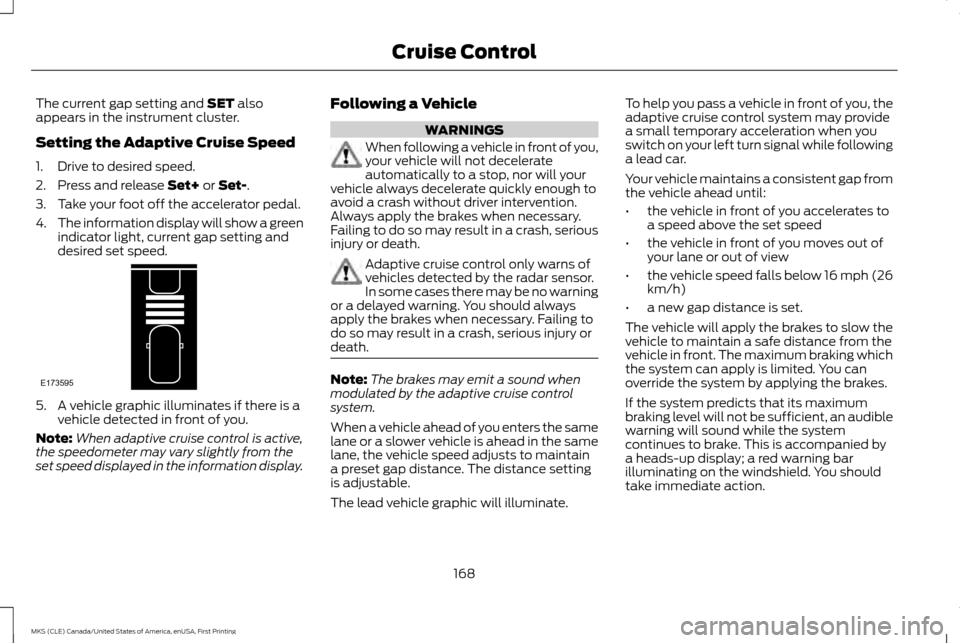
The current gap setting and SET also
appears in the instrument cluster.
Setting the Adaptive Cruise Speed
1. Drive to desired speed.
2. Press and release
Set+ or Set-.
3. Take your foot off the accelerator pedal.
4. The information display will show a green
indicator light, current gap setting and
desired set speed. 5. A vehicle graphic illuminates if there is a
vehicle detected in front of you.
Note: When adaptive cruise control is active,
the speedometer may vary slightly from the
set speed displayed in the information display. Following a Vehicle WARNINGS
When following a vehicle in front of you,
your vehicle will not decelerate
automatically to a stop, nor will your
vehicle always decelerate quickly enough to
avoid a crash without driver intervention.
Always apply the brakes when necessary.
Failing to do so may result in a crash, serious
injury or death. Adaptive cruise control only warns of
vehicles detected by the radar sensor.
In some cases there may be no warning
or a delayed warning. You should always
apply the brakes when necessary. Failing to
do so may result in a crash, serious injury or
death. Note:
The brakes may emit a sound when
modulated by the adaptive cruise control
system.
When a vehicle ahead of you enters the same
lane or a slower vehicle is ahead in the same
lane, the vehicle speed adjusts to maintain
a preset gap distance. The distance setting
is adjustable.
The lead vehicle graphic will illuminate. To help you pass a vehicle in front of you, the
adaptive cruise control system may provide
a small temporary acceleration when you
switch on your left turn signal while following
a lead car.
Your vehicle maintains a consistent gap from
the vehicle ahead until:
•
the vehicle in front of you accelerates to
a speed above the set speed
• the vehicle in front of you moves out of
your lane or out of view
• the vehicle speed falls below 16 mph (26
km/h)
• a new gap distance is set.
The vehicle will apply the brakes to slow the
vehicle to maintain a safe distance from the
vehicle in front. The maximum braking which
the system can apply is limited. You can
override the system by applying the brakes.
If the system predicts that its maximum
braking level will not be sufficient, an audible
warning will sound while the system
continues to brake. This is accompanied by
a heads-up display; a red warning bar
illuminating on the windshield. You should
take immediate action.
168
MKS (CLE) Canada/United States of America, enUSA, First Printing Cruise ControlE173595
Page 178 of 382
The current assessment of your alertness
indicates that you should rest as soon as
safely possible.
The status bar will travel from left to right as
the calculated alertness level decreases. As
the rest icon is approached the color turns
from green to yellow to red. The yellow
position indicates the first warning is active
and the red position indicates the second
warning is active.
Note:
If you have recently received a warning;
you should consider resting, even if the current
assessment is within the typical range.
Note: If the camera sensor cannot track the
road lane markings or if your vehicle speed
drops below approximately 40 mph
(64 km/h), the alertness level will change to
grey for a short time and the information
display will inform you that the system is
unavailable.
Resetting the System
You can reset the system by either:
• Switching the ignition off and on.
• Stopping the vehicle and then opening
and closing the driver ’s door. LANE KEEPING SYSTEM (If Equipped) WARNING
The system is designed to aid the driver.
It is not intended to replace your
attention and judgment. You are still
responsible to drive with due care and
attention. Note:
The system works above
40 mph
(64 km/h).
Note: The system works as long as the
camera can detect one lane marking.
Note: The system may not function if the
camera is blocked or there is damage to the
windshield.
Note: When Aid mode is on and the system
detects no steering activity for a short period,
the system will alert you to put your hands on
the steering wheel. The system may detect a
light grip or touch on the steering wheel as
hands off driving. The system notifies you to stay in your lane
through the steering system and the
instrument cluster display when the front
camera detects an unintentional drift out of
your lane is likely to occur. The system
automatically detects and tracks the road
lane markings using a camera mounted
behind the interior rear view mirror.
Switching the System On and Off
Note:
The system on or off setting is stored
until it is manually changed, unless a MyKey®
is detected. If the system detects a MyKey®,
it defaults to on and the mode is set to alert.
Note: If a MyKey® is detected, pressing the
button will not affect the on or off status of
the system. You can only change the mode
and intensity settings. Press the button located on the
center console to switch the
system on or off.
175
MKS (CLE) Canada/United States of America, enUSA, First Printing Driving AidsE173233
Page 193 of 382
DRIVE CONTROL
LINCOLN DRIVE CONTROL
Lincoln Drive Control delivers the Lincoln
driving experience through a suite of
sophisticated electronic vehicle systems.
These systems continuously monitor your
driving inputs and the road conditions to
optimize ride comfort, steering, handling,
powertrain response and sound. You can
preset your preferences for these systems
within the information display. Lincoln Drive
Control will respond to your preferences
based on what gear position you select. This
provides a single location to control multiple
systems performance settings.
Lincoln Drive Control consists of the following
systems:
•
Continuously controlled damping
dynamically adjusts the shock absorbers
stiffness in real time to match the road
surface and driver inputs. This system
continuously monitors your vehicle ’s
motion (roll, pitch, bounce), suspension
position, load, speed, road conditions, and
steering to adjust the suspension
damping for optimal vehicle control.
• Electronically power-assisted steering
adjusts steering effort and feel based on
your vehicle speed and your inputs. •
Active noise control utilizes your vehicle
electronics to enhance the acoustic
experience.
• Electronic stability control and traction
control maintain your vehicle control in
adverse conditions or high performance
driving.
• Electronic throttle control enhances the
powertrain response to your inputs.
Using Lincoln Drive Control
You can configure which of the Drive Control
modes are active when your vehicle is in drive
(D) or in sport (S). The configuration remains
active until modified from the main menu on
the information display. These systems have a range of modes which
you can choose from in order to customize
your ideal driving experience:
•
Comfort – Provides a more relaxed
driving experience, maximizing comfort.
Your steering effort decreases and the
suspension movement is more fluid.
Comfort mode is ideal when you desire
enhanced traveling comfort.
• Normal – Delivers a balanced
combination of comfortable, controlled
ride and confident handling. This mode
provides an engaging drive experience
and a direct connection to the road
without sacrificing any of the composure
demanded from a luxury vehicle.
• Sport – Provides a sportier driving
experience. The suspension stiffens, with
an emphasis on handling and control. The
engine responds more directly to your
inputs and takes on a more powerful
tone. Sport mode is ideal for use during
more spirited driving.
You can change your vehicle's Drive Control
settings from the menu on the display screen.
See Information Messages (page 95).
Note: Not all settings may be available.
190
MKS (CLE) Canada/United States of America, enUSA, First Printing Driving Aids
Page 226 of 382
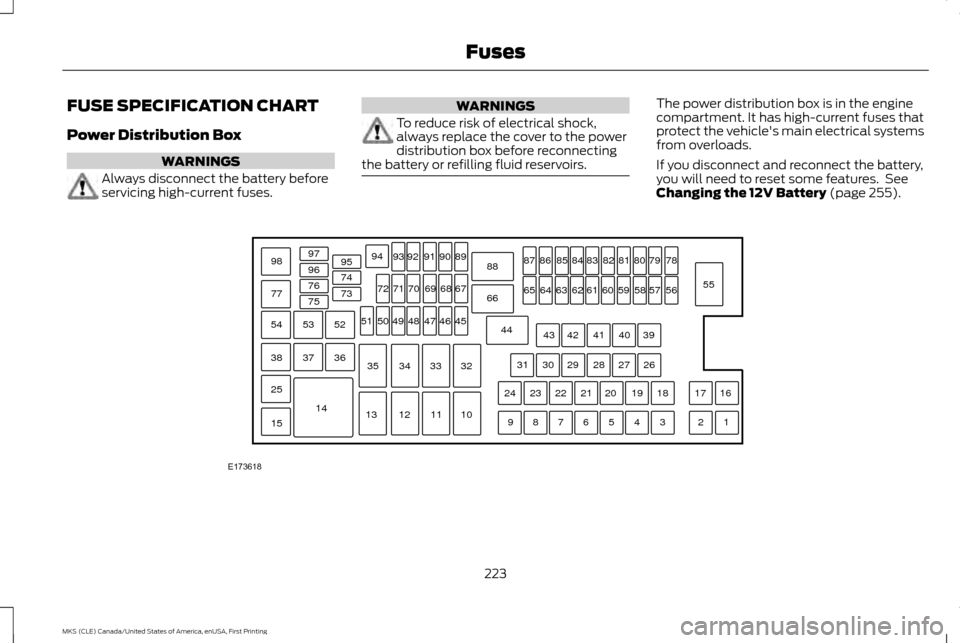
FUSE SPECIFICATION CHART
Power Distribution Box
WARNINGS
Always disconnect the battery before
servicing high-current fuses. WARNINGS
To reduce risk of electrical shock,
always replace the cover to the power
distribution box before reconnecting
the battery or refilling fluid reservoirs. The power distribution box is in the engine
compartment. It has high-current fuses that
protect the vehicle's main electrical systems
from overloads.
If you disconnect and reconnect the battery,
you will need to reset some features. See
Changing the 12V Battery (page 255).
223
MKS (CLE) Canada/United States of America, enUSA, First Printing FusesE173618
97
98
77 96
95
94
9392 919089
88
66
44 78
56
39 26 18 16
17
3 1
2
4
5
6
7
8
9 19
20
21
22
23
24 27
28
29
30
31 40
41
42
43 55
57
58
59
60
61
62
63
64
65 79
80
81
82
83
84
85
86
87
67
45
32
10
11
12
13 33
34
35 46
47
48
49
50
51 68
69
70
71
72
74
73
76
75
53
37 36
54
38
25
15
1452
Page 249 of 382
Note:
Do not add oil further than the MAX
mark. Oil levels above the MAX mark may
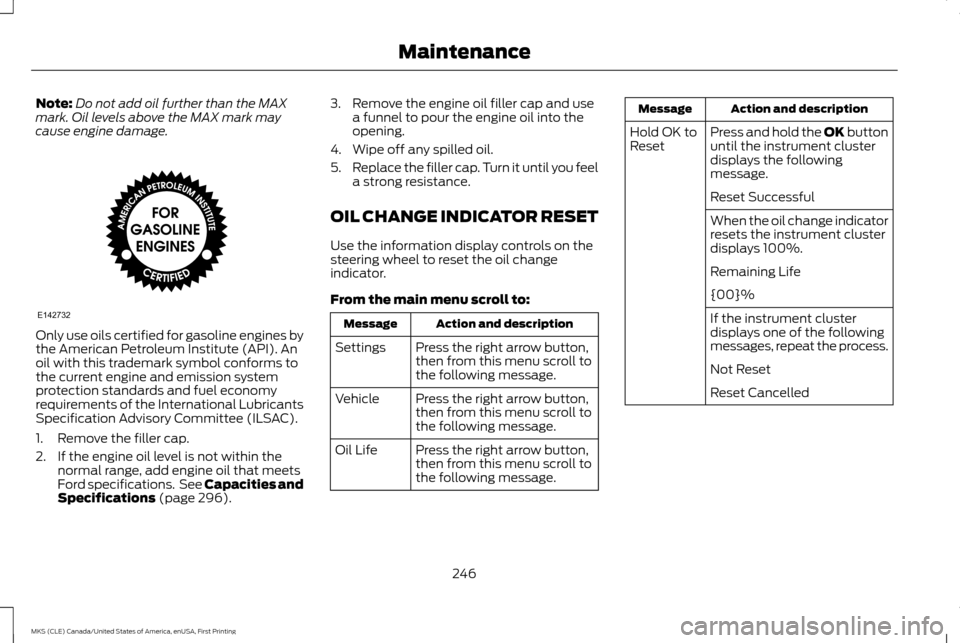
cause engine damage. Only use oils certified for gasoline engines by
the American Petroleum Institute (API). An
oil with this trademark symbol conforms to
the current engine and emission system
protection standards and fuel economy
requirements of the International Lubricants
Specification Advisory Committee (ILSAC).
1. Remove the filler cap.
2. If the engine oil level is not within the
normal range, add engine oil that meets
Ford specifications. See Capacities and
Specifications (page 296). 3. Remove the engine oil filler cap and use
a funnel to pour the engine oil into the
opening.
4. Wipe off any spilled oil.
5. Replace the filler cap. Turn it until you feel
a strong resistance.
OIL CHANGE INDICATOR RESET
Use the information display controls on the
steering wheel to reset the oil change
indicator.
From the main menu scroll to: Action and description
Message
Press the right arrow button,
then from this menu scroll to
the following message.
Settings
Press the right arrow button,
then from this menu scroll to
the following message.
Vehicle
Press the right arrow button,
then from this menu scroll to
the following message.
Oil Life Action and description
Message
Press and hold the
OK button
until the instrument cluster
displays the following
message.
Hold OK to
Reset
Reset Successful
When the oil change indicator
resets the instrument cluster
displays 100%.
Remaining Life
{00}%
If the instrument cluster
displays one of the following
messages, repeat the process.
Not Reset
Reset Cancelled
246
MKS (CLE) Canada/United States of America, enUSA, First Printing MaintenanceE142732
Page 252 of 382
the coolant temperature warning
light will illuminate
the service engine soon indicator
will illuminate.
If the engine reaches a preset
over-temperature condition, the engine
automatically switches to alternating cylinder
operation. Each disabled cylinder acts as an
air pump and cools the engine.
When this occurs, your vehicle will still
operate. However:
• The engine power will be limited.
• This will disable the air conditioning
system.
Continued operation increases the engine
temperature, causing the engine to
completely shut down. Your steering and
braking effort increases in this situation.
When the engine temperature cools, you can
re-start your engine. Take your vehicle to an
authorized dealer as soon as possible to
minimize engine damage. When Fail-Safe Mode Is Activated WARNINGS
Fail-safe mode is for use during
emergencies only. Operate your vehicle
in fail-safe mode only as long as
necessary to bring your vehicle to rest in a
safe location and seek immediate repairs.
When in fail-safe mode, your vehicle will have
limited power, will not be able to maintain
high-speed operation, and may completely
shut down without warning, potentially losing
engine power, power steering assist, and
power brake assist, which may increase the
possibility of a crash resulting in serious injury. Never remove the coolant reservoir cap
while the engine is running or hot.
You have limited engine power when in the
fail-safe mode, so drive your vehicle with
caution. Your vehicle will not maintain
high-speed operation and the engine will
operate poorly.
Remember that the engine is capable of
automatically shutting down to prevent
engine damage. In this situation:
1. Pull off the road as soon as safely
possible and switch off the engine.
2. Tow your vehicle to an authorized dealer. 3. If this is not possible, wait a short period
for the engine to cool.
4. Check the coolant level and add if low.
5. Re-start the engine and drive your vehicle
to an authorized dealer.
Note: Driving your vehicle without repair
increases the chance of engine damage.
Contact an authorized dealer as soon as
possible.
Engine Fluid Temperature Management
(If Equipped) WARNINGS
To reduce the risk of crash and injury,
be prepared that the vehicle speed may
reduce and the vehicle may not be able
to accelerate with full power until the fluid
temperatures reduce. Never remove the coolant reservoir cap
while the engine is running or hot.
Your vehicle can pull a trailer, but because
of the added load, your vehicle
’s engine may
temporarily reach higher temperatures during
severe operating conditions such as
ascending a long or steep grade while pulling
a trailer in high temperatures.
249
MKS (CLE) Canada/United States of America, enUSA, First Printing Maintenance